Search engine visibility is a constant battle. There are only ten opportunities for organic searches on the first page of Google’s search engine results page (SERP).
That means you need to be on top of your game to improve your standing. That means putting a lot of work into every page on your site. It also means optimizing and improving your content on and off the page to appeal to the ever-shifting Google algorithm.
But in the battle for high search engine rankings, you may be surprised to know that some of your site’s pages could be hurting your ranking. Logic would dictate that you should remove those pages. But many are essential from both functional and legal standpoints.
So, what are you supposed to do?
You can take steps to stop Google from indexing certain pages on your site. That means when gathering information and assigning a rank, Google’s crawler bots bypass these pages. They won’t factor into your overall search engine optimization (SEO) score.
But which pages should you block? And what can you do to stop search engine bots from indexing them? In this article, we’re going to answer all of these questions so you’ll always prioritize the user experience and meet ranking algorithms.
What is search engine indexing?
Before we get into the why and how of blocking search engine indexing measures, we should first talk about the term and what indexing actually means.
Understanding the indexing process will help you block bot access to irrelevant or harmful pages. But it can also help you optimize other pages for enhanced search engine visibility as part of your SEO project plan.
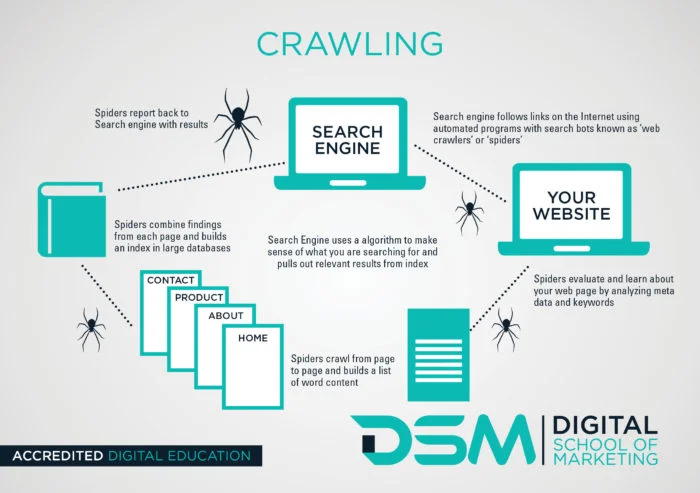
The search engine listing process on Google and other popular platforms like Bing and Yahoo breaks down into three main components.
Crawling
This is when search engine bots crawl over the Web in search of content that’s either new or recently updated. It’s the automated system examining your website. These bots pass through internal links, menu items, photos, videos, and all written copy.
Indexing
Once the Google bots have analyzed new and updated content, they go through a process called parsing. That’s when the system translates your content into a language a computer program can understand.
Then it renders your pages through a browser to see what the end user sees. After gathering all that information, the engine can properly categorize and index your content. Indexing is the organization of content pages.
Google takes your content and files it in an enormous digital database. Then it’s easily accessible when someone performs a search, and Google needs to generate a SERP.
Ranking data
The search engine ranking step is the final stage of the search results process. It’s where your search engine visibility efforts come to fruition. First, a user performs a search. Google then determines the search intent and generates a SERP based on indexed content.
There are numerous methods for using knowledge of this system to monitor and enhance the organic search visibility of your website. Improving accessibility is one ranking criteria.
A website that prioritizes accessibility helps with the crawling stage of the process. Search engine algorithms can comprehend accessible content more effectively. In turn, you get a searchability boost.
You can determine if your website meets accessibility standards with an accessibility checker. This tactic can help you identify areas for improvement that’ll support Google’s search bots in crawling your site.
You can also increase your website’s search engine visibility by creating quality SEO writing content and good article page titles. An AI article writer can generate high-quality articles in seconds.
An AI article writer will generate your articles whenever you need them. They can even optimize high-quality content for search engine visibility by adding a few keywords. (You can conduct keyword research yourself and provide the tool with the suggested relevant search queries).
But you can also improve every step of the process by excluding certain pages from the indexing stage. This step makes crawling and indexing easier and prevents the system from getting confused regarding who you are and what you do. For example, if you’re managing a healthcare site like Henry Meds, you might have multiple pages related to weight loss and treatment options, but not all of them should be indexed.
A high-value, keyword-optimized page like the semaglutide oral is the type of content you do want search engines to rank, as it provides targeted, relevant information for users actively searching for semaglutide support. In contrast, pages like internal policy documents, duplicate content, or checkout confirmation screens should be blocked from indexing using noindex tags or robots.txt, so they don’t dilute your SEO efforts or compete with your primary content
Why should you block certain web pages from indexing?
Deindexing pages can be highly beneficial in the quest to create a website that meets search engine optimization standards to provide a positive user experience. Even when it comes to mobile SEO. You’re removing irrelevant results. That means you’re presenting search engines with only the cream of the crop, beneficial content that showcases your purpose.
This makes the crawling process a lot easier. The bots have fewer pages to cycle through. It also makes indexing more accurate.
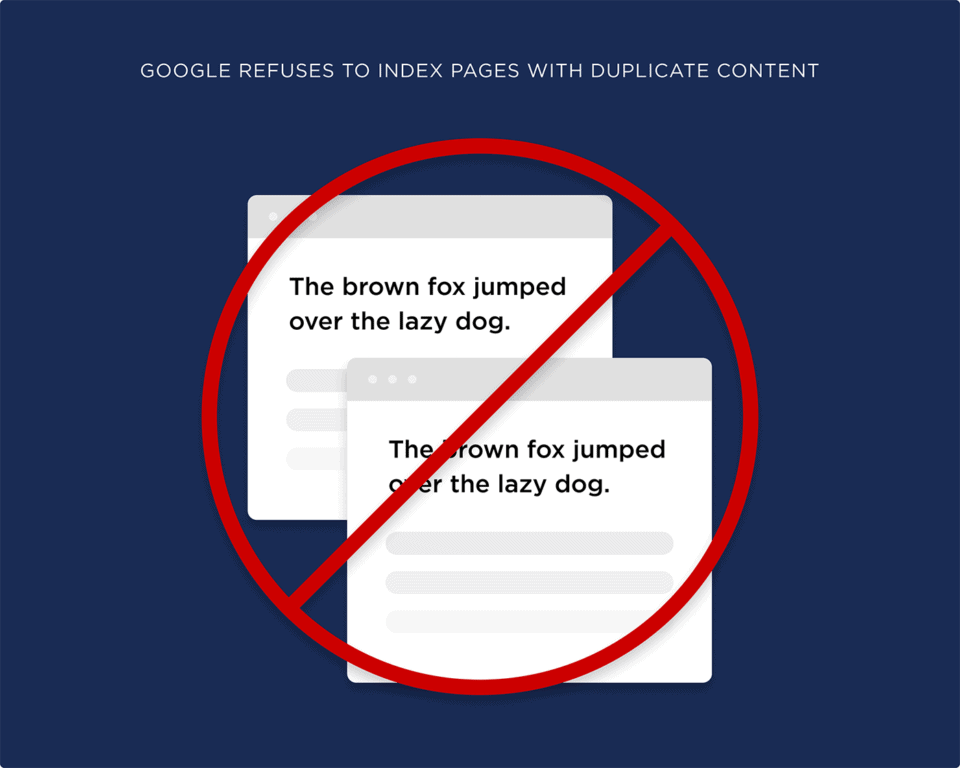
Deindexing allows you to avoid certain Google pitfalls, like duplicate content.
Sometimes duplicate content is necessary. For example, you might want a printer-friendly version of an existing page for enhanced accessibility.
This service helps users and customers, but Google doesn’t see that context. It only notices that there’s duplicate content and penalizes your score.
So, why doesn’t Google like duplicate content?
Duplicate content can confuse organic search results pages and lower your site’s ranking. Let’s say you have multiple versions of the same page with different parameters or filters. You can use the canonical tag or the “noindex” tag to tell search engines which version to index.
Then you have pages designed for internal purposes, like a data schema markup. These pages define the structure and relationships of your database.
They’re not meant for public consumption and might even expose sensitive information, including pages related to fake OTP verification or internal authentication workflows. That’s why it’s a good idea to block them from indexing.
There are also pages you legally must have that aren’t relevant to your overall content. These could include your privacy policy.
It’s needed to cover yourself legally. But it could also confuse search engines and hurt your overall ranking algorithms.
Which pages should you block from search engine indexing?
Now that you understand the need for deindexing pages, let’s discuss which pages you should omit.
Consider blocking Google from indexing your:
- Privacy policy pages
- Old or outdated content that’s still useful to customers
- Advertising landing pages
- Duplicate pages
- Thank you pages for purchases
- Admin pages
This whole process might seem like a lot of work. You could have pages on your site that you’ve completely forgotten about. But thankfully, AI marketing tools can help you determine what you should and shouldn’t index.
Digital marketing tools powered by AI are advancing rapidly, providing unique opportunities for website owners to manage their SEO efforts more effectively. One significant advantage of OpenAI is that they’re able to analyze your website and its pages, identifying which are likely to achieve a better ranking position in search results.
They use machine learning algorithms to understand what each content piece is about. They also analyze its relevance, and predict its performance. Using these insights, website owners like you can decide which pages to block from indexing so they’re not part of SERP visibility.
For example, suppose your website has pages that attract low-quality traffic or irrelevant audiences. These pages could harm your overall SEO performance, skew your analytics data, and decrease conversion rates.
An AI marketing tool can help identify these pages. You can then choose to block them from Google’s search bots.
It’s an easy and efficient way to take control of your web page’s SERP visibility. These tools allow you to focus on pages that genuinely benefit your search engine optimization strategy and overall business goals.
How to block specific pages from search engine indexing
Now that we’ve covered what indexing is, why it’s necessary, and what pages you should omit from search engine crawling, it’s time to get into how this works.
Deindexing happens through the source code on your website’s back end. Certain content management systems (CMS) or plugins can help you with this process if you’re not a coding expert.
Let’s dive into four ways you can deindex pages on your website and omit them from Google’s search process.
“NoIndex” Metatag
Your noindex metatag is the simplest and most direct way to prevent search engine bots from indexing your content.
A site’s metatags are backend code that describes the content of a page. They’re not something users can see. These tags inform search engines and anyone else analyzing a page’s source code.
Meta tags should include:
- A page’s title
- The author’s name
- A description of the page’s content
The noindex tag tells crawlers not to index a page before they ever access it. Think of this tag as a digital “Closed” sign hanging on the entrance of a page. It effectively bars access.
To add a noindex metatag to specific pages, take the following steps:
- Access the <head> section of the page’s HTML markup
- Write in <meta name=”robots”content=”noindex”>
It’s as simple as that.
Some CMS platforms will give you easy access to source code. Others require a third-party plugin to make these changes. Something like Yoast SEO can typically give you this access and implement the noindex tag.
There’s no way to mass-produce this tag. You must add it manually to every page you want Google to pass over.
Google Removals Tools
Google offers a tool that allows you to temporarily deindex a page. It’s called the Removals, and SafeSearch Reports tool. It temporarily blocks pages from showing up in Google Search results.
You can also use the tool to see a history of removal requests on your site (from site owners and non-owners alike). It can even identify any pages marked as “adult content.”
This tool isn’t a permanent solution. It’s a temporary removal that only works for Google searches. That means the pages you block can still appear on other search engine results pages.
We focus so heavily on Google because it has such a massive share of the online search market. Google has more than 90% of the world’s total searches. That’s why it’s always the top priority for the SEO world.
Robots.txt file
Robots.txt files prevent search engine traffic from overwhelming your website. They prevent multimedia files like videos and optimized images from appearing on SERPs. This file isn’t for hiding entire pages from Google, but it can still be helpful for deindexing.
You’ll need to use a text editor. With this tool, create a UTF-8 or ASCII text file and add it to the site’s root folder. Google limits you to only one of these files, and it must be named robots.txt.
The file can’t appear in a subdirectory. It must be on the root URL. This mandate ensures that the rules applied to the robots.txt file encompass all URLs under your site’s main domain.
These files have groups of rules or directives. You can apply one rule per line with each group detailing who it applies to, what directories and files are accessible, and which aren’t.
Creating these files, adding rules, and uploading them can be labor-intensive and technical.
X-Robots-Tag in the site’s HTTP header
Put an X-Robots-Tag into a URL’s HTTP response header to create the same effect as a “noindex” meta tag. However, you can set conditions for individual search engines by doing this.
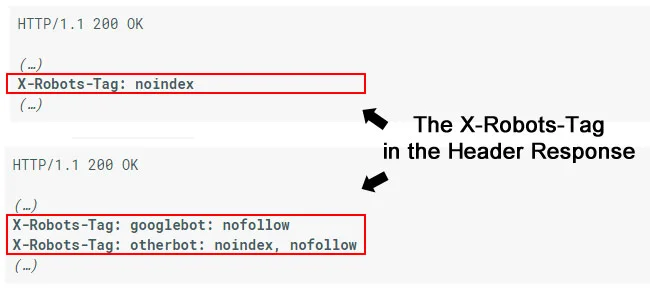
For example, de-indexing an entire page would involve a “noindex” tag in the response header. However, if you were trying to block Google’s bots specifically, you’d write in “googlebot: nofollow.” All others would be “otherbot.”
Conclusion
When trying to improve the search engine visibility of your high-value pages, deindexing irrelevant or harmful content can be crucial. This process guarantees that the search engines you’re appealing to only access relevant keywords for the content you want them to see.
To review, you can deindex pages from search results by:
- Adding a “noindex” metatag
- Using Google’s Removals and SafeSearch tool (For Google searches only)
- Creating a robots.txt file and adding it to your site’s root folder
- Putting an X-Robots-Tag in your HTTP header
By taking these extra steps, you can focus your search engine optimization and local SEO efforts on high-value content. As such, you’ll improve your search engine visibility by simplifying the crawling and indexing processes for crawler bots.
Take control of your search engine visibility. Work with us to de-index low-value pages, improve your ranking position, and publish pages that meet search intent. Contact us today.