Backlinks are an important part of SEO when it comes to improving your website rankings on SERPs.
But what if we say that not all backlinks are good for your website’s SEO?
Spam backlinks, also known as toxic backlinks, might be as harmful to your website rankings as other manipulative SEO tactics that violate search engine guidelines.
In this article, we will explore why they are actually bad for your website’s SEO and suggest five actionable steps to avoid them.
How Can Spam Backlinks Affect Your Website SEO?
Spam backlinks are specifically targeted at tricking search engines, and Google strongly discourages using such tactics.
Once search engines detect toxic backlinks, they can lead to:
- Lowered rankings,
- Reduced organic traffic,
- Damaged website authority.
This is how Google detects and penalizes any violation of their Spam Policies:
“We detect policy-violating practices both through automated systems and, as needed, human review that can result in a manual action. Sites that violate our policies may rank lower in results or not appear in results at all”.
But how do these links appear? Our next section tells just that.
Where Do Spam Backlinks Come From?
Spam backlinks are often the result of manipulative link-building practices or low-quality websites, which are trying to gain traffic or SEO benefits.
These types of backlinks usually originate from various sources, such as:
-
- Private Blog Networks (PBNs): These are mostly paid websites created specifically for creating backlinks.
- Automated link-building tools: Such tools find websites and generate a large number of backlinks. These backlinks can be out of your control and come from spammy and irrelevant websites.
- Competitor tactics: Keep an eye on your competitors, as they might deliberately create spam backlinks that redirect to your website.
- Overoptimized anchor texts: These are examples of anchor texts that search engines might view as manipulative, such as repeatedly using exact match keywords like “best SEO services.” A more natural and safer alternative is descriptive text like “improve your website visibility,” linking to your services.
So, the most severe consequence of spam backlinks is a significant drop in your Google rankings or complete removal from SERPs. This makes the risk far greater than any potential short-term gain. Therefore, it is important to regularly conduct backlink audits and identify toxic backlinks to avoid these consequences.
Spam Backlinks: How Can You Identify Them
The most effective way to identify spam backlinks is to do a regular backlink audit. Here, you can utilize various backlink monitoring tools that will help you maintain a healthy backlink profile.
One of such tools is Ahrefs, which helps you see which websites link to you and what problems arise with it.
Identifying via Ahrefs
To do a detailed backlink audit on Ahrefs, follow these steps:
- Go to Ahrefs’ “Site Explorer” section,
- Type your website’s URL. This will give you an overview of how your website is doing on SERPs.
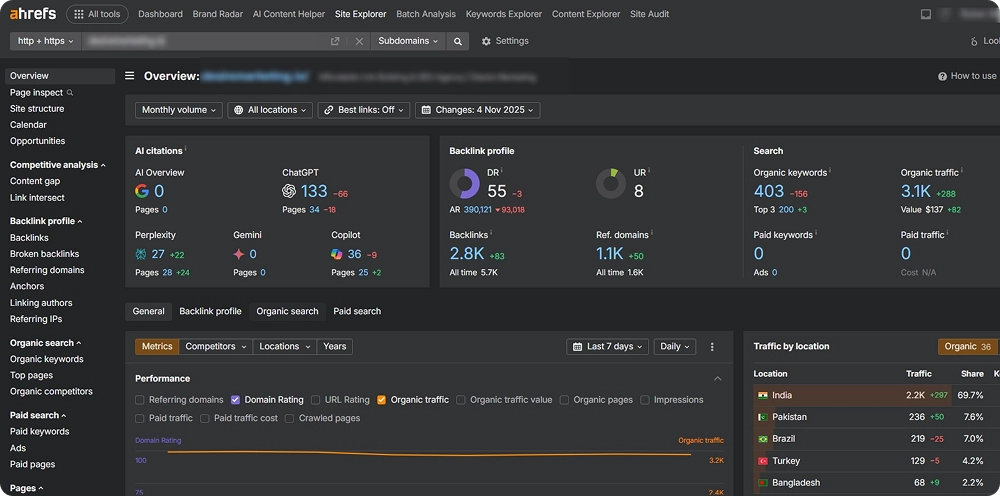
- On the left side of the interface, navigate to the “Backlinks” tab to see the full picture of referring domains and their metrics.
- Through the filtering tool, filter the websites with low domain authority (DR: Up to 10). Hit the “Dofollow” filtering too, as search engines evaluate these links when assessing your backlink profile, so they are also the links most likely to cause harm if they come from low-quality or spammy sources.
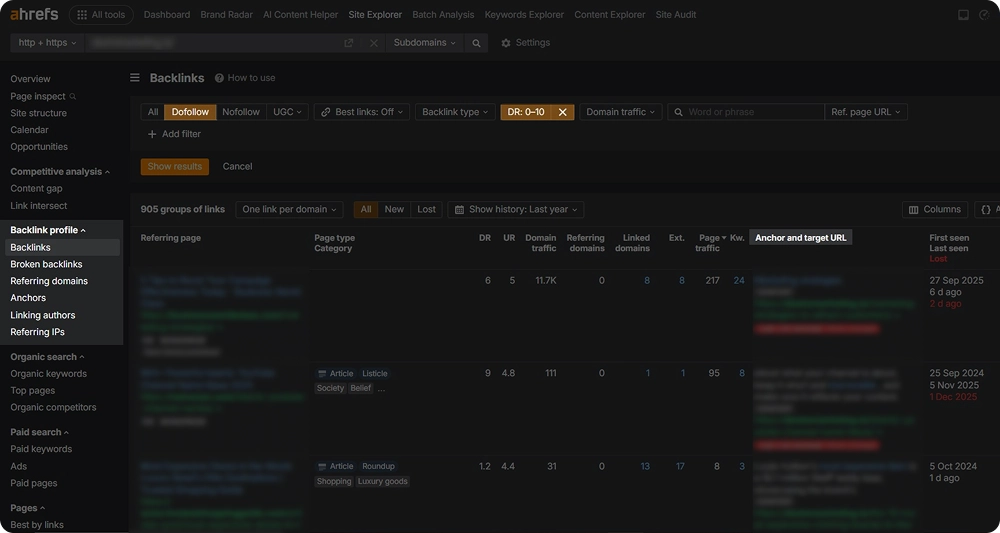
- To get a full image of the domains that link to you, go to the “Referring domains” tab. Track the New and Lost Backlinks to identify unnatural linking activity and sudden changes in a timely manner.
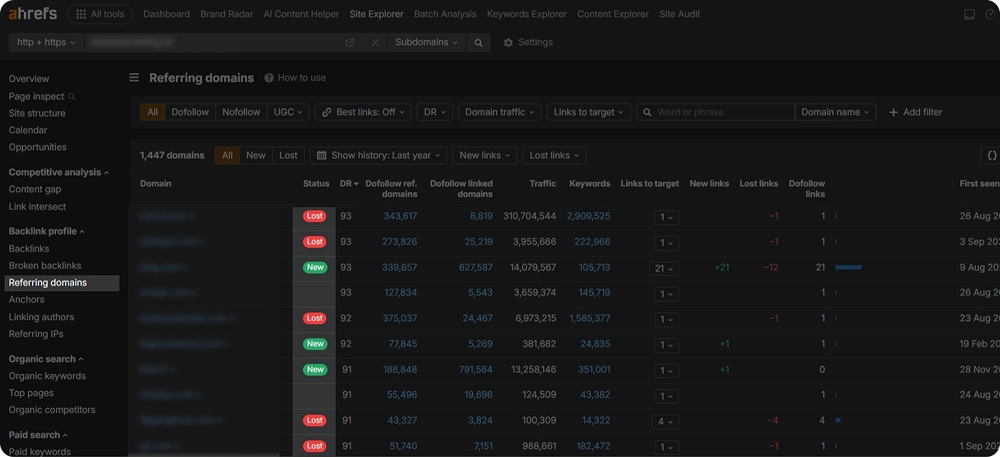
Now you have an overall understanding of how to identify spammy or irrelevant websites that link to you through repeated and suspicious links, overly optimized or forced anchor texts.
Find via Google Search Console
Google Search Console provides backlink data directly from Google, making it a reliable source for identifying links that may affect your site’s performance. It helps you spot suspicious domains early, before they cause ranking issues.
To identify spam backlinks on GSC, try these simple steps:
- Log in to Google Search Console and select your verified website
- Go to Links in the left menu
- Review the Top linking sites and export the data
- Sort linking domains to identify unusual or low-quality sources
- Watch for red flags such as unrelated niches, foreign-language sites, adult content, spammy TLDs, or repeated links from the same domain
- Click suspicious domains to review individual linking pages and manually check their quality
Checking via Moz Link Explorer
Moz Link Explorer is especially helpful for quick backlink risk evaluation thanks to its Spam Score metric. It allows you to prioritize suspicious links fast without deep technical analysis.
How to find spam backlinks in Moz Link Explorer
- Go to Moz Link Explorer and enter your domain
- Review the overall Spam Score, focus on links above 30 percent
- Open the Inbound Links tab to see all backlinks
- Filter links by Spam Score, starting with the highest ranges
- Sort by low Domain Authority and Page Authority to spot weak domains
- Review spam indicators such as low trust, irrelevant anchors, and suspicious TLDs
- Manually check linking pages to confirm quality
- Export backlinks with Spam Score 30 percent or higher for review or disavow
5 Actionable Steps to Avoid Spam Backlinks
After you have identified spam backlinks your website has, there are several core steps you can take to remove those and avoid future issues.
Request Backlink Removal
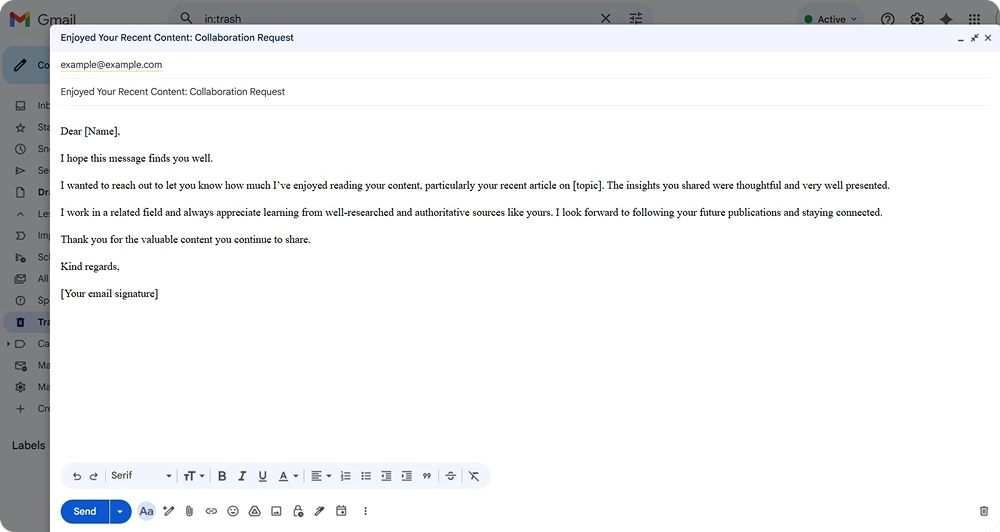
Try finding the website owners or editors of the websites that provided spam backlinks to your website. Reach out to them via email or any other professional communication channels (such as LinkedIn) and politely request the removal of your website.
Here’s an example template for a polite and professional link removal email.
Disavow Links
In case you don’t get any response from the website owner/editor or you get a rejection, there is another way to get your link removed from the website: try disavowing links.
You can request a link removal through Google’s disavow links platform, where you can find all the steps and procedures to get your links removed from any website.
Create Authentic Content
Concentrating on producing original, superior content is another efficient strategy to prevent spam backlinks.
Make sure your content is written naturally rather than just for search engines, offers genuine value, and responds to user needs by answering their “What” and “Why” questions.
Valuable content is more likely to attract relevant, organic links from trustworthy websites, reducing the risk of low-quality or spammy backlinks.
Building thought leadership through insightful articles, research, or expert commentary can further attract credible backlinks from authoritative sites, reducing the risk of low-quality or spammy links.
Build Network and Collaborations
Another method you can use to build natural backlinks and avoid spammy ones is by growing your professional network.
Identify relevant and authoritative websites, typically those with a Domain Authority (DA) of 50 or higher, and aim to earn backlinks from them.
But don’t be spammy yourself by randomly reaching out and directly asking for a link. The valuable collaborations should be built gradually:
- Subscribe to their website newsletter,
- Actively engage with their blog posts and social media content,
- Leave thoughtful comments and reviews
Try different websites and anchor texts, because this variety can signal to search engines that your links are natural, without any manipulative tactics involved.
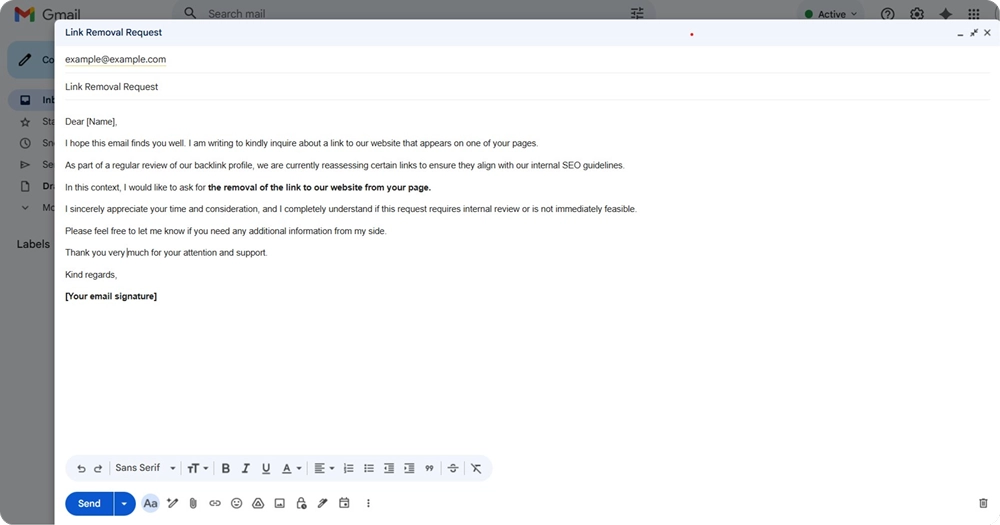
Once you’ve established a genuine connection, you can politely reach out to request a link to your website or propose writing a guest post, where you can naturally include a link back to your site.
Here’s another email template example, where you can state your interest in the website’s content and ask for future collaboration:
Continue Monitoring Your Backlinks
Last but not least, keep a regular track of your backlink profile.
Set a reminder to regularly update yourself on any spikes, alerts or suspicious linking activity related to your website. Apart from Ahrefs, you can also utilize other top SEO audit tools to help you with backlink audit.
This way, you will be able to react quickly and take the measures listed above.
To Sum Up
Spam backlinks can hurt any website’s SEO, and no site is completely safe, including yours.
When spammy websites link to you, it can damage your SEO efforts, even if you are trying hard to boost your site’s authority.
However, you don’t need to panic if your backlink audit shows spammy links. You can take action by asking for link removals, disavowing harmful links, and stopping future spam by creating valuable content and building relationships with trusted websites.
These steps will help improve your website’s credibility and long-term SEO performance.