Are you doing your SEO right but still noticing sudden drops in your website rankings?
Content repetition might be the reason.
Search engines try to show the most original and useful content, so they can “get confused” when the same content appears on multiple pages.
This can hurt your rankings, even if you’re not copying anyone else on purpose.
Follow these 3 easy ways to avoid duplicate content penalty and keep your site performing well in search results.
Why is Duplicate Content Harmful for Your SEO?
Duplicate content is any text that appears with the same wording on different pages, either on your website or other sites. Even if the wording is changed, search engines can still consider it a duplicate if the meaning and structure remain the same.
Google wants to provide users with the most authentic and useful information, so duplicate content can pose several risks for your website’s SEO strategy.
- Split rankings: When the same content appears on different pages, search engines may have trouble deciding which one to show in the results. This can divide your ranking power among several pages instead of focusing it on the most important one.
- Lower website traffic: If search engines choose to display a duplicate page instead of the original, your main page might not get as much visibility, leading to reduced overall traffic.
- Indexing issues: When a site has many duplicate pages, Google may decide not to index some of them. Pages that aren’t indexed cannot appear in search results, which limits your reach.
- Wrong page prioritized: Even if all duplicate pages are indexed, Google may select a page you didn’t intend to be the primary one. This can result in the wrong page appearing in search results, which may be less optimized or relevant for your audience.
And finally, the most radical action Google can take against duplicate content is the duplicate content penalty. In fact, this happens quite rarely.
Here’s what Google says on this: “There are some penalties that are related to the idea of having the same content as another site—for example, if you’re scraping content from other sites and republishing it, or if you republish content without adding any additional value.”
So, unless you are intentionally scraping or copying content from other sites, having duplicate content on your own website, such as multiple URLs with the same text, will not be subject to a duplicate content penalty.
How to Do a Duplicate Content Audit
You can use various methods to check for duplicate content.
On Google, this includes a simple search by copying a sentence or a paragraph from your content and pasting it in the search bar in quotes and finding exact matches.
For a deeper audit, you need to turn to professional SEO tools, such as Ahrefs.
On Ahrefs, through the “Site Audit” section, you can conduct a duplicate content audit by following these steps:
Step 1: Go to Ahrefs’ “Site Audit” section. If you don’t have a project yet, create one by adding your domain.
Step 2: Adjust settings (subdomains, crawl depth, JavaScript if needed) and start the crawl. Ahrefs will scan your site and highlight duplicate content issues.
Step 3: After the crawl finishes, go to the “Duplicates” section of the Site Audit report.
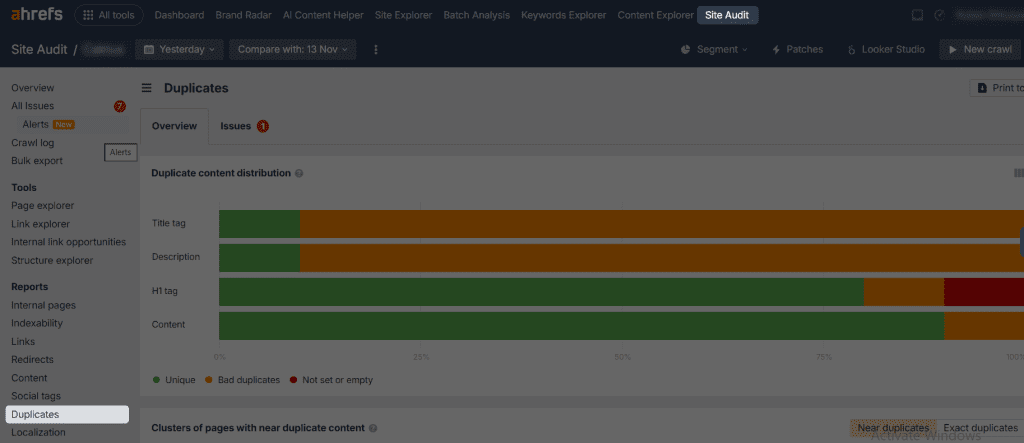
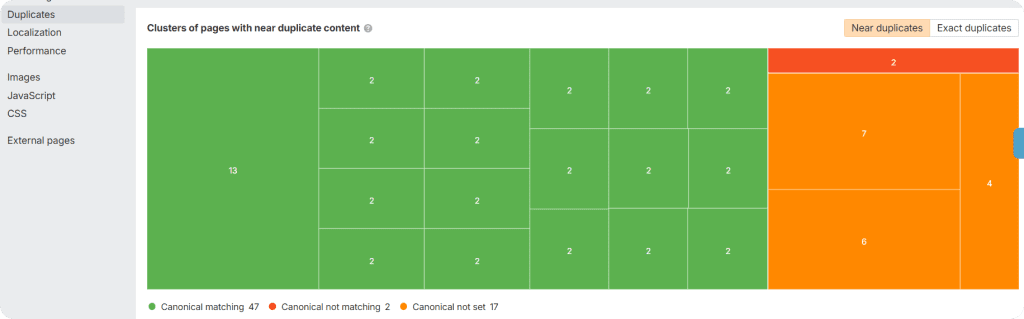
- Here, you’ll see two main charts: one that clusters duplicates by meta elements (title, meta description, H1, content), and another that groups internal HTML URLs by how similar their content is.
Pay special attention to “Bad duplicates”, as these are duplicates not properly handled with canonical tags, hreflang, or pagination.
Now that you know how to conduct a duplicate content audit, let’s move on to practical steps for preventing it on your site.
How to Avoid Duplicate Content Penalty: 3 Actionable Steps
To avoid having duplicate content on your website, these are some core steps you need to take:
Write Unique Content
It is as simple as that. To avoid duplicate content on your website in general, try writing unique content. These can be anything from unique blog posts that come from your own experience or research to product descriptions and/or comparisons.
You can create original content by following these simple steps:
- Consider doing some secondary research on the topic you want to write about,
- Check industry expert insights, or even better, interview them to get exclusive content.
- You can also review what already exists on the topic and find gaps your content can fill, which makes your page more valuable to readers.
Of course, it might seem too time-consuming, but modern AI writing tools are there to help with tasks like providing blog idea inspirations or simply polishing your content.
Remember that search engines are prioritizing helpful and reliable content. And to achieve this, Google recommends that you “focus on creating people-first content to be successful with Google Search, rather than search engine-first content made primarily to gain search engine rankings.”
To understand whether or not your content is reliable and helpful to the users, do a self-evaluation of your content. Is your content answering the “Who, How and Why” questions?
Taking the time to create original material not only helps with SEO but also builds trust with your audience and sets your website apart from others.

Image Source: Freepik.com
Use rel=”canonical” Tag
Apart from the content itself, websites that have multiple duplicate URLs also need to take several important technical steps to help search engines differentiate between them.
One of the most practised solutions is using the rel=”canonical” tag on the duplicate pages. You should place the canonical tag inside the head section of the HTML on the duplicate page.
The link inside the tag should point to the main page.
Here’s an example of a final tag, where we tell search engines that page A is our main page.
<link rel=”canonical” href=”https://example.com/page-a”>
Therefore, using the canonical tag correctly ensures search engines know which page to prioritise, helping prevent ranking issues from duplicate content.

Image Source: Freepik.com
Use 301 Redirects
Another option to signal the search engines about the main page is setting up 301 redirects on the server where your website is hosted.
A 301 redirect is a permanent redirect that tells search engines that a page has moved to a new URL.
Let’s bring an example to make it clearer.
Imagine you have the same type of content that can be found on multiple URLs of your website.
For example, if your main page is https://example.com/page, and can be accessed through https://www.example.com/page and https://example.com/page?ref=123 as well, you would redirect these two URLs to that main URL using 301 redirects.
By setting up 301 redirects from all duplicate URLs to a single preferred version, you:
- Prevent search engines from indexing duplicates
- Ensure users always land on the correct page
Therefore, 301 redirects are a powerful way to protect your website’s SEO from duplicate content penalties.
Conclusion
Duplicate content doesn’t have to harm your website if you take the right steps.
By creating unique content, using canonical tags, and setting up 301 redirects, you can ensure search engines know which pages to prioritise. This helps keep your site performing well.
You can also look over your site from time to time to catch any new duplicates that appear, especially if you add pages often.
Start applying these simple steps today to protect your rankings and provide your visitors with a great experience.