Content is an afterthought at most e-commerce sites. Product pages go up, a few category descriptions get written, and the blog collects dust between seasonal promotions. In WooCommerce, built on WordPress, content is a first-class citizen with the same level of infrastructure and flexibility that dedicated publishing platforms are built around.
For store owners who recognize this, it is one of the most underused advantages in online retail and one of the few areas where a well-run WooCommerce store can build a lead that pure commerce platforms simply cannot close.
The SEO Gap That Most E-Commerce Platforms Cannot Close
Spend any time comparing e-commerce platforms from an SEO angle, and a pattern emerges quickly. Hosted platforms like Shopify and BigCommerce cover the technical basics well enough, but their content capabilities are limited by design. They are commerce platforms first, content platforms second. Buildingtopical authority across a product category requires the kind of deep content infrastructure that most hosted platforms were never designed to support.
That gap shows up in predictable ways:
Blogging exists, but lacks real editorial depth or flexibility
Content and commerce operate as separate layers rather than one integrated system
The interconnected content architecture needed for sustained organic growth simply isn’t available at the level a dedicated CMS provides
WooCommerce is in a whole different situation. It’s built on WordPress (the world’s most
popular content management system), and so it offers a package of features and options that are second to none, especially when it comes to content management. WooCommerce offers all of WordPress’s post types, taxonomies, custom fields, and workflows for editing posts. Commerce layer and content layer are truly integrated, and that makes the SEO strategy that can be carried out on a WooCommerce store just much stronger than any pure commerce platform.
Not all WooCommerce store owners take advantage of this. Many use the blog for occasional announcements and treat product pages as their only SEO surface. The stores that invest properly in content-driven SEO build organic search presences that compound over time and become very hard for competitors to match.
Why Content-Led SEO Works Differently for E-Commerce
Content-led SEO isn’t about having a blog. It’s about building a content framework that matches search intent at every stage of the buyer’s journey:
Awareness: informational queries where shoppers are learning and researching
Consideration: comparison content that helps narrow down options
Transaction: product and category pages built for purchase intent
When someone wants to buy a standing desk, they rarely start with a specific product search. They start with questions: best standing desk heights, do standing desks improve productivity, fixed vs. adjustable. These informational queries carry significant search volume and far less competition than the direct product terms every e-commerce store fights over.
A site that answers these questions well, and links them intelligently to product and category pages, earns the visitor’s trust long before they are ready to buy.
WordPress makes this kind of content organization straightforward. Categories, tags, custom post types, and internal linking at scale are all built in. On most other platforms, replicating this would require considerable workarounds.
In competitive e-commerce categories, the stores that win organic search are not always the ones with the best product pages. They are the ones who earn the visit before the purchase decision is even made.
Structuring the Content Architecture for SEO Impact
Mapping the Search Landscape First
The gap between a blog that gets occasional traffic and a content strategy that keeps growing comes down to structure. Random publishing produces random results. A planned content architecture, built around real search demand for the store’s products and customers, creates rankings that reinforce each other over time.
Understanding why internal SEO links matter goes beyond navigation and is the foundation of any content architecture that actually performs in search.
Before publishing anything, every piece of content should clearly answer three questions:
Which keyword is it targeting?
Which stage of the buyer’s journey does it serve?
Which commercial page does it support through internal linking?
Technical Implementation in WooCommerce
In WordPress and WooCommerce, this structure is put into practice through post categories that reflect the product taxonomy, internal linking that connects informational and transactional content in both directions, and URL structures that communicate topical relevance to search engines.
Getting this right from the start is far more effective than retrofitting it later. It’s also the kind of basic-level work that will truly combine the expertise of experienced WooCommerce Development Services and SEO strategy, as it’s not possible to implement the technical part without understanding the content strategy, and vice versa.
Product and Category Pages as Content Assets
Content-led SEO applies to the commerce layer too, not just editorial content. Product pages and category pages are content assets, and they are consistently underdeveloped in most WooCommerce stores. Many category pages are little more than a product grid with filters, which leaves a lot of organic search opportunity unused.
WooCommerce makes it easy to go further. A well-built category page can include:
An introduction optimized for the primary keyword
Copy that addresses common buyer questions
Links to supporting content that builds topical authority
Product pages can be developed with original, substantive content that informs the customer and gives search engines something meaningful to rank, rather than duplicated manufacturer descriptions found across dozens of other stores.
Schema markup is another area where WooCommerce’s WordPress foundation provides a structural edge. Implemented cleanly and at scale, the right schema types improve how search engines understand and display the store’s content:
Product schema: price, availability, and product details in search results
Review schema: star ratings that lift click-through rate
Breadcrumb schema: site structure shown directly in the SERP
FAQ schema: expanded listings that capture more visibility and answer intent
This kind of work sits at the intersection of development and content strategy, and it produces the best results when both disciplines are genuinely working together.
Building Domain Authority Through Content That Earns Links
One of the strongest long-term benefits of WooCommerce’s WordPress foundation is what it makes possible for link acquisition. Editorial content, original research, and useful tools attract inbound links from other publications and industry sites in ways that product pages simply cannot.
A WooCommerce store with a proper content operation can build the kinds of assets that earn links naturally:
Original data studies and industry research
Definitive category guides that become go-to references
Interactive tools that solve real problems for the target audience
These won’t drive immediate traffic to product pages, but the domain authority they build has a compounding effect on overall organic search performance. Domain authority is one of the few things in SEO that cannot be bought or replicated quickly, which is exactly why consistent investment in it creates a lasting competitive edge. That investment means paying close attention tobacklink quality, since a smaller number of relevant, high-authority links will always outperform a large volume of weak ones.
To make this work, content strategy, development architecture, and ongoing technical SEO need to function as one connected system. The right WooCommerce development services partner understands that the store’s technical infrastructure exists to enable its content strategy, and builds with that in mind so every piece of content published has the best possible chance of ranking, converting, and building value over time.
Final words
WooCommerce’s WordPress foundation is a strategic advantage that most store owners never fully use. When content architecture, internal linking, schema markup, and domain authority building work together as one system, the result is organic growth that compounds over time and becomes hard for competitors to match.
That does not happen by accident. It requires the right technical setup, a clear content plan, and consistent execution. For WooCommerce stores willing to commit to that approach, the opportunity is wide open.
Keywords are not just random words or phrases used in your content.
They vary based on different factors, such as their goals, roles, or structure. And exploring these differences will give you clearer insights into how to build your content strategy.
Read along to uncover the most common types of keywords in SEO with examples, as well as how to find each of them.
What Are Keywords? Their Importance in SEO
Keywords are words or phrases users type in Google or other search engines to find answers or information. Those can be anything from one-word keywords to long phrases or questions.
Thus, properly optimizing your content with relevant keywords helps search engines determine:
Whether it matches users’ search queries
Whether it deserves to appear as a relevant answer source in search results.
This is where understanding different types of keywords comes into play, as they are an important part of the SEO keyword mapping and keyword optimization process.
The Main Types of Keywords: Grouped and Explained
Now that the importance of learning about the keyword types is clear, let’s see what the main types of keywords are.
To make it more structured and clearer, we have grouped the types by their goals and meanings.
Intent-Based Keywords
These keywords reflect the user’s search intent (the purpose or reasoning behind a search query).
There are four types of intent-based keywords:
Informational: Users want to get some information (for example: why is SEO important?)
Navigational: They want to land on a specific website or platform (for example: Instagram login)
Commercial: Users are still in the research phase before making a purchase (for example: best SEO tools review)
Transactional: They are ready to make a purchase (for example: subscribe to Netflix)
As you may have noticed, each type of keyword often includes specific words that signal the category it belongs to.
Informational: “What?”, “Why?”
Navigational: “login”, “sign in”
Commercial: “best”, “top”, “review”
Transactional: “buy”, “purchase”
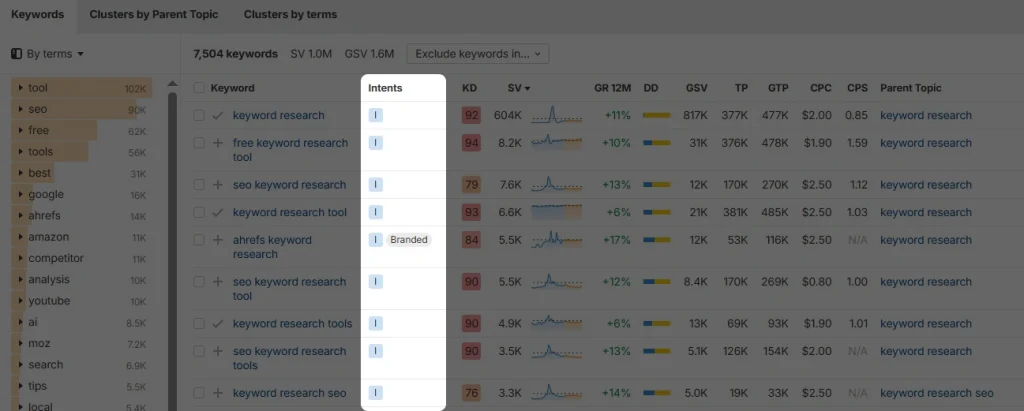
To quickly identify keyword intent, consider using SEO tools. They are designed to browse dozens of keywords with their intents in seconds, so that you don’t have to check them manually.
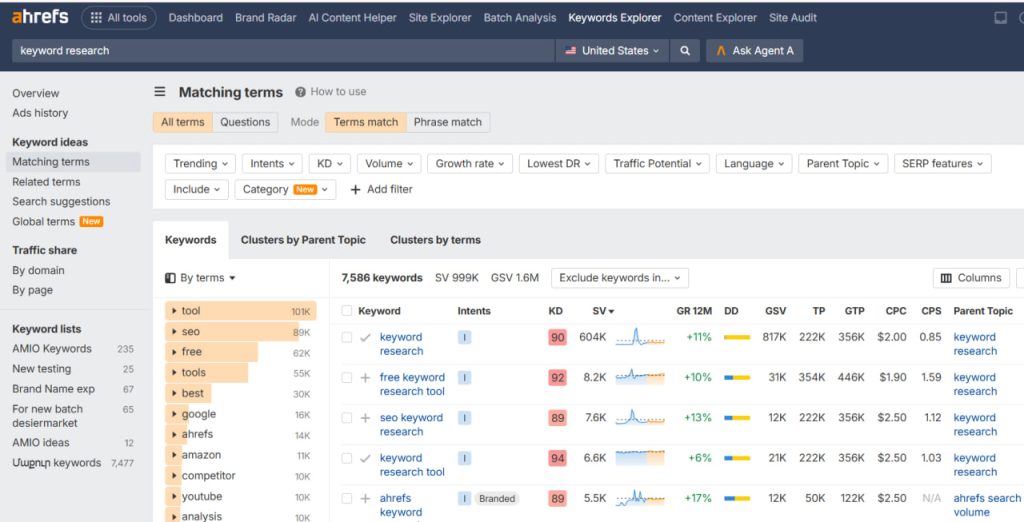
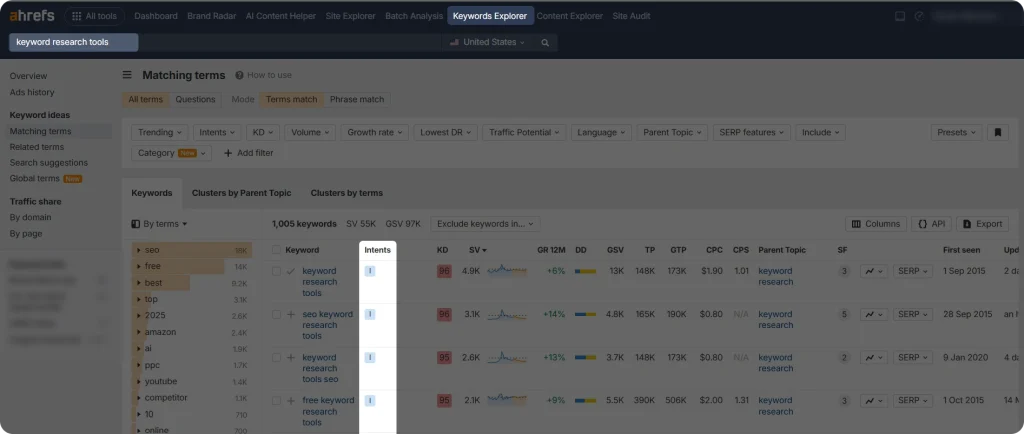
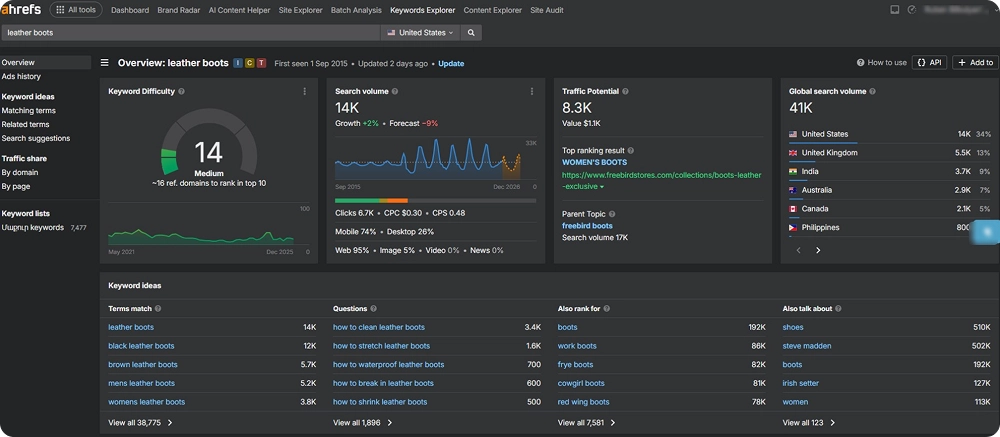
In the example below, Ahrefs, one of such tools, has a special column for showing the intent right next to each keyword.
First, log in to your Ahrefs account
Go to the “Keywords Explorer” section and type your keyword.
In the “Terms match” section, you will find the relevant intent letter (I, N, C, T) next to each of the suggested keywords. You can also identify which of the keywords are branded.
Structure-Based Keywords
There are two types of keywords based on their structure, search volume, and competitiveness: long-tail and short-tail.
Short-tail: Short-tail keywords are keywords consisting of up to 3 words (for example: keyword research). They are broad and have high keyword search volumes. Therefore, they are also highly competitive as they are targeted more.
Long-tail: The name tells for itself. These are the longer versions of keywords, usually including 4 or more words (for example: keyword research tools for small businesses). They are more specific and therefore have lower search volume than short-tail ones.
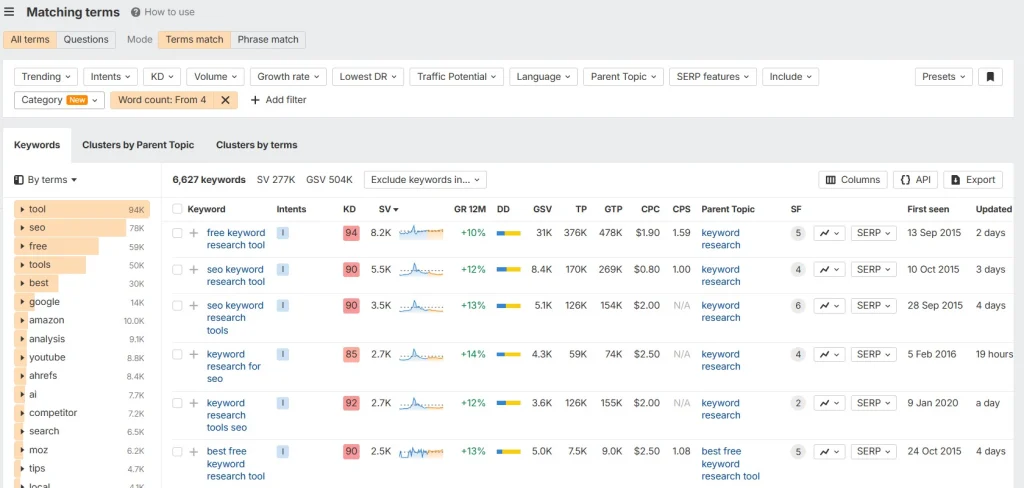
To identify short-tail and long-tail keywords on Ahrefs, you can simply see which of the keywords in “Terms match” have up to 4 or more.
Pro tip: To find long-tail keywords faster, add the “Word count” filter starting from 4 words.
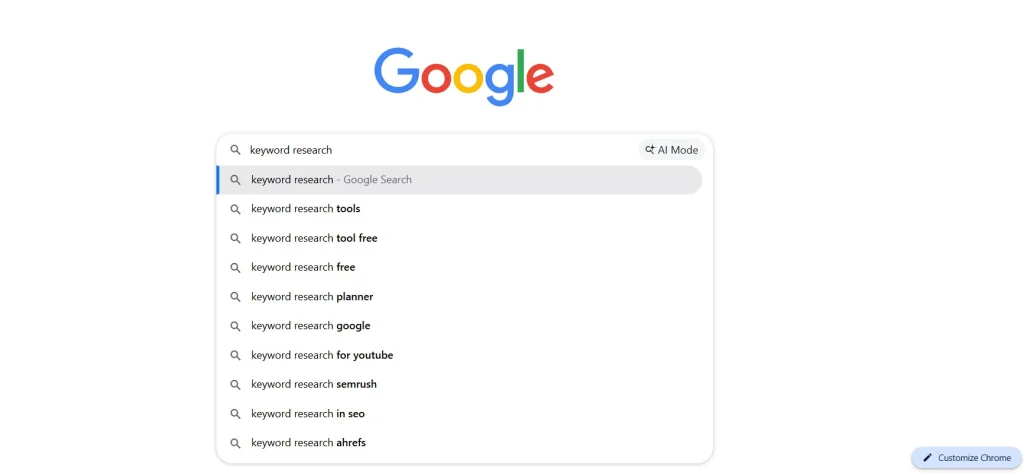
Google’s autocomplete feature can also help you find both short-tail and long-tail keywords. Just go to the Google search bar and type your search keyword or focus keyword to see what results appear below.
It is worth noting that there is no strict rule for which one of these keywords is the best for your SEO strategy. Using the best SEO tool can help you evaluate both options based on your goals, website potential, and resources.
Role-Based Keywords
We named this group “target-based” because the keywords in this group differ in their target goals and why they are used in content strategies.
Seed keyword: The seed keyword is the initial keyword you use to start your keyword research. It is broad, general, and usually consists of one or two words.
Focus keyword: The focus keyword (also known as the primary keyword) is the main keyword you want your content to target and rank for. It serves as the central topic around which your content is built.
Secondary keyword: These are supporting keywords related to your focus keyword. They also have ranking potential, and using them naturally and relevantly throughout your content can strengthen your SEO writing efforts and improve your chances of ranking for multiple search queries.
Again, each of these keywords can be used for different purposes and in different ways.
If it is a seed keyword, it is mainly used at the very beginning of your keyword research stage. It helps you find more keywords that have a ranking potential and can be used in your content. They also help you understand your content direction and strategy.
Meanwhile, your focus keyword should strategically be placed in headings, meta tags, the introduction, and the conclusion of your article. This is important for signaling search engines on what you are targeting in your content. But beware of keyword stuffing.
And finally, secondary keywords can be simply placed in different sections of your article based on relevance.
Why is it Important to Master the Types of Keywords?
At first, it might seem like learning all the different keyword types will not make much difference when building your SEO strategy.
In reality, understanding how keywords work and what purpose each type serves can help you create more targeted and effective content.
Using the right keywords allows you to connect with the right audience at the right stage of their search journey, which can improve both rankings and conversions:
Right targeting: Different keywords attract different audiences. So, using the right type of keyword will help you reach users with the right intent and provide content that matches their needs.
Defining your strategy: Understanding keyword types makes it easier to plan your content strategy and prioritize SEO efforts.
In addition, mastering keyword types can:
Strengthen your chances of ranking higher in search engines
Help you compete more effectively in your industry.
A well-structured keyword strategy also prevents you from targeting the wrong audience or creating content that fails to meet user expectations.
To Wrap Up
Keywords play a major role in building an effective content strategy.
Understanding the different types of keywords gives you an even greater advantage when it comes to targeting the right audience.
By choosing keywords based on search intent, you can create content that better matches what users are actually looking for at every stage of their online journey.
To get the best results, do your keyword research, analyze search intent carefully, and build your content around the most relevant keyword types.
This approach will help your content appear in front of the right audience at the right time, increasing your chances of driving meaningful traffic, engagement, and conversions for your brand.
If you’re wondering why certain pages on your website, like blog posts or product pages, aren’t performing well online, the issue may not be the content itself.
In many cases, those pages are simply invisible to search engines. That’s why it’s important to understand how to find orphan pages and make sure they are properly connected to your site.
In this article, you’ll learn what orphan pages are, how to find and fix them, and why fixing orphan pages is essential for your SEO performance in the first place.
What Are Orphan Pages?
Orphan pages are pages on your website that have no internal links pointing to them from any other part of your site.
It is like you are creating an internal document and saving it somewhere no one can access via normal navigation. The document exists, but others can only find it if you share its link directly.
And the issue of having orphan pages on your website may have an impact on your website’s SEO performance.
Why You Should Find and Fix Orphan Pages?
Imagine you have a new page on your website, but there are no internal links from other pages pointing to it (maybe you just forgot, it happens). And if the page is not included in your sitemap and has no backlinks from other websites, you are making it much harder for search engines to find and index your page. In this case, how will Google or users discover that the page even exists?
Your page will turn into a ghost wandering online. It is there, but it is not seen.
So, there are two main reasons why finding and fixing orphan pages is important for your website’s SEO:
It helps search engines discover, crawl, and index your pages more effectively
It improves user experience by making it easier for visitors to navigate your website and find the content they need
A proper internal linking strategy helps search engines better trust your website, which can lead to improved visibility and performance in search results.
The importance of internal links is obvious, and Google explains it best:
“You may usually think about linking in terms of pointing to external websites, but paying more attention to the anchor text used for internal links can help both people and Google make sense of your site more easily and find other pages on your site. Every page you care about should have a link from at least one other page on your site. Think about what other resources on your site could help your readers understand a given page on your site, and link to those pages in context.”
And Finally, Here is How to Find Orphan Pages
Given the importance of fixing orphan pages on your site, let’s now look at the practical steps to find them.
Manual Google Search
The first method for finding orphan pages on your website is to search manually using a simple Google search. While this approach can be time-consuming, it works well for smaller websites with a limited number of pages.
To start, you can review your sitemap data. In most cases, you can access it by typing example.com/sitemap.xml into your browser. If your site doesn’t have one, you can generate a sitemap using online tools or plugins.
Once you have your sitemap, go through the listed URLs and check whether those pages are internally linked from other parts of your website. If you find pages that appear in the sitemap but cannot be reached through internal links, they may be orphan pages or at least poorly linked pages.
Note: Keep in mind that a sitemap does not always include every page on your website, so this method may not catch all orphan pages.
Another manual approach is to use type site:example.com into Google to see a list of indexed pages. From the results, pick a page, such as a blog post or product page, and try to locate it on your website.
Start from your homepage and follow these steps:
Check the main menu (navigation bar) and browse through relevant sections like blog, services, or products
Use the internal search bar, if available, to search for the page title
Open the relevant category or listing pages and scan for the page
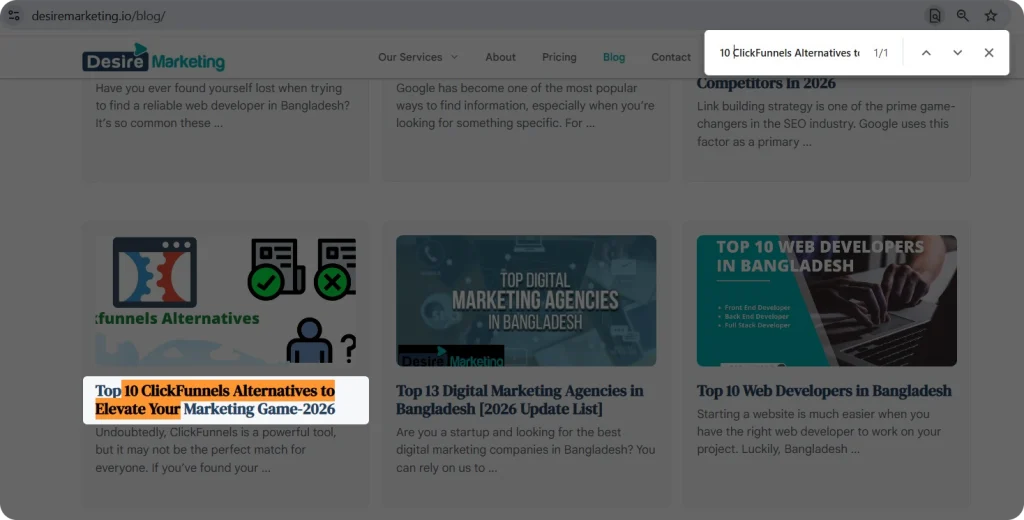
Use the Ctrl + F (or Cmd + F) shortcut on those pages to quickly search for the title
If you cannot find the page through normal navigation or search, it may be an orphan page or a page with very weak internal linking.
Note: Since these methods rely on manual checking, they are best used to identify potential orphan pages rather than provide a complete and fully accurate list.
Using SEO Tools
Now, if your website is much bigger for a manual check and the page structure is more complex, you can use professional SEO tools to find orphan pages. Tools like Ahrefs, Screaming Frog, or Semrush are among the most popular ones to help you with this task.
Let’s see how Ahrefs Site Audit can help you find orphan pages on your website.
First and foremost, you need to set up an Ahrefs account. After logging in to your account:
Go to the Site Audit section and follow the instructions to run a new audit project. This is a great tool to run scheduled SEO audits on your website.
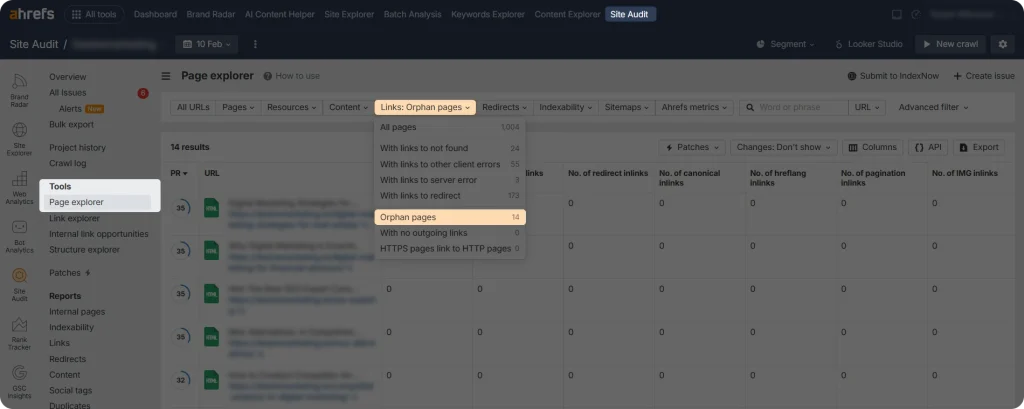
After the audit is completed, go to Tools > Page Explorer
In the Links filter, hit Orphan pages to see the list of orphan pages on your website that Ahrefs has managed to identify.
Note: These are only the pages included in your sitemap or that have a backlink profile. Otherwise, Ahrefs doesn’t have the data on your orphan pages (and neither does Google.)
Fixing Orphan Pages
As mentioned, orphan pages are pages that have no internal links pointing to them from other parts of your website. The most logical way to fix them is to add at least one relevant internal link.
However, depending on the type of page, its further importance, and how it was created, there are other ways to handle orphan pages as well.
So, here are some of the most common solutions to fixing orphan pages:
Adding internal links: Make sure to add at least one relevant internal link pointing to your orphan page. Ideally, link to it from pages with organic traffic or closely related in topic, such as blog posts, category pages, or your homepage. Use clear, descriptive anchor text so both users and search engines understand what the page is about. If the page is important, consider adding multiple internal links to improve its visibility and accessibility.
Redirecting: If the orphan page is no longer needed or contains outdated information, consider redirecting it to a more relevant, updated page using a 301 redirect. This is especially important if the page has backlinks, as redirects help preserve the SEO value instead of losing it.
Deleting: If the orphan page no longer provides value, has no backlinks, and is not needed for your website, deleting it can be the best option. This helps keep your site clean and focused, without unnecessary pages.
Additionally, make sure to conduct regular site SEO audits to identify not only orphan pages but also other SEO issues on your website. Addressing these problems early can help improve your site’s overall performance in search engine results.
Final Thoughts
Website maintenance should be a top priority if you want your site to perform well online, and preventing orphan pages is an important part of that process. Once you understand how to find orphan pages, the rest comes down to consistent planning.
With a well-structured internal linking strategy and proper use of redirects, you can prevent orphan pages from appearing and ensure your website structure stays easy to navigate for both users and search engines.
Picture this: your website is not performing well online, and you are not sure what is causing the problem. It could be site speed, content quality, or even the overall site structure.
This is where SEO audit services come in. They help identify issues on your website and provide clear guidance on how to fix them.
If you do not have the technical knowledge or experience to carry out an audit yourself, it is often better to rely on specialized services. To help you choose the best option for your business, in the article below, we have offered the most popular SEO audit providers you can explore.
What is an SEO Audit?
An SEO audit is an analysis of a website to identify issues that may be limiting its ranking potential. It also helps create a clear roadmap for fixing these problems and improving the website’s performance in search engine results.
Generally, an SEO audit includes key areas such as:
On-page SEO audit: Here, your main goal is to check and fix all the internal issues within your website, such as meta tags, internal links, and the overall website content. Using an AI SEO tool can help identify on-page issues more efficiently by analyzing meta tags, internal linking structures, content quality, and other optimization opportunities across your website.
Off-page SEO audit: You check external backlinks pointing to your website, including any lost or broken backlinks.
Technical SEO audit: In this phase, you check the technical aspects of your website, such as its speed, mobile-friendliness, and overall site performance.
And if you are wondering why you should do an SEO audit, here are the core reasons:
Finding and fixing issues that are blocking your website from ranking higher on search engines
Maintaining strong site performance and a smooth user experience
Monitoring your website’s overall online performance over time
Analyzing your website’s performance against competitors, identifying gaps, and addressing them
So, an SEO audit is an important step you should not skip if you want your website to deliver a smooth user experience, have strong ranking potential, and perform effectively overall. Modern SEO audits also take into account SEO and AI-driven search, ensuring your website is optimized not only for traditional ranking factors but also for evolving AI-powered search experiences and intent-based results.
SEO Audit Services: 5 Options to Consider
There are thousands of SEO audit services available, each offering different features, scopes of work, and pricing structures.
Here are five popular agencies you can consider:
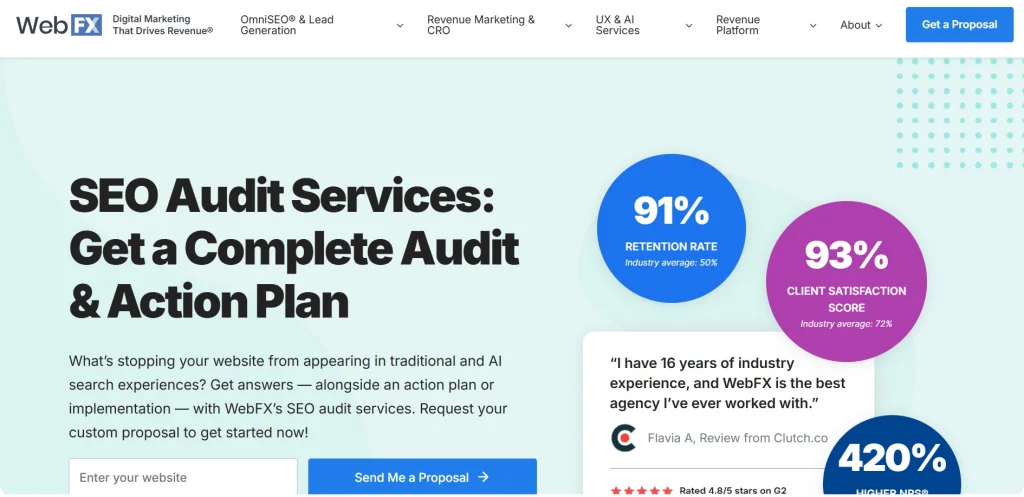
WebFX
WebFX is a digital marketing agency with over 25+ years of experience in the industry. WebFX provides data-driven marketing services that focus on improving online visibility, lead generation, and conversions.
One of their core services provided is SEO audit services, which covers the following areas:
On-page SEO audit
Off-page SEO audit
Technical SEO audit
AI SEO audit
SEO report
Audit implementation
SEO strategy
Pricing:
WebFX offers custom SEO audit plans starting at $8,600/ month. Pricing depends on each website’s SEO needs and website size.
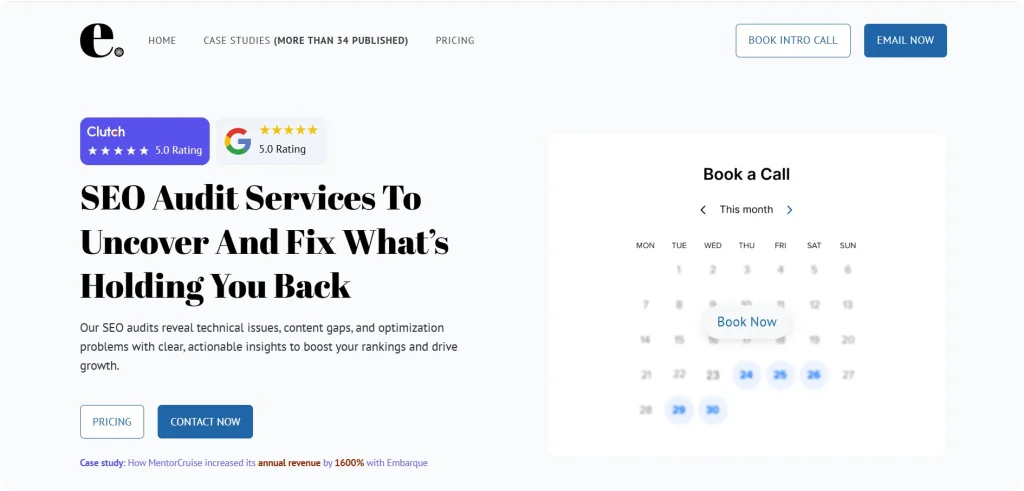
Embarque
Embarque is an SEO and AI-driven search agency that helps businesses grow through organic search. The company provides services like technical SEO, content strategy, and SEO link building, all designed to increase traffic, generate leads, and drive revenue.
At the same time, Embarque’s SEO audit services are designed to reveal the website’s technical and content gaps and provide actionable recommendations to fill them and boost rankings.
Among the core areas covered within the audit services are:
Technical SEO audit
On-page SEO audit
Topical authority audit
Backlink profile audit
UX and core web vitals audit
Pricing:
Pricing plans depend on the scale of services provided.
Tier 2: $4,900/ month (includes everything in Tier 1 + heatmap tracking, AI/LLM SEO, Reddit, and forum marketing)
Tier 3: $5,999/ month (includes all tier 2 services + Programmatic SEO, Technical SEO, Multilanguage SEO)
Enterprise:Starting at $11,000/ month (includes every tier 3 capability + A/B testing, full-funnel analytics integration, Programmatic SEO, Multilanguage SEO)
For further information on audit services tailored to your specific needs, you can contact Embarque’s team via email directly from their website.
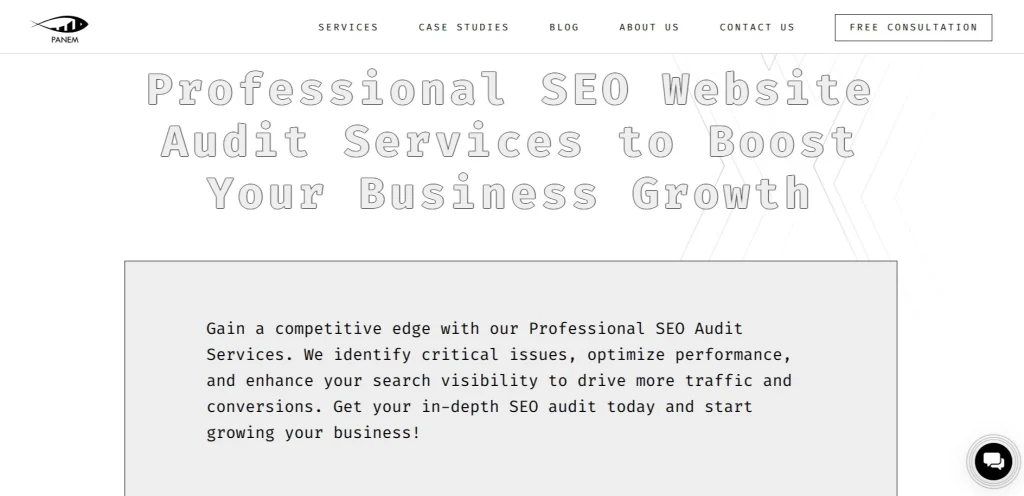
Panem Agency
Panem Agency is a full-service SEO and digital marketing agency, working with clients across the US, EU, and Canada. It specializes in SEO, PPC, content strategy, and AI-driven optimization for international brands.
Panem Agency also provides SEO audit services, encompassing areas such as:
Usability analysis
Keyword analysis
Content optimization
Technical analysis
Domain analysis
Google penalties
Competitor analysis
Backlink audits
Local SEO audit
Pricing:
Panem Agency offers 3 pricing plans, depending on the services provided.
Essential SEO audit: Best for small businesses or startups looking for a foundational SEO check-up, from $500
Advanced SEO audit: Growing businesses needing an in-depth analysis of technical SEO, content, and rankings, from $1000
Premium SEO audit and strategy package: Enterprises and businesses requiring a comprehensive, data-driven SEO strategy with a roadmap for long-term growth, Custom pricing based on project scope
Panem Agency allows you to get a free consultation directly from their website to get a deeper understanding of their services.
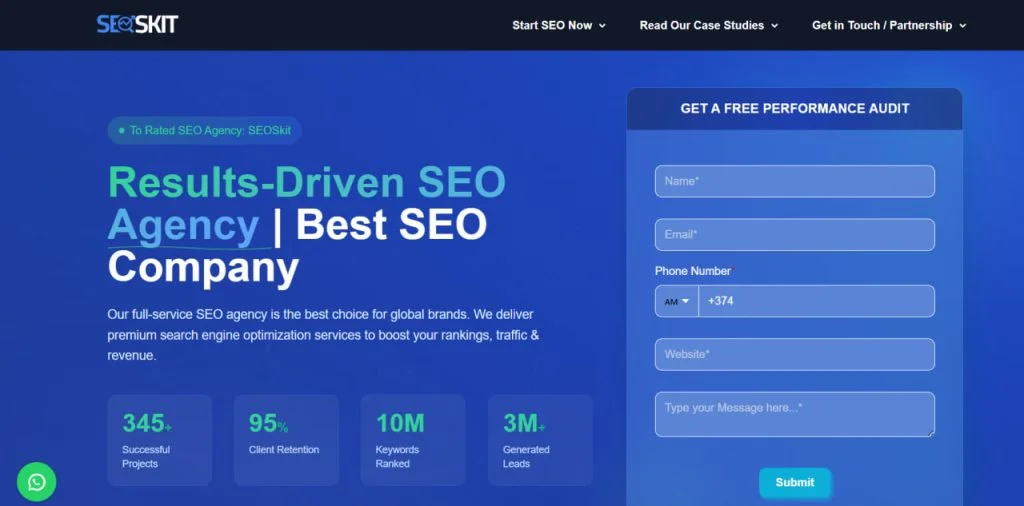
SEOSkit
SEOSkit is an SEO agency that provides search engine optimization services for businesses looking to improve their online visibility and organic traffic.
It offers services such as SEO audits, technical optimization, keyword research, on-page SEO, link building, content strategy, and guest posting to help websites improve their rankings.
Some of the key SEO audit services that the agency offers include:
Technical SEO analysis
On-Page SEO Evaluation
Site Speed Assessment
Mobile Responsiveness Check
XML Sitemap Review
Robots.txt Configuration Analysis
Basic Backlink Profile Overview
Complete Backlink Profile Audit
Comprehensive On-Page Audit
Core Web Vitals Deep Dive
Pricing:
The agency offers 3 pricing plans depending on the scope of audit services provided.
Basic SEO audit: One-time comprehensive analysis, $499/ audit
Professional SEO audit: In-depth analysis with action plan, $999/ audit
Enterprise SEO audit: Complete analysis with ongoing support, $2999/ audit
If you need further information, you can both contact the agency through their website and book a consultation to ask your questions.
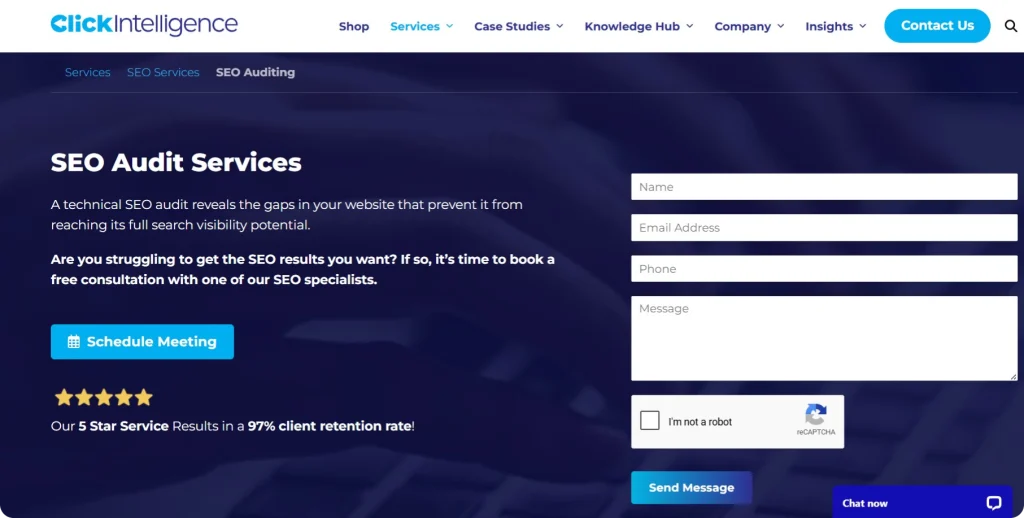
Click Intelligence
Click Intelligence is a UK-based SEO and digital marketing agency that provides a range of SEO services, including technical SEO audits, keyword research, content optimization, and link building.
Its audit services focus on areas such as:
Keyword Research
Technical SEO
Technical Audit
Content Optimization
Backlink Analysis
Pricing:
There are 3 SEO audit service pricing plans that vary by the services provided.
SEO Audit Basic: Designed for startups, from $1,147 – $2,025/ audit
SEO Audit Standard: Designed for SMEs, from $2,700 – $6,750/ audit
SEO Audit PRO: Designed for growing enterprises, from $8,100 – $10,800/ audit
To get more information on the SEO results and audit services, you can send a message to Click Intelligence directly through the website or book a consultation with agency experts.
How to Choose SEO Audit Services?
Now that you understand the importance of SEO audit services and have shortlisted a few of them to consider, here are some tips to keep in mind when planning your collaboration.
Check agency expertise: Choose an agency with rich experience and background, especially in multiple industries. Make sure they have worked within your industry and can quickly adapt to your specific needs.
Ask for case studies: To evaluate their expertise and quality of work, ask for previous projects, case studies, or client testimonials to understand how they have handled similar work. Pay close attention to timelines, results achieved, and the industries they have worked in. It is also important to review their website carefully for additional insights and information.
Clarify pricing: Although the pricing plans are usually available on agency websites, the costs of audit services may still vary depending on specific cases and the needs of each client. So, make sure to clarify the final pricing for your website and project. Include it in the final contract to avoid hidden costs and misunderstandings.
Clarify communication and reporting: Clear communication is key to any successful collaboration. Make sure you understand which channels will be used, how often updates will be shared, and how reports and deliverables will be provided throughout the project.
Remember that choosing the right agency is a key step toward achieving your desired results in website marketing and long-term online success. Take the time to research your options thoroughly, clarify all details, and ask the right questions before making a decision.
Summing Up
A full SEO analysis is an integral part of your digital marketing efforts. It is a detailed and thorough process, which is why many businesses choose to outsource SEO audit services.
While there are many providers available, this list of five agencies offers a helpful starting point.
With careful research and clear communication, you can find the right partner to ensure the results meet your expectations.
Have you ever received outreach emails saying “get backlinks from websites with high DA” or “DA 30+”? Or noticed that your potential link partners lose interest because your site’s authority seems too low?
This often leads to a common question: how to improve Domain Authority to unlock better link building opportunities and strengthen your site’s overall SEO performance?
If you are new to SEO and link building, this guide will help you understand what Domain Authority is, why it matters in link building, and the most effective steps to improve it.
What is Domain Authority?
Domain Authority is a metric (or a relative score) developed by Moz to evaluate a website’s potential and competitiveness on SERPs. Although it is widely used by digital marketers and business owners, it is not an official Google ranking metric.
Domain Authority score can change over time, and various factors affect these changes, such as:
Changes in your backlink profile (losing or getting backlinks)
Changes in your competitors’ backlink profile
Search engine algorithm changes
Since DA was developed by Moz, it is calculated using data from its Link Explorer index, taking multiple factors into account.
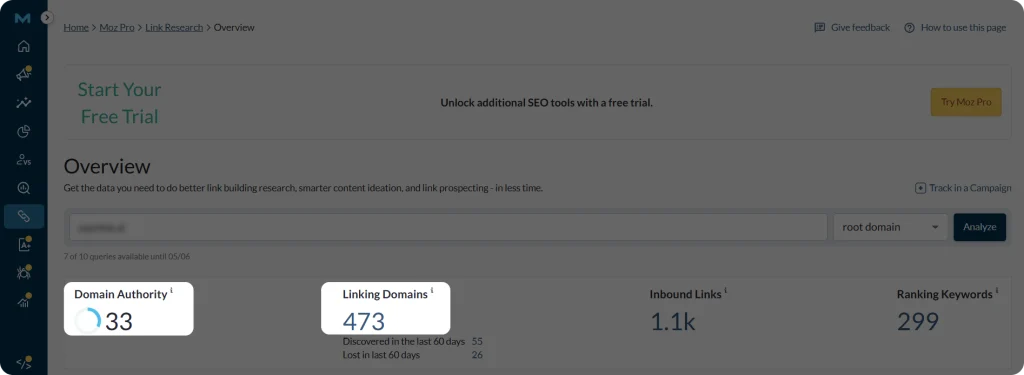
To check your Domain Authority, go to Link Explorer and type your domain URL
You’ll see a general overview of your website metrics with DA and Linking Domain numbers (number of unique external sources that link to you), too.
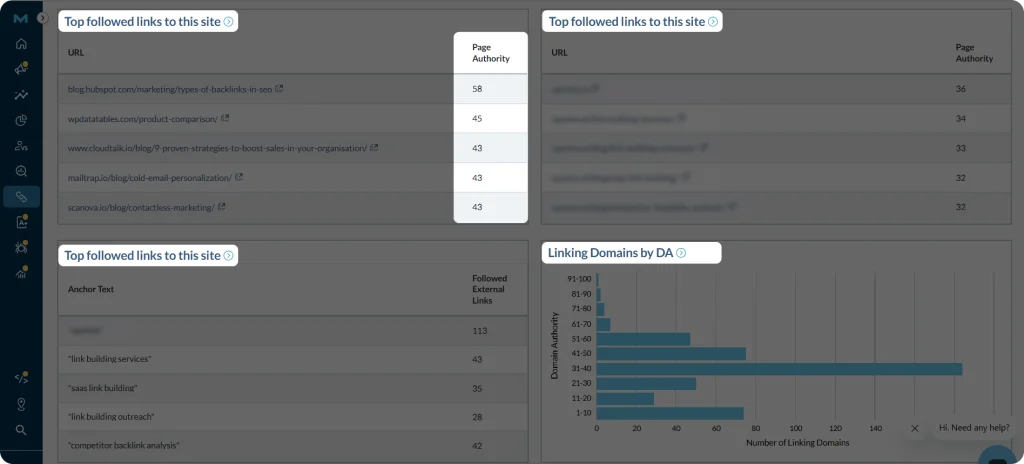
Later as you scroll down, you can see 4 sections showing the pages that link to you (“top followed links to this site”), your pages, that are linked to (“top pages on this site”), your anchor texts (“top anchor texts for this site”), as well as a chart sorting linking domains by their DA.
You might have also heard of Domain Ranking, which is also a website authority metric, but created by Ahrefs.
Domain Authority: Created by Moz. The scale is from 0 to 100. The goal is to predict how likely a website is to rank on SERPs
Domain Ranking: Created by Ahrefs. The scale is from 0 to 100. The goal is to evaluate the strength of a website’s backlink profile
So, in short, Domain Authority is a relative metric that compares your site’s ability to rank on search results against competitors, making it most useful for understanding your ranking potential within your industry.
Why Do You Need to Improve Domain Authority?
If Domain Authority is a relative metric and not used by Google, a natural question arises: why should you care about improving it?
While it is not an official ranking factor, DA score is still widely used by SEO professionals and businesses as a practical benchmark.
To earn backlinks from higher-quality websites: Many SEO and link building specialists use DA scores as a quick filter when deciding whom to collaborate with and how to further coordinate their manual link building efforts.
To understand your competitiveness: Since it is a comparative score, it helps you see how your website compares to others in your industry.
To shape your SEO strategy: By knowing where you stand and collecting your backlink data, you can set realistic goals and focus on actions that improve your overall search performance.
For these reasons, the DA score is still used to understand how strong a website is, especially when building links and comparing it with competitors.
So, How to Improve Domain Authority?
Now that you have a general understanding of Domain Authority, how and why it is used in SEO, let’s discuss some important steps to improve your DA.
Get Links from Authoritative Websites
Since Domain Authority is calculated based on backlink data, it means that the primary way to improve your DA is to acquire backlinks from authoritative websites.
Backlinks are important for any website’s online presence. Earning natural backlinks is one of the most important SEO strategies for improving visibility and authority.
Don’t try to buy backlinks or use other black-hat practices, as those will harm your rankings. Instead, try to identify relevant and authoritative websites and reach out for a backlink exchange.
One good option is researching which websites link to your competitors and not to you.
Here, Moz can help you.
Log in to your Moz account (for deeper insights, you need to have a Moz Pro subscription)
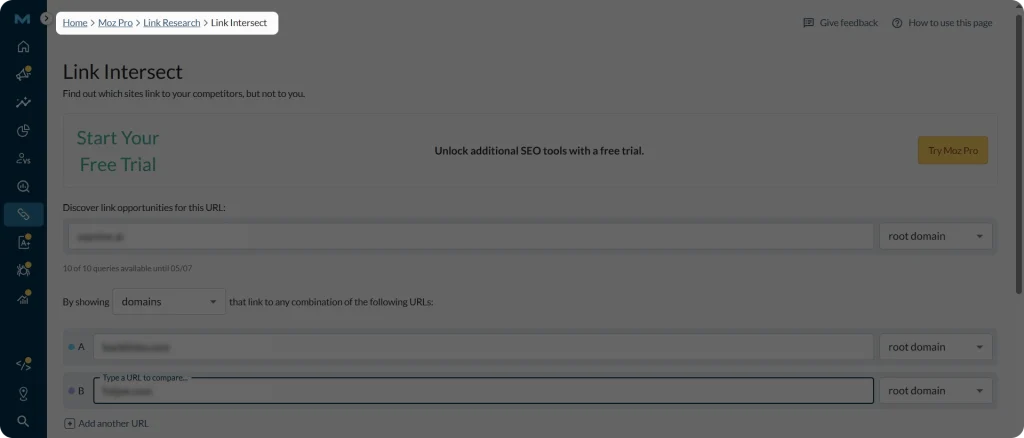
Go to the “Link Intersect” section.
Enter your URL and then your competitors’ URLs and hit “Find opportunities”.
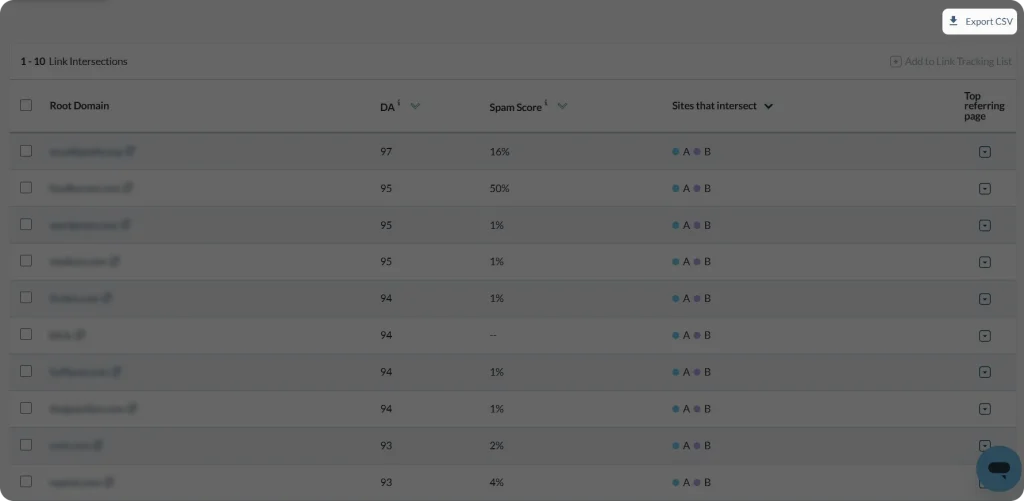
There you go, a list of all the potential link building sources is presented.
You can then download this list in a CSV format for your further analysis and filtering. Pay special attention to DA scores by sorting the ones that are higher.
After filtering all the relevant websites, find contacts and reach out for backlink opportunities.
Create Content Worth Linking to
Another reliable way to get backlinks is to create compelling content that will add value to the target website, your target audience, and search engines in general.
Don’t just generate robotic content that is stuffed with keywords. Instead, invest some time in keyword and topic research to create content that is built around people’s search queries. Make sure your keywords are relevant and fit the context without overloading your article.
Here are some tips along the way:
Use a simple Google search to see what people are searching for. On Google, type your seed keywords (like “digital marketing”, “SEO strategy”, “SEO content writing”) and the most popular related search queries will show up. For long-tail results, scroll down to the “People also search for” section.
This will help you understand the type of content your audience prefers, whether it is informational blog posts, in-depth guides,or case studies.
For deeper insights, use SEO keyword research tools like Ahrefs, Semrush, or Moz. All these listed tools have free keyword research tools to uncover general keyword insight. However, if you want to go deeper, different pricing plans are available, depending on your business needs.
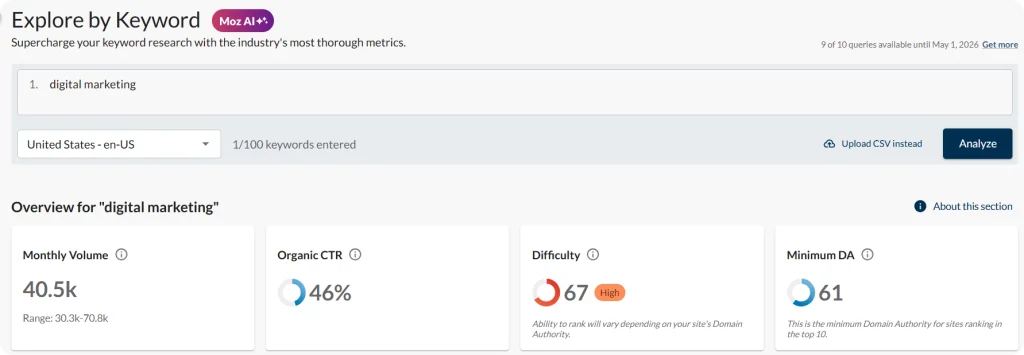
Let’s take a look at Moz Keyword Explorer, as an example. After searching for your seed keywords, you get an overview of your keywords’ search volume, difficulty, or primary search intent.
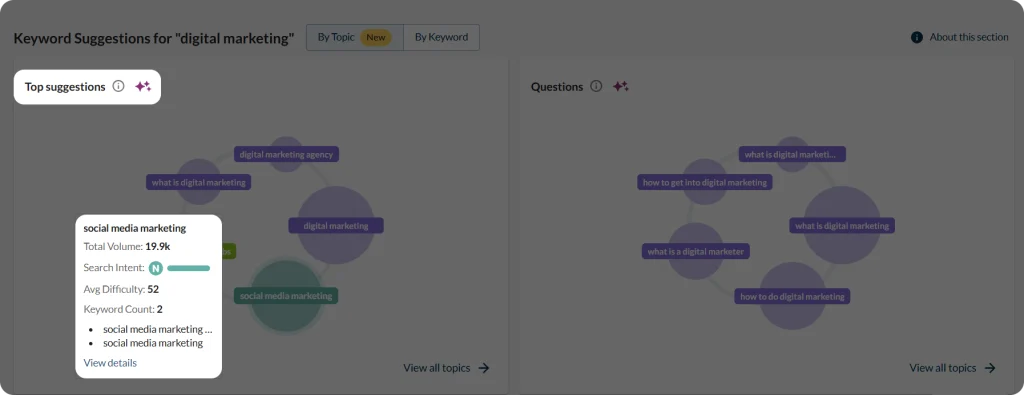
As you scroll down, you can uncover more keyword suggestions and questions related to your general keyword, again, with respective metrics showing too.
When creating your content, also pay attention to your article structure, making sure it’s clear and readable.
In short, your content should be valuable, relevant, and genuinely worth linking to, making it a strong foundation for successful organic link building efforts.
Don’t Forget About On-Page SEO
While you may be putting a lot of effort into finding and reaching out to websites for backlinks, it is just as important to make sure your own website is worth linking to and visiting. This means having solid on-page SEO in place to deliver a smooth and reliable user experience.
If your site is slow, hard to navigate, or poorly structured, even high-quality backlink opportunities may not convert:
Choose the right primary and secondary keywords, and use them naturally throughout your content, especially in titles and headings
Add internal links to help users navigate easily across your website
Use schema markup to help search engines like Google better understand your content
Ensure your website loads quickly, is mobile-friendly, and has no broken pages
Ensuring smooth navigation, fast load times, and proper keyword usage improves the user experience, strengthens your website’s credibility in the eyes of users and search engines, and can therefore contribute to higher Domain Authority.
To Sum Up
You can think of Domain Authority as a score from 0 to 100 that shows how strong a website is compared to others in terms of SERP ranking potential.
While it is not a direct measure of ranking success, it can still help you get a quick idea of your backlink profile and guide your link building efforts, especially when learning how to improve Domain Authority.
By focusing on getting high-quality, relevant backlinks and creating useful content, you can slowly improve your website’s authority and support better long-term SEO results.
Let’s picture this: you spent hours researching your topic and writing a top-notch article. You feel relaxed after finally publishing it. But time passes, and your article is not doing so great on SERPs.
So you start questioning whether your piece was good enough. The thing is that the problem may not be in the content itself, but the SEO strategies that you might have missed while writing your article.
To do well on SERPs, you need to master the SEO writing tips and tricks.
And this article provides just that, so read along to find out more.
What is SEO Writing?
SEO writing is the process of writing and optimizing your content so that it ranks well on search engines and attracts traffic. It also helps your content get featured on AI search engines, too. Various optimization rules are used to achieve this goal.
This is what makes it different from general content writing.
SEO writing: Here, your content is strategically structured around keywords and search intent. It follows a clear optimization structure. The core goal is to improve visibility on search engines while maintaining readability and value for the reader.
Content writing: The focus is primarily on informing, educating, or engaging the audience. It is more flexible in structure and does not require strict keyword targeting. As a bonus, it can still perform well in search results if the content naturally matches the search intent.
So, remember that your article should not only answer people’s queries but also be structured in an SEO friendly way.
SEO Writing: A Go-To Optimization Checklist
So, if your goal is to increase your brand visibility through your content, let’s turn to the optimization steps below.
Optimize Your Article Structure
One of the most important rules in SEO writing is your article structure. It has to be as clear as possible to ensure readability.
Here are some common points you need to consider when structuring your article:
Keep your meta titles within 50-60 characters, while meta descriptions within 150-160 characters.
Ensure a hook in your meta tags, so that your readers are interested enough to click and open your article.
URL slug: Optimize your article URL, too, by making it as short and clear as possible. For example: /seo-writing, /content-writing-tip.
Bullet points and numberings: Where relevant, break your idea into bullet points and numberings as these are easier to read visually than long paragraphs, which readers usually tend to skip.
Clear paragraphs and sections: Break your articles into paragraphs. Try to present one idea per paragraph without stuffing them. Be short and precise.
By ensuring your article is structured, not only people, but also search engines will be able to smoothly scan through your article and grasp which topic is mentioned in which section.
Identify the Search Intent
Search intent is the reason behind your users’ searches. Why did they search for that specific term, and what information did they want to get? And to rank higher, your content should match their intent.
There are 4 main types of search intent:
Informational: These types of content (blog posts, articles, guides) help readers to learn something and get new information.
Navigational: This is when users want to land on a specific page or website.
Commercial: Here, users want to find options, compare them, before actually making a purchase.
Transactional: And as a last stage, users are ready to take action, such as buying or subscribing.
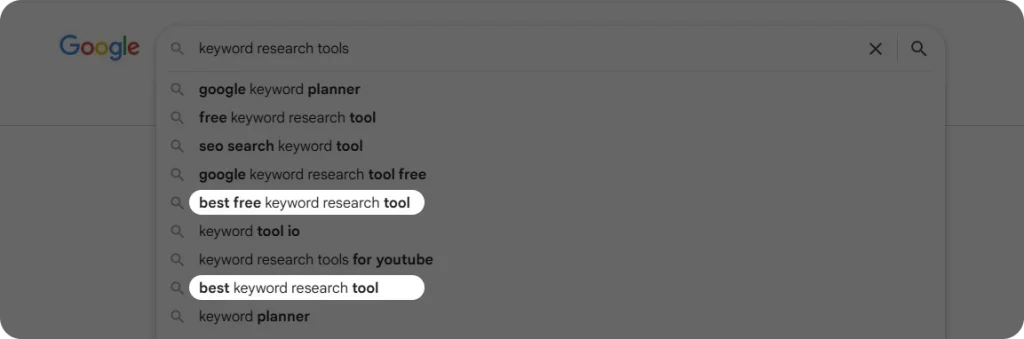
To identify the search intent, you can simply have a closer look at the Google search results and “People also ask” section, because each of the intents has a structure and its specific keywords, which is especially important for local SEO. For example, if the query is “how to” or “what is”, this is an informational intent, while keywords such as “best” or “top” are common for the commercial one. Here’s an example of a commercial intent for “keyword research tools”.
Many SEO tools, like Ahrefs, also show the search intent for each matching keyword of your target keyword. Here’s an example of Ahrefs.
Just type your general keyword in the Keyword Explorer,
Go to the Matching terms section,
See the letters “I”, “N”, “C”, “T” for each matching keyword.
By understanding the search intent, you will be able to structure your content accordingly, target the right keywords, and ensure appearing in the SERPs at the right time.
Place Keywords Naturally
In SEO writing, your content is built around your primary and secondary keywords. To achieve this, you need to do keyword research and identify keywords that have high chances of ranking on SERPs (pay attention to KD and search volume). Tools like Ahrefs, Semrush, or Moz can help you with this research.
However, this doesn’t mean that adding as many of your target keywords as possible will benefit your rankings. In fact, keyword stuffing will make it even worse and lead to low rankings or not showing on SERPs at all.
Now, if you are asking yourself what the rule of avoiding keyword stuffing is, here are some suggestions:
Use keywords once every 200 words in your article.
If they don’t fit in the paragraph or context, just don’t place them. Use synonyms or related terms instead.
Make sure your primary keywords are present in your meta tags, Heading 1 (your title), intro, and conclusion (but only once or twice). Place in the subheadings only if relevant.
After completing your article, re-read it to identify the sections with keyword overuse, because you might not notice it while writing.
To sum up, the general rule for avoiding keyword stuffing is to use your keywords evenly and naturally.
Use Relevant Visuals
Another way to optimize your article and improve its readability is by adding relevant and compelling visuals. Visual information is better digested than text-based information, so make sure you include visual elements too.
For example, if you are writing a tool review guide, you can include step-by-step screenshots so that your readers can follow along.
To support your point, you can also include video tutorials or charts.
In terms of SERP visibility, good visuals can increase your chances of appearing in Google featured snippets or AI Overviews. This can drive additional traffic to your content.
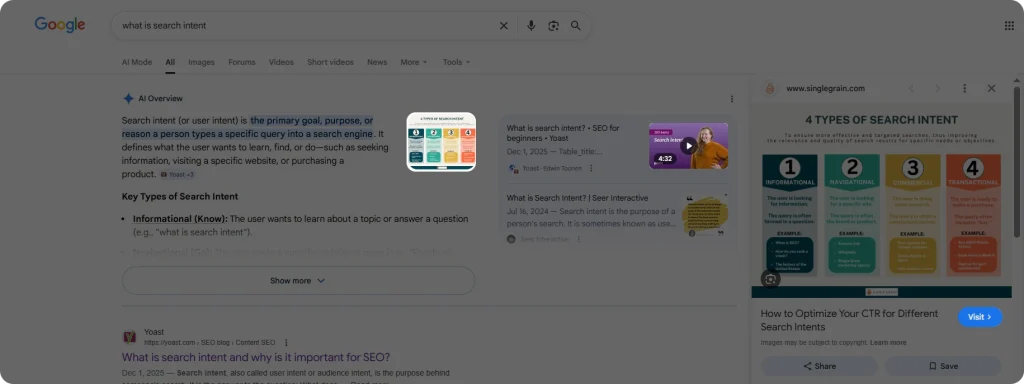
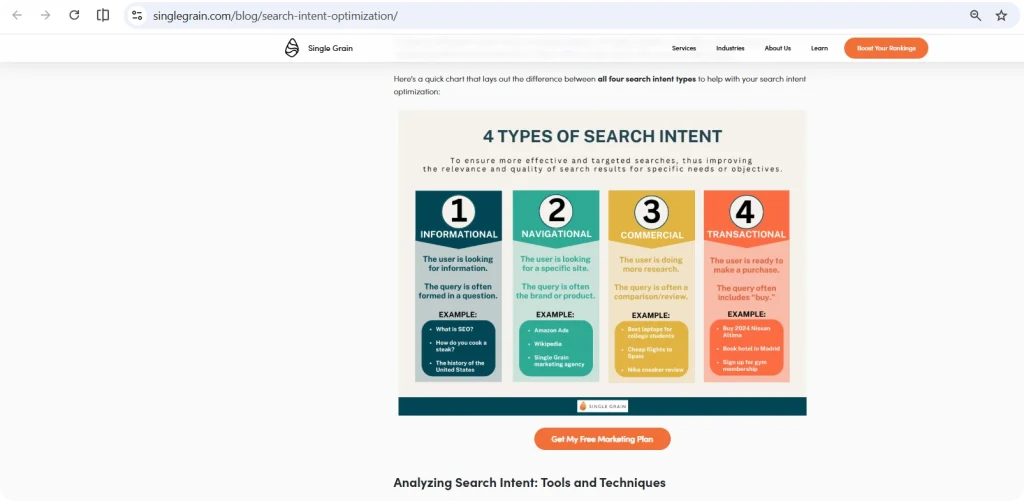
Here’s an example of a Google query for “what is search intent”. AI Overviews provided several sources on search intent and highlighted an informative chart explaining the differences of 4 intents provided by Single Grain. Later, after clicking on the visual, you are redirected to Single Grain’s relevant article, where you can find the visual.
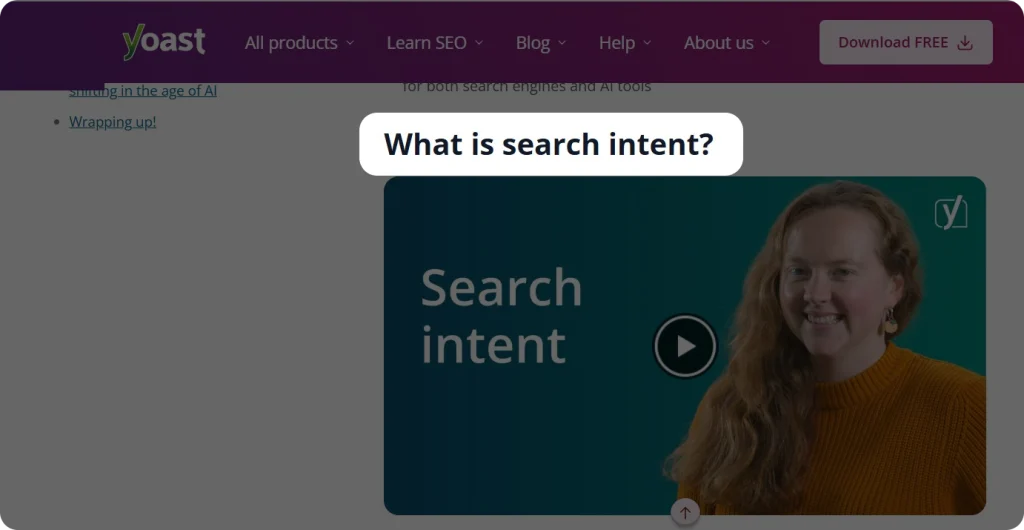
It also highlighted a video provided by Yoast SEO answering our “what is search intent” query.
Notice that in Yoast SEO’s article, the video is placed right under the “What is search intent?” heading to signal that the answer is explained in the video. And that’s how search engines considered it as a credible source to cite.
When placing your visuals, don’t forget to optimize alternative text (alt text) to explain to search engines what each image is about. Keep them short, preferably within 100 characters.
So, adding visual elements to your article can improve engagement, keep readers on the page longer, and may also help improve your visibility in search engines.
Add Internal and External Links
Internal and external links play an important role in SEO writing by improving content structure, credibility, and search engine understanding.
They also help increase authority across your website and support better rankings in SERPs.
Internal links connect different pages within your website, helping users navigate more easily and allowing search engines to better understand your site structure.
External links point to relevant and trustworthy sources outside your website, which can increase credibility and provide additional value to readers.
Therefore, using both internal and external links strategically enhances user experience and strengthens your content’s SEO performance.
SEO Writing: The AI Trends
Today, people use AI search engines (such as ChatGPT, Claude, or Gemini) to find answers to their queries. This tendency sets its rules in SEO writing, where your goal is to be cited by AI platforms, too.
Have you ever noticed how AI search engines answer your questions and which sources they rely on? By analyzing these patterns, you can refine your article structure to increase your chances of being cited by AI systems.
Here are some points to consider:
As said before, your article should be easy to scan, with clear headings, well-defined sections, and concise paragraphs. Formats such as question-and-answer or term-and-definition can make it easier for AI to extract information.
Focus on writing credible and reliable content, as accuracy and trustworthiness are key factors for being cited.
Consider using listicles, as structured lists make information easier to process and more likely to be picked up by AI.
Focus on your brand mentions across different sources. This way, your product or service will have higher online visibility and more chances to get featured on AI search engines.
And after your AI search optimization efforts, use SEO tools to track important AI visibility metrics. For example, Ahrefs’ brand radar does just that by comparing your brand’s and your competitors’ AI visibility across various AI platforms like AI Overviews, AI Mode, ChatGPT, or Gemini.
So, optimizing your content for search engines and AI search platforms should go hand in hand, as both are important for ensuring your brand’s long-term visibility and success.
The Bottom Line
SEO writing requires specific practices to ensure content ranks on search engines and AI platforms. But this doesn’t mean that your content should sound robotic with keywords mentioned in every corner.
As search algorithms continue to change, it is more important than ever to create compelling, informative content that adds value to your audience.
If you are new to the field, you can also take an SEO writing course to learn the essential techniques and gain hands-on practice.
In short, the best results come from balancing optimization techniques with natural, people-first writing.
Are you getting qualified B2B leads from your SEO strategy, or is it just traffic that doesn’t convert?
If you are operating in the B2B space, your SEO strategy should be developed with B2B objectives in mind. You should consider all the differences and specifics that an SEO strategy for B2B carries.
Let’s examine how you can modify your SEO tactics to successfully meet your business-to-business objectives.
B2B VS B2C SEO: How Are They Different??
If you plan to use a B2B SEO strategy, you might be wondering how it differs from a B2C strategy.
The short answer is that, although SEO principles don’t change, their application in SEO strategy for B2B can. The reason lies in:
Smaller and more focused target audience,
More specific keywords and content,
Longer sales cycles.
These factors may seem minor, but, in fact, they can significantly impact the development of your B2B SEO strategy and content marketing.
Benefits of SEO for Your B2B Brand
Of course, SEO is essential for building long-term visibility for both B2B and B2C brands.
Therefore, if you do take into account the differences between B2B and B2C SEO and adjust your SEO strategy appropriately, the following advantages won’t keep your brand waiting too long:
Increased and more targeted search presence,
Qualified B2B leads,
Higher and more consistent website traffic,
Stronger positions as an authority in your industry.
In short, when done right, a B2B SEO will give you the chance to “appear in the right place at the right time” on SERPs and address the problems your target audience is trying to solve.
Building SEO Strategy for B2B: A Step-By-Step Guide
Now that you have an overall understanding of the differences of an SEO strategy for B2B, let’s have a look at the core strategies you need to implement to reach your B2B goals:
Identify Your Target Audience
In B2B SEO, the first step to building your strategy is understanding who you want to target.
Unlike B2C marketing, where the audience can be broad and diverse (like anyone looking for a fitness app), B2B audiences are usually much narrower and more specialized, for example, department heads looking for an agency management solution.
Keep in mind that your target is typically the narrow decision-making circle of the company and those who have purchasing authority, such as:
Company executives
Directors and/or managers
Department heads or team leads
Since this is a narrower group than in B2C marketing, your content and SEO efforts should be highly focused on addressing their specific needs, challenges, and goals.
Pro tip: To make the process of identifying your B2B buyer persona easier, you can consider holding some initial discussions with your sales team. Ask them who your main buyers are, what titles they usually hold, or what they are looking for in general when searching for your services. These insights will help you better understand your target market and take to next steps more easily.
Do Keyword Research
After the target audience, keyword research is the next step of your SEO strategy for B2B.
Since your audience is narrow and very specific, your keywords should be filtered accordingly.
When doing your B2B SEO keyword research, you should focus on more specific, long-tail keywords. For example, instead of searching for broad keywords like “project management software”, your target audience might be searching for “agency workflow management tool for small businesses”. So, your further content strategy should focus on these types of keywords.
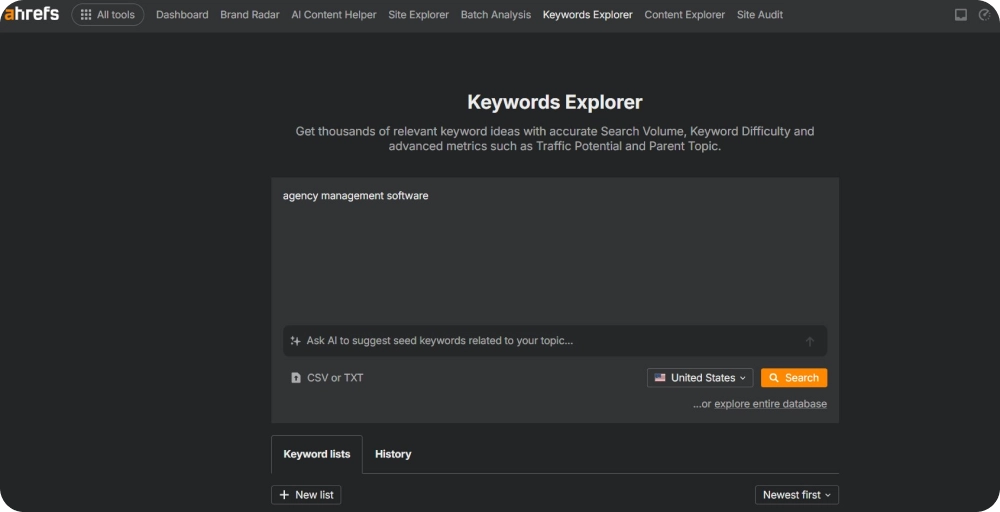
To help you with keyword research, you can utilize professional SEO tools like Ahrefs. To start with your B2B keyword research on Ahrefs:
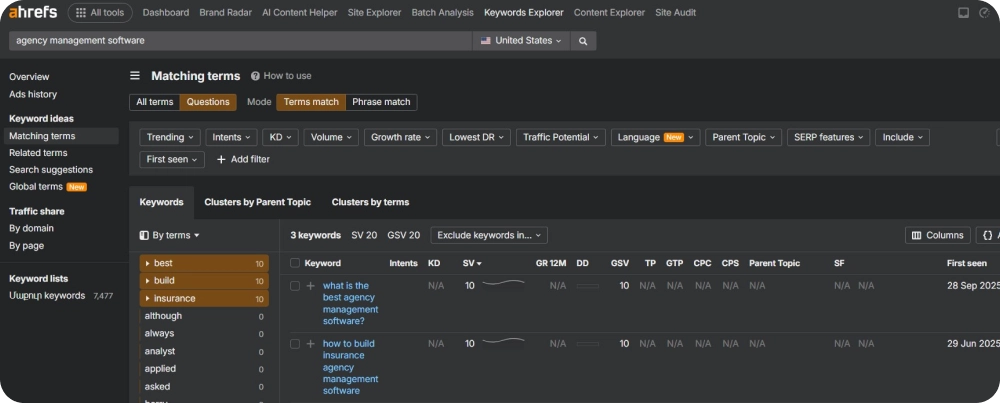
Step 1: Start with a broad seed keyword search in the “Keyword Explorer” section. This is your starting point to identify the long-tail keywords.
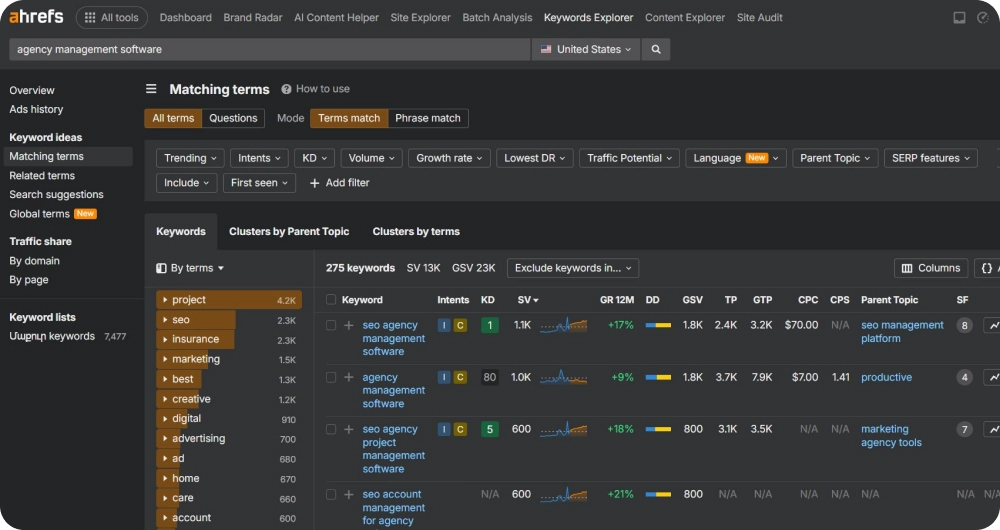
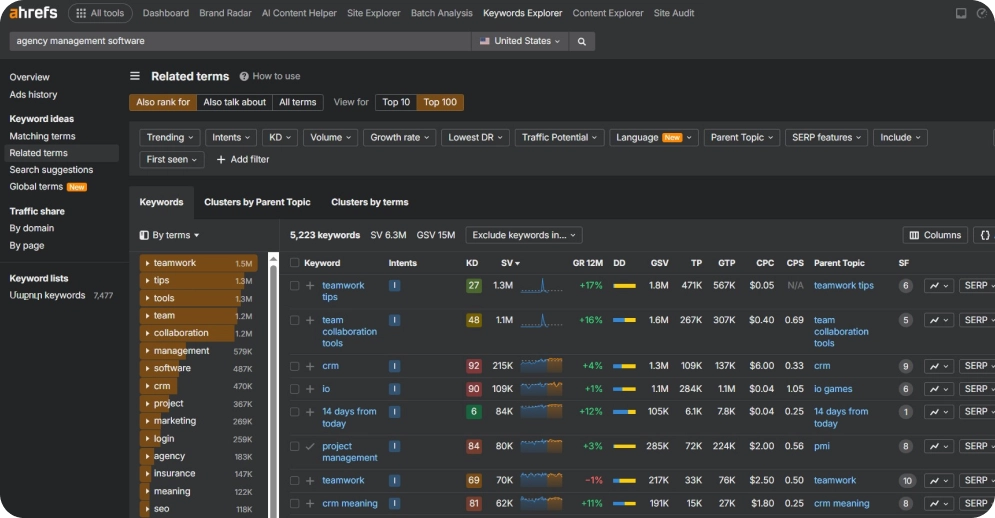
Step 2: Explore the “Terms match” and “Also rank for” sections, where you can also find long-term keywords
Step 3: Filter down the search intents by informational, transactional, and commercial ones, as these are usually searched for problem-solving and decision-making purposes
Step 4: Navigate to the “Questions” section, where there are mostly long-tail questions ideal for your further informational content.
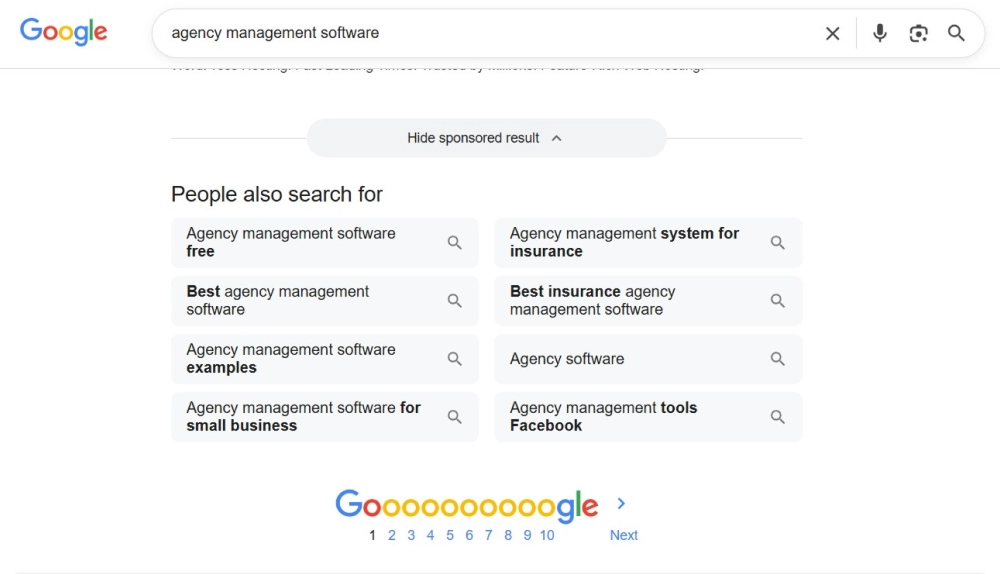
Here, you can also use the simple Google search bar to type in your seed keyword and get more insights on what users are usually looking for. Let’s take the “agency management software” keyword as an example and scroll down to the “People also search for” section.
As you can see, there are also keyword modifiers such as “best”, which are actually quite helpful in attracting a relevant audience for your SEO strategy for B2B.
You can export the data and analyze the important keyword metrics, such as difficulty, search volume, and traffic potential, since not all the identified keywords can be suitable for your content strategy.
Write and Optimize Your Content
Now that you have your keywords and search intents filtered, it is time to make good use of them in your content strategy.
Your content will be another key component of your SEO strategy for B2B. It should answer the “Why” question of your audience.
In B2B SEO, the most common types of content are:
Informational blogs, guides: As you want to attract your audience with informational and educational content, answering their questions
Case studies and testimonials: To show your expertise and strengthen your positions as an authority
Social media posts, webinars: These are perfect to engage your audience and boost your online presence through popular channels like LinkedIn.
Optimize your content by naturally including your target keywords, using clear headings, and structuring information so it is easy for both readers and search engines to understand.
This approach not only builds trust with decision-makers but also improves your search rankings.
Don’t forget about internal linking, as it plays an important role in guiding visitors across your website. Make sure your links are placed naturally and point to relevant pages. This not only helps users navigate your site more easily but also helps search engines to understand your website structure, improving indexing and boosting your website’s overall SEO performance.
Track and Measure Performance
This is the last but not the least important step. You need to track whether or not your efforts are bringing you the desired results. And if not, you will be able to see where the gaps are and refine your strategy.
Of course, here you need to utilize special SEO tools that will help you see the necessary metrics, such as:
Organic traffic,
Conversion rates,
Keyword rankings.
If you are using Ahrefs, all this information is accessible through a couple of simple steps:
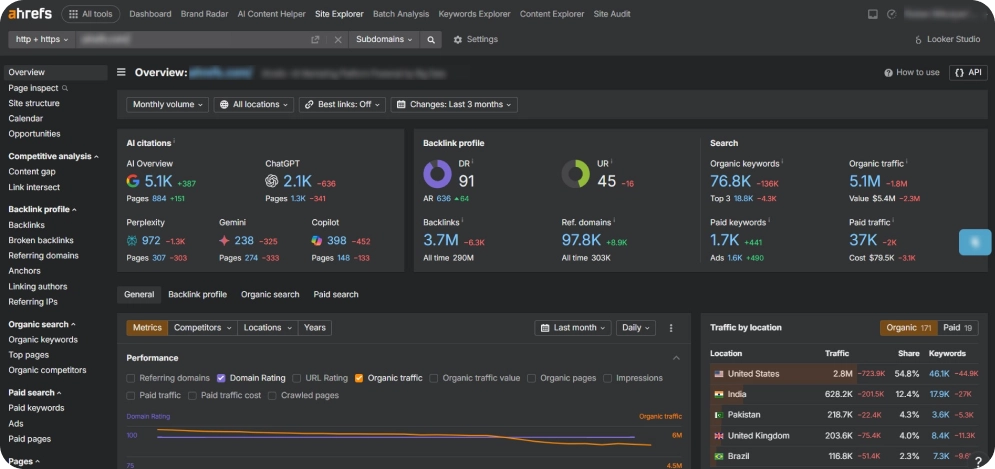
Go to Ahrefs’ “Site Explorer” section,
Type your domain name
And here you are, see the necessary metrics such as organic traffic, organic keywords, and traffic value in the “Overview” tab.
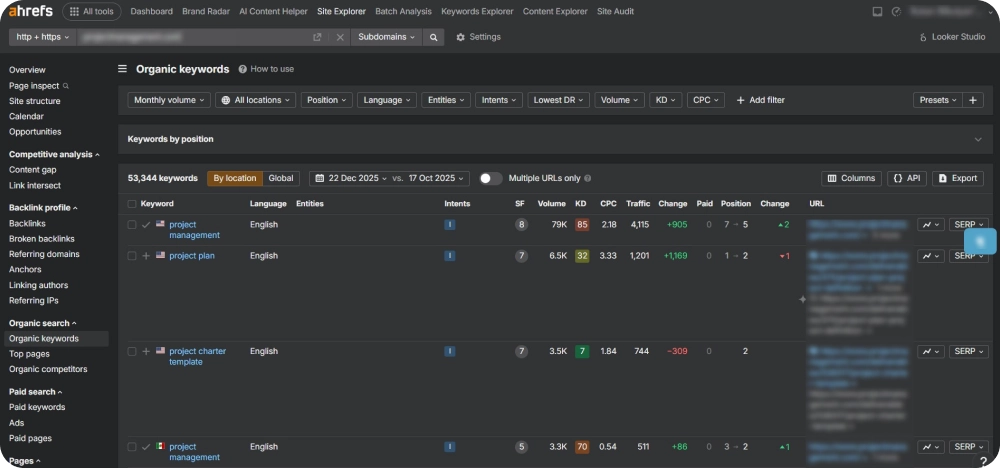
And if you want to check your keyword rankings, you just navigate to the “Organic keywords” tab on the left side, where you will gain deeper insights into the keywords you rank for with the necessary metrics.
Maybe you will identify keywords that are no longer relevant or ranking, or maybe there are new content ideas that haven’t been implemented in your content strategy.
That’s why you need to “keep your finger on the pulse” and be adaptive to all the trends in SEO strategy for B2B.
Conclusion
Building a successful SEO strategy for B2B requires a targeted approach that is in line with how decision-makers look for, assess, and select solutions.
Defining your industry audience, focusing on long-tail keywords, and creating optimized content are what really distinguish B2B strategies, even though the fundamentals of SEO are still the same.
Every stage, from audience research to content optimization, is essential for B2B lead generation purposes.
Are you getting ready to launch your website but noticing that everything feels a bit confusing?
One common reason is the lack of SEO keyword mapping.
This step is essential because it helps you structure your categories, makes crawling easier for search engines, and brings more clarity to your overall content.
Below, we will explore why it matters and walk through the steps you need to follow, so stay tuned.
What is SEO Keyword Mapping?
In short, it is the process of linking specific keywords to the most relevant pages on a website.
And in practice, it involves researching keywords and grouping them by topic and intent. Then, you map those groups to existing pages or pages that need to be created.
This provides a clear outline of what each page should focus on and how your site can grow.
Why Do You Need an SEO Keyword Mapping?
SEO keyword mapping includes several important benefits for your website. By properly mapping your industry keywords:
Each page of your website targets a clear search intent to help search engines understand what each page covers.
It prevents pages from competing for the same terms, eliminating the possibility of a duplicate content penalty
Makes planning website content strategy easier.
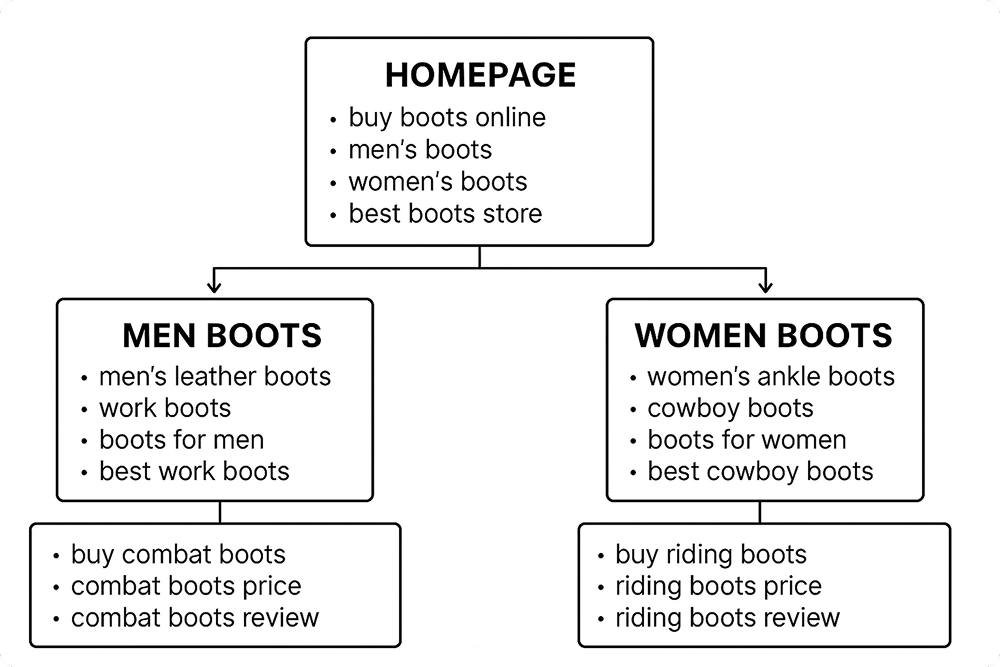
Here’s an example of a mapping structure for an online store selling boots.
But before you can see the real benefits, you need a solid understanding of your industry. This knowledge helps you sort your keywords into accurate categories and subcategories, which leads to a more organized and effective site structure.
How To Do SEO Keyword Mapping From A to Z
To make the SEO keyword mapping process easier and more structured, below is a step-by-step guide you can follow.
Step 1: Do Your Keyword Research
Keyword research is the very first step of organizing and assigning your target keywords to specific pages. You need to first identify all the relevant and ranking keywords for your specific industry to be able to map them accordingly.
There are different methods you can practise for doing keyword research easily. And there are different SEO tools that can help you, too. One of such tools is Ahrefs, which can help you see ranking keywords, their search intent and important keyword metrics.
Let’s take the example of an online store for boots and see the keyword research steps on Ahrefs:
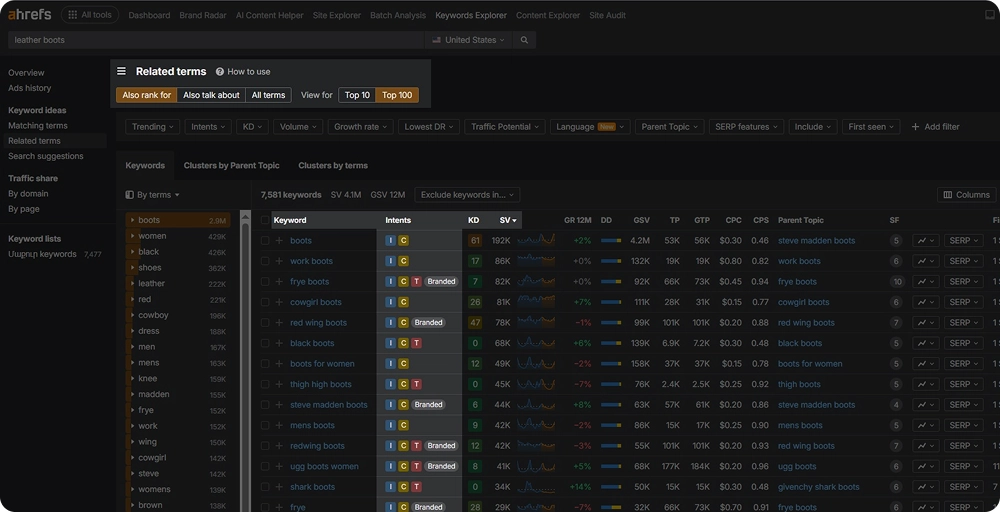
Go to the Ahrefs Keyword Explorer tool․
Type in some main product keywords related to your industry.
Now you can review the list of ranking keywords along with the metrics Ahrefs provides.
Tip:
The keywords in the “Terms match” and “Also rank for” sections are useful for building keyword categories and subcategories.
The keywords in the “Questions” section are great for planning blog posts or other informational content.
You can access all the essential keyword data needed to craft a successful SEO strategy, including keyword difficulty, search volume, and search intent.
For easier analysis, you may also download the results into a spreadsheet.
Step 2: Search Intent Identification
Search intent shows the reason why people search for a specific term, keyword or question. It answers the question of “What do people want” when they type in their search queries.
There are 4 common grouped intents:
Informational: Users are looking for information, answers, or insights about a topic. Examples include blog posts, how-to guides, and tutorials.
Navigational: Users want to land on a specific website or page. Examples include searches like “Facebook login” or “Nike official site.”
Commercial: Users are researching products or services with the intention of buying in the near future. Examples include “best smartphones 2026” or “top SEO tools.”
Transactional: Users are ready to take action, such as making a purchase, signing up, or downloading. Examples include “buy iPhone 15 online” or “subscribe to Netflix.”
Therefore, gaining insights into your keyword search intent will help you better categorize your keywords and also design your content.
And as already mentioned before, SEO tools like Ahrefs can help you with the identification of search intents by applying the right intent letter to each of the ranking keywords (indicated by the letters “I”, “C”, “T”, or “N” next to each keyword).
Step 3: Categorize and Group Your Keywords
Now that you have your keywords and search intents clear, your next step is to categorize them.
In SEO keyword mapping, categorizing your keywords according to topic, search intent, and relevance is a critical step because it determines how each keyword fits into your website’s structure and content strategy. It also helps search engines understand which pages of your website should rank for specific keywords.
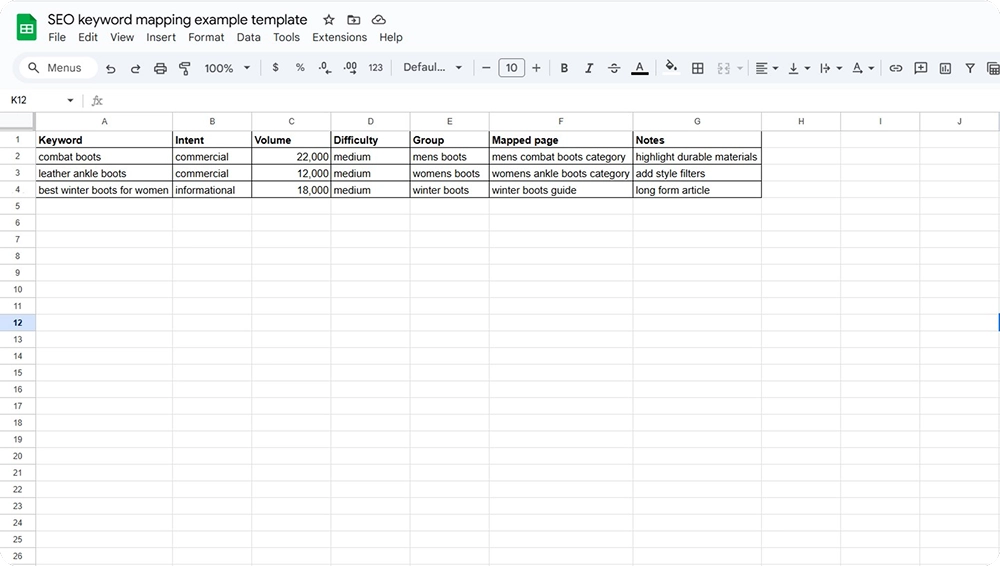
To make this process more organized, consider compiling everything in Google Sheets or Excel. Or you can use specialised SEO tools to help you with grouping and storing your keyword categories.
Here is an example of a layout you can create on these spreadsheets:
Step 4: Assign URLs To Your Pages
Assigning URLs in SEO keyword mapping involves deciding which page on your site will target each keyword group. This turns your research into a clear site structure.
If we again take the example of an online store that sells boots, here are the steps for assigning URLs:
First, organize your keywords into meaningful topics like men’s boots, women’s boots, leather boots, or winter boots.
Then match each topic to the most relevant page. This page could be an existing category, a product page, or a new page you plan to create. Each page should focus on one main keyword group. Avoid assigning multiple groups to the same URL.
Once you determine the right placement, add the chosen URL to your mapping sheet. This gives you a clear blueprint of what every page should target.
Step 5: Regularly Update Your Keyword Map
Keywords, their metrics and SEO realities in general tend to change. Therefore, it is especially important to update your mapped keywords.
Take some time to:
review the updated keyword metrics,
identify and categorize new ones
filter out those that lost their relevance or rankings.
Regular updates ensure your content strategy stays aligned with search behavior and keeps your website competitive.
Conclusion
As you can see, if you want search engines to clearly understand your website’s structure and content, and build a strong content strategy, SEO keyword mapping is essential.
While it can be time-consuming and requires some deep research, the results are well worth the effort.
Follow our guide, learn to use the right tools, and you’ll soon start seeing the results you want.
Search engine optimization (SEO) is crucial for any business operating online, and SaaS (Software as a Service) companies are no exception. While content and link building are important aspects of SEO, technical SEO plays a vital role in ensuring your SaaS website is visible, crawlable, and properly indexed by search engines.
SaaS technical SEO refers to the process of optimizing the technical elements of your website to improve its visibility and ranking in search engine results pages (SERPs). This includes factors such as site structure, crawlability, indexation, page speed, and mobile-friendliness.
The importance of technical SEO for SaaS companies
With the increasing competition in the SaaS market and the ever-evolving search engine algorithms, technical SEO has become an indispensable component of a robust digital marketing strategy. By optimizing the technical aspects of your website, you can not only enhance your search engine visibility but also provide a seamless user experience, which ultimately translates into higher engagement, conversions, and revenue.
Let’s see the importance of technical SEO in your SaaS business:
Highly Competitive SaaS Market
The SaaS industry is saturated with numerous players offering similar products and services, making it challenging to stand out in the crowded online space.
Technical SEO can be your secret weapon, giving you a competitive edge by ensuring that your website is optimized for search engines. By addressing technical issues and adhering to best practices, you can improve your search engine rankings, making it easier for potential customers to discover your SaaS offering amidst the competition.
Improves Site Traffic
Search engines rely heavily on technical factors to crawl, index, and rank websites. By addressing technical issues that may hinder search engine crawlers, such as poor site structure, crawl errors, or indexation problems, you can significantly improve your website’s visibility in search engine results pages (SERPs). This increased visibility translates into higher organic traffic, which can be a valuable source of leads and potential customers for your SaaS business.
Improves User Experience
Technical SEO is not just about optimizing for search engines; it also plays a crucial role in enhancing the user experience on your website.
Many technical SEO elements, such as page speed, mobile-friendliness, and Core Web Vitals, directly impact how users interact with your website. By optimizing these factors, you can ensure a seamless and enjoyable experience for your visitors, leading to higher engagement, longer session times, and ultimately, higher conversion rates.
Long-Term SEO Benefits
Technical SEO is the foundation upon which sustainable, long-term SEO success is built. By addressing technical issues early on and establishing a solid technical SEO framework, you can create a strong foundation for your future content and link building efforts.
A well-optimized website not only improves your current search engine rankings but also sets the stage for more effective content marketing and link acquisition strategies, ensuring long-lasting benefits for your SaaS business.
Key SaaS Technical SEO Elements
To ensure your SaaS website is optimized for search engines, you need to focus on the following technical SEO elements:
Subdomain vs. Subfolder
Hosting your SaaS application on a subdomain (e.g., app.yourcompany.com) or a subfolder (e.g., yourcompany.com/app) is a strategic decision that can impact various aspects of your website’s performance. Subdomains are generally preferred for SaaS applications as they provide better isolation, flexibility, and potential SEO benefits.
By isolating your SaaS application on a subdomain, you can ensure that any issues or updates within the application do not affect the main website’s performance and stability. Additionally, subdomains allow for greater scalability, as you can independently scale your SaaS application without impacting the main website’s resources.
From an SEO perspective, search engines treat subdomains as separate entities, which can be beneficial for SaaS applications that require their own unique SEO strategies and optimizations.
Meta Elements
Optimizing your website’s meta elements, such as meta titles, meta descriptions, header tags, and other on-page elements, is crucial for accurately representing your content and increasing visibility in search results.
Well-crafted meta titles and descriptions can improve click-through rates and entice users to visit your website, while properly structured header tags can enhance the readability and organization of your content. For SaaS companies, it’s essential to include relevant keywords related to your product or service, as well as your brand name, to increase visibility and brand recognition.
Crawlability
Search engine crawlers need to be able to easily access and crawl your website’s pages to index and rank your content effectively.
To ensure optimal crawlability, you should implement a well-structured sitemap, optimize your robots.txt file, and address any crawl issues that may arise. A sitemap provides a roadmap for search engine crawlers, guiding them to your website’s important pages, while a properly configured robots.txt file can prevent crawlers from accessing unnecessary pages or resources, improving the crawling process’s efficiency.
Indexation
After search engine crawlers have accessed your website’s pages, they need to index them to include them in search results.
Proper use of canonical tags can prevent duplicate content issues, which can negatively impact your search engine rankings. Additionally, utilizing robots meta tags and implementing schema markup can improve indexation by providing search engines with additional context and information about your website’s content.
Canonical Tags
Implementing canonical tags is crucial for preventing duplicate content issues, which can dilute your search engine rankings and visibility. Canonical tags inform search engines which version of a page is the canonical (preferred) version, ensuring that search engine ranking signals are consolidated to the correct page.
Site Structure and Sitemaps
Organizing your website’s structure in a logical, user-friendly manner is essential for both users and search engines.
A well-structured website with clear navigation and hierarchy can improve the overall user experience and make it easier for search engines to crawl and understand your content.
Additionally, submitting an XML sitemap to search engines can facilitate the crawling and indexation process by providing a comprehensive list of your website’s pages and their relationships.
Core Web Vitals
Google’s Core Web Vitals are a set of metrics that measure a website’s performance in terms of loading speed, interactivity, and visual stability. Optimizing your website’s performance to meet the Core Web Vitals benchmarks can directly impact your search engine rankings, as Google prioritizes websites that provide a smooth and responsive user experience.
Schema Markup
Implementing structured data markup, such as JSON-LD, can provide search engines with additional context and information about your website’s content. For SaaS companies, schema markup can be used to display rich snippets in search results, such as software application details, pricing information, and user reviews. This can improve click-through rates, visibility, and overall search engine performance by providing users with more comprehensive and relevant information about your SaaS offering.
By focusing on these key technical SEO elements, SaaS companies can ensure that their websites are optimized for search engines, improve their visibility and rankings in search results, and provide a seamless and engaging user experience for potential customers.
Auditing Your SaaS Technical SEO
Before embarking on the journey of optimizing your SaaS website’s technical SEO, it’s imperative to conduct a comprehensive audit to identify any existing issues or areas that require improvement. This proactive approach ensures that you have a solid understanding of your website’s current technical health, enabling you to prioritize and address the most critical concerns effectively. Here are some key elements to scrutinize during your SaaS technical SEO audit:
Duplicate Content
Duplicate content can be a significant hindrance to your website’s search engine performance, leading to potential penalties and diluted rankings. During the audit process, it’s essential to identify instances of duplicate content, which may arise from various sources, such as similar product descriptions, republished blog posts, or even inadvertent URL canonicalization issues. Addressing these duplications promptly can help ensure that search engines accurately attribute the appropriate value to your unique content.
Page Loading Time
Page loading times can significantly impact user experience and, consequently, search engine rankings. Slow-loading pages not only frustrate users but also increase bounce rates, negatively affecting your website’s overall performance. During the audit, analyze your website’s page loading times across various devices and network conditions to pinpoint any bottlenecks or performance issues that need to be addressed.
Incorrect Meta Elements Tags
Meta elements, such as titles, descriptions, and header tags, play a crucial role in how search engines understand and display your website’s content in search results. An audit should check for missing, inaccurate, or duplicate meta elements, as these issues can negatively impact click-through rates and user engagement. Ensuring that these elements accurately represent your content and include relevant keywords is essential for improving visibility and attracting potential customers.
Mobile-Friendliness
With an ever-increasing number of users accessing the internet on mobile devices, it’s imperative to ensure that your SaaS website is mobile-friendly. During the audit, evaluate your website’s mobile experience, including responsiveness, navigation, and functionality across various devices and screen sizes. Google prioritizes mobile-friendly websites in its rankings, making this aspect a critical consideration for technical SEO success.
Response Codes
Broken links or pages returning incorrect status codes, such as 404 errors, can negatively impact the user experience and hinder search engine crawlability. The audit should identify any instances of incorrect response codes, ensuring that users and search engines can easily navigate and access your website’s content without encountering unnecessary roadblocks.
Missing Canonical Tags
Canonical tags are essential for preventing duplicate content issues, as they inform search engines which version of a page should be treated as the canonical (preferred) version. During the audit, identify pages without canonical tags, as this can lead to search engines diluting ranking signals across multiple versions of the same content, resulting in diminished visibility and rankings.
No Indexation
Ensuring that your website’s pages are properly indexed by search engines is crucial for their visibility and discoverability. The audit should check if any pages are being excluded from indexation due to improper use of robots meta tags or other technical factors. Addressing these issues can help unlock your website’s full potential in search engine results.
By conducting a comprehensive SaaS technical SEO audit, you gain valuable insights into the current state of your website’s technical health. Armed with this knowledge, you can prioritize and address the most pressing issues, laying a solid foundation for further technical SEO optimizations and ensuring that your SaaS website is primed for success in the competitive online landscape.
Best Tools for SaaS Technical SEO
To streamline your technical SEO efforts, consider using the following tools:
Screaming Frog
A popular website crawler that can analyze your website’s structure, identify technical issues, and generate sitemaps and reports.
SiteBulb
A comprehensive technical SEO auditing tool that can analyze your website’s performance, crawlability, indexation, and more.
Google’s free tool that provides valuable insights into your website’s search performance, indexation status, and any crawl errors or issues.
Google Tag Manager
A tag management system that allows you to easily implement and manage various tracking codes and scripts on your website, including structured data markup.
Google PageSpeed Insights
A tool that analyzes your website’s performance and provides recommendations for improving page loading times and Core Web Vitals.
OnCrawl
A technical SEO platform that can crawl and audit your website, identifying issues related to indexation, duplicate content, and more.
Key Takeaways and Next Steps
Technical SEO is a critical component of a successful SaaS SEO strategy. By optimizing technical elements such as site structure, crawlability, indexation, page speed, and mobile-friendliness, you can improve your website’s visibility, user experience, and search engine rankings.
To get started, conduct a comprehensive technical SEO audit to identify any issues or areas for improvement. Prioritize addressing critical issues, such as duplicate content, slow loading times, and indexation problems.
Implement the necessary technical optimizations, and consider using tools like Screaming Frog, SiteBulb, and Google Search Console to streamline your efforts.
Remember, technical SEO is an ongoing process, and it’s essential to regularly monitor and maintain your website’s technical health. Incorporate technical SEO into your product roadmap and development cycles to ensure long-term optimization and success.
By following this ultimate SaaS technical SEO guide, you’ll be well on your way to improving your website’s search engine visibility, driving more organic traffic, and staying ahead of the competition in the highly competitive SaaS market.
Search engine optimization (SEO) is critical for small businesses to get their websites found online and drive growth. However, with limited resources and expertise, they face challenges in implementing effective SEO strategies. The right tools can make this process more manageable. This article provides a guide to the best SEO software and platforms for small business needs and budgets.
The goal is to highlight the top tools across key categories—from keyword research to backlink building—to help small businesses improve their SEO and increase web traffic. Whether you are an entrepreneur handling SEO yourself or a marketing consultant managing SEO for clients, these tools will set you up for success.
Key Considerations for Choosing SEO Tools
Choosing SEO software solutions is an important decision for long term success. Carefully evaluate budget, skill level and business requirements with the above guidelines before committing. This ensures your selected SaaS platform emp
Budget: SEO tools have huge pricing variability, ranging from completely free to premium solutions costing over $500 per month. Google offers free SEO utilities like Search Console and Keyword Planner. Many paid tools have discounted rates for startups and small businesses, while enterprise SEO platforms with advanced capabilities are more expensive.
Carefully assess your budget and how much you can invest in software on a monthly or annual basis. Free SEO tools might seem attractive, but often lack important automation, insights and competitor analysis available in paid tools. Startups should consider discounted rates from vendors like SEMrush, Ahrefs, or Moz based on company size. More established small businesses may find premium tools worthwhile if they drive sufficient ROI.
Skill Level: The experience level of people managing your SEO also determines what solution fits best. Beginner-friendly SEO software features intuitive user interfaces, detailed training resources, educational blogs/videos, and easy workflow automation. This enables new teams to get oriented quickly.
In comparison, power users often prefer functionality-rich SEO platforms like SEMrush, Moz Pro or Ahrefs that unlock more advanced analytics, annotations, API access, data exports and customization. Evaluate your team’s overall competency with SEO tools and the complexity they can handle before deciding.
Business Needs: Every small business has unique needs when it comes to search optimization. Start by auditing your existing SEO process to identity exactly where there are gaps a tool could address—comprehensive keyword research insights? Technical site audit? Content performance analysis? Local SEO management? This self-assessment reveals functional areas that need the most focus.
Then, analyze various SEO software options to see which ones provide the best features mapping to your requirements. Whether you need help with keyword volumes, technical optimizations, content building, backlink analysis or local listings, match business needs to tool specialities before selecting the best fit.
Partnering with an experienced SEO agency can further streamline your decision-making process. Whether you’re investing in tools yourself or partnering with SEO Services San Francisco, carefully evaluate your budget, skill level, and business requirements with the above guidelines before committing. This ensures your selected SaaS platform empowers your search optimization initiatives instead of restricting them.
Best SEO Tools for Small Businesses
After considering key selection criteria like budget, skill level, and business needs, the leading SEO software options across different categories are:
Google’s free keyword planning tool provides search volume data, suggested keywords related to entered seed keywords, and low competition keywords for targeting. This enables basic-level keyword research without any cost. However, it has limitations in tracking historical volumes, accurately determining difficulty, and doing competitor analysis compared to paid tools.
Ahrefs Keyword Explorer ($99+/mo)
Ahrefs is likely the most powerful keyword research tool available with robust data insights, tracking, and analysis capabilities. It reveals actual search volumes tracked across Google and Bing over time. Users can dig deeper into keyword difficulty scores, CPC rates, and search trends. Competitor tracking allows benchmarking your rankings vs others. Content gap analysis identifies missing targets.
Ubersuggest (Free plan available)
Ubersuggest by Neil Patel makes keyword research easy for beginners with its user-friendly and visual interface. It generates abundant keyword suggestions based on seed keywords, site content, Google autocomplete, and questions. The tool also shows expected traffic volumes and difficulty score for each suggestion. While less robust than Ahrefs, it produces lots of ideas while still being easy to navigate.
Technical SEO Tools
Google Search Console (Free)
Google Search Console connects directly with Google to monitor critical site health issues – crawl errors, sitemap problems, indexing status, etc. The tool issues warnings for problems like faulty redirects, errors preventing Googlebot from accessing pages, or issues with structured data. It is vital for staying on top of technical SEO.
Screaming Frog SEO Spider (Free for 500 URLs)
This desktop crawler generates detailed SEO audit reports by crawling a site to reveal all technical issues. It tracks landing page response codes, duplicate content, broken links, page speed metrics, HTML tags usage, etc. The visual interface allows drilling into metrics before/after changes to gauge SEO impact.
SEMrush Site Audit ($99+/mo)
SEMrush offers over 600 comprehensive technical SEO checks as part of its speedy site audits. It digs into optimizations needed across site performance, structured data, on-page content, HTML tags, security issues, accessibility problems and more. The reports summarize action levels by severity as well as recommendations for fixes. Long term tracking shows improvements over time.
Content Optimization Tools
Surfer SEO ($49+/mo)
Surfer SEO specialized in optimizing on-page content for higher rankings. It analyzes existing pages and posts to identify issues through a customizable content grading algorithm. Specific opportunities to improve titles, meta descriptions, headings, images etc are highlighted. One of its best features is discovering content gaps – valuable keywords that lack page targeting.
Frase ($47+/mo)
Frase is an AI-powered content writer focusing on topic clusters and questions to drive search and conversion. Its machine learning algorithms generate endless content ideas optimized for SEO, then guides writing complete pieces with keywords properly integrated. Publishers can set up entire workflows for ideation, writing, and distributing content across websites, social media etc.
Yoast SEO (Free and premium plans)
Yoast SEO is the most popular WordPress plugin available for optimizing content. The analysis tool checks reading level, word counts, titles, meta descriptions, headings and images against best practices. Fragmentation and transition words are also assessed. With millions of sites using Yoast, it is the community standard for creating SEO-friendly blog posts and webpages.
Backlink Building Tools
Moz Link Explorer ($99+/mo)
Moz Link Explorer lets you analyze the backlink profile of any domain to assess successes and find weak spots. Link opportunity discoveries reveal websites to consider reaching out to. Useful metrics like Domain Authority and Spam Score are calculated. Historical tracking shows link growth over the years. An outreach workflow helps manage link-building campaigns and email templates.
SEMrush Backlink Audit
SEMrush performs backlink audits scanning all incoming links to evaluate risks. Toxic, manipulative or questionable links from low-quality sites are flagged. Comparisons with competitors’ backlink profiles provide ideas for earning similar high-authority links. Monitoring link growth over time is also included.
HARO (Free)
While not a software, HARO facilitates earned media and backlinks at scale. It is essentially a matching platform between journalists seeking expert sources and brands wanting media coverage. By responding to relevant queries with helpful commentary, brands earn backlinks when their quotes are published. Relevance is key to getting picked frequently.
GMB Briefcase is a local SEO platform designed to streamline the management of Google Business Profiles (GBP) for agencies and multi-location businesses. It offers features such as GBP optimization, content scheduling, review management, and performance tracking within a centralized interface. By enhancing local search visibility and ensuring consistent brand presence across various locations, GMB Briefcase simplifies the complexities of managing multiple GBPs.
Arobis AI Visibility Checker
Arobis AI Visibility Checker helps businesses understand how visible their brand is across AI-powered search and answer engines such as ChatGPT, Gemini, Claude, Perplexity, and Google AI Overviews. Instead of focusing solely on traditional keyword rankings, it tracks whether a brand is being mentioned, cited, and recommended in AI-generated responses. The platform helps marketers identify visibility gaps, monitor AI search presence, and measure performance beyond conventional SERPs. For local businesses, agencies, and SaaS companies, it provides valuable insights into AI-driven discovery and supports Generative Engine Optimization (GEO) and Answer Engine Optimization (AEO) efforts alongside traditional SEO strategies.
Google My Business (Free)
Google My Business listings power the information displayed on Google Search and Maps for local businesses. Business owners can claim and manage vital listing details – address, hours, photos, services, attributes etc. It also tracks interactions and site visits enabled by the listing. Given its direct connection with Google, optimizing and monitoring this should be the first priority.
BrightLocal ($49+/mo)
BrightLocal audits the consistency of NAP (name, address and phone numbers) information across 50+ listing sites like Yelp, YellowPages, Foursquare and listings directories. It identifies duplicate unclaimed listings to take over. Local ranking reports benchmark progress monthly. The tool also manages review generation and response workflows critical for reputation.
Whitespark ($97+/mo)
Whitespark provides guidance to improve local SEO based on underlying searcher intent and interests. By unlocking localized keyword demand and buyer keywords, sites can target content around community needs. Detailed technical audits ensure on-page elements like city names, area served, and address information aid local ranking. Needed citations are also identified to establish NAP consistency.
Together Google My Business, BrightLocal and Whitespark provide complementary local SEO capabilities spanning optimized listings management, reputation monitoring, customer review handling, local keyword insights, on-page optimizations, and citations corrections.
Conclusion
Implementing SEO effectively does not have to be complicated for resource-constrained small businesses, especially with expert-recommended software guiding the process. This guide outlined the best tools across the key phases of SEO:
Keyword research to identify low competition long-tail targets based on actual search volumes.
Technical site audits to diagnose and eliminate errors impeding visibility.
Content optimization scoring and assistance to improve existing assets.
Backlink analysis and outreach tools to build brand signals in similar sites.
Local SEO management to rank better for geographic customer searches.
These solutions are designed to handle the heavy lifting across both foundational and advanced areas of search optimization. Most offer tailored pricing for small business teams to access capabilities delivering significant ROI if properly leveraged.
The key is commitment to continuous small scale experimentation and improvement over time. As your experience with these tools grows, aim to make incremental SEO gains monthly.
Stay motivated by tracking website traffic, search visibility, leads and sales metrics lifted by search growth.
Keyword research is one of the most crucial tasks facing any marketing team aiming to improve their local search visibility.
Finding the right keywords to target can lead to substantial gains in organic rankings, website traffic, and ultimately more sales and conversions for local businesses.
However, researching and identifying the best performing keywords and phrases is also one of the most challenging aspects of local SEO. The “right” keywords are precise to every unique business location and geo-targeted market.
Additionally, tracking keyword performance and adjusting to search behavior changes over time is hugely impactful but time-intensive without the proper tools.
Thankfully, there are now more options than ever when it comes to specialized local keyword research tools offering robust data and analytics.
In this comprehensive guide, we will cover:
Why proper keyword targeting and management is crucial for dominating local SEO
The key factors that come into play when researching localized keywords
An overview of 15 “best-in-class” keyword research platforms available right now
Detailed side-by-side comparisons and use case scenarios for selecting the right keyword research tool(s)
Step-by-step walkthroughs for utilizing advanced keyword data to optimize your local landing pages
Pro tips for seamlessly tracking keyword performance improvements over time
By the end, you will have an actionable blueprint for leveraging the best keyword research tools to do better your 2024 local search marketing efforts.
Now, Let’s dive into this.
Why Keyword Research is Crucial for Local SEO
Conducting in-depth keyword research is an instrumental first step to creating any effective local search engine optimization and content marketing strategy.
While it may seem tedious, investing the time into keyword research and analysis helps set your entire local SEO campaign up for success by:
Allowing You to Optimize Pages for Searcher Intent
People enter different queries into Google and other search engines based on their particular needs and the information they are looking for. Search intent plays a significant role in determining the relevance of search results.
Understanding user search intent through keyword research lets you optimize on-page content around fulfilling specific informational goals or commercial needs. Effective keyword research is a foundational step in any successful local lead generation strategy, ensuring that your content aligns with what potential customers are actively searching for.
For example, a search query like [buffalo chicken wings NEAR ME] indicates a user looking for quick restaurant options to visit. A page optimized around that exact keyword with relevant information signals relevancy to Google’s algorithms.Another great example would be “Link Building Canada”
Providing Insights into Search Volume and Keyword Difficulty
Quality keyword research tools provide data estimating monthly search volumes for a given term or phrase. This allows you to gauge potential traffic opportunities.
Most tools also assign a “keyword difficulty” score dictated by factors like existing domain authority rankings and page competition. This helps determine whether a high volume keyword will be reasonably achievable to rank for.
Without search volume and difficulty context, you end up targeting keywords that drive little traffic or have almost no chance of ranking. This is where a text generator can be both helpful and risky. While it can quickly produce keyword-rich content, relying solely on generated text without strategic research may result in generic articles that don’t align with actual user intent or SEO potential.
Allowing You to Reverse Engineer Competitor Efforts
One of the most effective local keyword research strategies is identifying what terms and phrases your top competing locations actively target and rank for.
By researching their current page strategies, you can get a sense of proven, high-potential keywords in your industry while also assessing opportunity gaps.
Make a list of emerging “head term” keywords your competition ranks for. Then expand your own optimization efforts around relevant long-tail permutations and questions for that same topic.
Building an Effective Content Strategy
Yet another benefit of advanced keyword research for local SEO is allowing you to architect a smarter, more effective location-based content strategy.
Look for rising questions and conversations happening around your products, services, and industry in your target regions. Keyword research sheds light on what information potential customers are hungry for.
You can then inject these high-potential topics into localized blog content, videos, and social media campaigns.
Tracking Keyword Performance Over Time
Keyword research tools also make it possible to monitor changes in the search ranking landscape related to your core terms.
Many allow you to follow metrics like month-over-month volume and density changes, shifts in ranking domains, and improvement in your own rankings.
This makes dynamically optimizing existing pages and reacting to new opportunities much simpler. You can track what landed-page content and keywords are gaining or losing steam.
As you can see, advanced keyword research fundamentally enables local businesses to architect smarter SEO and content game plans while reacting faster to what is resonating in their unique market.
Main Factors to Consider with Local Keywords
While keyword research fundamentals remain essential, there are unique considerations when choosing what terms and phrases to target for local SEO.
Here are some of the main factors to consider:
Geographic Targeting
Naturally, all of your seed keywords need to contain the geographic location or region you want to rank in. This includes surrounding cities, neighborhoods, county names, etc.
For example, a restaurant would optimize around queries like:
[thai food san jose]
[catering companies near mountain view]
[top santa clara lunch spots]
[link building Uk]
[link building chile]
[link building Colombia]
[link building mexico]
Get as hyperlocal as possible. Go beyond just city names by also incorporating airport services codes, landmarks, nearby highways, and popular regional nicknames.
Mobile vs. Desktop Performance
Industry experts recommend keeping the <15% click-through rate (CTR) benchmark difference between mobile and desktop queries.
If a seed keyword has a 50% CTR on mobile but only 20% on desktop, optimization efforts around that term may translate poorly across devices.
Advanced keyword tools allow you to filter suggestions by mobile friendliness potential.
Long Tail & Question-Based Searches
Consumers increasingly use longer, full sentence search queries when researching local businesses. Questions beginning with “where can I find” are also common.
For example:
[where can i find good ramen in downtown austin]
[what oil change shops are open now near me]
Optimizing for these long-tail questions better targets user intent while being less competitive key phrases to rank for.
Individual Platform Search Behavior
User search behavior can vary drastically depending on the platform. The same keyword produces different autocomplete suggestions and search volumes on Google vs. YouTube or Amazon.
Research keyword permutations specific to high-potential sites beyond just Google to maximize visibility.
Now that we have covered the unique requirements of local keyword research, let’s overview some of the top tools available for unlocking local SEO success in 2024.
Overview of the Top 15 Local Keyword Research Tools
There are now dozens of keyword research tools available catering to localized search analysis. Here is a brief overview of 15 leading options:
1. Ahrefs Keyword Explorer
The Ahrefs Keyword Explorer has one of the largest search query databases, comprising more than 171 billion indexed keywords across 171 countries and 10 platforms.
It provides key keyword metrics including volume, competition level, and optimization difficulty to help you gauge potential. You’ll also see related long-tail keyword ideas and the typical user journeys surrounding your seed keyword.
With Serbia-based Ahrefs vast crawling capabilities, you can assess keyword performance through a global or location-targeted lens. (E.g.: See search interest for “concerts” in Austin vs. Portland).
2. SEMRush
SEMRush has become a premium SEO staple thanks to its unparalleled keyword tracking. You can analyze how any term has trended over the past 12 years along 100+ data points.
Filtering keyword ideas and metrics by city and state is granular. For instance, easily comparing performance for “steakhouse” across DFW cities. Or for business-intent terms like “Dallas commercial roofing services.”
SEMRush’s cloud also automatically groups related keywords together – revealing clusters around shared topics. This helps for outlining top-level optimization opportunities.
3. Moz Keyword Explorer
Moz fields its own keyword research solution finely tuned for SEO needs. The Mozscape index comprises over 6 billion fresh keywords enriched by their web crawler and triangulation technology.
Useful perks include visualizing historical search volume trends over time. If you want to see if interest in “San Antonio Spurs tickets” might be rising or declining YoY as a leading indicator, Moz can chart it.
You can also filter by keyword length, location relevancy, and commercial intent. The tool will highlight which keywords may have geographic optimization needs for targeting certain Texas cities.
Unique views like Share of Voice analyze the breadth of keywords your pages rank for versus competitors. Helping you spot gaps.
4. Ubersuggest
First launched by Neil Patel back in 2014, Ubersuggest taps multiple datasets to fuel its simple yet expensive keyword idea generator.
The tool does a capable job suggesting lengthier long-tail variations, questions, and permutations fitting around a core topic. Helping unlock hidden local SEO gems other tools would miss.
It has options for targeting a specific country to refine ideas by language and regional search interests. For most though, Ubersuggest is best used for brainstorming and creative jumping off points.
5. Soovle
Soovle takes the unique approach of aggregating auto-complete results across over 500 million keyword permutations found on 7 major search platforms.
Rather than relying on estimated volumes, Soovle reveals what actual users are searching for by tapping straight into Google suggest results. You also get keyword trends for YouTube, Amazon, Bing, eBay and more in a single report.
This multi-platform perspective helps uncover optimization opportunities sitting across different properties like video, eCommerce or images. Country targeting also helps localize permutations matching regional dialects and conversations.
6. AnswerThePublic
One of the most visually engaging tools on this list, London-based Answer the Public presents keyword data through intuitive maps and charts breaking down questions, prepositions, comparisons and other deep searches people are using around topics.
Seeing full keyword phrases already formatted as questions naturally sparks ideas for all types of localized content marketing from blogs to videos to landing pages. (e.g “Where to buy used pianos in Cincinnati??”)
The tool pulls data from Google autocomplete and serves it in a way far more interesting than spreadsheets. You can shape ideas for location-based articles, Facebook groups and more based on uncovering the full stories people want to hear.
7. Keywords Everywhere
Keywords Everywhere functions as a browser extension rather than a standalone platform. But has transformed keyword research through seamless integration.
It essentially surfaces the data engines like Google already show behind the scenes in autocomplete directly within your searches. Saving tons of manual digging across platforms.
See estimated monthly volumes, cost-per-click data, and keyword difficulty scores displayed right on Google, YouTube, Amazon and other SERPs. Easily revealing gaps competitors may be missing.
Filtering by city and state is supported along with exporting keyword lists discovered to CSVs for safekeeping. This free browser tool is a must-try complement to round out your stack.
8. KeywordTool.io
While the paid Keywordtool.io plans unlock the most robust features, the freemium offering provides immense value on its own – albeit with usage caps.
Benefit from 4 keyword data sources spanning search, YouTube, Google Trends and App Store suggestions. Location filters help narrow regional volume and demand.
Useful optimization ideas reveal questions being asked around topics plus expanded long-tail permutations you wouldn’t have considered. “Near me” keyword identification also aids local targeting.
9. Google Keyword Planner
Naturally, Google’s own paid-traffic keyword tool (formerly Keyword Planner) deserves a spot on this list thanks to tapping direct search query data.
Requirements for accessing KWP include having an existing Google Ads account, still, integration with their paid tools allows seeing granular, accurate monthly impressions and other volumes around lucrative terms. Helping better estimate SEO content ROI.
Since Google owns geo-based search, their geographic filters for cities and regions should be considered highly reliable sources on localized opportunity including bid estimates.
10. Keyword Sheetter
Keyword Sheeter has grown into an advanced generator – while retaining its simplistic UX.
The tool asks for a simple head keyword or phrase related to your business before working its algorithm magic to populate expansive, personalized lists of ideas.
Filter results by word count, expected volume ranges, location relevance utilizing built-in geography databases and more. Useful for discovering localized long tails competitors likely never targeted.
Export options let you easily save keyword reports segmented by category and priorities in Excel or other formats.
11. Google Search Console
Google Search Console (GSC) offers free insight into how your existing pages are already performing for certain keywords.
Connect your sites to index important impressions, click and position data based on organic searches. Revealing high-potential queries to double down on while showing ones with plummeting traffic.
The location report adds a geographic layer detailing your website’s visibility across cities, states and regions. Helpful for gauging if your localization efforts are paying dividends by growth in certain markets.
12. Google Trends
Google Trends focuses specifically on rising or declining search popularity over time rather than volumes. But geographical segmentation remains a useful feature.
Analyze whether people in target Texas cities have growing or waning interest in topics like “austin bachelorette parties” based on year-over-year curves. Allowing better allocation of optimization and content efforts.
Comparing Trends search popularity metrics on competing terms also aids decisions between targeting “dentist”, “dental clinic” or “emergency dentistry”.
13. Keyword Keg
This aptly-named idea generator serves keyword research neophytes and experts alike. The Google Autocomplete-powered engine suggests thousands of semantic connections and questions around seed keywords searched.
But Keyword Keg’s more advanced Location Comparison reports unveil interesting geographic performance divides around the same term. Like which city between LA, Chicago, and NYC searches for a specific query the most.
This reveals optimization voids competitors potentially haven’t capitalized on based on disparities in regional demand.
Full keyword lists can be exported directly into SEO campaign spreadsheets or content calendars from within the platform.
14. KWFinder
Boasting the largest keyword database among tools analyzed here, KWFinder’s 1 trillion index aids uncovering emerging queries before they gain steam.
The Keyword Difficulty metric benchmarks the competitiveness and existing authority around ranking for any given term – helping set realistic expectations.
While geographic targeting options mostly cover individual countries currently, an interesting Location Popularity feature compares regional interest levels between your seed keyword and related suggestions. Flagging terms showing more relative demand in your target city.
15. AlsoAsked
Google’s “People Also Ask” boxes are bursting with lucrative keyword opportunities around any topic. AlsoAsked lays out these buyer question keywords for you in an easy-to-navigate branching diagram.
Just search any primary term like “content creation,” and AlsoAsked maps out the hidden web of related questions, such as:
What does content creation mean?
How do I get started with content creation?
What are the main elements of content creation?
What does a content creator do?
Click any branch to view a whole new question keyword diagram from that starting point.
This not only shows you topics to potentially cover, but illuminates the relationships between questions people are asking. So you can structure your content to answer searchers’ questions in the order they likely think of them.
Cover all the bases, from beginner to advanced. Export the data as a CSV or visually in an image for analysis and presentations.
And that covers 15 of the most utilized keyword research tools for unlocking local search ranking opportunities!
Side-by-Side Comparison of the Top 5 Tools
While the comprehensive list of 15 tools provides a menu of options covering different local keyword research needs, we will directly compare the core capabilities of 5 leading platforms:
Ahrefs
SEMRush
Moz
Ubersuggest
Answer the Public
Here is an overview of key criteria to consider when evaluating keyword tools for local SEO:
Tool
Keyword Database Size
Location Targeting Specificity
Historical Trends
Keyword Groupings
Long-Tail Discovery
Competitor Analysis
Ahrefs
171 billion
City & state
✅
By journeys
Strong
Organic share-of-voice
SEMRush
71 billion
Hyperlocal
12 year
By topic clusters
Decent
Ranking domains
Moz
6 billion
ZIP code & metro
5+ year
Some clustering
Good
URL intersection
Ubersuggest
3.5 billion
Country-level
Limited
Minimal
Excellent
Domain comparison
ATP
500 million*
Country mostly
None
Visual maps
Great for questions
None
Search Volume Reliability
Moz, Ahrefs, and SEMrush invest heavily in building their own keyword indices through proprietary web crawling and analytics. This leads to very accurate search volume estimates for gauging traffic potential.
Meanwhile, Ubersuggest and Answer the Public source indirectly from Google suggest results instead. This provides tons of fresh long-tail ideas but less precise availability estimates.
Location Targeting Specificity
SEMRush edges out the pack when it comes to geographical segmentation granularity thanks to integrating advanced geo-intent signals into its rankings data.
Phrases can be analyzed at a neighborhood level in many cases to unlock hyperlocal results. Moz also impresses by targeting down to metro and ZIP codes using longitude and latitude.
Analysis of Keyword Trends Over Time
Moz and SEMrush house the largest historical databases for assessing keyword trends – each with over 10+ years of snapshots allowing users to pinpoint new declines or surges. This aids content planning decisions.
Ubersuggest and Ahrefs still offer ample trend data, while Answer the Public’s real strength lies in rediscovering the newest questions people are asking right now.
And the comparison illuminates unique local SEO advantages around each tool.
Next we will walk through exactly how to utilize one platform’s capabilities to unearth profitable, low competition keywords in your area.
We Choose SEMrush for showing how to use tools for keyword research
Step-by-Step Guide to Using tools for Local Keyword Research
We chose SEMrush for showing how to use tools for keyword research.This can be different from any other tools but structure will be the same.
Out of the enterprise-level keyword research platforms compared, SEMrush strikes an ideal balance of location targeting specificity, robust historical data, and useful topic groupings.
Now let’s walk through a start-to-finish workflow for unlocking fresh local SEO opportunities using SEMrush’s tool set:
Step 1: Enter Your Seed Keywords and Location
First, enter 1-2 core “head term” keywords that are relevant to your local business in the search bar. These should be simple overarching phrases or topics.
Next, utilize SEMrush’s location setting options just underneath to target metrics by city, region, or state as needed. For a Link Building Agency this might be Houston, TX.
This surfaces keyword ideas, questions, long tails and other permutations specifically being searched in your geo-area.
Step 2. Analyze Keyword Grouping Clusters
As you can see, my seed keywords quickly spawned hundreds of additional ideas. But scrolling through an endless list isn’t efficient.
Instead, navigate to the handy grouping cluster map which automatically categorizes suggested keywords around common topics and subtopics. Making it far easier to spot the biggest opportunities hiding in the noise.
You can see group sizes indicate where more expansive or popular conversations are happening around categories like menus, reservations, reviews and descriptions.
Step 3. Prioritize Topics & Questions
Now that you have a better sense of topical concentrations, start opening relevant keyword groups to identify priority long-tail phrases and questions.
Sort remaining keywords by highest monthly search volume and lowest keyword difficulty to quickly spotlight phrases with traffic potential:
Also look for rising year-over-year trends indicating growing interest.
Step 4. Export & Track Performance
Build out a master list of 10-20 top keywords for each core topic cluster that align with your business. Export selections into a spreadsheet tracker:
Now optimize location landing pages for each target keyword phrase and monitor rank improvements each month using SEMrush’sPosition Tracking tool.
Rinse and repeat keyword research for improved results every quarter!
Optimizing Landing Pages for Local Keywords
Armed with fresh, high-potential keywords and topics fueling searches in your geographic area, optimizing pages to drive more visibility is the next step.
Follow this checklist to transform keyword research into tangible local SEO results:
Conduct Topic-Based Pillar Page Planning
Many keywords you uncovered likely concentrate around a handful of overarching topics and questions. These present opportunities for pillar pages.
For a restaurant example, much interest consolidates around your menu, reservations process, locations overview, and descriptions/reviews. Consider making each their own optimized pillar page targeting these clusters.
This provides a focused, authoritative resource to rank for all the long-tail variations.
Craft Locally-Optimized Title Tags
Your title tag is the first on-page element seen by search engines and users. Ensure it includes:
Primary keyword – This likely includes your brand name and services. [Amazing Buffalo Wings Austin]
Location – The city, region or state name. [Amazing Buffalo Wings Austin Texas]
Summary snippets under titles should also reference geo details like:
City name
Popular suburbs
Distance descriptor
Visit the best buffalo wings restaurant in Austin Texas near Round Rock and Cedar Park…
Localize On-Page Content
Work elements like neighborhood names, iconic city attractions, sports teams, airport codes and more into content wherever possible. This helps search engines strongly associate pages with those locations.
Also include locator schema markup so search engines list rich contact info.
Analyze What Competitors Target
Remember those useful optimization gaps found when researching competitor efforts earlier?
Now build pages around the popular topics they lack locally-optimized landing pages for already. Be the resource for that emerging topic cluster.
Continuously Track Performance
Finally, keywords will fluctuate in volume and difficulty over time. Set calendar reminders to rerun reports and monitor how your pages climb in rankings for key terms using tracking tools.
Dynamically improving existing content while creating new pages around rising searches ensures sustained local SEO success.
With a process now in place, let’s discuss how best to analyze the tangible results of all these keyword targeting efforts.
Conclusion and Key Takeaways
Keyword research is the foundation of digital visibility for local businesses. Finding the right terms that your customers are searching fuels the entire localized SEO and content engine.
As this guide underscored, modern tools now provide marketer immense power for discovering untapped keywords offering outsized traffic potential.
The benefits of tapping the robust datasets these platforms provide spans beyond rankings alone in value. Optimizing for searcher intent drives relevance. Filling competitor holes seizes white space. Structuring topics smartly through pillars scales production.
And tracking volumes, position shifts and conversions over time leads to assets continually becoming more effective – compounding gains each year while staying steps ahead of disruption.
Hopefully this guide provided a helpful blueprint both for selecting the best tools and optimizing their data for your unique market
In today’s competitive digital landscape, staying on top of your search engine rankings is crucial for success. SEO continues to be a key driver of website traffic and business growth, and rank tracking tools have become an essential part of any effective SEO strategy.
These tools help you monitor the performance of your keywords, understand market trends, and make informed decisions to stay ahead of the competition.
Rank tracking tools are designed to provide insights into how well your website is performing in search engine results pages (SERPs). By understanding the rise and fall of keyword rankings, businesses can identify opportunities for improvement and ensure they maintain a competitive edge.
In this post, we’ll explore the top 10 rank tracking tools of 2025, examining their features, pros, cons, and the types of users they are best suited for.
Whether you’re a small business owner, an SEO agency, or an advanced SEO professional, this guide will help you choose the best tool to fit your needs.
So, Let’s get started.
What Are Rank Tracking Tools and Why Are They Important?
Rank tracking tools are software solutions designed to monitor the position of your website’s keywords in search engine results pages (SERPs).
They allow you to track changes in your rankings over time, analyze the performance of your SEO campaigns, and adjust your strategies accordingly.
These tools provide valuable insights that help businesses identify which keywords are driving traffic and which ones need more optimization.
The importance of rank-tracking tools lies in their ability to keep you informed about your website’s visibility. Without monitoring keyword rankings, it’s difficult to know if your SEO efforts are paying off or if adjustments are needed.
Rank tracking tools help you stay on top of your competitors, adapt to algorithm changes, and make data-driven decisions to improve your website’s search performance.
Benefits of Rank Tracking Tools:
Monitor Keyword Performance: Track how your keywords are performing in the SERPs and identify opportunities for improvement.
Competitor Analysis: Gain insights into your competitors’ rankings and identify areas where you can outrank them.
Identify Trends: Spot trends in keyword performance to adapt your SEO strategy accordingly.
Make Informed Decisions: Use data to make informed decisions about content creation, link building, and other SEO strategies.
Improve ROI: By understanding which keywords are driving traffic and conversions, you can focus your efforts on high-impact areas, ultimately improving your ROI.
Rank tracking tools are an essential part of any SEO toolkit, whether you’re a small business owner looking to improve your local search visibility or an SEO professional managing multiple campaigns.
Criteria for Evaluating Rank Tracking Tools
To determine the top 10 rank tracking tools of 2024, we used a set of specific evaluation criteria. These criteria ensure that we cover a range of tools suitable for different user needs and preferences.
Below are the key factors we considered when evaluating each tool:
Accuracy of Keyword Ranking Data: The accuracy of the data provided by a rank tracking tool is crucial. We evaluated how well each tool tracks rankings in comparison to real SERP results to ensure that the information is reliable and actionable.
Ease of Use and User Interface: A user-friendly interface makes a big difference, especially for beginners. We considered how intuitive the tool is and whether it offers a smooth user experience.
Feature Set: We assessed the features offered by each tool, such as competitor analysis, keyword tracking across different search engines, historical data, and advanced reporting. A comprehensive set of features helps users get the most value out of their rank tracking efforts.
Pricing and Affordability: Rank tracking tools come in a wide range of price points. We looked at whether the tool provides good value for the cost and whether there are different pricing plans suitable for various budgets.
Customer Support and Value-Added Features: Customer support is important, particularly for users who may need assistance while using the tool. We also considered value-added features like integrations with other SEO tools, custom reporting, and additional resources.
By using these evaluation criteria, we aimed to provide a well-rounded review of each rank tracking tool, ensuring that our list includes the best options for various types of users.
The Top 10 Rank Tracking Tools of 2024
1. SEMrush
Overview: SEMrush is a well-known SEO suite that offers a powerful rank tracking feature alongside a wide range of other SEO tools. It is widely recognized for its ability to provide in-depth keyword analysis, competitor research, and SEO insights.
Key Features: SEMrush provides accurate keyword tracking, competitor analysis, extensive reporting options, and integration with other SEMrush features like site audits, backlink analysis, and content optimization tools.
How It Works: SEMrush allows users to enter specific keywords and track their rankings on search engines like Google. The tool provides real-time updates on keyword performance and offers detailed reports that help users analyze fluctuations and identify potential opportunities. SEMrush’s integration with other SEO tools, like backlink analysis, means you can also see how link building impacts rankings.
Pros: SEMrush delivers accurate and timely data, making it a popular choice for SEO professionals. Its robust feature set is excellent for competitive research, content marketing, and comprehensive SEO strategy planning.
Cons: SEMrush can be quite expensive, particularly for beginners or small businesses. The learning curve can also be steep due to the number of features available.
Ideal Users: Best suited for marketing agencies, advanced SEO professionals, and businesses looking for an all-in-one SEO solution.
2. Ahrefs
Overview: Ahrefs is another comprehensive SEO tool that provides a strong rank tracking feature along with extensive backlink data. Ahrefs is well known for its detailed backlink analysis, which makes it a favorite for link-building efforts.
Key Features: Ahrefs offers keyword rank tracking, backlink tracking, competitor analysis, and a content explorer to find trending content ideas. The rank tracker provides detailed reports on keyword performance across different search engines.
How It Works: Ahrefs allows users to input keywords they want to monitor, and it tracks those keywords’ positions across multiple search engines. The tool also provides insights into how competitors rank for the same keywords, which can help you refine your content strategy. Ahrefs’ backlink analysis helps users understand how external links are affecting their rankings.
Pros: Ahrefs provides comprehensive data with an easy-to-use interface. Its backlink analysis is top-notch, making it a go-to tool for link builders. The detailed keyword metrics are perfect for understanding how your content is performing.
Cons: Ahrefs is on the expensive side, especially for smaller businesses or freelancers. Some features may not be necessary for all users, which can make the cost harder to justify.
Ideal Users: Ideal for SEOs looking for an all-in-one tool with a particular focus on backlink data and competitive analysis.
3. Serpstat
Overview: Serpstat is an affordable rank tracking option that provides a good range of SEO features, making it a great choice for those on a budget. It combines rank tracking with site audits, keyword research, and competitor analysis, offering excellent value for its price.
Key Features: Rank tracking, site audits, keyword research, and competitor analysis are the main features. Serpstat provides a keyword trend analysis to help users understand how keywords are performing over time.
How It Works: Serpstat’s rank tracking feature allows users to track their keyword performance across multiple search engines. The tool provides historical data, which helps users analyze trends in keyword rankings and adjust their SEO strategies accordingly. Additionally, the competitor analysis feature enables users to compare their keyword performance against competitors.
Pros: Serpstat is easy to use, affordable, and offers good all-around features. It is great for small businesses or startups that need access to a variety of SEO tools without breaking the bank.
Cons: It lacks some advanced features that more comprehensive tools offer, which may limit its effectiveness for larger enterprises or advanced SEO professionals.
Ideal Users: Suitable for small businesses, startups, and individuals who need an affordable SEO solution.
4. AccuRanker
Overview: AccuRanker is a specialized rank tracking tool known for its speed and accuracy. It focuses exclusively on rank tracking, making it one of the best tools in terms of delivering fast, accurate keyword ranking updates.
Key Features: AccuRanker offers fast rank updates, detailed reporting, keyword analysis, and integration with Google Analytics and Data Studio. It also has an intuitive shareable dashboard for clients.
How It Works: AccuRanker allows users to enter keywords they want to monitor, and the tool provides instant updates on their rankings. Users can also see historical data to understand trends. The tool’s integration with Google Analytics helps users correlate ranking changes with traffic and conversions, providing a more complete picture of SEO performance.
Pros: AccuRanker is extremely fast and accurate, providing instant updates whenever you need them. It has a straightforward, easy-to-use interface that is perfect for both beginners and seasoned professionals.
Cons: AccuRanker is limited in that it doesn’t offer other SEO features like site audits or backlink analysis. It focuses solely on rank tracking.
Ideal Users: Perfect for SEO professionals, agencies, or freelancers who need dedicated rank tracking without extra features.
5. Moz Pro
Overview: Moz Pro offers a user-friendly rank tracking tool as part of its broader SEO suite. Moz is a well-established name in the SEO industry, and Moz Pro offers tools for keyword tracking, on-page optimization, and site auditing.
Key Features: Moz Pro includes keyword tracking, page optimization suggestions, site audits, and keyword difficulty analysis. Its keyword explorer feature provides insights into keyword opportunities.
How It Works: Moz Pro allows users to track keyword rankings over time and provides insights into how their content is performing. The tool also offers on-page optimization suggestions, which help users improve their content based on the keywords they are targeting. Moz’s keyword difficulty score helps users identify the best opportunities for ranking.
Pros: Moz Pro is easy to use and provides valuable insights into keyword performance. It is particularly strong in providing on-page optimization suggestions and keyword difficulty metrics.
Cons: The data updates can be slower compared to other competitors, and the interface, while user-friendly, may feel a bit outdated to some users.
Ideal Users: Good for beginners, marketing teams, and those new to rank tracking who need a user-friendly tool.
6. Rank Ranger
Overview: Rank Ranger is a customizable rank tracking tool that offers in-depth analytics and reporting options. It allows for the creation of custom dashboards and reports, making it ideal for agencies that need to present data to clients.
Key Features: Rank Ranger provides customizable reporting, integrations with Google Analytics, white-label reporting, and support for multiple search engines and SERP features.
How It Works: Rank Ranger allows users to track their keyword rankings and create highly customized reports to meet their specific needs. The tool integrates with Google Analytics, giving users deeper insights into how ranking changes impact website traffic. Users can also monitor various SERP features, such as featured snippets and local pack rankings.
Pros: Rank Ranger is highly customizable, making it great for agencies that need detailed reports. The analytics are in-depth, allowing users to get a complete picture of their SEO efforts.
Cons: The interface can feel outdated, and the learning curve is steeper compared to other tools on the market.
Ideal Users: Best suited for agencies needing custom reporting solutions and detailed analytics.
7. SERPWatcher by Mangools
Overview: SERPWatcher is part of the Mangools suite and is known for its beginner-friendly approach. It focuses on providing key metrics in an easy-to-understand way, making it ideal for those just starting out in SEO.
Key Features: Keyword tracking, performance index, integration with other Mangools tools like KWFinder and LinkMiner, and a user-friendly dashboard.
How It Works: SERPWatcher allows users to enter keywords and track their performance over time. The performance index feature gives a summary of how well a website is doing, based on keyword rankings. The tool integrates with other Mangools tools, enabling users to conduct keyword research and analyze backlinks as part of their overall SEO strategy.
Pros: SERPWatcher is affordable and beginner-friendly. The performance index metric is a unique feature that gives users a quick overview of how well their keywords are doing.
Cons: It is limited in-depth features for advanced users, making it less suitable for experienced SEO professionals.
Ideal Users: Perfect for beginners, small business owners, and those using the broader Mangools suite of tools.
8. Nightwatch
Overview: Nightwatch is an advanced rank tracking tool that is particularly known for its local rank tracking capabilities. It is highly visual and allows users to track keyword performance in specific regions and cities.
Key Features: Visual data reports, local rank tracking, segmentation options, and integration with Google Analytics and Google Data Studio.
How It Works: Nightwatch allows users to track keyword rankings based on location, making it ideal for businesses with a local focus. Users can set up keyword tracking for different cities or regions and see how they rank locally. Nightwatch’s visual reports help users easily understand trends and make data-driven decisions.
Pros: Nightwatch offers great local rank tracking, advanced segmentation, and visually appealing reports that are easy to understand. It is particularly useful for businesses that focus on local SEO.
Cons: It lacks additional SEO tools, such as backlink tracking or site audits, making it a specialized solution.
Ideal Users: Local businesses, marketing agencies, and professionals focused on location-based SEO.
9. Wincher
Overview: Wincher is a simple yet effective rank-tracking tool that offers great value for money. It is designed to provide essential rank tracking without the extra bells and whistles.
Key Features: Simple rank tracking, daily updates, keyword grouping, and easy reporting options. Wincher allows users to track keyword progress over time with a focus on simplicity.
How It Works: Wincher allows users to track their keyword rankings daily and group keywords into different projects for easier management. The tool’s focus on simplicity makes it easy to get started with rank tracking, while the reporting options allow users to generate straightforward performance reports.
Pros: Wincher is budget-friendly and easy to use, making it a great choice for users who need basic rank tracking. The interface is intuitive, and it provides straightforward reporting.
Cons: It lacks many of the features found in more comprehensive tools, such as in-depth competitor analysis or advanced reporting.
Ideal Users: Individuals, small businesses, and users looking for a no-frills, budget-friendly rank tracking solution.
10. ProRankTracker
Overview: ProRankTracker is a highly specialized tool that offers detailed rank-tracking capabilities across multiple search engines and languages. It is known for its accuracy and customization options, making it a great choice for users who need in-depth ranking insights.
Key Features: Daily keyword ranking updates, customizable reporting options, support for multiple languages, a mobile app for on-the-go tracking, and the ability to track rankings across Google, Bing, Yahoo, and other search engines.
How It Works: Users can enter keywords to monitor their rankings across different search engines. ProRankTracker provides daily updates and detailed, customizable reports, which can be tailored to suit individual needs or shared with clients. The mobile app ensures users can keep track of their rankings anytime, anywhere.
Pros: ProRankTracker excels in providing accurate ranking data with customizable reports, making it easy for users to track progress. It is also budget-friendly, which makes it accessible to small businesses and freelancers.
Cons: The user interface could be more modern and intuitive, which might be a drawback for some users, especially beginners who prefer a more streamlined experience.
Ideal Users: Freelancers, small agencies, and users who need a reliable, multilingual rank tracking solution with the ability to generate detailed custom reports.
Comparison Table of the Top 10 Rank Tracking Tools
How to Choose the Right Rank Tracking Tool for Your Needs
Choosing the right rank-tracking tool depends on several factors, such as your budget, the features you need, and your level of expertise. Here are some guidelines to help you make the best decision:
Determine Your Budget: Some tools, like SEMrush and Ahrefs, are high-end and offer comprehensive features, but they come at a higher cost. If you’re on a budget, consider tools like Serpstat or Wincher.
Consider the Features You Need: If you need an all-in-one SEO solution that includes backlink analysis, competitor research, and more, SEMrush or Ahrefs may be ideal. On the other hand, if you only need a dedicated rank-tracking tool, AccuRanker or ProRankTracker might be more suitable.
User-Friendliness: Beginners should look for tools that are easy to navigate, such as Moz Pro or SERPWatcher. More advanced users might prefer the depth of customization offered by Rank Ranger or the advanced features of Ahrefs.
Local vs. National Tracking: If your business is focused on local SEO, Nightwatch is a great option due to its advanced local tracking capabilities. For broader tracking, consider SEMrush or Ahrefs.
Customer Support and Resources: If you value strong customer support and educational resources, tools like Moz Pro and SEMrush have extensive documentation and support teams to help you get started.
By evaluating these factors, you can choose a rank-tracking tool that aligns with your goals, budget, and level of expertise. In the next section, we will discuss emerging trends in rank-tracking tools and how these trends can benefit your SEO strategy in 2024.
Trends in Rank Tracking Tools for 2024
As SEO evolves, so do the tools we use to stay on top of search engine rankings. Here are some of the key trends in rank tracking tools for 2024:
AI Integration: Many rank tracking tools are starting to incorporate AI to provide more accurate insights and predictive analytics. AI can help you understand not just how your keywords are currently performing, but also forecast future trends based on current data.
Improved Local SEO Tracking: Local SEO continues to be a critical aspect of many businesses’ strategies. Tools like Nightwatch and SEMrush are enhancing their local tracking features to help businesses understand how they rank in specific regions and how they can optimize for local searches.
Mobile-First Tracking: With more searches being conducted on mobile devices, rank tracking tools are focusing on providing mobile-specific ranking data. This allows users to optimize their content for mobile users and improve their visibility on mobile SERPs.
Automated Reporting: More tools are offering automated reporting features, allowing users to schedule reports to be sent to their teams or clients. This helps save time and ensures that everyone is up-to-date on the latest ranking changes.
These trends are shaping the future of rank-tracking tools, making them more powerful, accurate, and user-friendly. Staying informed about these trends can help you choose the right tool and stay ahead of your competition.
Conclusion
Rank-tracking tools are an essential part of any SEO strategy, providing insights into your website’s visibility and helping you make data-driven decisions. Whether you’re a small business owner, an SEO agency, or an advanced SEO professional, there is a rank-tracking tool that fits your needs. From comprehensive all-in-one solutions like SEMrush and Ahrefs to budget-friendly options like Wincher, this guide has covered the top 10 rank-tracking tools of 2024.
Evaluate your needs, consider your budget, and choose the tool that will help you achieve your SEO goals. Staying on top of your keyword rankings is crucial for success in the ever-competitive digital landscape, and with the right tool by your side, you can ensure that your SEO efforts are driving real results.