Looking for the best SEO expert in Bangladesh? Or Want to hire a local SEO expert in Bangladesh for your local business? We have made a list of the 10 best SEO experts in Bangladesh
These experts are either providing SEO services or are actively running training programs with consultancy services. By going through this list, you will have a clear idea of who is leading the SEO industry in Bangladesh and where you can find the best service to scale your online business.
Once you go through this list, we recommend you check out their public profiles to find more information about service charges or work availability.
Quick Overview of Top 15 SEO Experts in Bangladesh
Sheikh Shadi Shuvo
Abul Kashem
NS Shamim
Abdul Aouwal
Khondokar Asiful Islam
Jinnat Ul Hasan
Faisal Mustafa
Taposh Ghosh
MD Faruk Khan
Mohammad Sujan Sarkar
Masum Billah Bhuiyan
Md Abdulla Jubair
Nahid Hasan
Hridoy Chowdhury
Khalid Farhan
How to choose the best SEO expert in Bangladesh
To keep things simple for you, we have used some common factors to choose the best SEO expert in Bangladesh:
Number of Years in Business- We considered the time they have spent in the industry helping their clients achieve SEO goals.
Relevance in Various Industries- The right SEO expert is flexible with most industries. Thus, we also considered their experience in various industries.
Popularity- We also considered the popularity of the SEO experts in Bangladesh to give you an idea of whether they are known names or not.
Number of Clients- The client portfolio of an SEO is quite crucial when it comes to their credibility. That is why we factored in the number the clients managed by each professional.
ROI- You will also find the average return on investment (ROI) maintained by each SEO expert in Bangladesh to understand their overall performance.
Best SEO Experts in Bangladesh – The Top 10 Experts
Sheikh Shadi Shuvo is the most popular SEO expert in Bangladesh. He has been in the business for more than 15 years and is providing his services to hundreds of businesses in Bangladesh and other countries and featured on Hubspot, Opencart, Businessinsider, etc. He accepts SEO projects that start from 5000$. He started his first SEO agency in 2012 and provided his services to hundreds of clients.
Content + Link building + Technical SEO the fundamental of his philosophy made him one of the best SEO experts and consultants in Bangladesh. Sheikh Shadi Shuvo is the founder of Desire Marketing and offers all his services through his 2 SEO Agencies. His client lists are top-notch brands such as Hostinger, Slazzer, Elementor, Vpnoverview, Nordvpn, Testsigma, etc.
If you are looking for a reliable SEO expert to help your business make an online presence, Sheikh Shadi Shuvo is the right person for the job.
Abul Kashem -SEO Expert In Bangladesh
Abul Kashem is a digital entrepreneur who is much more than just an SEO expert and has made a famous name for himself in this industry. He founded Hyaroo and UpRankly in 2007 (15 years ago). It is safe to say that Abul Kashem is one of the most experienced (if not the leading) SEO experts in Bangladesh who is widely followed by thousands of people for his amazing work.
His focus is on helping Software as a service (SaaS) companies through advanced methods and SEO techniques. With UpRankly, he started link-building services for online businesses and companies that want to establish credibility online.
NS Shamim- SEO Expert In Bangladesh
NS Shamim often comes up in Google search results when you search for the best SEO expert in Bangladesh and there’s a reason for it. He is an experienced SEO expert and trainer with enough experience and results to back him for this title.
He has already worked as an SEO trainer passionately. He believes in guiding his clients in the right direction and providing them with the required services once they know what they want.
Abdul Aouwal
Abdul Aouwal is an accomplished SEO expert and web designer with over seven years of experience. He has a solid foundation in e-commerce, having spent six years at Teezily, a well-known print-on-demand marketplace. During his time there, he initially worked as a brand ambassador for two years before being promoted to country manager, a role he held for four years.
Currently, Abdul runs his own company, ItShikkha, where he leads a team of 20 professionals working on various web design and SEO projects. With a passion for helping businesses succeed online, Abdul has a proven track record of delivering impactful results for his clients and is always looking for new ways to use his expertise to contribute to the digital world.
Khondokar Asiful Islam
Khondokar Asiful Islam is one of the most talented SEO experts in Bangladesh. He is a very active member of the Bangladesh SEO community.
As a B2B SaaS marketer, Khondokar worked with many SaaS companies and incredibly improved their organic search traffic. He is always committed to his client’s success.
He discovers new ideas and strategies and implements them to make his client’s business more profitable.
If you are an SEO guy you can follow Khondokar Asiful Islam on social media to get SEO tips daily.
Jinnat Ul Hasan
Jinnat Ul Hasan is a highly experienced Technical SEO Manager with over 12 years of expertise in driving organic growth for prominent B2B and B2C brands such as Nikon, GSK, Unilever, and Philip Morris International (PMI). With a strong programming background, Jinnat excels at simplifying complex technical SEO concepts, making them accessible to clients and teams alike.
Currently, Jinnat manages SEO operations at Philip Morris International, overseeing more than 100 websites across various global markets. His expertise covers the full technical SEO spectrum, including strategic site migrations, auditing and resolving complex issues, performance optimization, and implementing scalable SEO processes. His passion for crafting data-driven strategies ensures he delivers measurable results, making him a trusted partner in navigating the dynamic world of search engine optimization.
Faisal Mustafa-SEO Expert
Faisal Mustafa is the founder of ViserX. This SEO expert is well-known in Bangladesh for offering SEO services to small and large businesses. He holds over 10 years of experience in digital marketing. He aims to help businesses explore digital opportunities in their industry.
The reason we added Faisal Mustafa to this list is his management of one of the most popular SEO agencies in Bangladesh. You can learn more about his SEO techniques on his blog. He is known for updating his blog with new tips and tricks online.
Taposh Ghosh
Here’s an interesting profile on our list. Taposh Ghosh is one of the most popular keyword research experts who helps you find the best keywords to rank. Although he is a proper digital marketer, he likes to keep his expertise limited to keyword research. So, if you are looking for niche and competition research, Taposh is the best person for the job.
He is working with 11+ years of experience and is known as a highly sought-after freelancer on Upwork today. You can check out his profile to learn more about him.
MD Farukh Khan -SEO Expert In BD
MD Faruk Khan often comes up in Google search results when you search for the best SEO expert in Bangladesh and there’s a reason for it. He is an experienced SEO expert and trainer with enough experience and results to back him for this title. With over 150 clients, 6+ years of experience as a trainer, and years of experience as an SEO expert, MD Faruk Khan is one of the best in the market.
Faruk Khan has already trained over 5000 students through his SEO training courses. All these students were trained through 100+ batches in Bangladesh by partnering up with multiple platforms.
He has already worked as an SEO trainer passionately. He believes in guiding his clients in the right direction and providing them with the required services once they know what they want.
Mohammad Sujan Sarkar – BD SEO Expert
Mohammad Sujan Sarkar is a renowned SEO expert and co-founder of OneLittleWeb, a company that specializes in helping SaaS and enterprise businesses scale their organic traffic. With over 65 professionals on his team, Sujan has successfully built thousands of backlinks for over 100 clients, generating over a billion in traffic.
His expertise lies in creating world-class content and securing high-authority backlinks by leveraging relationships with journalists and editors. Sujan’s proven strategies, combined with his dedication to driving exceptional organic growth, have positioned him as a leader in the SEO industry in Bangladesh.
Masum Billah Bhuiyan- SEO Expert In BD
Masum Billah Bhuiyan is the founder of Giant Marketers. He is an SEO specialist with over 12 years of experience in the field. He is managing an agency with 50+ employees and serves over 300+ clients every month. The best thing about this SEO expert is he understands how Local SEO in Bangladesh works.
So, you can trust his services to start the digitalization of your business the right way. If you want to learn more about Masum Billah Bhuiyan, you can check out his LinkedIn profile and connect with him for a collaboration.
Md Abdulla Jubair
MD Abdullah Jubair is the owner of Abd Raaz Digital, a specialized agency focusing exclusively on Local SEO and Content Marketing. Rather than offering a broad range of services, Abdullah dedicates his expertise to mastering these areas, ensuring top-tier performance and results. Abd Raaz Digital serves as a behind-the-scenes partner for agencies, handling local SEO and link-building tasks so that clients can focus on delivering exceptional results.
By managing SEO and link-building processes through a white-label approach, Abd Raaz Digital allows agencies to scale confidently and enhance their client outcomes. Abdullah’s commitment to excellence in these specialized areas makes Abd Raaz Digital a valuable asset for agencies looking to optimize their local SEO efforts and content strategies.
Nahid Hasan – BD SEO Expert
Nahid Hasan is one of the most experienced active SEO experts in Bangladesh. He is the founder of Bizscope and is running one of the largest digital marketing agencies in Bangladesh.
He is considered one of the most knowledgeable SEO experts in Bangladesh and is backed by the results he delivers for his clients.
Nahid Hasan believes in white-hat SEO and encourages his clients to stay away from black-hat techniques to get gradual but sustainable growth over time.
If you are looking for an agency with enough experience in SEO white hat techniques, you can trust Nahid Hasan to provide you with the services.
Hridoy Chowdhury
Hridoy Chowdhury is a top-rated SEO expert and consultant based in Bangladesh, known for his passion for digital marketing and a successful track record of helping over 1,000 websites achieve top search engine rankings. With over 2,500 completed projects on Upwork and a remarkable 99% job success rate, Hridoy has established himself as a leader in the SEO space.
He specializes in providing comprehensive SEO services for platforms such as WordPress, Wix, and Shopify, with a focus on e-commerce SEO. In addition to his consulting work, Hridoy shares his knowledge as a mentor through his YouTube channel, “Learn From Top Rated Freelancer,” and offers direct SEO training sessions. His tailored approach to SEO ensures each client receives a strategy that aligns with their unique needs, driving meaningful growth and sustained success.
Khalid Farhan – SEO Expert in BD
Khalid Farhan, 30 years old, is another famous name in the Bangladesh digital marketing industry. He made a name for himself after completing a Bachelor of Business Administration (BBA) in Marketing from North South University. After a small pet accessories business and some freelancing work, he decided to become a professional SEO expert and started providing his services to various clients in Bangladesh and all over the world.
With over 10 years of experience as an SEO, Khalid Farhan is managing different clients using SEO techniques. He is among the best SEO experts in Bangladesh because of his unique approach to SEO which makes things more interesting for clients and beginners in this industry.
Conclusion
Anyone looking to start an online business in Bangladesh must find the right resources to make it a success. They can not ignore finding the best SEO experts in Bangladesh as internet marketing has become one of the most crucial parts of running an online business. With our list of top 10 SEO experts in Bangladesh, we tried to take you through the professional lives of these experts.
You can reach out to them to learn more about the SEO packages or to get the required training that allows you to run your business without outsourcing the SEO operations.
If you’re looking to evaluate the performance of your website or a competitor’s website on the SEO front, Domain Authority Checker Tools can be of great help. These tools provide an online metric that determines the strength of a domain and its potential to rank on search engine result pages.
In this article, we’ll introduce you to the 12 best Domain Authority Checker Tools that you can use to analyze your website’s online presence.
Understanding Domain Authority
What is Domain Authority
Domain Authority (DA) is a metric developed by Moz that predicts how well a website will rank on search engine result pages (SERPs). It is calculated on a logarithmic scale from 1 to 100, with higher scores indicating a greater likelihood of ranking. DA is calculated by evaluating multiple factors, including the number of high-quality backlinks, the relevance of the content, and the overall SEO strength of the website.
Why Is Using a Domain Authority Checker Important
Assessing Website Strength: A Domain Authority Checker helps in assessing the overall strength and credibility of your website in the eyes of search engines. This is crucial for understanding where your blog stands in comparison to competitors.
SEO Strategy Development: By knowing your blog’s domain authority, you can tailor your SEO strategies more effectively. If your domain authority is low, you might focus more on building quality backlinks and improving content quality.
Tracking Progress Over Time: Regularly checking your domain authority allows you to track the progress of your SEO efforts over time. This can be motivating and informative, showing you what strategies are working and what needs improvement.
Competitor Analysis: A Domain Authority Checker can also be used to gauge the authority of your competitors’ websites. This insight can help you understand what it might take to outrank them in search engine results pages (SERPs).
Link Building Insights: Understanding your domain authority can guide your link-building strategy. Websites with higher domain authority are generally more selective about their outbound links, so earning a link from them can be more beneficial.
Content Marketing Strategy: Knowing your domain authority can influence your content marketing strategy. High-quality, authoritative content can improve your domain authority, attracting more organic traffic and potentially leading to higher rankings.
Avoiding Negative SEO: A sudden drop in domain authority could indicate negative SEO practices or penalties from search engines. Regular checks can help you stay on top of such issues and address them promptly.
Predicting Website Traffic: While DA is not a direct indicator of traffic, a higher DA often correlates with better search engine rankings, which can lead to increased organic traffic.
Using a Domain Authority Checker is important for understanding the strength of your website, developing effective SEO strategies, tracking progress, analyzing competitors, guiding link-building efforts, shaping content strategy, and avoiding negative SEO impacts.
Top 11 Domain Authority Checker Tools
If you’re looking for the best Domain Authority (DA) checker tools to measure the ranking potential of a website, you’re in the right place. In this section, we’ll introduce you to the top 11 DA checker tools that can help you improve your website’s ranking.
Moz
Moz is the company responsible for coining the term “Domain Authority” initially. They created the DA score as a way of predicting a website’s ranking potential for the SERPs. Moz offers domain authority scores on a range from 1 to 100, with 100 as the top score. You can check your website’s DA score for free using Moz’s domain analysis tool.
Ahrefs
Ahrefs is a popular SEO tool that offers a website authority metric of its own called Domain Rating (DR). It runs on a scale from zero to a hundred. The higher a website’s DR, the stronger and more authoritative it is. Ahrefs offers a free website authority checker tool that shows your website’s authority as calculated by Ahrefs.
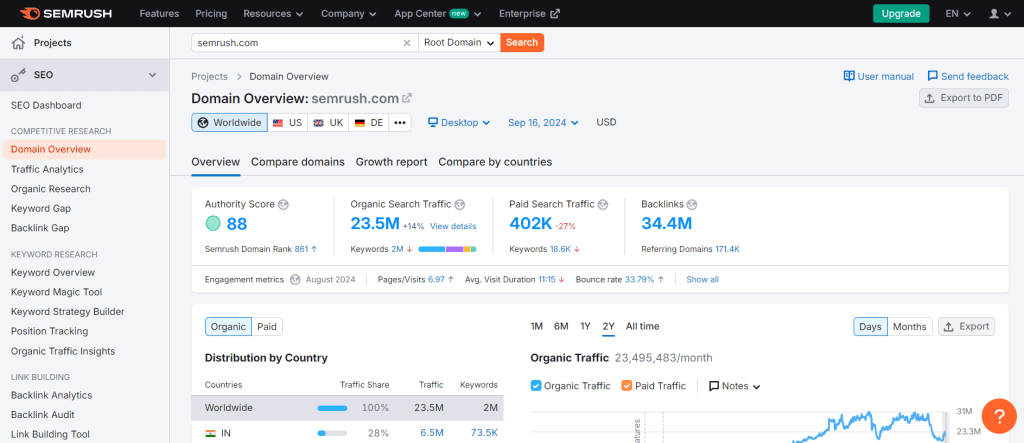
SEMrush is an all-in-one SEO tool that offers a variety of features, including a domain analysis tool that measures the authority of a website. SEMrush’s authority score is based on the number of backlinks pointing to the website and the quality of those links. SEMrush also offers a backlink checker tool that allows you to analyze your website’s backlink profile.
Majestic is a popular backlink analysis tool that offers a website authority metric called Trust Flow (TF) and Citation Flow (CF). Trust Flow measures the quality of backlinks pointing to a website, while Citation Flow measures the quantity of backlinks. Majestic also offers a free website checker tool that allows you to check your website’s TF and CF scores.
The Hoth
The Hoth is a popular SEO service provider that offers a variety of SEO tools, including a domain authority checker tool. The Hoth’s domain authority score is based on the number of backlinks pointing to the website and the quality of those links. The Hoth also offers a backlink checker tool that allows you to analyze your website’s backlink profile.
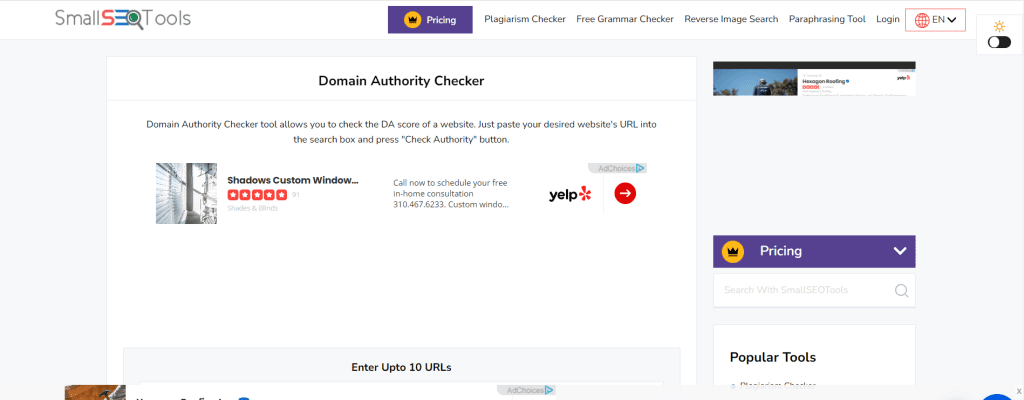
Small SEO Tools
Small SEO Tools is a free online SEO tool that offers a variety of features, including a domain authority checker tool. Small SEO Tools’ domain authority score is based on the number of backlinks pointing to the website and the quality of those links. Small SEO Tools also offers a backlink checker tool that allows you to analyze your website’s backlink profile.
SEO Review Tools
SEO Review Tools is a versatile platform that offers a comprehensive domain authority checker among its various SEO tools. It allows users to easily evaluate the authority of any website, providing insights into its backlink profile and overall SEO health. The intuitive interface caters to both novices and seasoned professionals, ensuring that users can quickly access valuable data to enhance their online presence.
AnchorText
AnchorText.ai is an SEO tool that complements domain authority checkers by optimizing your anchor text strategy. The platform analyzes your backlink profile and suggests natural anchor variations to prevent over-optimization. It also helps improve link relevance, study competitor anchor strategies, and distribute authority across your site effectively. When used alongside a domain authority checker, AnchorText.ai ensures your backlinks not only boost your DA score but also strengthen overall SEO performance.
Bulk Domain Authority Checker
Bulk Domain Authority Checker is a free online tool that allows you to check the authority of up to 500 domains at once. The tool uses Moz’s domain authority metric to calculate the authority score of each domain.
Chrome Extension
The Chrome Extension by Moz allows you to check the domain authority of any website while browsing the internet. The extension displays the DA score of a website in the Chrome browser’s toolbar.
Mangools is an all-in-one SEO tool that offers a variety of features, including a domain authority checker tool. Mangools’ authority score is based on the number of backlinks pointing to the website and the quality of those links. Mangools also offers a backlink checker tool that allows you to analyze your website’s backlink profile.
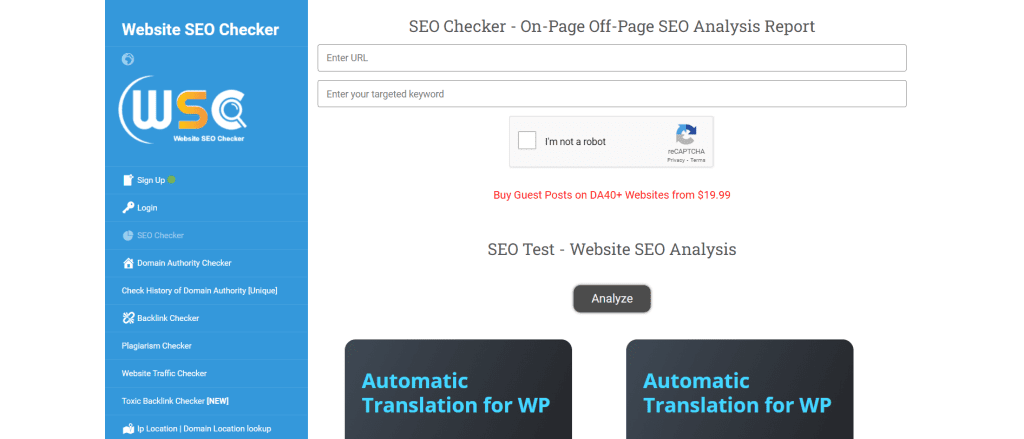
Website SEO Checker
Website SEO Checker is a free online SEO tool that offers a variety of features, including a domain authority checker tool. Website SEO Checker’s domain authority score is based on the number of backlinks pointing to the website and the quality of those links. Website SEO Checker also offers a backlink checker tool that allows you to analyze your website’s backlink profile.
That’s it! These are the top 11 domain authority checker tools that you can use to measure the ranking potential of your website.
Factors Affecting Domain Authority
Several key factors influence a website’s Domain Authority score:
Linking root domains: The number of unique domains linking to your website is one of the strongest indicators of DA. The more diverse, high-quality domains linking to your site, the better your score.
Quality of backlinks: The quality of the backlinks is also crucial. High-quality backlinks from authoritative websites have a greater impact on DA than low-quality backlinks from spammy websites.
Content relevance: The relevance of the content on a website is another important factor in determining DA. Websites that produce high-quality, relevant content on a consistent basis are more likely to have a high DA score.
Website structure: The structure of a website, including the URL structure, internal linking, and navigation, can also impact DA.
Domain Authority is a crucial metric for website owners and digital marketers who want to improve their website’s visibility and performance on search engine result pages. By understanding the factors that impact DA, website owners can take steps to improve their score and ultimately drive more traffic and conversions to their websites.
Prepostseo
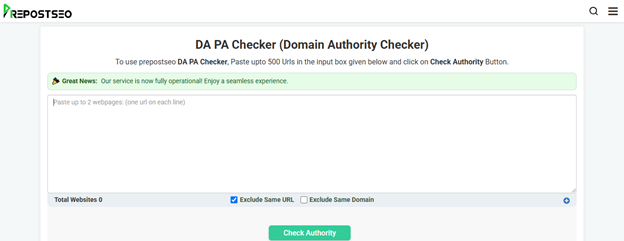
Prepostseo offers a dedicated tool for quickly evaluating the domain and page authority score of a website. Alongside DA PA scores, it also provides insights into spam scores, IP addresses, and no. of pages indexed in Google. Prepostseo DA checker can check bulk URLs (up to 500) in one go, making it a versatile option for professional SEO experts.
DA PA Checker
DA PA Checker is a freemium online tool that helps users quickly determine a website’s Domain Authority (DA) and Page Authority (PA) scores. With a direct affiliation with Moz’s system, this bulk DA PA checker accurately assesses the said metrics along with some additional ones like URL Rating (UR), Spam Score (SS), and Moz Rank (MR) in a single click.
Understanding Metrics in Domain Authority Checker Tools
When you’re looking to improve your website’s search engine optimization (SEO), one of the most important metrics to consider is your domain authority. Domain authority is a score developed by Moz that predicts how well a website will rank on search engine result pages (SERPs). It’s based on a number of factors, including the number and quality of inbound links, the age of the domain, and the overall trustworthiness of the website.
Domain authority is often abbreviated as “DA” and is typically measured on a scale of 1 to 100. The higher your DA score, the more likely it is that your website will rank well on SERPs. However, it’s important to note that domain authority is just one of many factors that search engines use to determine rankings.
In addition to domain authority, there are several other metrics that you may come across when using domain authority checker tools. Here’s a brief overview of some of the most common metrics:
Page Authority (PA): Similar to domain authority, page authority is a score developed by Moz that predicts how well a specific page will rank on SERPs.
Authority Score: Some domain authority checker tools use a more general “authority score” metric that takes into account a variety of factors, including domain authority, page authority, and other SEO metrics.
MozRank: MozRank is a metric developed by Moz that measures the popularity and quality of inbound links to a website or page.
Spam Score: Spam score is a metric developed by Moz that predicts the likelihood that a website or page is spammy or low-quality.
Citation Flow and Trust Flow: These are metrics developed by Majestic that measure the quality and quantity of inbound links to a website or page. Citation flow measures the quantity of links, while trust flow measures the quality of links.
DR Score: DR (Domain Rating) is a metric developed by Ahrefs that measures the strength of a website’s backlink profile.
By understanding these metrics and using domain authority checker tools to track them over time, you can gain valuable insights into your website’s SEO performance and make data-driven decisions to improve it
Conclusion
In this article, we have covered the 11 best domain authority checker tools that can help you improve your SEO efforts. These tools are essential for anyone who wants to improve their website’s ranking on search engines. By using these tools, you can analyze your website’s domain authority and identify areas for improvement.
Pinterest is a visual discovery and bookmarking platform that allows users to discover and save ideas for various topics. With over 400 million active users, Pinterest has become a valuable tool for businesses and individuals looking to drive traffic to their websites.
However, with so many users and pins on the platform, it can be challenging to get your content seen. This is where Pinterest SEO comes in.
Understanding Pinterest SEO
Pinterest is a visual search engine that allows users to discover and save ideas. It is also a powerful platform for businesses to increase their online visibility and reach. Pinterest SEO is the process of optimizing your content to rank higher in Pinterest search results.
Pinterest’s algorithm works differently from other search engines such as Google. It prioritizes fresh content and engagement, which means that pins with higher engagement rates and more recent pins are more likely to appear at the top of search results.
To improve your Pinterest SEO, it is important to understand how the algorithm works. Here are some key factors to keep in mind:
Keywords: Including relevant keywords in your profile, board titles, and pin descriptions can help your content appear in relevant search queries. Use keywords that accurately reflect your brand and the content you are sharing.
Engagement: Pins with higher engagement rates, such as saves, comments, and clicks, are more likely to appear at the top of search results. Encourage engagement by creating high-quality, visually appealing pins that resonate with your audience.
Freshness: Pinterest prioritizes fresh content, so it is important to regularly share new pins and update your boards.
Relevance: Pinterest’s algorithm considers the relevance of the content to the search query. Make sure your pins and boards are relevant to the keywords you are targeting.
Quality: Pinterest values high-quality content, so make sure your pins and boards are visually appealing and provide value to your audience.
10 Pinterest SEO Strategy To Follow In 2024
1. Setting Up Your Pinterest Profile
When it comes to optimizing your Pinterest profile for SEO, there are a few key elements that you need to focus on. In this section, we’ll cover two of the most important: choosing a username and optimizing your bio.
Choosing a Username
Your username is one of the first things people will see when they come across your Pinterest profile. It’s important to choose a username that accurately reflects your brand and is easy for people to remember.
When choosing your username, try to keep it short and sweet. Avoid using numbers or special characters, as they can make your username harder to remember. If possible, use your business name as your username to make it easier for people to find you.
Optimizing Your Bio
Your bio is another important element of your Pinterest profile. It’s a chance for you to tell people what your brand is all about and why they should follow you.
When writing your bio, be sure to include relevant keywords that describe your brand and the type of content you share. This will help your profile show up in relevant search results.
In addition to keywords, you should also include a brief description of what your brand is all about and what people can expect to find on your Pinterest boards. This will give people a better idea of whether or not your content is relevant to their interests.
Be sure to include a link to your website or blog in your bio. Additionally, make sure to include your logo in your profile picture, and if you don’t have one yet consider using a logo maker to easily create one. This will drive traffic to your site and help you build your online presence.
By following these tips, you can set up a Pinterest profile that is optimized for SEO and designed to attract new followers and customers.
2. Creating Quality Content
Creating quality content is the foundation of any successful Pinterest SEO strategy. By producing content that resonates with your target audience, you can drive engagement, increase your reach, and ultimately, boost your SEO ranking. Here are some tips for creating quality content on Pinterest.
Creating Pins
Pins are the visual representations of your content on Pinterest. To create effective pins, you need to focus on the following:
Visuals: Use high-quality visuals that are eye-catching and engaging. Make sure your images are clear, well-lit, and properly cropped. To enhance your images further, a background remover can be used to eliminate distracting elements and create a cleaner, more professional look.
Text: Include clear and concise text that accurately describes your content. Use keywords in your text to make it easier for users to find your pins.
Branding: Include your brand logo or name on your pins to increase brand recognition.
Using Rich Pins
Rich pins provide additional information about your content, making it easier for users to understand what your content is about. To use rich pins, you need to add metadata to your website. Here are some types of rich pins you can use:
Article pins: Provide a headline, author, and story description for your articles.
Product pins: Provide pricing, availability, and purchase information for your products.
Recipe pins: Provide ingredients, cooking times, and serving sizes for your recipes.
Video Pins
Video pins are a great way to showcase your content and engage with your audience. Here are some tips for creating effective video pins:
Length: Keep your videos short and to the point. Aim for 30 seconds or less.
Sound: Use music or voiceover to enhance your videos. Make sure your sound is clear and easy to understand.
Branding: Include your brand logo or name in your videos to increase brand recognition.
By creating quality content, you can increase engagement, drive traffic to your website, and improve your SEO ranking on Pinterest. Use these tips to create pins that stand out, use rich pins to provide additional information, and incorporate video pins to engage with your audience.
3. Keyword Research for Pinterest
Pinterest keyword research
Pinterest is a visual search engine that relies heavily on keywords to help users find what they are looking for. Therefore, keyword research is essential for optimizing your Pinterest account and increasing your visibility on the platform.
To start with, you should identify the keywords that are relevant to your brand and audience. You can use various tools, such as Google Keyword Planner, Ahrefs, or Pinterest’s own search bar, to find relevant keywords and search terms.
Once you have a list of potential keywords, you should evaluate their relevance and search volume. Look for keywords that are highly relevant to your brand and have a decent search volume. Avoid using keywords that are too broad or too specific, as they may not generate enough traffic or may be too competitive.
When conducting keyword research, it’s important to consider the context in which your keywords will be used. For example, if you are promoting a product, you may want to use keywords that describe the product’s features and benefits. If you are promoting a blog post, you may want to use keywords that reflect the topic and key points of the post.
Another important aspect of keyword research for Pinterest is identifying long-tail keywords. Long-tail keywords are more specific and less competitive than broad keywords, making them easier to rank for. They also tend to generate more targeted traffic, as users who search for long-tail keywords are often further along in the buying process.
In addition to using relevant keywords in your profile and pin descriptions, you can also use them in your boards and board descriptions. Consider creating boards around specific topics or themes and using relevant keywords in the board titles and descriptions.
4. Optimizing Pinterest Boards
Pinterest boards are an essential part of a successful Pinterest SEO strategy. Here are two tips for optimizing your Pinterest boards:
Naming Your Boards
When naming your boards, it’s important to use clear and descriptive titles that accurately reflect the content of the board. This will make it easier for users to find your boards in search results and increase the chances of your pins being discovered.
Here are some tips for naming your boards:
Use relevant keywords in your board titles
Keep your board titles short and concise
Avoid using vague or generic board titles
Use proper capitalization and punctuation in your board titles
Using Board Cover Images
Board cover images are the first thing users see when they visit your Pinterest profile, so it’s important to choose visually appealing images that accurately represent the content of your boards.
Here are some tips for using board cover images:
Choose high-quality images that are visually appealing
Use images that accurately represent the content of your board
Use consistent branding elements in your board cover images
Update your board cover images regularly to keep your profile fresh and engaging
5. Increasing Engagement on Pinterest
Engagement is a crucial aspect of Pinterest SEO. The more engagement your pins receive, the more likely they are to be seen by a wider audience. Here are some tips to increase engagement on Pinterest:
Pin Consistently
Consistency is key when it comes to Pinterest SEO. The more frequently you pin, the more likely your content is to be seen by your audience. Aim to pin at least once a day, but don’t overload your followers with too much content at once.
Optimize Your Pins
Make sure your pins are visually appealing and easy to read. Use high-quality images and clear, concise text to grab your audience’s attention. Use keywords in your pin descriptions and titles to make them more searchable.
Engage with Your Followers
Interact with your followers by responding to comments and messages. This will help build a strong relationship with your audience and encourage them to engage with your content.
Follow Other Users
Follow other users in your niche to stay up-to-date on the latest trends and to build relationships with other content creators. This can also help increase your own visibility on the platform.
Use Pinterest Ads
Consider using Pinterest Ads to promote your content and increase visibility. Pinterest Ads can help you reach a wider audience and increase engagement on your pins.
By following these tips, you can increase engagement on Pinterest and improve your overall Pinterest SEO. Remember to stay consistent, optimize your pins, engage with your followers, follow other users, and consider using Pinterest Ads to promote your content.
6. Using Pinterest Analytics
Pinterest Analytics is a powerful tool that can help you better understand your audience and improve your Pinterest SEO strategy. By analyzing your audience’s behavior, interests, and engagement with your Pins, you can optimize your content to drive more traffic and sales.
One of the key features of Pinterest Analytics is the dashboard, which provides you with a range of metrics and data points that can help you monitor your performance and track your progress over time. Some of the key metrics you can track include:
Impressions: The number of times your Pins have been seen by users on Pinterest.
Engagements: The number of times users have interacted with your Pins, such as saving, clicking, or commenting.
Clicks: The number of clicks your Pins have received, which can help you measure the effectiveness of your content and drive more traffic to your website.
Another important aspect of Pinterest Analytics is the ability to track your audience’s behavior and interests. By analyzing data on your audience’s demographics, interests, and engagement with your Pins, you can better understand what types of content resonate with your target audience and adjust your strategy accordingly.
For example, if you notice that your Pins are getting more engagement from users in a certain age group or location, you can adjust your content to better target that audience. Similarly, if you notice that certain topics or keywords are performing particularly well, you can create more content around those themes to drive more traffic and engagement.
8. Leveraging Other Social Media Platforms
While Pinterest is a great platform for visual discovery and inspiration, it is not the only social media platform out there. In fact, leveraging other social media platforms can help increase your reach and drive more traffic to your Pinterest account. Here are a few tips on how to use other social media platforms to boost your Pinterest SEO:
Twitter
Twitter is a great platform for sharing quick updates and engaging with your audience. To leverage Twitter for Pinterest SEO, consider tweeting out links to your Pinterest boards and pins. Make sure to include relevant hashtags and keywords in your tweets to increase their visibility. You can also use Twitter to engage with other Pinterest users and build relationships with influencers in your niche.
Facebook
Facebook is the largest social media platform in the world, making it a great place to promote your Pinterest content. Consider sharing links to your Pinterest boards and pins on your Facebook page, and encourage your followers to engage with your content. You can also join Facebook groups related to your niche and share your Pinterest content with the group.
Instagram
Instagram is a visual platform, just like Pinterest, making it a natural fit for promoting your Pinterest content. Consider creating Instagram posts that showcase your Pinterest pins and boards, and include a call-to-action to encourage your followers to check out your Pinterest account. You can also use Instagram Stories to share behind-the-scenes glimpses of your Pinterest content creation process.
YouTube
YouTube is the second largest search engine in the world, making it a great place to promote your Pinterest content. Consider creating videos that showcase your Pinterest pins and boards, and include links to your Pinterest account in the video description. You can also use YouTube to share tutorials and how-to guides related to your niche, which can help drive traffic to your Pinterest account.
By leveraging other social media platforms, you can increase your reach and drive more traffic to your Pinterest account. Make sure to tailor your content to each platform and include relevant keywords and hashtags to boost your visibility.
Advanced Pinterest SEO Strategies
Pinterest is an essential platform for businesses that want to increase their online reach and engagement. To ensure that your business stands out on Pinterest, you need to implement advanced SEO strategies. This section covers two advanced strategies: Using Pinterest Tags and Becoming a Verified Merchant.
9. Using Pinterest Tags
Pinterest tags are a powerful tool for SEO. They allow you to add additional information to your pins, such as keywords, descriptions, and other relevant data. By using tags, you can improve the visibility of your pins and make them more discoverable to users.
To use Pinterest tags effectively, you need to follow these steps:
Identify relevant keywords for your pins.
Add those keywords to your pin descriptions.
Use hashtags to categorize your pins.
Add relevant links to your pins.
Use rich pins to provide additional information about your pins.
10. Becoming a Verified Merchant
Becoming a verified merchant on Pinterest is an excellent way to boost your business’s credibility and visibility. Verified merchants are businesses that have been verified by Pinterest as legitimate and trustworthy.
To become a verified merchant, you need to follow these steps:
Create a business account on Pinterest.
Add your website to your business account.
Apply for verification by clicking on the “Verify Now” button on your account settings page.
Provide Pinterest with the required information, such as your business name, address, and phone number.
Wait for Pinterest to review your application and approve your verification.
Once you become a verified merchant, you can take advantage of a range of benefits, such as:
Access to Pinterest’s Verified Merchant Program.
Increased visibility on Pinterest.
Enhanced credibility and trustworthiness.
The ability to use rich pins to provide additional information about your products.
By implementing these advanced Pinterest SEO strategies, you can improve your business’s visibility, engagement, and credibility on Pinterest.
Conclusion
Optimizing for Pinterest SEO can greatly increase the visibility and traffic to a website. By implementing the tips discussed in this article, businesses and content creators can improve their chances of being discovered on the platform.
Overall, by implementing these tips and staying up-to-date with the latest Pinterest SEO trends, businesses can improve their visibility, drive more traffic to their website, and ultimately increase their bottom line.
If you’re a website owner or an SEO specialist, you may have heard of the term “backlinks”. Backlinks are links that point to your website from other websites. While backlinks can be beneficial for your website’s search engine optimization (SEO), not all backlinks are created equal. Some backlinks can actually hurt your website’s SEO and rankings. These harmful backlinks are known as “toxic backlinks”.
If your website has toxic backlinks, you may want to consider disavowing them. Disavowing backlinks is the process of telling search engines like Google to ignore certain backlinks when evaluating your website’s SEO. This can help improve your website’s search engine rankings and protect it from penalties.
Google provides a disavow tool that allows you to submit a list of backlinks that you want to disavow. However, it’s important to note that disavowing backlinks should be done with caution. Disavowing too many backlinks or disavowing backlinks unnecessarily can actually hurt your website’s SEO. In this article, we’ll go over the basics of how to disavow backlinks and provide some tips on when and how to use the disavow tool effectively.
Identifying Bad Backlinks
When it comes to disavowing backlinks, the first step is to identify the bad ones. Bad backlinks are links that can harm your website’s ranking and reputation. They can be the result of a negative SEO attack, link scheme, or unnatural links. Here are some tips on how to identify bad backlinks:
1. Review Link Quality
Manually reviewing the websites linking to your site is a great way to identify bad backlinks. Look for reputable and authoritative sources. If a website appears spammy, has low-quality content, or displays suspicious behavior, it may be a candidate for a bad backlink. Here are some signs of a bad backlink:
Link schemes are a type of black hat SEO tactic that involves manipulating links to improve a website’s ranking. If you notice a sudden increase in the number of links pointing to your site, it may be a sign of a link scheme. Here are some common link schemes:
Negative SEO attacks are a deliberate attempt to harm a website’s ranking and reputation through the use of unethical tactics. If you notice a sudden drop in your website’s ranking, it may be a sign of a negative SEO attack. Here are some common negative SEO tactics:
There are several tools available that can help you identify toxic backlinks. These tools analyze your website’s backlink profile and identify links that may be harming your website’s ranking. Here are some popular backlink analysis tools:
Identifying bad backlinks is the first step in disavowing them. By regularly monitoring your website’s backlink profile and using the tips above, you can prevent bad backlinks from harming your website’s ranking and reputation.
The Impact of Bad Backlinks
Bad backlinks can have a significant impact on your website’s search engine rankings. These links, also known as toxic backlinks, can harm your website’s reputation and credibility.
When search engines like Google crawl your website, they analyse the quality and quantity of the backlinks that point to it. Backlinks from reputable sources, such as high-quality image submission sites, can boost your rankings—while a high number of bad backlinks can harm them
Bad backlinks can harm your website in several ways. They can trigger algorithmic penalties, manual actions, and negatively affect your domain authority. If your website has a high number of bad backlinks, you may notice a significant drop in traffic.
Google’s algorithm is constantly evolving, and it is becoming increasingly sophisticated in identifying bad backlinks. If Google detects that your website has a high number of bad backlinks, it may penalize your website.
A manual penalty is a severe penalty that Google can impose on your website if it detects that you have violated its webmaster guidelines. If your website has a high number of bad backlinks, you may receive a manual penalty.
Manual actions are penalties that Google can impose on your website if it detects that you have violated its webmaster guidelines. If your website has a high number of bad backlinks, you may receive a manual action.
In some cases, bad backlinks can be the result of negative SEO. Negative SEO is when someone intentionally creates bad backlinks to harm your website’s rankings.
Using Disavow Tools
Use disavow tools
If you have identified spammy or low-quality links pointing to your website, you may want to disavow them. Disavowing links means that you are telling search engines not to count those links when evaluating your website’s authority.
To disavow links, you can use the Google Disavow Tool, which is available through Google Search Console. The tool allows you to upload a disavow file that contains a list of URLs or domains that you want to disavow.
To create a disavow file, you can use a text editor or spreadsheet program. Each URL or domain should be listed on a separate line, and you can include comments by starting a line with the pound sign (#). Comments can be useful to remind yourself why you disavowed a particular link.
It’s important to note that disavowing links is not a guarantee that your website’s ranking will improve. In fact, if you disavow too many links, you could harm your website’s ranking. Therefore, it’s essential to use the disavow tool judiciously and only disavow links that you believe are harming your website’s authority.
If you’re not sure which links to disavow, you can use tools like Ahrefs, Moz, or SEMrush to perform a backlink audit. These tools can help you identify spammy or low-quality links and determine which links are most likely to be harming your website’s authority.
Once you have identified the links you want to disavow, you can use the disavow tool to upload your disavow file. Google will then review your file and use it to inform their algorithm about which links to ignore when evaluating your website’s authority.
How to Disavow Backlinks- 2023
Get a Manual Actions Report
If a Google reviewer — that’s a real person, not a computer — decides that your site isn’t in-line with their quality guidelines, they’ll issue a manual action. That’s basically Google’s way of saying, “Hey, we know you’re trying to trick us. Stop it.” If your site has manual actions against it, your web pages or entire site could be either ranked lower or totally omitted from results. You can run a manual actions report to see if your site is in danger — you’ll either find a count of manual actions or a green check, which means you’re fine.
Creating a Disavow File
If you have determined that you need to disavow links to your site, the next step is to create a disavow file. This is a text file that contains a list of links or domains that you want Google to ignore when assessing your site’s backlink profile.
The disavow file can be up to 100,000 lines long and must be saved in UTF-8 or 7-bit ASCII format. You can create the file using any text editor, such as Notepad or TextEdit.
To disavow a link, you need to include the entire URL of the linking page in your disavow file. For example, if you want to disavow a link from example.com, you would add the following line to your disavow file:
domain:example.com
If you want to disavow a specific page on a domain, you would add the entire URL of that page to your disavow file:
http://example.com/spammy-page.html
You can also disavow an entire domain by adding the following line to your disavow file:
domain:example.com
This will tell Google to ignore all links from example.com, including links to specific pages on that domain.
When creating your disavow file, it’s important to be as specific as possible. You should only disavow links that are spammy, artificial, or low-quality. If you disavow too many links, you could harm your site’s search engine rankings.
Uploading the file to Search Console
Once you have created your disavow file, you can upload it to Google Search Console. Google will then use this file to inform its algorithms that you want to disavow the listed links. It’s important to note that disavowing links does not guarantee that they will be removed from your backlink profile. However, it can help to mitigate the negative impact of spammy or low-quality links on your site’s search engine rankings.
Recovering from Penalties
If you’ve received a manual action or algorithmic penalty from Google, you’ll need to take action to recover your rankings. Here are some steps you can take to recover from penalties:
1. Identify the Penalty
The first step in recovering from a penalty is to identify what type of penalty you’ve received. If you’ve received a manual action, you’ll receive a notification in Google Search Console. If you’ve received an algorithmic penalty, you’ll need to analyze your backlink profile and other factors to determine the cause of the penalty.
2. Clean Up Your Backlink Profile
If you’ve received a penalty due to spammy or low-quality backlinks, you’ll need to clean up your backlink profile. This involves identifying the problematic backlinks and taking steps to have them removed or disavowed. You can use tools like Ahrefs or SEMrush to analyze your backlink profile and identify problematic links.
3. Improve Your Website Quality
In addition to cleaning up your backlink profile, you’ll also need to improve the quality of your website. This includes improving the content on your site, optimizing your site for user experience, and ensuring your site is mobile-friendly.
4. Submit a Reconsideration Request
If you’ve received a manual action, you’ll need to submit a reconsideration request to Google once you’ve cleaned up your backlink profile and improved your website quality. This involves explaining the steps you’ve taken to address the issues that led to the penalty and asking Google to reconsider your site for ranking.
5. Be Patient
Recovering from a penalty can take time, so it’s important to be patient and continue to monitor your backlink profile and website quality. Keep working to improve your site and build high-quality backlinks, and eventually, you should see your rankings start to recover.
In conclusion, recovering from penalties is a process that requires time, effort, and patience. By identifying the cause of the penalty, cleaning up your backlink profile, improving your website quality, submitting a reconsideration request, and being patient, you can recover from penalties and regain your rankings.
Maintaining a Clean Backlink Profile
Maintaining a clean backlink profile is crucial for the success of your website. A clean backlink profile means that your website has high-quality, relevant, and trustworthy backlinks. It also means that your website is not associated with any spammy or low-quality backlinks that can harm your website’s ranking and reputation.
To maintain a clean backlink profile, you need to be proactive in disavowing any harmful backlinks. Disavowing is the process of telling search engines to ignore certain backlinks that are harmful to your website. By disavowing these backlinks, you can prevent them from devaluing your website’s ranking and reputation.
There are several best practices that you can follow to maintain a clean backlink profile. First, you need to ensure that your website complies with the webmaster guidelines set by search engines. These guidelines provide you with the dos and don’ts of link building and help you avoid any penalties associated with spammy and low-quality backlinks.
Second, you need to create great content that attracts high-quality backlinks. Great content is the backbone of any successful website, and it can help you earn backlinks naturally. When you have high-quality content, other websites will want to link to it, and this can help you build a strong backlink profile.
Third, you need to regularly monitor your backlinks and disavow any harmful backlinks that you come across. This is an ongoing process, and you need to be vigilant in identifying and disavowing any harmful backlinks that can harm your website’s ranking and reputation.
Finally, you need to keep up with the latest updates and changes to search engine algorithms, such as the Penguin algorithm. These updates can impact your website’s ranking and reputation, and you need to be aware of them to maintain a clean backlink profile.
Avoiding Link Schemes
When it comes to disavowing backlinks, prevention is always better than cure. One of the best ways to avoid having to disavow backlinks is by avoiding link schemes altogether.
A link scheme is any practice or technique that is intended to manipulate the ranking of a website by artificially inflating the number of backlinks it has. Some common types of link schemes include paid links, private blogging networks (PBNs), and link exchanges.
Paid links are links that are purchased from other websites in exchange for money. While it may seem like a quick and easy way to get backlinks, this practice is considered a violation of Google’s Webmaster Guidelines. If you get caught buying links, your website could be penalized or even banned from search results.
Private blogging networks (PBNs) are networks of websites that are owned by the same person or group of people. These websites are used to create backlinks to other websites owned by the same person or group. While PBNs can be effective in boosting a website’s ranking, they are also considered a violation of Google’s Webmaster Guidelines.
Link exchanges are agreements between two websites to link to each other’s websites. While this practice is not inherently bad, it can become a problem if the links are not relevant or if they are used solely for the purpose of manipulating search engine rankings.
Hacked websites are another common source of bad backlinks. If your website has been hacked, it is possible that the hacker has created backlinks to other websites without your knowledge. Regularly monitoring your website for signs of hacking can help you catch and address this issue before it becomes a problem.
By avoiding these types of link schemes, you can reduce the risk of having to disavow backlinks in the future. Instead, focus on creating high-quality content that other websites will want to link to naturally. This approach may take more time and effort, but it is a safer and more sustainable way to build backlinks and improve your website’s ranking.
Understanding Google’s Stance
When it comes to backlinks, Google has a strict stance on what it considers acceptable and what it considers spammy. Google’s algorithm is designed to reward websites that have high-quality, relevant backlinks, while penalizing those with low-quality, irrelevant backlinks.
Google’s stance on backlinks is reflected in its guidelines for webmasters. According to Google, webmasters should focus on creating high-quality, relevant content that naturally attracts backlinks. Webmasters should avoid any tactics that manipulate backlinks or attempt to artificially boost their website’s rankings.
Google’s penalties for violating its guidelines can be severe, including a drop in rankings or even a complete removal from search results. That’s why it’s important to understand Google’s stance on backlinks and take steps to ensure that your website’s backlink profile is in compliance.
One tool that Google provides to help webmasters manage their backlink profiles is the Disavow Links Tool. This tool allows webmasters to tell Google to ignore specific backlinks that they believe are spammy or low-quality. However, it’s important to note that the Disavow Links Tool is a “strong suggestion rather than a directive.” This means that while Google will consider the disavow file, it may not necessarily act on it.
In addition to using the Disavow Links Tool, webmasters should also focus on building high-quality, relevant backlinks through natural means. This includes creating valuable content that others will want to link to, reaching out to other websites in your industry to request backlinks, and participating in online communities and forums to build your reputation and attract backlinks.
Understanding Google’s stance on backlinks is crucial for any webmaster who wants to ensure that their website is in compliance with Google’s guidelines and avoid penalties. By focusing on building high-quality, relevant backlinks and using tools like the Disavow Links Tool when necessary, you can help ensure that your website is in good standing with Google and set yourself up for long-term success.
Conclusion
Disavowing backlinks can be a complex and time-consuming process, but it is necessary if you want to improve your website’s online reputation and ranking algorithm. By disavowing low-quality or spammy links, you can prevent them from negatively affecting your website’s progress and user experience.
If you’re looking to improve your SEO game, you might want to consider incorporating AI tools into your strategy. AI SEO tools can help you automate tasks, speed up content creation, and optimize your website for search engines. With so many options available, it can be challenging to determine which AI SEO tool is right for you.
To help you out, we’ve compiled a list of the 13 best AI SEO tools for 2024. These tools were chosen based on their features, ease of use, and effectiveness in improving SEO. Whether you’re looking for a tool to audit your website, find backlink opportunities, or conduct keyword research, there’s an AI SEO tool on this list that can help you achieve your goals.
So, without further ado, let’s dive into the world of AI SEO tools and explore the best options available for you in 2024.
Benefits of Using AI SEO Tools
When it comes to optimizing your website for search engines, using AI SEO tools can give you a significant advantage. Here are some of the benefits of using AI SEO tools:
Improved Keyword Research
Keyword research is an essential part of any SEO strategy. AI-powered tools can help you identify high-value keywords related to your content using machine learning algorithms. This can save you time and effort in finding the right keywords to target.
Predictive Analytics
AI SEO tools can use predictive analytics to analyze search patterns and predict trends. This can help you stay ahead of the competition by identifying new opportunities and potential threats.
Actionable Insights
AI SEO tools can provide you with actionable insights for your website’s optimization. They can analyze your website’s performance and provide solutions to areas that need improvement. This can help you improve your website’s ranking on search engines and drive more traffic to your site.
Increased Efficiency
Using AI SEO tools can save you time and effort in optimizing your website. They can automate many tasks, such as keyword research and content optimization, allowing you to focus on other aspects of your business.
Better ROI
By using AI SEO tools, you can improve your website’s ranking on search engines, which can lead to increased traffic and revenue. This can help you achieve a better ROI on your SEO efforts.
Overall, using AI SEO tools can help you optimize your website for search engines more efficiently and effectively. They can provide you with valuable insights and save you time and effort, allowing you to focus on other aspects of your business.
13 Best AI SEO Tools in 2024: To Get on Page #1 of Google
Here are the 13 best AI SEO tools that you can use to improve your SEO strategy. With their AI-powered features, you can get insights into your competitors’ strategies, find new opportunities to grow your business and create content that ranks well in search engines.
Tool 1: Semrush
If you’re looking for an all-in-one SEO tool that helps you monitor your backlinks & keywords, optimize content, and manage marketing campaigns, Semrush is a great option. Semrush is one of the top SEO and content marketing suites for executing comprehensive digital strategies. It provides a robust set of tools for marketers and agencies to perform effective keyword research, site audits, backlink analysis, rank tracking, competitor insights, and more in one platform.
Features
Semrush offers a variety of features to help you improve your SEO game. Some of the most notable features include:
Keyword research: Semrush offers a comprehensive keyword research tool that helps you find the best keywords for your website or blog.
Site audit: With Semrush’s site audit tool, you can easily identify and fix over 140 potential SEO issues on your website.
Content optimization: Semrush’s content optimization tool helps you optimize your content for search engines and improve your website’s ranking.
Competitor analysis: Semrush provides in-depth competitor analysis to help you stay ahead of the competition and improve your SEO strategy.
Pricing
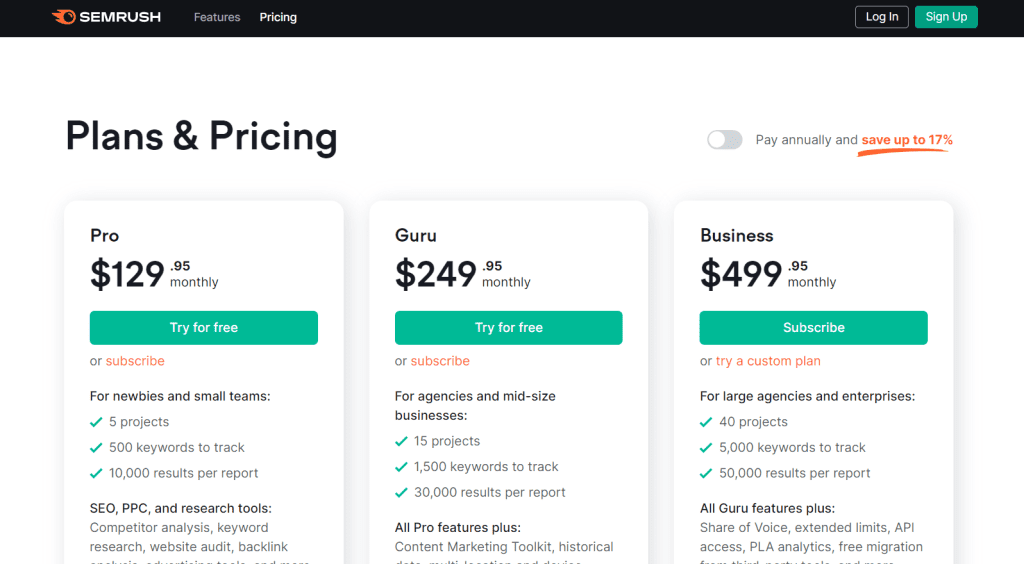
Semrush offers a variety of pricing plans to fit your needs. The pricing plans range from $129.95 per month to $499.95 per month. Each plan offers different features and benefits, so it’s important to choose the plan that best fits your needs and budget.
Pros and Cons
Here are some pros and cons of using Semrush:
Pros:
A comprehensive set of SEO tools in one platform
In-depth competitor analysis
User-friendly interface
Offers a free trial
Cons:
Can be expensive for small businesses
Some features may be overwhelming for beginners
Limited keyword tracking in the lower-tier plans
Overall, Semrush is a powerful SEO tool that offers a range of features to help you improve your website’s ranking. Whether you’re a beginner or an experienced marketer, Semrush has something to offer.
Tool 2: Jasper
Jasper AI is an AI-powered SEO tool that helps you create SEO-optimized content, images, and videos from text. It analyzes and improves existing content with the help of natural language processing and machine learning algorithms. Jasper AI is a great tool for content marketers, SEOs, and agencies who want to improve their organic search rankings and drive more traffic to their websites.
Features
Jasper AI offers a range of features that make it a powerful SEO tool:
Content creation: Jasper AI can create SEO-optimized content from scratch or from existing content. It uses natural language processing and machine learning algorithms to analyze the content and identify the best keywords to target.
Image and video creation: Jasper AI can create SEO-optimized images and videos from text. It uses machine learning algorithms to identify the best images and videos to use based on the content.
Content analysis: Jasper AI can analyze your existing content and provide suggestions for improvement. It uses natural language processing and machine learning algorithms to identify areas where your content can be improved.
Keyword research: Jasper AI can help you identify the best keywords to target for your content. It uses machine learning algorithms to analyze search data and identify the most relevant keywords for your content.
Pricing
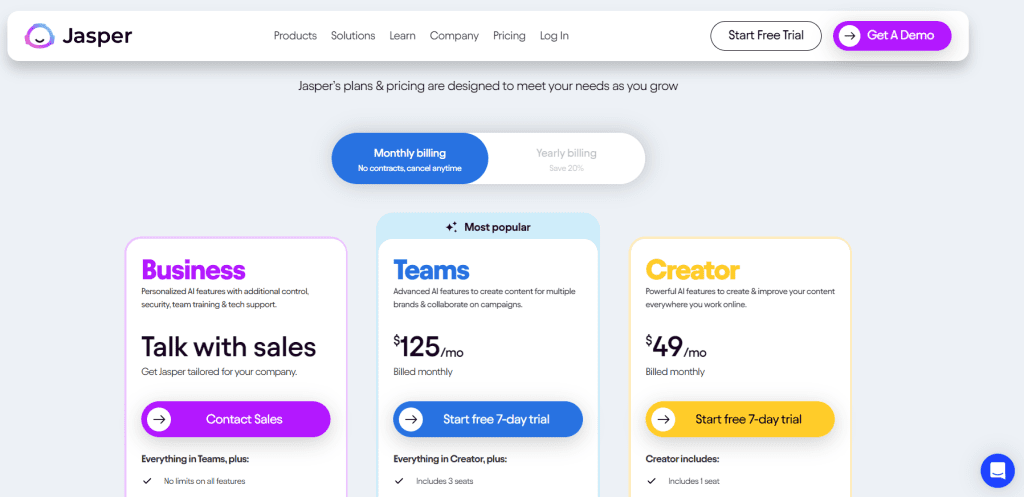
Jasper AI offers a range of pricing plans to suit different needs and budgets. The pricing plans start at $49 per month and go up to $125 per month. The plans offer different levels of features and support, so you can choose the one that best suits your needs.
Pros and Cons
Here are some pros and cons of using Jasper AI:
Pros:
Easy to use: Jasper AI is easy to use, even if you have no experience with SEO or content creation.
Saves time: Jasper AI can save you time by automating many of the tedious tasks involved in SEO and content creation.
Improves content quality: Jasper AI can help you improve the quality of your content by providing suggestions for improvement.
Cons:
Limited features: Jasper AI may not have all the features you need if you have more advanced SEO needs.
No free trial: Jasper AI does not offer a free trial, so you will need to pay to try it out.
Limited support: Jasper AI’s support is limited to email support, so you may not get immediate assistance if you have a problem.
Tool 3: Ahrefs
Ahrefs is a popular all-in-one SEO tool that provides a wide range of features to help you improve your website’s search engine rankings. It is an AI SEO tool that is used by many marketers from leading companies around the world.
Features
Ahrefs offers a range of features that can help you improve your website’s SEO. Some of the most notable features include:
Keyword research: Ahrefs has a powerful keyword research tool that can help you find the best keywords to target for your website. You can see the search volume, keyword difficulty, and other important metrics for each keyword.
Site audit: With Ahrefs’ site audit feature, you can identify technical SEO issues on your website that could be affecting your search engine rankings. The tool checks for issues such as broken links, missing meta tags, and slow page speed.
Backlink analysis: Ahrefs has a powerful backlink analysis tool that can help you identify the backlinks that are pointing to your website. You can see metrics such as the domain rating, URL rating, and the number of referring domains.
Pricing
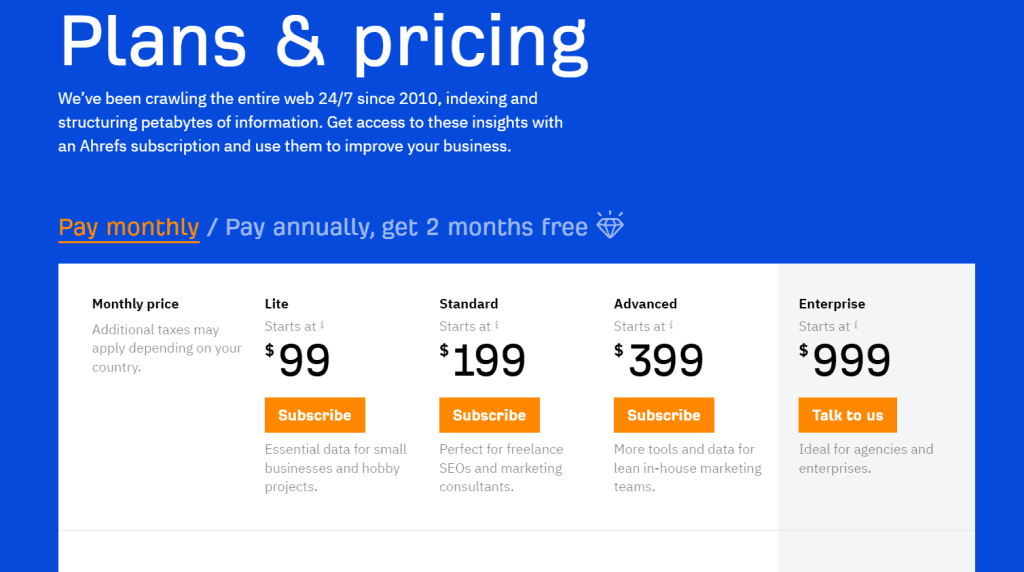
Ahrefs offers several pricing plans to suit different needs and budgets. The plans are as follows:
Lite: $99 per month
Standard: $199 per month
Advanced: $399 per month
Agency: $999 per month
Pros and Cons
Here are some of the pros and cons of using Ahrefs:
Pros
Ahrefs offers a wide range of features that can help you improve your website’s SEO.
The backlink analysis tool is one of the best on the market, providing detailed information about the backlinks pointing to your website.
The site audit feature can help you identify technical SEO issues on your website that could be affecting your search engine rankings.
Cons
Ahrefs can be quite expensive, especially for smaller businesses or individuals.
The user interface can be a bit overwhelming for beginners, and it can take some time to learn how to use all of the features.
In conclusion, Ahrefs is a powerful AI SEO tool that can help you improve your website’s search engine rankings. It offers a wide range of features, including keyword research, site audit, and backlink analysis. While it can be quite expensive, it is a worthwhile investment for businesses that are serious about SEO.
Tool 4: Moz
If you’re looking for a comprehensive SEO toolset, Moz is an excellent choice. Moz offers a suite of tools to help you optimize your website for search engines, including keyword research, site audits, backlink analysis, and more. Moz is a popular choice among SEO professionals, and for good reason.
Features
Moz offers a wide range of features to help you improve your website’s search engine rankings. Some of the key features of Moz include:
Keyword research: Moz’s keyword research tool helps you find the best keywords to target for your website. You can see how competitive a keyword is, how many searches it gets each month and more.
Site audits: Moz’s site audit tool helps you identify technical issues on your website that could be hurting your search engine rankings. It checks for things like broken links, missing meta tags, and more.
Backlink analysis: Moz’s backlink analysis tool helps you see who is linking to your website, and how authoritative those links are. You can also use this tool to find new link-building opportunities.
Rank tracking: Moz’s rank tracking tool helps you see where your website ranks in search engine results pages (SERPs) for your target keywords.
Pricing
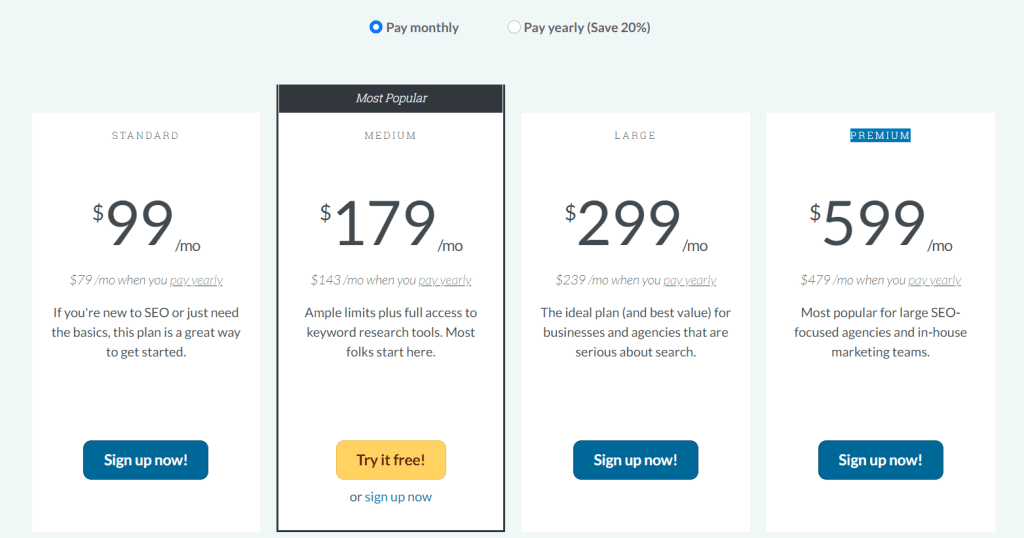
Moz offers a range of pricing plans to fit the needs of different businesses. The plans start at $99 per month for the Standard plan, which includes access to Moz’s keyword research, site audit, and rank tracking tools. The Medium plan is $179 per month and includes additional features like backlink analysis and content optimization. The Large plan is $299 per month and The Premium plan is $599 per month and includes even more features, like custom reports and on-demand crawl.
Pros and Cons
Here are some of the pros and cons of using Moz:
Pros
Comprehensive toolset: Moz offers a wide range of tools to help you optimize your website for search engines.
Easy to use: Moz’s tools are user-friendly and easy to navigate, even for beginners.
Great support: Moz offers excellent customer support, including a knowledge base, community forums, and email support.
Cons
Expensive: Moz’s pricing plans can be expensive, particularly for small businesses.
Steep learning curve: Some of Moz’s more advanced features can be difficult to learn, particularly for beginners.
Limited keyword research: Moz’s keyword research tool doesn’t offer as much data as some other tools, like SEMrush or Ahrefs.
Overall, Moz is an excellent choice for businesses looking for a comprehensive SEO toolset. While it can be expensive, the wide range of features and excellent customer support make it a worthwhile investment for many businesses.
Tool 5: Surfer SEO
If you are looking for an AI SEO tool that can help you with website auditing, backlink opportunities, and keyword research, then Surfer SEO is a great option. This tool uses AI to analyze your website and provide you with actionable insights to improve your rankings.
Features
Surfer SEO comes with a variety of features that can help you optimize your website for search engines. Here are some of the key features:
Website Audit: Surfer SEO can analyze your website and provide you with a detailed report on any issues that need to be fixed.
Keyword Research: This tool can help you find the best keywords to target for your content and optimize your website for those keywords.
Backlink Opportunities: Surfer SEO can help you find high-quality backlink opportunities that can improve your website’s authority and rankings.
Content Optimization: This tool can help you optimize your content for search engines by analyzing your competitors’ content and providing you with suggestions on how to improve your own content.
Pricing
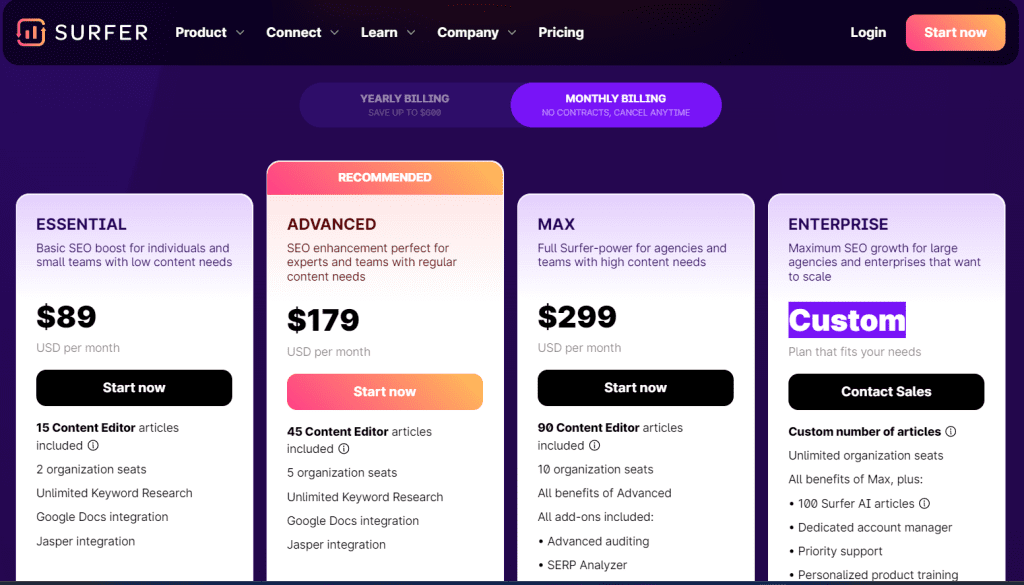
Surfer SEO offers a variety of pricing plans to suit different needs and budgets. Here are some of the key pricing plans:
Essential Plan: $89/month
ADVANCED Plan: $179/month
MAX Plan: $299/month
ENTERPRISE Plan: Custom
Pros and Cons
Here are some of the pros and cons of using Surfer SEO:
Pros:
Surfer SEO is easy to use and provides actionable insights to improve your website’s rankings.
This tool offers a variety of features to help you optimize your website for search engines.
Surfer SEO’s pricing plans are affordable and flexible.
Cons:
Some users may find Surfer SEO’s interface to be a bit overwhelming at first.
This tool may not be suitable for businesses with very large websites or complex SEO needs.
Overall, Surfer SEO is a great AI SEO tool that can help you improve your website’s rankings and drive more traffic to your site.
Tool 6: MarketBrew
If you’re looking for an AI SEO tool that can help you optimize your website’s search engine rankings, then MarketBrew is definitely worth considering. Here’s what you need to know about this powerful tool.
Features
MarketBrew offers a range of features that can help you optimize your website’s search engine rankings. Some of the key features include:
Keyword Analysis: MarketBrew can help you identify the best keywords to target for your website, based on factors like search volume, competition, and relevance.
Content Optimization: This tool can analyze your website’s content and suggest changes that can help improve your search engine rankings. For example, it can recommend changes to your page titles, meta descriptions, and other on-page elements.
Competitor Analysis: MarketBrew can help you analyze your competitors’ websites and identify opportunities to improve your own rankings. For example, it can show you which keywords your competitors are targeting and how they’re ranking for those keywords.
Pricing
MarketBrew has two license types, starting at $20/crawl and $200/search engine model. Due to its high price and advanced features, this tool is more suited for SEO experts and large-scale companies.
Pricing Plan: $20/crawl and $200/search engine model
Pros and Cons
Here are some of the pros and cons of using MarketBrew:
Pros
Powerful Features: MarketBrew offers a range of powerful features that can help you optimize your website’s search engine rankings.
Competitive Pricing: MarketBrew’s pricing is competitive compared to other AI SEO tools on the market.
Customizable: MarketBrew’s Enterprise Plan is fully customizable, so you can tailor the tool to your specific needs.
Cons
Steep Learning Curve: MarketBrew can be complex to use, so there may be a bit of a learning curve involved.
Limited Integrations: MarketBrew doesn’t offer as many integrations with other tools as some other AI SEO tools on the market.
Overall, MarketBrew is a powerful AI SEO tool that can help you optimize your website’s search engine rankings. With a range of powerful features and competitive pricing, it’s definitely worth considering if you’re looking for an AI SEO tool to take your website to the next level.
Tool 7: KeywordInsights
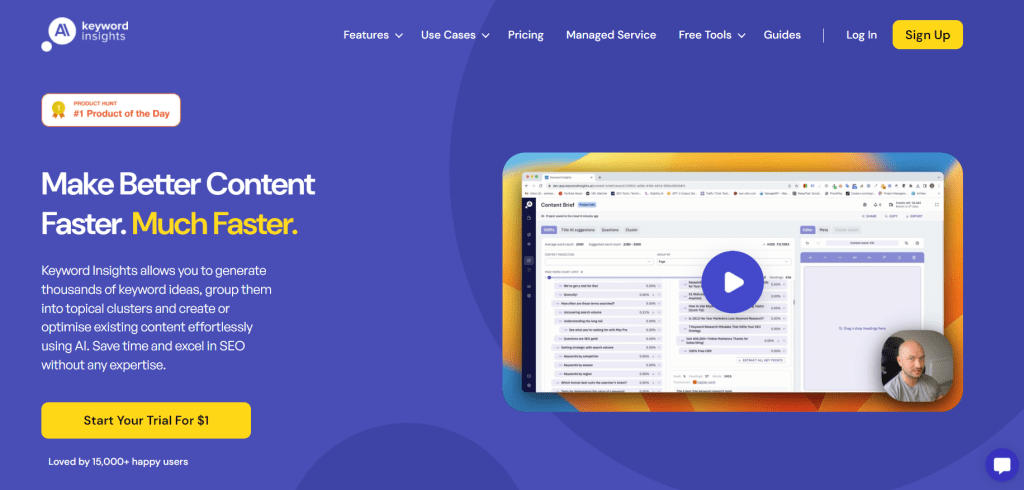
If you’re looking for an AI SEO tool that can help you generate thousands of keyword ideas and optimize existing content with ease, KeywordInsights is a great option to consider. In this section, we’ll take a closer look at some of the key features of this tool, as well as its pricing and pros and cons.
Features
KeywordInsights is an AI-driven content marketing platform that can help you make better content much faster. With this tool, you can generate thousands of keyword ideas, group them into topical clusters, and create or optimize existing content effortlessly using AI. Some of the notable features of KeywordInsights include:
Keyword clustering: This feature allows you to group your keywords into topical clusters, making it easier to create content that’s focused on specific topics.
Keyword suggestion: KeywordInsights uses AI to suggest new keywords that you may not have thought of, helping you to expand your keyword list and reach a wider audience.
Content optimization: With KeywordInsights, you can optimize your existing content by analyzing it and suggesting changes that can help improve its performance on search engines.
Competitive analysis: This tool can help you analyze your competitors’ content and identify areas where you can improve your own content to outrank them on search engine results pages (SERPs).
Pricing
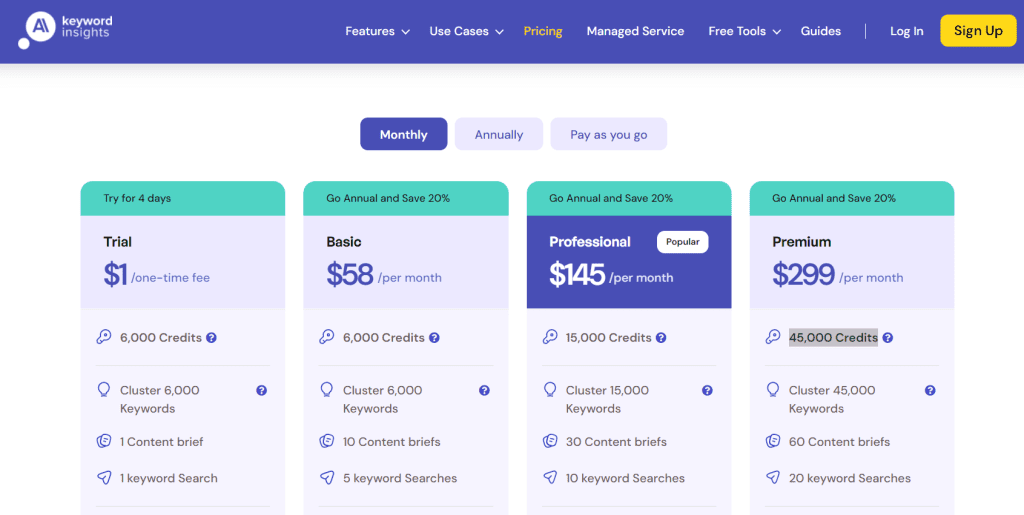
KeywordInsights offers a 4-day free trial at $1, after which you’ll need to choose a pricing plan to continue using the tool. The pricing plans are based on the number of keywords you want to track and range from $58/month for 6,000 Credits to $299/month for 45,000 Credits
Pros and Cons
Here are some of the pros and cons of using KeywordInsights:
Pros:
Easy-to-use interface: KeywordInsights has a user-friendly interface that makes it easy to navigate and use.
AI-powered suggestions: This tool uses AI to suggest new keywords and optimize your content, making it easier to create high-quality content that performs well on search engines.
Competitive analysis: KeywordInsights can help you analyze your competitors’ content and identify areas where you can improve your own content to outrank them on SERPs.
Cons:
Limited keyword tracking: The pricing plans for KeywordInsights are based on the number of keywords you want to track, which may be limiting for some users.
No backlink analysis: This tool doesn’t offer any backlink analysis features, which may be a drawback for users who want a more comprehensive SEO tool.
Overall, KeywordInsights is a valuable AI SEO tool that can help you generate keyword ideas, optimize your content, and outrank your competitors on search engines.
Tool 8: Frase
Frase is an AI-powered SEO content optimization tool that helps you write and optimize content for search engines. With Frase, you can easily analyze and condense content from the top search results of any query, saving you time and effort.
Features
Frase offers a range of features that can help you improve your SEO strategy, including:
SERP research: Frase allows you to visualize key SERP metrics like word count, domain rating, and heading count, making it easier to analyze your SEO competitors’ content.
Content optimization: Frase’s AI-powered content optimization tool helps you write content that is optimized for search engines. It analyzes your content and provides you with suggestions for improving your SEO.
Research panel: Frase’s intuitive research panel allows you to easily analyze your competitors’ content and identify gaps in your own content strategy.
Keyword research: Frase’s keyword research tool helps you find the best keywords to target for your content, making it easier to rank higher in search engine results pages.
Pricing
Frase offers a range of pricing plans to suit different needs and budgets. Their plans include:
Unlimited AI content with the Pro Add-On ($35/mo)
Solo: Frase’s Solo plan costs $14.99 per month and includes features like content optimization, a research panel, and keyword research.
Basic: Frase’s Basic plan costs $44.99 per month and includes advanced features like content clustering, content briefs, and team collaboration.
Team: Frase’s Team plan costs $114.99 per month.
Pros and Cons
Here are some pros and cons of using Frase for your SEO strategy:
Pros
Frase’s AI-powered content optimization tool can help you write better content that is optimized for search engines.
Frase’s research panel makes it easy to analyze your competitors’ content and identify gaps in your own content strategy.
Frase’s keyword research tool helps you find the best keywords to target for your content, making it easier to rank higher in search engine results pages.
Cons
Frase’s pricing plans can be expensive, especially for small businesses or individuals.
Frase’s interface can be overwhelming at first, especially if you are new to SEO or content optimization.
Overall, Frase is a powerful AI-powered SEO tool that can help you improve your content strategy and rank higher in search engine results pages.
Tool 9: NEURONwriter
If you’re looking for an AI SEO tool that can help you create high-quality content quickly, NEURONwriter is definitely worth checking out. This tool uses advanced machine learning algorithms to analyze your website and generate content that is optimized for search engines.
Features
NEURONwriter comes with a range of features that make it one of the best AI SEO tools on the market. Here are some of the key features:
Content creation: NEURONwriter can generate high-quality content for your website based on your target keywords and other specifications.
Keyword research: The tool can help you identify the best keywords to target based on your niche and competition.
Content optimization: NEURONwriter can analyze your existing content and suggest ways to optimize it for search engines.
Competitor analysis: The tool can help you analyze your competitors’ websites and identify opportunities to improve your own content.
Pricing
NEURONwriter offers a range of pricing plans to suit different business needs. The plans start at $23 per month, and there is also a free trial available.
Pros and Cons
Here are some of the pros and cons of using NEURONwriter:
Pros
NEURONwriter can save you a lot of time and effort when it comes to content creation.
The tool uses advanced machine learning algorithms to generate high-quality content that is optimized for search engines.
NEURONwriter can help you identify the best keywords to target based on your niche and competition.
Cons
The pricing plans for NEURONwriter can be a bit expensive for smaller businesses.
The tool may not be suitable for businesses that require a high degree of customization in their content.
Overall, NEURONwriter is a powerful AI SEO tool that can help you create high-quality content quickly and efficiently. If you’re looking for a tool that can help you optimize your content for search engines and improve your website’s ranking, NEURONwriter is definitely worth considering.
Tool 10: Serpstat
If you’re looking for a comprehensive AI SEO tool that can help you with everything from keyword research to backlink analysis, Serpstat is definitely worth considering. Here are some of the key features, pricing options, and pros and cons of this popular tool.
Features
Serpstat offers a wide range of features that can help you improve your SEO strategy. Some of the most popular features include:
Keyword research: Serpstat’s keyword research tool can help you find the best keywords to target for your website. You can search for keywords by volume, difficulty, and other factors, and the tool will provide you with a list of related keywords to consider.
Site audit: Serpstat’s site audit tool can help you identify technical issues on your website that may be affecting your search engine rankings. The tool will scan your site for issues like broken links, duplicate content, and missing meta tags, and provide you with a report detailing the issues that need to be fixed.
Backlink analysis: Serpstat’s backlink analysis tool can help you identify the sites that are linking to your website, as well as the quality of those links. You can use this information to improve your link-building strategy and avoid low-quality links that could harm your rankings.
Competitor analysis: Serpstat’s competitor analysis tool can help you identify your top competitors in the search results, as well as the keywords they are targeting and the backlinks they have. You can use this information to improve your own SEO strategy and stay ahead of the competition.
Pricing
Serpstat offers a range of pricing options to suit different needs and budgets. Here are some of the most popular plans:
Individual: $59/month (or $50/month if paid annually)
Team: $119/month (or $100/month if paid annually)
Agency: $479/month (or $410/month if paid annually)
Enterprise: Custom pricing
Pros and Cons
Here are some of the pros and cons of using Serpstat for your SEO needs:
Pros
Comprehensive feature set: Serpstat offers a wide range of features that can help you with everything from keyword research to backlink analysis.
Competitive pricing: Serpstat’s pricing is competitive compared to other AI SEO tools on the market.
Easy to use: Serpstat’s interface is user-friendly and easy to navigate, even for beginners.
Cons
Limited data: Serpstat may not have as much data as some of its competitors, particularly when it comes to backlink analysis.
Slow site audits: Serpstat’s site audit tool can be slow to complete, especially for larger websites.
Limited integrations: Serpstat may not integrate with all of the tools you use for your SEO strategy.
Tool 11: Outranking
Outranking is an AI-powered SEO tool that helps content teams and SEO professionals with keyword and content strategy. With its cutting-edge technology, Outranking significantly reduces the time spent on tedious tasks, allowing you to focus on more important aspects of your SEO campaign.
Features
Outranking offers a wide range of features that can help you improve your website’s organic performance. Here are some of its notable features:
AI-assisted workflows for content creation
Comprehensive SEO-optimized outlines and factual content generation
Content marketing tool for creating ROI-driven keyword strategies
Planning content around targeted keywords and optimizing existing content
Organizing content into silos
Enhancing internal linking
Managing a content calendar
Pricing
Outranking offers a free trial for $9 First Month,($69 starting next month) after which you can choose from three pricing plans. The SEO Wizard plan costs $159 per month, The SEO Ace plan costs $229 per month. and You can choose Custom Plan.
Pros and Cons
Here are some of the pros and cons of using Outranking:
Pros
AI-powered content research platform
Well-researched and value-added content
Comprehensive SEO-optimized outlines
Factual content generation
ROI-driven keyword strategies
Content calendar management
Cons
A limited number of content outlines in the Basic plan
Higher pricing compared to some other AI SEO tools
Overall, Outranking is a great tool for content teams and SEO professionals looking to achieve content success in the competitive digital landscape. With its AI-powered technology, Outranking can significantly cut the process of keyword and content strategy, allowing you to focus on more important aspects of your SEO campaign.
Tool 12: Diib
If you are looking for a comprehensive AI SEO tool that can help you grow your website, Diib is an excellent choice. This tool uses artificial intelligence to analyze your website and provide you with actionable insights to improve your SEO.
Features
Diib offers a wide range of features to help you optimize your website for search engines. Some of the key features include:
SEO analysis: Diib analyzes your website and provides you with a detailed report on your SEO performance, including areas for improvement.
Competitor analysis: Diib also analyzes your competitors’ websites and provides you with insights on how you can improve your SEO to outperform them.
Keyword research: Diib helps you find the right keywords to target for your website to improve your rankings.
Content optimization: Diib provides you with recommendations on how to optimize your content for search engines.
Backlink analysis: Diib analyzes your backlinks and provides you with insights on how to improve your backlink profile.
Pricing
Diib offers a free plan that includes basic SEO analysis and monitoring. For more advanced features, you can upgrade to one of their paid plans, which starts at $7.99/month.
Pros and Cons
Here are some of the pros and cons of using Diib as your AI SEO tool:
Pros
Comprehensive SEO analysis: Diib provides you with a detailed analysis of your website’s SEO performance, including areas for improvement.
Competitor analysis: Diib also analyzes your competitors’ websites and provides you with insights on how to outperform them.
User-friendly interface: Diib has a user-friendly interface that makes it easy to use, even if you are not an SEO expert.
Affordable pricing: Diib’s paid plans are affordable, making them accessible to small businesses.
Cons
Limited keyword research: While Diib does offer keyword research, it is not as comprehensive as some other AI SEO tools on the market.
Limited backlink analysis: Diib’s backlink analysis is not as detailed as some other AI SEO tools.
Overall, Diib is an excellent choice for small businesses looking for a comprehensive AI SEO tool at an affordable price.
Tool 13: Narrato
Narrato AI is a comprehensive AI-powered content platform designed to meet all your SEO needs. Featuring more than 100 AI templates and tools, it streamlines everything from planning and creating SEO content to optimizing and finally publishing it.
Features
AI SEO brief generator: Provides keyword suggestions, topics to explore, and questions to address, along with an SEO score, ensuring your content remains well-optimized.
AI keyword generator: Offers a list of relevant keywords for a specific topic, complete with data on their search volume.
AI content assistant: Provides over 100 AI templates designed to help you create SEO-friendly content for your blog or website.
Other AI tools for content enhancement: AI tools like AI Content Improver, AI text simplification tool, and AI Text Summarizer enhance the clarity and readability of your content. The platform also includes features for plagiarism detection and grammar correction, ensuring your content is both original and polished.
Pricing
The Pro Plan is priced at $36 per month and includes 4 user seats. The Business Plan is available for $96 per month and also includes 4 user seats. For customized options, Narrato offers other plans where you can adjust features and pricing to better fit your needs.
Pros and Cons
Here are some pros and cons of using Narrato
Pros:
More than 100 AI templates and micro AI SEO tools available
Bulk content generation
AI brand voice generator for generating consistent brand messaging
AI-powered translation available in over 20 languages
AI Image Generator, GIF collection, and CC image search library for visuals
Cons:
While there isn’t a free plan that lasts indefinitely, they do offer a free trial.
Narrato’s AI SEO tools make it easy to create and optimize high-quality content. But it’s much more than just a content creation tool. Narrato provides a comprehensive content workflow and project management platform to help you manage your content from start to finish.
How to Choose the Right AI SEO Tool
When it comes to choosing the right AI SEO tool, there are several factors to consider. Here are some tips to help you make the right choice:
Identify Your Target Audience and User Intent
Before you choose an AI SEO tool, it’s important to identify your target audience and understand their intent. This will help you create content that meets their needs and interests. Look for tools that can help you analyze user intent and identify the keywords and topics that are most relevant to your audience.
Consider Your Conversion Goals
Your conversion goals will also play a role in choosing the right AI SEO tool. Whether you’re looking to increase sales, generate leads, or drive traffic to your website, you need a tool that can help you achieve your goals. Look for tools that offer features like A/B testing, conversion tracking, and visitor analysis to help you optimize your website for conversions.
Look for Comprehensive Analytics
To get the most out of your AI SEO tool, you need access to comprehensive analytics. Look for tools that offer detailed reports on your website’s performance, including metrics like traffic, engagement, and conversions. This will help you identify areas for improvement and make data-driven decisions.
Choose a Tool That Fits Your Budget
AI SEO tools come in a variety of price ranges, so it’s important to choose one that fits your budget. Look for tools that offer a range of pricing options, including free trials and affordable monthly plans. Keep in mind that the most expensive tool isn’t always the best, so be sure to compare features and pricing before making a decision.
Consider Ease of Use
Finally, consider the ease of use of the AI SEO tool you choose. Look for tools that are user-friendly and offer intuitive interfaces. This will help you get up and running quickly and make the most of the tool’s features.
By considering these factors, you can choose an AI SEO tool that meets your needs and helps you achieve your goals.
Conclusion
You now have a good understanding of the best AI SEO tools available in 2024. These tools can help you improve your website’s search engine rankings, increase traffic, and boost your conversions.
The AI SEO tools we’ve covered in this article use a variety of technologies, including natural language processing, AI outline generators, and live editors. These tools can help you optimize your website’s content, identify keywords, and analyze your competitors’ strategies.
When choosing an AI SEO tool, consider your specific needs and budget. Some tools are more expensive than others, but they may offer more advanced features and customization options. On the other hand, some tools are more affordable and user-friendly, making them a good choice for beginners or small businesses.
We recommend testing out a few different tools to find the one that works best for you. Keep in mind that no tool can guarantee success, and it’s important to continue monitoring and adjusting your SEO strategy over time.
Overall, AI SEO tools are a valuable resource for any website owner or SEO specialist. By leveraging the power of artificial intelligence, you can gain a competitive edge and achieve your business goals more efficiently.
If you’re running an online store using WooCommerce, it’s essential to optimize your website for search engines. Improving the SEO performance of your WooCommerce store is crucial since it plays a vital role in where your website appears in search results. The higher your website ranks, the more traffic and sales you can generate.
To optimize your WooCommerce website for search engines, you need to follow some specific SEO tips. These tips include optimizing your product page titles, adding SEO meta descriptions to all products, creating SEO-friendly product URLs, optimizing the product H1 tag, optimizing product content, optimizing product images and videos, enabling and optimizing breadcrumbs, and more. By following these tips, you can improve your website’s visibility, attract more visitors, and increase your sales.
In this article, we’ll provide you with some of the best WooCommerce SEO tips to help you optimize your online store for search engines. We’ll cover everything from basic WordPress SEO settings to advanced optimization techniques, such as keyword research, optimizing product descriptions, writing unique product SEO titles and meta descriptions, optimizing your product URL slug, optimizing product images and videos, and more. By the end of this article, you’ll have a better understanding of how to improve your WooCommerce website’s SEO performance and generate more traffic and sales.
Understanding WooCommerce SEO
If you have an online store built on WooCommerce, it’s important to optimize it for search engines so that potential customers can find your products easily. WooCommerce SEO involves optimizing your website for search engines like Google, Bing, and Yahoo.
SEO, or search engine optimization, is a process that involves optimizing your website so that it ranks higher in search engine results pages (SERPs). The higher your website ranks, the more likely it is that potential customers will find your products.
To optimize your WooCommerce website for search engines, you need to understand how search engines work. Search engines use complex algorithms to determine which websites should rank higher in search results. These algorithms take into account a wide range of factors, including website content, keywords, backlinks, and more.
To optimize your WooCommerce website for search engines, you need to focus on the following key areas:
Keyword research: Identify the keywords that potential customers might use to search for products like yours. Use these keywords in your product titles, descriptions, and tags.
Product descriptions: Write unique and compelling product descriptions that include your target keywords.
Product images: Optimize your product images with alt tags that include your target keywords.
Product reviews: Encourage customers to leave reviews on your product pages. Positive reviews can help improve your website’s rankings.
Website speed: Make sure your website loads quickly. Slow-loading websites can negatively impact your website’s rankings.
Mobile optimization: Ensure that your website is optimized for mobile devices. More and more people are using their smartphones to shop online, and search engines consider mobile optimization when ranking websites.
Backlinks: Build high-quality backlinks to your website. Backlinks from reputable websites can help improve your website’s rankings.
By focusing on these key areas, you can improve your WooCommerce website’s SEO and attract more potential customers to your online store. By focusing on these key areas, you can improve your WooCommerce website’s SEO and attract more potential customers to your online store, whether you are running a clothing shop or a building materials eCommerce business.
Importance of Keywords
Keywords are the foundation of SEO, and they play a crucial role in the visibility of your WooCommerce store. They are the words and phrases that users enter into search engines when looking for a product or service. By optimizing your store’s keywords, you can improve your rankings in search results and drive more traffic to your website.
Keyword Research
Before optimizing your store’s keywords, you need to conduct thorough keyword research. Keyword research involves identifying the words and phrases that your target audience uses when searching for products or services like yours. You can use various tools like Google Keyword Planner, Ahrefs, and SEMrush to conduct keyword research.
Relevant Keywords
Once you have identified the keywords that your target audience is using, you need to ensure that your store’s content includes those keywords. However, it is essential to use relevant keywords that accurately describe your products or services. Using irrelevant keywords can harm your SEO and lead to a high bounce rate.
Avoid Keyword Stuffing
While it is crucial to include relevant keywords in your store’s content, it is equally important to avoid keyword stuffing. Keyword stuffing refers to the practice of adding too many keywords to a page in an attempt to manipulate search engine rankings. This practice can harm your SEO and lead to a penalty from search engines.
In conclusion, optimizing your store’s keywords is an essential aspect of WooCommerce SEO. By conducting thorough keyword research and using relevant keywords, you can improve your store’s visibility in search results and drive more traffic to your website. However, it is crucial to avoid keyword stuffing and use keywords in a natural and relevant way.
Optimizing Product Pages
When it comes to WooCommerce SEO, optimizing your product pages is crucial. Your product pages are where your customers will make their buying decisions, and it’s also where search engines will analyze your site’s content to determine its relevance and ranking. In this section, we’ll cover three key areas of product page optimization: product titles, product descriptions, and product images.
Product Titles
Your product title is one of the most important elements of your product page. It should be clear, concise, and descriptive. It’s also important to include your target keywords in your product title, as this will help search engines understand what your product is about.
When creating your product title, try to be as specific as possible. Instead of just using a generic title like “Blue T-Shirt,” consider adding more details such as “Men’s Blue Cotton T-Shirt with Crew Neck.” This will not only help with SEO, but it will also give your customers a better idea of what they’re buying.
Product Descriptions
Your product description is another important element of your product page. It should be unique, informative, and engaging. Your description should describe the features and benefits of your product, and it should also include your target keywords.
When writing your product description, try to be creative and use language that will appeal to your target audience. Avoid using generic descriptions that could apply to any product. Instead, focus on what makes your product unique and why someone should buy it.
Product Images
Your product images are also an important element of your product page. They should be high-quality, clear, and visually appealing. Your images should showcase your product from different angles and highlight any important features.
When optimizing your product images for SEO, be sure to include descriptive alt tags and file names. This will help search engines understand what your images are about and improve your site’s overall relevance and ranking.
In conclusion, optimizing your product pages is crucial for WooCommerce SEO success. By focusing on your product titles, descriptions, and images, you can create a compelling product page that will appeal to both your customers and search engines.
URL and Permalinks
When it comes to WooCommerce SEO, optimizing your URLs and permalinks is crucial. URLs are the web addresses that identify unique pages on your website, while permalinks are the permanent URLs that are used to access specific pages. In this section, we’ll cover some tips for optimizing your URLs and permalinks.
URL Optimization
Your URLs should be clear and descriptive, making it easy for both users and search engines to understand what your page is about. Here are some tips for optimizing your URLs:
Keep them short: Shorter URLs tend to perform better in search engine results pages (SERPs) and are easier for users to remember and share.
Include your target keyword: Including your target keyword in the URL can help improve your page’s relevance and visibility in search results.
Use hyphens to separate words: Hyphens are the preferred way to separate words in your URL, as they are more readable and search engine-friendly than underscores or other characters.
Permalinks
Permalinks are the permanent URLs that are used to access specific pages on your website. Here are some tips for optimizing your permalinks:
Use a clear structure: Your permalink structure should be clear and easy to understand, both for users and search engines. A simple structure like /%postname%/ is recommended.
Include your target keyword: Including your target keyword in the permalink can help improve your page’s relevance and visibility in search results.
Avoid stop words: Stop words are common words like “and”, “the”, and “of” that add no value to your permalink and can make it longer and harder to read.
By following these tips for optimizing your URLs and permalinks, you can improve your WooCommerce SEO and make it easier for users and search engines to understand your website’s content.
SEO Plugins
When it comes to optimizing your WooCommerce store for search engines, using a reliable SEO plugin can make a huge difference. Here are some of the most popular SEO plugins that you can use to improve your WooCommerce SEO:
Yoast SEO
Yoast SEO is one of the most popular SEO plugins for WordPress and WooCommerce. It helps you optimize your website for search engines by providing you with a range of features including keyword optimization, content analysis, XML sitemap generation, and more. With Yoast SEO, you can easily optimize your product pages, category pages, and other pages on your website for maximum visibility on search engines.
All-in-One SEO
All in One SEO is another popular SEO plugin for WooCommerce. It offers a range of features including XML sitemap generation, keyword optimization, content analysis, and more. With All in One SEO, you can easily optimize your product pages, category pages, and other pages on your website for better search engine visibility. The plugin also offers a range of advanced features for power users.
SEMRush is a popular SEO tool that offers a range of features for optimizing your WooCommerce store for search engines. It offers keyword research, site audit, backlink analysis, and more. With SEMRush, you can easily identify the most profitable keywords for your store and optimize your product pages and category pages for better search engine visibility.
When it comes to choosing the best WooCommerce SEO plugin, it’s important to consider your specific needs and goals. Some plugins may offer more advanced features, while others may be more user-friendly. Ultimately, the best plugin for you will depend on your specific needs and preferences.
Meta Descriptions and Titles
Your WooCommerce product page titles and meta descriptions are crucial for SEO. They are the first thing potential customers see in search engine results, so it’s essential to make them both engaging and informative.
Titles
Your product page title tag should be between 50-60 characters to ensure that it displays correctly in search engine results. It should include the primary keyword for that product, and if possible, the brand name. Make sure that each product page has a unique title tag to avoid duplicate content issues.
Meta Descriptions
Your meta description should be between 150-160 characters and should include the primary keyword for that product. It should also provide a brief summary of what the product is and what it does. Make sure that each product page has a unique meta description to avoid duplicate content issues.
SEO Titles and Descriptions
If you’re using an SEO plugin like Yoast, it will provide you with fields to enter your SEO title and description. Your SEO title should be the same as your page title, and your SEO description should be the same as your meta description.
Page Titles
Your page title should be the same as your product page title tag. It should be an H1 heading and should include the primary keyword for that product. Make sure that each product page has a unique page title to avoid duplicate content issues.
In summary, optimizing your product page titles and meta descriptions is crucial for SEO. Make sure that each product page has a unique title tag, meta description, and page title. Use primary keywords in both your title and description, and keep them engaging and informative.
Site Structure and Navigation
The structure of your WooCommerce site and the ease of navigation are crucial factors that can affect your SEO performance. A well-organized site structure and easy-to-use navigation can help search engines crawl and index your site more efficiently, which can lead to higher rankings.
When designing your site structure, it’s essential to keep in mind the user experience and the search engine requirements. Your site structure should be logical, easy to understand, and follow a hierarchical order. A good site structure should have a clear homepage, followed by categories, subcategories, and product pages.
Your navigation should be simple and intuitive, allowing users to find what they’re looking for quickly. Use clear and descriptive labels for your navigation links to help users understand where they’re going. Avoid using generic labels like “products” or “services” since they don’t provide any context.
Including breadcrumbs on your site can also help improve navigation and user experience. Breadcrumbs are a series of links that show the user the path they took to get to the current page. They provide context and can help users understand where they are in the site hierarchy. Breadcrumbs can also help search engines understand the structure of your site and improve crawlability.
In summary, a well-structured site with intuitive navigation and breadcrumbs can improve your SEO performance and user experience. Take the time to plan and organize your site structure and navigation to help users and search engines find what they’re looking for quickly and easily.
Image Optimization
Images play an important role in the success of your WooCommerce store. They not only make your store visually appealing but also help in improving your search engine rankings. However, large images can slow down your website, which can negatively impact user experience and SEO. Therefore, optimizing your images is crucial for the success of your store.
Image Format
The first step in optimizing your images is to save them in the correct format. The two most common image formats to use are Portable Network Graphics (PNG) and Joint Photographic Experts Group (JPEG or JPG). PNGs are better quality and allow for transparency, but their image file sizes are larger. On the other hand, JPEGs have smaller file sizes but can lose quality when compressed too much. Therefore, it’s important to choose the right format based on the type of image and its purpose.
Image Size
The size of your images also plays a crucial role in optimizing them. Large images can slow down your website, which can negatively impact user experience and SEO. Therefore, it’s important to resize your images to the appropriate size before uploading them to your store. You can use image editing software or online tools to resize your images.
Alt Text
Alt text is a description of an image that is displayed when the image cannot be loaded. Alt text is also used by search engines to understand the content of an image. Therefore, it’s important to include descriptive alt text for all your images. The alt text should describe the content of the image accurately and concisely. It’s also important to include relevant keywords in the alt text, but avoid keyword stuffing.
Image Optimization Plugins
There are several image optimization plugins available for WooCommerce that can help you optimize your images automatically. These plugins can compress your images without losing quality, resize your images, and add alt text to your images automatically. Some popular image optimization plugins for WooCommerce include Imagify, Smush, and ShortPixel.
By optimizing your images, you can improve your website’s user experience and SEO. Use the tips mentioned above to optimize your images and improve the performance of your WooCommerce store.
Speed and Mobile Friendliness
When it comes to WooCommerce SEO, website speed and mobile friendliness are two crucial factors to consider. Not only do they affect your search engine rankings, but they also impact the user experience of your customers. Slow-loading pages and poorly optimized mobile sites can lead to high bounce rates and lost sales.
To ensure your website is up to speed, start by testing its performance using tools like Google PageSpeed Insights or GTmetrix. These tools can provide insights into how your site is performing and offer suggestions for improvement.
One of the most effective ways to improve website speed is by optimizing your images. Large image files can slow down your site, so make sure to compress them before uploading. Additionally, consider using a content delivery network (CDN) to distribute your site’s content across multiple servers, improving load times for users around the world.
Mobile friendliness is also important for WooCommerce SEO. With more and more people accessing the internet on their mobile devices, it’s crucial to ensure your site is optimized for smaller screens. This includes using a responsive design that adapts to different screen sizes and ensuring that buttons and links are large enough to be easily clicked on a touchscreen.
To test your site’s mobile friendliness, use Google’s Mobile-Friendly Test tool. This tool will analyze your site and provide suggestions for improvement, such as increasing font sizes or reducing the number of pop-ups.
In summary, website speed and mobile friendliness are critical factors for WooCommerce SEO. By optimizing your site’s performance and ensuring it’s mobile-friendly, you can improve your search engine rankings and provide a better user experience for your customers.
Dealing with Duplicate Content
Duplicate content is a common issue that many eCommerce sites face, and it can negatively impact your WooCommerce SEO efforts. When search engines crawl your site, they may encounter multiple pages with identical or very similar content. This can confuse search engines and lead to lower rankings or even penalties.
To avoid duplicate content issues, it’s essential to create unique content for each page on your site. This means avoiding using the same product descriptions or category descriptions on multiple pages. Instead, take the time to craft unique descriptions that accurately reflect the content of each page.
Another way to deal with duplicate content is to use canonical tags. A canonical tag tells search engines which version of a page is the preferred version. If you have multiple versions of a page, such as a product page and a category page that both have similar content, you can use a canonical tag to indicate which page you want search engines to index.
Additionally, you can use 301 redirects to redirect traffic from duplicate pages to the preferred version of the page. This can help consolidate link equity and ensure that search engines are indexing the correct version of your content.
Finally, if you have content on your site that is duplicated from another site, such as manufacturer descriptions or product specifications, consider adding unique content to supplement the duplicated content. This can help differentiate your content from other sites and improve your search engine rankings.
Dealing with duplicate content is critical for maintaining a strong WooCommerce SEO strategy. By creating unique content, using canonical tags, and implementing redirects, you can avoid duplicate content issues and improve your search engine rankings.
Structured Data and Schema Markup
One of the most important things that you can do to improve your WooCommerce SEO is to use structured data and schema markup. Structured data is behind-the-scenes data that you can add to your site to help Google and other search engines understand your content. Schema markup is a type of structured data that specifically helps to identify and classify different types of content on your site.
By using schema markup, you can help search engines to better understand your product pages, your blog posts, and other types of content on your site. This can help you to rank higher in search results and to attract more traffic to your site.
Here are some of the key benefits of using schema markup for your WooCommerce site:
Have your products appear on Google Products: By using schema markup to identify your products, you can help them to appear in Google’s product search results. This can help you to attract more traffic to your site and to increase your sales.
Rich snippets of your product pages (and editorial content): By using schema markup to identify different elements of your product pages and blog posts, you can help them to appear as rich snippets in search results. This can help to make your content more visible and attractive to potential customers.
More traffic and improved organic ranking: By making it easier for search engines to understand your content, you can help to improve your organic ranking and attract more traffic to your site.
Increased click-through rates: By appearing as rich snippets in search results, your content can be more eye-catching and attractive to potential customers. This can help to increase your click-through rates and drive more traffic to your site.
Overall, using structured data and schema markup is an essential part of any effective WooCommerce SEO strategy. By helping search engines to better understand your content, you can attract more traffic to your site, increase your sales, and improve your overall online visibility.
Using Categories and Tags
When it comes to optimizing your WooCommerce store for SEO, using categories and tags can be an effective way to organize your products and improve your search engine rankings.
Categories
Categories are used to group similar products together, making it easier for customers to find what they are looking for. They also help search engines understand the structure of your website and the relationships between different pages.
When creating categories, it’s important to choose descriptive and relevant names that accurately reflect the products they contain. Avoid using generic names like “Products” or “Items” as they don’t provide any useful information to customers or search engines. Instead, use specific names that describe the type of products in each category, such as “Women’s Clothing” or “Outdoor Gear”.
It’s also a good idea to create a hierarchy of categories, with broad categories at the top and more specific subcategories underneath. This helps customers navigate your store more easily and can also improve your SEO by creating a clear structure for search engines to follow.
Tags
Tags are similar to categories in that they are used to organize products, but they are more specific and flexible. They allow you to add additional keywords and descriptors to your products that may not fit neatly into a category.
When using tags, it’s important to be selective and avoid adding too many irrelevant or duplicate tags. This can actually harm your SEO by creating a confusing and cluttered structure for search engines to navigate. Instead, focus on using tags that are relevant to the product and provide additional information or context.
Product Categories
In addition to using categories and tags, WooCommerce also allows you to create specific product categories that are separate from your main categories. These can be useful for organizing products that have unique attributes or features, such as size, color, or material.
When creating product categories, it’s important to choose names that accurately reflect the attributes of the products they contain. For example, if you sell clothing, you might create product categories for “Men’s Shirts” or “Women’s Dresses”.
Categories and Tags Best Practices
Here are some best practices to keep in mind when using categories and tags in your WooCommerce store:
Use descriptive and relevant names for categories and tags
Avoid using too many tags or creating duplicate tags
Create a hierarchy of categories for better organization
Use product categories for products with unique attributes or features
Regularly review and update your categories and tags to ensure they are accurate and relevant to your products.
By following these best practices, you can improve the organization and structure of your WooCommerce store, making it easier for customers to find what they are looking for and improving your search engine rankings.
Google Tools
When it comes to optimizing your WooCommerce store for search engines, Google offers a few powerful tools that can help you improve your rankings and visibility. In this section, we’ll cover two of the most important Google tools: Google Search Console and Moz.
Google Search Console
Google Search Console is a free tool that allows you to monitor your website’s performance in Google search results. With Google Search Console, you can:
See which pages on your website are indexed by Google
Monitor your website’s search traffic and performance
Identify and fix technical issues that may be affecting your website’s visibility in search results
Submit sitemaps and individual URLs for crawling by Google
By regularly monitoring your website’s performance in Google Search Console, you can identify opportunities to improve your website’s visibility and rankings in search results.
Moz
Moz is a suite of SEO tools that can help you improve your website’s rankings and visibility in search results. With Moz, you can:
Conduct keyword research to identify high-traffic, low-competition keywords to target in your content
Monitor your website’s rankings and visibility in search results
Identify and fix technical issues that may be affecting your website’s visibility in search results
Analyze your competitors’ websites to identify opportunities to improve your own website’s rankings and visibility
Moz offers a variety of tools and resources to help you optimize your website for search engines, including a keyword research tool, a site audit tool, and a link-building tool.
By using Google Search Console and Moz together, you can gain valuable insights into your website’s performance in search results and identify opportunities to improve your website’s rankings and visibility.
Improving Conversion Rates
Improving your conversion rates is essential to the success of your WooCommerce store. A high conversion rate means more sales and more customers. Here are some tips to help you optimize your conversion rates:
1. Simplify Your Checkout Process
One of the most common reasons for cart abandonment is a complicated checkout process. Make sure your checkout process is simple and easy to navigate. Offer guest checkout options, and minimize the number of steps required to complete a purchase.
2. Optimize Your Product Pages
Your product pages should be optimized for conversions. Use high-quality images, clear product descriptions, and customer reviews to provide valuable information to potential customers. Make sure your product pages are easy to navigate and include a prominent call-to-action button.
3. Offer Discounts and Promotions
Discounts and promotions are a great way to incentivize customers to make a purchase. Offer discounts for first-time customers, or run limited-time promotions to encourage customers to buy.
4. Provide Excellent Customer Service
Excellent customer service is crucial to building customer loyalty and increasing conversions. Respond promptly to customer inquiries and provide helpful information to potential customers.
5. Use Retargeting Ads
Retargeting ads are a great way to bring back customers who have abandoned their carts. Use retargeting ads to remind customers of items they have left in their carts, or to offer personalized recommendations based on their browsing history.
By implementing these tips, you can optimize your conversion rates and increase sales for your WooCommerce store.
Security Considerations
When it comes to running an online store, security should be one of your top priorities. You don’t want to put your business or your customers’ personal information at risk. Here are some security considerations to keep in mind when setting up your WooCommerce store:
Use Secure Hosting
Make sure your hosting provider is secure and reliable. Choose a hosting provider that offers SSL certificates, firewalls, and regular backups. This will help protect your site from security breaches and data loss. Familiarizing yourself with an elementor review can also give you insight into how well certain hosting providers perform with website builders and security features.
Keep Your Software Up-to-Date
Make sure you keep your WooCommerce software up-to-date. This includes your WordPress installation, WooCommerce plugin, and any other plugins you use. Updates often include security patches that fix vulnerabilities and protect your site from attacks.
Use Strong Passwords
Use strong passwords for your website, email, and any other accounts associated with your store. Avoid using easily guessable passwords such as “password” or “123456”. Use a combination of upper and lowercase letters, numbers, and special characters.
Use Security Plugins
Security plugins can help protect your site from brute-force attacks, malware, and other hacking attempts. There are many security plugins available for WordPress and WooCommerce, so make sure to choose one that is reputable and regularly updated. When engaging in WordPress development, integrating reliable security plugins is essential to fortify your site against potential cyber threats.
Limit Login Attempts
Limit the number of login attempts allowed on your site to prevent brute-force attacks. You can use a plugin to set a limit on the number of login attempts per IP address.
Backup Your Site Regularly
Make sure you back up your site regularly. This will help you recover your site in case of a security breach or data loss. There are many backup plugins available for WordPress and WooCommerce that make it easy to back up your site.
By following these security considerations, you can help protect your WooCommerce store from security breaches and keep your customers’ personal information safe.
Conclusion
In conclusion, optimizing your WooCommerce store for SEO is essential for improving your search engine rankings and driving more traffic to your website. By following the tips outlined in this guide, you can improve your product titles, descriptions, content, meta descriptions, and permalinks to ensure that your products are easily discoverable by search engines.
If you’re running an SEO agency, you know that one of the biggest challenges is managing your client’s expectations while also delivering results. That’s where white-label SEO companies come in. These companies provide SEO services that you can rebrand and resell as your own, allowing you to expand your offerings without having to hire additional staff or invest in new technology. In this article, we’ll introduce you to 10 of the best white-label SEO companies in the industry.
SEO is essential for any business that wants to succeed online. However, not all businesses have the resources or expertise to manage their own SEO campaigns. That’s where white-label SEO comes in. By partnering with a white-label SEO company, you can provide your clients with the SEO services they need while still maintaining your own brand identity. The best white-label SEO companies offer a range of services, including keyword research, on-page optimization, link building, and content creation. They also provide detailed reports that you can share with your clients to show them the progress of their campaigns.
When choosing a white-label SEO company, it’s important to look for a company that has a proven track record of success. You want to work with a company that has a deep understanding of SEO and can deliver results for your clients. You also want to work with a company that is easy to work with and provides excellent customer service. In the following sections, we’ll introduce you to 10 of the best white-label SEO companies in the industry, so you can find the right partner for your business.
Quick List of 10 White Label SEO Services
#1 Desire Marketing ➡️ [Affordable Link Building & SEO Agency that drives real growth.🔥]
#2 The Hoth ➡️ [Scalable SEO solutions for growing agencies.]
#4 Boostability ➡️ [Local SEO made simple for small businesses.]
#5 Semify ➡️ [White-label SEO with easy campaign management.]
#6 HigherVisibility ➡️ [Award-winning SEO for businesses of all sizes.]
#7 BrightLocal ➡️ [Local SEO experts with white-label services.]
#8 WebFX ➡️ [Data-backed SEO for clear and impactful growth.]
#9 SE Ranking➡️ [Versatile SEO tools with white-label options.]
#10 LinkGraph➡️ [SEO and link-building strategies.]
What is White-Label SEO?
White-label SEO, also known as private-label SEO, is a practice in digital marketing where an agency outsources SEO services to another company and then sells them under its own brand name. In other words, it is a way for agencies to offer SEO services to their clients without having to do the work themselves.
White-label SEO is a great way for agencies to expand their offerings without having to invest in additional staff or resources. It allows them to focus on their core competencies while still providing their clients with high-quality SEO services.
One of the biggest advantages of white-label SEO is that it allows agencies to offer a full suite of digital marketing services to their clients. This can help them increase their revenue and improve their client’s online visibility. By offering SEO services, agencies can help their clients improve their search engine rankings, drive more traffic to their websites, and ultimately increase their sales.
When developing a white-label SEO strategy, it is important to choose a reputable company that has a proven track record of success. Look for a company that offers a complete set of SEO tools, including keyword research, on-page optimization, and link building. Additionally, make sure that the company you choose is transparent about its methods and provides regular reports on the progress of your client’s campaigns.
Benefits of Using White-Label SEO Companies
If you’re looking to expand your business strategy and provide SEO services to your clients, but don’t have the expertise or resources to do so in-house, working with a white-label SEO provider can be an excellent option. Here are some of the benefits of using white-label SEO companies:
Cost-Effectiveness
Outsourcing your SEO operations to a white-label company can be more cost-effective than building an in-house team. By working with a white-label provider, you can avoid the costs of hiring and training a team of SEO experts. Additionally, you can save money by not having to invest in expensive SEO tools and software (although it is possible to get a free website SEO check).
Expertise and Resources
One of the biggest advantages of working with a white-label SEO provider is that you gain access to their expertise and resources. White-label companies specialize in SEO and have teams of experts who are up-to-date with the latest SEO trends and techniques. By working with them, you can be sure that your clients are getting the best possible SEO services.
Scalability
Another benefit of working with a white-label SEO company is scalability. As your business grows and your client base expands, you can scale up your SEO operations without worrying about hiring and training new employees. White-label companies have the resources to handle large-scale SEO campaigns, so you can focus on growing your business without worrying about the technical details.
Key Services Offered by White-Label SEO Companies
White-label SEO companies offer a range of services to help your business improve its online visibility and rankings. Here are some of the key services offered by the best white-label SEO companies:
Keyword Research
Keyword research is an essential part of any SEO strategy. A good white-label SEO company will conduct thorough keyword research to identify the most relevant and high-traffic keywords for your business. This will help you target the right audience and improve your search engine rankings.
On-Page SEO
On-page SEO involves optimizing your website’s content and structure to make it more search-engine friendly. A white-label SEO company will ensure that your website’s on-page elements, such as title tags, meta descriptions, and header tags, are properly optimized for search engines.
Competitor Analysis
A white-label SEO company will analyze your competitors’ online presence to identify their strengths and weaknesses. This information can be used to improve your own SEO strategy and gain a competitive advantage.
Link Building
Link building is a crucial aspect of SEO. A white-label SEO company will help you build high-quality backlinks to your website from authoritative sources. This will improve your website’s authority and search engine rankings.
Local SEO
Local SEO is important for businesses that want to attract customers in their local area. A white-label SEO company will help you optimize your website for local search by creating local business listings, optimizing your Google My Business profile, and more.
Technical SEO
Technical SEO involves optimizing your website’s technical elements, such as site speed, mobile-friendliness, and schema markup. A white-label SEO company will ensure that your website is technically sound and optimized for search engines.
Content Creation
Content is at the heart of SEO. A white-label SEO company creates high-quality, engaging content tailored to your audience and optimized for search engines. This not only improves rankings but also boosts engagement and conversions.
More!
In addition to the services listed above, white-label SEO companies may offer additional services such as social media marketing, PPC advertising, and reputation management. These services can help you improve your online presence and attract more customers to your business.
Top 10 White Label SEO Companies
When it comes to selecting a white-label SEO company, you want to make sure you choose a partner that can help you achieve your business goals. With so many SEO companies out there, it can be challenging to find the right one. In this section, we have compiled a list of the top 10 white-label SEO companies that can help you scale your business and provide high-quality services to your clients.
#1 Desire Marketing
desiremarketing.io
Desire Marketing is a white-label SEO company that specializes in providing top-notch SEO services to businesses. They offer a comprehensive range of services that include Guest Posting, Niche Edits, link building, Saas Link Building, and many more. Their services are designed to help businesses improve their online visibility and drive more traffic to their website.
Pricing and Plans
Desire Marketing offers a range of pricing plans to suit the needs of different businesses. They have three main packages, which include Basic, Advanced, and Enterprise. The Basic package is ideal for small businesses that are just starting out, while the Advanced and Enterprise packages are designed for larger businesses that require more advanced SEO services.
Their pricing plans are flexible and can be customized to suit the needs of your business. They offer competitive pricing and provide value for money. You can contact them for a quote and they will provide you with a detailed breakdown of their pricing plans.
Reviews and Reputation
Desire Marketing has a solid reputation in the industry for providing high-quality white-label SEO services. They have received positive reviews from their clients, who have praised their professionalism, expertise, and commitment to delivering results.
They have a team of experienced SEO experts who are dedicated to helping businesses achieve their online goals. They work closely with their clients to understand their business needs and develop customized SEO strategies that deliver results.
Client Portfolio
Desire Marketing has worked with a range of clients across different industries, including healthcare, finance, e-commerce, and more. They have helped businesses of all sizes improve their online visibility and drive more traffic to their website.
Some of their notable clients include Slazzer, Nord VPN, and Testsigma. They have a proven track record of delivering results and helping businesses achieve their online goals.
#2 TheHoth
TheHoth is a well-known white-label SEO company that offers a variety of SEO services, including link building, content creation, and local SEO. The company has been in business since 2010 and has helped thousands of clients improve their online presence. In this section, we will take a closer look at TheHoth’s pricing and plans, reviews and reputation, and client portfolio.
Pricing and Plans
TheHoth offers a range of pricing plans to suit different budgets and needs. Their plans are designed to be flexible and customizable, so you can choose the services that best fit your business goals. The company offers both one-time and monthly plans, so you can choose the option that works best for you.
One of the unique features of TheHoth is their “link building packages,” which are designed to help businesses improve their search engine rankings by building high-quality backlinks to their website. The packages range from $60 to $1,000 per month, depending on the number of links and the quality of the websites they come from.
Reviews and Reputation
TheHoth has a solid reputation in the industry and is well-regarded by its clients. The company has received numerous positive reviews on sites like G2 and Trustpilot, where clients praise the quality of their work and their customer service. TheHoth has a 4.9-star rating on G2, with clients describing them as “the best SEO company
Client Portfolio
TheHoth has worked with a wide range of clients, from small businesses to large corporations. Some of their notable clients include Hertz, Marriott, and Airbnb. The company has also worked with a number of agencies, helping them provide SEO services to their own clients. TheHoth has a portfolio of case studies on their website, which showcase the results they have achieved for their clients. y” and “an excellent partner for any agency.”
#3 Victorious
Victorious is an SEO agency that focuses exclusively on SEO, making it one of the best white-label SEO companies in the market. Victorious offers a wide range of SEO services, including link building, on-page optimization, technical SEO, and content marketing.
Pricing and Plans
Victorious offers customized pricing and plans that are tailored to your specific needs. The company does not have a set pricing structure, as each project is unique and requires a different approach. Victorious works with clients to develop a customized plan that fits their budget and goals.
Reviews and Reputation
Victorious has received numerous positive reviews from clients and industry experts. The company has been featured in top publications such as Forbes, Business Insider, and Search Engine Journal. Victorious has also won several awards for its SEO services, including the Best SEO Campaign of 2022 award from the US Search Awards.
Client Portfolio
Victorious has worked with a wide range of clients, from small businesses to large enterprises. Some of its notable clients include SoFi, HP, and HoneyBook. Victorious has helped these clients achieve significant improvements in their search engine rankings, resulting in increased traffic and revenue.
#4 Boostability
Boostability is a top-rated white-label SEO company that offers a wide range of SEO services to help your clients improve their online visibility. With its proven track record of success, Boostability has become a popular choice for marketing agencies looking to outsource their SEO needs.
Pricing and Plans
Boostability offers flexible pricing plans that can be customized to meet the specific needs of your clients. You can choose from a range of packages that include on-page optimization, link building, content creation, and more. Boostability’s pricing is transparent, and you can easily find the cost of each package on their website.
Reviews and Reputation
Boostability has an excellent reputation in the industry, with many positive reviews from satisfied clients. The company has received numerous awards and accolades for its outstanding SEO services, including being named the #1 White Label SEO Company by Clutch in 2021.
Client Portfolio
Boostability has worked with thousands of clients across various industries, including healthcare, finance, e-commerce, and more. Some of their notable clients include The Home Depot, Allstate, and ADP. Boostability’s client portfolio demonstrates its ability to deliver results for businesses of all sizes and niches.
#5 Superside
Superside is a comprehensive creative partner that empowers in-house teams with top global talent and advanced AI workflows. They offer a wide array of creative design and production services, including ad creative, social media content, presentations, illustrations, branding, web design, video production, motion graphics, and 3D & AR design, along with AI and marketing services.
Pricing and Plans
Superside operates on a subscription-based model, with typical plans ranging from $10,000 to $100,000+ USD per month. Their official “Flex Subscription” starts at $10,000 per month. Most subscriptions require a one-year commitment, and unused budget can roll over for up to three months.
A fixed service fee of $1,000/month may apply to some plans. They offer various levels (e.g., Level 1, 2, 3) and custom enterprise solutions.
Reviews and Reputation
Superside holds a strong reputation with a 4.5 out of 5-star rating on G2, based on 75 reviews, and 91% of customers would recommend them. Users frequently praise their fast turnaround times, high-quality work, responsiveness, and dedicated teams. However, some reviews mention challenges with occasional disorganization, perceived inconsistencies in quality compared to sales pitches, difficulties in managing project credits, and concerns regarding their one-year contract commitment and reported instances of legal action for early cancellations
Client Portfolio
Superside boasts an impressive client portfolio, having partnered with major global brands and tech giants. Notable clients include Salesforce, Google, Meta, Shopify, Amazon, Red Bull, and Boston Consulting Group. They showcase successful case studies, such as quadrupling design capacity and reducing time-to-market by 60% for S&S Streetwear, and achieving a 2x design speed increase and 100% brand consistency for Pixlmob.
#6 HigherVisibility
If you’re looking for a reliable white-label SEO company, HigherVisibility is a company worth considering. They have been in the industry for over a decade and have worked with a variety of clients, including Fortune 1000 companies and small businesses. In this section, we’ll take a closer look at HigherVisibility’s pricing and plans, reviews and reputation, and client portfolio.
Pricing and Plans
HigherVisibility offers customized pricing and plans based on your business’s needs. They offer a range of SEO services, including on-page optimization, link building, keyword research, and more. They also offer PPC management, social media management, and content marketing services.
To get a quote, you can fill out a form on their website or call their sales team directly. They will work with you to create a customized plan that fits your budget and goals.
Reviews and Reputation
HigherVisibility has a solid reputation in the SEO industry. They have been featured in publications such as Forbes, Entrepreneur, and Inc. Magazine. They have also received positive reviews on third-party review sites such as G2 and Clutch.
One reviewer on G2 praised HigherVisibility’s customer service, saying, “Their timeliness, professionalism, and ease of which to reach and get answers and solutions is probably perfect.” Another reviewer on Clutch said, “They’re very responsive and always available to answer any questions or concerns we have.”
Client Portfolio
HigherVisibility has worked with a variety of clients in different industries, including healthcare, finance, and e-commerce. They have helped their clients improve their search engine rankings, increase website traffic, and generate more leads and sales.
Some of their notable clients include Marriott International, Terminix, and the University of Michigan. They also have case studies on their website that showcase their success in helping clients achieve their SEO goals.
#7 BrightLocal
BrightLocal is a popular white-label SEO company that offers a range of digital marketing services to help businesses improve their online visibility. The company has been in the industry for over a decade and has a solid reputation for delivering high-quality services to its clients.
Pricing and Plans
BrightLocal offers a range of pricing plans to suit different business needs and budgets. The company’s plans start from as low as $39 per month and go up to $59 per month for more advanced features. The plans are designed to be flexible, so you can choose the one that best fits your business needs.
Reviews and Reputation
BrightLocal has a great reputation in the industry for delivering high-quality services to its clients. The company has received positive reviews from its clients, with many praising the company’s professionalism, expertise, and customer service. BrightLocal is also highly rated on review sites like Trustpilot, with an average rating of 4.8 out of 5 stars.
Client Portfolio
BrightLocal has worked with a wide range of clients across various industries, including healthcare, legal, hospitality, and more. Some of the company’s notable clients include Choice Hotels, Liberty Tax Service, and The UPS Store. BrightLocal’s client portfolio is a testament to the company’s expertise in delivering effective SEO solutions to businesses of all sizes.
#8 WebFX
WebFX is a full-service digital marketing agency that offers white-label SEO services to its clients. They have been in business since 1996 and have worked with over 1000 clients across various industries. In this section, we will discuss their pricing and plans, reviews and reputation, and client portfolio.
Pricing and Plans
WebFX offers customized digital marketing solutions, making it difficult to find one-size-fits-all pricing on their website. The final cost depends on your specific needs, such as your industry, company size, and desired marketing goals.
Here are some options to get an accurate quote:
Contact their sales team: This is the best way to get a personalized quote tailored to your specific needs.
Review WebFX resources: Blog posts or case studies might provide insights into typical project costs.
Research industry averages: Researching average industry costs for specific services can give you a general idea.
By reaching out to WebFX, you can get a transparent and accurate quote that fits your budget and marketing goals.
Reviews and Reputation
WebFX has a strong reputation in the digital marketing industry. They have been featured in several publications, including Forbes, Inc., and The Huffington Post. They have also received numerous awards for their work, including the Interactive Marketing Award for Best SEO Campaign and the US Search Award for Best Large SEO Agency. They have a 4.9-star rating on Clutch.co, an independent review site, based on 183 reviews.
Client Portfolio
WebFX has worked with a variety of clients across different industries, including healthcare, e-commerce, and education. Some of their notable clients include Verizon, Penn State University, and Auntie Anne’s. They have also worked with several small and medium-sized businesses to help them improve their online visibility and increase their organic traffic.
#9 SE Ranking
SE Ranking is a white-label SEO company that offers a complete set of SEO tools designed with agencies’ needs in mind. It is a reliable and affordable option for agencies looking to provide their clients with top-notch SEO services. In this section, we will take a closer look at SE Ranking’s pricing and plans, reviews and reputation, and client portfolio.
Pricing and Plans
SE Ranking offers different pricing plans that cater to different agency needs. Their pricing is transparent, and there are no hidden fees. Their pricing plans include:
Essential: This plan is for individual SEO professionals and costs $65 per month for 500 keywords.
Agencies’ Choice: This plan is for agencies and small teams and costs $119 per month for 2000 keywords.
Business: This plan is for large agencies and enterprises and costs $259 per month for 5000 keywords.
All plans come with a 14-day free trial, and you can cancel at any time.
Reviews and Reputation
SE Ranking has a solid reputation in the SEO industry. They have received positive reviews from their clients and have been featured in top publications like Entrepreneur, Forbes, and Search Engine Journal. They have a Trustpilot score of 4.8 out of 5, which is an excellent rating.
Client Portfolio
SE Ranking has worked with over 12,000 clients worldwide, including small businesses, startups, and Fortune 500 companies. Some of their notable clients include Philips, Hootsuite, and Shopify. They have helped their clients achieve their marketing and business goals by providing them with effective SEO solutions.
#10 LinkGraph
LinkGraph is a full-service SEO and link-building agency that offers white-label SEO services to help companies scale their organic traffic and revenue with white-glove marketing services and cutting-edge SEO software. In this section, we will explore the pricing and plans, reviews and reputation, and client portfolio of LinkGraph.
Pricing and Plans
LinkGraph offers a range of pricing and plans for its white-label SEO services. Their pricing model is based on the number of keywords, with plans starting at $1,000 per month for up to 10 keywords. They also offer customized plans for clients with larger SEO needs.
Reviews and Reputation
LinkGraph has a solid reputation in the industry, with numerous positive reviews from satisfied clients. They have been recognized as the #1 Product of the Day, Top B2B SEO Companies, and Best B2B Campaign. Their clients range from startups to enterprise companies in verticals like SaaS, Healthcare, E-commerce, and more.
Client Portfolio
LinkGraph has an impressive client portfolio, which includes leading brands like Forbes, Salesforce, and NBC. They have helped these companies achieve significant growth in organic traffic and revenue through their white-label SEO services.
How to Choose the Ideal White Label Company for Your Business Needs
Selecting the right white label company is crucial for agencies looking to expand their service offerings without developing in-house expertise. Here’s how to make an informed decision:
Ensure Your White Label Company Focuses Solely on SEO
Specialization matters. A white label company dedicated exclusively to SEO is likely to have:
✔️ Deep expertise in the latest search engine algorithms
✔️ Refined processes for efficient campaign management
✔️ Cutting-edge tools and technologies for SEO analysis and reporting
Avoid generalist agencies that offer SEO as just one of many services. Their knowledge may be spread thin, potentially compromising the quality of your clients’ campaigns.
Look for Transparency When Selecting a White Label Company
Transparency builds trust and ensures smooth collaboration. Key aspects to consider:
✔️Clear pricing structures without hidden fees
✔️Open communication about methodologies and strategies
✔️Willingness to share detailed reports and analytics
✔️Honest discussions about potential challenges and limitations
A transparent white label partner allows you to confidently represent their services as your own.
Request Case Studies for Proof of Success
Before committing to a white label company, ask for case studies of their previous clients. This will give you a better understanding of their capabilities and the results they have achieved for other businesses. Look for case studies that are relevant to your industry and target audience, as these will provide the most valuable insights.
Check Testimonials for Confidence in Your White Label Company
Testimonials from satisfied clients can be a valuable resource when selecting a white label company. Look for testimonials that highlight the company’s expertise, professionalism, and the quality of their services. Reading positive feedback from other businesses can give you confidence in your decision and help you avoid potential pitfalls.
Face-to-Face Meetings: The Final Step in Selecting Your White Label Provider
Once you’ve narrowed down your options, consider scheduling face-to-face meetings with the shortlisted companies. This will allow you to meet the team, discuss your specific needs in detail, and get a sense of their company culture. A face-to-face meeting can provide valuable insights into the company’s communication style, level of commitment, and overall suitability for your business.
By following these guidelines, you’ll be well-equipped to choose a white label SEO company.
Conclusion
Partnering with a white-label SEO company can be a game-changer for your agency. By outsourcing SEO services, you can expand your service offerings without the need for additional resources or expertise.
When selecting a white label SEO provider, it’s essential to consider factors such as reputation, experience, pricing, and the range of services offered. The 10 companies we’ve highlighted in this article are among the best in the industry, and each has its unique strengths and capabilities.
Remember that the success of your partnership with a white label SEO company depends on clear communication, trust, and a shared commitment to achieving your clients’ goals. Make sure to choose a provider that aligns with your agency’s values and culture, and that has a proven track record of delivering measurable results.
By leveraging the expertise of a white label SEO provider, you can provide your clients with high-quality SEO services that drive traffic, leads, and revenue. And by doing so, you can position your agency for long-term growth and success in a highly competitive market.
If you manage a website, you may have come across the term “orphan pages” before.
But what exactly are orphan pages and how do they impact your site’s SEO?
In this comprehensive guide, we’ll explain what orphan pages are, why they are problematic for SEO, and most importantly – how to identify and deal with them.
So, get started.
What are Orphan Pages?
Orphan pages are web pages that have no internal or external links pointing to them, making them difficult to find by search engines and website visitors.
These pages are isolated from the rest of the website structure, which can negatively impact SEO efforts.
Common Causes of Orphan Pages
There are several common causes of orphan pages. One of the most common causes is when a web page is deleted or moved without updating the internal links on the website. This can leave behind orphan pages that are not linked to any other pages on the website.
Another common cause of orphan pages is when a website is redesigned or restructured, and some pages are left behind. These pages may not be linked to any other pages on the website, making them difficult to find.
Orphan pages can also be created intentionally, such as when a landing page is created for a specific marketing campaign. These pages may not be linked to any other pages on the website, but they can still be found through external links or search engine results.
Understanding orphan pages and their impact on SEO is important for website owners and marketers. By identifying and fixing orphan pages, you can improve the overall structure of your website and make it easier for search engines and visitors to find your content.
Impact of Orphan Pages on SEO
Orphan pages can have a significant impact on your website’s SEO performance.
In this section, we will discuss the various ways orphan pages can affect your website’s SEO.
Effect on Crawl Budget
Search engines use crawlers to index and rank websites. Crawlers follow links from one page to another, which means that if an orphan page has no internal links pointing to it, it will not be crawled by search engines. This can lead to a waste of crawl budget, which is the amount of time and resources search engines allocate to crawl your website.
When search engines crawl orphan pages, they are not able to crawl other pages on your website, which can result in important pages being left out of the index. This can negatively impact your website’s search engine rankings.
Influence on Site Structure
Orphan pages can also have an impact on your website’s site structure. Site structure refers to the way pages are organized and linked together on your website. If an orphan page has no internal links pointing to it, it is essentially isolated from the rest of your website. This can make it difficult for users and search engines to navigate your website.
Having a clear and organized site structure is important for SEO because it helps search engines understand the hierarchy and relationships between pages on your website. If orphan pages are left unaddressed, they can disrupt the site structure and negatively impact your website’s search engine rankings. This is especially important for businesses targeting a specific geographic area. For example, if your business is based in Alexandria, Virginia, a strong Northern VA local SEO strategy depends on your service and location pages being properly connected through internal links and easy for search engines to crawl. Orphan pages can make it harder for search engines to discover and understand these important pages, which may reduce their visibility in local search results.
Impact on Organic Traffic
Orphan pages can also have an impact on your website’s organic traffic. Organic traffic refers to the traffic that comes to your website from search engine results pages. If an orphan page has no internal links pointing to it, it will not be indexed by search engines and will not appear in search engine results pages. This means that potential visitors will not be able to find the page through search engines, resulting in a loss of organic traffic.
Furthermore, if orphan pages are left unaddressed, they can negatively impact your website’s overall user experience. Users may become frustrated if they are unable to find the information they are looking for on your website, leading to a decrease in user engagement and a loss of potential customers.
Orphan pages can have a negative impact on your website’s SEO performance. It is important to identify and fix any orphan pages on your website to ensure that search engines can crawl and index all of your important pages, maintain a clean and organized site structure and maximize your website’s potential organic traffic.
How To Identify Orphan Pages
To identify orphan pages on your website, you can use a variety of tools including Google Analytics, Google Search Console, and SEO tools such as Ahrefs and Screaming Frog.
Using Google Analytics
Google Analytics provides an easy way to identify orphan pages on your website. To do this, follow these steps:
Log in to your Google Analytics account and select the website you want to work on.
Click on “Behavior” in the left-hand menu, then select “Site Content” and “All Pages.”
Look for pages with zero page views. These are likely orphan pages.
Using Google Search Console
Google Search Console is another useful tool for identifying orphan pages on your website. Here’s how to do it:
Log in to your Google Search Console account and select the website you want to work on.
Click on “Coverage” in the left-hand menu, then select “Excluded.”
Look for pages labeled “Excluded by ‘no index’ tag” or “Excluded by ‘nofollow’ tag.” These are likely orphan pages.
Using SEO Tools
SEO tools such as Ahrefs and Screaming Frog can also help you identify orphan pages on your website. Here’s how to do it:
Ahrefs
Log in to your Ahrefs account and enter your website’s URL.
Click on “Site Explorer” in the left-hand menu, then select “Best by Links” and “404 not found.”
Look for pages with zero backlinks. These are likely orphan pages.
Screaming Frog
Download and install Screaming Frog on your computer.
Enter your website’s URL and click “Start.”
Look for pages with zero internal links. These are likely orphan pages.
By using these tools, you can quickly and easily identify orphan pages on your website. For outreach and link-building opportunities, tools like Google Map Extractor can help you find relevant local business contacts to strengthen your internal and external linking strategy. Once you have identified them, you can take steps to fix them and improve your website’s SEO.
How To Fix Orphan Pages
If you have identified orphan pages on your website, it is essential to fix them to avoid negative impacts on your SEO. In this section, we will discuss some effective ways to fix orphan pages.
Implementing Internal Linking
One of the most effective ways to fix orphan pages is by implementing internal linking. Internal linking refers to linking to other pages on your website within your content. By doing so, you can help search engines discover your orphan pages and improve their visibility.
To implement internal linking, you can add links to your orphan pages from other relevant pages on your website. You can also add links to your orphan pages in your navigation menu or footer. This will help search engines discover your orphan pages and improve their visibility.
Utilizing Sitemaps
Another effective way to fix orphan pages is by utilizing sitemaps. A sitemap is a file that lists all the pages on your website and helps search engines discover them. By submitting your sitemap to search engines, you can improve the visibility of your orphan pages.
To create a sitemap, you can use various online tools or plugins. After creating a sitemap, you can submit it to search engines like Google and Bing using their webmaster tools.
Applying Noindex and Canonical Tags
If you have orphan pages that you do not want to appear in search engine results, you can apply no index tags to them. Noindex tags tell search engines not to index a particular page. This can help prevent duplicate content issues and improve the overall quality of your website.
On the other hand, if you have multiple pages with similar content, you can apply canonical tags to them. Canonical tags tell search engines which page is the original version and should be indexed. This can help prevent duplicate content issues and improve the visibility of your pages.
Monitoring Orphan Pages
Regularly monitoring your website for orphan pages is crucial for maintaining a healthy website and improving your SEO. There are several ways to monitor orphan pages, including regular site audits and server log file analysis.
Regular Site Audits
Performing regular site audits is an effective way to identify orphan pages on your website. Site audits involve analyzing your website’s structure, content, and performance to identify any issues that may be affecting your SEO.
During a site audit, you can use a tool like Screaming Frog or SEMrush to crawl your website and identify any pages that are not linked to other pages on your website. Once you have identified these orphan pages, you can take steps to fix them by adding internal links to these pages from other pages on your website.
Server Log Files Analysis
Another way to monitor orphan pages is by analyzing your server log files. Server log files contain a record of all requests made to your website, including requests for pages that do not exist or are not linked to other pages on your website.
By analyzing your server log files, you can identify any requests for orphan pages and take steps to fix them. You can use a tool like Logz.io or Splunk to analyze your server log files and identify any orphan pages.
In addition to monitoring for orphan pages, analyzing your server log files can also help you identify other issues that may be affecting your SEO, such as broken links, slow page load times, and crawl errors.
By regularly monitoring your website for orphan pages and other issues, you can ensure that your website is functioning properly and improve your SEO over time.
Conclusion
In conclusion, understanding orphan pages and their impact on SEO is crucial for the success of your website. Orphan pages can negatively affect your SEO efforts by hindering search engine crawling and indexing, which ultimately impacts your website’s visibility and organic traffic potential.
As a website owner, it is essential to regularly audit your website for orphan pages and fix them promptly.
Technical SEO experts can help you identify and address orphan pages on your website, ensuring that your website is optimized for search engines and providing a seamless user experience for your visitors.
Frequently Asked Questions
What are orphan pages and how do they impact SEO?
Orphan pages are pages on a website that have no internal links pointing to them, making them difficult for search engines to find and index. These pages can negatively impact SEO because they don’t contribute to the overall authority of the website and can lead to a poor user experience.
Why are orphan pages problematic for website optimization?
Orphan pages are problematic for website optimization because they don’t contribute to the overall authority of the website. They can also lead to a poor user experience if users can’t find the content they are looking for. Additionally, orphan pages can waste the crawl budget, which can lead to slower indexing of important pages on the website.
How can orphan pages be identified using Google Analytics?
To identify orphan pages using Google Analytics, you can look at the Landing Pages report. This report shows which pages on your website are receiving traffic from search engines. If you notice that there are pages receiving traffic but have no internal links pointing to them, then they are likely orphan pages.
What are some common causes of orphan pages?
Common causes of orphan pages include website redesigns, changes to the website’s URL structure, and content updates that remove internal links. Orphan pages can also be created when a website’s content management system generates pages automatically.
What steps can be taken to fix orphan pages in WordPress?
To fix orphan pages in WordPress, you can add internal links to them from other pages on your website. You can also use plugins like Broken Link Checker to identify any broken links on your website and fix them. Additionally, you can use the Yoast SEO plugin to set up a 301 redirect from orphan pages to relevant pages on your website.
Can orphan pages be indexed by search engines?
Yes, orphan pages can be indexed by search engines if they are linked to external websites or if they are submitted to search engines manually. However, it is best practice to ensure that all pages on your website are linked internally to maximize their visibility and authority.
Domain authority and domain rating are two important metrics in the world of search engine optimization (SEO). They are used to measure the strength and authority of a website and to predict its ability to rank in search engine results pages (SERPs). While these terms are often used interchangeably, they are actually two distinct metrics that use different algorithms and factors to determine a website’s ranking potential.
What is Domain Authority?
SEO metric
Domain Authority is a search engine ranking score developed by Moz that predicts how likely a website is to rank in search engine result pages (SERPs). It is one of the most important SEO metrics used by webmasters and digital marketers to assess the authority of a website. In this section, we will explore the different aspects of Domain Authority, including its role in SEO, DA scores, the algorithm used to calculate DA, and how it serves as a comparative metric.
The Role of Moz in Domain Authority
Moz is a leading provider of SEO tools and resources. It developed Domain Authority as a way to measure the authority of a website in relation to other websites on the internet. Moz crawls the web to collect data on websites and uses this data to calculate a DA score for each website. DA is based on a logarithmic scale, which means that it is easier to increase your DA score from 10 to 20 than it is to increase it from 50 to 60.
DA Scores and Their Importance
DA scores range from 1 to 100, with higher scores indicating a greater likelihood of ranking on the first page of search engine results. Websites with high DA scores are considered to be more authoritative and trustworthy than websites with low DA scores. DA scores are used to compare websites and to track the progress of SEO campaigns over time.
The Algorithm Behind Domain Authority
The algorithm used to calculate DA takes into account a variety of factors, including the number and quality of backlinks pointing to a website, the age of the domain, and the content on the website. Moz updates its algorithm regularly to ensure that it is accurate and up-to-date.
Domain Authority as a Comparative Metric
Domain Authority is a comparative metric, which means that it is used to compare the authority of one website to another. DA scores are not absolute measures of the quality or authority of a website, but rather a relative measure of how a website compares to other websites on the internet. As such, DA scores should be used in conjunction with other SEO metrics to get a more complete picture of a website’s authority and performance.
What is Domain Rating?
Domain Rating
Domain Rating (DR) is a proprietary metric developed by Ahrefs to assess a website’s authority and strength. It measures the quality and quantity of a website’s backlinks and provides a score on a scale of 0-100. DR is one of the most important SEO metrics that helps website owners and marketers understand how their website stacks up against their competitors.
Contribution of Ahrefs to Domain Rating
Ahrefs, a popular SEO tool, has developed DR to help SEO professionals and website owners understand the strength of their website’s backlink profile. Ahrefs crawls the web and collects data on backlinks to websites, which it uses to calculate DR scores. The DR score is based on a logarithmic scale, which means that the difference between a DR score of 10 and 20 is much larger than the difference between 90 and 100.
Understanding DR Scores
DR scores range from 0 to 100, with higher scores indicating a stronger backlink profile. A score of 0 means that the website has no backlinks, while a score of 100 means that the website has an extremely strong backlink profile. However, it is important to note that DR is not an absolute measure of a website’s authority and should be used in conjunction with other SEO metrics.
Algorithm Behind Domain Rating
The algorithm behind DR takes into account the quality and quantity of backlinks to a website. The quality of a backlink is determined by the authority of the linking domain, while the quantity of backlinks is determined by the number of unique referring domains. The DR score is updated regularly to reflect changes in a website’s backlink profile.
In conclusion, DR is an important SEO metric that helps website owners and marketers understand the strength of their website’s backlink profile. A higher DR score indicates a stronger backlink profile, which can help improve a website’s authority score and ranking in search engine result pages (SERPs).
Factors Influencing Domain Authority and Domain Rating
When it comes to evaluating website authority, both Domain Authority (DA) and Domain Rating (DR) are important metrics. While DA is a metric developed by Moz, DR is developed by Ahrefs. Both metrics are based on different algorithms and factors. In this section, we will look at some of the factors that influence Domain Authority and Domain Rating.
The Impact of Backlinks
Both Domain Authority and Domain Rating are heavily influenced by backlinks. Backlinks are links from other websites that point to your website. The more high-quality backlinks your website has, the higher your DA and DR scores will be. However, not all backlinks are created equal. Backlinks from high-authority websites are more valuable than backlinks from low-quality websites. It is also important to note that the relevancy of the linking website is also a factor that determines the value of the backlink.
Role of Root Domains
Root domains are the main domain of a website. When it comes to calculating DA and DR, the number of root domains that link to your website is an important factor. The more root domains that link to your website, the higher your DA and DR scores will be. However, it is important to note that having too many links from a single root domain can have a negative impact on your DA and DR scores.
The Significance of Domain Age
Domain age is another factor that influences DA and DR. The older the domain, the higher the DA and DR scores are likely to be. This is because older domains are considered to be more trustworthy and authoritative. However, it is important to note that the age of your domain is just one of many factors that influence DA and DR. A newer domain can still have a high DA and DR score if it has a strong backlink profile.
Influence of Linking Root Domains
Linking root domains are the number of unique root domains that link to your website. The more linking root domains your website has, the higher your DA and DR scores will be. However, it is important to note that having too many links from a single linking root domain can have a negative impact on your DA and DR scores. It is also important to note that the quality of the linking root domains is more important than the quantity.
Domain Authority vs Domain Rating and Google
Domain Authority (DA) and Domain Rating (DR) are two metrics that SEO experts use to determine the authority and strength of a website. These metrics are not directly related to Google’s ranking algorithm, but they can be useful indicators for predicting how likely a website is to rank in the search engine results pages (SERPs).
Correlation with Google Rankings
While DA and DR are not direct ranking factors, there is a correlation between a website’s DA or DR and its Google rankings. Websites with higher DA or DR scores tend to rank higher in Google SERPs. However, it is important to note that correlation does not equal causation, and other factors such as content quality, relevance, and user experience also play a significant role in Google rankings.
PageRank vs DA and DR
PageRank was Google’s original ranking algorithm, which used backlinks as a primary ranking factor. DA and DR are similar to PageRank in that they both use backlinks as a factor in their calculations. However, DA and DR take into account a wider range of factors, such as the quality and relevance of the backlinks, as well as the overall link profile of the website.
Direct Ranking Factor or Not?
While DA and DR are not direct ranking factors, they can indirectly influence a website’s Google rankings. Websites with high DA or DR scores are more likely to attract quality backlinks, which can improve their overall link profile and ultimately lead to higher Google rankings. Additionally, websites with high DA or DR scores may be more likely to have higher-quality content and a better user experience, which are also important ranking factors.
Improving Domain Authority and Domain Rating
Improving domain authority and domain rating is crucial for any website that wants to rank high in search engine result pages (SERPs). In this section, we will discuss some effective ways to improve domain authority and domain rating.
Quality Over Quantity
One of the most important factors in improving domain authority and domain rating is the quality of backlinks. Having high-quality backlinks from authoritative websites can significantly boost your website’s authority and strength. Instead of focusing on the quantity of backlinks, it is important to focus on the quality of backlinks.
Link Building Strategies
Link building is one of the most effective ways to improve domain authority and domain rating. However, it is important to have a link-building strategy in place. Some effective link-building strategies include guest blogging, broken link building, and creating link-worthy content. It is also important to avoid black hat link-building techniques that can harm your website’s reputation.
Role of Content Marketing and SEO Health
Content marketing and SEO health play a crucial role in improving domain authority and domain rating. Creating high-quality content that is relevant to your target audience can attract high-quality backlinks and improve your website’s authority. It is also important to ensure that your website is technically sound and follows SEO best practices. Using SEO tools to identify and fix technical SEO issues can improve your website’s health and boost your domain authority and domain rating.
Measuring and Analyzing DA and DR
Using SEO Tools
To measure and analyze DA and DR, SEO tools such as Ahrefs, M
oz, and SEMrush are commonly used. These tools provide a comprehensive overview of a website’s backlink profile and help analyze its SEO score. Ahrefs, for example, measures DR based on the quality and quantity of backlinks to a website. Moz, on the other hand, calculates DA based on the same factors but also takes into account other factors such as the quality of content and user experience.
Link Explorer is another tool that can be used to measure DA and DR. It provides detailed insights into a website’s backlink profile, including the number of linking root domains, total links, and MozRank. With these tools, it becomes easier to understand a website’s strengths and weaknesses in terms of its backlink profile and SEO score.
Importance of Competitor Analysis
Competitor analysis is an essential part of measuring and analyzing DA and DR. By analyzing the backlink profiles of competitors, it becomes easier to identify areas where a website can improve its own backlink profile. This can involve identifying high-quality backlinks that competitors have and working to acquire similar backlinks. Data scraping tools can help automate this process by collecting competitors’ backlink data, making it easier to uncover valuable link-building opportunities.
Competitor analysis can also help identify areas where a website has a competitive advantage. For example, if a website has a higher DR than its competitors, it may be able to rank higher in search engine results pages (SERPs) for certain keywords.
Common Misconceptions About DA and DR
Despite being two of the most widely used metrics in the SEO industry, Domain Authority (DA) and Domain Rating (DR) are often misunderstood. Here are some common misconceptions about DA and DR:
Misconception 1: DA and DR are the same thing.
While both metrics are used to measure the strength of a website’s backlink profile, they are calculated differently and take into account different factors. DA is calculated by Moz and considers factors such as the number and quality of links pointing to the site, the age of the domain, and the size of the website. On the other hand, DR is calculated by Ahrefs and focuses more on the quantity and quality of backlinks. It is important to understand the differences between the two metrics to accurately assess a website’s backlink profile.
Misconception 2: A high DA or DR guarantees high search engine rankings.
While having a high DA or DR can be an indication of a strong backlink profile, it does not guarantee high search engine rankings. There are many other factors that search engines consider when ranking websites, such as the relevance of the content, user experience, and technical SEO. It is important to focus on all aspects of SEO, not just the backlink profile, to achieve higher search engine rankings.
Misconception 3: A high spam score will negatively affect DA and DR.
Spam score is a metric used by Moz to identify potentially spammy websites. While a high spam score can be an indication of low-quality backlinks, it does not necessarily mean that a website’s DA will be negatively affected. Similarly, a high spam score does not necessarily mean that a website’s DR will be negatively affected. It is important to assess the quality of backlinks and not rely solely on spam score when evaluating a website’s backlink profile.
Misconception 4: Black hat SEO techniques can increase DA and DR.
Black hat SEO techniques, such as buying backlinks or using link farms, can temporarily increase a website’s DA and DR. However, these techniques are against search engine guidelines and can result in penalties or even a complete removal from search engine results pages. It is important to focus on building a strong, natural backlink profile through ethical SEO practices to achieve long-term success.
Misconception 5: Nofollow links have no impact on DA and DR.
Nofollow links are links that have a rel=”nofollow” attribute, which tells search engines not to follow the link. While nofollow links do not pass link equity, they can still have an impact on a website’s DA and DR. Nofollow links can still provide traffic and exposure to a website, which can indirectly impact its backlink profile. It is important to consider all types of links, including nofollow links, when evaluating a website’s backlink profile.
Misconception 6: DA and DR are measured on a linear scale.
Both DA and DR are measured on a logarithmic scale, which means that it is much easier to increase from 10 to 20 than it is to increase from 80 to 90. This is important to keep in mind when comparing websites with different DA or DR scores. A difference of 5 or 10 points may not seem significant, but it can actually represent a much larger difference in the strength of a website’s backlink profile.
Conclusion
In conclusion, both Domain Authority and Domain Rating are important metrics for assessing a website’s authority and strength in the SEO industry. While they have their own unique calculations, they are regularly used to represent ranking potential.
There are some significant differences between Domain Authority and Domain Rating, and it’s important to understand them. Domain Authority is a more widely used metric and is considered a more accurate predictor of a website’s ranking potential. However, Domain Rating provides a more detailed analysis of a website’s backlink profile.
It is important to note that neither Domain Authority nor Domain Rating is a guarantee of a website’s ranking potential. SEO is a complex and ever-changing field, and there are many other factors to consider when trying to improve a website’s search engine ranking. However, using these metrics can provide valuable insights into a website’s overall authority and strength.
Overall, understanding Domain Authority and Domain Rating can help website owners and SEO professionals make informed decisions about their website’s optimization strategy. By focusing on improving a website’s backlink profile and overall authority, they can increase their chances of ranking higher in search engine results pages.
Landing pages are like the front doors of your online business. When they work well, they invite people in and encourage them to buy what you’re selling.
Think of landing page optimization (LPO) as giving your door a fresh coat of paint and a shiny new doorknob. It makes your page more inviting and turns visitors into buyers.
Whether you’ve just set up a new landing page or have had one for some time, sprucing it up will always bring in more visitors and sales.
In this guide, we’ll give you the top tips and tricks to make your landing page stand out. Dive in and see how LPO can help you get ahead.
Understanding Landing Page Optimization
A landing page is a standalone web page created specifically for a marketing or advertising campaign. It is designed to capture the attention of visitors and encourage them to take a specific action, such as filling out a form or making a purchase.
Landing pages are often used in conjunction with pay-per-click (PPC) advertising campaigns, email marketing campaigns or social media advertising campaigns. The purpose of a landing page is to convert visitors into leads or customers by providing them with a clear and compelling offer.
The content and design of a landing page are focused on a single objective, which is usually to get the visitor to take a specific action. This is achieved by removing any distractions that could take the visitor’s attention away from the main objective.
A well-designed landing page should have a clear headline, a strong call-to-action, and a clean layout. It should also be optimized for mobile devices and load quickly. By creating a landing page that is focused on a single objective and optimized for conversions, businesses can increase their chances of success with their marketing campaigns.
Importance of Landing Page Optimization
Landing page optimization is an essential aspect of online marketing campaigns. It involves using various techniques such as A/B testing to improve the conversion goals of a given landing page. An optimized landing page can help businesses achieve their marketing objectives, including generating leads, selling products, or collecting data.
Improved Conversion Rates
One of the primary benefits of landing page optimization is the improved conversion rates. When visitors arrive at a landing page, they expect to find relevant information that matches their search intent. An optimized landing page can provide visitors with a seamless user experience, leading to higher engagement and increased conversion rates.
Increased Customer Engagement
Landing page optimization can also lead to increased customer engagement. By providing visitors with a personalized experience, businesses can build trust and credibility with their audience. An optimized landing page can help businesses establish a connection with their customers, leading to increased engagement and brand loyalty.
Lower Advertising Costs
Another benefit of landing page optimization is the potential to lower advertising costs. By optimizing landing pages for higher conversion rates, businesses can achieve better results from their advertising campaigns. This can lead to lower costs per click and cost per acquisition. By reducing advertising costs, businesses can allocate more resources to other areas of their marketing campaigns.
Key Elements of an Optimized Landing Page
Creating an optimized landing page that converts visitors into customers requires careful planning and execution. Here are some key elements of an optimized landing page that you should consider:
Clear and Concise Headlines
The headline is the first thing that visitors see when they land on your page, and it should clearly communicate what your offer is. A clear and concise headline that highlights the benefits of your product or service can help to grab the visitor’s attention and encourage them to read on.
Engaging Visuals
Images and videos can be powerful tools for communicating your message and engaging your audience. Including high-quality visuals that are relevant to your offer can help capture the visitor’s attention and keep them on your page for longer.
Strong Call to Action
Your call to action (CTA) is the most important element of your landing page. It should be prominently displayed and clearly communicate what the visitor needs to do to take advantage of your offer. A strong CTA that uses action-oriented language and creates a sense of urgency can help to increase conversions.
Customer Testimonials
Including customer testimonials on your landing page can help to build trust and credibility with your audience. Real-life examples of how your product or service has helped others can be a powerful motivator for visitors to take action.
Mobile Optimization
With more and more people accessing the internet on their mobile devices, it’s essential that your landing page is optimized for mobile. This means using responsive design to ensure that your page looks great and functions well on screens of all sizes.
By including these key elements in your landing page, you can create a user-friendly experience that encourages visitors to take action and become customers.
Landing Page Optimization Techniques
Landing page optimization is a critical aspect of digital marketing. It involves improving web page design and layout with the goal of increasing conversions, elevating the user experience (UX), and turning more visitors into loyal customers. Here are some of the most effective landing page optimization techniques:
A/B Testing
A/B testing is a technique that involves creating two versions of a landing page and testing them against each other to see which one performs better. The goal is to identify the elements that are most effective in driving conversions, such as headlines, images and calls to action. A/B testing can help optimize landing pages for specific user segments, such as mobile users or users from a particular geographic region.
Multivariate Testing
Multivariate testing is a more complex version of A/B testing that involves testing multiple variations of different elements on a landing page. This technique can help to identify the best combination of elements for driving conversions. However, multivariate testing requires a larger sample size than A/B testing to achieve statistical significance.
Heatmap Analysis
Heatmap analysis is a technique that involves tracking user behavior on a landing page to identify areas of high engagement and areas that are being ignored. Heatmaps can help to identify which elements are most effective in driving conversions, such as buttons, forms, and images. By identifying areas of low engagement, marketers can make changes to improve the user experience and drive more conversions.
User Experience Testing
User experience testing involves gathering feedback from users about their experience on a landing page. This can be done through surveys, focus groups, or user testing sessions. User experience testing can help to identify usability issues, such as confusing navigation or slow loading times, that may be driving users away from the page. By addressing these issues, marketers can improve the user experience and drive more conversions.
Landing page optimization is critical for driving conversions and improving the user experience. By using techniques such as A/B testing, multivariate testing, heatmap analysis, and user experience testing, marketers can identify the elements that are most effective in driving conversions and make changes to improve the user experience.
Monitoring and Improving Landing Page Performance
Landing page optimization is a continuous process that involves monitoring and improving the performance of your landing pages. By doing so, you can identify issues, make data-driven decisions, and increase conversions. In this section, we will discuss some effective ways to monitor and improve the performance of your landing pages.
Use of Analytics
One of the most important ways to monitor and improve your landing page performance is by using analytics. Analytics tools can provide valuable insights into visitor behavior, traffic sources, and conversion rates. By analyzing this data, you can identify areas for improvement and make data-driven decisions.
Some of the key metrics to track include bounce rate, conversion rate, and average time on page. You can also use advanced segments to see bounce rates on your landing pages from the most important traffic sources. By tracking these metrics over time, you can see if your changes are having a positive impact on your landing page performance.
Regular Updates
Another effective way to improve your landing page performance is by making regular updates. By updating your landing pages, you can keep them fresh and relevant, and improve their performance over time. Some of the key areas to focus on when making updates include:
Headlines and subheadings
Call-to-action buttons
Images and videos
Form fields and input labels
By testing different variations of these elements, you can identify what works best for your audience and improve your conversion rates.
Feedback Incorporation
Finally, it’s important to incorporate feedback from your visitors into your landing page optimization strategy. By listening to your visitors’ feedback, you can identify areas for improvement and make changes that will improve their experience on your landing pages.
Some effective ways to gather feedback include:
User surveys
Heatmaps and click-tracking
A/B testing
By incorporating feedback into your landing page optimization strategy, you can create a better experience for your visitors and increase your conversion rates.
Conclusion
Landing page optimization is an essential aspect of digital marketing that can significantly improve conversion rates and overall return on investment. By following best practices and utilizing data-driven approaches, businesses can create high-converting landing pages that attract more prospects and convert more users.
If you’re looking to improve your website’s search engine optimization (SEO), one key factor to consider is responsive web design. With more and more users accessing websites on their mobile devices, having a site that is optimized for mobile use can have a significant impact on your search engine rankings. In this article, we’ll explore the SEO benefits of responsive web design and why it’s so important for your website’s success.
Understanding Responsive Web Design
Responsive web design is an approach to web design that aims to provide optimal viewing and interaction experience across a wide range of devices with different screen sizes and resolutions. With RWD, the layout of a website adapts to the viewport size of the device, ensuring that the content is easily accessible and readable.
Responsive Web Design uses fluid grids and flexible images that adjust to the screen size of the device. This means that the website layout is not fixed, but rather it is fluid and adapts to the screen size of the device. This is achieved by using CSS (Cascading Style Sheets) and the max-width property to set the maximum width of the content container.
One of the key benefits of Responsive Web Design is that it eliminates the need for separate websites for different devices. Instead, a single website can be designed and developed to work seamlessly across all devices. This not only saves time and resources but also ensures a consistent user experience across all devices.
SEO Benefits of Responsive Web Design
Responsive web design is an approach to web design that places user experience (UX) at the forefront of importance. It is an effective solution to the challenge of designing websites that work on different devices with varying screen sizes. When thoughtfully integrated, 3D elements can enhance user engagement without compromising performance across devices. Responsive web design has numerous benefits for SEO, which can help your website rank higher in search engine results pages (SERPs). Here are some of the benefits of responsive web design for SEO:
1. Improved User Experience
Responsive web design helps to provide a positive experience for users by ensuring that websites are easily navigable and mobile-friendly. This means that users can easily find what they are looking for, no matter what device they are using. By providing a better user experience, responsive web design can help to reduce bounce rates and increase the time users spend on your website. Moreover, by incorporating custom web design, businesses can ensure their website is not only responsive but also uniquely tailored to their brand, offering a more personalized experience for users.
2. Enhanced Mobile Traffic
With the increasing use of smartphones and tablets, mobile traffic has become a significant factor in website traffic. Responsive web design ensures that your website is optimized for mobile devices, which can help to increase mobile traffic, as well as improve your website’s ranking in mobile search results. Working with a professional UI UX Design Agency can ensure that your site not only functions well on all screen sizes but also delivers a seamless and engaging user experience.
3. Lower Bounce Rate
Bounce rate refers to the percentage of visitors who navigate away from the site after viewing only one page. A high bounce rate can be a negative signal to search engines, indicating that users aren’t finding what they’re looking for or that the user experience is lacking. Responsive web design ensures a consistent and user-friendly experience across all devices.
When users find a website accessible and easy to navigate regardless of whether they’re on a desktop, tablet, or mobile device, they are less likely to leave immediately, thus reducing the bounce rate. Lower bounce rates can contribute to higher rankings in search engine results pages. Accessibility in this regard pertains to people with certain disabilities. Responsiveness allows people with motor disabilities to properly access sites, and thus testing for accessibility invariably requires testing for responsiveness.
4. Avoidance of Duplicate Content
Having duplicate content on your website can negatively impact your website’s ranking in search engine results pages. Responsive web design can help avoid duplicate content by ensuring that your website’s content is displayed consistently across different devices.
5. Increased Social Sharing
Responsive web design can help to increase social sharing by making it easier for users to share your content on social media platforms. This can help to increase the visibility of your website and improve your website’s ranking in search engine results pages.
6. Boosted Backlinks
Responsive web design can help to boost backlinks by making it easier for other websites to link to your website. This can help to improve your website’s ranking in search engine results pages.
7. Easier Site Management
Responsive web design can make site management easier by allowing website owners and business owners to manage their website from a single URL. This can help to reduce the time and effort required to manage a website.
Historically, some businesses opted for two versions of their website: one for desktop users and another specifically for mobile devices. However, this approach doubles the maintenance efforts. With two separate websites, you’d need to update content, layouts, and back-end changes twice, which consumes time and resources. Responsive web design simplifies this by allowing you to maintain a single site that serves all users. A skilled web design agency can implement and maintain this unified approach effectively. This not only reduces the risk of errors but also ensures that updates and improvements are consistent across all devices. Moreover, from an SEO perspective, it’s easier to focus your efforts on optimizing and promoting a single domain.
8. Better Conversion Rates
Responsive web design can help to improve conversion rates by providing a positive user experience and ensuring that your website is easily navigable on different devices. This can help to increase the number of visitors who become customers.
9. Improved Site Performance
Responsive web design can help to improve site performance by ensuring that your website is optimized for all devices. This can help to reduce page load times and improve the overall performance of your website.
10. Increased Visibility on Search Engines
Responsive web design can help to increase your website’s visibility on search engines by improving your website’s ranking in search engine results pages. This can help to attract more visitors to your website and increase your website’s traffic.
11. Optimized for All Devices
Responsive web design ensures that your website is optimized for all devices, including desktops, smartphones, and tablets, which is crucial for industries like MSP website design to enhance user experience and search engine performance. This can help to provide a positive user experience and improve your website’s ranking in search engine results pages.
12. Enhanced Branding
Responsive web design can help to enhance your branding by ensuring that your website is visually consistent across different devices. This can help to build brand recognition and improve your website’s reputation.
13. Responsive Images and Videos
Responsive web design can help to ensure that images and videos are displayed correctly on different devices. This can help to improve the overall user experience and increase the time users spend on your website.
14. Effective Use of CSS Media Queries
Responsive web design uses CSS media queries to automatically adapt the layout of a website to different devices. This can help to ensure that your website is displayed correctly on all devices, without the need for separate websites for desktop and mobile users.
15. The Role of Google’s Mobile-First Index
Google’s mobile-first index means that websites that are not optimized for mobile devices may not rank as well in search engine results pages. Responsive web design can help to ensure that your website is optimized for mobile devices and improve your website’s ranking in search engine results pages.
Are you looking to expand your reach and establish yourself as an authority in your niche? Guest posting is a powerful tool that can help you achieve these goals. By publishing content on other websites, you can tap into new audiences, build backlinks to your site, and position yourself as an expert in your field.
But how do you write a guest post that stands out from the crowd and delivers real results? In this complete guide to guest posting in 2024, we’ll walk you through everything you need to know to create effective guest posts that drive traffic, engage readers, and boost your online presence. From understanding the basics of guest posting to crafting compelling content and pitching your ideas to editors, we’ll cover it all.
So whether you’re a seasoned blogger or just starting out, this guide will give you the tools and strategies you need to take your guest posting to the next level. Let’s dive in!
Key Takeaways
Guest posting is a powerful way to expand your reach and establish yourself as an authority in your niche.
To create effective guest posts, you need to understand the basics of guest posting, prepare your content carefully, and pitch your ideas to editors strategically.
By following the tips and strategies outlined in this guide, you can create guest posts that drive traffic, engage readers, and boost your online presence.
Understanding Guest Posting in 2024
Guest posting is a valuable blogging strategy in 2024 that can help you reach out to a new audience, build credibility, and drive targeted traffic to your site. It involves writing and publishing content on someone else’s blog or website, with the goal of providing value to their readership and building relationships with site owners and readers.
One of the main benefits of guest posting is that it can help you build backlinks to your site, which can improve your search engine ranking and drive referral traffic. However, it’s important to note that guest posting is not just about link building – it’s also about providing value to your audience and building trust with them.
To get started with guest posting, you’ll need to do some research to find guest posting opportunities that are relevant to your niche and target audience. You can use Google search strings or SEO tools like SEMrush to find sites that accept guest posts and have a high domain authority (DA).
When you reach out to site owners or editors, make sure to follow their guest posting guidelines and provide them with high-quality, original content that is tailored to their audience. Your content should be well-structured, and engaging, and provide valuable insights that readers won’t find elsewhere.
It’s also important to interact with readers and site owners by responding to comments and promoting your guest posts on social media. This can help you build relationships and establish yourself as an expert in your field.
Overall, guest posting is a valuable digital marketing strategy in 2024 that can help you build your brand, increase your reach, and drive traffic to your site. By following the latest trends and providing value to your audience, you can use guest posting to build your credibility and reputation in your niche.
Preparing for Guest Posting
Before you start writing your guest post, it’s important to do some preparation work. This will help you create a post that is relevant to your target audience and will increase your chances of getting published. In this section, we’ll cover the importance of research, identifying the right niche, and understanding your audience.
Importance of Research
Research is the foundation of any successful guest post. It helps you understand your target audience, identify the right niche, and create content that is relevant and valuable. To start your research, you can use tools like Google Trends, BuzzSumo, and SEMrush to find popular topics and keywords in your niche. You can also read industry blogs and forums to get a sense of the latest trends and challenges in your field.
Identifying the Right Niche
Identifying the right niche is crucial for guest posting success. You want to find a niche that is relevant to your brand and that has a large and engaged audience. To identify the right niche, you can use tools like SimilarWeb and Alexa to analyze the traffic and engagement of different websites in your niche. You can also look at your competitors’ guest posts to see which websites they are posting on and what topics they are covering.
Understanding Your Audience
Understanding your audience is key to creating a guest post that resonates with them. You want to know their pain points, interests, and preferences so you can create content that provides value and solves their problems. To understand your audience, you can use tools like Google Analytics and social media analytics to analyze their behavior and engagement. You can also conduct surveys and interviews to get direct feedback from your target audience.
By doing your research, identifying the right niche, and understanding your audience, you’ll be able to create a guest post that is relevant, valuable, and engaging. This will increase your chances of getting published and reaching a wider audience.
Writing an Effective Guest Post
Writing a guest post can be a great way to increase brand awareness and drive traffic to your website. However, it’s important to make sure that your post is effective. Here are some tips on how to write an effective guest post:
Choosing a Relevant Topic
The first step in writing an effective guest post is to choose a relevant topic. Make sure that the topic you choose is related to your brand and will be of interest to the blog’s audience. Do some research on the blog and its readers to get a better idea of what topics are popular.
Creating Engaging Headlines
Your headline is the first thing that readers will see, so it’s important to make it engaging. Use action words and make sure that your headline accurately reflects the content of your post. Avoid clickbait headlines that are misleading or don’t accurately represent your post.
Incorporating Relevant Keywords
Using relevant keywords in your post can help it rank higher in search engine results. However, it’s important to use keywords naturally and not stuff them into your post. Use keywords in your headline, subheadings, and throughout your post, but make sure that your post still reads naturally.
Using High-Quality Images
Including high-quality images in your post can make it more engaging and visually appealing. Make sure that your images are relevant to your post and are of high quality. Avoid using generic stock images that don’t add value to your post.
Maintaining a Consistent Tone and Style
Maintaining a consistent tone and style throughout your post can help make it more engaging and easier to read. Make sure that your writing style is consistent with your brand’s voice and that your post flows well. Use subheadings and bullet points to break up your post and make it easier to read.
By following these tips, you can write an effective guest post that will help increase brand awareness and drive traffic to your website. Remember to always keep your target audience in mind and provide value with your content.
Pitching Your Guest Post
Pitching your guest post is the first step towards getting your content published on a blog. Crafting a compelling pitch and reaching out to blog owners are two essential parts of this process. To make your outreach more professional, you can also create email signature that clearly presents your contact information and credentials.
Crafting a Compelling Pitch
A compelling pitch is the key to getting your guest post accepted. Here are some tips to help you craft a pitch that stands out:
Personalize your pitch: Address the editor or blog owner by name and mention their blog in your pitch. This shows that you have done your research and are genuinely interested in contributing to their blog.
Highlight your expertise: Explain why you are qualified to write about the topic you have chosen. Mention any relevant experience, education, or certifications that make you an expert on the subject.
Show your unique perspective: Explain how your guest post will add value to their blog and offer a fresh perspective on the topic. Highlight any unique insights or data that you will be sharing in your post.
Keep it concise: Your pitch should be brief and to the point. Avoid using jargon or technical terms that may be unfamiliar to the editor or blog owner.
Reaching Out to Blog Owners
Once you have crafted a compelling pitch, it’s time to reach out to blog owners and submit your guest post. Here are some tips to help you make a great impression:
Follow submission guidelines: Before submitting your guest post, make sure you read and follow the blog’s submission guidelines. This will ensure that your post meets their requirements and is more likely to be accepted.
Be professional: Use a professional tone in your emails and avoid using slang or informal language. Make sure to proofread your emails for any spelling or grammatical errors.
Follow up politely: If you don’t hear back from the blog owner after a few days, it’s okay to follow up politely. Send a brief email reminding them of your pitch and asking if they have had a chance to review it.
Build relationships: Guest posting is a great way to build relationships with blog owners and editors. If your guest post is accepted, make sure to thank the blog owner and share their post on your social media channels. This will help you build a positive relationship and increase your chances of being invited to contribute again in the future.
By following these tips, you can increase your chances of crafting a compelling pitch and getting your guest post accepted on a blog.
After Publishing Your Guest Post
Congratulations! You have successfully published your guest post and it is now live on the website of your host blogger. However, your work does not end here. There are a few things you can do to ensure that your guest post gets the attention it deserves.
Interacting with Comments
One of the most important things you can do after publishing your guest post is to interact with the comments. This is a great opportunity to engage with the readers and build a relationship with them. Make sure to respond to every comment, even if it is just a simple thank you. If someone asks a question, take the time to answer it in a thoughtful and informative way. This will show that you are knowledgeable and that you care about the readers.
Promoting on Social Media
Another important step is to promote your guest post on social media. Share the link to your post on your own social media accounts and encourage your followers to read and share it. You can also reach out to other bloggers in your niche and ask them to share your post with their followers. This will help to increase the visibility of your post and drive more traffic to the host blogger’s website.
Here are a few tips for promoting your guest post on social media:
Use relevant hashtags to reach a wider audience
Tag the host blogger and any other relevant accounts in your posts
Share multiple times over the course of a few days to reach more people
By interacting with comments and promoting your post on social media, you can ensure that your guest post gets the attention it deserves and helps to establish you as an authority in your niche.
Measuring the Success of Your Guest Post
After publishing a guest post, it’s important to track its success to evaluate its effectiveness and determine if it met your goals. Here are two key metrics to track:
Analyzing Traffic and SEO Value
One way to measure the success of your guest post is to analyze the traffic it generates for your website. Use Google Analytics to track the number of visitors and pageviews your guest post drives to your website. This will give you an idea of the post’s popularity and the effectiveness of your call to action.
In addition to traffic, you should also track the SEO value of your guest post. Use tools like Ahrefs or Moz to see if your guest post has generated any backlinks to your website. Backlinks from high-quality websites can improve your website’s search engine ranking and increase your organic traffic.
Evaluating Backlinks and Referral Traffic
Another way to measure the success of your guest post is to evaluate the backlinks it generates and the referral traffic it drives to your website. Backlinks from authoritative websites can improve your website’s domain authority and increase your visibility in search engine results pages.
Use tools like Ahrefs or Moz to track the number and quality of backlinks your guest post generates. You should also track the referral traffic your guest post generates by using Google Analytics. Referral traffic from high-quality websites can drive leads and sales for your business.
measuring the success of your guest post is crucial to evaluate its effectiveness and determine if it met your goals. By tracking metrics like traffic, backlinks, and referral traffic, you can determine the impact of your guest post and optimize your guest posting strategy for future success.
Common Mistakes to Avoid in Guest Posting
Guest posting is a great way to build your authority, credibility, and exposure in your niche. However, it’s easy to make mistakes that can hurt your SEO value and reputation. Here are some common mistakes to avoid when guest posting:
1. Not Following Guest Posting Guidelines
Before you start guest posting, make sure you read and understand the guidelines of the blog or site you want to submit your post to. Each site has its own set of rules and requirements for guest posting, such as word count, formatting, and tone. Not following these guidelines can result in your post being rejected or not published at all.
2. Poor Quality Content
High-quality content is crucial for guest posting. Your post should be well-written, informative, and valuable to the readers of the blog or site. It should also be relevant to the site’s niche and audience. Poorly written or irrelevant content can damage your credibility and reputation.
3. Ineffective Pitching
When reaching out to potential host blogs, it’s vital to provide a concise, compelling pitch that demonstrates your value and the unique angle you can bring to their audience. Avoid sending generic pitches that don’t show your expertise or relevance to the site. Personalize your pitch and show that you’ve done your research on the site and its audience.
4. Not Proofreading
Proofreading is essential to ensure that your post is error-free and well-written. Grammatical errors, spelling mistakes, and typos can make your post look unprofessional and damage your credibility. Take the time to proofread your post before submitting it.
5. Black Hat SEO Techniques
Using black hat SEO techniques like keyword stuffing, hidden text, and irrelevant links can hurt your SEO value and damage your reputation. Stick to white hat SEO techniques and focus on providing valuable content that is relevant to the site’s audience.
6. Not Interacting with the Site Owner and Readers
Guest posting is not just about publishing your content on other sites. It’s also about building relationships with site owners and readers. Engage with the site owner and readers by responding to comments and questions. This can help you build trust, credibility, and exposure in your niche.
In conclusion, guest posting is a valuable strategy for building your authority, credibility, and exposure in your niche. However, it’s important to avoid these common mistakes to ensure that your guest posting efforts are effective and successful.
Conclusion
Congratulations! You have now learned how to write effective guest posts in 2024. By following the steps outlined in this guide, you can create high-quality content that will help you establish your authority in your niche, drive traffic to your website, and build relationships with other bloggers and influencers.
Remember, the key to successful guest posting is to focus on providing value to your readers. Take the time to research your target audience and understand their pain points and needs. Then, create content that addresses those needs and provides actionable advice and insights.
When pitching your guest post ideas, be sure to personalize your outreach and demonstrate your expertise and credibility. Use data, case studies, and examples to back up your claims and show that you are a thought leader in your field.
Finally, don’t forget to promote your guest posts once they are published. Share them on social media, email them to your subscribers, and reach out to other bloggers and influencers in your niche to ask for their support.
By following these tips and strategies, you can become a successful guest blogger in 2024 and beyond. Good luck!
Frequently Asked Questions
What are some tips for finding the right guest posting opportunities?
Finding the right guest posting opportunities can be challenging, but there are some tips that can help you. First, research websites that are relevant to your niche and have a good reputation. Look for websites that have a high domain authority and a good amount of traffic. Second, use search engines to find websites that accept guest posts. You can use search queries like “[your keyword] + guest post” or “[your keyword] + write for us” to find relevant websites. Third, network with other bloggers and website owners in your niche to find guest posting opportunities.
How can I make my guest post stand out from others?
To make your guest post stand out from others, you need to focus on creating high-quality content that provides value to the readers. Make sure your content is well-researched, informative, and engaging. Use subheadings, bullet points, and images to make your content easy to read and understand. Additionally, make sure your content is original and not plagiarized from other sources. Finally, follow the guidelines provided by the website owner or editor, and make sure your content is formatted correctly.
What are some common mistakes to avoid when writing a guest post?
There are some common mistakes that you should avoid when writing a guest post. First, avoid using a promotional tone in your content. Your content should provide value to the readers and not be focused on promoting your brand or products. Second, avoid using clickbait headlines or misleading information in your content. Your headline should accurately reflect the content of your post. Third, avoid using poor grammar or spelling mistakes in your content. Make sure your content is well-written and proofread before submitting it.
Are there any specific guidelines to follow for guest posting on different websites?
Yes, there are specific guidelines that you should follow when guest posting on different websites. Each website may have its own guidelines and requirements for guest posting. Some websites may require a specific word count, while others may have specific formatting requirements. Make sure you read and follow the guidelines provided by the website owner or editor to ensure your content is accepted and published.
How do I approach website owners or editors for guest posting opportunities?
When approaching website owners or editors for guest posting opportunities, you should first research the website and make sure your content is relevant to their niche and audience. Then, you can reach out to the website owner or editor via email or social media and introduce yourself and your content. Make sure you provide a brief summary of your content and explain why it would be a good fit for their website. Finally, make sure you follow up with the website owner or editor to ensure they received your message.
What are some effective ways to promote my guest post after it’s published?
After your guest post is published, there are several effective ways to promote it. First, share the post on your social media channels and tag the website owner or editor. Second, reach out to your network and ask them to share the post on their social media channels. Third, include a link to the post in your email signature and in your email marketing campaigns. Finally, consider repurposing the content into other formats, such as videos or infographics, to reach a wider audience.