
Blog

  • Tips to Choose the Best PPC Agency for Your Business

    Tips to Choose the Best PPC Agency for Your Business

    Advertisement: that’s what pops up in your mind once you think about expanding your business. You likely consider your budget, as running ads requires a significant investment. 

    What if we told you that advertising could be affordable, fast, and highly effective? Even though traditional advertising is still functional, digital ads have transformed how businesses reach their target audience, becoming a game-changer. 

    Imagine being charged only when someone is genuinely interested in your brand by clicking on your ad. Sounds amazing, right? That’s why integrating PPC (pay-per-click) into your business strategy will not only decrease unnecessary costs but also result in visibility for your brand.

    In this guide, we will explore the best PPC agencies for your business by highlighting their key strengths, the services they offer, and how you can benefit from them. 

    What Is PPC and How Does It Work?

    PPC is a digital marketing advertising tool that enables advertisers to pay for every time someone clicks on one of their ads. This type of advertisement enables businesses to showcase their ads on search engine results pages (SERPs), such as Google Ads and Bing Ads, as well as on other digital platforms like Instagram Ads and YouTube Ads.  

    When used correctly, a campaign managed by a ppc management company can provide an ROI (return on investment) that far exceeds your initial expenditure. For example, you could invest only $2 in an ad, and if the campaign is run precisely, you could earn a profit of $200. 

    The processes of PPC implementation can vary from platform to platform, though, while overall maintaining the same process.

    Here’s a breakdown of all the steps an advertiser needs to take to run a PPC advertising campaign.

    The advertiser:

    • Chooses the campaign type
    • Enhances targeting and settings
    • Provides budget 
    • Inputs the destination URL
    • Builds the ad

    PPC work setup

    Voilà, you are all set to get started! However, let’s take a moment before you take action on your own. Even though your marketing team can certainly run advertising campaigns, do you think they’d be as effective as hiring an external PPC agency?

    That’s unquestionable, since PPC agencies are designed to take your ad campaigns to the next level. Curious about how they achieve that? Keep reading!

    The Role of PPC Agencies

    While traditional advertising methods and full-service digital marketing agencies matter significantly, the role of PPC agencies is gradually increasing, making them a vital component for every business.

    A reputable PPC agency Atlanta can help businesses optimize their ad strategies, reaching the right audience with precision and efficiency.

    Let’s explore the key factors your business could gain by partnering with the right PPC agency. 

    • PPC agencies are real time-savers

    Managing PPC campaigns requires constant attention. By outsourcing to an agency, your team can focus on other core business activities while experts handle campaign setup, monitoring analytics, and optimization. PPC agencies will tailor every element, from images to messaging, that aligns with your business goals, so you don’t have to worry about making an impact.  

    • Clear and transparent reporting using real-time data

    The best PPC agencies periodically check the PPC performance by ensuring that your PPC campaigns stay aligned, and they provide suggestions for improvement, allowing you to make data-driven decisions confidently. This way, you can ensure you’re on the right track, as continuous feedback drives ongoing growth. 

    • In-depth knowledge of ad platforms

    Obviously, your in-house digital marketing team can have broad knowledge and expertise across multiple platforms. However, a PPC specialist has more profound expertise in bid automation tools, A/B testing, high-intent keywords, and a range of other key areas. 

    So, by hiring a PPC agency, you are not just outsourcing your ads; you bond with experts who know their way around click-through rates like it’s their morning coffee.

    With all the advantages listed previously, it’s crucial to note that there are various types of PPC agencies, each specializing in different aspects. Thus, you need to dig deeper to determine which direction fits your business needs better and, therefore, make a wise decision. 

    For example, one PPC agency can be a guru in Google Ads, whereas the other might specialize in a niche industry. A well-suited partner will help you maximize your ROI and will deliver trackable performance.

    Now that we’ve learnt about how your business can benefit from choosing the right PPC agency, let’s have a look at what you should consider before actually making a choice. 

    Key Factors to Consider When Choosing a PPC Agency 

    When choosing a PPC agency, it is crucial to check several key factors:

    • Results You Can Count On

    Request past track records, client portfolio, and testimonials. The more diverse the agency’s background, the better, as a diverse client background is a strong indicator of the agency’s adaptability and its capacity to work with clients from different sectors or cultures. This way, you can ensure that the agency has proven results in the industry and that you won’t be wasting your resources. 

    • Strategic Approach Using Modern Tools

    Assess the agency’s proficiency in keyword research, audience targeting, and copy optimization. Ensure they are knowledgeable about AI tools and current PPC trends.

    • Market-Oriented Expertise

    Concentrate on agencies that align with your industry or niche. Additionally, prioritize certifications from Google Ads or Bing Ads to demonstrate their expertise in managing complex platforms.

    • Budget Control

    Evaluate their capacity to allocate the advertising budget effectively, ensuring your resources are utilized efficiently. Discuss with them how they handle sudden changes in market dynamics, including fluctuations in keyword costs, shifts in audience behavior, or unexpected drops in performance.

    strategy

    You’ve evaluated the key factors and selected the best PPC agency for your business. But can you determine their effectiveness? Absolutely!

    By utilizing tools such as Google Analytics and Google Ads, you can track important metrics like CTR (click-through rate), conversion rate, CPA (cost per acquisition), and ROI. 

    By clearly defining your campaign objectives, you can achieve measurable success, and you now have the tools to check if they eventually drive the so much-desired traffic or not.

    Top 3 Best PPC Agencies in 2025

    We’ve made it here. After a thorough review of hundreds of PPC agencies, we’ve narrowed it down to three top ones that stand out with most of the features we’ve covered above. 

    If chosen wisely, any of these can effectively support your business goals.

    Impression 

    Impression began as a performance marketing agency, consisting of a small team of developers and creative marketers who specialized in technical expertise and data-driven marketing. 

    While expanding, they also integrated PPC services, offering a comprehensive range of solutions:

    • Google Ads: They have experienced specialists and strategists in Google Ads to enhance visibility, drive sales, target a good CPA (cost per acquisition), and reduce cost per click.
    • Programmatic Display: The agency utilizes Display & Video 360 from the Google Marketing Platform for real-time bidding on display/video inventory.
    • Remarketing: They focus on targeting the people who have visited your site with the intention of re-engaging them.
    • PPC Audits and Consultancy: Through one-time projects, the team assesses the effectiveness of the current PPC campaign, which helps to identify and optimize the drawbacks. 

    On their website, you won’t find fixed pricing as it’s offered after thoroughly exploring specific marketing needs and goals. By outlining your requirements and providing a brief description of what you expect, a professional will contact you to discuss pricing options.

    Impression can be the perfect match for your business if you value continuous improvement and innovation. 

    KlientBoost

    KlientBoost identifies itself as a performance-driven marketing agency helping clients drive growth using their key creative features. KlientBoost could be the perfect match for those businesses that prefer both vision and performance. 

    Their PPC services include:

    • PPC Management: a complete management of paid search campaigns
    • Keyword research and Ad copy tools: focusing on search ads, as well as display via Google.
    • Social Media and E-commerce Growth: managing paid social media on platforms like Facebook and LinkedIn.
    • Ongoing PPC Consulting: Constantly reviewing PPC campaign performance  to track drawbacks and implement modern tools.

    They offer a customized approach, including a marketing plan with no investment. 

    That’s right! Once you explain your business challenges and request a PPC campaign, they will be ready to present a growth plan for your business.

    Based on the reviews by top brands working with them, KlientBoost is flexible and super communicative with clients. That’s crucial since you can effectively track the campaign if the agency is responsive and gives thorough and quick feedback on the process. 

    No surprise; you can’t find fixed pricing on their website. As you import the data based on your services, needs, goals, and monthly digital marketing budget, they can perform the necessary calculations and offer pricing.

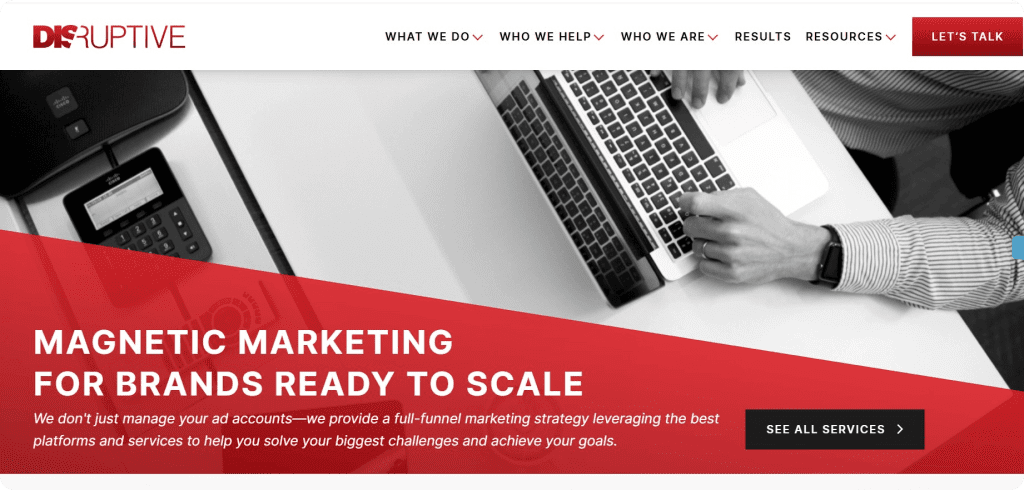
    Disruptive Advertising

    Disruptive Advertising agency identifies itself as an agency that puts more money into your pocket. By focusing on key factors in partnering with clients, such as honesty, responsibility, authenticity, and exclusivity, they stand out with the ability to eliminate wasted spend. 

    This agency allows you to:

    • Get a free PPC audit and thoroughly discuss all the brand-related issues
    • Manage your PPC campaigns, allowing you to concentrate on other parts of your business
    • Build your PPC creative strategy based on your business goals. This way, you can reduce customer acquisition cost (CAC), increase ROI, and lifetime value (LTV). 

    This agency could be a perfect fit for existing ad accounts that lack the expertise to optimize and scale for better results.

    Disruptive does not publish fixed pricing tiers on its PPC management services. You can get your free marketing audit on their website by filling in the necessary information regarding your marketing needs.

    To Sum Up

    Clicks don’t lie, but a poorly chosen PPC agency does. Choosing the best PPC agency will undoubtedly reduce the chances of burning budget by increasing the chances of profiting from wise investments. 

    Consider booking calls with those agencies that you think match the values and strategic goals of your business. Eventually, sourcing out a PPC agency opens up enough time and space for your in-house marketing team to work more effectively on ongoing projects and expand into new areas. 

  • How Reliable Hosting Strengthens SEO and Organic Growth

    Search Engine Optimisation (SEO) is an evergreen tactic for organic traffic, brand recognition, and growth. However, SEO isn’t just about content optimization or link building. It involves technical aspects like site speed, security, uptime, and server location.

    By investing in a reliable web hosting provider, you can boost these technical SEO components. Wondering how? Keep reading to find out.

    What is Website Hosting?

    Website hosting refers to the purchase or renting of digital space to store a website on the World Wide Web. This way, the HTML writing, images, media, and all forms of content are stored in a server that allows internet users from all over the world to connect with your website. In simple words, it means providing a website with the ability to be viewed online. 

    5 Ways How Reliable Hosting Promotes SEO and Organic Growth

    Improved Site Speed and Page Load Time

    Enhanced site speed and performance is the best way hosting boosts SEO. Google ranking depends significantly on page load speed. A fast site translates to improved engagement, minimal bounce rates, and better rankings. It encourages more sharing and backlink acquisition, which sends positive signals to search engines. Using a reliable local SEO tool alongside a fast website can help you target nearby customers more effectively and boost your local search visibility.

    A trustworthy hosting service uses content delivery networks (CDNs) and optimized server configurations that accelerate server response times and ensure minimal latency.

    They provide high-performance servers along with SSD storage. Their scalable resources manage traffic spikes without slowing or crashing the site.

    A high-performance hosting provider is ideal for businesses seeking organic growth. If you’re looking for a quality provider without breaking the bank, check out these Hostinger coupon codes. You can get an additional 10% off on the current Hostinger plans with code CNHostinger.

    Consistent Site Uptime

    Website downtime is not just an inconvenience; it can seriously harm your SEO results and user trust. If your website is down frequently, you lose visitors and leads. Sometimes, website downtime isn’t caused by the server itself but by incorrect DNS records or misconfigured traffic routes. Checking your DNS records ensures your domain is properly connected to your hosting server, helping visitors access your site without interruption.

    Search engine crawlers can’t index your page correctly if the website is often down. As a result, Google might penalize your site, i.e., drop ranks or de-index the page.

    A dependable web hosting provider maintains up to 95% or higher uptime. Thus, using one keeps your website accessible all the time. Consistent and higher site uptime keeps the website live for visitors and search engine bots. Pages stay indexed, ensuring steady ranks. For websites focusing on affiliate SEO, downtime can directly reduce commissions by preventing traffic from reaching affiliate links.

    Server Location and GeoTargeting

    The loading speed of your website for a select audience relies on the geographical location of the hosting server. If you host the website from a server geographically closer to your audience, the latency drops while the loading speed skyrockets.

    The right hosting provider will offer you a range of global server locations. Some may provide integrated CDN solutions where the content is served from the closest server location to users.

    Such an infrastructure lets locals from anywhere in the world load your website faster. This keeps your website relevant to the local search results on Google. For those wondering how long it takes for SEO to kick in, faster-loading websites usually rank better and sooner.

    Better Security and Trust Signals

    Proper hosting also enhances website security, which is a critical factor in SEO and site ranking. For instance, Google ranks websites secured with HTTPS protocols, which is used by 88.08% of all websites, higher on its search engine due to a safer user experience.

    On the flip side, those without HTTPS security are highly vulnerable to hacking and malware. Search engines may flag and blacklist or remove these sites from the search results.

    A robust hosting provider offers SSL certificates, malware scanning, DDoS protection, superior firewalls, regular security patches, and frequent backups. These significant security features protect the site from cyber threats.

    The advanced security safeguards all data and users and builds credibility among search engines and visitors.

    Scalable Solutions

    Organic growth is never steady; it’s low on some days and high on others. Website traffic varies on different days depending on campaign success, content virality, and attempts at the latest trends.

    Improper hosting services can cause your website to slow down or completely crash during such trying times. It not only impacts user impression but also ruins SEO efforts. Contrarily, good hosting ensures plenty of scalability so resources are adjusted on demand during particular times. Hosting, thus, is an SEO tool that keeps the website functional, preventing performance issues. With time, scalability builds a strong domain authority and helps the site rank better.

    Upgrade Your Hosting to Unlock SEO Growth

    With the right hosting service, your website will send the right signals to the search engines and make the algorithm work in your favor. It allows you to have a website that can outperform your competitors in SERPs, enhancing SEO and organic growth. So, find the best hosting provider today and let your website flourish․

  • Ultimate Guide to the Best Backlink Manager Software for SEO

    Ultimate Guide to the Best Backlink Manager Software for SEO

    Backlinks are at the forefront of your SEO game. Without them, search engines cannot consider your domain credible, which means it will not be ranked. The more relevant backlinks you get, the more it will indicate to Google that many pages trust your source and refer to your website. 

    And guess what, building that many backlinks manually and tracking them is going to take ages. Thousands of spreadsheets and open tabs consume the majority of resources, leaving the critical brainwork behind.

    Now that automation is at the core of many processes, backlink management has become relatively easy to handle. Tracking new and lost backlinks, anchor texts, and competitor profiles can be done from a single dashboard of the software.

    Depending on one’s business needs, each tool can be used differently. A single competitor analysis tool may suffice for some, while others may require the entire software suite as their business needs expand. So let’s explore what the backlink manager software gives you and what you can expect.

    Why You Should Start Using Backlink Manager Software

    Backlink manager software is more than just a monitoring tool; it’s a key resource that simplifies complex SEO tasks and helps you protect, track, and grow your backlink profile with ease. By using one, you gain several significant advantages that make link management both efficient and strategic.

    1. Saves time and automates link tracking

    Manually checking backlinks in Google Search Console or spreadsheets can quickly become overwhelming, especially if your site has hundreds or thousands of links. Backlink manager software centralizes all this data and automatically tracks your incoming and outgoing links, providing real-time updates on new, lost, or broken links. This automation saves hours of repetitive work and ensures you never miss important changes in your backlink profile, even when managing multiple domains.

    2. Monitors link quality and prevents penalties

    Toxic backlinks can harm rankings or trigger Google penalties. Backlink manager software evaluates each link’s authority, spam score, and relevance, helping you identify valuable links and flag harmful ones. With these insights, you can disavow risky links before they impact your SEO, keeping your backlink profile healthy and search-engine-friendly.

    3. Provides deeper analytics and actionable insights

    Modern backlink tools go beyond basic monitoring. They allow you to analyze competitor backlinks, identify link gaps, and track metrics like anchor text distribution, referring domains, and traffic contribution. This advanced reporting helps you make informed decisions, prioritize opportunities, and refine your SEO strategy to outperform competitors.

    4. Simplifies link-building and competitive advantage

    Many backlink management platforms include outreach features, enabling you to contact editors, manage link-building campaigns, and track placements from a single dashboard. This is especially helpful for usage-based billing platforms or SaaS tools with dynamic pricing models, where SEO and organic growth must scale in tandem with usage data and user acquisition. By analyzing competitor link profiles and identifying domains that link to them but not to you, the software helps uncover opportunities to strengthen your authority and increase your chances of appearing in search rankings.

    5. Streamlines campaign management

    From setting link-building goals to generating detailed reports, backlink manager software centralizes all aspects of your campaigns. You can easily monitor the progress of outreach efforts, track results, and adjust strategies without juggling multiple tools, saving time and improving efficiency.

    Using a backlink manager software combines automation, insights, and strategic oversight to make link management far easier and more effective. By exploring different platforms and understanding their features, you can choose the best software for your needs, ensuring your backlink profile grows stronger and supports long-term SEO success.
    Top 3 Backlink Manager Software for Link-Building Success

    1. SEMrush

    SEMrush is a famous SEO and marketing tool that provides various features for tracking keyword trends, managing backlinks, and analyzing content trends and ads. Today, we will explore its Backlink Analytics tool and its capabilities. 

    Screenshot of SEMrush backlink analysis

    With the biggest backlink database, marketers can receive detailed insights on a domain’s full backlink profile. Here are the insights you can get:

    • Domain’s authority score with scores on organic traffic and natural profile
    • Historical data on all kinds of backlinks and referring domains
    • A full visualized report on new and lost referring domains and backlinks
    • Categorized graphs on different kinds of referring domains and backlinks
    • Top-ranking anchors and pages

    SEMrush’s features extend to analyzing the backlink gap by comparing two or more competitor domains. This feature shows the referring domains that are linked to your competitors and not you. This is an ideal way to check for missed opportunities to link.

    For maintaining a healthy backlink profile, you can use the Backlink Audit for reviewing the hidden aspects of your SEO. Businesses can manage the suspicious, broken, and lost backlinks from a single dashboard. SEMrush also provides personalized recommendations and action lists to improve backlink health. 

    This comprehensive backlink database provides great value to SEO experts who want to stay ahead of their competitors and never miss linking opportunities.

    2. Ahrefs

    Ahrefs, being one of the most trusted platforms by digital experts, offers a wide range of features for effective backlink management. Ahrefs has a vast backlink database that gets updated every 15 minutes. Besides backlink management, Ahrefs is used by every marketer, beginner to expert, for SEO audit, keyword research, and more. 

    Screenshot of Ahrefs projects overview

    Ahrefs’ most important link-building features are included in several core tools:

    • Insights on Domain Rating (DR), URL rating (UR), and other metrics in Site Explorer
    • Thorough competitor analysis for checking competitors’ progress and finding gaps in the link-building process
    • Anchor text analysis for finding the anchor texts of backlinks directing to your website
    • Real-time alerts whenever users gain new backlinks or lose the old ones
    • Disavow the backlinks that are no longer needed to be considered for ranking

    On top of these, in case you need to analyse multiple domains for new link-building strategies, the Batch Analysis allows you to check the websites of potential partners and streamline their selection by filtering your desired metrics.

    Another unique feature of Ahrefs is the ability to check the relevance of referring domains to the topic of your website. This will support in acquiring quality backlinks that will appear natural to search engines and higher your ranking chances.

    With its real-time data and comprehensive backlink index, Ahrefs keeps its popularity and credibility for those who aim to maintain an up-to-date backlink profile.

    3. Moz Pro

    Moz Pro is very popular among marketers for its clarity, user interface, and backlink insights. T’s widely used by beginners and experienced users for site audits, keyword research, and backlink management. 

    Screenshot of Moz Pro backlink overview

    While offering similar features to Ahrefs and SEMrush, Moz Pro helps in maintaining a healthy backlink profile with a wide range of tools:

    • Analyzing backlink profiles with a 43-trillion-link database. 
    • Identifying the domain’s spam score to flag low-quality links
    • Comparing backlink profiles against up to 5 competitors 
    • Setting link-building goals by tracking placements and outreach campaigns

    The highlight of Moz is that it uses its own metric system – Domain Authority and Spam Score, which gives a whole other perspective on the quality measurement.  You can also measure your backlink profile health by looking at the DA score of your referring domains. Moz’s feature helps you quickly grasp your chance of ranking higher. 

    With the Link Tracking Lists, you can increase your chance of ranking by tracking up to 500 URLs that might link to you. This feature sends automated alerts once a domain links to your website. 

    Overall, Moz Pro offers a unique blend of metrics, tracking capabilities, and competitive insights that make it an invaluable tool for anyone looking to build, monitor, and maintain a high-quality backlink profile.

    Wrapping Up

    Keeping track of backlinks doesn’t have to feel like a never-ending chore. With the right software, you can have everything in one place and fix the problems before they affect your rankings. What really matters is finding the one that fits your work style and the goals you are trying to achieve. 

    Managing backlinks is more about building credibility and trust rather than just numbers, ensuring your website receives the attention it deserves. With the right strategy, you will not only keep your website healthy but also invest in long-term growth. 

  • Top 10 Best Business Communication Solution Providers for 2026

    Explore the top business communication solution providers for 2025. Find the best tools to streamline your business communication.

    Over 75% of businesses worldwide are expected to have either adopted or plan to adopt VoIP and unified communication solutions by the end of 2025. The rapid shift from outdated legacy systems to cloud-based, digital-first platforms is not just a trend; it’s a necessity in today’s fast-paced business world.
    In 2025, seamless communication is no longer a “nice to have”, it’s the lifeline of every business operation. With hybrid and remote work models becoming standard practice, teams are scattered across time zones, customers expect real-time support, and collaboration needs are at an all-time high.
    Whether you’re running a startup or managing a global enterprise, the right business communication solution can help bridge gaps between teams, enhance customer satisfaction, and boost overall productivity.

    What’s Coming Next?👀
    What defines a business communication solutionKey features you should look for in 2025A detailed list of the top 10 business communication solution providersA comparison table to make your decision easierTips on how to choose the right solution for your unique need

    Let’s first break down what exactly falls under the umbrella of a modern business communication solution.

    What is a Business Communication Solution?

    A business communication solution refers to any digital tool or platform that enables effective internal and external communication for a business. It ensures information flows freely between teams, departments, and clients, no matter where they are.

    Here’s what typically falls under the umbrella of business communication tools

    • VoIP (Voice over Internet Protocol): Enables businesses to make and receive calls over the internet, replacing traditional phone lines.
    • Unified Communications (UCaaS): A centralized system integrating voice, video, messaging, conferencing, and collaboration tools.
    • Customer Relationship Management (CRM): Tools that track and manage customer interactions and history.
    • Video Conferencing Tools: Platforms for virtual meetings and webinars.
    • Instant Messaging & Team Collaboration Apps: Allow quick communication and file sharing among team members. A content marketing agency can use these tools to streamline campaign discussions and share creative assets in real time.
    • Contact Center Solutions: Help desk, ticketing, and omnichannel customer support systems.

    A good communication tool not only keeps your team connected but also helps deliver better customer experiences, boosts productivity, and supports business scalability.

    In 2025, if your communication tools are not cloud-based, secure, and integrated, you’re losing out. Businesses must adopt versatile platforms that adapt to remote needs, customer demands, and real-time collaboration. Choosing a platform that includes appointment booking software ensures scheduling is seamless and reduces back-and-forth with clients.

    Let’s explore the features that truly matter when choosing your ideal communication solution.

    9 Key Features to Look for in a Business Communication Tool

    When you’re evaluating business communication solutions, it’s easy to get caught up in shiny dashboards and flashy features. At its core, the ideal internal chat tool for business should simply help your team collaborate more effectively, work smarter, and stay connected, regardless of their location.

    So, how do you know which business communication solution is the right fit for your team?

    Here are the key features you should keep an eye out for:

    1. Unified Communication Capabilities

    Gone are the days when phone calls and emails were enough. Today’s business communication solutions need to bring everything, voice, video, messaging, screen sharing, and file sharing, under one roof. A unified interface reduces app switching and enhances productivity across teams. Choosing an all-in-one software makes it easier to manage communication without juggling multiple platforms.

    2. Security and Compliance

    Your communication tool should protect your data like a vault. Whether it’s end-to-end encryption, multi-factor authentication, or compliance with standards like GDPR, HIPAA, or ISO/IEC, security should be a non-negotiable requirement. If you’re in a regulated industry, this is even more critical.

    3. Mobility and Accessibility

    Work doesn’t just happen at the office anymore. Your business communication solution should offer full functionality across both mobile and desktop devices, with seamless syncing. Whether your team is working from home, traveling, or in a hybrid setup, staying connected shouldn’t be a hassle. And when employees do come into the office, trusted desk booking software makes it simple to reserve a workspace in advance, ensuring flexibility and reducing friction in hybrid schedules.

    4. Scalability

    Your business may start small, but your business communication solution should grow with you. As your needs become more complex, a large room conference camera can help maintain clear communication across bigger teams and meeting spaces. Look for platforms that can scale easily, whether you’re adding users, integrating new departments, or expanding globally.

    5. Integration with Other Tools

    A communication platform that integrates seamlessly with other systems, such as CRM, project management tools, or helpdesk software, can significantly enhance workflows. The best business communication solutions integrate effortlessly with your existing tech stack.

    6. Ease of Use and User Experience

    If your team needs a training manual just to send a message or start a video call, that’s a red flag. Choose a business communication solution with an intuitive interface that requires little to no onboarding. A clean UX saves time and boosts user adoption.

    7. Customization and Control

    Every business is unique, and so are its communication needs. Your ideal solution should allow for customizable workflows, branding, user roles, and permissions, giving you complete control over how it’s used.

    8. Analytics and Reporting

    Data-backed decisions are smarter decisions. A robust communication solution for businesses will provide detailed analytics, including call logs, response times, usage patterns, and user engagement. These insights help optimize operations and identify areas for improvement.

    9. Reliable Support

    Even the best tools hit a snag. When that happens, fast and efficient support is crucial. Look for business communication solutions that offer 24/7 customer support, detailed documentation, and a responsive ticketing system. Beyond that, many teams rely on VoIP phone systems to keep calls stable and support workflows connected during technical issues.

    Whether you’re a startup looking for your first tool or an enterprise upgrading from a legacy system, these features form the foundation of an effective business communication solution. 

    Remember, it’s not just about communication; it’s about smarter, faster, and more secure collaboration that fuels business growth.

    Next, let’s dive into the top solution providers you should consider this year.

    Leading 10 Business Communication Solution Providers in 2025

    With numerous options available, how do you determine which provider best suits your needs? 

    To help you make an informed decision, we’ve rounded up the top 10 business communication solution providers for 2025, each offering a unique blend of features, flexibility, and future-ready technology to keep your teams connected and productive.

    1. Ecosmob Technologies

    Ecosmob Technologies stands out as a global leader in VoIP-based business communication solutions, recognized for its robust and customizable platforms tailored to diverse industry needs. With over a decade of experience, Ecosmob provides cutting-edge VoIP software development services, covering Hosted PBX, SIP trunking, Unified Communications (UCaaS), and real-time collaboration tools. Their client-centric approach and deep technical expertise make them a preferred choice for enterprises seeking reliable, scalable, and secure communication solutions for business.

    Top Features:

    • Hosted PBX solutions
    • SIP trunking services
    • Unified Communications as a Service (UCaaS)
    • Intelligent IVR systems
    • WebRTC-based audio and video conferencing
    • Session Border Controller (SBC) development
    • VoIP mobile and desktop apps
    • Custom CRM and API integrations

    Best for – Mid to large-sized enterprises seeking AI-driven VoIP and unified communications systems.

    Pricing –  Custom quote based on project requirements.

    Pros – Highly customizable solutions tailored to industry-specific needs, Strong technical support and maintenance services, Expertise in VoIP, AI, and real-time communication tools

    Cons – Custom pricing may not suit small startups or freelancers. Not a one-size-fits-all platform

    2. RingCentral

    RingCentral is a cloud communications giant that offers a comprehensive suite of business communication solutions, including voice, video, messaging, and contact center capabilities. Designed for hybrid and remote teams, RingCentral’s platform helps businesses manage workflows efficiently with seamless integrations and a user-friendly interface.

    Top Features:

    • Cloud-based phone system
    • Video conferencing and webinars
    • Team messaging with task management
    • Call analytics and AI transcription
    • Integration with Microsoft 365, Google Workspace, and Salesforce
    • Mobile and desktop apps

    Best for – Businesses of all sizes needing an all-in-one communication platform.


    Pricing – Starts at $20/user/month (Core Plan).

    Pros – Reliable and scalable cloud communication, Robust third-party integrations, Strong uptime and global availability

    Cons – Some features locked behind higher-tier plans, Learning curve for new users, Limited customization for specific workflows

    3. Zoom

    Originally known for video conferencing, Zoom has rapidly evolved into a unified business communication solution offering chat, VoIP, webinars, and collaboration tools under one umbrella. It combines simplicity with powerful, enterprise-grade features, making it a go-to solution for both remote teams and enterprises.

    Top Features:

    • HD video conferencing
    • Zoom Phone (cloud telephony)
    • Zoom Chat (team messaging)
    • Zoom Webinars and Events
    • Breakout rooms and screen sharing
    • Integration with third-party tools like Slack, Salesforce, and HubSpot

    Best for – Organizations prioritizing video-first communication with hybrid workforces.

    Pricing – Free basic plan; paid plans start at $14.99/month/user.

    Pros – Intuitive and user-friendly UI, Reliable performance even with low bandwidth, Excellent scalability, and brand trust

    Cons – Phone features may lag behind dedicated VoIP providers, can get expensive with add-ons, Basic plan limits session duration

    4. Microsoft Teams

    Microsoft Teams is a core component of Microsoft 365, providing a tightly integrated communication solution for businesses. It combines chat, meetings, file sharing, and business apps under one platform. Ideal for businesses already using Microsoft tools, Teams promotes a unified digital workplace environment.

    Top Features:

    • Instant messaging and threaded conversations
    • Video conferencing and screen sharing
    • Deep integration with Microsoft 365 apps
    • Shared calendars, tasks, and files
    • VoIP phone calling and voicemail
    • Enterprise-grade security and compliance

    Best for – Microsoft-centric enterprises and educational institutions.

    Pricing – Starts at $4/user/month (Essentials Plan).

    Pros – Seamless integration with the Microsoft ecosystem, Strong enterprise security, Ideal for collaboration and document co-editing

    Cons – Can feel cluttered with too many features, requires a Microsoft 365 subscription for full functionality, less flexible outside Microsoft environments

    5. 8×8

    8×8 is a cloud-based business communication solution focused on providing integrated voice, video, chat, and contact center capabilities. Their all-in-one X Series platform is geared towards businesses that want to simplify operations and improve customer experiences with built-in analytics and AI tools.

    Top Features:

    • VoIP phone services
    • HD video and audio meetings
    • SMS and team chat
    • Integrated contact center
    • AI-powered call analytics
    • Microsoft Teams integration

    Best for – Mid-sized businesses with customer service teams.

    Pricing – Starts at $24/user/month.

    Pros – All-in-one platform with contact center options, Strong analytics and reporting features, Easy-to-use mobile and desktop apps

    Cons – International calling rates vary, Complex for very small businesses, Limited free trial edition

    6. Nextiva

    Nextiva offers VoIP and UCaaS-based communication solutions for businesses with a strong focus on simplicity, reliability, and customer service. It combines phone systems, team collaboration, CRM, and analytics in one clean interface, making it especially suitable for service-oriented businesses.

    Top Features:

    • Cloud-based VoIP phone system
    • Built-in CRM and contact management
    • Call recording and analytics
    • Video conferencing and messaging
    • Automated call routing and IVR
    • Integration with productivity tools

    Best for – Customer service-heavy businesses and sales teams.

    Pricing – Starts at $23.95/user/month.

    Pros – Excellent uptime and call quality, strong customer support and reputation, Ideal for customer-facing terms

    Cons – Advanced features reserved for higher tiers, limited integrations compared to others, interface feels dated to some users

    7. Cisco Webex

    Cisco Webex is a trusted name in enterprise-grade business communication solutions, offering powerful tools for meetings, webinars, calling, and collaboration. Backed by Cisco’s security expertise, it caters to large organizations that prioritize data privacy and global collaboration.

    Top Features:

    • HD video meetings with AI enhancements
    • Cloud calling and voicemail
    • Advanced meeting controls and real-time transcription
    • Whiteboarding and co-editing tools
    • Strong encryption and compliance
    • Integration with Microsoft, Google, Salesforce

    Best for – Enterprises and highly regulated industries.

    Pricing – Starts at $14.50/user/month.

    Pros – Enterprise-level security and reliability, suitable  for large-scale global terms, excellent AI-powered meeting features

    Cons – Requires training for full features adoption, UI can feel less modern compared to Zoom, and onboarding takes time for non-technical users

    8. Dialpad

    Dialpad is an AI-powered business communication solution that focuses on voice intelligence. It offers a clean and modern platform with VoIP, video conferencing, messaging, and call analytics, all backed by real-time AI transcription and coaching tools.

    Top Features:

    • VoIP and video meetings
    • Team messaging and SMS
    • AI-based call transcription and insights
    • Salesforce and Microsoft 365 integrations
    • Voicemail drop and call routing
    • Mobile app with call switching

    Best for – Tech-savvy teams and AI-focused customer support.

    Pricing – Starts at $15/user/month.

    Pros – AI tools for sales and support teams, sleek and modern interface, easy to use and deploy

    Cons – AI features require a premium, Limited customization for workflows, and limited international support compared to competitors

    9. GoTo Connect

    GoTo Connect is part of the LogMeIn family and offers a user-friendly communication solution for businesses, featuring VoIP, video, and messaging capabilities. It’s especially appreciated by SMBs looking for reliable performance, simplified setup, and built-in customer engagement features.

    Top Features:

    • VoIP business phone system
    • Video conferencing and team chat
    • Call routing and IVR
    • Visual dial plans
    • CRM integrations
    • Admin and user portals

    Best for – Small to medium-sized businesses and remote teams.

    Pricing – Starts at $27/user/month.

    Pros – Easy setup and intuitive UI, Competitive pricing for SMBs, Reliable customer service

    Cons – Less suited for large enterprises, Limited advanced features for analytics, Feature set may feel basic to power users

    10. Vonage Business Communications

    Vonage Business Communications offers flexible and feature-rich business communication solutions designed to support cloud telephony, team collaboration, and customer engagement. It’s known for its flexibility, allowing businesses to mix and match features based on their specific needs.

    Top Features:

    • VoIP calling and SMS
    • Video meetings and team chat
    • App center with dozens of integrations
    • API-based customizations
    • Call forwarding and mobile extensions
    • Unified admin dashboard

    Best for – Businesses needing flexibility and programmable communication APIs.

    Pricing – Starts at $19.99/user/month.

    Pros – Highly customizable plans, Rich third-party integration ecosystem, Flexible deployment and hybrid options

    Cons – Support response times may vary, more expensive for advanced features, and complex pricing tiers

    Provider NameVoice & VideoIntegrationsPricingSecurityBest for
    Ecosmob Technologies✅✅✅✅✅✅CustomAdvancedMid-to-large Businesses
    RingCentral✅✅✅✅✅From $20HighGrowing hybrid teams
    Zoom✅✅✅✅✅From $15ModerateVide-centric remote teams
    Microsoft Teams✅✅✅✅✅✅Bundled with Microsoft 365HighMicrosoft-centric organizations
    8×8✅✅✅From $24HighSMBs and call centers
    Nextiva✅✅✅✅✅From $18.95GoodSmall Businesses
    Cisco Webex✅✅✅✅✅From $14.50Very HighSecurity-focused enterprises
    Dialpad✅✅✅From $15HighData-driven teams
    GoTo Connect✅✅✅From $27ModerateQuick setup SMBs
    Vonage✅✅✅✅✅✅From $19.99HighDeveloper-heavy companies

    Not every tool will align with your team’s specific needs, structure, or long-term goals. The key lies in identifying what truly matters to your business and filtering out the noise. 

    Here is how to decide which one can be a good fit for you!

    How to Choose the Right Communication Tool for Your Business?

    To determine what fits your business communication needs, consider the following five points. Here’s how to narrow it down:

    1. Start with your goals: Are you focused on internal collaboration, customer communication, or both?
    2. Consider your current infrastructure: Are you already using Microsoft 365? Teams might be the best fit. Want something flexible and scalable? Ecosmob is a strong contender.
    3. Think about your team size and future growth: Scalability is key.
    4. Set a realistic budget: Understand the full cost of ownership, including any additional expenses.
    5. Look at support and training, especially for teams new to digital tools.

    Choosing the right business communication solution can elevate your entire workflow and make your organization more agile and connected.

    Wrapping Up

    In 2025, fast, secure, and flexible communication is the foundation of business success. From VoIP phone systems to all-in-one unified communication platforms, the right business communication solution can transform how your teams and customers connect.

    Whether you’re a fast-growing startup or a large enterprise, this list of the top 10 business communication solution providers offers a great starting point. Remember:

    • Choose based on your size, goals, and existing tools.
    • Pay attention to integrations and security features.
    • Don’t hesitate to go for a custom solution when your business demands it.

    Looking for something tailored?

    Ecosmob Technologies offers customizable, enterprise-grade business communication solutions that grow with your organization. With a strong focus on security, scalability, and real-time support, Ecosmob is an ideal partner for businesses seeking a robust communication solution for business in 2025 and beyond.

  • B2B Content Marketing: How Data Alignment Boosts Lead Quality

    The Hidden Revenue Killer Every SaaS Marketing Team Must Fix

    Your content marketing team just published a comprehensive guide that generated 500 downloads. Marketing celebrates. But when Sales reviews those leads, only 12 turn into qualified opportunities. Sound familiar?

    This disconnect between content marketing efforts and actual revenue impact is quietly killing B2B SaaS growth. While Marketing optimizes for engagement metrics and content downloads, Sales focuses on deal size and pipeline velocity. The result? Brilliant content that generates the wrong kind of traffic, leading to frustrated sales teams and wasted marketing budgets.

    At Keboola, we solved this exact problem by building a unified data approach that transformed how we measure and optimize our B2B content marketing efforts. The result wasn’t just better collaboration—it was a complete transformation in lead quality and conversion rates that directly impacted our bottom line.

    What is Keboola and Why This Matters

    Keboola is a cloud data platform that helps organizations collect, connect, clean, and automate their data workflows across the entire business. We’re built to empower not just IT and data teams, but also Marketing, Sales, Finance, and beyond—without constant dependency on developers.

    But here’s what makes this case study particularly relevant: we’re also one of our own most demanding customers. Our Sales and Marketing teams rely on Keboola every day as the central nervous system for how we use data. This isn’t theoretical advice from consultants—it’s a battle-tested approach from a team that lives and breathes data-driven marketing every single day.

    As a B2B SaaS company serving other B2B companies, we face the exact same challenges our customers do: complex sales cycles, multiple stakeholders, high customer acquisition costs, and the constant pressure to prove marketing ROI. The solution we built for ourselves has since become the foundation for how we help other companies transform their marketing operations.

    Why B2B Content Marketing Success Metrics Are Broken

    Most B2B content marketing teams measure success with vanity metrics that don’t correlate with revenue growth. They track:

    • Page views and session duration
    • Content downloads and form submissions
    • Email signups and newsletter subscribers
    • Social media engagement and shares

    Meanwhile, Sales teams care about entirely different numbers:

    • Account size and annual contract value potential
    • Decision-maker engagement and buying signals
    • Pipeline velocity and close rates
    • Customer lifetime value and expansion opportunities

    This misalignment creates a dangerous blind spot. Your content might be driving thousands of visitors, but if those visitors don’t match your Ideal Customer Profile (ICP) or show genuine buying intent, you’re essentially funding your competitors’ lead generation.

    The real problem isn’t the content itself—it’s the data infrastructure that prevents you from connecting content performance to actual revenue outcomes.

    The Data Integration Challenge in B2B Content Marketing

    Here’s what typically happens in a growing B2B SaaS company:

     Marketing uses tools like HubSpot, Google Analytics, and content management platforms to track engagement. Sales operates in Salesforce or Pipedrive, focusing on deal progression. Customer Success works in their own tools, measuring retention and expansion.

    Each department has rich data about customer behavior, but that data lives in silos. Marketing can’t see which content pieces actually influence closed deals. Sales can’t identify which blog posts or whitepapers correlate with higher-quality leads. Customer Success can’t pinpoint which onboarding content reduces churn.

    This fragmentation means your content marketing strategy is based on incomplete information, leading to:

    • Misaligned content priorities: Creating content that performs well in analytics but doesn’t drive qualified pipeline
    • Inefficient budget allocation: Doubling down on channels that generate volume but not value
    • Longer sales cycles: Sales teams spending time on leads that were never properly qualified through content engagement
    • Poor customer experience: Prospects receiving irrelevant content because marketing doesn’t understand their actual needs and behaviors

    How We Built a Revenue-Focused Content Marketing Stack

    When we recognized this problem at Keboola, we made a deliberate decision to break down these data silos. As a company that helps other businesses unify their data, we became our own most demanding customer.

    Our approach was straightforward but systematic:

    Step 1: Unified Data Collection

    We connected all our marketing tools—from Google Analytics and content management systems to email platforms and social media analytics—into a single data environment. But we didn’t stop there. We also integrated Sales data from our CRM, customer support interactions, and product usage analytics.

    Step 2: Content-to-Revenue Attribution

    Instead of just tracking who downloaded our content, we built attribution models that followed prospects through their entire journey. We could see which blog posts influenced prospects who later became enterprise customers, and which whitepapers correlated with shorter sales cycles.

    Step 3: Real-Time Content Optimization

    With unified data flowing in real-time, we could optimize our content strategy based on actual business outcomes rather than vanity metrics. If a particular content topic drove engagement but rarely converted to qualified leads, we could pivot quickly.

    Step 4: Automated Lead Scoring and Routing

    We developed scoring models that combined content engagement with firmographic data and behavioral signals. A prospect who read three enterprise-focused case studies and worked at a company matching our ICP received a different follow-up sequence than someone who downloaded a general industry report.

    The Results: From Vanity Metrics to Revenue Impact

    The transformation didn’t happen overnight, but the results were measurable and substantial:

    • Lead Quality Improvement: The percentage of marketing-generated leads that Sales qualified as “sales-ready” increased from 23% to 67% within six months.
    • Faster Response Times: The time from content engagement to sales follow-up dropped from hours to minutes, allowing us to connect with prospects while their interest was still fresh.
    • Content ROI Clarity: We could finally answer the question “Which content pieces actually drive revenue?” This led us to double down on high-performing content formats and eliminate efforts that looked good in analytics but didn’t contribute to growth.
    • Sales-Marketing Alignment: Both teams now use the same definitions for lead quality, opportunity stages, and success metrics. The endless debates about lead quality disappeared because the data was transparent and accessible to everyone.

    Practical Framework: Building Your Own Revenue-Focused Content Marketing System

    You don’t need to be a data platform company to implement similar improvements. Here’s a practical framework any B2B SaaS marketing team can follow:

    Phase 1: Audit Your Current Data Flow

    Map out every tool in your marketing and sales stack. Document what data each tool captures and how (or if) that data flows to other systems. Identify the gaps where valuable context gets lost.

    Phase 2: Establish Shared Definitions

    Before touching any technology, align your Sales and Marketing teams on definitions. What constitutes a “qualified lead”? How do you define your Ideal Customer Profile (ICP)? What behaviors indicate genuine buying intent versus casual research?

    Phase 3: Implement Progressive Data Integration

    Start small. Connect your content management system with your CRM to track which content pieces influence deal progression. Use tools like Zapier for simple integrations, or consider more robust platforms like Keboola for complex data workflows.

    Phase 4: Build Content-to-Revenue Attribution

    Create reports that connect content engagement to actual business outcomes. Track which blog posts, whitepapers, or case studies correlate with closed deals. This data will guide your content strategy decisions.

    Phase 5: Automate and Optimize

    Once you have visibility into content performance, automate the insights. Set up alerts when high-value prospects engage with your content. Create automated nurture sequences based on content consumption patterns and firmographic data.

    Content Marketing Metrics That Actually Matter for B2B SaaS Growth

    With proper data integration, your B2B content marketing dashboard should include metrics that directly tie to revenue:

    • Content-Influenced Pipeline: The total dollar value of opportunities where prospects engaged with your content during their buyer journey.
    • Content-to-Customer Attribution: Which specific content pieces most frequently appear in the journey of prospects who become customers.
    • ICP Content Engagement Rate: What percentage of your content consumption comes from companies that match your Ideal Customer Profile (ICP).
    • Sales Velocity by Content Engagement: How content engagement affects the speed at which deals progress through your pipeline.
    • Customer Acquisition Cost by Content Channel: The true cost of acquiring customers through different content marketing channels, including both creation costs and paid promotion.

    The SEO and Content Marketing Connection

    This data-driven approach also dramatically improves your SEO and organic content marketing efforts. When you understand which content topics actually drive qualified traffic, you can:

    • Target High-Value Keywords: Instead of optimizing for high-volume keywords that drive unqualified traffic, focus on terms that your actual customers search for during their buying process.
    • Create Content That Converts: Use your attribution data to identify content gaps in your customer journey. If prospects consistently convert after reading about specific use cases, create more content around those topics.
    • Optimize for the Right Audience: SEO becomes much more effective when you know exactly who you’re trying to attract and what they care about. Additionally, maintaining authenticity and ensuring your content aligns with brand voice is equally crucial. That’s where understanding AI Detection in B2B Content plays a key role in balancing automation with genuine engagement.
    • Build Authority in Profitable Niches: Focus your thought leadership content on topics that resonate with your highest-value customer segments, rather than casting a wide net.

    Overcoming Common Implementation Challenges

    Most B2B marketing teams face similar obstacles when trying to implement revenue-focused content marketing:

    Challenge: “Our data is too messy”

    Start with what you have. Even basic integrations between your CMS and CRM can provide valuable insights. Perfect data is the enemy of good insights.

    Challenge: “We don’t have technical resources”

    Many modern tools offer no-code integration options. Focus on connecting 2–3 key systems first, then expand gradually as you prove value.

    Challenge: “Sales won’t share their data”

    Frame the conversation around shared goals. When Sales sees that better data leads to higher-quality leads, they become enthusiastic partners.

    Challenge: “The setup seems overwhelming”

    Break it into phases. Start by manually tracking content engagement for a small segment of your highest-value prospects. Use spreadsheets if necessary. Prove the concept before investing in automation.

    The Competitive Advantage of Connected Content Marketing

    Here’s what many B2B SaaS companies don’t realize: while your competitors are optimizing for vanity metrics, you can build a sustainable competitive advantage by optimizing for actual business outcomes.

    When your content marketing is directly connected to revenue data, you can:

    • React faster to market changes: Quickly identify when content topics stop resonating with qualified prospects
    • Allocate budgets more effectively: Invest in content formats and topics that actually drive growth
    • Personalize at scale: Use behavioral and firmographic data to deliver the right content to the right prospects
    • Shorten sales cycles: Provide Sales with rich context about prospect interests and engagement

    Taking Action: Your Next Steps

    The gap between content marketing efforts and revenue impact doesn’t fix itself. It requires intentional action to bridge the data silos that prevent you from measuring what really matters.

    Start by auditing your current setup. Can you tell which content pieces influence your best customers? Do you know which blog posts correlate with shorter sales cycles? If not, you’re flying blind in one of your most important marketing channels.

    The companies that figure out content-to-revenue attribution first will have a significant advantage in the increasingly competitive B2B SaaS landscape. They’ll spend their content marketing budgets more effectively, generate higher-quality leads, and build stronger alignment between their marketing and sales teams.

    Your content marketing strategy should be a revenue multiplier, not just a lead generation machine. The data to make that transformation possible is probably already flowing through your organization—it just needs to be connected properly.

    Whether you’re investing in SEO, content marketing, or paid campaigns, the principles remain the same: unified data leads to better decisions, better decisions lead to higher-quality leads, and higher-quality leads drive sustainable growth. For B2B SaaS companies looking to build comprehensive content marketing strategies that actually convert, this data integration approach isn’t optional—it’s essential.

    Conclusion

    The shift from vanity metrics to revenue-focused content marketing is no longer a “nice-to-have” — it’s a necessity for every B2B SaaS company. Those that continue to optimize for clicks, downloads, and engagement risk being outpaced by competitors who measure what truly matters: the impact of content on revenue and growth.

    The solution isn’t more content or bigger budgets. The key is smarter data integration across marketing and sales, making it clear which blog posts, case studies, or whitepapers actually shorten sales cycles and bring in high-value customers.

    If you want to dive deeper into the technical aspects of marketing data integration, explore our comprehensive guide to data-driven marketing implementation and best practices. For B2B SaaS companies specifically looking to build comprehensive content strategies, check out this detailed 10-step SaaS content marketing guide that complements the data integration approach we’ve discussed.

    Frequently Asked Questions

    How long does it take to see results from data-driven content marketing?

    Most B2B teams see initial insights within 30-60 days of implementing basic attribution tracking. However, meaningful improvements in lead quality and conversion rates typically take 3-6 months as you optimize based on the data.

    Can smaller B2B companies implement this without a huge tech budget?

    Absolutely. Start with simple integrations between your existing tools using platforms like Zapier or native integrations. The key is connecting content engagement data with deal progression data, which doesn’t require expensive enterprise software.

    How does this approach improve SEO performance?

    When you understand which content actually drives qualified prospects, you can optimize for keywords and topics that attract your ideal customers rather than just high-volume traffic. This typically leads to better conversion rates and more sustainable organic growth.

    What if our sales team resists sharing data with marketing?

    Frame the conversation around shared goals and quick wins. Start by showing how better lead context helps Sales prioritize their outreach efforts. Once they see the value, data sharing becomes a natural part of the process.

  • B2B Content Marketing: 7 Strategies That Convert Decision Makers

    B2B Content Marketing: 7 Strategies That Convert Decision Makers

    Content is a key part of modern B2B marketing. 

    Today’s buyers don’t respond well to pushy sales tactics. Instead, they prefer to research, learn, and build trust before making a decision. 

    That’s why B2B content marketing is so important. With the right approach, it can bring in traffic, create leads, and help businesses stand out as leaders in their industry.

    In this article, we’ll talk about different content formats that work best for B2B and explore the strategies that can help you convert decision-makers into clients.

    Let’s start!

    What Is B2B Content Marketing?

    B2B (business-to-business) content marketing is the process of creating and distributing valuable content to attract, educate, and engage other businesses. 

    Unlike B2C content, which often focuses on quick purchases and emotional triggers, B2B content is designed for a longer decision-making process.

    Example: A company like HubSpot produces eBooks that help marketing professionals solve problems. This positions them as an authority and builds trust long before a sales conversation happens.

    So, B2B content marketing is about sharing knowledge and insights that guide potential customers through their buyer’s journey, from awareness to decision.

    Now, let’s see why this strategy matters!

    Why Is B2B Content Marketing Important?

    Understanding the value of B2B content marketing becomes clearer when looking at its key benefits. 

    Here they are:

    1. It Delivers Strong ROI (Return on Investment)

    B2B content marketing can generate measurable results over time. Good content attracts valuable leads, nurtures them through the buyer’s journey, and in the end drives sales. Also, it continues to provide value long after it’s published.

    Example: Salesforce uses ebooks, downloadable guides, and research reports to capture leads from professionals actively searching for solutions in sales, customer relationship management, and business operations. By providing these resources for streamlining Salesforce deployments, they capture leads who are already interested in its solutions. Over time, these leads can be nurtured into paying customers, which directly contributes to revenue. 

    Here’s a link to an example ebook.

    2. It Builds Trust and Enhances Brand Reputation

    Trust is a critical factor in B2B decision-making. Business buyers want to feel confident that they are partnering with experts. By consistently publishing good content, brands demonstrate expertise and credibility.

    Example: IBM regularly releases in-depth industry reports and technology insights that position the company as a leader in innovation and enterprise solutions. When businesses recognize your content as informative, reliable, and actionable, they are more likely to choose your products or services over competitors.

    3. Improves SEO and Organic Visibility

    Good content and effective content collaboration could improve search engine rankings, leading to increased visibility, more organic traffic, and better user engagement, making it easier for decision-makers to find your business name when they’re searching for solutions.

    4. Positions Your Brand as a Leader

    Publishing insights, research, and expert opinions helps establish your company as a leader in the industry, giving it an advantage over competitors.

    5. Educates Customers and Simplifies Complex Products

    B2B products are often complex. Content marketing, such as guides, tutorials, and webinars, helps prospects understand your offerings and make informed decisions.

    Content Formats That Work for B2B

    There’s no single approach that works for every business.

    The key is to mix different content types and see what resonates best with your B2B audience. 

    However, here are some of the most popular and effective content formats:

    1. Email Marketing

    Email marketing remains one of the best-performing B2B channels. Companies like Mailchimp and HubSpot nurture leads with regular newsletters that share industry insights, new features, and helpful guides. 

    These emails help people remember your brand while they decide on making a purchase.

    2. Blog Posts

    Blogs are the foundation of most B2B strategies. They provide SEO value, educate readers, and demonstrate expertise. 

    For example, Ahrefs’ blog is filled with tutorials that not only bring in massive organic traffic but also showcase the company’s tools in action.

    A screenshot of the Ahrefs tutorial blog

    A screenshot of the Ahrefs tutorial blog 

    3. Case Studies

    Case studies prove that your solution works in real-world scenarios. They show actual results and help potential customers visualize their future success. 

    For instance, Slack often publishes case studies, highlighting how large companies use their platform to improve collaboration, which makes their product more relatable to new prospects.

    A screenshot of the Slack case studies

    A screenshot of the Slack case studies

    4. Webinars

    Webinars are live online events where a company presents information, teaches a topic, or demonstrates a product to an audience in real time. 

    They let participants watch, listen, and sometimes interact through Q&A sessions or polls.

    Webinars are powerful because they allow genuine, real-time interaction and provide an educational experience for attendees. They also give businesses a platform to showcase their expertise.

    For instance, LinkedIn regularly hosts webinars to teach marketing and sales teams how to use their platform more effectively. In the screenshot below, you can see a webinar registration page specifically for those who want to master LinkedIn recruitment.

    Here’s a screenshot of a LinkedIn webinar example

    Here’s a screenshot of a LinkedIn webinar example

    5. Podcasts

    Podcasts provide a convenient, conversational way to share knowledge. 

    Many potential customers can listen to podcasts during commutes or just as a free-time activity. 

    A good example is “The Growth Show” by HubSpot, which features stories from business leaders and entrepreneurs.

    Here’s a screenshot of the HubSpot podcast The Growth Show

    Here’s a screenshot of the HubSpot podcast The Growth Show

    6. Whitepapers and PDFs

    Whitepapers are detailed reports that explain a specific topic, problem, or solution in depth. They’re designed to educate readers, share insights, and show that a company knows its field. PDFs are simply the format used to share these documents online.

    These resources are ideal for sharing industry research, reports, or technical guides. 

    They not only provide valuable information but also work well as lead magnets, as businesses often offer them in exchange for contact details like an email address.

    A good example is Gartner, which regularly publishes research reports covering technology and business trends. Many of these are available after filling out a form, allowing Gartner to collect leads while giving readers valuable insights. 

    7. Video Content

    Videos make complex ideas easier to understand and more engaging. 

    Product demos, customer success stories, or explainer video examples can be shared on YouTube, LinkedIn, or company websites

    For example, Adobe uses short video tutorials to show how businesses can get the most out of their software. Here’s a link to the source, if you want to check it out.

    8. Customer Testimonials and Reviews

    Social proof plays a huge role in B2B. 

    Hearing from satisfied customers reassures potential buyers. 

    Companies like G2 and Capterra thrive on customer reviews, and many B2B brands repurpose these testimonials into videos, blog quotes, or social media posts.

    Now that we know what content formats are preferred for B2B content marketing, let’s move on to exploring the best strategies to get more sales!

    Strategies to Convert B2B Customers

    Here are the most effective techniques to focus on if you want to actually move potential customers toward conversion:

    1. Focus on Keywords That Matter

    B2B buyers usually start their journey with research. That’s why optimizing content for the right keywords ensures your business appears when decision-makers are searching for solutions.

    Example: Ahrefs targets high-intent keywords with detailed guides, capturing readers who are already interested in SEO tools.

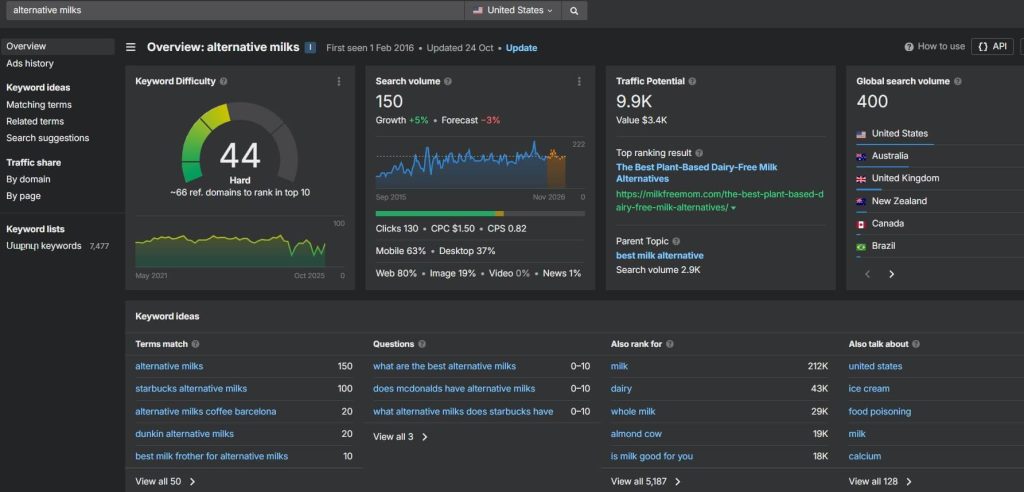
    To do proper keyword research using Ahrefs, follow these steps:

    1. Start with a primary keyword: Enter a broad topic related to your business into Ahrefs’ Keywords Explorer. For example, if your business offers CRM software, you could start with “CRM software” or “sales automation.”

    Here’s a screenshot of the Ahrefs keywords explorer tool

    Here’s a screenshot of the Ahrefs keywords explorer tool

    1. Analyze keyword metrics: Look at search volume and keyword difficulty. High search volume with moderate difficulty is usually ideal for B2B content.
    2. Identify buyer intent: Focus on keywords that indicate a clear intent to research, compare, or purchase solutions. Terms like “best CRM for small business” or “CRM implementation guide” show strong buyer intent.
    3. Explore Related Keywords: Use the “Related Terms” and “Match Terms” sections to find variations and long-tail keywords that capture more specific search queries.
    4. Plan Content: Select keywords based on a mix of search volume, difficulty, and relevance to your audience. Then, create content optimized around these keywords.

    By following these steps, your content can attract qualified leads actively searching for solutions, increasing the chances of conversion.

    2. Find Relevant Topics

    Don’t just write about anything. It’s better to focus on the problems your audience is actually facing. 

    If your content directly addresses their pain points, you’ll stand out as a helpful resource.

    You can use Google Trends to discover what topics are trending in your industry. In the screenshot below, for example, I searched for “marketing,” and you can see what related topics and queries it showed.

    Here is a screenshot of the Google Trends topics

    Here is a screenshot of the Google Trends topics

    Next point!

    3. Create Informative Content

    Vague and repetitive content marketing won’t help your B2B business grow.

    People in this field are looking for more depth and relevant insights. 

    Most valued types are:

    • Industry Studies: Research-based reports that highlight trends, challenges, or opportunities within a specific industry.
    • Leadership Content: Insights and opinions from industry or company leaders that position the brand as knowledgeable.
    • Comprehensive Guides: In-depth tutorials or how-to articles that help readers solve specific problems.

    HubSpot’s annual “State of Marketing Report” is a great example of content that’s informative as well as drives authority and trust.

    Moving on!

    4. Publish a Weekly Newsletter

    Consistency is key in B2B content marketing. 

    And a weekly newsletter provides exactly that. It keeps your brand in front of potential customers while giving them ongoing value. 

    This could include blog recaps, various news, or exclusive tips. Over time, this builds loyalty and increases the chances of conversion.

    Next strategy!

    5. Invest in Video Content

    Video is no longer optional. 

    Businesses are consuming more video content than ever, whether it’s explainer videos, product demos, or even podcasts with video elements. 

    Most popular video platforms for B2B content are:

    • YouTube
    • LinkedIn

    Dropbox, for instance, makes explainer videos on YouTube to show its product benefits clearly within minutes.

    6. Create LinkedIn Content

    As I already mentioned, LinkedIn is one of the most popular and powerful platforms for B2B marketing. 

    Sharing thought leadership posts, engaging in conversations, and promoting case studies here directly connects you with decision-makers. 

    Microsoft and Deloitte frequently publish industry insights on LinkedIn to stay visible to professionals.

    Last but not least!

    7. Repurpose Content Across Channels

    Maximize your efforts by turning one piece of content into many. 

    For example, a webinar can become a blog post, a series of LinkedIn posts, and a YouTube video. 

    This not only saves time but also ensures you reach different audiences in the format they prefer.

    Now that wraps up our guide on B2B content marketing!

    Concluding Thoughts

    As you can see, B2B content marketing is more than just publishing blog posts or sending emails; it’s about building trust, providing value, and guiding decision-makers toward choosing your business.

    By using different content formats and effective strategies like the right keywords and engaging video content, businesses can generate traffic, leads, and long-term customers.

    Start small, focus on delivering value, and remember: the goal is not just to attract attention but to convert attention into action.


  • Ahrefs vs SEMrush: The Ultimate Comparison Guide

    Ahrefs vs SEMrush: The Ultimate Comparison Guide

    If you are a business whose success depends on website traffic, you definitely cannot ignore SEO. Your website performance, backlink profile, and content strategy either attract new customers or push them away. Therefore, you need to put in some effort.

    Optimizing your website requires more than just publishing nice content, but also higher ranking keywords, backlinks, fast-loading pages, and overall website health. And there are plenty of available tools for marketers to reach their SEO goals. 

    In this article, we have focused mainly on the most popular SEO platforms, Ahrefs vs SEMrush. They are widely used by most digital marketing specialists; however, depending on your goals, you may choose one over the other. By comparing key features and capabilities, you can start using the best one that will serve your marketing purpose.

    Ahrefs: Rank Higher with Advanced Analytics


    Ahrefs is one of the leading SEO platforms serving many digital marketers with its wide backlink database and competitor analysis tools. It is designed for agencies and individuals who need exact results on their website and link performance. The platform has an easy-to-navigate interface and clear data structure, which makes it a go-to solution for many experts. 

    Why Should You Choose Ahrefs

    1. Advanced Keyword Research

    In Ahrefs, you can use the Keyword Explorer for insights into search queries. With one click, you can see the search volume, difficulty level, clicks, return rate, and traffic potential for your keywords. The highlight of this feature is that you can see real-time click data for the keywords, meaning how often searchers click the results.

    Additionally, Ahrefs suggests keyword ideas based on search patterns and provides global and local data, giving a broader perspective for campaign planning. This can also support content creation strategies to target terms that can deliver long-term results.

    screenshot of Ahrefs keyword explorer

    2. Comprehensive Backlink Analysis

    Backlink analysis is so far the strongest feature of Ahrefs, which makes it the first choice for many experts. It has one of the largest and frequently updated backlink databases in the industry. 

    The two main tools, the Site Explorer and Backlink Checker, provide data on referring domains, anchor texts, new or lost links, and link growth trends. This is due to the database size and speed, which makes it a reliable source for link research and new link-building strategies.

    3. Site Audit and Technical SEO

    With the Site Audit tool of Ahrefs, you can crawl your website to detect technical issues that might hurt your rankings. The tools support a thorough website audit by finding broken links, slow-performing pages, or missing metadata.

    What makes it especially effective is the way results are presented in a highly visualized dashboards and charts allow you to easily grasp the severity of each issue and prioritize fixes. 

    4. Competitive Gap Analysis

    Ahrefs includes powerful tools for analyzing competitors in ways SEMrush doesn’t fully match. Features like Link Intersect and competitor traffic insights let you see exactly where your competitors get their backlinks, which keywords drive their traffic, and which content performs best. This makes it easier to spot gaps in your own strategy and find opportunities to outperform competitors in organic search.

    Pricing

    Afresh’s subscription plans range from Lite to Advanced, with prices starting from $129/mo to $449/mo. Each plan includes access to the main features like Site Explorer, Keywords Explorer, Site Audit, Rank Tracker, etc.

    Each plan receives additional features on top of the core ones and fewer limits to access data. It is perfect for both individual and corporate users. 

    For digital marketers who are focused on boosting their rankings with the help of advanced backlink and keyword management tools, Ahrefs is the perfect choice, as it provides a comprehensive suite covering all the aspects of off-page SEO. 

    SEMrush: All-in-One SEO and Marketing Platform

    As an all-in-one digital marketing tool, SEMrush goes beyond SEO by covering more aspects of online marketing. It is very popular among marketers who specialize in content management, paid advertising, and competitive research. It is a perfect tool and a resource for those who are regularly running multi-channel campaigns. 

    Why Should You Choose SEMrush

    1. Large Keyword Database for Advanced Research

    SEMrush’s Keyword Magic tool has a large keyword database, allowing its users to apply advanced search filters and group keywords into clusters for campaign planning. This tool highly supports PPC optimization, as it provides cost-per-click data and competitor keyword tracking.

    2. Beginner-Friendly Site Audit

    The advanced features of SEMrush’s Site Audit provide similar ways to identify website issues. On top of that, it also gives actionable recommendations for improving the site structure and your website’s health. With the assigned health score feature, it is easy to track the improvements over time.

    screenshot of SEMrush site audit page

    3. Assistance in Content Management

    SEMrush provides a Content Toolkit and content creation and optimization. This platform helps marketers track their content performance, analyze engagement and identify high-performing topics. The Topic Research tool allows to research the trending content ideas and find subtopics. More specifically, the SEO content Template helps writers with SEO best practices.

    4. Advertising Support and PPC Analytics

    SEMrush offers comprehensive tools to manage and optimize paid campaigns. The PPC Keyword Tool helps identify high-performing keywords for ads. At the same time, Advertising Research helps with analyzing competitors’ ad strategies, budgets, and copy.  

    Marketers can also track banners and visual campaigns across networks, as well as create optimized ad copy. 

    These features help marketers plan, track, and refine PPC campaigns to maximize ROI across search engines and display networks.

    Pricing

    With SEMrush, marketers can access multiple subscription plans: Pro, Guru, and Business. Pro starts from $117/mo, and the highest plan is $416/mo. It also provides Add-on services for content marketers and is more focused on general marketing solutions. The limits on features of keyword research, backlink, and competitive analysis vary among the plans. 

    With its all-in-one features for managing content and ads across multiple campaigns, SEMrush is a go-to choice for many marketers who need advanced insights into SEO, PPC, and overall digital performance. Its combination of advertising tools, content management solutions, and competitive analysis makes it a perfect platform for multi-channel marketing strategies.

    Pros and Cons: The Ultimate Decision

    Ahrefs

    Pros:

    • Large  and frequently updated backlink database 
    • Organic keyword metrics with accurate click data
    • Intuitive interface and fast site crawling
    • Great for link building and competitor analysis

    Cons:

    • Higher pricing compared to competitors
    • Limited PPC and paid search insights
    • Fewer advanced reporting and multi-user options

    SEMrush

    Pros:

    • Broad marketing tools for SEO, PPC, social media and content marketing.
    • Large keyword database with more search intent data
    • Advanced site audit with recommendation features
    • Add-on for further marketing capabilities

    Cons:

    • Less focused on organic data and less precise than Ahrefs
    • The interface can be slightly complex for beginners
    • Smaller backlink database 

    Ahrefs is ideal for SEO specialists focused on organic backlink strategies and is less suitable for broader marketing efforts. On the other hand, SEMrush has better pricing plans and is best for teams or agencies managing multi-channel marketing campaigns, though its organic search data is slightly less precise than Ahrefs.

    Wrapping up

    Both Ahrefs and SEMrush are powerful SEO tools with slightly different purposes. Choosing between them highly depends on your goals.

     If you decide to choose organic growth with detailed backlink analysis opportunities, Ahrefs should be your go-to tool. But if you are a marketer who wants to focus on their website health, as well as go deeper into PPC and paid advertising, SEMrush can give you recommendations and add-ons for a full experience. 


  • The Complete Beginner’s Guide to Affiliate SEO Marketing

    The Complete Beginner’s Guide to Affiliate SEO Marketing

    Have you ever wanted to make money online but didn’t know where to start? Affiliate SEO marketing might be the answer you’ve been looking for. 

    It may sound complicated at first, but don’t worry. You don’t need to be a tech expert. 

    In this article, we’ll explore what affiliate SEO marketing is, whether it’s worth the effort, and the key steps you need to take to start building a career in it.

    Let’s get started!

    What Is Affiliate SEO Marketing?

    Affiliate SEO marketing combines affiliate marketing and search engine optimization. The goal is to attract organic traffic through high-ranking web pages and then earn revenue when visitors click on affiliate links and make purchases.

    Example: Suppose you create a travel website that publishes detailed guides like “Best Hotels in Paris for 2025.” You optimize the page with SEO techniques so that it ranks when people search for terms like “where to stay in Paris.” Inside the guide, you include affiliate links from hotel booking platforms. When a reader books a hotel through your link, you earn a commission. Many beginners explore affiliate SEO as a side income after completing a Digital Marketing Course, since it builds on SEO, content creation, and audience targeting skills they’ve already learned. That way, they can apply theory directly to practice while experimenting with niches that interest them.

    Let’s break it down further so it’s easier to understand.

    What is Affiliate Marketing?

    Affiliate marketing is when you recommend products or services and earn a commission if someone buys through your link.

    Example: Imagine you’re a YouTuber reviewing some products. It can be anything from electronics to makeup. In your video, you mention, “I’ve added the Amazon link in the description if you want to check them out.” When viewers click that link and make a purchase, you earn a commission.

    What is SEO?

    SEO stands for search engine optimization. It’s the process of making your website show up in Google when people search for topics related to your niche.

    Example: Let’s say you sell coffee beans and run a blog on your website. You write an article titled “Best Affordable Coffee Makers.” With the help of SEO, that article can show up on Google when people search for that phrase. As a result, new visitors discover your content, and while they’re there, they may also check out your coffee beans.

    How Affiliate Marketing and SEO Work Together

    By combining affiliate marketing with SEO, you:

    • Attract free traffic from Google
    • Help people find useful products
    • Earn money through affiliate links

    Example: You have a fitness website and publish an article about “Yoga Mats for Beginners.” In the article, you include a link to a yoga mat company. When someone searches that phrase on Google, finds your site, clicks the link, and buys a yoga mat, you earn a commission.

    That’s affiliate SEO marketing, and it works for almost any niche you can think of.

    Is Affiliate SEO Worth It?

    The short answer is yes, but you need to be patient with it. 

    Affiliate SEO marketing is not a quick way to make money. It usually takes months to see results. But once your articles rank on Google, they can bring readers and sales every single day.

    Here’s why you should give it a try:

    • It brings visitors for free: Good SEO content can show up on Google for years without paying for ads.
    • Earns while you sleep: Once your articles rank, they can keep making sales without extra work.
    • Easy to grow: You can keep adding more articles or try new topics to earn more.
    • Low cost to start: All you need is a website and time to create content.

    So, while it may feel slow in the beginning, over time, affiliate SEO marketing can turn into a steady income stream.

    Now, if you’re still interested in starting your own affiliate SEO business, keep on reading!

    7 Steps to Start Affiliate SEO Marketing 

    Launching an affiliate SEO marketing website for the first time can feel overwhelming.

    But don’t stress out, we’ve got you!

    If you follow these easy steps, you’ll create a strong foundation for your business and start attracting visitors with correct SEO tactics. 

    Let’s begin!

    Step 1: Pick Your Niche

    Your niche is your website’s topic, and picking the right one is an important step in your affiliate SEO efforts. 

    A good niche should have three key qualities:

    1. People are searching for it: There’s demand and interest in the topic.
    2. It has products to promote: You can recommend items or services your audience will want.
    3. You have some interest in it: Being at least a little curious or passionate helps you create better content.

    Here are some niche ideas that are popular today:

    • Cooking tools (air fryers, blenders)
    • Fitness gear (running shoes, yoga mats)
    • Tech gadgets (headphones, laptops)
    • Pets (dog toys, cat food)

    Pro Tip: When choosing your niche, write down 3-5 ideas. Then search them on Google to see if people are already writing about them. If yes, that means there’s demand. Now you can pick the idea that fits your interests and strengths best.

    Next!

    Step 2: Build Your Website

    Once you have your niche, it’s time to build your site.

    Here’s how to do it:

    1. Get a Domain and Hosting

    Your domain is your website’s address (like bestcoffeebeans.com). Choose something simple, short, and related to your niche.

    Beginner-friendly hosts include Bluehost, Hostinger, etc.

    2. Set Up WordPress

    Most hosts let you install WordPress with one click. WordPress is free and easy to use.

    Choose a clean, simple theme. Don’t worry too much about web design; visitors care more about speed and content. 

    And this leads us to the next step!

    Step 3: Make Your Site Easy to Use

    Google values a user-friendly site. If people leave quickly, rankings drop.

    Tips for beginners:

    • Use a mobile-friendly, responsive web design.
    • Keep menus simple (Home, Blog, About, Contact).
    • Write short paragraphs and use bullet points.
    • Add clear buttons like “Check Price on Amazon.”

    Moving on!

    Step 4: Do Keyword Research

    To create affiliate SEO content, you need keywords. 

    Keywords are the words and phrases people type into Google when searching for something.

    To get traffic, you need to do proper keyword research to identify what terms people are searching for in your niche and build your site to match them.

    Here are a few methods to look for keywords:

    1. Keyword Research Tools 

    The most popular tools for this are Ahrefs and SEMrush. To see how it works, let’s use Ahrefs as an example.

    Let’s say your niche is kitchen products. You could type a general term like “coffee makers” into the Keywords Explorer and examine the Matching Terms section. It shows related terms, their search volume, and how hard it is to rank for the keywords.

    Keyword Research Tools

    A screenshot of the Ahrefs keyword research 

    2. Google Autosuggest

    Google itself gives keyword ideas when you start typing in the search bar. 

    For example, if your niche is beauty and you type “face serums” into Google, it might suggest phrases like “face serums for mature skin,” “face serums for glowing skin,” etc. These suggestions show what real people are searching for and can help you find ideas for articles, product reviews, or guides.


    Google Autosuggest

    A screenshot of Google autosuggest

    3. Google “People Also Ask”

    When you search a topic, Google also shows a “People Also Ask” section with questions related to your search. 

    For example, searching “running shoes” might show questions like “what shoe is best for running?” or “what is the most sold running shoe?”

    people also askedA screenshot of Google’s “People Also Ask” section

    These questions also give insight into what your audience wants to know, and you can build content around them.

    Pro Tip: At the start, focus on long-tail keywords (longer, specific phrases). They’re easier to rank for.

    Step 5: Create Helpful Content

    As you have your keywords, you can now create articles based on them. 

    Good blog posts are the most important part of your affiliate SEO marketing site. They bring readers, build trust, and make sales.

    Here are the two main content types you should create:

    • Content that helps readers: This is informational content. It teaches or answers questions. Example: “10 Easy Meals You Can Make in an Air Fryer”.
    • Content that makes money: This is commercial content. It compares products and gives buying advice. Example: “Air Fryer vs Instant Pot: Which One Should You Buy?”

    The key is to balance both. Helpful content builds trust, and review content drives sales.

    On to the next step!

    Step 6: Learn Basic On-Page SEO

    On-page SEO means making SEO-optimized content that’s easy for Google to understand.

    Here are the basic rules to follow:

    • Write a meta title. This is the headline that shows in Google search results. Keep it around 50-60 characters.
    • Write a meta description. This is a short summary of your article that appears under the title on Google. Keep it around 150-160 characters.
    • Break content into headings (H2, H3, H4).
    • Add relevant images with clear file names (like “yoga-mat-for-beginners.jpg”).
    • Write alt text for each image. Keep it around 125-150 characters.
    • Use your main keyword in the title, meta title, and the first paragraph of your article.
    • Use relevant internal and external links.
    • Use keywords naturally. Don’t stuff them. 

    Start with these basics, and as you gain experience, you can learn more advanced SEO strategies to improve your rankings even further.

    And the last step!

    Step 7: Start Building Links

    Backlinks are links from other websites to yours. Google sees them as a sign to trust you if your backlinks come from credible sites. 

    The more quality backlinks, the higher you rank.

    Here are the two most common ways to get backlinks:

    • Guest posts: Write an article for another blog and include your link.
    • Niche edits: Ask website owners to add your link where it fits in exchange for their link on your site.

    Pro Tip: Avoid buying cheap links. They can hurt your site.

    Now that your website is set up and optimized, you can join different programs and earn money with your affiliate SEO marketing. 

    Where to Join Affiliate Programs

    There are many places to find affiliate programs for your niche. Some popular options include:

    • Amazon Associates: Great for almost any product niche.
    • ShareASale: Offers a wide variety of programs in different categories.
    • CJ Affiliate (Commission Junction): Works with big brands and retailers.
    • ClickBank: Focuses on digital products like courses and ebooks.
    • Individual brand programs: Many companies run their own affiliate programs. Check the footer of their website for “Affiliate” or “Partners.”

    Once you join, you’ll get links to use in your content. When someone clicks your link and buys, you earn a commission.

    And that’s a wrap on our affiliate SEO marketing guide!

    Final Thoughts

    Affiliate SEO is one of the best beginner-friendly online businesses. It doesn’t need much money, but it does need time and patience.

    Consistency is key here. If you keep creating helpful content, optimizing your site, and joining affiliate programs to promote products, your site can generate a steady stream of income over time.

    Good luck!

  • Top 10 Software Marketplaces Every SaaS and E-Commerce Business Should Know

    Explore the top 10 software marketplaces in 2025 that SaaS and e-commerce businesses can use to boost growth, visibility, and customer acquisition.

    Introduction

    For SaaS and e-trade companies, visibility and trust are everything. As the digital world becomes more competitive each year, finding the right platform to promote and sell your software is no longer optional, it’s essential. Businesses that rely only on traditional marketing channels often struggle to reach their ideal audience. This is where software marketplaces step in as game changers, complementing modern eCommerce marketing strategies to maximise reach and impact.

    A software marketplace is a key hub where customers can find, compare, and review different software products before buying. For vendors, it offers direct right of entry to decision-makers who are already searching for answers. Beyond discoverability, those marketplaces help agencies generate top-notch leads, make stronger credibility through established opinions, and, in the long run, drive regular conversions.

    Top-Rated 10 Digital Platforms for SaaS and E-Commerce Firms

    To help SaaS and e-commerce businesses expand visibility and win customer trust, several leading marketplaces provide the right stage to showcase software solutions. These platforms allow users to compare features, check authentic reviews, and choose tools that best match their business needs. Below are the top-rated platforms worth considering, almost like tried-and-tested marketing tips for e-commerce brands aiming for higher visibility.

    1. Techimply

    Techimply is one of the leading software marketplaces for corporations seeking to find dependable SaaS and IT solutions. It capabilities an extensive range of classes, from HR and accounting to task management and CRM gear. With thousands of indexed software carriers, Techimply makes it less complicated for customers to compare alternatives, read reviews, and select the right solution for his or her commercial enterprise needs.

    Why it’s valuable:

    • Covers 500+ software categories tailored to enterprise functions.
    • Offers verified critiques that construct agree with.
    • Provides visibility for SaaS startups and agency-level answers.
    • Attracts selection-makers actively trying to find software.

    By listing your product on Techimply, you not only gain publicity but also the risk to compete in a market relied on through agencies worldwide.

    2. SaasAdviser

    SaasAdviser is another pinnacle software marketplace that focuses solely on SaaS solutions. It enables organisations of all sizes to discover equipment that increases productivity. The platform is designed for its specified comparisons, expert insights, and tested client critiques, making it a first-rate choice for SaaS carriers aiming to reach a highly relevant audience.

    Why it’s valuable:

    • Niche recognition on SaaS gear and structures.
    • Strong advice engine based on use instances.
    • Attracts a target audience already invested in virtual growth.
    • Supports B2B SaaS companies searching for targeted exposure.

    SaasAdviser is in particular beneficial for groups aiming to establish themselves fast within the SaaS domain, because it draws customers who are actively getting to know and are prepared to invest.

    3. G2

    G2 is one of the world’s biggest software evaluation and market platforms. It’s used by means of hundreds of thousands of organisations to discover, evaluate, and review software equipment. For SaaS companies, G2 gives wonderful visibility through its ranking system, in which products are compared within classes and rated with the aid of validated customers.

    Why it’s precious:

    • High area authority and worldwide target market.
    • Verified evaluations that have an impact on purchase decisions.
    • Valuable analytics and client rationale records for providers.

    The credibility that incorporates being listed and reviewed on G2 frequently ends in faster belief-constructing and better conversion costs for SaaS companies.

    4. Capterra

    Capterra offers corporations with comprehensive evaluation tools to assess a couple of software companies facet by facet. With specified filters with the aid of pricing, industry, and capabilities, Capterra is particularly useful for businesses with precise needs. For SaaS companies, it ensures exposure to high-motive consumers looking to make immediate purchasing choices.

    Why it’s valuable:

    • Wide coverage of software categories.
    • Trusted by SMEs and enterprises alike.
    • Generates qualified leads for SaaS carriers.

    Its intuitive interface and in-depth filtering options make it a move-to resource for companies that want tailored solutions.

    5. GetApp

    As part of Gartner Digital Markets, GetApp has a robust reputation for handing over correct and reliable records on SaaS products. It permits groups to explore answers primarily based on functionality, pricing models, and client reviews. For SaaS carriers, listing on GetApp boosts credibility way to Gartner’s sturdy brand presence.

    Why it’s treasured:

    • Gartner-sponsored authority and reliability.
    • Easy-to-navigate evaluation gear.
    • Strong B2B target market base.

    Being part of the Gartner ecosystem gives SaaS carriers immediate credibility and enables them to reach corporation-level clients.

    6. SoftwareSuggest

    SoftwareSuggest is the other relied on software marketplace that relies on B2B SaaS and IT solutions. It facilitates corporations to discover tools in categories like ERP, HRMS, and CRM. With expert hints and validated opinions, it’s particularly powerful for organisations looking to enter new markets.

    Why it’s treasured:

    • Strong base in India and expanding globally.
    • Personalised software pointers.
    • Good platform for SaaS startups.

    Its developing international presence makes SoftwareSuggest a first-rate choice for SaaS providers seeking international recognition.

    7. SourceForge

    SourceForge is thought of globally as a platform for open-source and enterprise software solutions. It offers software vendors an area to reach developers, IT specialists, and businesses. SourceForge additionally offers gear for web hosting, dispensing, and reviewing software.

    Why it’s valuable:

    • Ideal for open-supply SaaS and organisation gear.
    • Reaches a worldwide developer network.
    • Long-status credibility inside the software space.

    For SaaS companies concentrated on a greater technical audience, SourceForge gives unmatched publicity.

    8. Product Hunt

    Product Hunt is a completely unique platform wherein new software products are released and found each day. It’s an amazing market for SaaS startups looking for preliminary traction, person feedback, and visibility. A successful launch on Product Hunt can appreciably raise consciousness and adoption.

    Why it’s treasured:

    • Strong network-pushed discovery.
    • Great for brand new SaaS gear and startups.
    • Can create viral momentum.

    Startups that benefit from traction on Product Hunt regularly find it easier to draw buyers and early adopters.

    9. Software Advice

    Software Advice is another Gartner-owned market that provides unique studies and advisory services. It connects corporations with software solutions tailor-made to their desires and regularly consists of free consultations. For SaaS vendors, it presents a reputable platform subsidised via Gartner’s studies.

    Why it’s valuable:

    • Trusted for advisory and sessions.
    • Strong emphasis on B2B software categories.
    • Builds credibility for indexed providers.

    Its consultative approach makes it in particular helpful for groups unsure about which way to undertake.

    10. AppSumo

    AppSumo is a famous platform for promoting SaaS gear, especially for startups and small groups. It’s famous for lifetime deals and inexpensive access to premium gear, which makes it appealing to marketers and freelancers. SaaS vendors gain exposure to a pretty engaged target audience eager to try new solutions.

    Why it’s valuable:

    • Popular for SaaS offers and promotions.
    • Great publicity for brand-spanking-new businesses.
    • Builds an early customer base quickly.

    AppSumo’s particular version enables SaaS groups to generate buzz, accumulate consumer comments, and set up logo presence at an early level.

    Conclusion

    For SaaS and e-trade organisations, choosing the right marketplace can considerably affect growth, visibility, and sales. Platforms like Techimply and SaasAdviser provide area-of-interest-specific publicity, ensuring your product is visible by means of customers who are already looking for answers. 

    Established names like G2, Capterra, and GetApp construct credibility with their reliance on reviews and global recognition, even as systems like Product Hunt and AppSumo are perfect for startups looking for rapid traction and a devoted user base.

  • 5 Best Practices to Provide Amazon-Like E-Commerce Customer Service

     Discover 5 best practices to deliver Amazon-like e-commerce customer service, boosting satisfaction, loyalty, and trust for a seamless shopping experience.

    Business goal for creating this content:Educate the readers 5 Proven Ways to Deliver Amazon-Level E-Commerce Customer Service
    Target persona(s):Customer Support team, Product Manager, Ecommerce team etc.
    Voice/tone:Informative, clear, they like lists.

    5 Best Practices to Provide Amazon-Like E-Commerce Customer Service

    Providing excellent e-commerce customer service is very important for online stores, apart from selling quality products and services. Regardless of the industry or sector in which you operate, with the help of Amazon-like e-commerce customer service, you can alleviate yourself from the rivals in the market. As per the recent data, 75% of customers who receive outstanding customer service will return to your company.

    Source
    The majority of companies are proud to note this, but only a handful of them manage to do it effectively. If you want customers to return or even turn loyal, then you have to direct your attention to how you can help them as customers. While the online consumer is absolutely satisfied with the conveniences of online stores, the end-user prefers user-friendly and easily accessible e-commerce customer satisfaction.

    In this blog, we will check out the best practices to offer Amazon-like e-commerce customer service to attract more customers and build a strong network and goodwill in the market.

    What is the Best Way to Describe E-Commerce Customer Service?

    The customer service aspect of e-commerce starts right with offering your products to them, helping them make purchases and payments, and reaching a solution to their problems. When interacting with businesses, 93% of consumers use emails, and 88% use phones. Consequently, e-commerce customer service should consist of not a single but a multi-channel portal. 

    You should support your customers through WhatsApp, SMS, easy calling via a Cloud PBX phone system, and live chat. Whenever a customer faces an issue, they should be able to reach you instantly. Effective customer support is quick, convenient, and genuinely helpful for your clients. Most customers dislike spending time searching for a business’s contact details, so make it effortless for them—ensure your email, phone number, Cloud PBX contact line, and social media handles are clearly visible and easily accessible at all times. This not only builds trust but also enhances customer satisfaction and loyalty. You should support your customers through WhatsApp, SMS, easy calling, and live chat. Whenever a customer faces any issue, they should be able to contact you instantly. Effective customer support is quick, convenient, and helpful for your clients. Most customers don’t like spending time searching for a business’s contact details. Your email, phone number, social media handles, etc., should be readily available to your customers.

    The main aim of e-commerce customer service is to resolve your customers’ issues and problems and offer them a seamless experience to drive sales in ecommerce without any hindrance.. Any issue related to shipping and delivery, product quality, wrong orders, etc., should be taken care of and solved as fast as possible. 

    For e-commerce customer satisfaction, it is crucial to be quick while solving your customers’ queries. 

    Significance of Providing Amazon-Like Customer Service

    There are several reasons why it is important to offer Amazon-like customer service to your customers. People want to buy from places where they feel valued and welcome, so you must keep this in mind when dealing with clients. 

    1. Meet customer expectations: Everyone wants to purchase from a store that is reliable, convenient, and quick. You have to offer quick shipping with live tracking, easy returns, and exchanges, and solve any problems quickly. Through effective customer support, you can offer all this and meet your customers’ expectations.
    1. Do better than your competitors: The online market will have thousands of such businesses that will have similar products. E-commerce customer support plays a big role in customer retention and service delivery; you can use it to outdo the competition. Consumers will prefer your shop over the competitors if you care for them and listen to them. Helping your customers with problems goes a long way.
    1. Maintain brand reputation: Amazon has become such a global and big brand because of its customer support. When you offer Amazon-like e-commerce customer service, you can also boost your brand image and maintain a great reputation. More and more people will trust your brand and want to do business with you. To achieve this level of excellence, many businesses collaborate with Amazon marketing agencies that specialize in optimizing customer experience, improving brand visibility, and implementing strategies that mirror Amazon’s service standards. These agencies help brands build trust, streamline communication, and deliver consistent support — just like Amazon does.
    1. Gain loyal customers: Effective customer support would bring back a wide range of loyal customers and new buyers. People value it so much when you show them that you are dedicated to meeting their demands and that you always give them support when they require help. Such an approach will enable you to turn the buyers into ultimate fans and make them refer you further. Combining this with smart e-commerce marketing strategies ensures that your outreach and engagement efforts are aligned with customer satisfaction, amplifying retention and conversions.

    In this sense, apps like ReferralCandy and Fluentaffiliate.com can quietly amplify customer advocacy, managing referral, affiliate, and influencer programs to turn delighted shoppers into brand ambassadors and fuel organic growth.

    Source

    1. Get positive ratings and reviews: Most people look for Google reviews and ratings on your website before buying stuff online. If you keep your customers happy with proper customer support, they will surely leave the best ratings and reviews for your store. People will check out these positive reviews and trust your store to buy stuff.
    1. Adapt to customer demands: When you spend time and effort on customer service, you will know the common issues your customers face, and you can work on solving them. You can improve your products and offerings so that future client problems and issues are low. Also, you will understand the demands and wants of your customers better.
    1. Reach a global audience: Offering the best e-commerce customer service will lead to more and more customers for your business. If you keep up the good work, your online business will soon become global, and people from around the world will buy your products.

    What Standards Must be Met to Deliver an Outstanding E-Commerce Customer Service?

    You must take care of meeting the following standards if you want to deliver an outstanding customer service experience for your clients: 

    • Make sure to have a variety of different payment and shipping options to satisfy the needs of people from different regions.
    • Keep your online store secure with SSL certification. If your online store has sub-domains, then you can go with the Wildcard SSL certificate. 
    • Disable any extra plugins or tools that make your website heavy and slow to load.
    • Make sure that there are direct links to your social handles, support phone numbers, chat, help desk, and other customer support channels.
    • Keep efficient upselling and cross-selling at the checkout page so that sales can increase.
    • Keep your delivery, shipping, return, and exchange policies as clear and concise as you can.

    5 Best Practices to Provide Amazon Like E-Commerce Customer Service

    You should follow these practices so that you can offer Amazon-like e-commerce customer service

    1. Create multi-level support 

    Your customer support service should be available across different channels. Keep your social media handles, email, phone numbers, live chat, and other portals easy to view and access. Your support team should be ready to instantly solve any customer query or issue they come across without wasting any time.

    Source

    Also, every customer has their own preferences. Some like contacting you over the phone, some will send emails, and some want to chat with support executives. Thus, you should be ready to offer support through multiple channels—and deliver consistent messaging using tools like a newsletter generator for scalable communication. 

    In addition, leveraging email outreach in-ecommerce can help you proactively engage customers, inform them of updates, and strengthen the overall shopping experience.

    To ensure the security of sensitive customer interactions, utilizing cloud email security solutions is essential, as they provide advanced protection against ransomware and other email-borne risks that can compromise both customer trust and business operations.

    1. Make your website customer-support friendly

    Your website should be integrated with customer support features so that it is easy for customers to get in touch. Use CTAs and forms so that anyone can directly reach the support team whenever they want to. 

    Source

    Add a help center and other sections so that customers can help themselves if possible. Live chat is another feature that customers love a lot. Keep automated answers ready for issues that are frequent, and your website should mention information regarding various support channels. 

    1. Add a frequently asked questions (FAQs) section

    One thing that will help provide effective customer service and improve the process for you is adding an FAQ section to your website. Many issues are common among customers, so you can talk about them and provide solutions in this section.

    Source

    Instead of directly getting in touch with the support team, customers can first go through this section and see if their problem can be resolved there. Also, search engines like Google highlight such sections and show them in their results. So, it is best for boosting your visibility as well as for better customer service.

    1. Utilize customer feedback 

    The best business is the one that works for its customers and listens to their demands. Make sure to ask every single customer for feedback regarding your products and services. Also, you can place feedback forms, so it is easy for customers to leave feedback and recommendations for you.

    Source

    This way, you will know better what your customers want and how to keep them happy. You can optimize your sales and service processes depending on the feedback received from clients. 

    1. Stay consistent with the support

    For the best e-commerce customer service, you have to take care of all aspects of your business. There are so many parts to your website, and a user may face issues anywhere. Therefore, your customer support should be consistent across all channels.

    Source

    Also, no matter if a query is simple or a bigger one, you have to treat every customer complaint equally. Your team should be dedicated to solving your customers’ problems, no matter how simple or complex they are.

    Conclusion

    Any business can offer the best products and services online, but they might not succeed unless they focus on offering the best e-commerce customer satisfaction. Therefore, taking care of the customers is vital if you want them to be loyal and leave good reviews about your business.

    We read about the top 5 practices you must follow if you want to provide Amazon-like e-commerce customer service. This way, you will be able to keep each customer happy and fulfill their demands. Helping your customers at every step of the way will take your business to new heights, without any doubt. 


    Author’s Bio: Ankita is an outreach specialist at SaaSifypro.com. With more than four years of experience along with communication skills, she develops and implements effective outreach strategies that deliver goal-oriented results.

    Email ID: [email protected]

    Author’s Headshot

  • How to Use AI Tools for Social Media in 2026

    Learn how to use AI tools for social media in 2025. Discover content generation, caption writing, trend spotting, analytics tracking & more using the best tools.

    It is unbelievable how fast things have changed.

    I mean, just a few years ago, using AI tools for social media involved post scheduling or some hashtag suggestions.

    But now, fast forward to 2025, AI is helping you generate personalized content, predicting trends, and so much more. A whole lot of social media strategy can be made. Seriously, it’s wild!

    In this blog post, I am going to tell you how you can use AI for your social media needs in 2025. You’ll discover the top 13 uses and the best tools for them. 

    So, I say, without any further ado, here we begin!

    The role of AI in social media

    How to use AI tools for social media: Top 10 ways and tools

    Ready for a spectacular social media performance?

    Here I go!

    Let me tell you about the top 13 uses of AI, each paired with the best tool to make it happen for your social media account. 

    1. Content creation with LightX

    Content is the king, the queen, and the entire royal court on social media. 

    With AI’s assistance, creating eye-catching posts, whether it’s a photo, video, or graphic design, becomes a breeze. 

    Instead of spending hours on Photoshop or simply thinking of ideas, AI tools can help you generate professional-like personalized content in just minutes. 

    The tool: LightX

    Honestly, LightX is my go-to AI content generator for social media. 

    It helps you come up with scroll-stopping masterpieces. You can generate AI images, designs, or videos like a pro. 

    Remove backgrounds, explore AI filters for Instagram pics, change outfits, hair, or backgrounds with AI, expand pictures or upscale them, resize them with just one click, and so much more. There’s literally so much that you can do, all in one place.

    It’s user-friendly and highly affordable, perfect for beginners as well as experts.

    2. Caption writing with Copy.ai

    You see, a caption can make or break your post. 

    Using an AI tool, you can craft a caption that matches your brand’s voice—funny, professional, inspirational, or any else.

    They can also include keywords and hashtags to help boost your discoverability. 

    The tool: Copy.ai 

    Trust me, Copy.ai is the champ for captions, copy, and hashtags. 

    Simply drop in your topic, pick a tone, and it will offer multiple caption options that feel human, not robotic, so your audience can connect. 

    It also suggests trending hashtags to maximize your reach. 

    I also love how it adapts to platforms. For example, short and punchy for X or storytelling style for Instagram. 

    It’s great for keeping a consistent tone across all your posts. 

    Learn more about how AI helps generate tailored social post content with HubSpot’s AI assistant.

    3. Hashtag generation with Hootsuite

    Hashtags are your ticket to get discovered. 

    But finding the right one is the pain. 

    AI hashtag generators here help you by analyzing the trends, your audience, and your content and then suggesting tags that would actually work. 

    They save you from using those generic or overused tags that get buried.

    You get a chance to land right in front of the crowd. 

    The tool: Hootsuite

    Hootsuite’s AI hashtag generator really stands out. 

    You enter your post’s topic or paste your caption, and it provides high-performing hashtags for Instagram, TikTok, or X. 

    It also considers your past post performance for personalized suggestions. 

    4. Video editing with InVideo

    Videos are HUGE on social media! And as Video-sharing app vine is returning

    Instagram Reels, TikToks, and YouTube Shorts will work like a charm!

    Using AI video editors, you can turn raw footage into engaging clips just like professionals. You can add music, captions, transitions, etc. 

    All this and more without needing a degree or any editing skills!

    The tool: InVideo

    InVideo is one great AI tool for social media videos.

    Just paste your script or describe your video idea (like a product demo for skincare), and it will generate a video using stock footage or templates.

    You can easily customize the colors, fonts, animations, and more to match your brand. 

    It is ideal for Reels and Stories. 

    The AI even suggests trending audio to increase engagement. 

    5. Social listening with Sprout Social

    Of course you’d wanna know what your audience is saying, right?

    Guess what? 

    There’s a thing called social listening that uses AI to monitor mentions, hashtags, and trends across platforms. 

    It helps you in spotting opportunities (like joining a viral challenge) or red flags (like customer complaints). 

    This insight allows you to shape content that resonates with your audience and builds trust. 

    The tool: Sprout Social

    When it comes to social listening, Sprout Social is the gold standard. 

    Its smart AI tracks conversations about your brand, competitors, or industry keywords—all in real time. 

    You get sentimental analysis (like are people happy with you) and actionable insights (like which topic is sparking engagement).

    It also integrates well with many content creation tools for a seamless workflow. 

    6. Posts scheduling with Buffer

    I think you’d agree when I say that consistency is the key.

    But posting manually every day? Nah!

    AI post-scheduling tools can help you here by analyzing your audience’s activity to suggest the best time for posting. They can automate your content calendar. 

    This frees up so much of your time to focus on strategy while staying active. 

    The tool: Buffer

    Buffer is perfect for post scheduling. 

    Its AI not only schedules the posts but also recommends the optimal posting times on the basis of when your followers are online. 

    You can queue up like a month’s worth of content in one go. You can also tweak posts for each platform from the dashboard. 

    Hootsuite does the same thing too. But, it’s up to you to decide between Buffer vs Hootsuite 

    Bonus: It also offers post ideas if you ever feel stuck. 

    7. Trend spotting with Brandwatch

    The key to staying ahead on social media?

    Jump on trends before they’re oversaturated. 

    AI trend-spotting tools analyze a wide range of posts, highlights, and conversations to identify what’s trending at that moment. These can be viral challenges, new aesthetics, or some topics. 

    Using this information, you can create timely content that rides the wave of what’s buzzing.

    The tool: Brandwatch

    With its trend-spotting capabilities, Brandwatch is one of the best AI tools for social media marketing.

    Its AI dives into data across platforms like X, TikTok, or Instagram to discover rising keywords, hashtags, or influencers in your niche. You get a real-time idea of what’s gaining traction, along with insights into why.

    It shows you what’s spiking and suggests how to adapt it for your audience. 

    It’s like having a trend radar!

    8. Audience segmentation with Emplifi

    You see, not all your followers are the same. So, AI audience segmentation tools help you in figuring out who’s who. 

    They analyze your followers’ behaviors, interests, and demographics and then group them into segments.

    This allows you to personalize your content or ads to specific groups. It boosts engagement and conversions. 

    The tool: Emplifi

    Emplifi has got you all covered when it comes to audience segmentation. 

    The AI takes data from your social accounts and creates detailed audience profiles. You get to see who’s engaging with what. 

    For example, it might reveal that one group loves your product tutorials while the other clicks on your lifestyle posts. 

    It then suggests targeted content or ad strategies for each segment, ensuring your posts hit the right people.

    It integrates with platforms like Instagram and LinkedIn, making it easy for you to act and grow your impact. 

    9. Analytics tracking with Social Champ

    Remember, you can’t improve what you don’t measure. 

    The AI analytics tools track metrics like reach, engagement, follower growth for you. They then serve insights on what’s working. 

    They help you double down on successful content and ditch what’s flopping. 

    Your strategy becomes data-driven. 

    The tool: Social Champ

    Looking to use AI for social media analytics tracking? Go for Social Champ!

    It monitors performance across different platforms like Instagram, LinkedIn, and X, giving you clear reports on what’s driving likes and clicks. 

    The AI also suggests tweaks like better posting times or content types according to your data. It also automates captions and scheduling for you. 

    So, it’s like a full package for your social media needs.

    10. Chatbot engagement with Chatfuel 

    Your followers expect quick replies, even if it’s 2:00 am. 

    The AI chatbots here come in handy. 

    They handle comments, DMs, or queries instantly, keeping your audience engaged. 

    They can answer FAQs, recommend products, or guide your audience to your site, boosting the customer satisfaction and your sales. 

    The tool: Chatfuel

    Chatfuel helps you automate replies on platforms like Instagram or Facebook using a natural language that feels human. That’s what the audience wants—that human touch.

    You can set it up simply to handle questions like “What’s your refund policy?” or drive sales with “Check out our new collection.”

    It’s easy to customize and track interactions to improve over time. 

    So, whether you are there or not, it has got your social presence and audience support. 

    And it’s a wrap! That’s it to my top 10 AI for social media posts, stories, reels, etc. 

    With these tools, watch your social game soar!

    Now, with the tools covered, let me tell you about some of the best practices of using AI for your social media.

    11. Creating Social Media Presentations with SlidesAI

    Presentations aren’t just for boardrooms anymore—they’re a powerful way to share content on LinkedIn, Instagram carousels, and even Twitter threads.

    With AI presentation tools, you can transform long-form content into engaging, shareable slides in minutes.

    The tool: SlidesAI

    SlidesAI makes presentation creation effortless. Simply paste your text, blog post, or idea, and the AI instantly converts it into a polished slide deck.

    You can choose themes, layouts, and visuals to match your brand identity.

    For social media, this means you can repurpose blog content, product guides, or even case studies into eye-catching carousel posts or explainer slides—without spending hours in PowerPoint.

    SlidesAI helps you turn ideas into professional, scroll-stopping presentations that boost engagement and save time.

    12. Audio Editing with AudioEnhancer.ai

    Of course you want your content to shine, right?

    Well, here’s the thing, audio is just as important as video.

    You can have a stunning 4K video, but if the sound is poor, nobody’s going to stick around to watch it.

    Good audio makes your content enjoyable, keeps people engaged, and actually makes them come back for more.

    The tool: AudioEnhancer.ai

    Audioenhancer.ai is an online platform that has everything you need.

    From boosting your voice and removing background noise to separating stems and even removing vocals, it’s packed with tools for editing and analyzing your audio.

    On top, its vocal remover offers maximum number of stem separation, six stems, i.e, drums, bass, guitar, piano, vocals and whole musicals.

    Basically, it gives you full control to make your sound clear, professional, and ready for anything.

    13. Generate Video ads with Tagshop AI 


    Short-form videos are taking over social media!

    From TikTok to Instagram Reels and YouTube Shorts, vertical videos are driving insane engagement right now.

    And if you’re running ads, having scroll-stopping creatives is everything.

    With an AI TikTok Ads maker, you don’t need advanced editing skills or a big production team anymore. You can turn simple ideas into high-converting video ads in minutes — add captions, voiceovers, transitions, hooks, and more without touching complex editing software.

    The tool: Tagshop AI

    Tagshop AI is a powerful AI TikTok Ads maker built for marketers and brands who want fast, high-quality video ads.

    Just paste your script or describe your product (for example, a skincare demo or dropshipping product), and it can generate a ready-to-run video ad. With just a few clicks, you can select the perfect AI voice to narrate your ad, making it sound professional without ever hiring a voice actor. You can choose avatars, select voices, adjust visuals, and customize everything to match your brand style.

    It’s perfect for TikTok ads, short-form video campaigns, and performance marketing.

    Best practices to use AI for social media posts

    AI tools like image editors, video generators, trend predictors, etc., are definitely the solution to making your social media posts stand out.

    But like any other tool, you gotta use it right to get those desired results. 

    Here are some practices that will help you slay the game: 

    ✅ Define clear goals or objectives; basically what you want.

    ✅ Choose the right tool that aligns with your needs.

    ✅ Maintain your brand’s unique tone, whether amusing, professional, or any other.

    ✅ Make sure the AI tools comply with privacy laws and protect your audience’s data.

    ✅ Use AI for efficiency but add a personal touch, as well, for authenticity.

    ✅ Experiment with AI’s assistance and refine based on performance.

    ✅ Train your team to use the suitable AI tools to maximize the potential. 

    There you go!

    These are the 10 no-fail practices to use AI for your social media.

    Now, last but not the least, let’s take a look at what the future of AI is in social media. 

    The future of AI in social media

    Okay, so, we have seen what AI can do for your social media.

    But, what’s next?

    Here’s a sneak peek: 

    • Real-time content personalization.
    • AI-generated virtual influencers.
    • Advanced deepfake detection.
    • Seamless multilingual engagement.
    • Predictive trend forecasting.
    • Emotion-driven ad targeting.
    • Automated, AI-driven ad campaigns.
    • Deeper creator-audience interaction via AI.
    • Ethical AI transparency tools. 

    Quite an impressive array of what’s coming, isn’t it?

    Final thoughts

    There are so many premium and free AI tools for social media out there.

    They are transforming how you can succeed.

    Whether you are a content creator, a business owner, or someone who’s just starting out, the AI tools make it easier than ever to create, connect, and grow your social media. 

    Start today and let the algorithms take you to new heights!

  • Local SEO Tool to Rank Higher | Rating Captain Local

    Discover how a powerful local SEO tool helps your business rank higher in local search results, manage Google listings, and increase visibility with ease.

    Best local SEO Tool to Improve Search Visibility and Boost Rankings

    Visibility isn’t just important, it’s everything. If your business isn’t showing up in local search results, you’re missing out on valuable foot traffic, leads, and sales. That’s why investing in the right local SEO tool is critical to your digital growth strategy. 

    Local SEO helps businesses and agencies improve their presence where it matters most: in Google Maps and local search, by making it easier to manage listings, monitor performance, and attract nearby customers ready to convert.

    Why a Powerful Local SEO Tool Matters for Local Businesses

    The modern local business ecosystem is dominated by proximity-based queries. Whether someone searches “dentist near me” or “best sushi in Brooklyn,” search engines prioritize local search intent. Without accurate local business listings, optimized content, and high visibility in local search, even the best services risk invisibility. This shift in user behavior highlights the need for precise tools that manage and enhance local SEO performance on an ongoing basis. Effective local SEO strategies must also include strong on site SEO, ensuring that website content, metadata, and structure are optimized to match local search intent and improve rankings.

    A reliable SEO tool focused on local ranking enables businesses to track how they appear in the local pack, respond to customer activity, and continuously optimize their strategy. Rather than reacting to visibility drops after they happen, companies can use proactive data from a local rank tracker to stay ahead of the competition. 

    According to WebFX, a leading US-based digital marketing agency, more than 80% of local-intent searches lead to conversions, meaning that ranking in top local results can have a direct and measurable impact on revenue.

    Managing Google Business Profile for Accurate Business Information

    Your Google Business Profile is your most important asset in local search. It influences click-through rates, maps visibility, and even in-store foot traffic. Yet many businesses underestimate how often these profiles are edited, sometimes without permission. Inaccurate hours, wrong addresses, or outdated categories can drastically reduce local visibility. Google verifies your business to confirm its legitimacy, helping to protect your profile from unauthorized changes and ensuring accurate information is displayed to potential customers.

    That’s where a dedicated local SEO software makes the difference. Rating Captain Local provides real-time monitoring, alerting you to suspicious changes and allowing bulk updates to ensure accuracy across every business listing. With this functionality, brands with dozens or hundreds of locations can manage their presence at scale, minimizing risks and ensuring that customers always see the correct information.

    Maintaining a consistent presence across local directories also reinforces trust with search engines, helping improve your local search rankings organically. Businesses that take this step not only appear more credible but gain a competitive edge in location-based queries.

    Local Rank Tracking: Measure and Improve Local SEO Performance

    No effective local SEO strategy exists without real-time tracking. Understanding your local ranking for specific keywords, across different locations, is essential to making informed decisions. That’s exactly what Rating Captain Local delivers with its powerful local rank tracking tools.

    With advanced rank tracker functionality, businesses can:

    • Track keyword performance by city, zip code, or even device
    • Get notified when positions drop or improve
    • Benchmark against competitors in the same geographic area
    • Visualize trends to make smarter optimization choices

    This continuous flow of data lets you react quickly, refine your content and citation strategy, and build a more predictable growth engine in local search. More than just a rank checker, Rating Captain Local becomes a control center for managing local SEO success.

    Boost Your Local SEO with Citation and Listing Management

    Citations: mentions of your business name, address, and phone number (NAP) — serve as a fundamental trust signal for Google. When they’re accurate and consistent across major platforms, you benefit from improved local search visibility. But managing citations manually is time-consuming and error-prone.

    A modern local SEO tool like Rating Captain Local automates the process. It helps you:

    • Identify outdated or incorrect business details
    • Submit and synchronize listings with top local directories
    • Monitor the health of your local citation profile over time

    The result? A unified presence that tells Google you’re reliable and rewards you with better local search rankings. When paired with an optimized Google Business Profile, citation consistency can help you dominate your category in search.

    Rank Higher with Automated Content and Review Management

    Google favors businesses that demonstrate activity, relevance, and responsiveness. With Rating Captain Local, you can create and automate content that meets all three criteria. AI-driven tools allow you to publish updates, offers, and news directly to your profile, using local keyword strategies that align with current trends.

    What makes this SEO tool especially powerful is its approach to customer reviews. You can:
    • Respond automatically with customized AI replies
    • Use tone and keyword personalization for better brand alignment
    • Monitor review sentiment to improve service and experience

    These features not only help you maintain a strong online reputation, but they also improve user engagement signals which, in turn, contribute to better ranking and visibility in local search results. By leveraging these advanced capabilities, the tool significantly boosts your SEO success, driving higher local rankings and attracting more customers to your business.

    SEO Reporting and Automation for Agencies and Brands

    Marketing agencies, , franchises, and multi-location businesses need scalable SEO services and solutions. Rating Captain Local delivers comprehensive SEO reporting capabilities that eliminate manual work and impress clients. Its white-label dashboards are both professional and intuitive, featuring KPIs that actually matter for local SEO performance.

    Included in these reports are:

    • Weekly and monthly ranking summaries
    • Review response logs
    • Citation and Google Business Profile updates

    This kind of transparency strengthens client relationships and provides the data needed for strategic pivots. It’s not just about looking good, it’s about making smarter decisions that improve your search engine presence consistently.

    Tools to Improve Your Local SEO Strategy in 2025

    Rating Captain Local

    Staying competitive in local search means using the best local SEO tools available. The industry is shifting toward automation, real-time data, and platform integrations. Rating Captain Local reflects that evolution by offering:

    • AI-enhanced review and content workflows
    • Bulk editing tools for local business listings across locations
    • Insightful analytics that reveal opportunities at a granular level

    It’s a popular local SEO tool for good reason: it reduces guesswork, saves time, and enables consistent visibility improvements across every touchpoint. From local pack presence to engagement metrics, it provides everything needed for true local SEO success.

    Bright Local

    BrightLocal offers an all-in-one platform that combines local rank tracking, citation building, reputation management, and SEO auditing. It’s especially well-suited for marketing agencies managing multiple clients or locations, thanks to its white-label reporting, lead generation tools, and customizable dashboards.

    Whitespark

    Whitespark focuses on local citation building and management, helping businesses get listed in the most relevant and authoritative directories. It also offers a powerful local rank tracker and tools for monitoring and generating customer reviews. Its structured approach to citation campaigns makes it ideal for businesses that need to improve local authority and NAP consistency.

    Moz Local

    Moz Local automates the distribution and syncing of business information across a wide network of directories and data aggregators. It detects and suppresses duplicate listings, keeps NAP data consistent, and provides real-time insights into the status and health of each listing, making it a reliable choice for businesses looking to maintain accurate, up-to-date online presence across platforms.

    Claim Your Business, List Your Business, Manage Your Local Presence

    Whether you’re just starting out or managing a network of locations, local SEO remains one of the most powerful ways to drive in-store visits, service bookings, and brand recognition within your community.

    From claiming your business profile to maintaining accurate contact details and earning positive reviews: every detail contributes to how your business is discovered and perceived locally.

    Local search is no longer just about being online; it’s about being visible to the right people at the right time, in the places they’re searching. A strong local SEO strategy helps you build trust, stand out in your area, and turn nearby searches into real-world results.

    Make local visibility your advantage and let your business be the first one customers find and choose.