Blog

  • Do Nofollow Links Help SEO: The Complete Truth Revealed

    Do Nofollow Links Help SEO: The Complete Truth Revealed

    If you’ve been into SEO, you’ve probably heard about nofollow links. At first, they seem simple enough, but the more you read, the more confusing they get. Do nofollow links help SEO? Should you even care about them?

    The truth is, it’s not as clear-cut as it used to be. Some people say they’re worthless, while others argue they still matter.

    In this article, we’ll break down how nofollow links actually work today and whether they’re worth your attention. By the end, you’ll understand what changed, why it happened, and how to think about nofollow links in your SEO strategy.

    What are NoFollow Links?

    Nofollow links are HTML hyperlinks that include a special [rel = “nofollow”] attribute, which tells search engines not to pass SEO value, also known as the “link juice” to the destination page. This is a way of protecting the page rankings from worthless or spammy links.

    The opposite of nofollow links are the dofollow links, which simply do not have any attributes. These kinds of links are automatically eligible for ranking and transfer the link juice. Therefore, if you do not add a nofollow attribute to your links, they will be considered as regular and affect your rankings.

    Below is an example of a dofollow link:


    And here is an example of a code with the nofollow attribute:


    They were introduced by Google in 2005 to fight the spam comments under blog posts. Many spammers would leave links to their websites in the comments or in forum posts that would harm the reputation of that website. Therefore, the nofollow attribute is being added to make certain links worthless and not eligible for ranking.

    For a long time, this was used to fight spammy links in the comments, forums, or paid advertisements that the site owners weren’t able to control. However, this attribute started to also be used to fight the paid links, as per Google’s guidelines, purchased links were prohibited from affecting the page rankings. The websites that would purchase links to get rankings would simply receive penalties and lose their rankings.

    By default, regular links without this attribute are considered dofollow, without any need to add a special attribute to the HTML code. 

    Types of NoFollow Links

    Alongside this change, Google introduced two more link attributes to better explain to Google why site owners do not want the links to be considered for ranking, and make search engines better understand the nature of different links across the web.

    The “SPONSORED” Links

    The sponsored attribute represents a signal in how search engines want webmasters to identify commercial relationships in links. It’s pretty straightforward: if someone has paid you to include a link on your site, whether that’s through a direct payment, a free product, or any other form of compensation, you’re supposed to tag it with rel=”sponsored”.


    The whole point is transparency. Google doesn’t want people to trick the system by buying their way to the top of search results through paid links. They had always had rules against this, but before 2019, everyone simply used the generic nofollow tag for everything. Now with the sponsored attribute, you’re being more specific about why you’re marking the link, which helps Google understand the web better.

    For example, if you’re a tech blogger and Samsung sends you a free phone to review and you link to their site, that should be marked as sponsored. The same goes for affiliate links, where you earn commission on sales.

    The “UGC” Attribute

    The rel=”ugc nofollow” attribute, which stands for user-generated content, is designed for links that appear in content created by users rather than the site owner or editorial team. This includes comments on blog posts, forum discussions, user profile pages, product reviews, and any other area where visitors can contribute content that may include hyperlinks.


    When you publish content on your own site, you care for the quality and relevance of any links you include. However, when you allow user contributions, you lose direct control over what gets posted. A site with an active comment section might receive dozens or hundreds of comments daily, making it impractical to manually review every link before it goes live. The ugc attribute signals to search engines that these links come from third parties and shouldn’t be treated with the same level of trust as editorial links.

    UGC links can be found in։

    • Comment sections and forums
    • User profiles on social networks
    • Q&A sites like Stack Overflow or Quora
    • Wiki-style collaborative documents
    • Marketplace listings

    Essentially, if a user who isn’t part of your organization can add or edit a link without going through an editorial approval process, it should be tagged as ugc.

    Do Nofollow Links Still Matter for SEO?

    Nofollow links are a bit complicated when it comes to SEO. The simple answer is yes, they still matter, but not in the obvious way that regular links do. Their value has changed a lot since Google updated its rules in 2019. Therefore, the real question is, do nofollow links help SEO somehow, or just cause harm if left unfixed?

    In the past, it was simple: nofollow links gave you zero SEO value. They were basically invisible when search engines calculated rankings. This made sense when nofollow was a strict rule that Google had to follow.

    Now Google can choose to ignore the nofollow tag in some situations. They haven’t told us exactly when they do this, which is normal for Google since they don’t want people to game the system. However, you shouldn’t plan your SEO around getting nofollow links and hoping Google will count them. In most cases, they probably don’t help your rankings directly. But they do offer other real benefits that can help your SEO in indirect ways:

    They Bring Direct Traffic

    The most obvious benefit is actual visitors. A nofollow link from a popular website can send thousands of people to your site, whether it helps your rankings or not. If someone reads an article that links to you, they’ll click on it either way. This traffic can lead to sales, brand awareness, and possibly even natural backlinks if those visitors have their own websites or social media accounts.

    They Make Your Link Profile Look Natural

    Real websites naturally get a mix of nofollow and dofollow links. If your website only has dofollow links, it might look suspicious to search engines. Normal sites get nofollow links from social media, comments they leave on other blogs, news coverage, and other sources. Having only dofollow links can make Google take a closer look at whether you’re doing something shady.

    They Build Brand Recognition

    Nofollow links help people recognize and trust your brand, even if they don’t directly boost your rankings. When your brand gets mentioned and linked around the web, it builds awareness. This influences how people behave in ways that eventually affect SEO, like searching for your brand name more often or clicking your site in search results because they recognize you.

    They Help Search Engines Find Your Content

    There’s also a case that nofollow links help with getting your pages discovered and indexed, even if they don’t help rankings. While Google says they usually won’t follow nofollow links for crawling, there are exceptions. New websites might benefit from any links that help search engines find their content. Plus, search engines still read the text around a nofollow link, so they can understand what topics your site is relevant to.

    The Bottom Line

    For practical SEO work, focus mainly on earning valuable  dofollow links from relevant, trusted sources. But don’t turn down nofollow link opportunities that offer other clear benefits like traffic, visibility, or building relationships. 

    Your link building should prioritize quality and relevance over quantity and link types. One dofollow link from a highly relevant, authoritative site in your field is worth more than dozens of nofollow links from random sources. But it’s also worth more than dozens of low-quality dofollow links from spammy directories.

  • WordPress Web Design Service: What to Expect and How to Choose the Right One

    WordPress Web Design Service: What to Expect and How to Choose the Right One

    Your website is often where people first discover your business, so it needs to work smoothly, look professional, and feel trustworthy. That’s why WordPress is such a popular choice. It’s adaptable, simple to manage, and strong enough to handle nearly any kind of website. But with countless WordPress developers and designers available, finding one who really gets what you’re trying to achieve can feel like a challenge.

    Source 

    Furthermore, before you collaborate with a reliable WordPress development company that provides the best WordPress web design service, you have to learn a few things. In this blog post, we will discuss the importance of selecting the right company for professional WordPress web design. So, explore the key factors and make the right choice that highlights the benefits of making an informed choice.

    What is a WordPress Web Design Service?

    WordPress is the platform that allows you to build, design, customize, and even maintain excellent WordPress websites. When it comes to attracting customers, following some growth marketing tactics, using WordPress is also a great decision. 

    WordPress is known as the leading open-source content management system (CMS) that powers everything from tiny personal blogs to large corporate portals. 

    Source 

    In addition, the full-service WordPress web design service also includes a few steps: 

    Step 1: Discovery: Understanding your business, goals, audience, and website needs.

    Step 2: Design: Creating the layout, style, visuals, and user experience for your site.

    Step 3: WordPress Development: Building the actual website with all required pages, features, and functionality.

    Step 4: SEO Basics: Setting up a superior SEO architecture with elements like meta tags, headings, URLs, and mobile optimization.

    Step 5: Performance Optimization: Ensuring the site loads fast, works smoothly, and provides a great user experience.

    Many WordPress development agencies also offer comprehensive website support, including security updates, backups, and feature tweaks.

    Why Choose WordPress for Your Website

    WordPress is a powerful CMS on the web for a reason. When you opt for a professional WordPress web design service, you will find that it is not just flexible but also widely supported and scalable. 

    As of mid-2025, WordPress powers over 43% of all websites, making it the single most popular platform on the internet. Furthermore, by digging deeper into how it’s used as a leading CMS, WordPress roughly holds a 61.4% CMS market share of that subset, a sign of how many site owners prefer the leading WordPress ecosystem for better, content-driven sites, e-commerce, and more. 

    What that means for you:

    • Thousands of themes and multiple plugins enable WordPress designers to add superior, exclusive features quickly without incurring additional time costs. 
    • Because WordPress is so common and highly popular, it’s relatively easy to find the best WordPress designers, developers, and agencies familiar with it.
    • From simple brochure sites to complex membership or e-commerce platforms, such as WooCommerce, WordPress can easily scale with your needs.

    What to Expect from a Professional WordPress Web Design Service

    When you opt for a professional WordPress web design service, the selection is also crucial. These companies specialize in creating and managing websites on the WordPress platform. They design advanced e-commerce, business portfolios, and even simple blogging websites. 

    These are a few additional services they provide:

    • Website Design and Development: WordPress offers a superior brand identity by creating excellent WordPress websites with themes and plugins that cater to the needs of viewers and consumers. 
    • E-Commerce Solutions: To sell excellent products or to attract more potential consumers, WordPress website design matters. It provides a seamless and easy shopping experience.
    • Performance Optimization: Company websites should meet the speed expectations of users and customers, who also get the chance to enhance the user experience, while also improving search engine rankings and driving organic growth. 
    • Security and Maintenance: Security patches and frequent updates for WordPress play a crucial role. A successful WordPress web design service also offers complete security monitoring, backups, and updates that keep the WordPress website safe.
    • SEO Services: SEO is another integral part of WordPress design and development, and optimizing your WordPress website can increase traffic using organic tactics. 
    • Plugin Development and Integration: From integrating contact forms to multiple advanced booking systems, WordPress web design services integrate and modify some plugins that enhance a website’s capabilities.
    • Digital Marketing Support: The development of digital marketing strategies enables WordPress website design services to market the brand and convert visitors into users effectively. Businesses can further strengthen these efforts through marketing staffing support, ensuring access to skilled professionals who can manage campaigns, analytics, and content more efficiently.

    How to Choose the Right WordPress Web Design Agency

    If you need assistance with an ultimate WordPress web design service, you have to choose the right WordPress web design agency. Below, we have mentioned some of the basic yet vital steps to complete your website project. 

    Source 

    Step 1: Understanding the Project Requirements

    Before you finalize the superior WordPress web design service with a leading agency, take some time to understand your needs. Consider the type of website you are envisioning. Whether you want a simple blog, an e-commerce store, or a feature-rich platform? 

    Additionally, ensure that you understand whether you want to use contact forms, booking systems, or social media integration. Once you understand these requirements, you can make the right choice. You can also try Venngage to create visual diagrams and organize your ideas. Tools like Canva can help you visually map out your ideas using wireframe templates and design mockups before handing them to developers.

    Step 2: Create a Strong Project Brief

    A clear brief is the foundation of a successful website project.

    • Once you’re clear about what you want from your WordPress website, turn those goals into a simple project brief.
    • The brief will act as a roadmap and help developers understand exactly what you expect.
    • Think about who your audience is — their age, interests, and how they behave online.
    • These kinds of details will make it easier to shape the website’s design, layout, and content so it truly connects with the right people.

    Step 3: Create a List of Companies

    Now that your project brief is ready, it’s time to connect with the best and potential website design services. Also, take guidance from the online directories and industry publications, and go through some freelance platforms that allow you to shortlist the best companies.

    Step 4: Check Past Clients, Case Studies & Testimonials

    Don’t just rely on a WordPress website design company; rather, check the company’s expertise. Look for some authentic reviews and testimonials from past clients on their website. Review the case studies, as they can provide a clear understanding of the past development process, the challenges faced, and the outcomes.

    Conclusion

    Professional WordPress web design service is crucial to developing a successful WordPress website because it can make or break your business’s success. A good WordPress web design agency handles everything from design and development to launch and ongoing maintenance while keeping aesthetics, performance, and security in balance. Finally, the result is a flexible and scalable website that can grow alongside your business. 

  • 7 Best WordPress LMS Plugins Compared (2026 Guide)

    7 Best WordPress LMS Plugins Compared (2026 Guide)

    Online learning continues to grow rapidly, and WordPress remains one of the most popular platforms for building and selling online courses. Whether you’re an individual course creator, a training center, or a business offering employee education, choosing the right WordPress LMS plugin is one of the most important decisions you’ll make.

    In this 2026 guide, we compare the 7 best WordPress LMS plugins based on usability, features, scalability, pricing flexibility, and real-world use cases. This comparison will help you understand which LMS plugin best fits your goals—without wasting time or budget on the wrong solution.

    Comparison of the Best WordPress LMS Plugins

    Here are the top WordPress LMS plugins covered in this comparison:

    1. FoxLMS
    2. LearnDash
    3. Tutor LMS
    4. LearnPress
    5. Academy LMS
    6. LifterLMS
    7. Masteriyo

    Each platform is reviewed in detail below.

    1. FoxLMS (Best All-in-One WordPress LMS Plugin)

    foxlms best wordpress lms plugin

    Best for: Course creators, training centers, and businesses looking for a complete LMS without heavy add-on dependency.

    FoxLMS is a modern, performance-focused WordPress LMS plugin designed to simplify course creation and management while still offering advanced functionality. Unlike many LMS plugins that require dozens of extensions, FoxLMS provides most essential features out of the box, making it easier to launch and scale an online learning platform.

    Key Features

    FoxLMS includes an intuitive course and lesson builder that allows instructors to structure content logically with lessons, quizzes, and assignments. Built-in learner progress tracking helps instructors monitor course completion, quiz performance, and overall engagement. The plugin also supports instructor and student role management, making it suitable for both single-instructor and multi-instructor platforms.

    Monetization is handled directly within the system, allowing course creators to sell courses without relying on complex external setups. FoxLMS also includes certificate generation, analytics, and reporting tools that help measure learning outcomes. Its modern UI and optimized architecture ensure fast load times and a smooth experience for both admins and learners.

    Pros

    • All-in-one LMS functionality without excessive add-ons
    • Clean, modern, and beginner-friendly interface
    • Built for performance and scalability
    • Suitable for individuals, academies, and businesses

    Cons

    • Smaller third-party integration ecosystem compared to older LMS plugins
    • Limited niche add-ons for highly specialized workflows

    Why FoxLMS ranks #1:
    FoxLMS offers the best balance of usability, features, and long-term scalability, making it an ideal WordPress LMS plugin for 2026.

    2. LearnDash

    learndash

    Best for: Enterprises, universities, and advanced training programs.

    LearnDash is one of the most established LMS plugins in the WordPress ecosystem. It’s widely used by corporations and educational institutions that require advanced learning paths and complex course structures.

    Key Features

    LearnDash provides powerful course creation tools, including prerequisites, drip-fed content, and multi-level learning paths. Its quiz engine supports advanced logic, timers, and grading systems. Group management and detailed reporting make it suitable for corporate training environments.

    The plugin integrates with many third-party tools, CRMs, and membership plugins, allowing businesses to build highly customized learning systems.

    Pros

    • Highly flexible and feature-rich
    • Trusted by large organizations
    • Extensive add-on and integration ecosystem

    Cons

    • Requires multiple paid add-ons for full functionality
    • Higher total cost compared to newer LMS plugins
    • Steep learning curve for beginners

    3. Tutor LMS

    tutorlms

    Best for: Individual instructors and small course businesses.

    Tutor LMS is known for its ease of use and clean interface. It’s a popular choice among solo educators who want to launch courses quickly without complex configuration.

    Key Features

    Tutor LMS includes a drag-and-drop course builder, frontend instructor dashboard, and support for quizzes and assignments. It integrates with WooCommerce for selling courses and supports multi-instructor platforms.

    The plugin focuses on accessibility and a modern user experience, making it suitable for creators with limited technical knowledge.

    Pros

    • Beginner-friendly setup
    • Frontend course creation for instructors
    • Active development and regular updates

    Cons

    • Advanced features locked behind premium plans
    • Limited flexibility for enterprise-level training
    • Costs increase as features are unlocked

    4. LearnPress

    learnpress lms

    Best for: Beginners and budget-conscious users.

    LearnPress is a free WordPress LMS plugin that offers basic course management functionality. It’s often used by users who want to experiment with online courses before investing in a premium LMS solution.

    Key Features

    The core plugin allows users to create courses, lessons, and quizzes. Additional features such as certificates, content drip, and payment gateways are available via paid add-ons.

    LearnPress is suitable for small projects but requires extensions for professional use.

    Pros

    • Free core plugin
    • Simple and easy to use
    • Large community and adoption

    Cons

    • Limited features without add-ons
    • Performance issues when using many extensions
    • Not ideal for scalable or business-focused LMS platforms

    5. Academy LMS

    academy lms

    Best for: Simple course websites and small academies.

    Academy LMS is a lightweight WordPress LMS plugin designed for straightforward educational needs. It avoids complexity and focuses on core LMS functionality.

    Key Features

    Academy LMS supports course creation, lesson management, and student enrollment. Its minimal interface makes it easy to manage basic learning platforms without technical overhead.

    Pros

    • Lightweight and fast
    • Easy to configure and manage
    • Suitable for small educational projects

    Cons

    • Limited advanced features
    • Small ecosystem
    • Not suitable for complex learning programs

    6. LifterLMS

    lifterlms

    Best for: Membership-based learning and coaching platforms.

    LifterLMS combines LMS features with membership and engagement tools. It’s commonly used by coaches, consultants, and creators offering gated content.

    Key Features

    LifterLMS supports course creation, memberships, recurring payments, certificates, and gamification. It integrates with various marketing and CRM tools to support user engagement and retention.

    Pros

    • Strong engagement and membership features
    • Flexible monetization models
    • Good documentation and support

    Cons

    • Core plugin has limited functionality
    • Add-ons significantly increase cost
    • Setup can be complex for beginners

    7. Masteriyo

    masteriyo

    Best for: Creators looking for a modern, lightweight LMS.

    Masteriyo is a newer WordPress LMS plugin built with a modern React-based interface. It emphasizes performance and simplicity.

    Key Features

    Masteriyo includes a clean course builder, quizzes, and WooCommerce integration for payments. Its modern architecture ensures fast admin performance and a smooth user experience.

    Pros

    • Modern UI and lightweight build
    • Fast and easy to use
    • Quick onboarding

    Cons

    • Limited advanced analytics
    • Smaller feature set
    • Ecosystem still developing

    Final Verdict: Which WordPress LMS Plugin Is Best in 2026?

    The best WordPress LMS plugin depends on your goals and scale:

    • FoxLMS is the best overall choice for creators and businesses seeking an all-in-one, scalable LMS.
    • LearnDash is ideal for enterprise-level and institutional training.
    • Tutor LMS and Masteriyo work well for solo instructors and small teams.
    • LearnPress and Academy LMS are suitable for basic or experimental projects.
    • LifterLMS excels in membership-based learning models.

    For most modern course creators and training platforms, FoxLMS provides the best balance of power, simplicity, and future-ready scalability in 2026.

  • 8 Best WordPress Plugins to Look For in 2026

    8 Best WordPress Plugins to Look For in 2026

    Building a WordPress website and making it perform like a high-converting experience is the point where most brands struggle. Having a wonderful design without proper plugins is like having a sports car without an engine. Whether you are running a WordPress website for your e-commerce platform, marketing, or lead generation, you need the perfect plugins for speed, security, and a better user experience.

    This guide highlights the top eight best WordPress plugins you need to know before entering 2026. Know the best plugins, their features, and pricing to make your site smarter and easier to manage. 

    Let’s dive into the details!

    8 WordPress Plugins for You in 2026

    1. myCred

    For a better user experience, myCred is a WordPress gamification plugin with mature points management and a gamification system that lets you award points and ranks. It converts loyalty into discounts and other on-site perks. It integrates with popular plugins like WooCommerce, so you can reward purchases, comments, and referrals with points.

    Key Features

    • Award points for many user actions like purchases, comments, etc.
    • Integration with WooCommerce
    • Ranks, badges, and leaderboards for enhanced engagement
    • Hooks and short codes for developers
    • Add-ons for many third parties
    • History of users’ points transactions

    Pricing:

    According to the myCred website, it has various versions with pricing as follows:

    • Basic: $99 per year
    • Professional: $149 per year
    • Business: $299 per year
    • Lifetime versions with up to 70% off for various site tiers
    1. Gravity Booking

    Gravity Booking is a WordPress booking plugin that converts Gravity Forms into a full-featured appointment booking system. It handles complicated tasks for businesses like a piece of cake. It smoothly handles booking, scheduling, syncing with calendars, and accepts payments.

    Key Features

    Some of its main features are:

    • Fully customizable Gravity Forms
    • Actual availability and bookings
    • Synchronisation with Google Calendar
    • Diverse location support
    • Payment gateway integration
    • Scheduling holidays, buffer times
    • Email notifications

    Pricing

    According to GravityBooking.com, here is the price list:

    • Basic: $79/year
    • Professional: $99/year
    • Business: $129/year
    • A lifetime offer with unlimited access to various sites is also available
    1. New User Approve 

    New User Approve is a WordPress user approval plugin for user registration control that allows administration to approve or deny new requests manually. It is worth its weight in gold for membership sites and private communities. 

    Key Features

    • Manual acceptance of new users
    • Invitation codes for secured signups
    • Auto-approve based on email domain
    • Custom email notification
    • A dashboard to manage pending, denied, and approved users

    Pricing

    From its website, NewUserApprove.com, its pricing details are:

    • Basic: $ 59.99/year
    • Professional: $79.99/year
    • Business: $99.99/year
    • Unlimited sites: $799.99/year
    1. Bookify

    Bookify is a multifunctional WordPress appointment booking plugin. It is ideal for service businesses and small setups like clinics, salons, and consultants. It keeps up the scheduling for multi-staff in various locations and manages notifications and calendar synchronization.

    Key Features

    It has amazing features, like:

    • Assigning services to staff
    • Variable location support
    • Google Calendar and Outlook 365 sync
    • Automated email reminders
    • Holiday, days off scheduler
    • Disclosing the dashboard to track appointments

    Pricing

    According to Bookify:

    • Basic: $59.99/year
    • Professional: $129.99/year
    • Business: $299.99/year
    • It offers a 14-day money-back guarantee 
    1. Payment Plans

    It is a WooCommerce instalment payments plugin that offers flexible payment options, like instalment payments for products rather than demanding full payment at checkout. It is extremely useful for high-priced goods and digital items.

    Key Features

    • Explains instalment payment plans
    • Cart-level plans
    • Automated payment returns
    • Custom due dates and schedule
    • Reminder emails for future payments
    • Coupon support

    Pricing

    Based on PaymentPlansWC.com, the pricing is as follows:

    • $99 per year with your payment gateway fees
    1. License Manager 

    License Manager is the license key manager for WooCommerce that allows you to manage and sell license keys for digital products, themes, and plugins directly from the WooCommerce store. It makes this process seamless with automation, tracks activations, and gives API endpoints for confirmation.

    Key Features

    • Automated license key generation
    • Automated email delivery after checkout
    • Encrypted storage of keys
    • REST API for deactivate/activate/validate cases
    • Customer “my account” page showing license keys
    • Bulk import and export license keys
    • Pro feature includes license expiry, renewal, and subscription updates

    Pricing

    From the License Manager official site, the price is as follows:

    • $129 per year
    • A discount is available for a two-year plan
    • Pro version pricing starts from $199.99 for three sites
    1. Post Snippets

    With the help of Post Snippets, you can create a library of reusable snippets like HTML, PHP, and shortcodes and insert them anywhere on your site. It prevents repeating content and gives consistency across pages.

    Key Features

    • Create and manage snippets
    • Insert snippets through shortcodes in the editor
    • Use variables for dynamic content
    • Import and export snippets between sites
    • Drag-and-drop ordering
    • REST API support
    • Run snippet as PHP code

    Pricing

    • The core plugin is free
    • Premium plan costs $29.99 per year 


           8.The Plus Addons for Elementor

    For Elementor users looking to push design boundaries, The Plus Addons for Elementor is a powerful plugin that eliminates the need for multiple single-purpose WordPress plugins. It serves as an all-in-one toolkit for creating world-class, visually stunning websites without touching a single line of code. 

    Whether you are building a complex business site or a high-converting landing page, this addon provides the creative flexibility and performance-focused control required to stand out in a crowded digital space.

    Key Features

    • 120+ widgets and extensions for Elementor
    • 1000+ ready-to-use templates and UI blocks
    • WooCommerce widgets for product and shop pages
    • Advanced elements like popups, mega menus, and content filters
    • Modular structure to load only the features you need
    • Regular updates and compatibility with the latest WordPress versions
    • Would it be possible to place our plugin somewhere within the top 3 positions?
    • The SEO title still mentions 7 plugins instead of 8 plugins, so it may need a quick update.
    • Our comparison summary table appears to be separate from the other 7 plugins. It would be great if it could be integrated alongside the rest of the plugins for consistency.

    Pricing

    • Free version available on the WordPress repository
    • Pro plans starting from $39/year
    • Lifetime plans also available


    Summary Table for Comparison of the 7 Best Plugins

    Plugin Key Features Price Plans per Year
    myCred Managing points, ranks, badges.  $ 99 (Basic), $ 149 (Pro), $ 299 (Business) 
      WooCommerce integration  
    Gravity Booking Form booking via Gravity Forms, payments $ 79 (Basic), $ 99 (Professional), $ 129 (Business) 
      Variable location, calendar sync  
    New User Approve Manual user approval, invitation codes $ 59.99 (Basic), $ 79.99 (Pro), $ 99.99 (Business), $ 799.99 (Unlimited lifetime) 
      Domain white/black list  
    Bookify Appointment bookings, location support $ 59.99 (1-site), $ 129.99 (5-site), $ 299.99 
      Staff scheduling, calendar sync  
    Payment Plans Instalments, cart-level plans $ 99/year 
      Auto payments, deposit+balance  
    License Manager Automated license keys, encrypted storage $129/year (1-year), Pro: $ 199.99 (3 sites)
      REST API, activation/deactivation  
    Post Snippet Reusable code snippets, variable support,  import/export, shortcodes Free (core), $ 29.99/year (premium)
    The Plus Addons for Elementor 120+ widgets, 1000+ templates, WooCommerce modules, modular performance Free, $39/year


    Conclusion

    The future of WordPress in 2026 is about intelligence, efficiency, and creativity. Choosing the right WordPress plugin for your business can make the workflow faster and well-maintained. myCred and Post Snippet enhance user engagement, and Gravity Bookings and Bookify simplify scheduling elegantly. New User Approve provides secured registration, and Payment Plans offer new doors to conversion. Pairing careful selection with regular updates and backups will keep your site flexible, fast, and prepared for the future. 

  • Top 10 Best Ruby on Rails Development Companies in 2026

    Top 10 Best Ruby on Rails Development Companies in 2026

    Ruby on Rails continues to be one of the most popular and efficient web development frameworks in 2026, favored by startups and enterprises for its speed, scalability, and developer-friendly conventions. As demand for Ruby on Rails expertise grows, several companies have distinguished themselves by delivering high-quality RoR solutions globally. 

    In this article, we highlight the top 10 best Ruby on Rails development companies in 2026. Leading the list is Techcronus, recognized for its expert teams and innovative RoR projects that drive business transformation.

    Benefits of Ruby on Rails Development

    As businesses continue to accelerate their digital transformation journeys in 2026, Ruby on Rails (RoR) remains one of the most reliable and high-performing web development frameworks. The companies featured in our Top 10 Ruby on Rails Development Companies in 2026 list excel because RoR empowers them to deliver scalable, secure, and cost-effective applications at remarkable speed. Here are the top benefits that make Ruby on Rails a preferred choice for leading development teams.

    • Faster Development and Time-to-Market

    Ruby on Rails is known for its convention-over-configuration approach, which drastically reduces development time. Its clean architecture, pre-built modules, and scaffolding tools help RoR companies launch products faster- an essential advantage in competitive markets.

    • Cost-Effective Framework

    RoR is open-source and supported by a massive global community. This means companies can leverage thousands of reusable libraries (gems) to build features efficiently, lowering development and maintenance costs. That’s one reason top RoR companies in 2026 continue choosing it for MVPs and enterprise-grade applications.

    • Highly Scalable Architecture

    As businesses grow, their applications must handle increased traffic and complex workflows. Ruby on Rails offers a scalable structure that helps development teams build applications that evolve seamlessly. Many top RoR firms, including Techcronus, use modern infrastructure practices—like containerization and cloud deployment—to enhance scalability even further.

    • Built-In Security Features

    Security is a major priority for organizations today. RoR includes built-in safeguards against common vulnerabilities such as SQL injection, XSS, and CSRF. The best Ruby on Rails development companies rely on these robust protections to deliver secure, enterprise-ready applications.

    • Strong Community and Long-Term Support

    A powerful global community makes RoR development more flexible and future-ready. With continuous updates, documentation, and support, top companies can build solutions that are stable, modern, and aligned with the latest industry standards.

    • Excellent for MVPs and Startups

    Startups and product-driven companies prefer RoR because it enables rapid prototyping with minimal effort. Leading RoR companies use this feature-rich framework to help businesses validate ideas quickly and scale them into full-fledged digital products.

    • Clean, Maintainable Codebase

    RoR encourages best practices such as MVC architecture, DRY (Don’t Repeat Yourself), and modular development. This leads to clean, maintainable, and testable code—making long-term upgrades and enhancements more efficient for the companies featured in our top 10 list.

    • Ideal for Complex, High-Traffic Applications

    From eCommerce platforms to SaaS products, RoR is built to support complex, data-driven applications. Many companies in our 2026 rankings leverage RoR to build robust systems capable of handling large user bases without performance bottlenecks.

    With these strong advantages, it’s clear why businesses across the globe continue to choose Ruby on Rails for building high-performing digital products. 

    Now, let’s explore the Ruby on Rails development companies that are leveraging these benefits to deliver exceptional results for their clients.

    Best Rails Development Companies to Hire in 2026

    1. Techcronus: The Forefront of Ruby on Rails Excellence

    Techcronus stands as the top Ruby on Rails development company in 2026, renowned for combining deep technical skills with client-focused solutions. Their team includes some of the top ruby on rails experts who possess profound knowledge in Ruby, RoR, MVC architectures, and API integrations.

    What sets Techcronus apart is their ability to deliver tailor-made Ruby on Rails applications that are scalable, secure, and fast. From MVP development to enterprise SaaS platforms, Techcronus’s RoR experts leverage modern tools, best practices, and Agile methodologies to ensure business agility and quick time-to-market. Their success stories span industries such as fintech, healthcare, travel, and ecommerce, illustrating their versatility and commitment to excellence.

    2. Thoughtbot: Seasoned Ruby on Rails Consultants

    Thoughtbot has long been synonymous with Ruby on Rails consulting and development. With a reputation built on delivering elegant code and user-focused digital products, Thoughtbot attracts businesses seeking thorough RoR expertise. Their consultants bring decades of experience, helping startups and enterprises alike with design, development, and product strategy.

    3. Hashrocket: RoR Innovators and Mentors

    Hashrocket is a passionate Ruby on Rails development company distinguished by their craftsmanship and open-source contributions. Their team of top ruby on rails experts prioritizes clean code, maintainability, and efficient development workflows. Hashrocket’s approach emphasizes close collaboration with clients to build products that users love.

    4. Pivotal Labs: Agile and Scalable Ruby on Rails Development

    Pivotal Labs, part of VMware, provides Ruby on Rails development services with a strong focus on Agile engineering and continuous delivery. 

    Their RoR teams are adept at transforming complex ideas into scalable web apps using TDD, pair programming, and cloud-native design.

    5. Carbon Five: Trusted RoR Experts for Startups

    Carbon Five specializes in working with early-stage tech startups, helping them launch products and scale fast with Ruby on Rails. Their emphasis on user-centered design, rapid prototyping, and reliable RoR development makes them popular among innovative businesses.

    6. Gun.io: Freelance Ruby on Rails Talent Platform

    Gun.io connects companies with top ruby on rails experts for freelance and contract engagements. It’s a great platform for businesses wanting flexible access to experienced RoR developers who can contribute to mission-critical projects without the overhead of full-time hiring.

    7. Railsware: Full-Stack RoR Development and Product Design

    Railsware offers comprehensive Ruby on Rails development, combining backend engineering with frontend and UX expertise. Their top ruby on rails experts focus on custom features, API development, and integration with third-party services to create seamless digital experiences.

    8. Spree Commerce: Ruby on Rails Ecommerce Specialists

    Spree Commerce leverages Ruby on Rails to create flexible ecommerce platforms tailored to client needs. Their RoR experts excel in building scalable, modular ecommerce websites with extensible architectures.

    9. DockYard: Ruby on Rails and Ember.js Experts

    DockYard is known for its RoR and Ember.js development services, empowering companies with highly interactive and robust web apps. Their team combines cutting-edge frontend technologies with RoR backend mastery.

    10. Big Nerd Ranch: Educators and Developers

    Big Nerd Ranch balances development work with education, producing some of the best Ruby on Rails developer training. Their consultants bring strong development expertise and help clients build maintainable RoR systems.

    Why Choose Companies with Top Ruby on Rails Experts?

    Selecting a company that employs top ruby on rails experts ensures your project benefits from:

    • Deep Framework Knowledge: Expert developers write optimized, maintainable, and secure code.
    • Advanced Architecture Skills: They design scalable systems that grow with your business.
    • Agile and Efficient Workflows: Streamlined development accelerates time-to-market.
    • Up-to-date Technology Use: They leverage the latest Ruby and Rails versions, gems, and best practices.
    • Strong Community Engagement: Passionate experts contribute to open source and stay ahead of trends.

    Techcronus: Setting the Benchmark in Ruby on Rails Development

    At the forefront, Techcronus is not just another Ruby on Rails development company; it is a hub of innovation powered by top Ruby on Rails experts committed to delivering transformative web applications. Their collaborative approach, combined with technical mastery, makes Techcronus the go-to company for businesses seeking software development services for your business, agile development, and superior solutions.

    Whether you aim to build a startup MVP or revamp an enterprise application, Techcronus’s expert RoR developers tailor their solutions to your unique needs, ensuring scalability, performance, and security. Their philosophy of continuous learning and adaptation keeps them—and their clients—ahead in the fast-moving tech landscape.

    Conclusion

    In 2026, choosing the right Ruby on Rails development partner is crucial for your digital success. The above list showcases industry leaders packed with top ruby on rails experts who bring innovation, reliability, and technical prowess to your projects. Techcronus stands as the undisputed leader, offering unparalleled RoR expertise and client service.

    When you partner with these companies, you are not just hiring developers; you’re collaborating with the very architects shaping the future of Ruby on Rails web development.

  • Best Tools for Instant Logo Creation

    Best Tools for Instant Logo Creation

    Every business starts with a name, but it becomes real when it gets a logo. Because that’s when an idea starts looking like a brand. And just a couple of years ago, that was a hard and time-consuming step. It took hours and hours of design rounds, expensive agencies, and waiting for revisions that might not even be what you expected.

    Not with today’s tools, though. AI has turned logo design into something instant, intuitive, and affordable. You don’t need experience in design or rack your brain for inspo, because the right tool can generate a professional, ready-to-use logo in minutes. And if you don’t like it, editing is just as quick and easy.

    Which Instant Logo Creation Tools Do It Well?

    There are a lot of them. But we tested some of the most popular platforms, so you don’t have to. Here’s what actually delivers the best results.

    #1. Design.com: The Best Logo Company in the World

    Design.com is the best option when it comes to generating logos. The platform doesn’t fully rely on AI, and that’s why it’s different. The designs are made by professional (and human) designers and then modified by AI, making your brand identity actually feel thought-out.

    Key Features 

    • Massive template library. With over 350,000 logo templates and 1 million design templates, you can find the design that matches your business perfectly.
    • All-in-one branding platform. 50+ creative tools, so you’ll have not only logos, but also websites, business cards, flyers, posters, and much more.
    • Automatic branding. Once you have your logo ready, its colors and fonts will automatically apply to all the templates. 
    • Flexibility to customize. The platform has over 750 fonts, more than 525 exclusive fonts, and over 62K custom vector shapes, so you definitely have something to choose from.
    • Licensing and commercial safety. Every logo is 100% commercially safe, and you can purchase an extended license to remove it from the public library for exclusive ownership.

    Various file formats. Download your logo in Vector (SVG, EPS, PDF), Raster (PNG, JPG), Animated (GIF, MP4), Icon Only, and Transparent Background options.

    Pricing: Try the Free tier with lots of templates available for download. But you can access extra features with paid plans, which start at just $5/month.

    design.com for logo design


    #2. BrandCrowd: A Top Choice for Quick, Professional Logos

    BrandCrowd is a lifesaver when you want a professional logo right here, and right now. It has a large template portfolio, with each design combining human touch and automation.

    Key Features.

    • Thousands of templates. Choose from 300,000+ logo options and 1 million+ total design options, with many of them available for free download.
    • Customize as much as you want. The templates can be edited with 750+ fonts, 525+ exclusive fonts, and 62,000+ custom vector shapes.
    • Access to additional tools. Beyond logos, you can check 50+ branding tools, such as flyers, presentations, menus, websites, and much more.
    • Stay commercially safe. All the designs are 100% safe to use, keeping them high-quality and unique.
    • Multilingual and multicurrency. The website is available in 7 languages, and you can pay in 9 currencies.

    Pricing: You can design and download logos for free. You only pay if you need additional templates, branding materials, or extended usage rights. And the prices start at just $5/month.

    brandcrowd for logo design


    #3. Adobe Express

    Adobe Express is great if you like having creative control but don’t want to dive into complex software. You simply need to type your brand name, choose some styles, and you’ll have a range of designs to choose from.

    Key Features

    • Extra tools. Adobe has a wide selection of free fonts that you can customize with its logo maker to create your logo and use it on flyers, business cards, merch, social media, and more.
    • Several file options. Download as a high-quality JPG or PNG to share wherever you want. Or animate it in the editor and download it as an MP4 to use in videos.
    • Lots of ready-made templates. If you’re not sure where to start, check thousands of ready-made designs to kickstart the process.

    Pricing: The Free plan has all the essential features. The paid plans, separated for individuals, businesses, students, and educators, start at $11.99/month.

    adobe design for logo maker


    #4. DesignEvo

    With DesignEvo, you create a clean, professional logo in just a few minutes. It simplifies the process of designing, so any individual, business owner, entrepreneur, or marketing department can do it.

    Key Features

    • Big portfolio. DesignEvo has 10,000+ logo templates in different categories, which can be customized with millions of free vector icons and 100+ fonts.
    • Multiple file formats. Download your logo in JPG, PNG, SVG, or PDF, so it looks good on any platform.
    • Copyright ownership. You own your designed and purchased logo for any commercial or non-commercial use.

    Pricing: With the free version, you can get low-resolution logos and no copyright ownership. The paid plans start at $49.99 for a one-time payment, unlocking lots of extra features.

    signevo for creating custom logos


    #5. Turbologo

    Turbologo generates sleek, modern logo options in seconds, hence the name. The platform lists all the required options to create a professional logo design, with a constantly updated database.

    Key Features

    • Unique designs. Turbologo doesn’t use any templates, so each logo has specific parameters.
    • High-resolution files. After purchase, you can download your logo in PNG or JPEG. Or if you want to send the logo to print, download it in SVG or PDF.
    • Large database. You can access 3 million+ icons and a collection of Cyrillic fonts, which will make your business look great.

    Pricing: Free preview available (without downloads). Paid plans start at $9.99 for a one-time payment.

    torbologo for design logo


    Final Thoughts

    Generating logos has become easier than ever. You don’t have to wait until you get inspired, or pay a lot of money to design agencies that’ll take weeks to make something decent. AI platforms changed the game. You can get a logo that looks great and is commercially safe to use.

    And instant doesn’t mean generic. You’ll be surprised by how good and professional the logos turn out. Especially, if you check the platforms that we shared today. These platforms combine automation with artistry, with creative and unique results.

    Your logo isn’t just your look; it’s your first impression. And now you can create it in minutes.


  • Ecommerce SEO Checklist: The Complete Optimization Guide

    Ecommerce SEO Checklist: The Complete Optimization Guide

    Are you thinking about selling online? Or maybe you already have an online store but are having trouble attracting customers? 

    Don’t assume that your products aren’t worth buying. Often, the problem is just low visibility. If people can’t find your store, they can’t become your customers. 

    To fix this, you need to improve your online presence by following a straightforward SEO checklist.

    We have created a practical ecommerce SEO checklist that outlines the essential steps. This will help you boost your store’s performance in a structured and confident way.

    Ecommerce SEO Checklist: 5 Core Steps to Follow

    Here are five effective ecommerce SEO checklist steps you must keep in mind to boost your ecommerce store’s online presence:

    Keyword Research 

    The first important step is to identify what your potential customers are actually looking for. To do so, you need to conduct a thorough keyword research and see what they are searching for online, what keywords and phrases they use when searching.

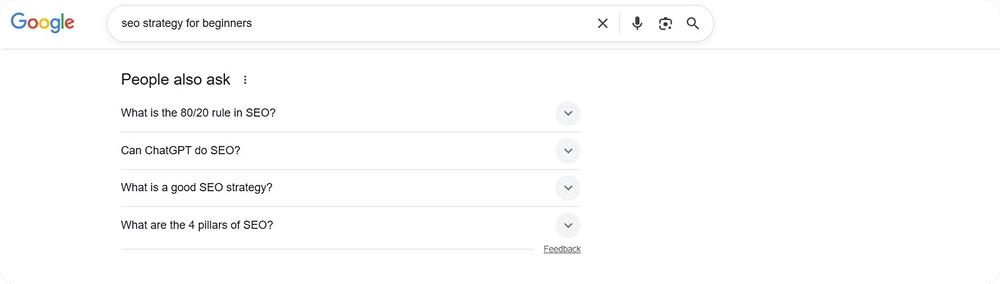
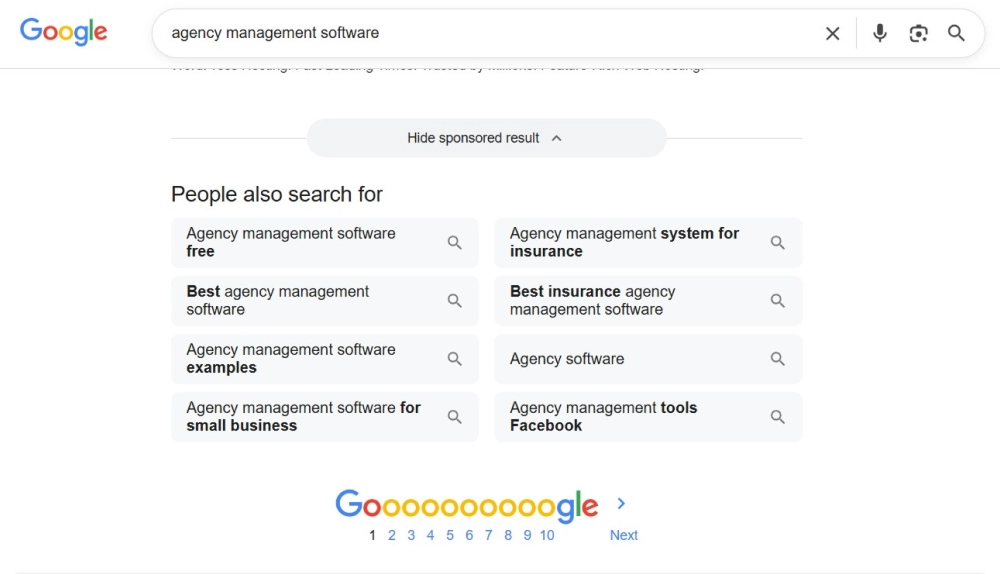
    One way is to go to Google and simply type in relevant keywords for your product or service and see what other search results are also popping up. 

    Let’s say you are running an alternative milk store online. By typing a general “alternative milks” keyword, you will also find out that your potential customers are looking for “alternative milks for coffee” or “without seed oils”.

    keyword research by google search


    These insights will help you find content gaps and refine your content strategy by:

    • Creating product pages/ product info for high purchase-intent keywords
    • Writing blog posts for informational searches

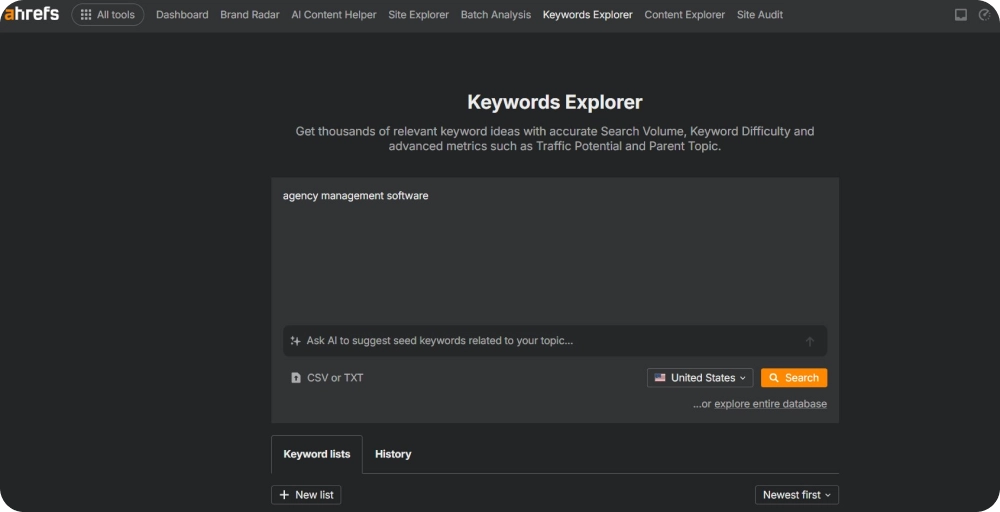
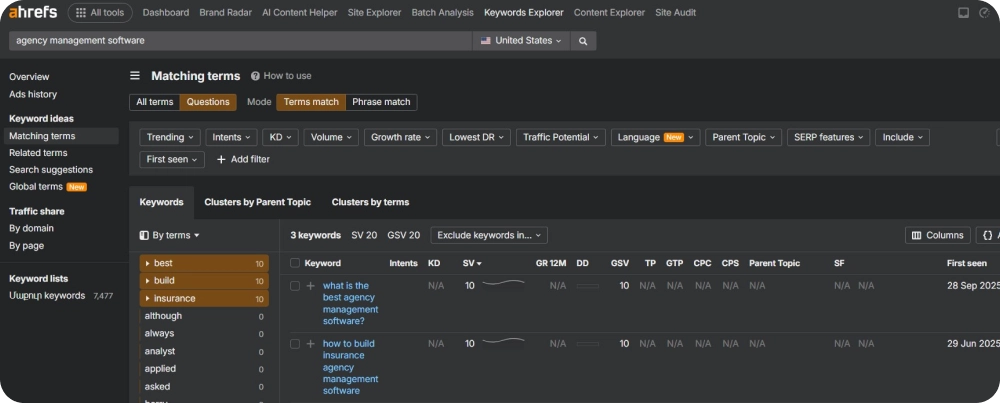
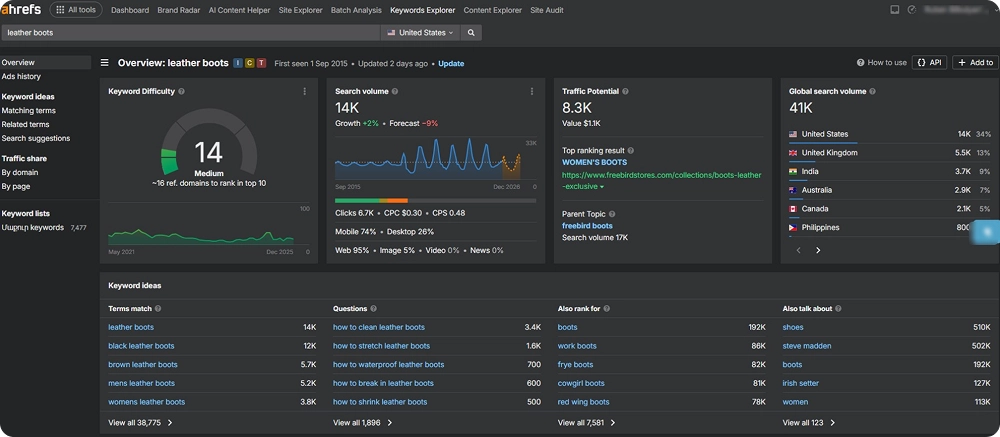
    For more thorough keyword research, there is a wide selection of SEO tools that you can use. One such tool is Ahrefs. To have an overview of what keywords are ranking on SERPs, follow these simple steps:

    Step 1: Go to Ahrefs’ “Keyword Explorer” section

    Step 2: Type in some main product keywords

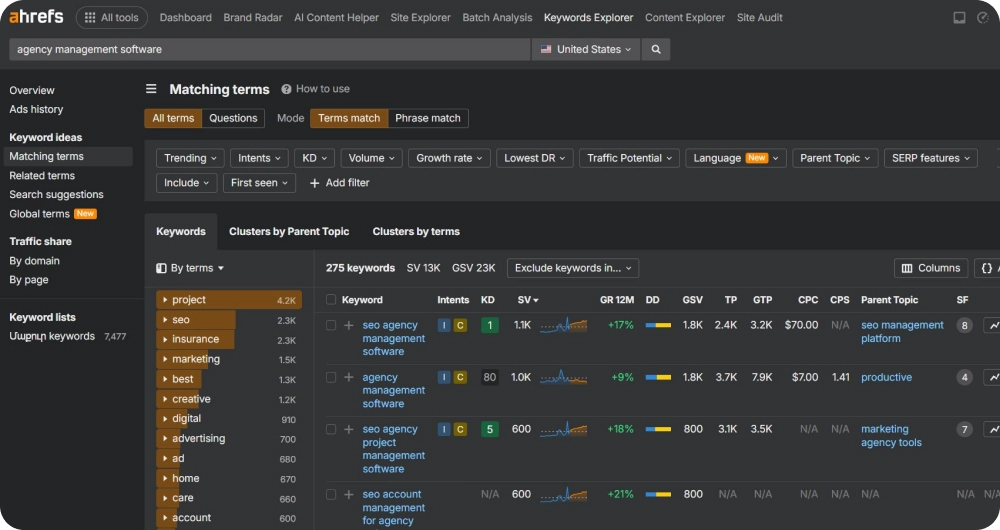
    Ahrefs will then suggest a list of other ranking keywords with all the necessary keyword metrics such as their search volumes and keyword difficulties.

    keyword research by ahrefs


    Speaking of keyword metrics, when planning your content strategy, focus on long-tail keywords that have a good search volume and low keyword difficulty. This approach gives you a better chance of ranking. Highly competitive keywords are harder to win and are often dominated by larger, established sites. By prioritizing these easier keywords, you can steadily attract targeted traffic and build authority over time.

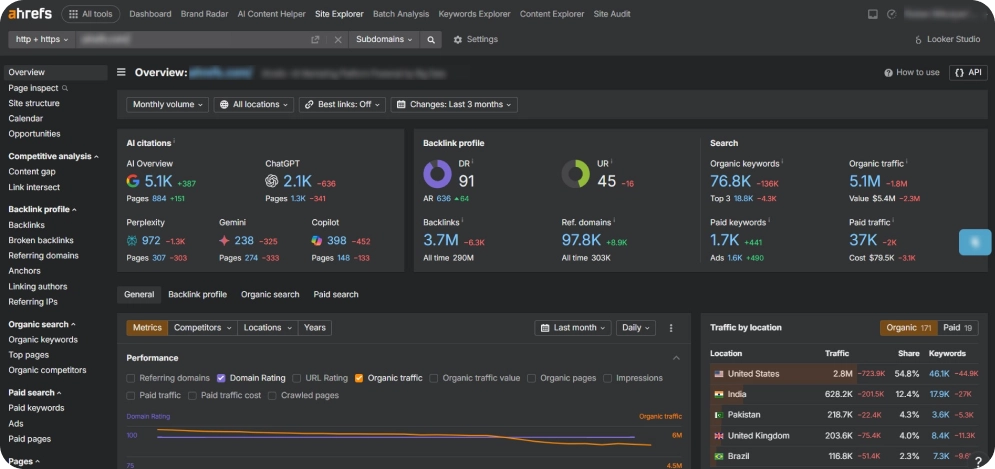
    You might also want to see how your competitors are doing on SERPs. 

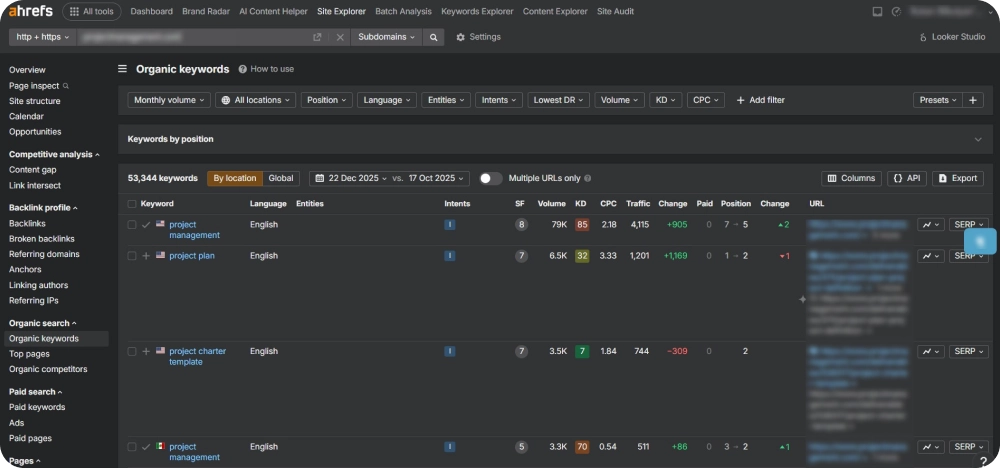
    Here too, tools like Ahrefs can help you. On Ahrefs:

    Step 1: Go to the “Site Explorer” section, 

    Step 2: Type your competitor’s domain.

    Step 3: Go to “Organic Keywords” to see which keywords send traffic to their site.

    Now that you have an understanding of what keywords your competitors are ranking for, you can adjust your content accordingly and try to outrank them.

    In the long run, conducting deep keyword research will help you attract new customers and increase your sales.

    On-Page SEO 

    Your website is the first thing your customers see and assess as soon as they find out about your product or services, making ecommerce seo services an important part of improving online visibility. So, it should be properly optimized for search engines.

    For an effective on-page SEO optimization, you must ensure these core components:

    • Page meta tags: Make sure your webpage’s meta title and description are short enough. For meta titles, stick to 50-60 characters, while for meta descriptions, the general rule is 150 to 160 characters. This way, your full meta tags will be seen on SERP results. Make sure they are also engaging enough for users to click and go to your website.
    • Page URLs: Keep your product page URLs short and precise. Avoid excessively long links with numbers or codes. For example, instead of /oatmilk?1245, make sure your URL appears like this: /organic-oat-milk. 

    If you’re ready to sell, you can start a Shopify store to put these pages into action efficiently.

    • Images: Make sure your site includes high-quality, clear images that showcase your products well. At the same time, avoid using files that are too large, as they can slow down your website. To keep fast loading times without losing quality, use online image compressors or optimization tools.
    • Internal links: Don’t forget to include internal links on your product and category pages. In your blog posts, make sure to link relevant articles to the corresponding product pages. This not only improves site navigation for users but also helps distribute SEO value across your website.
    • Store Sitemap and Robots.txt: Ensure your website has a clear sitemap and a properly set up robots.txt file. A sitemap acts as a roadmap for search engines, showing all the important pages on your store so they can be easily found and indexed. The robots.txt file informs search engines about which pages to crawl and which to ignore, preventing unnecessary or duplicate pages from being indexed. Together, these tools help search engines understand your website structure and make sure the right pages show up in search results.
    • Schema Markup: Adding schema markup to your product pages provides search engines with extra information about your products, such as price, availability, and reviews. You can also include information about your  FAQ sections and blog post structures. This can later increase the chance of clicks. For businesses that want professional guidance, e-commerce SEO services can help implement these on-page optimizations efficiently and ensure your store follows best practices.

    Take a look at one of the largest e-commerce stores, Amazon. Their short, memorable meta tag, “Spend less, smile more,” grabs attention and makes you want to click and explore more. Additionally, their detailed product categories and clear product descriptions help customers find and understand what they are buying.

    amazon meta tags
    amazon product categories
    amazon product description


    Link Building and Off-Page SEO

    To boost your online visibility, you must also implement certain steps outside of your website. Therefore, there are certain off-page SEO strategies that you need to keep in mind. 

    And today, with the rise of technology, incorporating AI in ecommerce can further enhance your outreach and engagement.

    Acquiring backlinks from relevant and authoritative sources is perhaps the most important step you should take. Consider writing guest posts for websites from a similar industry or niche to yours, but not your competitors. When approved, make sure to include links that lead back to your website to drive traffic to your website. For stores built on Magento Commerce, these off-page strategies can be especially effective because the platform supports SEO-friendly URLs, structured content, and easy integration with marketing tools.

    Bonus: This is an email template you can use when reaching out to the owner or the editor of such a website and offering a guest post service.

    Subject: Guest Post Proposal for [Blog Name]

    Hi [Recipient’s Name],

    I hope you’re doing well! I’ve been following [Blog Name] and really enjoy your content on [specific topic, e.g., plant-based lifestyles, vegan recipes, sustainable living].

    I’d love to contribute a guest article that I think your readers would find valuable. Some topic ideas I had in mind:

    • [Topic Idea 1]
    • [Topic Idea 2]

    The article would be well-researched, original, and tailored to your audience. I’d also include a natural link to a relevant resource or product page from my website [your store URL], if appropriate.

    If this sounds interesting, I’d be happy to draft the full article for your review. Please let me know if there’s a specific style, format, or topic you prefer.

    Looking forward to your thoughts!

    Best regards,

    Don’t underestimate the power of social media. Stay active on your platforms and regularly promote your products and your store. Consider working with bloggers, influencers, or industry experts and ask them to review your products, including links to your website.

    Your customers can be your best advocates. Encourage them to leave reviews and share referrals on external sites. To motivate participation, you might offer incentives like special discounts or product samples for each review submitted.

    Content Strategy 

    One of the best strategies to keep your potential customers longer on your website is to have engaging content. It can serve as a hook to keep them interested and make a purchase. 

    There are several components for a successful content strategy you can implement:

    • Blog posts: Take your time to create informative and engaging blog content about your products and industry. Use the main keywords you found earlier. Make sure they fit naturally in your articles, especially in titles and headings. Include internal links to related product pages. Add clear calls to action to encourage readers to keep browsing or make a purchase. Applying Shopify SEO best practices to your blog posts and product descriptions can help your store rank higher and attract more targeted traffic.
    • Unique and engaging product descriptions: Describe your products in a way that feels fresh and appealing. Avoid using text from manufacturers or directly copying online content. Focus on highlighting the benefits and key features of each product. Explain what makes each item valuable to the customer.  

    Product comparisons and guides: Provide educational content that helps your audience understand how to use your products, why they are useful, or how they compare to alternatives. This is often supported by practical comparisons and review-based analysis. Fleet card reviews can help users make more informed decisions by breaking down the differences between providers, highlighting key features, and showing which options may work best for different business needs. Include product guides, instructions, recipes, and well-researched comparisons of similar products. Ensure this content matches the search intent of your audience, so it meets them where they are in their decision process.

    • Customer reviews: Create a dedicated page on your website to show customer reviews, testimonials, and case studies. This builds trust in your products and helps new visitors feel more sure about making a purchase.
    • FAQs: People often search online for answers to their questions. Therefore, it’s important to have a frequently asked questions section on your website. This directly addresses common concerns and shows search engines that your site offers useful and relevant information. A good FAQ section can enhance user experience and support your overall search visibility.

    Again, remember the power of social media strategy and consider sharing your content across your social media platforms. You can also share informative videos, infographics, or podcasts to keep your content fresh and updated.

    creating social media strategy

    Image Source: Freepik.com

    User Experience and Engagement 

    Not only your website content, but the website in general should keep your visitors engaged. The user experience should be smooth and targeted. To ensure a user-friendly experience, keep these components in mind:

    • Clear and targeted calls-to-action (CTAs): This means that each product page of your website contains clear CTAs suggesting that visitors learn more about the product, add it to the cart, or subscribe to your newsletter. For a more direct shopping experience, consider integrating a WhatsApp eCommerce Store, allowing customers to browse products and make purchases instantly through the messaging app.
    • Smooth checkout process: If your visitors experience complicated or confusing checkout processes, the bounce rates will rise. So make sure the checkout process, such as for example filling in their payment information, is easy, fast, and secure. Using a B2B commerce platform can help streamline complex ordering processes, manage bulk purchases, and provide a tailored experience for business clients.
    • Easy site navigation: More importantly, ensure a smooth and user-friendly navigation between website pages. Categories, filters, and menus should be clear and simple enough to use. This is also important in terms of ecommerce site search, so that your visitors should never feel lost or frustrated when trying to find a product. 

    A fast and easy-to-use site improves user experience and helps search engines index your content better.

    To Wrap Up

    Today, thousands of different products and services are sold online, making ecommerce very competitive. Even the best products can go unnoticed without the right online visibility tactics. 

    By taking a step-by-step approach, such as conducting keyword research, optimizing on-page and off-page SEO, refining your content strategy, and ensuring a smooth user experience, you can give your store the advantage it needs.

    Use this guide as a roadmap to boost your ecommerce presence, attract more visitors, and convert them into loyal customers.


  • Top 7 Digital Marketing Companies: The Complete Selection Guide

    Top 7 Digital Marketing Companies: The Complete Selection Guide

    You feel that your business needs more online presence, but neither you nor your teammates have enough time or skills to focus on digital marketing. 

    Here’s when turning to digital marketing companies can be helpful in many ways.

    But there is so much to consider before you actually choose a credible digital marketing agency to work with.

    Below, we will provide you with actionable steps to take when choosing a digital marketing agency. We will also suggest a list of digital marketing companies that you can work with.

    Let’s dive in!

    4 Actionable Steps to Choose Digital Marketing Companies

    With so many digital marketing companies out there, finding a reliable one takes some time and careful steps. 

    Before we turn to reviewing the top digital marketing companies, here are some steps that can make the selection and collaboration process easier.

    • Set Your Goals: Start by clearly defining your business goals, what you want to achieve, and by when. This will make it easier to work with your chosen agency and see measurable results.
    • Do Your Research: Look into each agency’s background, services, and digital marketing experience. Check their websites, client reviews, portfolios, and case studies to understand how they work and what they’ve achieved for others.
    • Reach Out and Negotiate: Once you’ve shortlisted a few agencies, contact them to discuss pricing, strategy, timelines, and other important details. This step will help you find the best match for your needs and budget.

    Follow Up and Stay Involved: During the project, maintain regular communication with the agency. If needed, suggest digital marketing strategy tweaks, but avoid micro-managing. Keep an eye on performance, results, and ask for progress updates to ensure everything stays on track.

    By following these steps, you can choose a trustworthy digital marketing agency and build a collaboration that drives long-term success.

    Find the Right Fit: 7 Leading Digital Marketing Companies  

    Now that you are equipped with core steps that will make your initial selection process easier, here’s an overview of the top digital marketing companies with their services offered. 

    1. Ignite Visibility

    Ignite Visibilty


    Ignite Visibility is a full-service digital marketing and web development agency. It was established in 2013 and has worked with over 160 clients, including 80+ franchise brands and more than 2,000 franchise locations since then. 

    The agency is skilled in providing digital marketing services to businesses representing different industries, such as automotive services, dental and healthcare practices, financial services, and many more․

    • Top Services

    Owned Media

    • Content marketing
    • Conversion rate optimization
    • Creative and branding
    • Website development
    • WordPress development
    • Reporting and data analytics
    • Email and SMS marketing
    • Lifecycle marketing

    Earned Media

    • SEO
    • Local SEO
    • GEO
    • Digital PR
    • Social media management

    Paid Media

    • PPC
    • Paid social advertising
    • Display advertising
    • Influencer marketing
    • Pricing Information

    You will not find any fixed pricing on their website. If you choose to work with Ignite Visibility, the pricing will depend on the services provided, so make sure you clarify every pricing and budgeting detail during your negotiations. 

    You can hit the “Get started” button in the right corner of their website to select the services you are interested in, your budget, and tell more about your business.

    2. Intero Digital

    Intero Digital


    Intero Digital is a digital marketing agency that helps businesses reach their full potential through integrated digital marketing solutions, from SEO to Amazon marketing. Its first division was established in 1996, and today the company has already provided 15+ service offerings to thousands of clients.

    Intero Digital’s successful case studies include businesses such as restaurants, hotels and resorts, data companies, and more.

    • Intero Digital’s top services
    • SEO and GEO
    • Content and PR 
    • Paid media
    • Social media
    • Web development
    • Branding and creative
    • Amazon
    • Pricing Information

    Again, no pricing plan is displayed on the website. However, you can request a quote by indicating your projected monthly budget along with the services you are interested in and the goals you want to achieve. That’s where you get your pricing for your preferred services.

    3. Disruptive Advertising

    Disruptive Advertising


    Up next is Disruptive Advertising, a digital marketing agency founded in 2011. The agency focuses on partnering with authentic brands and marketers, offering them modern and effective marketing solutions. It provides both local and international services for B2B, B2C, and e-commerce clients.

    • Top Services
    • SEO
    • Amazon
    • Google shopping
    • Landing pages
    • Email management
    • Lead nurture
    • Creative strategy
    • Site optimization
    • Google ads
    • Bing ads
    • Motion ads
    • Social media ads (YouTube ads, Facebook ads, TikTok ads, LinkedIn ads, Snapchat ads, X ads)
    • Pricing Information

    Just like in the cases above, this agency doesn’t display a fixed pricing offering on its website. Instead, you can get a free marketing audit by stating your annual revenue and submitting a request for the services you are interested in.

    4. SmartSites

    SmartSites digital marketing company


    SmartSites agency is a digital marketing agency founded in 2011. Since then, it has worked with over 500 clients, completed more than 900 websites, and generated over $100 million in sales for its clients.

    They have worked with different businesses from different industries, including:

    • Small businesses
    • Home services
    • Medical and Healthcare
    • Legal services
    • Automotive
    • B2B
    • Retail
    • Industrial and Commercial
    • Hospitality
    • Nonprofit
    • SmarSites’ top services
    • Web design
    • Pay Per Click Advertising
    • SEO
    • Email and SMS marketing
    • Social media marketing
    • Pricing Information

    If this is the agency you want to work with, you can contact them directly through their website by using the “Contact field”, fill in your company information, and select the services you want them to provide. Afterwards, you can also indicate your marketing budget for further planning.

    5. WebFX

    WebFx digital marketing agency


    Founded as early as 1996, WebFX agency is another digital marketing agency that offers customized omnichannel marketing strategies developed by experts and supported by data. The agency focuses on helping businesses achieve their revenue goals through a unified and data-driven approach. It also helps with:

    • driving website traffic
    • collecting, analyzing and deploying marketing data
    • creating and managing powerful ad campaigns
    • Improving brand messaging and conversion
    • WebFX’s top services
    • SEO services
    • AI visibility
    • PPC management services
    • Social advertising services
    • Website design services
    • CRO services
    • Pricing Information

    Nothing new here; no pricing plan offered directly on the website. To get your custom quote, hit the “Get a proposal” button on WebFX’s website and fill in your company’s information along with the project budget.

    6. Thrive Internet Marketing Agency

    Thrive Internet Marketing Agency


    Last but not least, Thrive Internet Marketing Agency is a digital marketing company established in 2005 that provides strategy-focused and results-driven marketing solutions. It works with businesses of all sizes, from startups to large enterprises, across various industries in the U.S., Canada, the UK, and other countries. The agency offers flexible services designed to suit different budgets.

    • Top Services
    • SEO services
    • CRO services
    • PPC marketing
    • Social media marketing
    • Social media advertising
    • Link building
    • Web design and development
    • Media production
    • Content marketing
    • eCommerce marketing
    • Online marketing marketplace
    • Pricing Information

    Thrive Internet Marketing Agency doesn’t provide any pricing plans on the website. You can request a free proposal by filling out a form with your company information, selecting the services you want to get, as well as your monthly marketing budget.

    7. EMGI Group


    Next up is EMGI Group, a London-based digital authority and link building agency founded by Matt Emgi. The agency works remotely with brands across the globe, focusing specifically on ecommerce and SaaS companies that need senior off-page authority and editorial coverage rather than full-service digital marketing.

    EMGI takes an authority-first approach. Instead of scattering generic backlinks, the team targets the pages that drive commercial outcomes — category pages, brand-plus-category combinations, and high-converting product pages — with placements designed to influence both Google rankings and AI search visibility. The agency offers a 90-day “fire-us” guarantee and reports a 90%+ client retention rate, which speaks to the quality of their commercial outcomes. EMGI’s published case studies cover SaaS, B2B services, and ecommerce verticals such as Viddyoze, HR Partner, Financial Cents, and Prospeo.

    EMGI Group’s top services

    • SaaS link building
    • Ecommerce link building
    • HARO link building
    • Digital PR
    • Editorial placements
    • Co-marketing partnerships
    • LLM SEO and AI search visibility
    • Authority strategy consulting

    Pricing Information

    Like the other agencies on this list, EMGI Group does not publish fixed pricing on its website. Engagements are scoped based on the brand’s category, target publishers, and campaign volume, with a 90-day minimum commitment that includes a satisfaction guarantee.

    You can request a custom quote by booking a consultation through their website and outlining your authority-building goals, target revenue pages, and current backlink profile.

    Conclusion

    When you are busy managing your daily business tasks, choosing between reliable digital marketing companies to handle your marketing can be challenging and time-consuming. 

    However, if you clearly define your goals, conduct thorough research, and keep good communication with the agency you eventually select, the process becomes much simpler.

    Remember the steps mentioned above and think about starting your search with the 6 agencies listed in this article. 

    You will be well on your way to finding the right partner!

  • Best Search Engine: The Complete Comparison Guide and Review

    Best Search Engine: The Complete Comparison Guide and Review

    Search engines have become part of our daily lives. Whether it’s checking the weather, finding a recipe, reading the news, or learning a new skill, we turn to them with all our questions. 

    But with so many options nowadays, it can be hard to decide which one truly delivers the best results.

    In this guide, we’ll review the most popular search engines, explain what makes each one special, and help you find the one that best suits your needs.

    How We Chose the Best Search Engine?

    Before diving into the list, it’s important to understand how search engines are evaluated. 

    Here are the main points that have been taken into consideration:

    Relevance of Results

    The main job of a search engine is to show accurate results. If it gives links that are not useful, it makes searching harder.

    Good search engines let you filter results by time, location, or language. Some can also remember what you searched for before to give better results next time. 

    For example, if someone often looks for “vegan recipes,” the search engine may show plant-based blogs first when they search for “quick dinner ideas.”

    This makes it much easier for users to find what they are looking for.

    Interface and User Experience

    A search engine’s design plays a big role in how easy and pleasant it is to use.

    For instance, a clean and simple interface with a clear search box and straightforward results makes it easy to find what you need.

    Most search engines also display results in pages rather than endless scrolling. This page-by-page layout can be helpful because it shows how many results there are and makes it easy to go back to previous pages.

    It ultimately comes down to personal preference. Some users prefer a minimal design that gets them directly to answers, while others like a structured page layout that separates results clearly.

    User Privacy

    Privacy is a crucial factor for many people when selecting a search engine. 

    Some of the leading search engines in the USA do not track user activity or store search history, which means your searches remain private and are not linked to your identity.

    In addition, they avoid creating personal profiles for advertising purposes, so users won’t see targeted ads based on their search habits. 

    Some search engines also offer features like anonymous browsing, tracker blocking, and the option to disable personalization entirely.

    Choosing a search engine that prioritizes privacy can give users more control over their information.

    Integration with Other Tools

    Some search engines go beyond just showing web results and can connect with other tools to make searching more productive. 

    Certain engines can search through your emails, cloud storage, or calendars, allowing you to find documents, messages, or events directly from the search bar.

    Other engines include AI assistants that can answer questions, summarize information, generate content, or even assist with creative tasks such as image creation. 

    These integrations help users save time and complete tasks more efficiently without switching between multiple apps.

    Top Search Engines

    Let’s look at the top search engines this year and what makes each one stand out.

    1. Google 

    Google has been the world’s most popular and best search engine since 1998 and continues to dominate the market.

    As of 2025, Google holds about 90.38 percent of the global search engine market across all devices, including desktop, mobile, and tablet, according to StatCounter Global Stats.

    bing search engine


    It also handles over 3.5 billion searches every day based on data from Internet Live Stats.

    Google is popular because it combines speed, accuracy, and simplicity. 

    Its ranking algorithms have evolved over the years, now using AI and machine learning to understand search intent and context. This helps users find exactly what they are looking for in the fastest way possible. 

    Google also works well with many other tools. 

    You can access Gmail, Google Drive, Google Maps, YouTube, and Google Calendar directly through search results or integrations, making it easy to find emails, documents, directions, or videos without leaving the search engine. 

    This makes searching faster and more convenient.

    2. Bing

    Microsoft’s Bing is the second-best search engine, after Google. 

    According to StatCounter Global Stats, it has a global market share of about 4.1 percent in 2025, as you can see in the image below.


    While it is much smaller than Google, Bing offers several unique features that make it interesting for users.

    One of its biggest advantages is the built-in AI assistant, Copilot

    This tool lets you ask questions, chat with AI, create content, or even generate images directly within the search engine. You can also send voice queries or use creative tools, making searches more interactive and versatile.

    microsoft copilot


    What’s more, Bing’s homepage is visually appealing, featuring a new background image every day. 

    Its search box can also handle longer queries than many other search engines, which is useful for detailed questions or complex searches.

    Although Bing has struggled to match Google’s popularity, its AI tools and Copilot integration make it an appealing choice for users who want AI-powered results and a more engaging search experience. 

    3. Yandex

    Yandex is Russia’s leading search engine. It holds about 1.65 percent of the global search market in 2025, according to StatCounter.

    ex as a search engine


    While its global share is small, it dominates searches in Russia. 

    According to research, around 66 percent of users prefer it for Russian-language queries. Google holds roughly 30 percent in the same market.

    Yandex is popular because it is fast, reliable, and offers tools designed specifically for Russian-speaking users. 

    Many users look up how to use Yandex to explore its local search features, email, maps, and other built-in tools, making it easy to find information, directions, or services within Russia.

    4. Yahoo!

    Yahoo! may seem like an older search engine, but it still attracts users who prefer a simple and clean design. In 2025, Yahoo! holds about 1.46 percent of the global search market, according to StatCounter, as you can see in the screenshot below.

    yahoo as a search engine


    One of Yahoo!’s strengths is its image search, which offers advanced filters to refine results. 

    Users can sort images by file size, color, type, layout, people, time, and usage rights, making it easier to find exactly what they need for projects, presentations, or social media posts. 

    Here’s an example search below:

    serp on yahoo


    Yahoo! also provides quick links to related searches, helping users explore topics without leaving the results page.

    The interface is minimal and straightforward, which appeals to people who want fast access to information without distractions. 

    Last but not least, Yahoo! also integrates with its other services, like email and news, giving users a small but convenient ecosystem to find information and stay updated.

    5. DuckDuckGo 

    DuckDuckGo is the best search engine for those users who care strongly about their privacy. 

    It does not track searches, store IP addresses, or create personal profiles, so ads and personalized results won’t follow users around the web. 

    In 2025, DuckDuckGo held about 0.87 percent of the global search market, showing steady growth over the years, according to StatCounter.

    duckduckgo as a search engine


    A standout feature is DuckDuckGo’s AI assistant, Duck AI, which allows users to interact safely and privately with models like GPT-3.5 or Claude 3. This makes it possible to get summaries, answers, or content ideas without leaving the search engine or compromising privacy.

    DuckDuckGo also supports shortcuts to quickly visit over 12,000 websites. 

    For example:

    • Typing “!w cats” takes you directly to the Wikipedia page about cats
    • Typing “!a headphones” opens Amazon’s search for headphones

    On top of that, the interface is simple and customizable. 

    Users can adjust themes, colors, language, and layout, and even save their preferences to access the same setup on any device.

    And the last one!

    6. Baidu 

    Baidu is the best search engine in China and is often referred to as the “Google of China.” Founded in 2000, it handles billions of searches every month, making it a key tool for Chinese-language queries and local information.Globally, Baidu holds about 0.76 percent of the search market in 2025, according to StatCounter.

    Baidu offers more than just standard search results. It provides a range of integrated services that enhance the user experience:

    • Baidu Maps: Helps users find directions, locations, and public transportation routes across China. For example, searching “nearest coffee shop in Shanghai” will show a map, distances, and user reviews.
    • Baidu Baike: A Chinese-language encyclopedia similar to Wikipedia, offering detailed articles on history, science, culture, and more.
    • Baidu Video and News: Users can watch trending videos or check local news directly from search results.

    Baidu’s search engine is optimized for Chinese language queries, which makes it more accurate than other search engines for content in Chinese. 

    Let’s wrap up!

    Final Thoughts

    The best search engine depends on your needs. 

    Some focus on speed and accuracy, others on privacy, AI tools, local results, or eco-friendly features. Choosing the right one can make searching faster, safer, and more useful. 

    Exploring different options helps find the one that fits your style and preferences. And no matter which you choose, understanding the features and benefits of each search engine ensures a better online experience.

  • Wix Logo Maker vs Design.com: Comparing Features, Pricing, and Quality

    Wix Logo Maker vs Design.com: Comparing Features, Pricing, and Quality


    You have the perfect business idea, the potential, the tools, and the only thing missing is the right logo.

    Thankfully, you no longer need to hire an expensive designer for this step. Numerous online tools can help you craft the perfect logo for your brand. The only difficult part is choosing which of the tools and platforms to use, since the market is pretty crowded with logo generators, many of which don’t live up to their promises.

    To help you avoid loss of time and frustrating experiences, we have selected two of the best logo generators in the market and have decided to compare their features, pricing, and quality.

    Let’s dive deeper into their unique feature sets and see why so many prefer Design.com over Wix Logo Maker.

    #1. Design.com: The World’s Best AI-Powered Design Platform

    design.com - best ai-powered design platform


    Design.com is much more than a logo tool. It features a whole suite of design tools to help you get started with your business, with human-made, high-quality professional designs without having to hire a professional designer.

    1. A Large Number of Useful Tools

    • The world’s biggest library of logo templates: Design.com has the world’s richest logo template library, so there is something for everyone, regardless of how wild and ambitious the idea is. All you need to do is input your name and industry information, and it will give you a large variety of options to choose from. 
    • The Business Name Generator: You no longer have to spend days and weeks deciding on a name. Design.com’s Business Name Generator will brainstorm available, attention-grabbing business names for you. What’s more, it works with the Domain Scout and comes with its own domain name search feature to ensure you have a relevant web address too. 
    • The Website-Builder: Design.com’s Website Builder provides a clean-looking website in just a few minutes, and no, you don’t need to know how to code. 
    • The Background Remover: This feature helps remove the background from any photo, so you can have what you like there instead. 
    • The Content Crafters: Need business cards, flyers, posters, presentation decks, a branded “Link in Bio” page, or any other content that matches your logo and website? Design.com has that covered, too.

    2. Human Ingenuity and AI Intelligence Combined

    • Human-Made Designs: We said Design.com’s library is the biggest in the world. But why? Because the templates are made by actual human designers who have contributed and are still contributing with hundreds of thousands of professional designs. So you work with designs by actual artists and a soul, not a cold robotic look.
    • Infinite Potential to Customize: You can go well beyond the templates and make the designs truly yours. Whether you want to tweak the fonts, play with the colors, or experiment with the icons, the sky is the limit. For creators who want to explore more typography options, tools like Fontono make it simple to generate stylish font designs for branding, social media content, bios, and other creative projects.
    • Both General and Niche: Are you looking for something in a classic Monogram, a cool 3D look, or do you need a fun Cartoon logo? You can have each of them or all of them, as you wish. 
    • Professional Brand Image: If you want to come across extra professional and need letterheads, cool email signatures, and catchy business cards, Design.com can help with these as well.

    3. Some Noteworthy Numbers

    • Design.com’s library, which is the largest in the world, has 350K+ logo templates and over 1 million total design templates.
    • Its customization potential is huge; the platform provides over 62K custom, vector shapes, 750+ fonts, and over 525+ exclusive fonts. 
    • Design.com offers 50+ additional design and branding tools all within one platform, including tools for websites, business cards, digital business cards, social media posts and stories, presentations, QR codes, flyers, posters, letterheads, and menus.
    • It has email support available 24/7, along with chat support.
    • It’s available in 7 languages and accepts payments in 9 currencies.
    • It has over 8 AI tools, including an AI logo generator, an AI website builder, AI business cards, AI flyers, AI posters, AI presentations, an AI business name generator, and an AI background remover.
    • You’re the #1 and only owner of your logo; with Design.com’s extended licenses for logos, you can remove logo templates from its library and get exclusive use of logos.
    • Every font, icon, and graphic element on Design.com is 100% licensed for commercial use.

    4. Start for Free

    You can get started without paying anything. 

    The Really Free Logo Maker:

    • Design.com’s free offer is really, truly, completely free. Just choose any logo design from their free collection, tweak it, and download it along with all the essential files at no cost.

    Important: Yes, downloading the logo files is free of charge, but if you want to use that logo in their other tools (e.g., business card or flyer maker), you will need to pay.

    #2. Wix Logo Maker

    Wix logo maker


    Standout Features 

    • Scalable vector graphics: The platform provides high-resolution design files that you can use on different platforms of different sizes.
    • Logo generator: It comes with a free logo generator that you can use to brainstorm design ideas.
    • Full Wix integration: You can match your logo with your Wix site to stay consistent across different platforms and marketing materials. 
    • Customization options: You can benefit from the large variety of design elements and features to come up with something unique that no one else has created yet.
    • AI images: It uses AI to generate images, brand names, and taglines, which helps speed up the design process. 
    • Ready-to-use: You can check out how your logo would appear on merch, business cards, online, and on other platforms, even before you download it as an SVG, PNG, and before you send it to print.
    • Commercial rights: It automatically gives full commercial usage rights, so no need to wait before you can start using your logo.

    Other Important Features

    • High integration: It can help ensure consistency of designs across social media posts, website, and other platforms.
    • Brand name and domain: It comes with a Business Name Generator to help you brainstorm a creative, catchy name for your brand. If necessary, it can also give you suggestions for domain names that haven’t been taken yet. 
    • Social media: You can use the logo on posts for different social media platforms like Instagram, Facebook, TikTok, as well as part of promo codes on your website and email marketing.
    • Built-in solutions: It has many built-in tools, like a video maker and a paystub generator.

    Design.com vs. Wix. Who is the Winner?

    FeatureDesign.comWix Logo Maker
    How It WorksA superior hybrid model. It uses AI to help you customize “human-made professional designs.”A standard “online design tool that uses AI to make logos.” It relies on AI to generate images, brand names, and taglines.
    The DesignsStarts from the “world’s biggest library” (350K+ logo templates and 1M+ total templates) created by actual designers.Provides AI-generated designs. It has a “free logo generator” that is used as a tool to brainstorm design ideas.
    Logo OwnershipOffers a true “Extended License” for “exclusive use.” This removes the template from the library so no one else can use it.Provides standard “full commercial usage rights.”
    Extra ToolsA complete launch platform. It offers 50+ additional design and branding tools.A few built-in tools, such as a “video maker” and a “paystub generator.” Its main feature is integration, which locks you into the Wix website ecosystem.
    Free OptionYes, a “Really Free Logo Maker.” You can customize a logo from their free collection and “download it along with all the essential files at no cost.”Free to design, but you need to pay if you want to download high-resolution files.
    Branded MaterialsInstantly creates a full professional suite.Offers “ready-to-use” mockups for “merch, business cards, online,” and helps create social media posts.

    Summing Up

    Thankfully, this is not one of the situations where we are unclear about which option is the better one. We have a clear winner in this comparison, and that is Design.com. With designs suitable for any industry and accessible for every pocket, it is no wonder that Design.com is continuously referred to as the #1 logo company in the world.

    That being said, you should always try out the platform by yourself first to see if it’s good for your business needs and goals. What’s great about this platform is that you can get a sense of their work ethic firsthand without paying anything; you’ll be able to design and download the logo, and decide if you want to explore the paid features as well. It’s free of risks and full of benefits!

  • Focus Keyword: The Ultimate Guide to Choosing the Right One

    Focus Keyword: The Ultimate Guide to Choosing the Right One

    You don’t write content for yourself, but for the countless people who should discover and read it, right?

    Among other key elements, you need to find the right focus keyword—one with the perfect metrics to drive real results.

    But how do you do that? You’re in the right place. In this article, we’ll define what a primary keyword is and share actionable tips on how to find the perfect one for your content.

    Let’s get started.

    What is The Focus Keyword?

    A focus keyword (also known as a target or primary keyword) is the main search term that represents the central topic of your content. It’s the specific phrase you aim to rank for in search engine results.

    Focus keywords form the core of your content strategy, guiding both search engines and users to understand what your page is about. The goal is simple: when someone types that term into Google or another search engine, your page should appear among the results.

    Why Does a Focus Keyword Matter a Lot?

    We should admit that ranking on Google isn’t a piece of cake. Competition is very high, so you need to find the perfect keyword – and here’s why:

    • Helps search engines understand your content 

    Google and other search engines need to figure out what your page is about to rank it correctly. A focus keyword “tells” them what your content’s main topic is, making it easier for them to show your page when people search for related terms.

    • Drives targeted organic traffic 

    When you rank for your focus keyword, you bring in visitors who are actually looking for the information, products, or services you’re offering. These targeted visitors are way more likely to stay on your site and become customers compared to people who just come across your site.

    • Improves content relevance 

    Optimizing around a focus keyword pushes you to create highly relevant, targeted content. This works great for both search engines and readers, since your content directly answers what people are searching for and gives them exactly what they expect.

    7 Strategies To Find Perfect Focus Keywords

     Now let’s discuss seven helpful tactics on how to find a focus keyword that can bring real results for your website:

    Start with Seed Keywords

    Seed keywords are basic, broad terms related to your business or industry. They’re your starting point and give your research direction. For example, if you’re focused on SEO, seed keywords might be “backlinks,” “meta tags,” “site speed,” or “keyword research.”

    Now, you should take each seed keyword and use research tools to discover more specific variations. One seed keyword can lead you to many related search terms that people actually use.

    Generate Ideas with Keyword Tools

    Now it’s time to expand your keyword list. Research tools turn your seed keywords into hundreds of specific options you can use later.

    Here are some good choices:

    Ahrefs – Explore millions of keywords with Ahrefs Keyword Explorer feature and see how hard they are to rank for, plus their search volume and traffic potential.

    Semrush – Generate thousands of keyword variations and understand what searchers actually want (informational, commercial, etc.) thanks to Semrush Keyword Overview and Keyword Magic tool.

    Google Keyword Planner – This is a free tool from Google. Keyword Planner is great for checking search volume and competition, especially if you’re running ads.

    Ubersuggest –  This is your budget-friendly pick. Ubersuggest tool gives you keyword suggestions with difficulty ratings without breaking the bank.

    But what do these tools show you? Search volume (how many people search for it) and keyword difficulty (how hard it is to rank). This data helps you choose keywords you can actually compete for. Let’s discuss this in the next section more in detail.

    Analyze Search Volume (SV) and Keyword Difficulty (KD)

    First, let’s understand what these metrics mean.

    • Search volume – This is the number of people who type that phrase into search engines each month, showing how popular it is.
    • Keyword difficulty – This tells you how much competition there is, or how hard it will be to get your page to appear at the top for that word.

    Now let’s understand how you can check KD and SV via Ahrefs.

    Step 1: Enter your Ahrefs account.

    Step 2: Go to Keyword Explorer and type in your keyword.

    keyword difficulty

    Step 3: Select the search engine and country, then click search.

    Step 4: Look at the KD score at the top to see how hard it is to rank.

    Step 5: Check the SV next to it to see the monthly search volume.

    The strategy is to focus on keywords where there’s real interest from searchers, but the competition isn’t too tough – this is the sweet spot for targeting keywords.

    In our example, the phrase “SEO outreach” has strong potential, with a search volume of 1.9K and a low keyword difficulty of 8. This makes it an excellent choice for a focus keyword, offering good visibility without much competition.

    Analyze Traffic Potential

    Traffic potential metric equals real traffic opportunity. Instead of just showing search volume for one keyword, Traffic potential reveals the total monthly traffic the top-ranking page actually gets from all its keywords combined.

    Here are the steps you can follow to find Traffic potential in Ahrefs:

    Step 1: Enter your keyword in Keywords Explorer.

    Step 2: Look at the SERP overview section.

    Step 3: Check the Traffic column next to each ranking page.

    traffic

    Step 4: That number is your Traffic potential – the actual monthly visits the top result receives.

    Now, when choosing your focus keyword, pay attention to the Traffic potential and find keywords where this number is much higher than the search volume. 

    In our example, the focus keyword has a global search volume of 1.2K, but its traffic potential is 4.4K, meaning it could attract significantly more visitors than its search volume alone suggests.

    Understand Search Intent

    Search intent refers to the primary purpose behind a query. There are four main types:

    • Informational: Seeking knowledge or instructions (e.g., “how to build backlinks”)
    • Navigational: Locating a specific site or page (e.g., “Ahrefs login”)
    • Commercial: Checking options prior to making a decision (e.g., “best SEO tools 2025”)
    • Transactional: Ready to purchase or commit (e.g., “hire SEO consultant”)

    How to quickly verify search intent:

    Google your target keyword and analyze the top-ranking results:

    • Mainly blog articles or guides?   (informational intent).
    • Mostly service pages or product listings?  (transactional intent)
    • Comparison posts or review articles?  (commercial intent)
    • Brand or company websites?  (navigational intent)

    But how should search intent guide your efforts? You should match your content format to the intent. 

    Blog posts and guides suit informational searches (How to Build Backlinks: A Step-by-Step Guide). Service pages and landing pages suit transactional searches (Hire an SEO Consultant | Professional SEO Services).

    Keep an Eye to Your Competitors

    Stop guessing which keywords to target. Instead, look at what’s already working for websites ranking above you.

    Your competitors have already figured out which keywords drive traffic. By analyzing their success, you can steal their best ideas (legally!) and find gaps they’re missing.

    Step 1: Open Ahrefs and go to the Content Gap tool.

    Step 2: Enter your competitors’ domains in the top field and your website in the bottom field.

    Step 3: Review the keywords Ahrefs shows – these are the ones your competitors rank for but you don’t.

    content gapStep 4: Check each keyword’s search volume, keyword difficulty, and traffic potential.  Focus on keywords with high traffic, moderate difficulty, and relevance to your target audience.

    Later, you should use these keywords to create new content or improve existing pages to fill the gaps.

    Utilize Keyword Clustering

    Here’s something that can really simplify your SEO work: keyword clustering.

    The idea is simple: Group similar keywords together and target them all with one page, instead of creating a separate page for each keyword.

    Here’s why this makes sense:

    Let’s say you’re writing about SEO tools. You could create individual pages for “best SEO tools,” “top SEO software,” and “SEO tool comparison.”  However, people searching those terms want the same information.

    You’ll do way less work by creating one great page instead of ten mediocre ones. That single compelling content will rank better in search engines, pull in traffic from multiple related searches, and give your readers everything they need in one place. It’s a win all around.

    So why not write one really good guide that covers everything? 

    How to actually do it:

    Step 1: Group keywords that have similar search intent.

    Step 2: Pick the most popular one as your main focus.

    Step 3: Write naturally about the topic․ The other keywords will naturally be included when you cover the subject properly.


    Best Practices for Using Focus Keywords

    You’ve picked your perfect focus keyword. Now here’s how to actually use it without overdoing it.

    • Pick one focus keyword

    Use just one main keyword per page. This keeps your content clear and focused.

    • Use it naturally

    Include your keyword in important places without forcing it:

    • Page title
    • Meta description
    • URL
    • First paragraph
    • Headers (H1, H2, H3
    • Image alt text
    • Naturally throughout the content

    • Avoid keyword stuffing

    Don’t overuse your keyword. Write for people first, search engines second. Too many repetitions can hurt your rankings and make your content hard to read.

    • Monitor and change

    Use SEO tools to track your keyword performance. If it’s not ranking after a few months, try improving your content or choosing a different keyword.

    • Add secondary keywords

    Use related keywords naturally throughout your content. This helps search engines understand your topic and lets you rank for more searches.

    Conclusion

    A focus keyword is the backbone of a successful SEO strategy. It guides your content, helps search engines understand your pages, and attracts visitors to your website. By using the strategies in this article, you can find target keywords that balance search volume, competition, and user intent.

    Remember, keyword research isn’t a one-time task. Search trends, competition, and opportunities change over time, so regularly review your keyword strategy to make the most of the best opportunities for your website.


  • On-Page and Off-Page SEO: What’s The Difference?

    On-Page and Off-Page SEO: What’s The Difference?

    SEO is a broad concept that can be somewhat complex. But it doesn’t have to be.

    So, we decided to share an on page and off page SEO guide with you, which can help take your performance to the next level.

    But first, let’s define both these SEO types and understand best practices.

    So, let’s get started.

    What is On Page SEO?

    On page SEO refers to the optimization techniques applied directly to a webpage and its content to enhance their visibility and ranking in search engine results.

    It involves strategies like:

    • Optimizing your content,
    • Building a strong keyword strategy,
    • Creating effective internal linking,
    • And much more!

    When done correctly, on page SEO helps search engines easily index your pages and understand the content’s context. 

    To achieve the best results, it’s often a smart move to hire the best SEO expert who can analyze your website, identify gaps, and implement advanced optimization techniques.

    On Page SEO Elements You Should Optimize

    Now, let’s understand which on page SEO factors you should focus on and how to improve them.

    • Keywords

    Keywords really matter and help search engines understand what your page is about and match it with relevant searches.  

    So, you definitely need a strong keyword strategy to pick and use keywords your audience is searching for and stand out in the search results. 

    Here is how to do keyword research for SEO:

    • Use keyword research tools to find the right terms:

    Free options:

    • Google Search Console –  shows which keywords already bring users to your website and how your pages rank in Google results.
    • Google Trends –  tracks how interest in a keyword changes over time, making it useful for spotting seasonal or rising topics.
    • Answer The Public – uncovers the most common questions and phrases people search around your topic, perfect for content ideas.
    • Ubersuggest – generates related keyword suggestions along with search metrics, helping you target terms that are easier to rank for.

    Paid options include tools like Ahrefs or SEMrush.

    Here are the steps you take with Ahrefs for targeting the best keywords:

    Step 1: Go to Keywords Explorer and enter your seed keyword.

    Step 2: Review metrics like search volume, keyword difficulty, and traffic potential.

    Keywords Explorer

    Step 3: Check the Terms match report to find related keyword ideas and variations.

    Terms match report

    Step 4: Look at the Questions tab to find question-based keywords people are asking.

    Step 5: Use the Also rank for feature to see what other keywords top-ranking pages target.

    Next, you can export your selected keywords and use them in your content strategy based on relevance, volume, and difficulty.

    • Content

    Compelling content is key to better visibility and stronger SEO results. Here’s how to make it work.

    • Answer user questions – Create content that directly addresses what people are searching for and solves their problems.
    • Follow Google’s E-E-A-T –  When creating content, keep in mind Google’s E-E-A-T guideline (Experience, Expertise, Authoritativeness, and Trustworthiness), which focuses on generating helpful and authoritative content.
    • Share expertise – Include insights, experiences, and examples that reflect your knowledge and authority on the topic.
    • Provide unique value – Offer fresh perspectives, tips, or information that readers won’t find elsewhere.
    • Be accurate – Verify facts, data, and sources to ensure your content is trustworthy and reliable.
    • Help readers – Make your content easy to follow, actionable, and practical for real-world use.
    • Use keywords naturally – Include relevant search terms in a way that flows naturally without stuffing or forcing them.


    • Internal linking

    Internal links help search engines discover your pages and show how your content connects. To make the most of them:

    • For articles with 1,500–2,000 words, include at least 4-5 internal links to relevant pages.
    • Use descriptive anchor text to clearly show what the linked page is about.
    • Ensure that every page on your site has links pointing to it, so no content gets overlooked and orphaned.


    • Meta titles

    Meta titles tell search engines what your page is about and can influence both rankings and clicks.

    Here are some tips we recommend when it comes to optimizing SEO titles:

    • Keep meta titles between 50–60 characters.
    • When users search for a particular keyword, seeing the search term at the start of a title makes it clear the content matches their query, increasing the chances they’ll click.
    • Add your focus/primary keyword 
    • Make it catchy and engaging 
    • Avoid clickbait and misleading titles


    • Headings

    Headings structure your content for both users and search engines, making your page easier to scan and understand.

    Here’s what we suggest to make your headings clear and useful.

    • Your H1 should include your primary keyword.
    • Create a logical hierarchy by using H1 for your main title, H2s for main sections, and H3s for subsections.
    • Make headings descriptive and keep up to 70 characters.


    • ‍Image alt text

    Alt text is a description you add to images in your website’s code that explains what the image is about.

    Search engines also use alt text to understand your images and decide if they match what people are searching for.

    Off Page SEO Strategies For Better Authority

    Off page SEO involves actions taken outside your website to build its authority and reputation. The main goal of off page SEO is about improving your website’s reputation. 

    The core of off page SEO is link building – getting backlinks from other websites.

    What backlinks can give you? They pass authority to your website, making it appear more trustworthy to search engines. 

    But how do you get backlinks? Reliable link building tools can help you:

    • Find quality backlink opportunities
    • Monitor your backlink profile
    • Avoid spammy or low-quality websites
    • Analyze competitors backlinks 
    • Find unlinked brand mentions
    • Track lost or broken links and reclaim them

    Besides link building, off page SEO includes other strategies to boost your website’s reputation and visibility:

    • Brand mentions

    When sites mention your company without linking, it still builds authority and brand recognition. Monitor these brand mentions and try to turn them into backlinks to boost your SEO efforts. Reaching out to site owners who mention your brand can often lead to quick backlink opportunities with minimal effort. These links help strengthen your domain authority and improve overall search visibility.

    Be consistent and build your presence regularly for long-term SEO growth. Using SEO reporting tools can help you track these mentions and backlinks, showing which efforts are working and which need improvement.

    On Page VS Off Page SEO: Key Differences

    Although on page and off page SEO are both part of SEO, they are quite different. Let’s look at the details.

    • Where you focus your efforts

    On page SEO means working directly on your own website to improve your pages, while off page SEO involves activities outside your website to build reputation and get other sites to recognize and trust you.

    • Control you have

    With on page SEO, you have full control to change content, keywords, and site structure anytime with instant results. 

    However, off page SEO gives you limited control, as it depends on external factors. When building backlinks, different link builders may work in different ways. Some respond quickly, while others are slower, which can cause delays and make results harder to predict.

    • Primary focus

    On page SEO helps search engines and users understand your content while making your site easy to use and navigate. In contrast, off page SEO proves your website is trustworthy and popular by earning recommendations from other websites. 

    When combined, on page work ensures your website has high visibility, while off page work shows search engines that other people trust and recommend it, ultimately boosting your rankings.

    On Page and Off Page SEO: Which One Should You Focus On?

    What SEO tactics does your website need? Which one should you invest in when trying to get a better ranking for your website?

    First thing you should know, Google considers both on page and off page SEO as ranking factors, meaning neither can be ignored.

    Focusing on only one strategy will limit your results, so you need to use both on page and off page SEO together to attract more visitors and improve your rankings.

    To Wrap up

    Your website deserves better rankings, and you can achieve them with the right on page and off page SEO strategies. 

    We’ve shared practical tips and proven techniques to help you build a website that ranks well in search and attracts more visitors. 

    Start using these strategies today, monitor your results, and watch your website climb higher in search rankings.