
Blog

  • Focus Keyword: The Ultimate Guide to Choosing the Right One

    Focus Keyword: The Ultimate Guide to Choosing the Right One

    You don’t write content for yourself, but for the countless people who should discover and read it, right?

    Among other key elements, you need to find the right focus keyword—one with the perfect metrics to drive real results.

    But how do you do that? You’re in the right place. In this article, we’ll define what a primary keyword is and share actionable tips on how to find the perfect one for your content.

    Let’s get started.

    What is The Focus Keyword?

    A focus keyword (also known as a target or primary keyword) is the main search term that represents the central topic of your content. It’s the specific phrase you aim to rank for in search engine results.

    Focus keywords form the core of your content strategy, guiding both search engines and users to understand what your page is about. The goal is simple: when someone types that term into Google or another search engine, your page should appear among the results.

    Why Does a Focus Keyword Matter a Lot?

    We should admit that ranking on Google isn’t a piece of cake. Competition is very high, so you need to find the perfect keyword – and here’s why:

    • Helps search engines understand your content 

    Google and other search engines need to figure out what your page is about to rank it correctly. A focus keyword “tells” them what your content’s main topic is, making it easier for them to show your page when people search for related terms.

    • Drives targeted organic traffic 

    When you rank for your focus keyword, you bring in visitors who are actually looking for the information, products, or services you’re offering. These targeted visitors are way more likely to stay on your site and become customers compared to people who just come across your site.

    • Improves content relevance 

    Optimizing around a focus keyword pushes you to create highly relevant, targeted content. This works great for both search engines and readers, since your content directly answers what people are searching for and gives them exactly what they expect.

    7 Strategies To Find Perfect Focus Keywords

     Now let’s discuss seven helpful tactics on how to find a focus keyword that can bring real results for your website:

    Start with Seed Keywords

    Seed keywords are basic, broad terms related to your business or industry. They’re your starting point and give your research direction. For example, if you’re focused on SEO, seed keywords might be “backlinks,” “meta tags,” “site speed,” or “keyword research.”

    Now, you should take each seed keyword and use research tools to discover more specific variations. One seed keyword can lead you to many related search terms that people actually use.

    Generate Ideas with Keyword Tools

    Now it’s time to expand your keyword list. Research tools turn your seed keywords into hundreds of specific options you can use later.

    Here are some good choices:

    Ahrefs – Explore millions of keywords with Ahrefs Keyword Explorer feature and see how hard they are to rank for, plus their search volume and traffic potential.

    Semrush – Generate thousands of keyword variations and understand what searchers actually want (informational, commercial, etc.) thanks to Semrush Keyword Overview and Keyword Magic tool.

    Google Keyword Planner – This is a free tool from Google. Keyword Planner is great for checking search volume and competition, especially if you’re running ads.

    Ubersuggest –  This is your budget-friendly pick. Ubersuggest tool gives you keyword suggestions with difficulty ratings without breaking the bank.

    But what do these tools show you? Search volume (how many people search for it) and keyword difficulty (how hard it is to rank). This data helps you choose keywords you can actually compete for. Let’s discuss this in the next section more in detail.

    Analyze Search Volume (SV) and Keyword Difficulty (KD)

    First, let’s understand what these metrics mean.

    • Search volume – This is the number of people who type that phrase into search engines each month, showing how popular it is.
    • Keyword difficulty – This tells you how much competition there is, or how hard it will be to get your page to appear at the top for that word.

    Now let’s understand how you can check KD and SV via Ahrefs.

    Step 1: Enter your Ahrefs account.

    Step 2: Go to Keyword Explorer and type in your keyword.
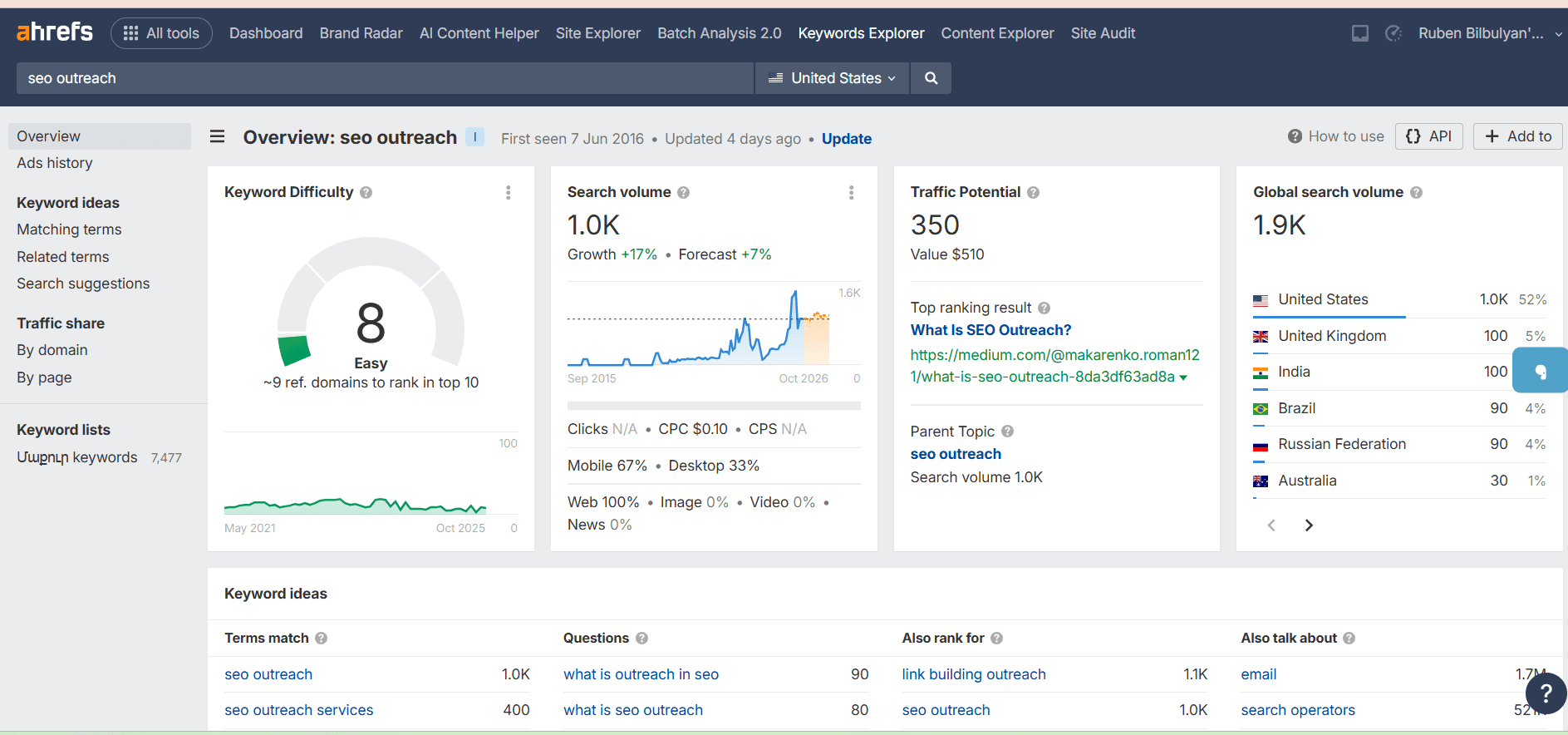
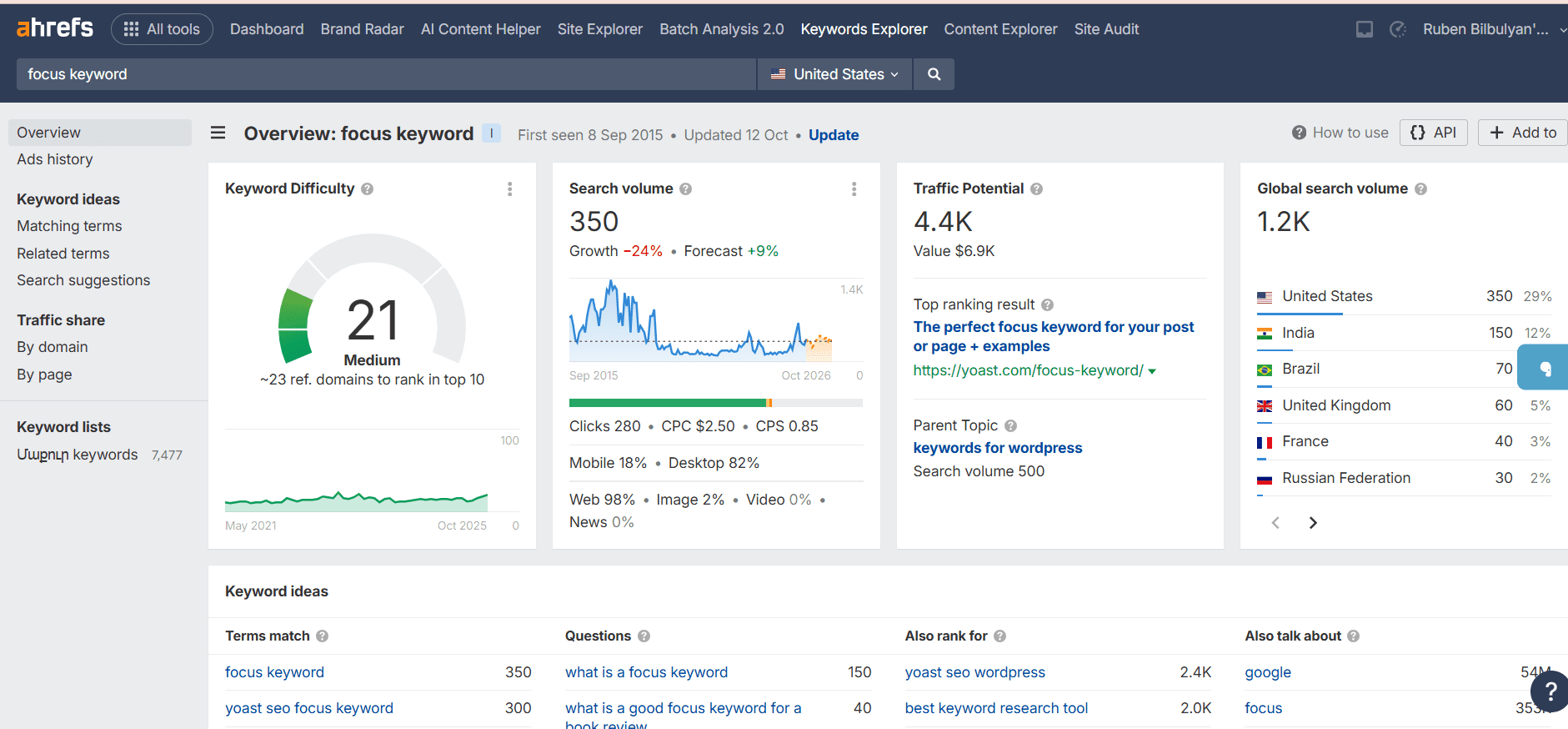
    keyword difficulty

    Step 3: Select the search engine and country, then click search.

    Step 4: Look at the KD score at the top to see how hard it is to rank.

    Step 5: Check the SV next to it to see the monthly search volume.

    The strategy is to focus on keywords where there’s real interest from searchers, but the competition isn’t too tough – this is the sweet spot for targeting keywords.

    In our example, the phrase “SEO outreach” has strong potential, with a search volume of 1.9K and a low keyword difficulty of 8. This makes it an excellent choice for a focus keyword, offering good visibility without much competition.

    Analyze Traffic Potential

    Traffic potential metric equals real traffic opportunity. Instead of just showing search volume for one keyword, Traffic potential reveals the total monthly traffic the top-ranking page actually gets from all its keywords combined.

    Here are the steps you can follow to find Traffic potential in Ahrefs:

    Step 1: Enter your keyword in Keywords Explorer.

    Step 2: Look at the SERP overview section.

    Step 3: Check the Traffic column next to each ranking page.
    traffic

    Step 4: That number is your Traffic potential – the actual monthly visits the top result receives.

    Now, when choosing your focus keyword, pay attention to the Traffic potential and find keywords where this number is much higher than the search volume. 

    In our example, the focus keyword has a global search volume of 1.2K, but its traffic potential is 4.4K, meaning it could attract significantly more visitors than its search volume alone suggests.

    Understand Search Intent

    Search intent refers to the primary purpose behind a query. There are four main types:

    • Informational: Seeking knowledge or instructions (e.g., “how to build backlinks”)
    • Navigational: Locating a specific site or page (e.g., “Ahrefs login”)
    • Commercial: Checking options prior to making a decision (e.g., “best SEO tools 2025”)
    • Transactional: Ready to purchase or commit (e.g., “hire SEO consultant”)

    How to quickly verify search intent:

    Google your target keyword and analyze the top-ranking results:

    • Mainly blog articles or guides?   (informational intent).
    • Mostly service pages or product listings?  (transactional intent)
    • Comparison posts or review articles?  (commercial intent)
    • Brand or company websites?  (navigational intent)

    But how should search intent guide your efforts? You should match your content format to the intent. 

    Blog posts and guides suit informational searches (How to Build Backlinks: A Step-by-Step Guide). Service pages and landing pages suit transactional searches (Hire an SEO Consultant | Professional SEO Services).

    Keep an Eye to Your Competitors

    Stop guessing which keywords to target. Instead, look at what’s already working for websites ranking above you.

    Your competitors have already figured out which keywords drive traffic. By analyzing their success, you can steal their best ideas (legally!) and find gaps they’re missing.

    Step 1: Open Ahrefs and go to the Content Gap tool.

    Step 2: Enter your competitors’ domains in the top field and your website in the bottom field.

    Step 3: Review the keywords Ahrefs shows – these are the ones your competitors rank for but you don’t.
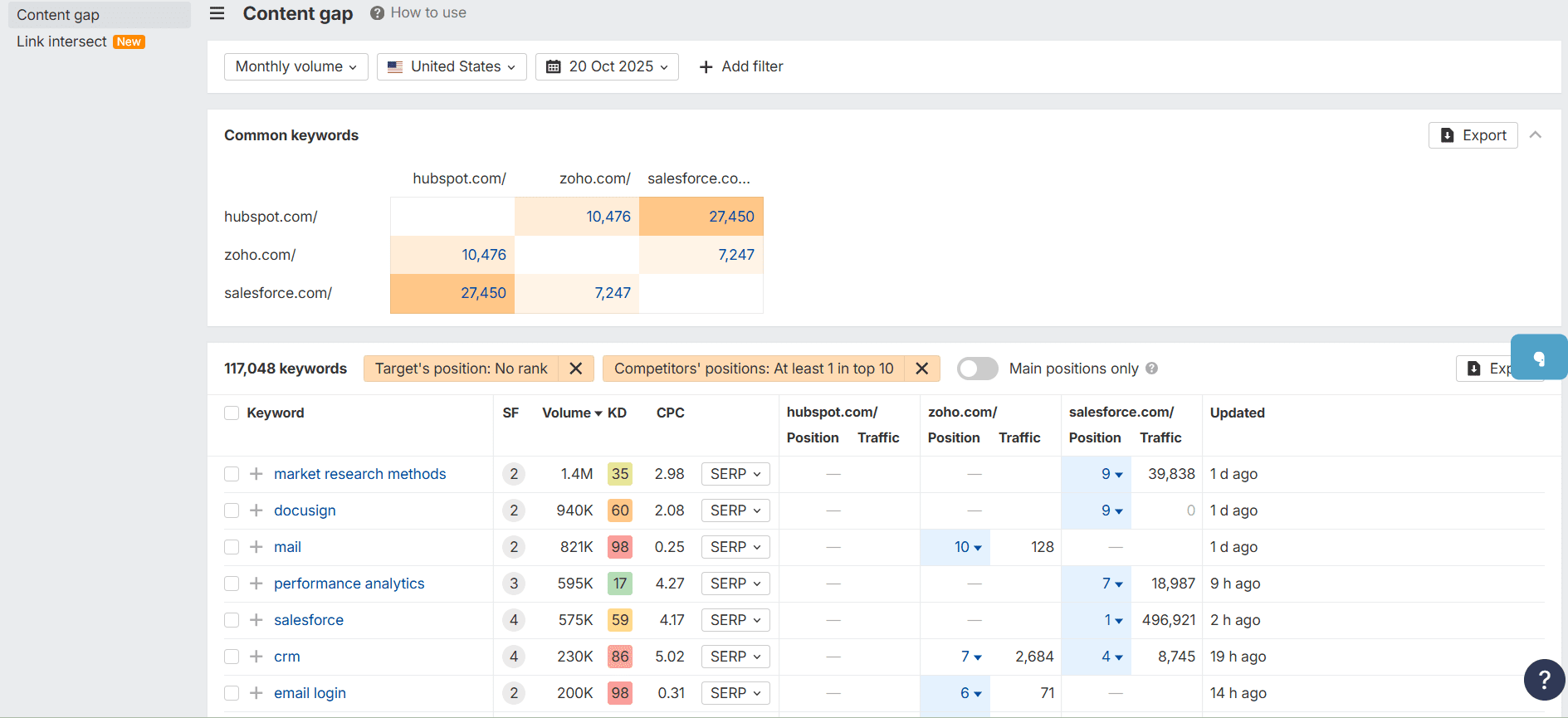
    content gapStep 4: Check each keyword’s search volume, keyword difficulty, and traffic potential.  Focus on keywords with high traffic, moderate difficulty, and relevance to your target audience.

    Later, you should use these keywords to create new content or improve existing pages to fill the gaps.

    Utilize Keyword Clustering

    Here’s something that can really simplify your SEO work: keyword clustering.

    The idea is simple: Group similar keywords together and target them all with one page, instead of creating a separate page for each keyword.

    Here’s why this makes sense:

    Let’s say you’re writing about SEO tools. You could create individual pages for “best SEO tools,” “top SEO software,” and “SEO tool comparison.”  However, people searching those terms want the same information.

    You’ll do way less work by creating one great page instead of ten mediocre ones. That single compelling content will rank better in search engines, pull in traffic from multiple related searches, and give your readers everything they need in one place. It’s a win all around.

    So why not write one really good guide that covers everything? 

    How to actually do it:

    Step 1: Group keywords that have similar search intent.

    Step 2: Pick the most popular one as your main focus.

    Step 3: Write naturally about the topic․ The other keywords will naturally be included when you cover the subject properly.


    Best Practices for Using Focus Keywords

    You’ve picked your perfect focus keyword. Now here’s how to actually use it without overdoing it.

    • Pick one focus keyword

    Use just one main keyword per page. This keeps your content clear and focused.

    • Use it naturally

    Include your keyword in important places without forcing it:

    • Page title
    • Meta description
    • URL
    • First paragraph
    • Headers (H1, H2, H3
    • Image alt text
    • Naturally throughout the content

    • Avoid keyword stuffing

    Don’t overuse your keyword. Write for people first, search engines second. Too many repetitions can hurt your rankings and make your content hard to read.

    • Monitor and change

    Use SEO tools to track your keyword performance. If it’s not ranking after a few months, try improving your content or choosing a different keyword.

    • Add secondary keywords

    Use related keywords naturally throughout your content. This helps search engines understand your topic and lets you rank for more searches.

    Conclusion

    A focus keyword is the backbone of a successful SEO strategy. It guides your content, helps search engines understand your pages, and attracts visitors to your website. By using the strategies in this article, you can find target keywords that balance search volume, competition, and user intent.

    Remember, keyword research isn’t a one-time task. Search trends, competition, and opportunities change over time, so regularly review your keyword strategy to make the most of the best opportunities for your website.

     

  • On-Page and Off-Page SEO: What’s The Difference?

    On-Page and Off-Page SEO: What’s The Difference?

    SEO is a broad concept that can be somewhat complex. But it doesn’t have to be.

    So, we decided to share an on page and off page SEO guide with you, which can help take your performance to the next level.

    But first, let’s define both these SEO types and understand best practices.

    So, let’s get started.

    What is On Page SEO?

    On page SEO refers to the optimization techniques applied directly to a webpage and its content to enhance their visibility and ranking in search engine results.

    It involves strategies like:

    • Optimizing your content,
    • Building a strong keyword strategy,
    • Creating effective internal linking,
    • And much more!

    When done correctly, on page SEO helps search engines easily index your pages and understand the content’s context. 

    To achieve the best results, it’s often a smart move to hire the best SEO expert who can analyze your website, identify gaps, and implement advanced optimization techniques.

    On Page SEO Elements You Should Optimize

    Now, let’s understand which on page SEO factors you should focus on and how to improve them.

    • Keywords

    Keywords really matter and help search engines understand what your page is about and match it with relevant searches.  

    So, you definitely need a strong keyword strategy to pick and use keywords your audience is searching for and stand out in the search results. 

    Here is how to do keyword research for SEO:

    • Use keyword research tools to find the right terms:

    Free options:

    • Google Search Console –  shows which keywords already bring users to your website and how your pages rank in Google results.
    • Google Trends –  tracks how interest in a keyword changes over time, making it useful for spotting seasonal or rising topics.
    • Answer The Public – uncovers the most common questions and phrases people search around your topic, perfect for content ideas.
    • Ubersuggest – generates related keyword suggestions along with search metrics, helping you target terms that are easier to rank for.

    Paid options include tools like Ahrefs or SEMrush.

    Here are the steps you take with Ahrefs for targeting the best keywords:

    Step 1: Go to Keywords Explorer and enter your seed keyword.

    Step 2: Review metrics like search volume, keyword difficulty, and traffic potential.

    Keywords Explorer

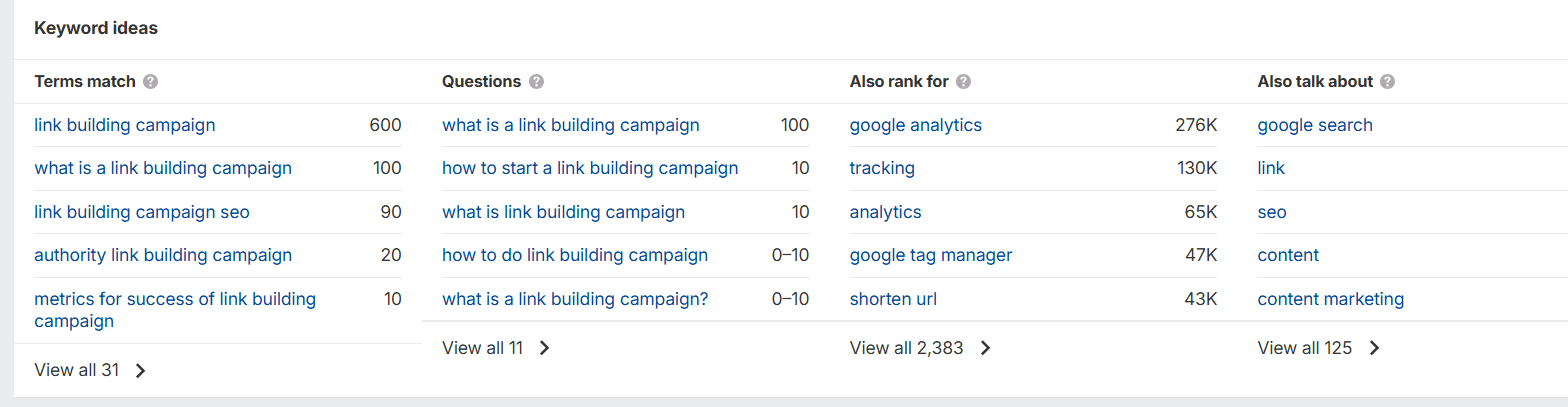
    Step 3: Check the Terms match report to find related keyword ideas and variations.

    Terms match report

    Step 4: Look at the Questions tab to find question-based keywords people are asking.

    Step 5: Use the Also rank for feature to see what other keywords top-ranking pages target.

    Next, you can export your selected keywords and use them in your content strategy based on relevance, volume, and difficulty.

    • Content

    Compelling content is key to better visibility and stronger SEO results. Here’s how to make it work.

    • Answer user questions – Create content that directly addresses what people are searching for and solves their problems.
    • Follow Google’s E-E-A-T –  When creating content, keep in mind Google’s E-E-A-T guideline (Experience, Expertise, Authoritativeness, and Trustworthiness), which focuses on generating helpful and authoritative content.
    • Share expertise – Include insights, experiences, and examples that reflect your knowledge and authority on the topic.
    • Provide unique value – Offer fresh perspectives, tips, or information that readers won’t find elsewhere.
    • Be accurate – Verify facts, data, and sources to ensure your content is trustworthy and reliable.
    • Help readers – Make your content easy to follow, actionable, and practical for real-world use.
    • Use keywords naturally – Include relevant search terms in a way that flows naturally without stuffing or forcing them.


    • Internal linking

    Internal links help search engines discover your pages and show how your content connects. To make the most of them:

    • For articles with 1,500–2,000 words, include at least 4-5 internal links to relevant pages.
    • Use descriptive anchor text to clearly show what the linked page is about.
    • Ensure that every page on your site has links pointing to it, so no content gets overlooked and orphaned.


    • Meta titles

    Meta titles tell search engines what your page is about and can influence both rankings and clicks.

    Here are some tips we recommend when it comes to optimizing SEO titles:

    • Keep meta titles between 50–60 characters.
    • When users search for a particular keyword, seeing the search term at the start of a title makes it clear the content matches their query, increasing the chances they’ll click.
    • Add your focus/primary keyword 
    • Make it catchy and engaging 
    • Avoid clickbait and misleading titles


    • Headings

    Headings structure your content for both users and search engines, making your page easier to scan and understand.

    Here’s what we suggest to make your headings clear and useful.

    • Your H1 should include your primary keyword.
    • Create a logical hierarchy by using H1 for your main title, H2s for main sections, and H3s for subsections.
    • Make headings descriptive and keep up to 70 characters.


    • ‍Image alt text

    Alt text is a description you add to images in your website’s code that explains what the image is about.

    Search engines also use alt text to understand your images and decide if they match what people are searching for.

    Off Page SEO Strategies For Better Authority

    Off page SEO involves actions taken outside your website to build its authority and reputation. The main goal of off page SEO is about improving your website’s reputation. 

    The core of off page SEO is link building – getting backlinks from other websites.

    What backlinks can give you? They pass authority to your website, making it appear more trustworthy to search engines. 

    But how do you get backlinks? Reliable link building tools can help you:

    • Find quality backlink opportunities
    • Monitor your backlink profile
    • Avoid spammy or low-quality websites
    • Analyze competitors backlinks 
    • Find unlinked brand mentions
    • Track lost or broken links and reclaim them

    Besides link building, off page SEO includes other strategies to boost your website’s reputation and visibility:

    • Brand mentions

    When sites mention your company without linking, it still builds authority and brand recognition. Monitor these brand mentions and try to turn them into backlinks to boost your SEO efforts. Reaching out to site owners who mention your brand can often lead to quick backlink opportunities with minimal effort. These links help strengthen your domain authority and improve overall search visibility.

    Be consistent and build your presence regularly for long-term SEO growth. Using SEO reporting tools can help you track these mentions and backlinks, showing which efforts are working and which need improvement.

    On Page VS Off Page SEO: Key Differences

    Although on page and off page SEO are both part of SEO, they are quite different. Let’s look at the details.

    • Where you focus your efforts

    On page SEO means working directly on your own website to improve your pages, while off page SEO involves activities outside your website to build reputation and get other sites to recognize and trust you.

    • Control you have

    With on page SEO, you have full control to change content, keywords, and site structure anytime with instant results. 

    However, off page SEO gives you limited control, as it depends on external factors. When building backlinks, different link builders may work in different ways. Some respond quickly, while others are slower, which can cause delays and make results harder to predict.

    • Primary focus

    On page SEO helps search engines and users understand your content while making your site easy to use and navigate. In contrast, off page SEO proves your website is trustworthy and popular by earning recommendations from other websites. 

    When combined, on page work ensures your website has high visibility, while off page work shows search engines that other people trust and recommend it, ultimately boosting your rankings.

    On Page and Off Page SEO: Which One Should You Focus On?

    What SEO tactics does your website need? Which one should you invest in when trying to get a better ranking for your website?

    First thing you should know, Google considers both on page and off page SEO as ranking factors, meaning neither can be ignored.

    Focusing on only one strategy will limit your results, so you need to use both on page and off page SEO together to attract more visitors and improve your rankings.

    To Wrap up

    Your website deserves better rankings, and you can achieve them with the right on page and off page SEO strategies. 

    We’ve shared practical tips and proven techniques to help you build a website that ranks well in search and attracts more visitors. 

    Start using these strategies today, monitor your results, and watch your website climb higher in search rankings.

  • Blog Post Templates: The Ultimate Collection for Content Writers in 2026

    Blog Post Templates: The Ultimate Collection for Content Writers in 2026

    Do you ever open your laptop to start writing your article, and don’t know where to start? 

    You get confused in your flow of thoughts without a clear structure in mind. That’s why it’s easier to find a blog post template that will serve as a guide throughout the writing process and keep your thoughts aligned.

    Learn how to choose blog post templates and get access to the most common templates today, and don’t worry about giving a lot of time to structuring your articles.

    What is a Blog Post Template?

    A blog post template is a ready-to-use structure that helps content writers create blog posts faster. 

    It contains the title, heading, and subheading structure in the right order to keep users engaged and focused on reading. 

    Here’s how it helps:

    • Simplifies the writing process, so you can focus on creativity instead of outlining
    • No need to rewrite blog sections
    • Provides an easy-to-follow layout
    • Helps overcome writer’s block by giving you a clear starting point

    Now, let’s look at some practical blog post templates you can use to speed up the writing process and create well-structured, engaging content every time.

    5 Mostly Used Blog Post Templates

    Obviously, the same kind of template cannot work for every kind of blog post. 

    Each type follows a different structure based on reader expectations that will lead to optimal conversions. 

    Below are the most common blog post templates you can use to get started! Feel free to customize them to fit your writing style.

    How-to Blog Posts

    How-to posts are made to educate readers on how to do something step by step. 

    For example, a blog post titled “How to Set Up a Home Office in 5 Easy Steps” can guide readers through choosing a workspace, selecting furniture, organizing cables, setting up lighting, and providing clear instructions at each step.

    Now let’s have a look at what your how-to blog post could look like.

    H1: How to [Action] [Item] in [Timeframe/Stps]

    Ex. How to Achieve Higher Rankings in One Year

    Introduction

    • Introduce the topic or the task you’ll be teaching.
    • Mention why it’s important or who will benefit from it.
    • Give a brief overview of what the guide will cover.

    H2: Key [Tools/Materials/…] You Need for [item]

    Ex. Key Tools You Need for SEO

    • List tools, materials, or prerequisites needed to complete the task.
    • Include optional alternatives if applicable.
    • Briefly explain why each item is necessary.

    H2: [Number] Steps to [action] [item]

    Ex. 5 Steps to Rank Higher On Google

    Give a general description of why these steps are necessary.

    H3: Step [number] – [action]

    Ex. Step 1: Optimize On-Page Elements

    • Describe the step clearly and concisely.
    • Give relevant examples.
    • Include images, screenshots, or other visuals.

    H3: Step [number] [Action]

    Ex. Step 2: Build Relevant Backlinks

    • Explain the step and why it matters.
    • Provide relevant examples.
    • Include images, screenshots, or diagrams.

    Continue detailed instructions until the task is complete.

    H2: Expert [Tips/Strategies/Tactics] For [Task/Goal]

    Ex. Expert Tips for SEO Success

    • Include additional advice to make the process smoother or faster.
    • Share alternatives or hacks that improve results.

    H2: [Troubleshooting/Solving/Addressing/…] Common [Problems/Issues] in [Task/Goal]

    Ex. Troubleshooting Common Ranking Issues

    • List common problems readers may encounter.
    • Provide solutions or workarounds for each problem.

    H2: Conclusion

    • Recap the main points of the how-to guide.
    • Emphasize the benefits of completing the task correctly.
    • Include a CTA if relevant (e.g., download a checklist, watch a video, try the technique).

    Pro tip: Remember that you can always add FAQs or links for further reading to encourage exploring your blog more. 

    With these tips in mind, your tutorials will keep your readers and actually deliver them the knowledge without any gaps.

    Listicle Blog Posts

    Listicle blog posts are often the most engaging and easy to follow. This type of content usually includes a list of tools, services, trends, or types of a specific strategy. 

    For instance, a listicle post could be “10 Best AI Tools to Streamline Your Content Creation Process,” where each item highlights a tool’s features, benefits, and pricing. 

    Here is a simple listicle blog post template to follow:

    H1: [Number] Best [Tools/Strategies/Ideas] for [Goal or Audience]

    Ex. 10 Best SEO Tools for Small Businesses

    Introduction

    • Introduce the topic and explain why it matters.
    • Mention the target audience or problem this list will help solve.
    • Briefly state what the reader can expect to learn or gain from the list.

    H2: How to [Choose/Manage/Use] the Right [Tool/Trend/Idea]

    Ex. How to Choose the Right SEO tool

    Give a small introduction to H3s

    H3: Identify Your [Goal/Objectives] Before Choosing [Tool/Trend/Idea]

    Ex. Define Your SEO Goals Before Choosing a Platform

    • Explain why this matters
    • Describe how one can identify their goals/objectives

    H3: Compare [Features/Capabilities] of [Tool/Trend/Idea]

    Ex. Compare the Features of various SEO tools

    • List some of the key features of different tools
    • Compare the features and mention the unique aspects.

    H3: Evaluate [Usability/Ease of Use] for [Tool/Trend/Idea]

    Ex. Evaluate the SEO Platform Usability 

    • Explain why this matters
    • Describe how to evaluate usability 

    Add as many H3s as necessary

    H2: [Number] Expert [Tools/Platforms/Ideas/Trends] to [Goal/Audience]

    Ex. 10 Expert Platforms for SEO Success

    Give a small introduction to guide the reader to the next section.

    H3: 1. [Item Name]

    Ex. Ahrefs

    • Brief overview of the platform.
    • Highlight what makes it stand out.
    • Include cost or availability details.
    • Explain how it helps the reader achieve their goal.

    H3: 2. [Item Name]

    Ex. SEMrush

    • Description
    • Key Features/Benefits
    • Pricing/Accessibility
    • Why It Matters

    Repeat the same structure for each item in the list

    H3: Expert [Tips/Hacks/Advice] for [Strategy/Goal/Task]

    Ex. Expert Tips for Your SEO strategy

    • Share practical advice for maximizing benefits from the items listed.
    • Include trends, best practices, or strategies to follow.

    H2: Conclusion

    • Summarize the top picks or most important takeaways.
    • Reiterate who will benefit most from the list.
    • Optional CTA: Encourage readers to try, download, or explore more.

    It’s recommended not to overload your conclusion with CTA’s, always keep it natural to the context, and place them where users actually need them. 

    Here is an example of a natural CTA that can complement your lead generation: “Try out a few of these productivity tools this week and see which ones help streamline your workflow most effectively”.

    Product Review Blog Post

    Product reviews are helpful articles that guide readers toward deciding whether or not to buy something. It builds trust when done honestly and clearly. 

    For a credible product review, you must use the tool thoroughly yourself and show its good and bad sides. For instance, an SEO agency can write a review of Ahrefs for SEO reporting, with clear cons and pros, leaving the final choice to the reader.

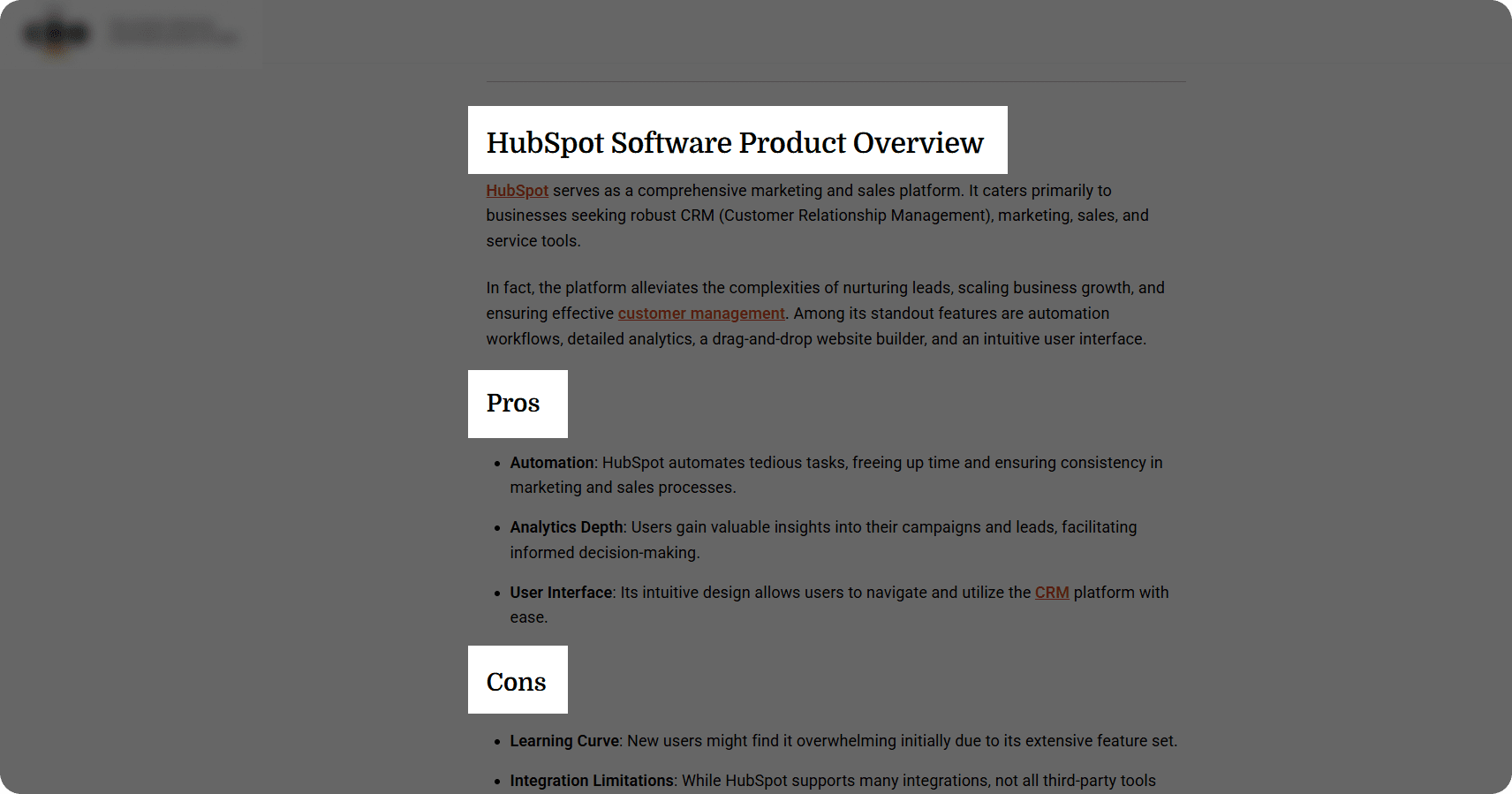
    In this example, you can see a part of a HubSpot review blog post, with the lists of the pros and cons of the product, where a detailed overview of the platform will follow.

    HubSpot software product overview blog post

    Here is your starting point:

    H1: [Product Name] Review: [Key Highlights/Focus]

    Ex. SEMrush review: Features, Pricing, and Pros & Cons

    Introduction

    • Introduce the product and its main purpose.
    • Mention the target audience or problem it solves.

    H2: Key [Features/Highlights/Functionalities/…] of [Product Name]

    Ex. Key Features of SEMrush explained

    Give a small introduction to H3s

    H3: [Feature 1]

    Ex. Keyword Research 

    • Describe the feature
    • Why it matters
    • Provide examples/screenshots

    H3: [Feature 2]

    Ex. Competitor Analysis

    • Describe the feature
    • Why it matters
    • Provide examples/screenshots

    Add as many features as necessary. 

    H2: How [Product Name] Helps [Users/Companies/Individuals/…] Achieve [Goal/Task]

    Ex. How SEMeush Helps Users Achieve Backlink Growth

    • Describe how well the product performs in real-life scenarios.
    • Talk about user interface, usability, and learning curve.
    • Optional: Include screenshots or examples

    H2: [Pros and Cons/Strengths and Weaknesses/…]: [Product Name 1] vs [Product Name 2]

    Ex. Benefits and Weaknesses: Ahrefs VS SEMrush

    Give a small introduction to H3s

    H3: [Pros/Benefits/Advantages] of [Product Name] 

    Pros of SEMrush

    • Provide bullet points of the positive sides

    H3: [Cons/Drawbacks/Weaknesses] of [Product Name]

    Cons of SEMrush

    • Provide bullet points of the negative sides

    H2: [Product] [Pricing/Cost/Subscription Plans]

    Ex. SEMrush Pricing

    • List different pricing tiers or plans (if applicable).
    • Compare with similar products in the market.
    • Explain whether it’s worth the cost.

    H2: Conclusion

    • Summarize key points.
    • State who will benefit the most from this product.
    • Include a recommendation and optional CTA (e.g., link to purchase).

    Make sure to keep it honest and not miss important details, such as pricing and limitations, to keep the readers coming back. 

    Case Study Blog Post

    Case studies show real results from using a product, service, or strategy. This format is ideal for professional services wanting to show their results and is for users wanting proof of credibility before committing to the service. 

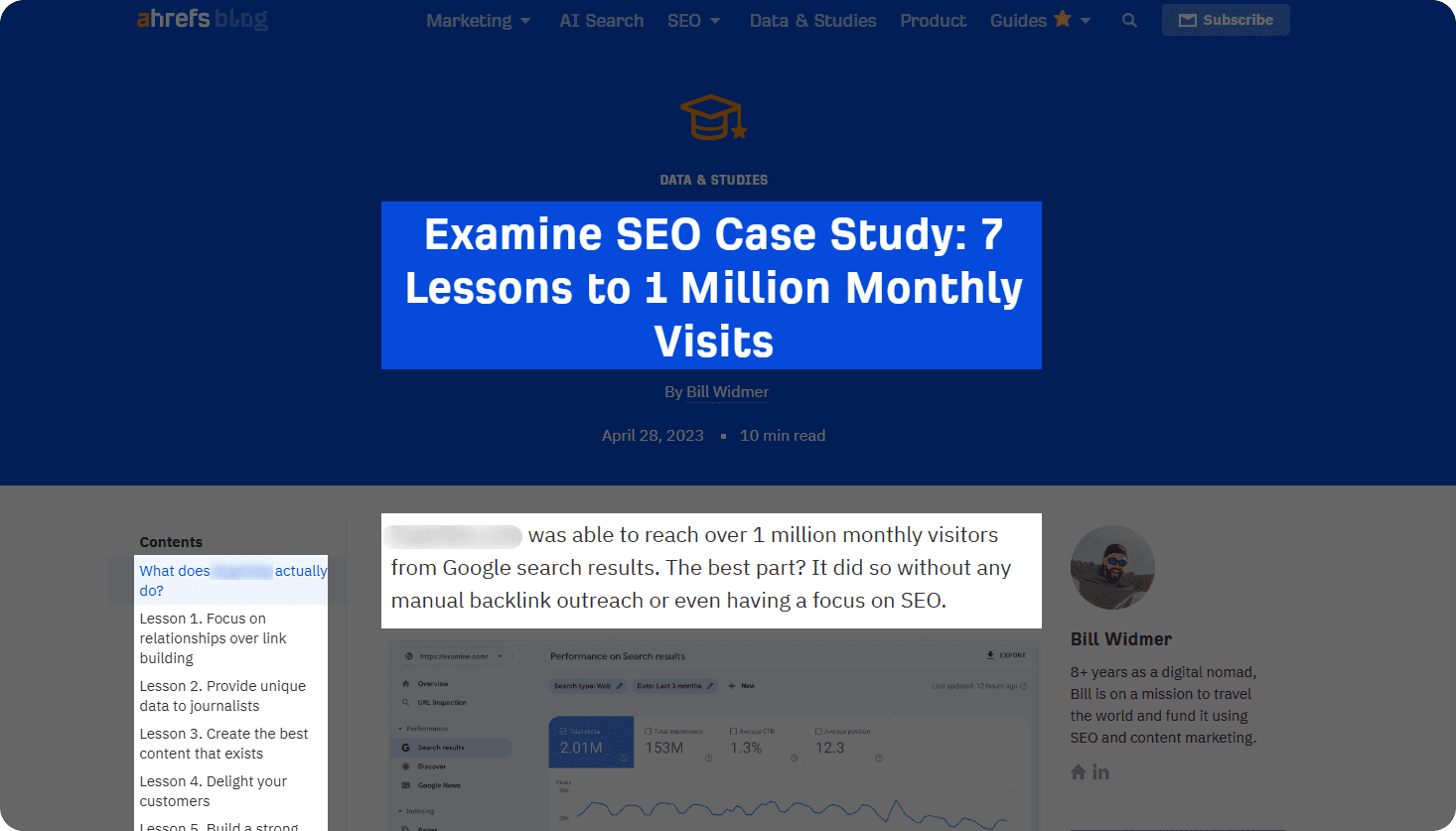
    For example, in an Ahrefs case study, we can see how they significantly increased the website traffic with detailed examples and results. 

    case study by Ahrefs

    Further reading:

    Examine SEO Case Study: 7 Lessons to 1 Million Monthly Visits

    H1: How [Company] [Action] [Item] Sales by [Number/Percentage] Using [Product/Service]

    Ex. How a Digital Marketing Agency Boosted SaaS Subscriptions by 45% Using HubSpot Marketing Hub

    Introduction

    • Introduce the client or company briefly.
    • Highlight the challenge or goal they aimed to achieve.
    • State what the case study will cover (solution, process, results).

    H2: [Background/History/Initial Situation] of [Company name]

    Ex. Initial Situation of the Agency

    • Describe the industry, size, target audience, or relevant context.
    • Briefly state the Initial situation/challenge, and describe the problem or pain points.

    H2: [Goals/Objectives/Milestones…] of [Company name]

    The Main Objectives that the Agency Wanted to Achieve

    • Define what the client wanted to achieve.
    • Include measurable targets if possible (KPIs, numbers, timelines).
    • Outline the plan or methodology.

    H3: [Strategy/plan of action] behind [item]

    Ex. Strategy behind increasing SaaS subscriptions

    • Describe step-by-step actions taken.
    • Add screenshots or examples

    H2: Results: [Numbers/Percentages] Achieved in [Target/Benchmark/Item/…]

    Ex. Results – 45% Increase in SaaS Subscriptions

    • Show quantitative results (e.g., increased sales by X%, reduced costs by Y%).
    • Show qualitative results (e.g., improved customer satisfaction, streamlined workflows).
    • Include charts, screenshots, or quotes if applicable.

    H2: Conclusion

    • Summarize the success story.
    • Emphasize the impact on the client’s business.
    • Optional CTA (e.g., contact you for similar solutions).

    In case of very specific case studies, collaborate with your other team members for accurate and professional information. At the same time, refine the content to be easily digestible, as your readers will want to read it in an understandable language.

    Comparison Blog Post

    Comparison posts help decide between two or more options. These work well for product comparison or buyer guides. Here, the important thing is to provide an honest and unbiased opinion. 

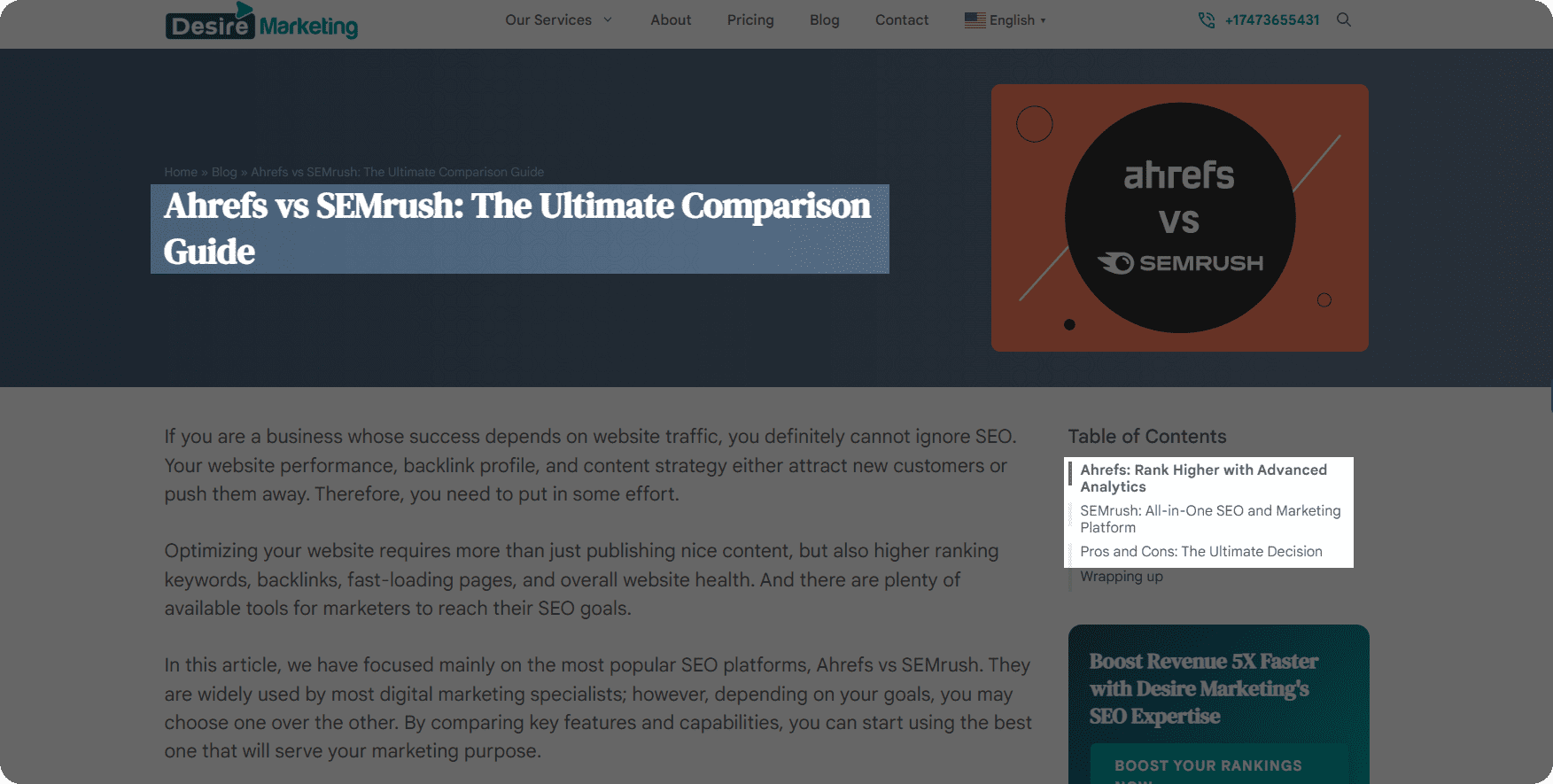
    For example, a post comparing Ahrefs VS SEMrush breaks down features, pricing, integrations, and user experience to help readers choose the best SEO tool for their team.

    comparison blog post title

    [Screenshot of comparison blog post title]

    H1: [Product/Service 1]vs [Product/Service 2]: Which is Better for [Use case]

    Ex. SEMrush vs Ahrefs: Which is Better for Link Building?

    Introduction

    • Introduce the products/services being compared.
    • Explain why a comparison is relevant for the audience.
    • State the goal of the post (help readers make an informed choice).

    H2: Overview of [Product/Service 1] and [Product/Service 2]

    Ex. Overview of Ahrefs and SEMrush

    • H3: [Product/Service 1] – Brief description, purpose, and main features.
    • H3: [Product/Service 2] – Brief description, purpose, and main features.

    H2:  [Product/Service 1]vs [Product/Service 2]: Key [Features/Functions/Benefits] Comparison

    Ex. Key Features Comparison: Ahrefs VS SEMrush

    Write a short introduction to the section.

    H3: [Feature 1] 

    Ex. Backlink Tracking

    • Compare how each product handles it.

    H3: [Feature 2] 

    Ex. Website Audit

    • Compare how each product handles it.

    H3: [Feature 3]

    Ex. Technical SEO

    • Compare how each product handles it.

    Add as many features as necessary.

    H3: [Pros/Benefits/Advantages] of [Product Name 1] 

    Ex. Pros of Ahrefs

    • Provide bullet points of the positive sides

    H3: [Cons/Drawbacks/Weaknesses] of [Product Name 1]

    Ex. Cons of Ahrefs

    • Provide bullet points of the negative sides

    H3: [Pros/Benefits/Advantages] of [Product Name 2] 

    Ex. Pros of SEMrush

    • Provide bullet points of the positive sides

    H3: [Cons/Drawbacks/Weaknesses] of [Product Name 2]

    Ex. Cons of SEMrush

    • Provide bullet points of the negative sides

    H2: [Pricing/Cost/…] Comparison [Product/Service A] VS [Product/Service B]

    Ex. Pricing Comparison: Ahrefs vs. SEMrush

    • Break down pricing plans, value for money, or hidden costs.

    H2: Which One do [Users/Companies/Individuals…] Prefer? [Product/Service A] or [Product/Service B]?

    Ex. Which One do SEOs Prefer? Ahrefs or SEMrush

    • Compare usability, speed, reliability, or support.
    • Include screenshots, tables, or charts if needed.

    H2: Final Thoughts 

    • Summarize which product/service is better for specific use cases or audiences.
    • Provide recommendations based on the comparison.
    • Optional CTA (e.g., try a demo, buy now, or learn more).

    Make sure to test these tools thoroughly before writing any verdicts, as it will impact your credibility later.

    Beginner Tips for Writing Blog Posts

    If you are new to SEO or just exploring ideas to renew your blog writing strategy, you might need some tips to guide you through the blog writing process. Check them out!

    Identify Your Blog’s Goal

    Before choosing your blog topic, decide whether the post is meant to inform, entertain readers, or improve the conversion rate. This will help you structure your blog post accordingly and keep your target readers engaged all the way to the CTA. 

    Here is what to do:

    • Decide what you want to achieve with your post
    • Match your tone and structure to your goal.
    • Create CTAs that align with your intended outcome.

    For instance, if your goal is to build brand awareness about the most effective digital marketing strategies, you might write an industry insights piece like “Emerging Marketing Trends to Watch in 2025.” 

    But if your goal is lead generation, a post such as “Top 5 CRM Tools to Streamline Your Sales Workflow” can attract readers actively searching for the CRM solution you offer and how it stands out in the market.

    Write with a reader-first mindset

    Always keep your reader in mind. Put yourself in the shoes of the reader and think about what would catch their attention and what would drive them away.  

    The best thing you can do is:

    • Understand your reader’s pain points and interests.
    • Create content that answers to their questions and addresses their problems.
    • Study competitor blogs to learn what keeps readers engaged.
    • Use clear formatting, subheadings, and white space for readability.
    • Incorporate visuals, charts, or infographics to maintain interest.

    This way, your article will be more natural and attract organic traffic, which in turn is one of the important signals for Google to consider your pages for ranking. 

    Think about SEO optimization

    Once you have picked a readable format, think about SEO optimization. Your blog post should leave space for natural keyword placement in the headings and subheadings. Therefore, structure your blog posts with SEO optimization in mind. 

    Keep in mind to:

    • Use keywords naturally in titles, subheadings, and text, without stuffing.
    • Write catchy meta titles and descriptions for each post.
    • Add descriptive alt text for all images to boost SEO and accessibility.
    • Keep paragraphs short and scannable for better readability.

    By balancing readability with SEO best practices, your blog will not only rank higher but also keep readers engaged from start to finish.

    Wrapping up

    Writing a blog post from scratch can be overwhelming, but having the right template can save a lot of time. With a ready-to-follow structure, you can focus more on the idea and less on figuring out what to write next. Our provided blog post templates are a perfect starting point, as you can use them as they are or tweak them to match your style.  

    Over time, you will naturally find your own rhythm and start creating your posts effortlessly. So pick a template and watch your article come together piece by piece. 

  • Broken Backlink: How To Find and Fix It

    Broken Backlink: How To Find and Fix It

    Backlinks are still relevant and important – that’s a fact. But if you want real results from your link building efforts, you need to make sure they’re actually working for you.

    Here’s the thing: a broken backlink can hurt your entire strategy.

    So let’s break this down step by step. We’ll show you how to fix this issue and boost your website’s rankings and performance.

    What Is a Broken Backlink?

    A broken backlink is a link to your website that doesn’t work anymore and leads to a non-existence page or an error message.

    Here are the reasons behind broken backlinks:

    • Improper Redirects

    If another website links to a page on your site that has been moved or renamed, the link can break if no redirect is in place. 

    Using a proper 301 redirect ensures that both visitors and search engines are sent to the correct new URL, preserving the link’s value and preventing confusion.

    • 404 Errors

    When a page on your site is deleted, renamed, or moved without setting up a redirect, links to the old URL will show a “Page Not Found” message. This makes the backlink useless for both visitors and search engines. Checking for 404 pages regularly helps avoid this issue.

    • 500 Server Errors

    If your website’s server goes down or has technical problems, your pages may not load. While this is temporary, backlinks to those pages will look broken until the server is fixed. Frequent server errors can also hurt your site’s reputation.

    • Incorrect URLs

    Sometimes, other websites link to your page using the wrong or incomplete URL, or they use an outdated version (for example, HTTP instead of HTTPS). These mistakes make the link fail and stop users from reaching your content. Reviewing backlinks with the best link building tools helps you find and fix these errors. 

    How Broken Backlinks Hurt Your Website?

    You may think a few broken backlinks aren’t a big deal, but they can quietly hurt your website’s performance in these ways:

    • You lose ranking power 

    Backlinks boost your SEO. When they break, that boost disappears, and your rankings drop.

    • It hurs the user experience

    Nobody sticks around after hitting a 404 error. Broken links send people straight to your competitors.

    • Google stops noticing you 

    Search engines waste time on dead pages instead of your good content. Result? Lower rankings. Fixing broken backlinks is an important part of your link building strategy, helping every link boost your site’s authority and SEO.

    • You’re losing money 

    Broken links to products or signup forms mean lost sales and leads. Every dead link costs you customers.

    How to Find Broken Backlinks: 5 Handy Tools

    Now that we’re clear on why having a broken backlink is bad for your website, let’s understand how you can spot them.

    Ahrefs

    The first tool we’ll recommend is one of the most popular SEO platforms – Ahrefs, which has a large backlink database. 

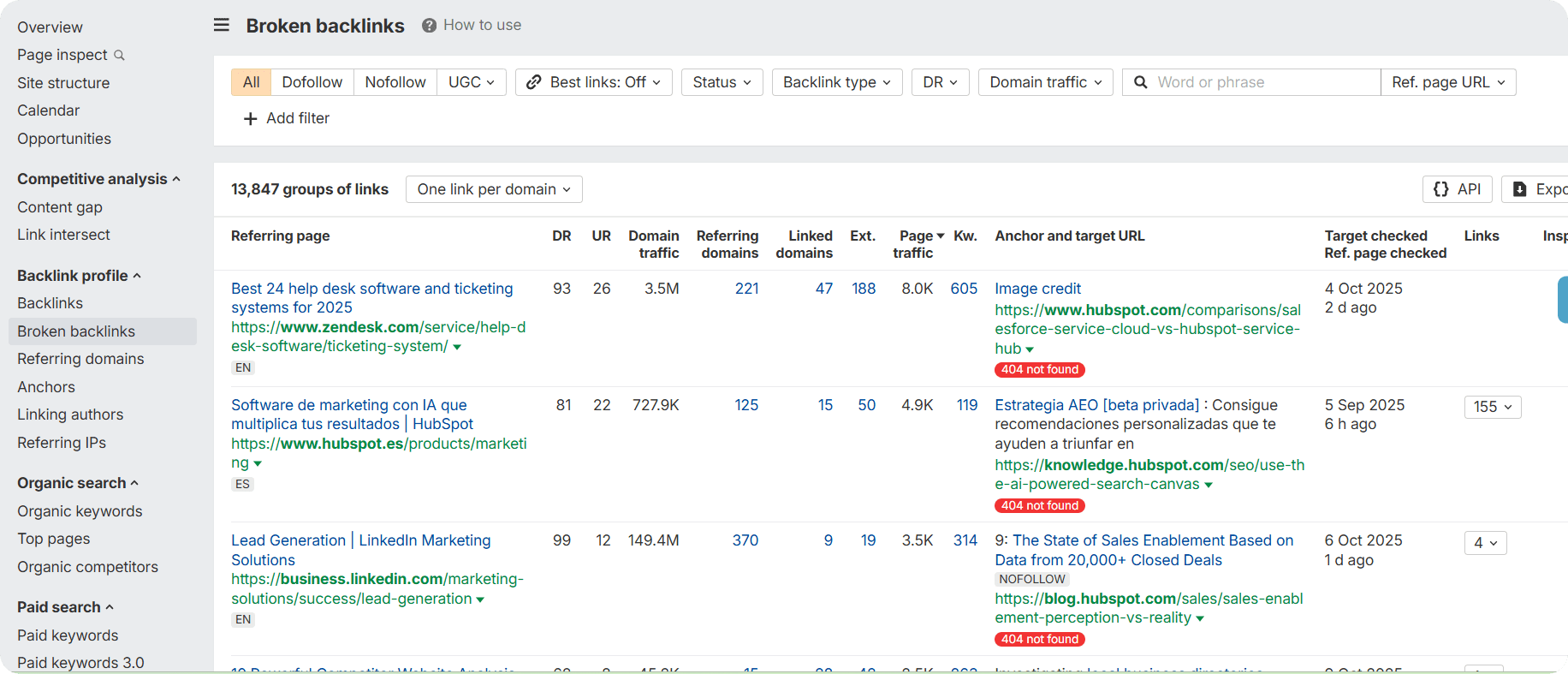
    Its Broken Backlinks Report can help you find dead backlinks. All you need to follow those steps:

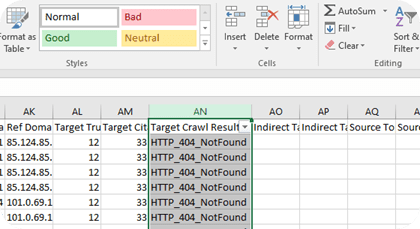
    Broken Backlinks Report

    Step 1: Open Ahrefs Site Explorer.

    Step 2: Go to the Backlinks profile section.

    Step 3: Click on Broken backlinks report.

    Step 4: Review all links pointing to your 404 pages.

    Step 5: Filter by anchor text, URL, or domain rating as needed.

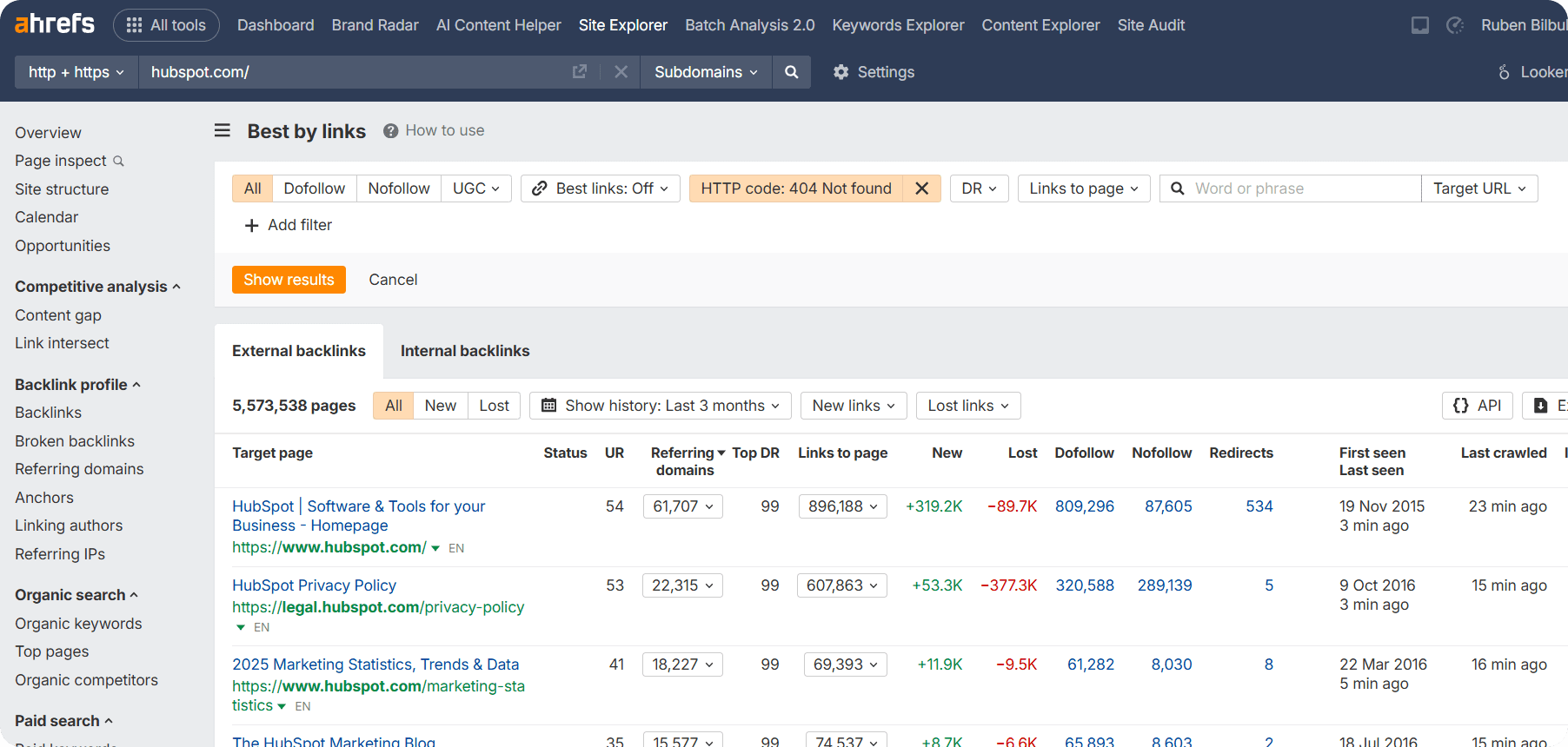
    Another Ahrefs tool you use to find broken links is the Best by Links Report.

    Best by Links Report

    Here are steps you can take:

    Step 1: Go to Site Explorer’s Pages section.

    Step 2: Open the Best by links report.

    Step 3: Apply the filter HTTP code: 404 not found.

    Step 4: Click the Links to page dropdown to see which sites are linking to each 404 page.

    Lastly, make sure to fix broken backlinks by adding redirects, bringing back deleted pages, or asking the linking sites to update your URLs with the correct links.

    SEMrush

    The next tool you can use for finding a broken backlink that points to your website is SEMrush. 

    Here is how you can do it:

    Step 1: Enter your SEMrush account and go to Backlink Audit.

    Step 2: Enter your domain to start analyzing backlinks.

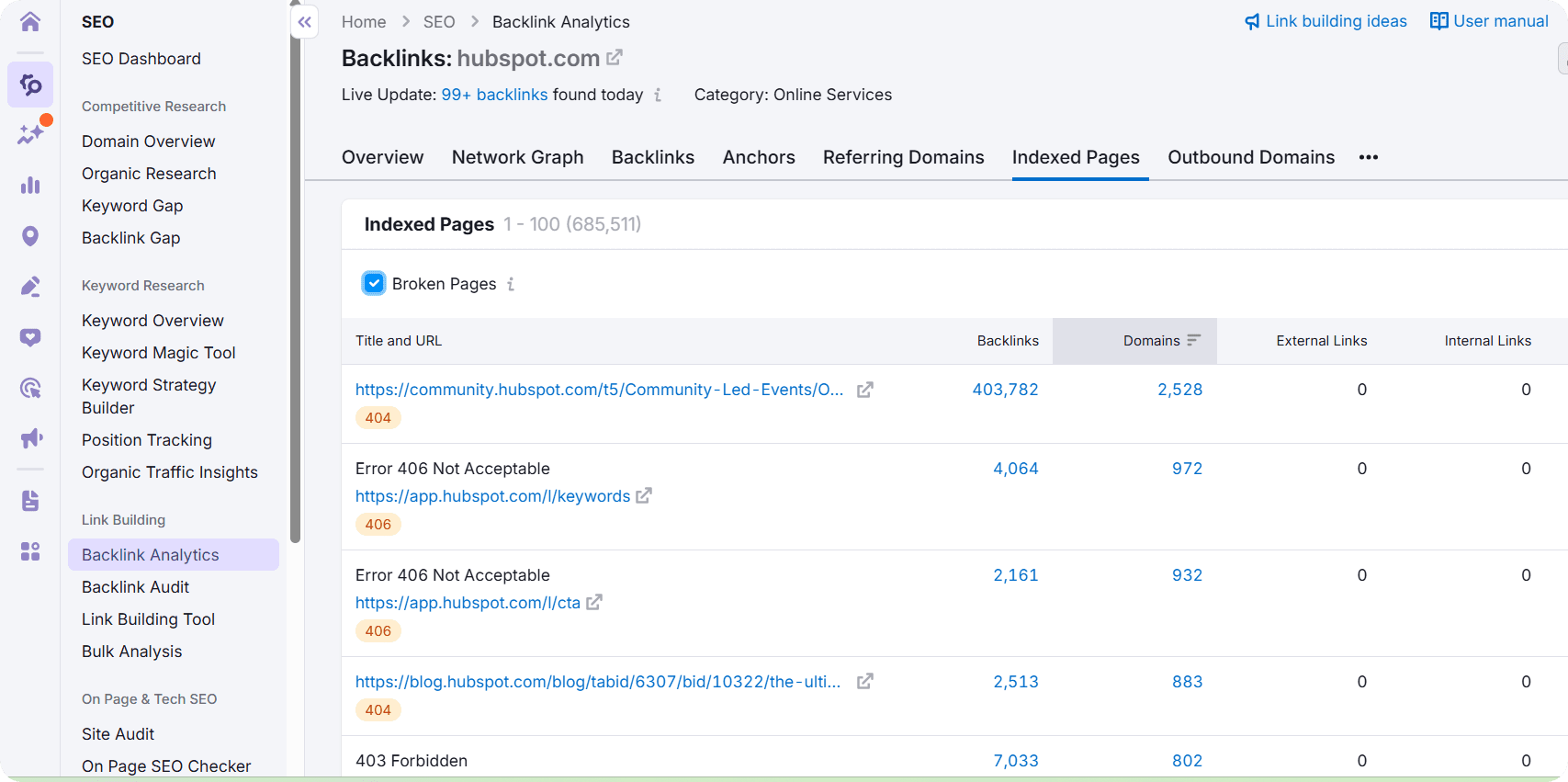
    Step 3: View the full Backlinks list (all links pointing to your site).

    Step 4: Filter to see Indexed Backlinks (links Google recognizes).

    Step 5: Filter by HTTP status codes (404, 410, 500) to find Broken Backlinks.

    finding a broken backlink

    The next option for finding broken links via SEMrush is to use the Backlink Audit feature.

    Step 1: Go to the Link Building section and select Backlink Audit.

    Step 2: Enter your domain if not already set up.

    Step 3: The Backlink Audit tool helps you find broken backlinks toyour site and those of your competitors.

    Step 4: Look for pages receiving backlinks that return 404 or other error codes.

    Step 5: Filter by HTTP status codes to prioritize fixes.

    Fix broken backlinks by asking website owners to update links, adding redirects, restoring or replacing pages, and checking regularly.

    Moz

    Another tool you can consider for better website health is Moz. With its Link Explorer, you can easily monitor and analyze links pointing to your website.  

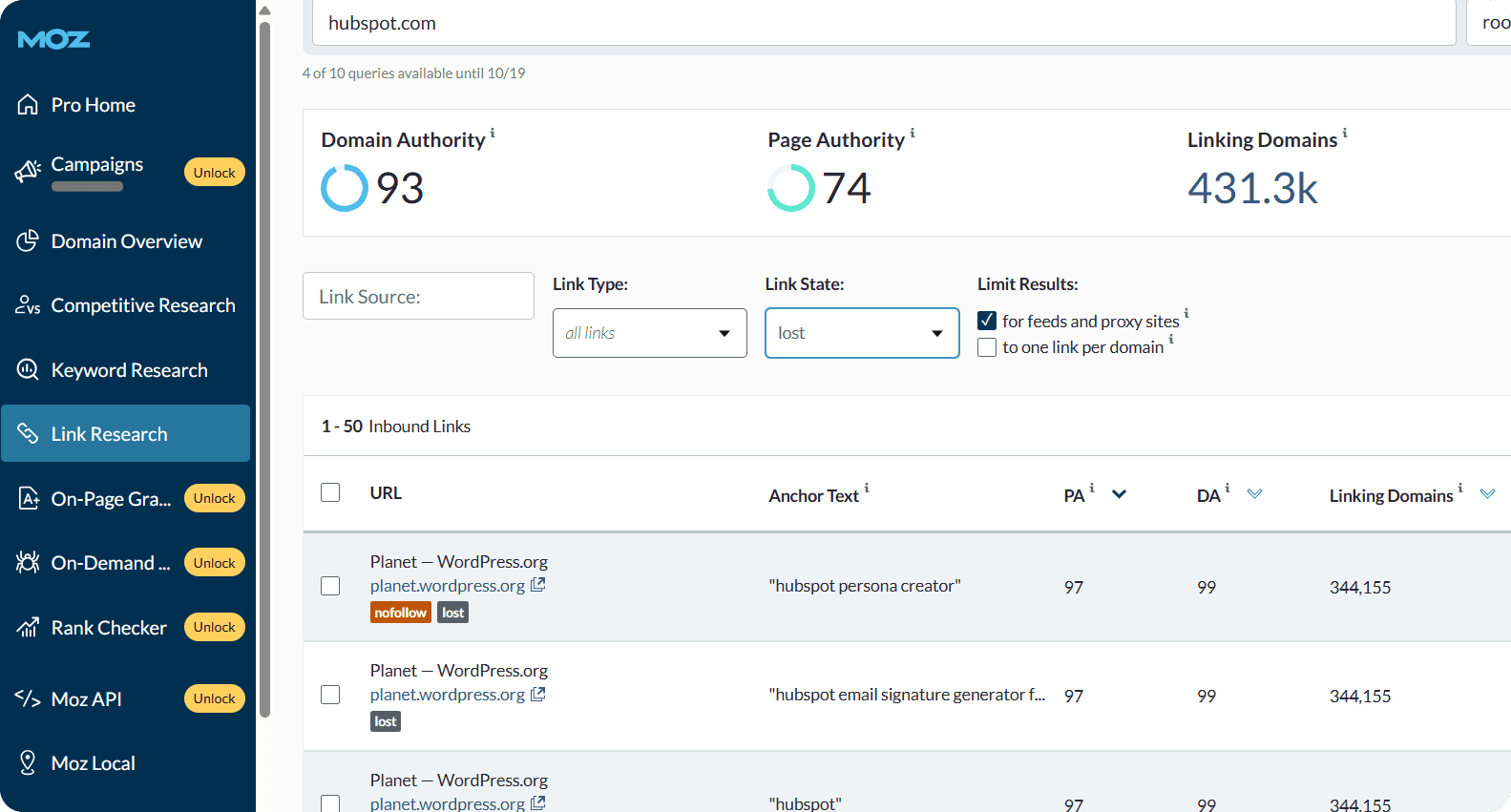
    Here is how you can find broken backlinks with Moz Link Explorer:

    find broken backlinks with Moz Link Explorer

    Step 1: Enter your website URL in Moz Link Explorer.

    Step 2: Go to the Inbound Links section.

    Step 3: Filter by Lost to view backlinks that no longer point to active pages on your site.

    Step 4: Export the list of those backlinks.

    Later, you should monitor and decide whether to fix, redirect, or contact site owners to fix the issues.

    Majestic

    The next tool to explore is Majestic, a powerful platform specifically designed for backlink research. Majestic’s Site Explorer can analyze backlinks, identify lost or broken links, check referring domains’ authority, and export data for SEO review.

    It also allows you to check broken backlinks with the following steps:

    Step 1: Go to the Backlinks section in Majestic.

    Step 2: Use the Export feature to download a list of all backlinks.

    Step 3: Open the downloaded file in a spreadsheet application like Excel.

    Step 4: Filter the data by the HTTP Status Code column to identify backlinks with a 404 status.

    majestic

    Source: https://blog.majestic.com/training/how-to-find-404-pages-using-majestic/

    Your steps are clear: to review the list of backlinks pointing to broken pages and take action. Let’s speak about this more directly in the next section.

    Next Steps: Fixing Your Broken Backlinks

    Ok, you’ve discovered that your website has broken backlinks. Now, what? We’ll recommend taking those steps:

    Step 1: Analyze the broken page 

    Check the broken URL to see what content was there and why it mattered. The more authoritative sites linking to it, the more valuable the content. This helps you decide whether to recreate the page or set up a redirect.

    Step 2: Choose your fix 

    Depending on the case, select one of these options:

    • Set up a proper redirect – Redirect the broken URL to a similar, relevant page on your site. There are different types of redirects (permanent and temporary). Make sure to choose the right option.
    • Contact website owners – If the linking site has the wrong URL, reach out and ask them to update the link.

    Step 3: Monitor regularly 

    Ensuring your backlinks are properly working is an ongoing process. So, you can use different SEO tools to continuously monitor for new broken backlinks and fix them quickly.

    To Wrap up

    A strong and healthy website is always a goal worth aiming for, and fixing broken backlinks is an important part of that. In this article, we’ve shown easy and practical ways to find and solve these problems. 

    Taking these steps helps your website stay reliable, improve user experience, and maintain credibility online. By checking your backlinks regularly, you keep your site effective, trustworthy, and ready to perform at its best.


  • How Elite Salesforce Development Partners Boost ROI with Custom Solutions

    How Elite Salesforce Development Partners Boost ROI with Custom Solutions

    Businesses nowadays must optimize operations, enhance customer experiences, and maximize ROI. Salesforce, the world’s leading CRM, is powerful, but without strategic customization, much of its potential remains untapped. Professional Salesforce development services provide tailored solutions that address unique business challenges and deliver measurable results.

    Understanding Salesforce’s Core Value

    Salesforce offers many online tools for sales, marketing, and customer service, and it can also support e-commerce. Its flexible, modular design works for businesses of all sizes. However, standard Salesforce setups may not meet the needs of organizations with unique goals or custom processes. For businesses with specialized requirements, it’s often best to hire a Salesforce consultant to tailor the platform to their unique processes and goals.

    Custom Salesforce development enhances the platform by extending its native capabilities. This includes:

    • Custom applications tailored to specific business processes
    • Automation of repetitive tasks to save time and reduce errors
    • Advanced analytics and dashboards for actionable insights
    • Seamless integration with third-party tools and legacy systems

    The Role of an Elite Salesforce Development Company

    Top Salesforce partners stand out because of their expertise, tested methods, and history of delivering results. Here’s how a leading Salesforce development company can boost ROI with custom solutions:

    Strategic Discovery and Requirement Analysis

    Elite partners discuss with you your business processes, goals, and pain points in depth in the beginning. Based on that knowledge, they communicate closely with stakeholders to recognize areas that obstruct the project and spots of betterment. It is crucial that the first part is done in this way as it provides for the final product that is in line with the business’ strategic direction.

    Tailored Salesforce Solutions

    Rather than out-of-the-box configurations, high-end partners provide tailored solutions that match your company size, industry, and user base. This is where Salesforce app development comes into play, ensuring that businesses receive solutions that align perfectly with their workflows and customer demands.

    Seamless Integration Capabilities

    Today’s businesses use a variety of systems such as ERP, accounting software, and marketing automation tools. The top Salesforce partners offer smooth integration of Salesforce with all the platforms available. This unifies data, removes silos, and improves department-level decision-making.

    Advanced Automation and AI Features

    Advanced automation and AI features in Salesforce help businesses work smarter and faster. They:

    • Reduce Manual Effort – Automate repetitive tasks like lead assignment, data entry, and report generation.
    • Improve Accuracy – Minimize human errors and ensure consistent, reliable data across all processes.
    • Enable Proactive Strategies – Use AI-powered insights to forecast trends, identify opportunities, and make informed decisions.
    • Enhance Customer Engagement – Predict customer needs and personalize interactions for better experiences.
    • Increase Productivity – Free up employees to focus on high-value tasks rather than routine work.

    User-Centric Interface Design

    User adoption is critical to ROI. Custom development includes designing intuitive interfaces and mobile-responsive layouts to improve user experience. With tailored dashboards and simplified navigation, employees can access the data and tools they need more effectively. By applying user-centered design principles, the development process focuses on the needs, preferences, and workflows of end-users, ensuring higher engagement and satisfaction.

    Performance Optimization and Scalability.

    Elite Salesforce partners design solutions that can grow with your business. Their custom development ensures your Salesforce system remains fast, efficient, and capable, no matter how large your organization becomes. Key benefits include:

    • Efficient Performance at Scale – The system remains responsive even as user numbers and data volume increase.
    • Flexible Infrastructure – Custom architecture can easily adapt to new business processes, integrations, or modules.
    • Future-ready Solutions – Designed to handle growth without needing a complete system overhaul.
    • Cost-effective Scaling – Reduces the need for expensive reinvention as your company expands.
    • Enhanced Reliability – Optimized code and architecture prevent slowdowns, bottlenecks, or downtime.

    Robust Testing and Quality Assurance

    High-quality Salesforce development depends on rigorous testing to ensure reliability and stability. Elite partners implement comprehensive QA processes, including:

    • Unit Testing – Ensures each individual component of the system works correctly.
    • Integration Testing – Confirms that different modules and third-party systems interact seamlessly.
    • User Acceptance Testing (UAT) – Validates that the solution meets business needs and user expectations.
    • Bug-free Delivery – Thorough testing minimizes errors, reducing future maintenance and downtime.
    • Performance Checks – Verifies system speed, responsiveness, and scalability under real-world conditions.

    Continuous Support and Innovation

    After deployment, elite Salesforce partners continue to support your system and help you stay ahead. Their services include:

    • Ongoing Maintenance – Regular updates, patches, and system monitoring to ensure smooth operation.
    • Proactive Enhancements – Suggesting improvements based on latest Salesforce features and market trends.
    • Adaptation to Updates – Staying current with Salesforce’s frequent platform upgrades without disrupting business.
    • ROI-focused Innovation – Identifying opportunities to automate, streamline, or expand capabilities for higher returns.
    • Training and Guidance – Ensuring users adopt new features effectively to maximize system value.

    Salesforce Development Services That Drive ROI

    Partnering with a Salesforce expert means access to a comprehensive range of services designed to deliver tangible business benefits. Here are key Salesforce development services that contribute directly to improved ROI:

    Custom App Development

    Create apps within Salesforce that mirror your exact workflows. These initiatives are a core part of custom software development, allowing companies to build unique solutions that extend Salesforce’s functionality beyond standard capabilities.

    Salesforce Lightning Migration

    Migrating from Classic to Lightning improves user experience, performance, and access to advanced features. An elite development company ensures a smooth transition without disruption.

    Automation Solutions

    Automate lead assignment, quote generation, case resolution, and more with Salesforce automation tools. Reducing manual intervention saves time and reduces errors.

    Einstein AI Implementation

    Salesforce Einstein delivers AI-powered insights. Elite developers configure Einstein features like predictive lead scoring, opportunity insights, and sentiment analysis to enhance sales and marketing efforts.

    Custom Reports and Dashboards

    Custom reports and dashboards in Salesforce provide businesses with clear, actionable insights that drive better decision-making. By tailoring these tools to your unique key performance indicators (KPIs), you can track progress, uncover trends, and make data-driven decisions with confidence.

    Key benefits include:

    • Personalized Insights – Build dashboards that focus on the metrics that matter most to your business, whether it’s sales, marketing, customer service, or operations.
    • Real-time Data Access – See up-to-the-minute updates across all departments to make timely, informed decisions.
    • Visual Representation of Data – Use charts, graphs, and tables to quickly understand performance trends and patterns.
    • Sales Performance Tracking – Monitor leads, opportunities, conversions, and revenue to identify strengths and areas for improvement.
    • Marketing ROI Measurement – Track campaign performance, lead generation, and customer engagement to evaluate marketing effectiveness.
    • Customer Service Monitoring – Measure case resolution times, customer satisfaction scores, and service efficiency to improve support.
    • Operational Efficiency Analysis – Identify bottlenecks in workflows and processes, allowing teams to optimize operations.
    • Forecasting and Trend Analysis – Use historical data to predict future outcomes and plan strategically.
    • Easy Sharing and Collaboration – Dashboards can be shared across teams, ensuring everyone works from the same data and insights.
    • Custom Alerts and Notifications – Get instant alerts when key metrics exceed thresholds or require attention, allowing proactive responses.

    Custom reports and dashboards transform raw data into actionable intelligence, empowering teams to work smarter, align with business goals, and achieve measurable ROI from Salesforce development.

    Salesforce Commerce Development

    For those in retail or eCommerce, Salesforce Commerce Cloud is an efficient and highly effective way of looking after digital storefronts. Custom development takes the redesigned storefront further, including checkout processes, inventory management, and personalization capabilities.

    Industries That Benefit Most from Custom Salesforce Development

    Almost every industry can gain from Salesforce customizations, but some have seen particularly strong results. Here’s how different sectors leverage Salesforce development to solve specific challenges and drive growth:

    Retail & eCommerce:

    • Personalized Marketing: Send tailored promotions to customers based on past purchases or browsing behavior.
    • Inventory Syncing: Automatically update stock levels across online and physical stores to prevent overselling.
    • Customer Service Automation: Use chatbots and automated ticketing to provide faster, 24/7 support, improving satisfaction.

    Example: A fashion retailer uses Salesforce to recommend products to customers via email campaigns, increasing repeat purchases by 20%.

    Healthcare:

    • Patient Tracking: Keep detailed records of patient visits, prescriptions, and treatment plans in one place.
    • Compliance Management: Ensure all healthcare processes comply with regulations like HIPAA.
    • Telehealth Integrations: Enable secure virtual consultations and remote monitoring.

    Example: A clinic integrates Salesforce with telehealth tools to schedule virtual appointments and track patient follow-ups, reducing missed appointments by 15%.

    Financial Services:

    • Secure Client Portals: Allow clients to safely view account information and investment reports.
    • Risk Analysis: Analyze client portfolios to identify potential risks and optimize investment strategies.
    • Investment Tracking: Keep real-time records of financial transactions and portfolio performance.

    Example: A wealth management firm uses Salesforce dashboards to monitor client portfolios, improving reporting accuracy and client satisfaction.

    Manufacturing:

    • Supply Chain Automation: Track inventory, shipments, and production schedules seamlessly.
    • Partner Portals: Enable suppliers and distributors to access key information and collaborate efficiently.
    • Order Tracking: Monitor orders from production to delivery to ensure timely fulfillment.

    Example: A manufacturing company integrates Salesforce with ERP systems to track shipments, reducing delivery delays by 25%.

    Education:

    • Student Management Systems: Keep records of enrollment, grades, and attendance.
    • Admissions Workflows: Streamline the application and enrollment process for prospective students.
    • Alumni Engagement: Maintain connections with graduates through newsletters, events, and fundraising campaigns.

    Example: A university uses Salesforce to manage alumni communications and track donations, increasing engagement and contributions.

    Measuring ROI from Salesforce Custom Development

    Investing in Salesforce development is a strategic decision, and measuring ROI is essential to ensure that the investment delivers tangible results. Key performance indicators (KPIs) can help track the impact of custom Salesforce solutions:

    • More Sales Revenue:
      • Streamlined sales processes, better lead management, and automated follow-ups help sales teams close deals faster.
      • Example: By using Salesforce to automate lead assignment and nurture campaigns, a company can see a measurable increase in monthly sales revenue.
    • Improved Conversion Rates:
      • Personalized customer experiences and data-driven marketing campaigns increase the likelihood of turning leads into customers.
      • Example: A business using Salesforce to segment leads and send targeted offers may see higher conversion rates compared to generic marketing.
    • Operational Efficiency:
      • Automation of repetitive tasks, integration of multiple systems, and optimized workflows save time and reduce errors.
      • Example: A company automates order processing and reporting, freeing employees to focus on strategic initiatives, reducing manual work by 30%.
    • Improved Customer Retention:
      • Faster response times, proactive service, and predictive analytics improve customer satisfaction and loyalty.
      • Example: Using Salesforce dashboards to track customer issues and send automated follow-ups helps reduce churn and increase repeat business.
    • Lower IT Costs:

    A professional Salesforce development company works closely with you to set benchmarks, track performance, and optimize over time.

    Maximize ROI with Expert Salesforce Development

    Salesforce is more than just a platform, it’s a powerful tool that can transform your business. By leveraging expert Salesforce development services, companies can unlock the full potential of the platform:

    • Custom Salesforce Development: Tailored solutions to meet your unique business needs.
    • Salesforce App Development: Build apps that streamline workflows and improve efficiency.
    • Automation Solutions: Reduce manual work and improve accuracy across departments.
    • Einstein AI Implementation: Leverage AI-powered insights for smarter business decisions.
    • Custom Reports and Dashboards: Track performance and KPIs in real time.
    • Commerce Cloud Development: Enhance eCommerce operations with a personalized, efficient digital storefront.
    • Continuous Support and Innovation: Stay current with platform updates and ongoing enhancements.

    These services help businesses streamline operations, improve customer experiences, and drive measurable ROI through Salesforce development.

    Conclusion

    Salesforce can transform how businesses acquire customers, manage operations, and grow. To get the most value, development must align with your company’s specific needs. The right Salesforce development ensures your platform is tailored, scalable, and supports long-term growth.

    With proper custom solutions, you can streamline processes, improve user experience, and boost ROI. Investing in tailored development turns Salesforce into a true business game-changer.


  • Best SEO Reporting Tools for 2026 Reviewed

    Best SEO Reporting Tools for 2026 Reviewed

    Do you think you could succeed in SEO without reports in front of you? They make it easier to grasp the image of your site’s SEO performance quickly, see where you have made progress, or where you need to work on. 

    Numerous SEO platforms offer reporting features, as well as dedicated tools specifically designed for generating reports. Depending on how you get things done, you should consider a tool that will precisely match your needs. 

    For that, we have reviewed the best SEO reporting tools and their features to help you make informed decisions.

    Why Do You Need SEO Reporting?

    SEO reporting is more than just collecting numbers. It helps you:

    • Track Key Metrics: Monitor keyword performance, site traffic, and conversions to see what drives results. For example, you can find which keywords bring the most organic traffic and replace underperforming ones with better alternatives.
    • Analyze Performance: Understand which pages or strategies need improvement and prioritize efforts accordingly.
    • Align Teams: For internal marketing teams, reports keep all stakeholders informed and aligned with shared goals.
    • Build Client Trust: For agencies, reports demonstrate the results of their work and the value of their services.

    Overall, they provide clarity, accountability, and a better sense of direction, which help you achieve long-term outcomes.  

    What to Look for in an SEO Reporting Tool

    The way you do your SEO reporting can make a huge difference in how effectively you track your website’s performance and make decisions. Not all tools are equal, and picking the right one among the best SEO reporting tools that match you will be a huge deal. 

    Here’s what to pay attention to:

    Ease of Use

    The reporting tool should be simple to understand. The dashboard shouldn’t be full of unnecessary tabs and information, as this will slow you down and make it harder to interpret data. 

    We recommend choosing tools that have clean layouts, more white space, and visualized data that will help you understand information quickly. 

    Data Accuracy

    The reports should include accurate data across all metrics. The organic traffic, keyword rankings, and backlink performance should be recently updated and reflect real-time changes, as precision is what you care about the most in reports. 

    For instance, many experts prefer to use Ahrefs because its huge backlink database never fails to provide accurate and fresh data.

    Customization

    Reporting tools may be able to provide lots of metrics, but you might not need all of them. You should be able to choose what to display and have personalized views for you and your clients. 

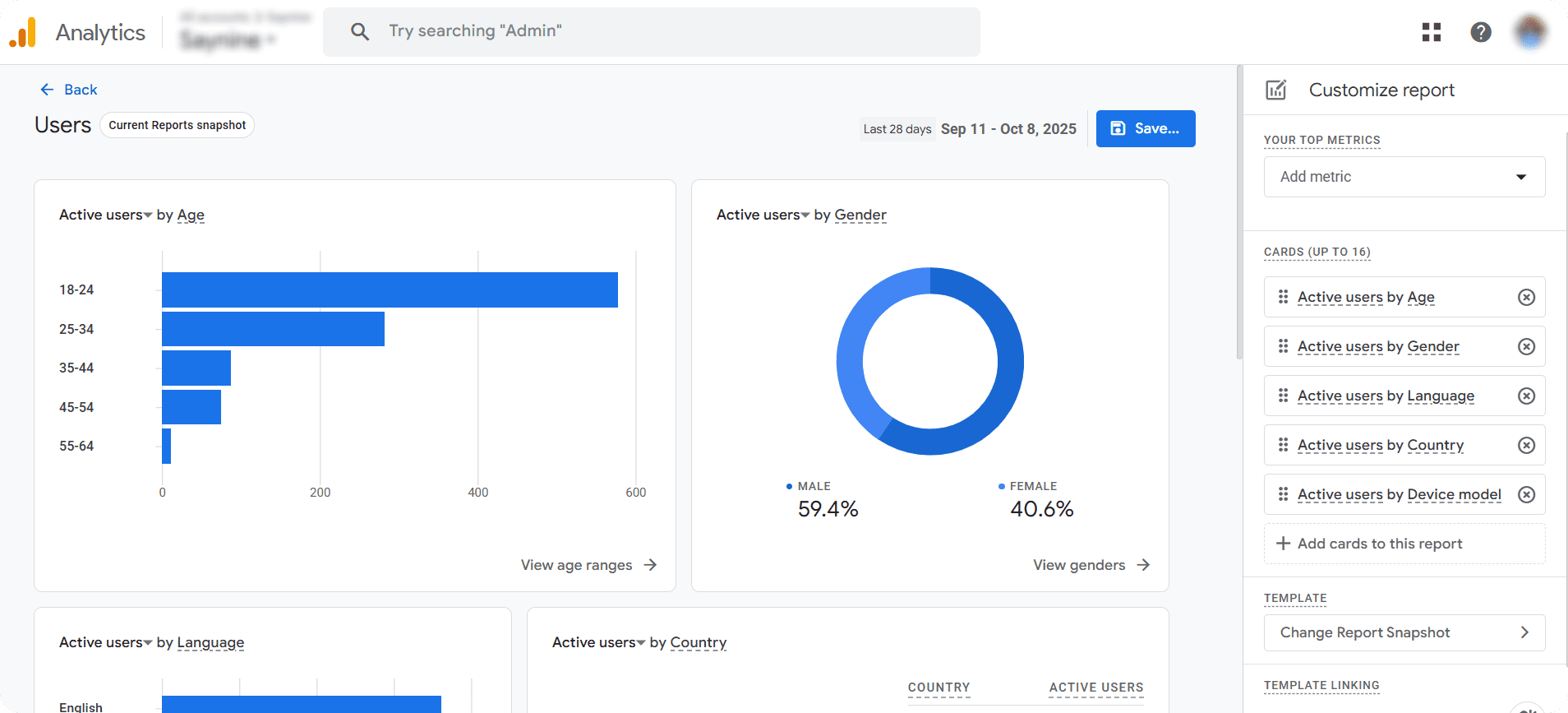
    For instance, in Google Analytics, you can easily customize reports by adding the metrics you care about, like active users by age, country, or device, so you only see the data that matters most. 

    analytics report

    Integration

    If you are using multiple tools for your SEO, the reporting tool should also be able to easily integrate with other software and fit your workflow. 

    For example, while using Looker Studio (formerly Google Data Studio), you can pull your organic traffic data from Google Analytics, CTA performance from Search Console, and have a look at them without the need to switch between tabs.

    Pricing

    Last but not least, the pricing structure is also important. Your choice of pricing highly depends on your company’s size and goals. Thoroughly measure how the tool you invest in will guarantee a bigger ROI.  

    If you have a large team and higher expectations on the outcome, it’s worth exploring higher-than-average pricing models to have fewer limitations and higher usability by all stakeholders. You can also consider affordable options if you are new to SEO and just testing the waters.

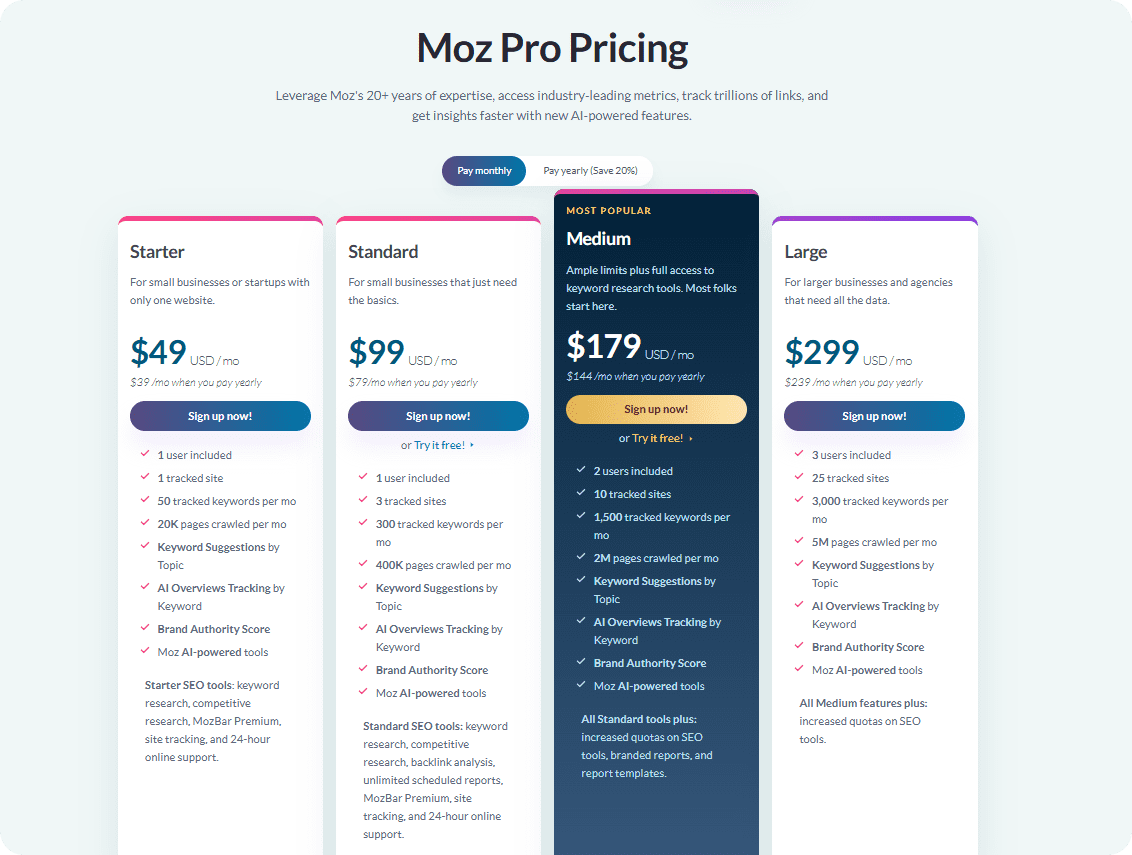
    For instance, Moz’s pricing starts at 49 USD/mo and scales up to 299 USD/mo, giving options for individuals and large companies. 

    Screenshot of Moz’s pricing plan

    Now that you know what factors to consider before making a purchase, it’s time to go through the best SEO reporting tools. Check them out!

    5 Best SEO Reporting Tools in 2025 

    Here are the top tools that many experts choose to make reports, both for the team and their clients.

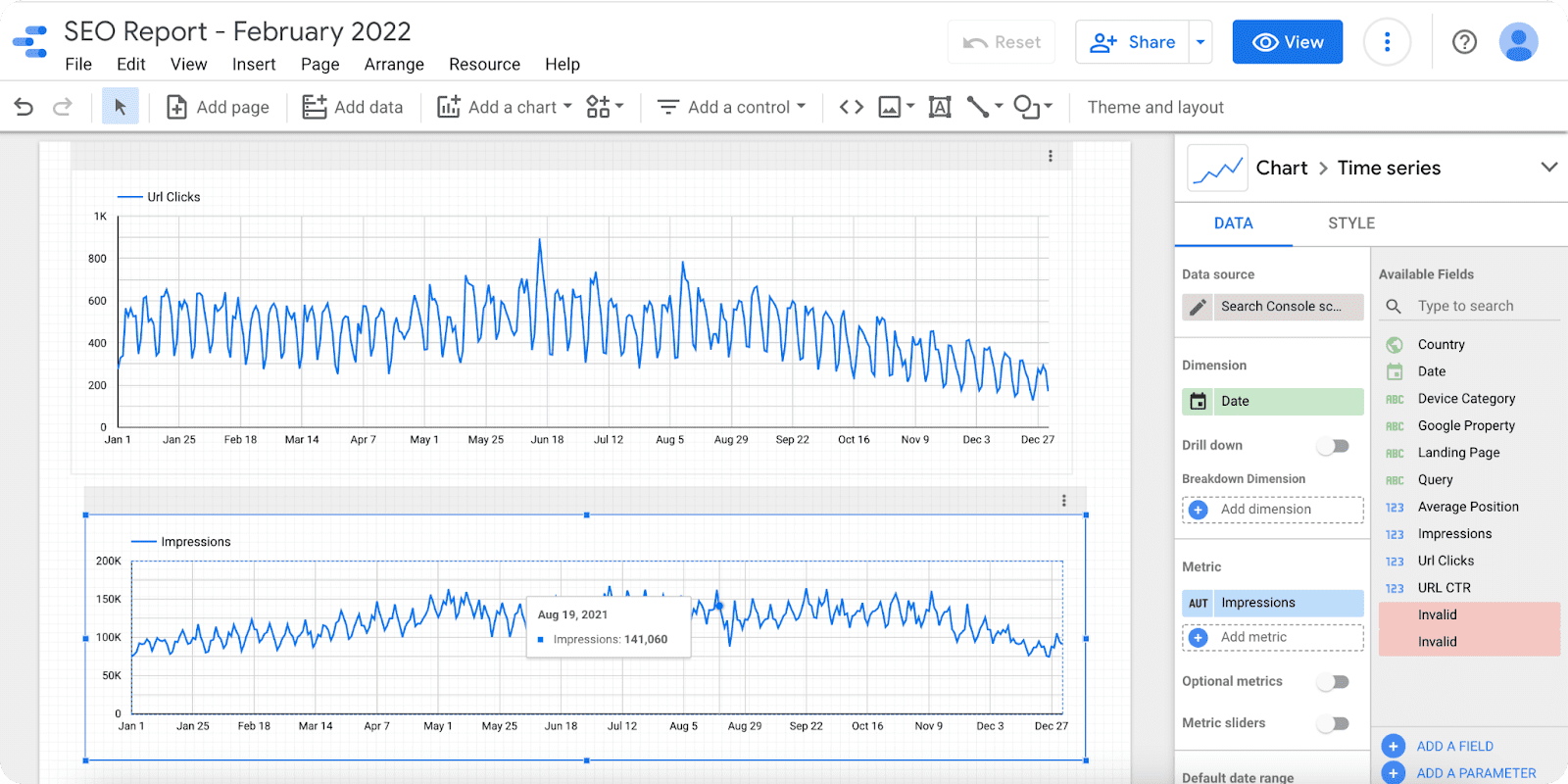
    Google Data Studio

    Google Data Studio is a free reporting tool that gives access to a fully customizable dashboard. Its strength lies in its ability to pull data from the whole Google ecosystem; however, you need to pay to integrate the third-party applications.

    The platform offers visual charts, graphs, and tables to easily spot patterns and trends in SEO performance. You can build really great and interactive dashboards with Data Studio with a few simple steps:

    Step 1: Sign in to Google Data Studio

    Step 2: Create a new report by clicking “+ Create” and going to “Report.”

    Step 3: Connect your data sources, like Google Analytics and Google Search Console.

    Step 4: Add charts and tables to show visualizations.

    Step 5: Customize the dashboard with filters, date ranges, and colors.

    Step 6: Share or schedule the report with your team or client

    Google Data Studio SEO report

    Source: https://improvado.io/blog/seo-dashboard-in-google-data-studio


    Your other team members can also collaborate with you, as the platform is shareable with multiple users. It’s very much similar to the Google Docs system, with “Viewer”, “Editor”, and “Commentor” options, once you share the link. 

    Overall, Data Studio is perfect for general reporting, for those who want to go beyond Excel and produce interactive reporting. 

    Ahrefs

    Every SEO specialist knows Ahrefs and uses it in their day-to-day workflow. It has everything for managing SEO processes and is the most famous and widely used toolkit that covers everything from keyword research to advanced link building management.

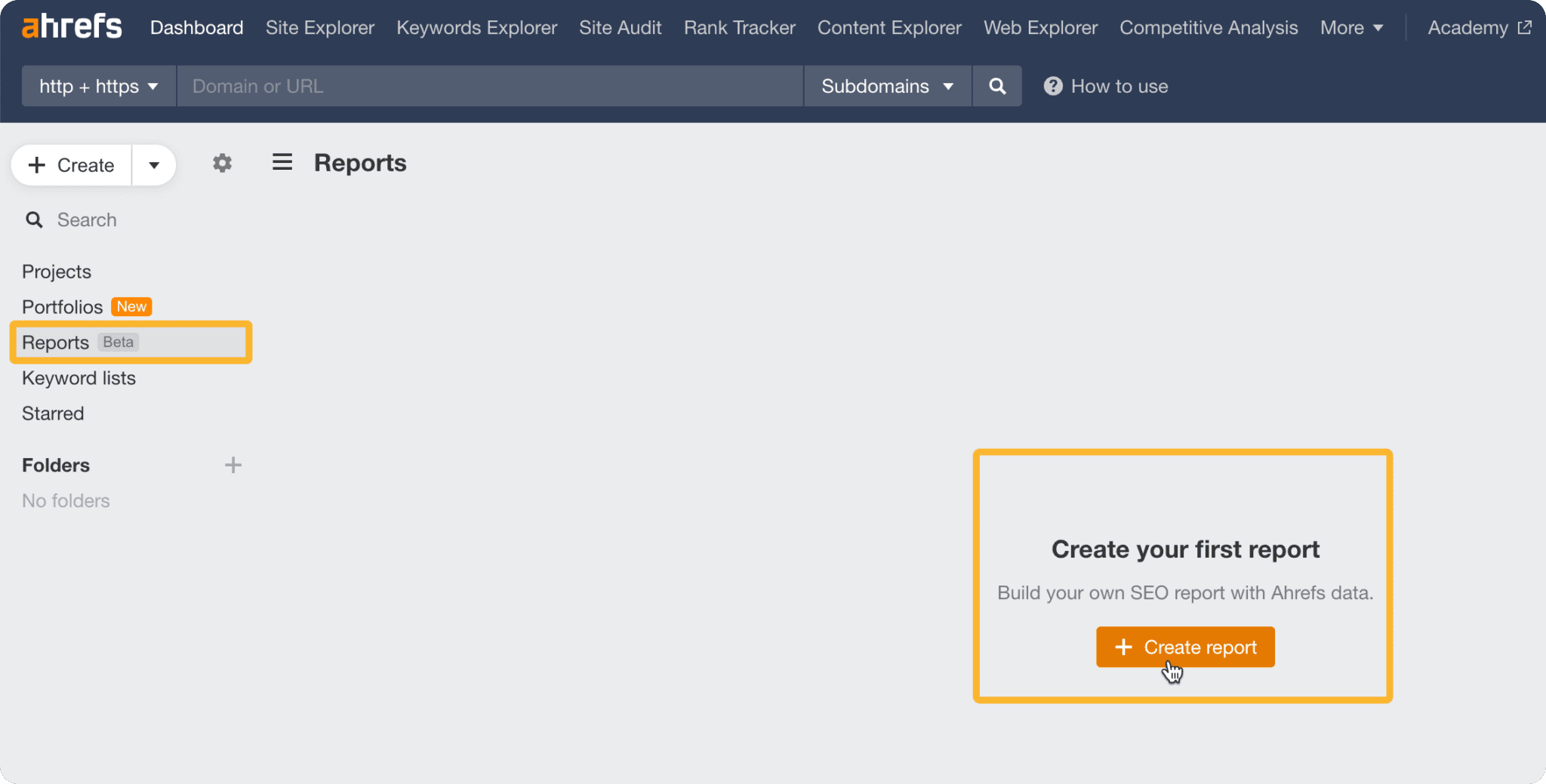
    Ahrefs’s reporting features have grown since they added their Report Builder add-on. With it, creating reports can be done following these simple steps:

    Step 1: Log in to your Ahrefs account and go to the Reports section, and click “Report builder”.

    Step 2: Click “Create Report” and pick the metrics you want

    Step 3: Add and customize widgets for each metric. You can set dates, compare periods, or focus on competitors.

    Step 4: Arrange your widgets by dragging them into the order you like.

    Step 5: Export or share the report as a PDF or directly with clients.

    Ahrefs SEO reports

    Source: https://ahrefs.com/blog/reports/

    As Ahrefs has the biggest backlink database, the reporting data quality is outstanding. If you need to report backlink growth or link gaps, Ahrefs’ reports will be the most credible and accurate.

    However, its pricing is quite expensive and made for enterprise-level usage. It starts from 129USD/mo for small businesses and goes up to 449 USD/mo for large in-house marketing teams. 

    Ahrefs is better used for general SEO purposes, in order to use all of its capabilities, rather than just reporting.

    SEMrush

    SEMrush is famous as a comprehensive SEO platform not only for reporting, but for keyword and competitor analysis, managing site health, conducting outreach, etc. With this all-in-one toolkit, marketers can generate detailed and precise reports. For SEO reporting, SEMrush provides all kinds of information that you need. It includes a range of data from position tracking, keyword performance, to website audits.

    To generate your report, you should:

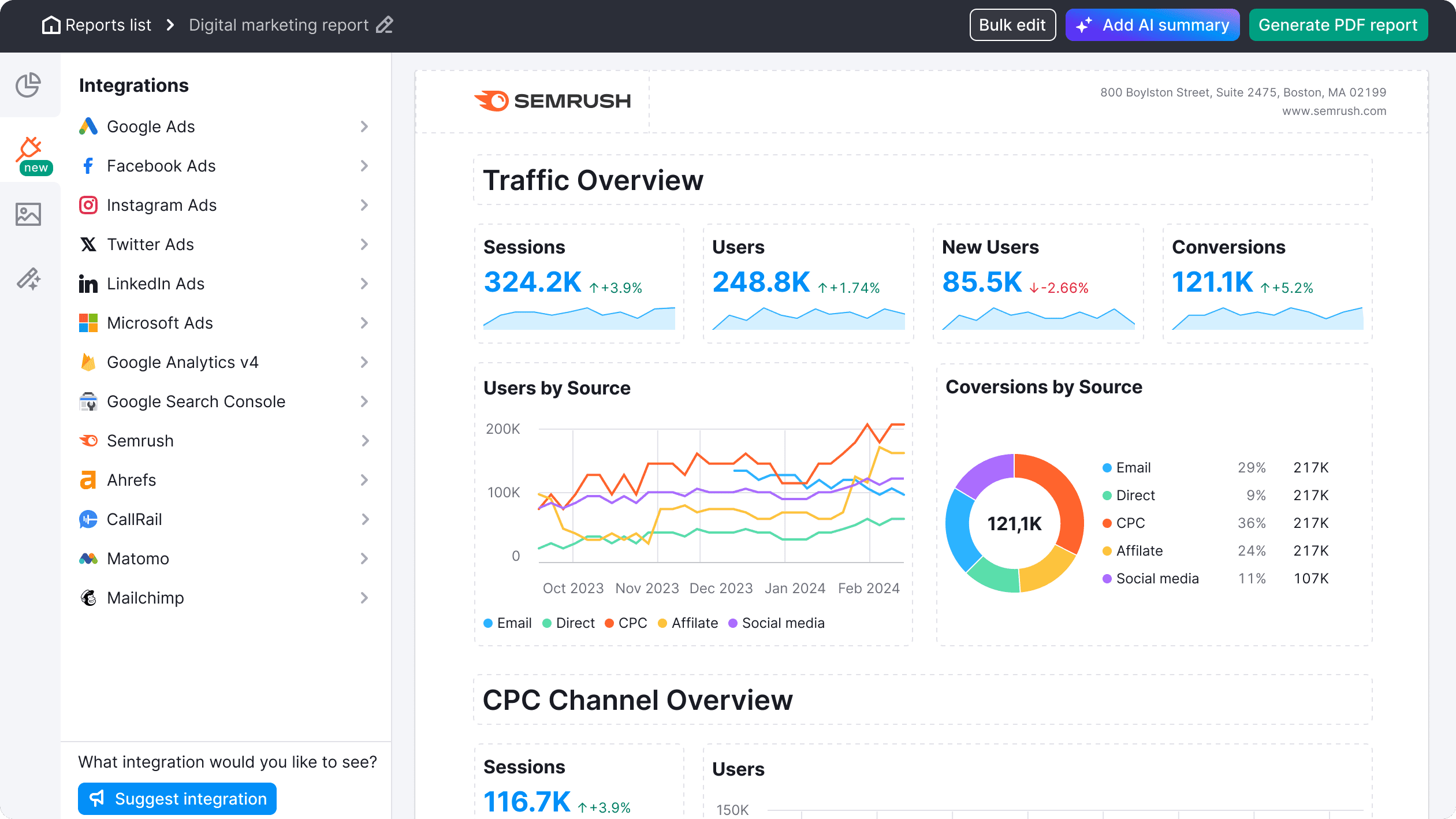
    Step 1: Log in and go to My Reports.

    Step 2: Click “Create Report” and add the widgets you want, like domain or keyword analytics, backlink, or site audit. You can also add widgets from your data on Google Business Profile, Analytics, or Search Console.

    Step 3: Arrange and customize the report layout, date range, and competitors.

    Step 4: Export or share the report, or schedule it to email automatically.

    semrush report page

    Source: https://www.semrush.com/my_reports/lp/seo-reporting/

    Here you can see a ready-to-export report on traffic overview with the visualizations of conversion traffic, user information, etc.

    You can see that with visualized charts, SEMrush does its best. For clients or people with less SEO knowledge, it won’t be necessary to be an expert to understand the issues when displayed by graphs or charts.

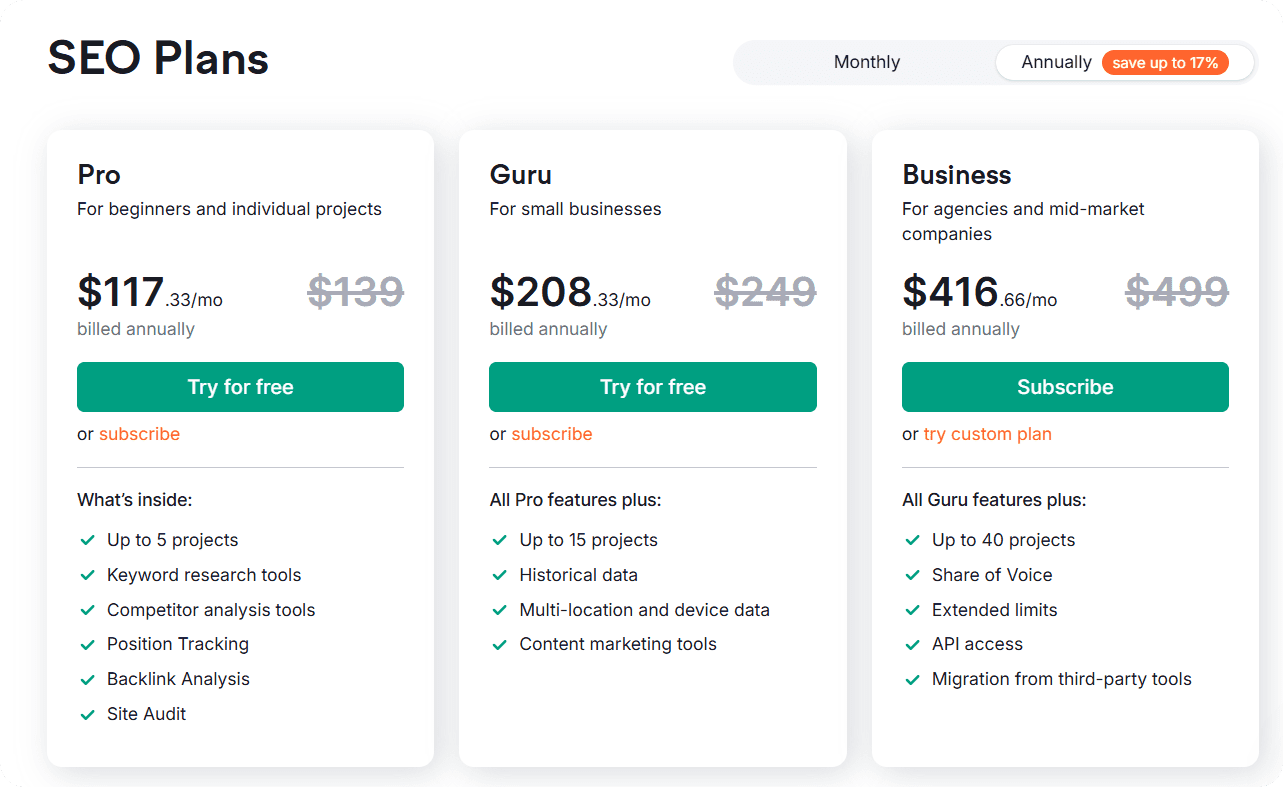
    SEMrush’s pricing plan starts at 117.33 USD/mo and is designed for beginners and individual projects. Agencies and mid-market companies can choose the highest option, which is 416.66 USD/mo.

    SE Ranking

    SE ranking is designed to provide comprehensive tracking and easy-to-understand reporting options. You can track your keyword rankings, conduct website audits, backlink monitoring, and much more. It’s considered to suit businesses of all sizes.

    Marketers prefer SE Ranking for its user-friendly interface. Even users who are new to SEO can get started with the platform easily and generate reports without much experience or a learning curve. 

    To get started with it:

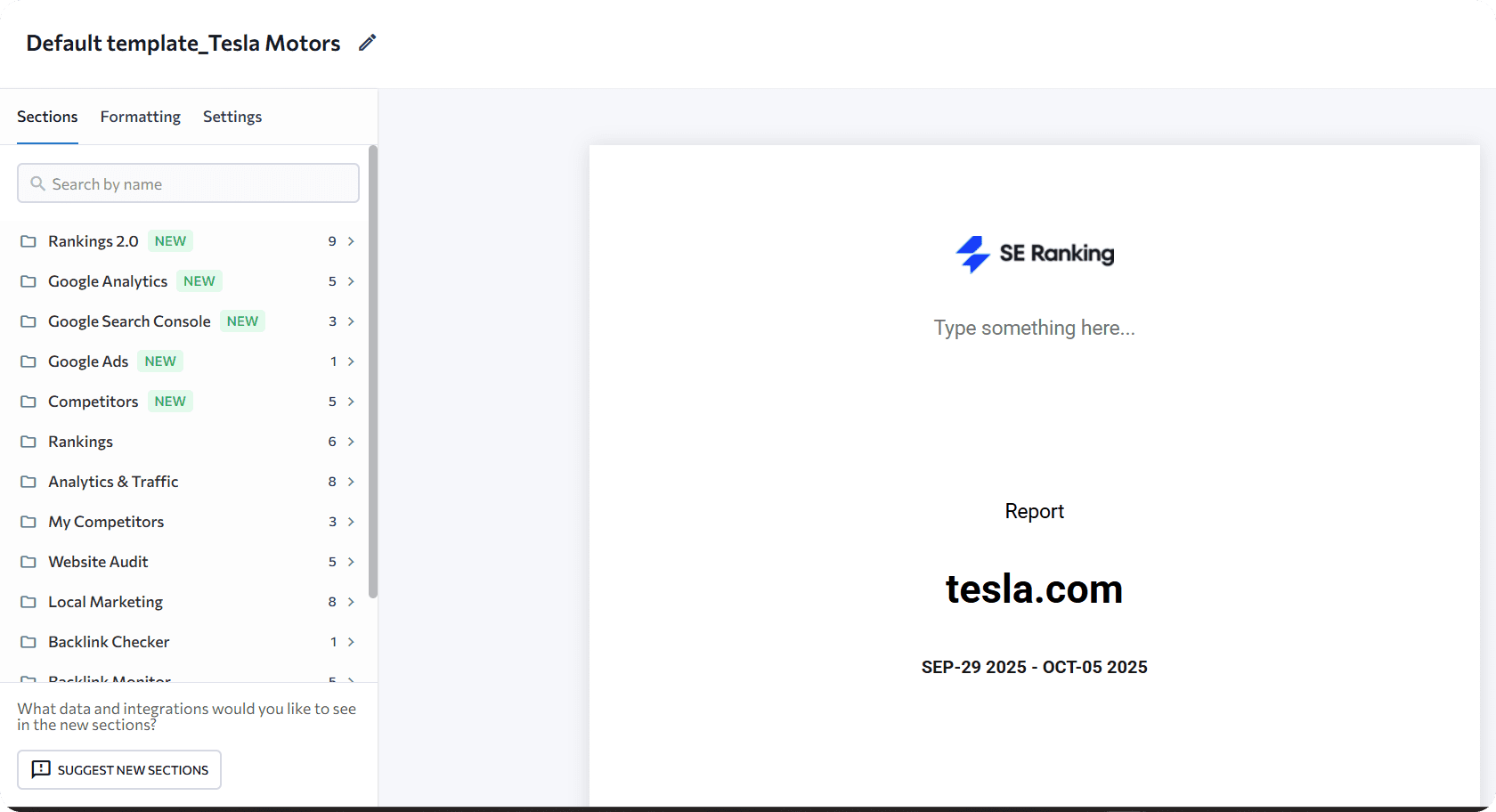
    Step 1: Simply log in to your SE Ranking account

    Step 2: Go to “Report Builder” and click on “Create Report”

    Step 3: Choose your desired SEO metrics

    Step 4: Apply formatting and your preferred customization options

    se ranking report

    The tool also allows scheduling automated reports. To keep all your stakeholders informed, you can set up monthly or weekly reports to be emailed directly to everyone involved in the project. You can also add branded and personalized elements for each client. 

    While its database is not as large as compared of Ahrefs or SEMrush, reports include highly accurate and actionable data at a more affordable rate, starting from 52 USD/mo. It’s ideal for small to mid-sized businesses and agencies that need easy-to-use SEO reporting without the complexity or the higher cost of larger enterprise tools.

    Moz Pro

    Another all-in-one solution is Moz Pro, which covers the SEO essentials with its link building, website audit, and page optimization capabilities. It’s known for reporting that gives clear and measurable results with recommendations to improve SEO performance.

    To make customized reports in Moz Pro:

    Step 1: Select a campaign

    Step 2: Click on “Custom Reports” and go to “Create/Schedule PDF report”

    Step 3: Choose whether you want to make the report from scratch or use the templates

    Step 4: Add your report’s details, such as the title and the description 

    Step 5: Add the relevant modules/metrics;

    Step 6: Preview and download the report

    Moz focuses on clarity and simplicity. The reports use plain language and visual elements like charts and tables, so you can quickly see progress and identify problem areas without getting lost in technical metrics. 

    Moz pro Reporting
    Source: https://moz.com/help/moz-pro/reporting/custom-reports 

    The pricing range starts with affordable options with 49 USD/mo and scales up to 299 USD/mo, making it a good fit for businesses that seek a balance between usability and clear results, serving both clients and internal teams well. 

    Now, with some credible options in mind, you are ready to test them and commit to a solution that helps you create SEO reports with clear and detailed insights. 

    Wrapping Up

    You can see that some of the best SEO reporting tools cover common areas of reporting and have mutual features. 

    Besides reporting, they also help improve other areas of SEO, perfectly fitting the workflow of professional marketing companies or individuals. But if you need a nice add-on for just reporting, you can choose other, less expensive tools as well.

    Our final recommendation is to thoroughly evaluate what you need and how the tool can support your SEO needs.


  • Revitalize Your Outreach with Automation: The Power of Direct Mail API & HIPAA-Compliant Direct Mail

    Let’s be honest—our screens are packed with ads 24/7. To truly reach people, you need more than just flashy headlines or trendy campaigns. To truly capture attention—and foster trust—you need a blend of innovation and authenticity. That’s where direct mail API and HIPAA direct mail come into play, and PostGrid offers stellar solutions for both.

    Why Traditional Direct Mail Still Works

    Despite the dominance of digital communication, direct mail remains a uniquely powerful way to engage recipients.

    Traditional direct mail, however, is labor-intensive. Printing, stuffing, addressing, and mailing chew through time and resources. Mistakes, delays, and compliance risks lurk at every step. Enter automation—and specifically, the direct mail API.

    What Is a Direct Mail API?

    A direct mail API transforms mailing into a seamless, digital-first process. By integrating directly with your CRM, marketing platform, or e-commerce solution, you can automate the printing, personalization, and delivery of letters, postcards, and checks.

    PostGrid’s Print & Mail API offers:

    • Integration with CRMs like HubSpot, Salesforce, Marketo, QuickBooks, and more
    • Variable data printing for highly personalized content
    • On-demand fulfillment and fast SLA (as quick as 2 business days)
    • Full campaign tracking and analytics

    Think of it like email marketing—plus the power of physical touch.

    Automate Without Sacrificing Compliance

    One of the standout strengths of PostGrid’s direct mail API is its strong compliance posture. Their API supports HIPAA, SOC 2, PCI DSS, GDPR, and PIPEDA standards. This makes HIPAA direct mail not just possible—it’s optimized.

    Healthcare providers can now securely send appointment reminders, statements, and other sensitive documents directly via mail, automated through a HIPAA-compliant system—no manual processing required.

    Real-World Benefits Across Industries

    Let’s break down how businesses—from healthcare to nonprofits—are leveraging PostGrid’s direct mail API and HIPAA-compliant options:

    1. Healthcare & Medical Compliance

    Medical practices can now send appointment reminders, billing statements, and records without manual effort, while ensuring HIPAA compliance—streamlining workflow and protecting patient privacy.

    2. E-commerce & Customer Retention

    Retailers can rekindle customer relationships with hyper-personalized postcards or letters triggered by behavior—abandoned cart, first purchase, or anniversary—integrated right into workflows like HubSpot or Zapier.

    3. Non-profits and Fundraising

    Non-profits can send highly customized appeals with tracking—making donor engagement efficient and measurable.

    4. Finance & Legal

    Financial services and law firms can automate secure mailings of invoices, statements, or compliance notices—tracking delivery to enhance transparency and customer trust.

    How to Use Direct Mail API & HIPAA Direct Mail

    Here’s a simplified process to get started:

    1. Integrate your systems

    Leverage PostGrid’s ready-made integrations—or tap into its powerful REST API—to seamlessly connect with CRMs like HubSpot, Salesforce, and many others. This flexibility lets you automate direct mail campaigns, sync customer data in real time, and create a unified workflow without disrupting your existing tech stack

    1. Define triggers

    With PostGrid, you can set up smart automations where key events—like a new user signup, a product purchase, or even a missed payment—automatically trigger personalized mailings. This ensures timely, relevant communication with your audience without manual intervention.

    1. Customize your mailers

    Use PostGrid’s professionally designed templates—or create your own from scratch—and easily incorporate variable data such as customer names, account details, or personalized messages. This level of customization helps every mailpiece feel tailored, boosting engagement and response rates.

    1. Ensure compliance

    Protect sensitive data with PostGrid’s fully HIPAA-compliant workflows, ensuring that every step of your mailing process—whether handling patient statements, medical notices, or other confidential documents—meets strict privacy and security standards.

    1. Monitor results

    Track every stage of your mailings—from processing and shipping to final delivery—in real time. With this visibility, you can measure campaign performance, optimize engagement strategies, and maximize ROI with data-driven insights.

    Why It Matters for DesireMarketing.io’s Audience

    At DesireMarketing.io, your clients are often SaaS businesses, agencies, and professionals seeking scalable, secure marketing solutions. Presenting direct mail API alongside HIPAA direct mail positions you at the forefront of automation, compliance, and omnichannel strategy.

    With content that highlights tangible ROI figures and seamless automation, you give clients the clarity and confidence to explore offline marketing—without pain or risk.

    Sample Article Outline with Approximate Word Counts

    SectionFocusWord Count
    IntroShowcase the enduring power of direct mail and introduce automation100–120
    What is Direct Mail API?Explain concept, integration benefits130–150
    HIPAA Direct MailDetail compliance advantages, especially for healthcare/finance150–180
    Industry Use CasesBreak down examples by sector200–250
    How It WorksStep-by-step onboarding and use150–180
    Why It Matters for DesireMarketing.io AudienceTailor to your brand’s SaaS/B2B / SEO focus150–180

    Final Thoughts

    By weaving in direct mail API and HIPAA direct mail into your DesireMarketing platform, you’re signaling a modern, results-driven mindset. You don’t just talk about marketing—you deliver automation, compliance, and ROI.

  • Must-Have WooCommerce Booking Plugins to Boost Your Store

    Running a service-based business without an online booking system can quickly become chaotic. Missed appointments, double bookings, long email threads, and last-minute cancellations are common headaches that not only waste time but can also hurt your revenue. In today’s fast-paced digital world, customers expect instant, hassle-free booking options. If they can’t book easily, they will likely take their business elsewhere.

    This is where WooCommerce booking plugins come in. They transform your WooCommerce store into a fully automated scheduling system, letting customers book appointments anytime, anywhere. With features like Google Calendar syncing, automated reminders, secure payments, and customizable availability, these plugins remove the stress of manual scheduling while providing a seamless experience for your customers.

    Whether you run a salon, spa, rental service, or consultancy, having the right booking system helps you manage appointments efficiently, avoid scheduling conflicts, and maximize revenue.

    Things to Consider Before Choosing a WooCommerce Booking Plugin

    Not every booking plugin is designed to meet the needs of all businesses. Choosing the wrong one can result in a complicated setup, poor performance on mobile devices, limited features, and a frustrating experience for both you and your customers. To ensure you pick the right solution, carefully evaluate these key factors:

    1. Ease of Use – Look for a plugin with an intuitive, beginner-friendly interface. A clean setup process and simple dashboard will allow you to manage bookings, appointments, and rental products quickly without needing technical expertise.
    2. Mobile Responsiveness – In today’s digital-first world, most customers book appointments or rentals via smartphones and tablets. A responsive plugin ensures that your booking forms, calendars, and payment gateways work seamlessly across all devices, providing a smooth user experience.
    3. Payment Gateway Support – Verify that the plugin supports multiple popular payment options such as PayPal, Stripe, and bank transfers. This flexibility ensures a secure and convenient checkout process, catering to a wider range of customers.
    4. Calendar Integration – Integration with Google Calendar, Outlook, or iCal helps prevent double bookings and keeps your schedule synchronized. Real-time syncing makes managing appointments across multiple platforms effortless.
    5. Customization Options – Every business has unique needs. Choose a plugin that allows you to customize booking forms, time slots, pricing rules, and availability. This ensures your booking system aligns perfectly with your business model.
    6. Automation Features – Automated email and SMS notifications, reminders, confirmations, and cancellations save time and reduce the risk of no-shows. Automation keeps both you and your customers informed, improving reliability and efficiency.
    7. Scalability – As your business grows, your booking volume will increase. Ensure the plugin can handle higher traffic and larger booking volumes without slowing down your site or causing errors.

    By carefully evaluating these factors, you can select a WooCommerce booking plugin that not only meets your current requirements but also grows with your business. A well-chosen plugin enhances operational efficiency, improves customer satisfaction, and ensures a smooth, professional booking experience.

    Top Must-Have WooCommerce Booking Plugins for 2025

    Here are three must-have booking plugins that can streamline scheduling and boost your store’s efficiency:

    1. PluginHive’s  WooCommerce Bookings and Appointments

    WooCommerce Bookings and Appointments is a premium WooCommerce booking solution designed to help store owners manage online reservations, appointments, and rentals efficiently. Ideal for service-based businesses like salons, spas, rental services, and consultants, it streamlines scheduling and enhances customer satisfaction.

    The plugin offers a real-time booking calendar, flexible booking durations, and advanced availability rules, reducing double bookings and saving valuable time. Customers can book instantly while businesses gain full control over appointments, resources, and staff management.

    With recurring bookings, multiple non-adjacent bookings, and a mobile-friendly interface, it’s perfect for any service-based business, ensuring seamless appointment handling and improved customer experience.

    Unique Key Features:

    • 2-way Google Calendar sync with customer notifications
    • Manual booking creation from the backend for walk-ins or calls
    • Partial payment and deposit options for bookings
    • Customizable booking forms with extra fields
    • Integration with Zoom for online meetings or consultations
    • Multi-vendor booking support via the Dokan plugin

    Pricing: $149/year for a single site with updates and support included

    2. YITH Booking and Appointment for WooCommerce

    YITH Booking and Appointment for WooCommerce is a comprehensive WooCommerce booking plugin that allows businesses to manage appointments, rentals, and reservations efficiently. Ideal for hotels, salons, travel agencies, and service-based websites, it helps streamline scheduling and improve customer satisfaction.

    The plugin supports hourly, daily, weekly, and monthly bookings, with advanced pricing rules, customizable availability, and Google Calendar integration. Customers can easily book services or rental products, while businesses gain full control over resources, staff, and booking management.

    With manual booking creation, deposit management, resource allocation, automated notifications, search filters, and multi-platform calendar sync, this plugin ensures smooth operations and enhanced customer experience.

    Key Features:

    • Set custom pricing per person, service, or product
    • Advanced availability rules for holidays, sickness, or closures
    • Unlimited free or paid resources for bookings
    • Custom search forms with location and service filters
    • Auto-sync bookings with Airbnb, Booking.com, and HomeAway
    • Integration with Google Calendar for seamless scheduling

    Pricing: $249.99/year with 1 year of updates and support

    3. RnB – WooCommerce Booking & Rental Plugin

    RnB is a complete WooCommerce booking and rental solution designed for businesses offering rentals, services, or appointments. From bikes and cars to holiday homes and event spaces, this plugin helps you manage bookings efficiently while providing a seamless experience for your customers.

    With features like Uber-style location-based pricing, request-for-quote functionality, and appointment booking add-ons, RnB simplifies rental management and ensures maximum flexibility for any type of service or product. Its advanced calendar, inventory variations, and Google Calendar integration make scheduling and resource management easy.

    Whether you run a rental shop, travel service, or event management business, RnB allows you to automate bookings, track availability, and deliver a professional service that boosts customer satisfaction and revenue.

    Key Features:

    1. Uber-style distance-based cost calculation for rentals
    2. Advanced Request-for-Quote system for customer negotiation
    3. Hourly bookings with calendar blocking
    4. Inventory management with multiple variations of the same product
    5. Appointment booking add-on for services
    6. Compatibility with Elementor, Gutenberg, Divi, and Oxygen builders for custom layouts

    Pricing: $29/year with Quality checked by Envato, future updates, and 6 months support from RedQTeam.

    Why Booking Plugins Are Essential for Your Business

    Investing in a robust WooCommerce booking system offers far more than just convenience; it can fundamentally transform how your business operates, improving efficiency, customer experience, and revenue generation.

    • Increase Revenue: By automating the booking process, these plugins minimize human errors, reduce no-shows, and ensure that all available time slots are effectively utilized. This translates to higher sales, maximized bookings, and improved overall profitability.
    • Enhance Customer Satisfaction: A seamless online booking experience allows customers to schedule appointments, rentals, or services with ease. Transparent processes, instant confirmations, and flexible options make your business more trustworthy, encouraging repeat bookings and positive reviews.
    • Save Time and Resources: Manual scheduling can be time-consuming, with endless email threads, calls, and spreadsheets. Booking plugins streamline this process, allowing staff to focus on providing quality service rather than managing calendars.
    • Optimize Staff Management: These systems enable better allocation of staff and resources. With real-time availability, businesses can avoid overbooking, plan workloads efficiently, and assign tasks to the right team members.
    • Boost Operational Efficiency: From automated reminders and confirmations to cancellations and rescheduling, booking plugins reduce administrative overhead. This ensures smooth daily operations and minimizes the chances of errors, double bookings, or customer dissatisfaction.

    By implementing a reliable WooCommerce booking solution, businesses can provide a professional, hassle-free, and efficient service that fosters customer loyalty, strengthens trust, and drives long-term growth.

    Final Thoughts

    Integrating a reliable WooCommerce booking system is essential for any service-based business that wants to simplify scheduling, reduce no-shows, and enhance customer satisfaction. A good booking system offers features like dynamic pricing, recurring bookings, calendar syncing, and resource management, making it suitable for a wide range of industries and business models.

    By choosing the right booking solution, businesses can streamline operations, provide a professional and convenient experience for customers, and support growth in the long term. Investing in a robust booking system not only improves efficiency but also helps build trust, loyalty, and repeat business.

  • Best White Label Reputation Management Tools

    Best White Label Reputation Management Tools

    This is a list of platforms whose ultimate goal is to become invisible.

    Their entire purpose is to perform the complex, often brutal, work of modern reputation management (the constant monitoring, the automated outreach, the data analysis) and then vanish completely behind your agency’s brand. They are the silent partners, the secret engines that power your results.

    This invisibility is your greatest asset. It lets you present a powerful, proprietary solution, transforming client conversations from “here’s what the tool found” to “here’s what our platform revealed.” It’s the difference between being a skilled technician and being the indispensable authority.

    Let’s look behind the curtain at some of the best invisible tools built to put your agency in the spotlight.

    Top White Label Reputation Management Solutions

    Here are some of the best white label reputation management platforms in the market in 2025.

    Synup

    synup

    Synup provides a complete, rebrandable command center for marketing agencies. It combines all necessary client service tools with a full suite of internal agency operation functions, from sales acquisition to payment processing.

    Key features

    • Total Brand Customization: Present the Synup platform as your own proprietary software. Your agency controls the client experience through a custom sign-in URL, branded email notifications, and a unique client portal.
    • Intelligent Reputation Control: The platform uses artificial intelligence to automate and refine reputation tasks.
      • Generate context-correct, brand-aligned replies to customer feedback without manual intervention.
      • The system analyzes review text to extract actionable business intelligence, so you can advise clients on specific operational strengths and weaknesses.
      • Launch automated email and SMS campaigns to solicit fresh feedback.
    • Centralized Multi-Site Oversight: Synup helps you monitor reviews on any site, providing comprehensive coverage. The system issues immediate alerts for new reviews or questions.
    • A Tool for Agency Growth: The platform contains a lead discovery function to identify local businesses with subpar online reviews or flawed business listings. An integrated CRM and sales module then helps your team craft targeted proposals and convert these opportunities into new clients.
    • Total Digital Footprint Management: A reputation requires high visibility. This platform provides the tools to secure it.
      • Business Listing Syndication: Correct and distribute client business information across a network of over 70 directories. The tool finds and eliminates duplicate listings to ensure data accuracy.
      • Social Media Automation: The built-in AI suggests and creates social media content. You can then schedule posts for platforms like Facebook and Google from a central calendar.
      • Hyperlocal SEO Reports: Demonstrates value with concrete data. The platform generates detailed grid-based rank tracking reports to show clients their exact search engine position in their specific service area.

    Grade.us

    gradeus

    Forget the bloated, all-in-one platforms. Grade.us has a singular focus: it transforms the chaotic, time-consuming task of review management into a clean, profitable, and scalable service line for marketing agencies. It’s a specialized tool for a specific job.

    Key features

    • Your Brand, Front and Center. Period: The Grade.us name completely vanishes. Your agency’s logo, colors, and custom domain occupy every client touchpoint. The dashboard they log into, the emails they receive, the URL on their review funnel; it’s all yours. To your client, you are the software provider. There is no ambiguity.
    • The Reputation Gatekeeper: Think of its core function as a digital bouncer for your client’s reputation. A simple, branded landing page politely guides happy customers to the review sites that matter most for their industry. Anyone with negative feedback gets routed to a private form. The result: you amplify positive voices while capturing crucial, private intelligence from detractors.
    • One Feed to Rule Them All: Grade.us pulls every review, from Google and Facebook to obscure industry-specific portals, into a single, actionable feed. Your team sees everything that’s said, the moment it’s said, all in one place. No more surprises.
    • Put 5-Star Reviews to Work: A great review is worthless if it’s hidden. This toolkit weaponizes them. Deploy website widgets that stream a live, constantly updating feed of the best testimonials. Set up simple rules to automatically broadcast new 5-star reviews across a client’s social media channels. It’s potent marketing that runs on autopilot.
    • Proof of Performance, Branded: Show, don’t just tell. The platform generates clean, straightforward reports that prove your value. They visualize the most important metrics, review volume, score trends, site-by-site performance, and are delivered under your agency’s branding. It’s the concrete evidence of your impact, ready for any client meeting.
    • Manage an Empire, Not a Spreadsheet: This architecture was never meant for a single business. It was built for a roster. Group franchise locations manage hundreds of distinct clients from one central dashboard, and onboard new businesses without the procedural headache. 

    BrightLocal

    brightlocal

    BrightLocal is the focused platform for agencies that treat local search as a science. It’s not an all-in-one generalist tool; it’s a specialized arsenal where reputation management is a crucial weapon in the fight for map pack dominance.

    Key features

    • Your Brand on Every Report: BrightLocal’s entire client-facing suite operates under your agency’s banner. Every audit, rank tracking dashboard, and reputation summary gets your logo and color scheme. You deliver all insights through a custom, shareable URL, which positions your agency as the definitive source of truth for the client’s local performance.
    • Reputation as a Ranking Factor: This platform doesn’t isolate reputation from other SEO efforts. It connects the dots. You can spot a competitor with a better review score and immediately see how it affects their map position. It shows you precisely how reputation impacts revenue.
    • A Machine for New Reviews: Don’t just wait for reviews; go get them. BrightLocal equips you to launch systematic campaigns to solicit feedback from recent customers. You can use email, SMS, or even an in-store ‘Kiosk Mode’ on a tablet.
    • Comprehensive Reputation Surveillance: The platform watches over 80 online review sites. It aggregates every piece of client feedback into one central dashboard. This broad surveillance means your team can spot and respond to new reviews instantly, a key factor in how modern customers judge a business’s responsiveness.
    • Foundation of Trust, Clean Listings: A local business’s reputation is built on accurate data. The platform’s powerful citation tools are designed to hunt down and fix inconsistent name, address, and phone number (NAP) information across the web. 

    Summing Up

    A platform is not a strategy. It’s a canvas.

    As we’ve seen, each tool offers a different one. One is a minimalist frame, built for the specialist who values focus above all. Another is a sprawling mural for the agency building a full-service empire. A third is a data-rich blueprint for the technical, SEO-minded tactician.

    The right choice isn’t found in a feature-comparison sheet. It’s found by asking which platform will best amplify your agency’s unique approach to client success. The software provides the power, but your expertise gives it value.

    Choose the foundation that best fits your ambition, then sign your name to the results with confidence.


  • 7 Simple Steps to Choose the Best Link Building Tools for Your SEO Strategy

    7 Simple Steps to Choose the Best Link Building Tools for Your SEO Strategy

    You can hardly find an SEO specialist who can get their sites to higher rankings without link building. It’s the core to building credibility and authority, both for users and search engines.

    But without the best link building tools, all of the manual work will become overwhelming. With so many platforms available, from all-in-one SEO suites to specialized outreach tools, it’s not always easy to know which option will give you the best return.

    By following a few simple steps, you can identify the features that matter most for your strategy by spending resources on what matters, and focus on tools that truly support your SEO goals.

    How to Choose the Best Link Building Tools

    Your link building strategy can suffer a lot from tasks that could be simply automated. For this, there are many available tools, but choosing the wrong one can lead to wasted time and money.  

    So, follow these easy and simple steps to help you make an informed decision.

    Step 1: Identify Clear Goals

    Before choosing a tool, you need to pursue a certain goal(s). 

    • Are you trying to find new link opportunities
    • Do you want to monitor existing links? 
    • Are you looking for a tool to manage backlink outreach campaigns? 

    For instance, if your priority is competitor backlink analysis, you can explore Ahrefs and SEMrush, which are well-known for analyzing competitor backlink profiles and identifying backlink gaps. 

    The best link building tools should not only fit into your everyday workflow but also help in receiving the expected results.

    Step 2: Explore the Key Features

    After defining goals, move to evaluating the features. There are tools that provide only the basics, while some other best link building tools offer more advanced capabilities. Here are some of the key features most link-building tools include:

    • Backlink Analysis: Identify your existing backlinks and evaluate their quality. Check the overall quality of the websites they come from, as well as the metrics of these referring domains. Ahrefs is an ideal tool for backlink monitoring, as it has an extensive database with large historical data for detailed analysis. 
    • Competitor Backlink Analysis: Discover where your competitors have backlinks but you don’t. This can reveal all the missed opportunities and gaps in your backlink strategy.
    • Link Prospecting: Identify relevant websites to target for link building outreach. Ahrefs’ Content Explorer allows you to find relevant websites. You can also filter them by domain rating and organic traffic
    • Monitoring and Reporting: Track new and lost backlinks, as well as irrelevant or toxic links, to keep your backlink profile healthy

    Carefully analyze these features and make sure they meet your goals. This way, you don’t have any wasted resources.

    Step 3: Evaluate Usability and Convenience

    Even the most powerful tool can be a trouble to use if it’s not user-friendly. If you are considering the tool for long-term use, or your other team members are going to use it, you should prioritize its user-friendliness. 

    Here’s what we recommend:

    • Look for a clean, intuitive dashboard where data and features are easy to access and clearly visualized.
    • Avoid tools that are confusing or overly complex, as they can take a lot of time to understand.
    • Ensure the tool can integrate with existing platforms and tools to reduce tedious work.
    • Check if the tool offers tutorials or has responsive customer support for quick onboarding and resolving technical issues.

    All of this together ensures that your team can focus on building links and not waste time on figuring out simple tasks.

    Step 4: Check Data Accuracy and Coverage

    For accurate link building results, you need precise data. A tool can have a lot of features, but if its backlink information is outdated or incomplete, your strategies will be misguided.

    When checking data quality, consider:

    • Backlink Database Size: Larger databases cover more websites and link opportunities.
    • Update Frequency: Frequent updates ensure the displayed data shows the latest links, lost backlinks, and new opportunities before competitors. For example, Ahrefs has the largest index of live backlinks, which updates every 15-30 minutes. Impressive, right?
    • Reporting Accuracy: Precise information on domain rating/authority, traffic, spam score, and other metrics helps users make smart and informed decisions.

    Step 5: Consider Pricing and Scalability

    Link building solutions come in a variety of pricing options, from free plans to enterprise-level subscriptions. While it’s tempting to go for the cheapest option, the best link building tools provide a balanced mix of features, reliability, and support. Enrolling in a digital marketing course can further enhance your understanding of how to use these tools effectively to improve your website’s SEO performance.

    For instance, SEMrush provides pricing plans for individual specialists, businesses, and larger enterprises, coming with appropriate limits and features that are specific to every target group.

    SEMrush’s pricing plan

    Keep in mind that monthly or annual plans vary in features and limits, so check what’s included in each plan. Check if they offer free trials, as it’s a good opportunity to test the tool before committing. 

    As your link building campaigns grow, make sure your current subscription can handle your current needs so you don’t feel forced to switch platforms.

    Step 6: Test with a Trial or Demo

    Before committing to any link building tool, do a complete hands-on test. If possible, ask the service provider to do a quick demo of the product. A free trial should give you the same chance to examine all the features.

    For instance, SE ranking provides free product tours to test and actually experience the features before deciding to commit.

    SE Ranking landing page

    When testing different tools, ask yourself the following questions:

    • Can I figure out how to use the link building tool without watching ten tutorials?
    • Do the features actually make my work easier or just look good on paper?
    • Which one feels the most effective to use and gives me the clearest, most reliable results?

    Trying out different options will help you understand which tool actually saves you time, delivers real insights, and feels right for your team’s daily workflow.

    Step 7: Read Reviews and Case Studies

    Before finalizing your choice, take time to see how others have used the tool in real-world scenarios. Reviews from real people can reveal practical tips about strengths, weaknesses, and overall usability that you might not notice during a short trial. 

    We recommend checking out platforms like Clutch or Trustpilot, where users share honest experiences, so you can get a clear picture of how the tool performs day to day and whether it’s a good fit for your team.

    Truspilot SE Ranking review page
    Case studies are equally important, as they show how businesses have applied the tool to achieve measurable results. 

    Relying on authentic feedback ensures that your decision is informed by both data and experience, giving you more confidence in your choice.

    Wrapping Up

    In the end, your link-building efforts should give you rankings and not bury you in a busy workload. Once you find the best link building tools that can do it for you, you’ll wonder how you ever managed backlinks without them.

    Maybe you’re a business that wants a platform offering everything in one place, or maybe you’d rather use specialized tools for each task. Either way, just find what works for your workflow and stick with it.

  • 5 Essential Tips to Hire the Best SEO Expert That Delivers Results

    5 Essential Tips to Hire the Best SEO Expert That Delivers Results

    Have you ever wondered why your website doesn’t show up on the first pages of Google, even after putting in so much effort? 

    Most probably, that’s because you are not working with the best SEO expert. 

    Today, with so many freelancers and agencies, choosing the right person can be hard. 

    In this blog, we’ll look at why hiring an SEO specialist matters and share five simple but crucial tips to help you find one who can actually help you grow online.

    Let’s begin!

    Why Do You Need an SEO Expert?

    First things first, do you really need an SEO expert? 

    The truth is, if your business has a website, then yes, you need search engine optimization. And to ensure it works properly, you also need someone who knows how to do it correctly.

    Why is SEO so important, you may ask? 

    That’s because most people begin their search for products or services on Google. And if your website isn’t showing up on the first pages when people search, potential customers will just choose your competitors instead.

    For example, if you have a marketing agency, you may want to rank for the keyword “social media marketing services.” The best SEO expert can optimize your content for that keyword so it gets noticed and starts attracting more visitors over time. This way, when people are searching for that service, your website appears on the first page of Google.

    But SEO is more than just picking the right keywords. It also involves:

    • Fixing technical issues like site speed and mobile-friendliness
    • Organizing content and site structure
    • Building quality backlinks
    • Improving overall user experience

    Trying to manage all of this without experience is practically impossible and can even harm your site’s rankings.

    Also, SEO takes time and consistent effort. By hiring a specialist, business owners can focus on running other parts of their business while the expert handles the SEO strategy, implementation, and tracking progress.

    Now, let’s explore some tips you can use when looking for your best SEO expert!

    5 Helpful Tips When Hiring the Best SEO Expert

    To make the hiring process easier and increase your chances of success, we’ve broken down some effective tips to guide you.

    Define Your Needs

    Before you start searching for an SEO expert, it’s important to understand what your business needs are. 

    Different websites can have different SEO needs, which is why outlining them in the beginning ensures you find someone with the right expertise.

    Here are some common SEO needs that you may have:

    • Increase website traffic – Improve visibility for relevant keywords.
    • Generate leads or sales – Convert visitors into customers.
    • Local SEO – Target nearby customers by using local SEO tools and optimization tactics.
    • E-commerce SEO – Optimize product and category pages for better sales.
    • Technical SEO – Improve site speed, mobile-friendliness, crawlability, and structured data.
    • Content strategy – Plan and optimize blog posts, landing pages, or other content.

    For example, you are a SaaS company that wants to increase free trial signups. By defining this goal clearly, you can hire the best SEO expert who focuses on high-intent keywords and can optimize landing pages, resulting in more signups.

    Next tip!

    Research Your Options 

    When you have your needs and goals all defined, it’s time to look for potential candidates. 

    Researching your options helps ensure you hire someone trustworthy and experienced.

    Here are some ways to find the best SEO expert:

    • Use your professional network: Ask colleagues or other businesses for recommendations.
    • Check freelance sites: These include platforms like Upwork or Fiverr.
    • Search on LinkedIn: Here, you may find groups for SEO professionals.
    • Explore review platforms: These can be Clutch, G2, and UpCity for client feedback and portfolios. 

    Let me bring an example using Clutch. Just go to the website and type the service you are looking for in the search bar, then click “Get Started.”

    Clutch search bar

    After that, answer a few simple questions about your business, and Clutch will provide a list of companies just like in the screenshot below.

    list of companies

    You can then read reviews, visit their profiles, learn about their services, and check out their websites to see if they are a good fit.

    Moving on!

    Make Sure They Focus on Ethical Practices

    It’s not enough for an SEO specialist to have proper experience; they must also follow ethical SEO, aka white-hat SEO methods.

    Here are some preferred practices that every expert should take into account:

    • Following Google’s Webmaster Guidelines
    • Creating original content 
    • Avoiding keyword stuffing
    • Building natural, relevant backlinks rather than buying low-quality links
    • Optimizing site structure and user experience instead of using black hat SEO tricks.

    Knowing these yourself can help you choose a specialist who has the right mindset on search engine optimization best practices.

    On to the next one!

    Check What Tools and Reporting System They Use 

    The best SEO expert should also use advanced tools and provide clear reports to track progress.

    Key points to look for:

    • SEO tools: Ahrefs, SEMrush, Screaming Frog, Google Analytics, Google Search Console.
    • Regular reporting: Updates on traffic, keyword rankings, backlinks, and conversions.
    • Transparent methods: Are they using spreadsheets or other tools so you can easily track what’s being done? Are they regularly keeping in touch with clients to provide updates, share progress reports, and clarify the next steps? If yes, then they are quite transparent about reporting and the services they provide. 

    For example, if you are a marketing agency, your SEO expert should provide monthly reports using tools like SEMrush and Google Analytics. These reports show top keywords, traffic trends, and conversions, helping both clients and SEO specialists to track progress more effectively, understand what’s working and what should be changed.

    And the last tip!

    Balance Cost with Value

    When it comes to SEO, paying very little usually does not work. Good SEO takes time, skill, and effort. Cheap services may not provide the desired results and could even harm your website with outdated or bad tactics.

    A reasonable budget for hiring the best SEO expert is often between $1,000 and $5,000 per month, depending on the work and experience. 

    It may feel like a lot, but good SEO can increase your website traffic, attract more leads, and bring in more clients, making it worth the investment.

    And don’t forget that content is also an important part of SEO. 

    Some experts include content management and content writing in their services, while others do not. If content is not included, you will need to consider the cost of hiring a writer, which can range from $300 to $1,000 per article, depending on quality.

    So, before choosing your SEO expert, ask these questions:

    • What exactly is included in the service?
    • Is content writing included? How many pieces per month?
    • Are technical SEO tasks covered, or are they extra?

    The goal is to focus on value, not just the lowest price. 

    Let’s wrap up!

    Final Thoughts 

    As you can see, having the best SEO expert is important if you want your website to be seen by the right audience. SEO is what attracts visitors who are looking for your services and helps your business grow over time.

    Although finding the right expert can take some effort, following the tips we discussed makes the process easier. 

    So, by defining your goals, researching your options, checking ethical practices, reviewing tools, and considering value, you can choose a specialist who will handle your SEO effectively.

    Thus, working with a skilled SEO expert ensures that your website stays visible, improves steadily, and supports your business in reaching more customers online.


  • 7 Essential Steps to Find the Best Digital Marketing Agency for Your Business

    7 Essential Steps to Find the Best Digital Marketing Agency for Your Business

    Have you been struggling to find the best digital marketing agency that perfectly matches your business needs?

    Then, you’re in the right place!

    In this article, we’ll walk you through 7 simple steps to make the entire process much easier. By following them, you’ll hire a digital marketing agency that understands your goals, communicates well, and can help your business improve its visibility online. 

    Let’s get started!

    7 Steps to Find the Best Digital Marketing Agency

    Choosing the right digital marketing agency is essential for your business success. But with so many agencies around, it can feel confusing and overwhelming to make a decision. 

    Here are the main steps that will help you find the best digital marketing agency that fits your needs:

    Step 1: Set Your Marketing Goals

    Before starting your search for a marketing agency, it’s important to know what your business really wants to achieve. 

    So, defining your main marketing goals first will make it much easier to find the right agency.

    Here are some common objectives many businesses focus on:

    • Attracting more visitors to your website – This means bringing more people to your site so they can learn about what you offer. An agency can help by improving your SEO, running ads, or creating better content to draw in more traffic.
    • Getting more leads and sales – If turning visitors into customers is the priority, look for an agency that knows how to build campaigns that generate leads and drive sales. They can support you with email marketing, ads, landing pages, and other strategies designed to convert visitors into buyers.
    • Making your brand more visible – If the goal is to get your business noticed, agencies can help with branding strategies, influencer collaborations, or online PR. This helps people recognize your brand and remember it when they need your products or services.

    Of course, every business is different. Many businesses aim to become a reliable name in their industry. Agencies may use content marketing, case studies, or influencer collaborations to build credibility and position your brand as an expert in the market.  Your goals might depend on your niche, your audience, or other factors. Some businesses may want to build authority in their field, while others focus mainly on increasing sales.

    The key is to clearly outline what your business wants to achieve before reaching out to an agency. Knowing this will guide you toward the right partner who can help turn your goals into results.

    Step 2: Plan Your Budget

    The next important step is setting your budget. 

    Your budget determines what services your business can afford and what results are realistic. Knowing it upfront helps focus only on agencies you can actually work with and avoids wasting time on options that aren’t manageable.

    Here’s how budget considerations often differ by business size:

    • Small businesses or startups – These businesses may start with smaller campaigns or flexible packages to test results without spending too much.
    • Medium or large businesses – They often have the resources to invest in full-service agencies that can handle SEO, paid ads, social media, and content marketing all at once.

    Other important factors to keep in mind:

    • Type of services – Different services come at different costs. For example, content marketing, paid ads, or social media management all vary in price. Focus on the ones that best align with your goals.
    • Short-term vs. long-term results – Some strategies, like content marketing, take time but provide lasting results. Others, like paid ads, can bring quick results but require continuous investment.
    • Extra costs – Ask about additional fees for reporting, tools, or campaign management to avoid surprises later.

    Remember, it’s not about spending the most money. It’s about getting the best value and achieving the results your business truly wants.

    Moving on!

    Step 3: Check Agency Services

    You should know that not every digital marketing agency offers the same services. 

    So, it’s important to make sure they can provide what your business actually needs.

    Here are some examples of the most common services:

    • SEO and website optimization – Helps your website rank higher on search engines, attract more organic traffic, and improve visibility.
    • Paid ads (PPC) – Running Google Ads or social media campaigns to quickly bring visitors to your website or landing pages.
    • Social media management – Creating posts, engaging with followers, and building your brand’s presence on platforms like Instagram, Facebook, or LinkedIn.
    • Content marketing – Writing blogs, guides, or producing videos to educate your audience, establish authority, and drive traffic over time.

    Examine the options you have and choose the agency that offers the services you need. This makes it more likely that they can help you reach your marketing goals.

    Next step!

    Step 4: Look for Industry Experience

    It helps if the agency has experience in the same industry or type of business. This is because agencies that know the exact market can create more targeted strategies that work better and faster.

    Here are two examples: 

    • A restaurant might choose a digital marketing agency that has worked with food businesses before, because they understand customer behavior and trends in that niche. 
    • An online store selling fashion items might look for an agency experienced in e-commerce marketing to boost sales and traffic effectively.

    Marketing agencies usually mention all the industries they are working for on their website, just like in the screenshot below.

    find the best digital marketing agency

    Here’s a screenshot of different industries mentioned on an agency website

    So, do your research and pick an agency that specializes in your niche.

    On to the next one!

    Step 5: Check Past Work and Client Feedback

    A great way to know if a digital marketing agency can actually help your business is to look at the work they’ve done before and see what past clients have to say. 

    Most agencies share client testimonials, case studies, or portfolios on their websites or social media, and reviews can be found on sites like Google, Clutch, or LinkedIn.

    What to look for:

    • Real examples of campaigns that show growth or increased sales.
    • Evidence that they helped businesses achieve goals similar to yours.
    • Positive client feedback about communication, results, and reliability.

    Here’s an example of a digital marketing agency showcasing client testimonials on their website.

    all industries

    A screenshot of a marketing agency showing customer testimonials

    Checking both past work and client feedback gives a clear picture of whether the agency is capable and trustworthy.

    Let’s go on!

    Step 6: See What Tools They’re Using

    Another crucial thing to consider is the tech and tools the marketing agency uses. 

    It’s important because the technology used can showcase agency expertise and how well it can handle different projects and tasks.  

    Examples of popular tools for a digital marketing agency:

    • Google Analytics – It helps understand how visitors interact with your website.
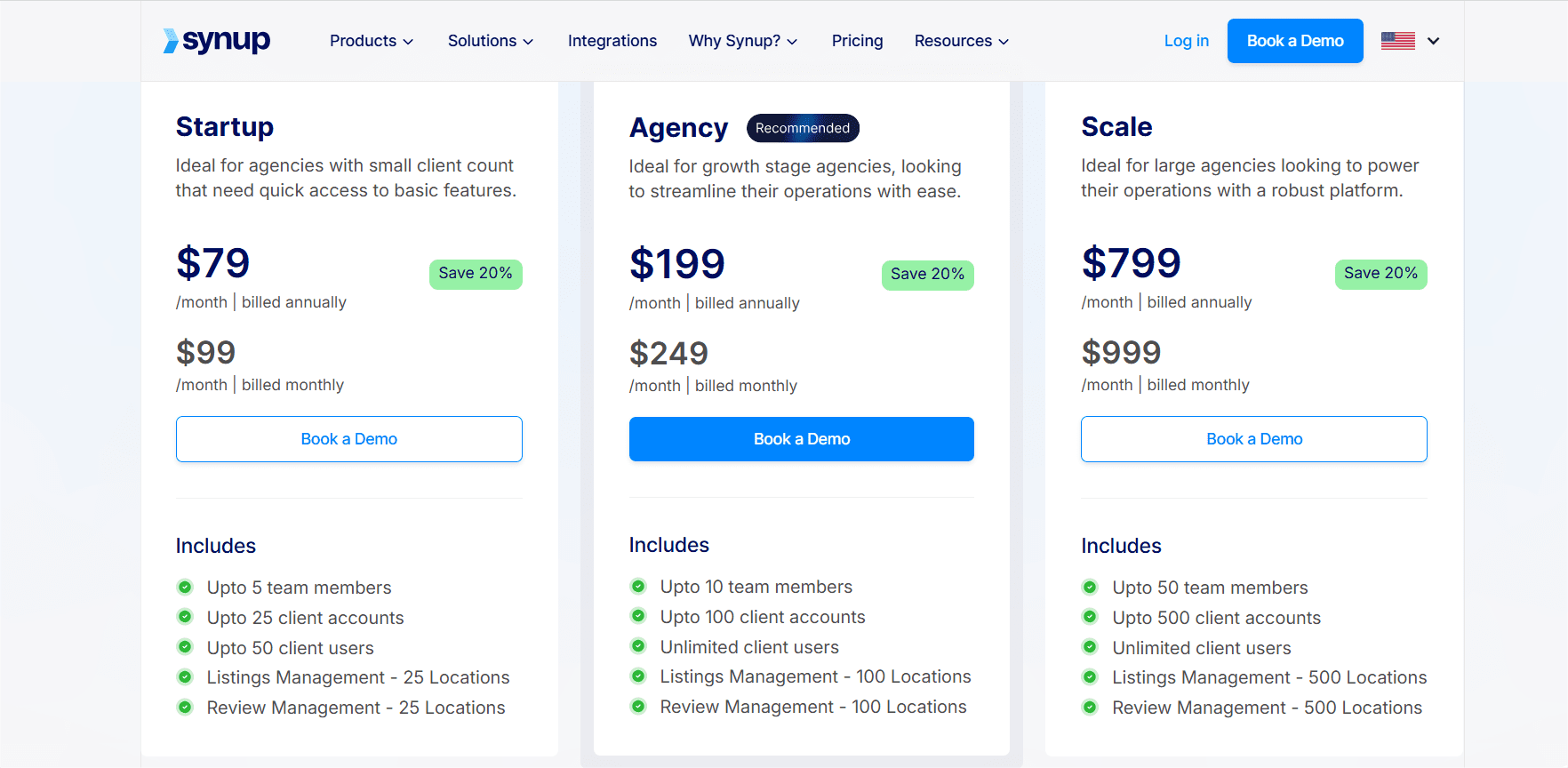
    • SEMrush or Ahrefs – They help monitor SEO and competitor activity.
    • HubSpot or Mailchimp – These are great for managing emails and automating marketing tasks.

    Agencies that use such modern tools are more likely to work effectively and provide factual insights into campaigns.

    And the last step!

    Step 7: Understand the Agency’s Strategy and Approach

    The last one is to understand how an agency plans and runs marketing campaigns, and whether their approach fits well with your business style.
    A good agency will not only have a clear strategy but also explain how they track results and measure success.
    To see if an agency is a good fit, you can ask questions like:

    • How will you help us reach our marketing goals?
    • How do you measure success and ROI?
    • What methods do you use to track performance?
    • How will your approach match our team and business style?

    If their answers make sense and align with your vision, it’s a sign the agency is a good match.

    This is vital because understanding their strategy and how they work with clients gives confidence that they can meet your business goals while effectively working with your team.

    And that wraps up our guide on how to find the best digital marketing agency!

    Concluding Thoughts 

    As you can see, finding the best digital marketing agency doesn’t have to be confusing. If you follow the right steps, you can easily make a choice that helps your business grow and expand.

    Remember, the best agency isn’t just about skills; it’s about understanding your goals, communicating clearly, and working well with your team. 

    So, take your time, ask the right questions, and you’ll find a partner that can take your online marketing to the next level.

    Good luck!