Search engine optimization (SEO) is crucial for driving organic traffic to your website. But how exactly do search engines determine what your web pages are about? This is where slugs come in.
A slug is the keyword-rich portion of a URL that identifies the nature of a web page’s content. Essentially, slugs act like a short page “nickname” to tell search bots what each page covers.
In the example above, the slug is “what-is-an-seo-slug”. This slug clearly signals that the content covers what an SEO slug is.
Properly optimized slugs are an important on-page SEO element. They help align user search intent with your content and influence keyword rankings.
In this comprehensive guide, we’ll break down exactly what slugs are, why they matter for SEO, and how to optimize them to improve organic traffic.
What is an SEO Slug?
To understand slugs, let’s quickly define some key terminology:
URL – Stands for “uniform resource locator”. The web address leading to an online resource.
Slug – The middle portion of a URL between the domain and file type, composed of keywords.
For example: https://desiremarketing.io/what-are-niche-edits/
In the URL above, “what-are-niche-edits” . niche-edits While the slug is part of the permalink, it specifically refers to the keyword-focused section.
The Importance of Slugs for SEO
Now that you know what an SEO slug is, you may be wondering why they even matter. Can’t search engines figure out what a page is about from the content itself?
While the actual text on a page is still the most important ranking factor, slugs serve several key SEO functions.
Help Search Engines Understand Pages
One of the main reasons slugs are vital for SEO is that they help search bots better understand what each page is about.
Think of slugs like mini summaries of your content from an SEO perspective. Rather than trying to decipher pages based solely on text, search engines can match the keywords in your URLs to the topics covered.
This signals:
Relevancy – The slug indicates whether the page content matches the user’s search intent
Topics – The keywords describe the nature of the information on that page
Importance – Including key terms in the URL emphasizes their overall weight
In short, descriptive slugs help align user intent with your content, which encourages search bots to rank your pages higher in results.
Improve Keyword Targeting
In addition to generally signaling relevancy, strategic use of keywords in your slugs can directly influence your site’s rankings.
Including your primary keyword in a slug will associate that page with that term from an SEO perspective. For example, a page with the slug “benefits-of-meditation” will be categorized for that exact phrase.
Useful for Internal Link Building
Slug optimization not only helps with on-page SEO but also makes interlinking easier.
When linking internally on a website, anchor text is applied in the same way as external links. This means effective slugs essentially provide built-in contextual anchor text for navigating between pages.
For example:
Here is a guide to [what is an SEO slug](/what-is-an-seo-slug).
Rather than needing to create descriptive anchor text manually, the optimized slug serves that purpose on its own. This makes internal cross-linking more natural and efficient.
In addition, clear slug names provide better context for relevancy when linking related content together. Search bots can better follow the relationship between pages based on aligned keywords in the URLs.
Now that we’ve covered why proper slug optimization is crucial from an SEO perspective, let’s look at some best practices for implementing effective slugs.
Best Practices for Optimizing Slugs
There are a few key criteria to keep in mind when creating or updating slugs on your site. Following slug SEO best practices will maximize how much they aid your organic visibility and rankings.
Concise and Scannable
Ideally, slugs should be:
2-5 essential keywords – Anymore and they become overstuffed
Separated by dashes – Improves scannability for users
Omit unnecessary words – Like “a”, “the”, “and”, etc.
The goal is to find the balance between being descriptive but also quick and easy to digest. Short, scannable slugs are essential for an optimal user experience.
Match Page Content
This may seem obvious, but it’s important to emphasize that your slugs should accurately reflect the topic of their corresponding page. Don’t just toss in any high-volume keywords if they have nothing to do with your actual content.
While the purpose of slugs is to target keywords, this should come second to properly representing what each page covers. Otherwise, you risk confusing users and accruing low dwell times.
Consider User Intent
When optimizing slugs, you need to focus on the user first rather than search engines. The goal is to help visitors quickly tell what content lives on which pages from the URLs alone.
Some criteria to keep in mind:
Readable – Avoid awkward capitalization, underscores, etc. that disrupt scannability
Informative – Signal the specific informational hierarchy
Conversational – Write for users, not bots
For example, “How To Make Money Blogging ” is overly not-focused. Instead, “how-to-earn-money-blogging” better fits natural user intent.
Prioritizing visitor experience ultimately serves SEO as well, since higher engagement metrics signal relevance to search algorithms.
Tips for WordPress Sites
Managing slugs on WordPress can take some extra effort compared to a site built from scratch. Here are some pointers:
Use a permalink editor plugin to easily customize all URLs site-wide
Create new posts with target keyword slugs from the start
Update old posts with improved slugs relevant to the content
The key is ensuring the slug taxonomy makes sense and adequately describes relationships between content across your site architecture.
This covers the basics of optimizing slugs for better SEO and user experience. Next we’ll wrap up with some concluding thoughts on why slug SEO matters.
The Bottom Line
If you only remember one thing from this guide, it should be that slugs play a crucial role in SEO success.
In short, effective URL slugs align user intent with content, signal authority, and boost pages’ organic visibility.
Conversely, neglecting your website’s slug taxonomy can negatively impact crawling, keyword targeting, and overall findability.
So be sure to audit your site’s current slugs and refine them according to the best practices outlined earlier.
The effort invested will pay dividends in the form of higher rankings and more qualified organic traffic.
To recap, a strategic focus on URL slug optimization should be part of any holistic approach to SEO. Descriptive permalinks with target keyword slugs help pages stand out in search and get discovered by your ideal visitors.
Hopefully this guide gave you ideas for improving your own website’s slug SEO. Best of luck ranking higher and driving sustainable organic growth!
Google PageRank has become synonymous with search engine optimization. Even though Google’s ranking algorithm has evolved quite a bit over the years, PageRank remains one of the most crucial signals used to determine the order of results on Google’s legendary search engine.
But what exactly is PageRank, and why does it matter so much for SEO? This comprehensive guide will explain everything a beginner needs to know about Google PageRank – from what it is to how it works, why it’s important, and how to improve your PageRank score.
We’ll cover topics like:
A brief history of the PageRank algorithm
An explanation of how the PageRank formula calculates scores
The key factors that influence your PageRank
Whether PageRank is still relevant in 2023
Tips to build high-quality backlinks and improve your ranking
A solid grasp of this fundamental SEO concept sets the foundation for an effective search optimization strategy.
So, Let’s get started.
What is PageRank?
PageRank is a link analysis algorithm developed by Google’s co-founders Larry Page and Sergey Brin while researching search engines at Stanford University.
In simple terms, it is a system for calculating the importance of a webpage based on the external pages that link to it. It works on the premise that pages earning more backlinks from other authoritative sites tend to be more reputable resources on a given topic.
A Brief History of PageRank
The PageRank algorithm was created in 1996 by Larry Page and Sergey Brin, the famous co-founders of Google. The initial concept behind it formed part of their research project while PhD students at Stanford University.
Page and Brin realized they could measure the importance of a webpage by examining the number and quality of links pointing to it. This mirrored the academic citation process where papers gain credibility by being referenced in subsequent research publications.
They coined the term “PageRank” by combining Larry Page’s name with the word “rank”. The unique SEO algorithm was later added to the Google search engine they developed in 1998.
Google’s new method of ranking web pages by analyzing backlinks quickly proved superior to existing techniques. It allowed the search engine to surface more authoritative and relevant content to searchers.
The company was so confident in PageRank’s abilities that they opened up data about websites’ PageRank scores to all internet users via the Google Toolbar. However, over time manipulation of scores by spammers would eventually lead to this transparency being limited.
Nonetheless, even over 20 years later, PageRank remains one of the key signals Google uses to assess the importance of pages. Let’s now examine exactly how PageRank works.
Understanding How PageRank Works
At the most fundamental level, PageRank operates by counting backlinks to a webpage much like an academic paper counting its citations. The more sites that link to a page, the higher authority it has.
But PageRank doesn’t treat all backlinks equally. It uses an algorithm to assign each link a value depending on certain quality factors. The total PageRank score is calculated using both quantitative and qualitative data.
PageRank Scores
Every webpage has a PageRank score between 0-10. The higher the score, the more important Google considers the page in its ranking decisions:
PageRank 3 & 4 – Moderate number of reasonably reputable backlinks.
PageRank 5+ – High-quality backlinks from authority sites.
The maximum PageRank score is 10 and very few sites achieve this exclusive status.
Link Juice Distribution
Each link passes on some link juice ranking power from the site linking to yours. The higher the authority of the site linking to you, the more link juice you receive.
For example, a backlink from a PR10 site like Wikipedia will pass on much more link juice than one from a PR2 blog.
In the original PageRank algorithm, link juice was distributed evenly between all outbound links on a page. So the more links on the same page, the less PageRank each one passed on.
This model has likely been refined over the years but backlink quality remains a major determinant of rankings.
PageRank Scoring and Calculation Methods
The original PageRank algorithm used the following formula to calculate a page’s score:
So Page Z ends up with a respectable PageRank score of 6.52!
Google has likely tweaked its scoring methodology over the years. But judging importance based on backlink quality remains at the core of the current algorithm.
Key Factors That Influence Your PageRank
Many different backlink factors determine the PageRank scores and link juice passed on by sites linking to your webpage. Some of the most important ones include:
Backlink Source Authority
The authority and PageRank score of the site sending the backlink plays a major role. Links from high PageRank sites like Wikipedia pass on significantly more value than low-quality sites.
Link Location Within Content
Links placed prominently in the main content rather than sidebars or footers tend to be weighted more highly.
Anchor Text Relevance
Links with anchor text containing relevant keywords related to the page’s content are seen as more meaningful endorsements by Google.
Internal Link Structure
How pages on your site interlink can indicate relative importance for ranking. Well-optimized internal links help establish a relevant hierarchy.
Link Velocity
Google prefers links that grow at an organic rate. Sudden backlink spikes from low-quality sites can trigger algorithm penalties.
Link Diversity
Backlinks from a range of reputable external sites related to your industry indicates popularity better than an artificial link scheme.
Now that we’ve covered what PageRank is and how it works, let’s examine why it still remains highly relevant for SEO in 2024.
Why PageRank Still Matters for SEO
Given how much Google’s algorithm has evolved over 20+ years, you might wonder if PageRank is still relevant. Well several pieces of evidence indicate it’s a crucial factor:
1. Google Confirmation
In 2017, Google’s Gary Illyes confirmed PageRank is still used along with hundreds of other ranking signals. So while the original formula has been refined, assessing backlink quality remains a core component.
2. The Backlink Factor
Google has directly stated that along with content and keywords, backlinks and citation flow are among their top 3 ranking factors.
3. Expiration of Original Patent
When Google’s PageRank patent expired in 2019, they updated it rather than abandoning it altogether. The algorithm lives on in an advanced form.
So optimizing your backlink profile remains vital for competing in the SERPs against authoritative domains in your niche. Let’s look at how you can check your site’s PageRank data.
Measuring and Monitoring Your PageRank Scores
Since 2016 when Google retired their public PageRank scores in the Toolbar, officially checking your website’s PageRank became difficult. However, third-party SEO tools stepped in to provide reliable estimates.
Moz PageRank Alternatives
Moz developed an accurate alternative metric called Domain Authority. This scores sites out of 100 based on backlink quality to predict Google rankings. Open Site Explorer also estimates Domain and Page Authority.
Ahrefs PageRank Estimates
Ahrefs’ Domain Rating functions similarly by evaluating backlink power on a 0-100 scale. It offers predictions aligned with actual Google results.
By monitoring DA, PA or DR year-over-year, you can measure progress optimizing your overall link building efforts.
Link Building Strategies to Optimize PageRank
The key to ranking higher is organically building quality backlinks from reputable sites in your field. Here are some effective tactics:
Create Resource Pages
Build links by offering value like comprehensive guides, ebooks, tools or webinars in your industry. Attractive resources encourage citations.
Guest Post Outreach
Writing posts for popular industry blogs helps secure valuable backlinks and raises domain visibility. Prioritize the sites with highest relevance and domain authority.
Promote Content
Use social media, email marketing, PR distribution services to actively promote your best content. Amplify reach to boost link earning potential.
Refresh Old Content
Revive evergreen content by updating facts, stats, examples etc. Republish and re-promote it to capture quality links as industry data changes.
Build Relationships
Proactively network with influencers, partners and industry websites. Strong connections ease the process of securing backlinks down the line.
The key principles here are adding value for potential referrers and earning links organically. Avoid buying links or using automated software.
Actionable Tips to Improve Your PageRank
Here are some parting tips to help improve that all-important PageRank score:
Monitor your scores using free tools like Moz’s Open Site Explorer or Ahrefs to benchmark progress.
Clean up toxic links from low-quality sites hurting your rankings using Google Disavow Links tool.
Prioritize quality over quantity for backlinks by securing endorsements from reputable authority sites, even if that means fewer links.
Promote your best content extensively via social media, outreach emails and PR distribution services to boost link potential.
Improve internal site architecture by interlinking related pages and structuring clear URL hierarchies.
Produce more high-value resources like guides and ebooks to encourage industry citations by positioning your brand as an authority.
After reading this complete beginner’s guide, you should now have a solid grasp of what the Google PageRank algorithm is, how it calculates rankings using backlinks and why it continues to matter greatly in 2024. Just remember that genuine, quality links remain the ethical key to boosting your website’s authority.
Have any other questions about PageRank in SEO? Let me know in the comments!
Keyword research is one of the most crucial tasks facing any marketing team aiming to improve their local search visibility.
Finding the right keywords to target can lead to substantial gains in organic rankings, website traffic, and ultimately more sales and conversions for local businesses.
However, researching and identifying the best performing keywords and phrases is also one of the most challenging aspects of local SEO. The “right” keywords are precise to every unique business location and geo-targeted market.
Additionally, tracking keyword performance and adjusting to search behavior changes over time is hugely impactful but time-intensive without the proper tools.
Thankfully, there are now more options than ever when it comes to specialized local keyword research tools offering robust data and analytics.
In this comprehensive guide, we will cover:
Why proper keyword targeting and management is crucial for dominating local SEO
The key factors that come into play when researching localized keywords
An overview of 15 “best-in-class” keyword research platforms available right now
Detailed side-by-side comparisons and use case scenarios for selecting the right keyword research tool(s)
Step-by-step walkthroughs for utilizing advanced keyword data to optimize your local landing pages
Pro tips for seamlessly tracking keyword performance improvements over time
By the end, you will have an actionable blueprint for leveraging the best keyword research tools to do better your 2024 local search marketing efforts.
Now, Let’s dive into this.
Why Keyword Research is Crucial for Local SEO
Conducting in-depth keyword research is an instrumental first step to creating any effective local search engine optimization and content marketing strategy.
While it may seem tedious, investing the time into keyword research and analysis helps set your entire local SEO campaign up for success by:
Allowing You to Optimize Pages for Searcher Intent
People enter different queries into Google and other search engines based on their particular needs and the information they are looking for. Search intent plays a significant role in determining the relevance of search results.
Understanding user search intent through keyword research lets you optimize on-page content around fulfilling specific informational goals or commercial needs. Effective keyword research is a foundational step in any successful local lead generation strategy, ensuring that your content aligns with what potential customers are actively searching for.
For example, a search query like [buffalo chicken wings NEAR ME] indicates a user looking for quick restaurant options to visit. A page optimized around that exact keyword with relevant information signals relevancy to Google’s algorithms.Another great example would be “Link Building Canada”
Providing Insights into Search Volume and Keyword Difficulty
Quality keyword research tools provide data estimating monthly search volumes for a given term or phrase. This allows you to gauge potential traffic opportunities.
Most tools also assign a “keyword difficulty” score dictated by factors like existing domain authority rankings and page competition. This helps determine whether a high volume keyword will be reasonably achievable to rank for.
Without search volume and difficulty context, you end up targeting keywords that drive little traffic or have almost no chance of ranking. This is where a text generator can be both helpful and risky. While it can quickly produce keyword-rich content, relying solely on generated text without strategic research may result in generic articles that don’t align with actual user intent or SEO potential.
Allowing You to Reverse Engineer Competitor Efforts
One of the most effective local keyword research strategies is identifying what terms and phrases your top competing locations actively target and rank for.
By researching their current page strategies, you can get a sense of proven, high-potential keywords in your industry while also assessing opportunity gaps.
Make a list of emerging “head term” keywords your competition ranks for. Then expand your own optimization efforts around relevant long-tail permutations and questions for that same topic.
Building an Effective Content Strategy
Yet another benefit of advanced keyword research for local SEO is allowing you to architect a smarter, more effective location-based content strategy.
Look for rising questions and conversations happening around your products, services, and industry in your target regions. Keyword research sheds light on what information potential customers are hungry for.
You can then inject these high-potential topics into localized blog content, videos, and social media campaigns.
Tracking Keyword Performance Over Time
Keyword research tools also make it possible to monitor changes in the search ranking landscape related to your core terms.
Many allow you to follow metrics like month-over-month volume and density changes, shifts in ranking domains, and improvement in your own rankings.
This makes dynamically optimizing existing pages and reacting to new opportunities much simpler. You can track what landed-page content and keywords are gaining or losing steam.
As you can see, advanced keyword research fundamentally enables local businesses to architect smarter SEO and content game plans while reacting faster to what is resonating in their unique market.
Main Factors to Consider with Local Keywords
While keyword research fundamentals remain essential, there are unique considerations when choosing what terms and phrases to target for local SEO.
Here are some of the main factors to consider:
Geographic Targeting
Naturally, all of your seed keywords need to contain the geographic location or region you want to rank in. This includes surrounding cities, neighborhoods, county names, etc.
For example, a restaurant would optimize around queries like:
[thai food san jose]
[catering companies near mountain view]
[top santa clara lunch spots]
[link building Uk]
[link building chile]
[link building Colombia]
[link building mexico]
Get as hyperlocal as possible. Go beyond just city names by also incorporating airport services codes, landmarks, nearby highways, and popular regional nicknames.
Mobile vs. Desktop Performance
Industry experts recommend keeping the <15% click-through rate (CTR) benchmark difference between mobile and desktop queries.
If a seed keyword has a 50% CTR on mobile but only 20% on desktop, optimization efforts around that term may translate poorly across devices.
Advanced keyword tools allow you to filter suggestions by mobile friendliness potential.
Long Tail & Question-Based Searches
Consumers increasingly use longer, full sentence search queries when researching local businesses. Questions beginning with “where can I find” are also common.
For example:
[where can i find good ramen in downtown austin]
[what oil change shops are open now near me]
Optimizing for these long-tail questions better targets user intent while being less competitive key phrases to rank for.
Individual Platform Search Behavior
User search behavior can vary drastically depending on the platform. The same keyword produces different autocomplete suggestions and search volumes on Google vs. YouTube or Amazon.
Research keyword permutations specific to high-potential sites beyond just Google to maximize visibility.
Now that we have covered the unique requirements of local keyword research, let’s overview some of the top tools available for unlocking local SEO success in 2024.
Overview of the Top 15 Local Keyword Research Tools
There are now dozens of keyword research tools available catering to localized search analysis. Here is a brief overview of 15 leading options:
1. Ahrefs Keyword Explorer
The Ahrefs Keyword Explorer has one of the largest search query databases, comprising more than 171 billion indexed keywords across 171 countries and 10 platforms.
It provides key keyword metrics including volume, competition level, and optimization difficulty to help you gauge potential. You’ll also see related long-tail keyword ideas and the typical user journeys surrounding your seed keyword.
With Serbia-based Ahrefs vast crawling capabilities, you can assess keyword performance through a global or location-targeted lens. (E.g.: See search interest for “concerts” in Austin vs. Portland).
2. SEMRush
SEMRush has become a premium SEO staple thanks to its unparalleled keyword tracking. You can analyze how any term has trended over the past 12 years along 100+ data points.
Filtering keyword ideas and metrics by city and state is granular. For instance, easily comparing performance for “steakhouse” across DFW cities. Or for business-intent terms like “Dallas commercial roofing services.”
SEMRush’s cloud also automatically groups related keywords together – revealing clusters around shared topics. This helps for outlining top-level optimization opportunities.
3. Moz Keyword Explorer
Moz fields its own keyword research solution finely tuned for SEO needs. The Mozscape index comprises over 6 billion fresh keywords enriched by their web crawler and triangulation technology.
Useful perks include visualizing historical search volume trends over time. If you want to see if interest in “San Antonio Spurs tickets” might be rising or declining YoY as a leading indicator, Moz can chart it.
You can also filter by keyword length, location relevancy, and commercial intent. The tool will highlight which keywords may have geographic optimization needs for targeting certain Texas cities.
Unique views like Share of Voice analyze the breadth of keywords your pages rank for versus competitors. Helping you spot gaps.
4. Ubersuggest
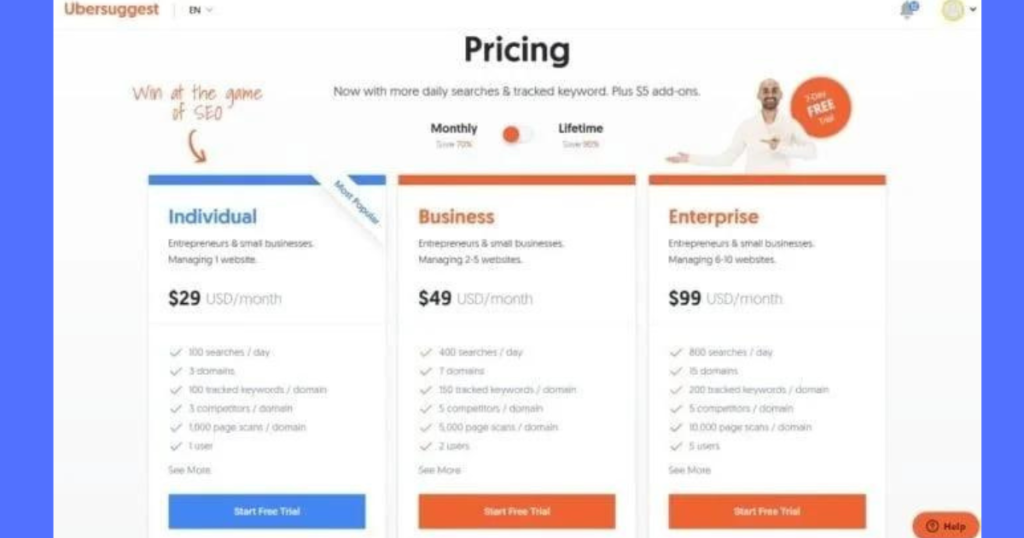
First launched by Neil Patel back in 2014, Ubersuggest taps multiple datasets to fuel its simple yet expensive keyword idea generator.
The tool does a capable job suggesting lengthier long-tail variations, questions, and permutations fitting around a core topic. Helping unlock hidden local SEO gems other tools would miss.
It has options for targeting a specific country to refine ideas by language and regional search interests. For most though, Ubersuggest is best used for brainstorming and creative jumping off points.
5. Soovle
Soovle takes the unique approach of aggregating auto-complete results across over 500 million keyword permutations found on 7 major search platforms.
Rather than relying on estimated volumes, Soovle reveals what actual users are searching for by tapping straight into Google suggest results. You also get keyword trends for YouTube, Amazon, Bing, eBay and more in a single report.
This multi-platform perspective helps uncover optimization opportunities sitting across different properties like video, eCommerce or images. Country targeting also helps localize permutations matching regional dialects and conversations.
6. AnswerThePublic
One of the most visually engaging tools on this list, London-based Answer the Public presents keyword data through intuitive maps and charts breaking down questions, prepositions, comparisons and other deep searches people are using around topics.
Seeing full keyword phrases already formatted as questions naturally sparks ideas for all types of localized content marketing from blogs to videos to landing pages. (e.g “Where to buy used pianos in Cincinnati??”)
The tool pulls data from Google autocomplete and serves it in a way far more interesting than spreadsheets. You can shape ideas for location-based articles, Facebook groups and more based on uncovering the full stories people want to hear.
7. Keywords Everywhere
Keywords Everywhere functions as a browser extension rather than a standalone platform. But has transformed keyword research through seamless integration.
It essentially surfaces the data engines like Google already show behind the scenes in autocomplete directly within your searches. Saving tons of manual digging across platforms.
See estimated monthly volumes, cost-per-click data, and keyword difficulty scores displayed right on Google, YouTube, Amazon and other SERPs. Easily revealing gaps competitors may be missing.
Filtering by city and state is supported along with exporting keyword lists discovered to CSVs for safekeeping. This free browser tool is a must-try complement to round out your stack.
8. KeywordTool.io
While the paid Keywordtool.io plans unlock the most robust features, the freemium offering provides immense value on its own – albeit with usage caps.
Benefit from 4 keyword data sources spanning search, YouTube, Google Trends and App Store suggestions. Location filters help narrow regional volume and demand.
Useful optimization ideas reveal questions being asked around topics plus expanded long-tail permutations you wouldn’t have considered. “Near me” keyword identification also aids local targeting.
9. Google Keyword Planner
Naturally, Google’s own paid-traffic keyword tool (formerly Keyword Planner) deserves a spot on this list thanks to tapping direct search query data.
Requirements for accessing KWP include having an existing Google Ads account, still, integration with their paid tools allows seeing granular, accurate monthly impressions and other volumes around lucrative terms. Helping better estimate SEO content ROI.
Since Google owns geo-based search, their geographic filters for cities and regions should be considered highly reliable sources on localized opportunity including bid estimates.
10. Keyword Sheetter
Keyword Sheeter has grown into an advanced generator – while retaining its simplistic UX.
The tool asks for a simple head keyword or phrase related to your business before working its algorithm magic to populate expansive, personalized lists of ideas.
Filter results by word count, expected volume ranges, location relevance utilizing built-in geography databases and more. Useful for discovering localized long tails competitors likely never targeted.
Export options let you easily save keyword reports segmented by category and priorities in Excel or other formats.
11. Google Search Console
Google Search Console (GSC) offers free insight into how your existing pages are already performing for certain keywords.
Connect your sites to index important impressions, click and position data based on organic searches. Revealing high-potential queries to double down on while showing ones with plummeting traffic.
The location report adds a geographic layer detailing your website’s visibility across cities, states and regions. Helpful for gauging if your localization efforts are paying dividends by growth in certain markets.
12. Google Trends
Google Trends focuses specifically on rising or declining search popularity over time rather than volumes. But geographical segmentation remains a useful feature.
Analyze whether people in target Texas cities have growing or waning interest in topics like “austin bachelorette parties” based on year-over-year curves. Allowing better allocation of optimization and content efforts.
Comparing Trends search popularity metrics on competing terms also aids decisions between targeting “dentist”, “dental clinic” or “emergency dentistry”.
13. Keyword Keg
This aptly-named idea generator serves keyword research neophytes and experts alike. The Google Autocomplete-powered engine suggests thousands of semantic connections and questions around seed keywords searched.
But Keyword Keg’s more advanced Location Comparison reports unveil interesting geographic performance divides around the same term. Like which city between LA, Chicago, and NYC searches for a specific query the most.
This reveals optimization voids competitors potentially haven’t capitalized on based on disparities in regional demand.
Full keyword lists can be exported directly into SEO campaign spreadsheets or content calendars from within the platform.
14. KWFinder
Boasting the largest keyword database among tools analyzed here, KWFinder’s 1 trillion index aids uncovering emerging queries before they gain steam.
The Keyword Difficulty metric benchmarks the competitiveness and existing authority around ranking for any given term – helping set realistic expectations.
While geographic targeting options mostly cover individual countries currently, an interesting Location Popularity feature compares regional interest levels between your seed keyword and related suggestions. Flagging terms showing more relative demand in your target city.
15. AlsoAsked
Google’s “People Also Ask” boxes are bursting with lucrative keyword opportunities around any topic. AlsoAsked lays out these buyer question keywords for you in an easy-to-navigate branching diagram.
Just search any primary term like “content creation,” and AlsoAsked maps out the hidden web of related questions, such as:
What does content creation mean?
How do I get started with content creation?
What are the main elements of content creation?
What does a content creator do?
Click any branch to view a whole new question keyword diagram from that starting point.
This not only shows you topics to potentially cover, but illuminates the relationships between questions people are asking. So you can structure your content to answer searchers’ questions in the order they likely think of them.
Cover all the bases, from beginner to advanced. Export the data as a CSV or visually in an image for analysis and presentations.
And that covers 15 of the most utilized keyword research tools for unlocking local search ranking opportunities!
Side-by-Side Comparison of the Top 5 Tools
While the comprehensive list of 15 tools provides a menu of options covering different local keyword research needs, we will directly compare the core capabilities of 5 leading platforms:
Ahrefs
SEMRush
Moz
Ubersuggest
Answer the Public
Here is an overview of key criteria to consider when evaluating keyword tools for local SEO:
Tool
Keyword Database Size
Location Targeting Specificity
Historical Trends
Keyword Groupings
Long-Tail Discovery
Competitor Analysis
Ahrefs
171 billion
City & state
✅
By journeys
Strong
Organic share-of-voice
SEMRush
71 billion
Hyperlocal
12 year
By topic clusters
Decent
Ranking domains
Moz
6 billion
ZIP code & metro
5+ year
Some clustering
Good
URL intersection
Ubersuggest
3.5 billion
Country-level
Limited
Minimal
Excellent
Domain comparison
ATP
500 million*
Country mostly
None
Visual maps
Great for questions
None
Search Volume Reliability
Moz, Ahrefs, and SEMrush invest heavily in building their own keyword indices through proprietary web crawling and analytics. This leads to very accurate search volume estimates for gauging traffic potential.
Meanwhile, Ubersuggest and Answer the Public source indirectly from Google suggest results instead. This provides tons of fresh long-tail ideas but less precise availability estimates.
Location Targeting Specificity
SEMRush edges out the pack when it comes to geographical segmentation granularity thanks to integrating advanced geo-intent signals into its rankings data.
Phrases can be analyzed at a neighborhood level in many cases to unlock hyperlocal results. Moz also impresses by targeting down to metro and ZIP codes using longitude and latitude.
Analysis of Keyword Trends Over Time
Moz and SEMrush house the largest historical databases for assessing keyword trends – each with over 10+ years of snapshots allowing users to pinpoint new declines or surges. This aids content planning decisions.
Ubersuggest and Ahrefs still offer ample trend data, while Answer the Public’s real strength lies in rediscovering the newest questions people are asking right now.
And the comparison illuminates unique local SEO advantages around each tool.
Next we will walk through exactly how to utilize one platform’s capabilities to unearth profitable, low competition keywords in your area.
We Choose SEMrush for showing how to use tools for keyword research
Step-by-Step Guide to Using tools for Local Keyword Research
We chose SEMrush for showing how to use tools for keyword research.This can be different from any other tools but structure will be the same.
Out of the enterprise-level keyword research platforms compared, SEMrush strikes an ideal balance of location targeting specificity, robust historical data, and useful topic groupings.
Now let’s walk through a start-to-finish workflow for unlocking fresh local SEO opportunities using SEMrush’s tool set:
Step 1: Enter Your Seed Keywords and Location
First, enter 1-2 core “head term” keywords that are relevant to your local business in the search bar. These should be simple overarching phrases or topics.
Next, utilize SEMrush’s location setting options just underneath to target metrics by city, region, or state as needed. For a Link Building Agency this might be Houston, TX.
This surfaces keyword ideas, questions, long tails and other permutations specifically being searched in your geo-area.
Step 2. Analyze Keyword Grouping Clusters
As you can see, my seed keywords quickly spawned hundreds of additional ideas. But scrolling through an endless list isn’t efficient.
Instead, navigate to the handy grouping cluster map which automatically categorizes suggested keywords around common topics and subtopics. Making it far easier to spot the biggest opportunities hiding in the noise.
You can see group sizes indicate where more expansive or popular conversations are happening around categories like menus, reservations, reviews and descriptions.
Step 3. Prioritize Topics & Questions
Now that you have a better sense of topical concentrations, start opening relevant keyword groups to identify priority long-tail phrases and questions.
Sort remaining keywords by highest monthly search volume and lowest keyword difficulty to quickly spotlight phrases with traffic potential:
Also look for rising year-over-year trends indicating growing interest.
Step 4. Export & Track Performance
Build out a master list of 10-20 top keywords for each core topic cluster that align with your business. Export selections into a spreadsheet tracker:
Now optimize location landing pages for each target keyword phrase and monitor rank improvements each month using SEMrush’sPosition Tracking tool.
Rinse and repeat keyword research for improved results every quarter!
Optimizing Landing Pages for Local Keywords
Armed with fresh, high-potential keywords and topics fueling searches in your geographic area, optimizing pages to drive more visibility is the next step.
Follow this checklist to transform keyword research into tangible local SEO results:
Conduct Topic-Based Pillar Page Planning
Many keywords you uncovered likely concentrate around a handful of overarching topics and questions. These present opportunities for pillar pages.
For a restaurant example, much interest consolidates around your menu, reservations process, locations overview, and descriptions/reviews. Consider making each their own optimized pillar page targeting these clusters.
This provides a focused, authoritative resource to rank for all the long-tail variations.
Craft Locally-Optimized Title Tags
Your title tag is the first on-page element seen by search engines and users. Ensure it includes:
Primary keyword – This likely includes your brand name and services. [Amazing Buffalo Wings Austin]
Location – The city, region or state name. [Amazing Buffalo Wings Austin Texas]
Summary snippets under titles should also reference geo details like:
City name
Popular suburbs
Distance descriptor
Visit the best buffalo wings restaurant in Austin Texas near Round Rock and Cedar Park…
Localize On-Page Content
Work elements like neighborhood names, iconic city attractions, sports teams, airport codes and more into content wherever possible. This helps search engines strongly associate pages with those locations.
Also include locator schema markup so search engines list rich contact info.
Analyze What Competitors Target
Remember those useful optimization gaps found when researching competitor efforts earlier?
Now build pages around the popular topics they lack locally-optimized landing pages for already. Be the resource for that emerging topic cluster.
Continuously Track Performance
Finally, keywords will fluctuate in volume and difficulty over time. Set calendar reminders to rerun reports and monitor how your pages climb in rankings for key terms using tracking tools.
Dynamically improving existing content while creating new pages around rising searches ensures sustained local SEO success.
With a process now in place, let’s discuss how best to analyze the tangible results of all these keyword targeting efforts.
Conclusion and Key Takeaways
Keyword research is the foundation of digital visibility for local businesses. Finding the right terms that your customers are searching fuels the entire localized SEO and content engine.
As this guide underscored, modern tools now provide marketer immense power for discovering untapped keywords offering outsized traffic potential.
The benefits of tapping the robust datasets these platforms provide spans beyond rankings alone in value. Optimizing for searcher intent drives relevance. Filling competitor holes seizes white space. Structuring topics smartly through pillars scales production.
And tracking volumes, position shifts and conversions over time leads to assets continually becoming more effective – compounding gains each year while staying steps ahead of disruption.
Hopefully this guide provided a helpful blueprint both for selecting the best tools and optimizing their data for your unique market
Website footers serve an important, albeit background role across pages. While headers attract attention for housing main navigation and branding, footers operate as more of an index or site blueprint. Given their fixed presence across all site pages, the links contained within footers facilitate user experience and site performance in helpful ways.
Defining Website Footer Links
Footer links refer to the hyperlinks contained in a website’s footer section, which displays consistently at the bottom of all pages. Some other names for footer links include:
Sitewide links
Boilerplate links
For example, ecommerce sites often showcase policies like shipping returns in footers because while important, they don’t require prominent real estate space. Additionally, footers commonly highlight contact pages, social media channels, sitemaps, and other resources to aid navigation.
Why Footer Links Improve User Experience
Well-organized footer links provide meaningful value beyond just taking up space at the bottom of pages. Specifically, great footers aid navigation and convert visitors more efficiently through:
Enhanced Site Navigation
While not as attention-grabbing as headers, visitors understand footers as secondary navigation hubs to find what they need. Grouped footer links help guide users who overlook menus.
Extra Informational Resources
Additional links beyond critical pages let visitors access helpful background content like materials guides or series archives when interested.
Familiar Location for Policies and Contacts
Users instinctively check footers first for legal paZ
ges like terms of service, as well as contact channels like phone, email, and social media.
Contain Overlooked Links
Not every supporting page warrants cluttering up the main navigation real estate. Footers house secondary links still benefit some visitors.
In essence, well-designed footers anticipate user needs and questions to provide quick access points across pages.
Footer Link Considerations for SEO
Beyond enhancing user experience, footer links also influence search engine optimization in a few key ways:
Help Bots Index Full Site Structure
One of the most important footer link functions is facilitating site crawling for search engine bots. As internal links, they provide pathways for bots to discover and index all relevant pages.
Part of Quality Internal Link Profile
The contextual footer links search engines come across also serve as signals to help infer the focus and authority of different site pages.
Prone to Manipulative Link Schemes
Unfortunately, excessively overloaded footers trying to inject artificial authority have led to suspicion. Moderation is key for credibility.
Current Understanding of SEO Value
Many speculate footers have decreased in influence given other signaling factors now available. However, ties to user experience and navigation indicate they still hold meaningful SEO weight when crafted properly.
Best Practices for Optimizing Footers
When used appropriately, footer links can mutually benefit users and SEO. However, they also have potential downsides if misused. Apply these guidelines to maximize their upside:
Organize Links Logically
Structure your footer links into coherent categories like Shop, Company, Resources to enhance scannability.
Mostly Internal Links
Aside from common social media links, aim to link internally. Avoid schemes with excessive or irrelevant external sites.
Avoid Over-Optimization
While footers can contain more links than headers reasonably, hundreds of forced links trigger manipulation alarms.
Highlight Contact Information
Ensure users can easily get help or answers by linking contact pages, forms, emails or chat functionality.
Submit XML Sitemap
Proactively provide bots a site index via XML sitemaps instead of solely relying on footer links for discovery.
Optimized footers strike an ideal balance between necessity and excess. They enrich site use rather than force components solely for artificial SEO gains.
The Role of Footer Links In Your SEO Strategy
While their popularity in SEO discussions has fluctuated, quality footer links do still influence search visibility through positive user metrics and internal linking foundations.
For Users
Enhanced site navigation, supplemental content access, transparent policies and robust contact improve visitor experience – the bedrock of sustained success.
For SEO
Proper page relationship signaling and site indexing facilitation via footer links pave pathways for pages to advance in SERPs through enriched content.
In essence, the user experience and SEO benefits of well-crafted footers work symbiotically, not independently. If your on-site content strategy already fuels high satisfaction and conversions, leveraging footer real estate to subtly connect resources provides incremental gains on top.
Conversely, overloading footers to artificially inflate pages risks sabotaging credibility. Ultimately quality matters most, in moderation.
Hopefully this provides a helpful evaluated perspective on strategically optimizing footer links!
Frequently Asked Questions About Footer Links
How many links should be in my footer?
There’s no universal ideal number, but aim for necessity over excess. Organize the critical site-wide resources, contact channels and policies users want along with supplemental helpful content – likely somewhere between 10-20 links.
Do footer links still help SEO rankings?
They don’t provide as much direct weight as in the past, but properly structured footers benefit page credibility through positive user experience signals and internal linking foundations.
Where should my contact page link go?
In the footer! Contact information is something visitors expect to easily access at the bottom of pages so they can get questions answered.
How can I organize a cluttered footer?
Audit what content is truly site-wide in nature and contributing value. Group remaining links into coherent conceptual buckets around elements like company, support and resources to enhance scannability.
If your website attracts an international audience, translating your content into multiple languages is essential for growth.
However, manual translation is time-consuming and expensive. This is where automatic website translation tools come in. These types of tools can translate entire websites with just a few clicks, saving you precious time and money.
But with so many options to choose from, how do you determine the best website translation services for your needs? This comprehensive guide will walk you through the top contenders based on accuracy, supported languages, pricing, and other key factors. Read on to find your perfect match.
Understanding Website Translation Needs
When creating an online presence, websites serve diverse goals and target audiences.
When selecting a translation service, you must first consider your website’s specific requirements.
E-commerce sites need accurate product descriptions and site navigation. Blogs should convey the author’s tone and voice. Support sites must clearly articulate technical guidance. Non-profits may prioritize conveying mission and vision.
Additionally, examine elements like target languages, content volume, update frequency, intended readers, and translation budget. This will narrow suitable tools.
For example, a multi-language e-commerce site needs an affordable solution with product catalog capabilities. An NGO blog would benefit from a tool preserving regional dialects. Organizations can also explore fundraising software for nonprofits to support their missions effectively. Outlining needs guides intelligent tool selection.
Top Website Translation Tools
Website translation technologies fall into three main buckets: Machine Translation, Hybrid Models, and Human-powered. Each approach has distinct strengths and limitations. Companies often prioritize speed and efficiency when selecting their preferred strategy for expanding reach. Relying on instant website localization helps teams maintain consistent messaging across global markets without the overhead of manual updates.
Machine Translation
Machine translation (MT) is an automated process that uses software to translate text from one language to another. MT relies solely on algorithms instead of human linguists to analyze and convert written material.
MT engines have improved tremendously in recent years with enhanced artificial intelligence capabilities. However, machine translation still faces accuracy limitations for complex text compared to human-powered or hybrid translation options.
MT best suits basic websites with repetitive, formulaic content that isn’t updated frequently. The top machine translation services for websites include:
Google Translate is the most widely adopted free machine translation service globally. This web app and browser extension instantly translates 90+ languages.
Key features:
Free web app, mobile apps, and browser integration
109 supported languages with decent accuracy for simple phrases
Options to translate text, documents, webpages and files
Website translation available via Translate API
Custom MT engine training through AutoML Translation
Pros:
No cost makes it accessible for basic use cases
Easy and intuitive user experience
Continuously evolving language and accuracy capabilities
Cons:
Less accurate with long, complex text
Fewer supported languages than paid competitors
Limited control or customization for websites
Ideal for: Basic yet functional translation of simple website content, best effort multilingual support
Pricing: Free web app, pay only for advanced customization features
Deepl is an award-winning neural machine translation service funded by the European Union. It receives consistent praise from linguists regarding translation quality.
Key features:
Supported languages include English, French, Spanish, Italian, Dutch, Polish, Russian, Portuguese & German
Patent-pending deep learning tech for linguistic accuracy
API available for integration
Option for annotating translation relevance
Pros:
Very high MT accuracy rated better than competitors
Specialized neural networks per language combination
Confidence scores on translation quality
Cons:
Currently only supports 40+ languages
Free version limits character count
Ideal for: Websites with complex writing conveying nuanced ideas
Pricing: Free version has usage limits, paid plans from $60/mo support API access and unlimited words translated
SYSTRAN excels at automating multilingual digital experiences with machine translation solutions purpose-built for global enterprise websites.
Key features:
60+ supported languages optimized for web content
Instant translation via widgets, plugins and API integration
Options for dictionary customization and engine training
On-premise deployment available for data privacy
Pros:
Linguistic asset management dashboard
Engine customization for websites
Scalable API-based architecture
Cons:
Less suitable for accurately conveying marketing or persuasive content
Human linguists not involved in process
Ideal for: Large websites streams of user-generated content or product catalogs
Pricing: Packages from $60/mo for plugins to $150/mo for API access and functionality
The machine learning behind MT continues advancing rapidly. While still not matching true bilingual human proficiency, MT suffices for cost-effective multilingual support on simpler sites.
Hybrid Human + Machine Translation
Hybrid translation combines the efficiency of machine translation with the linguistic skills of professional human translators.
First, software automatically translates website content. Then, bilingual experts review output to fix mistakes and refine it for readability, tone, dialect, and cultural nuance.
This approach delivers faster, more affordable translations than purely manual work. The human touch also increases accuracy beyond machines alone.
Hybrid translation best suits websites where quality matters, like:
Gengo offers over 1000 certified bilingual translators across 120+ languages. Customers can assign linguists as needed for hybrid machine translation solutions.
Key features:
Translators specialize in your industry niche
Translation delivered in under 24 hours
Supported content types include websites, apps, videos
Plugins and APIs allow directly integrating translation capabilities into your website CMS or infrastructure. This greatly simplifies managing multilingual content.
Some advantages of technical translation integrations include:
Translate site content without leaving the CMS
Dynamically localize pages for each visitor
Reduce manual touchpoints through automation
Allow contributors to publish in multiple languages
Leading plug-and-play solutions include:
WPML
WPML is the most popular multilingual plugin for WordPress websites. It avoids needing to manually translate posts and pages.
Key features:
Translate all WordPress content types
SEO-optimized translated pages
Support for both manual and automated translation
Find and hire translators from within WordPress
Setup wizards for streamlined configuration
Compatible with popular e-commerce and form plugins
WPML simplifies translating WordPress sites by letting admins manage multiple languages directly from the CMS.
CloudTranslate
CloudTranslate provides a translation API supporting 135 different languages. It focuses exclusively on programmatic integration.
Key features:
Translate dynamic page content on the fly
Included site widgets, plugins, and code snippets
Real-time Translation API
Option for combining machine + human workflows
Pricing starts at $7/month for 250k characters
Developers praise CloudTranslate’s robust API and integration options ideal for embedding translation into custom websites.
TranslatePress
TranslatePress combines automated translation with professional proofreading designed specifically for WordPress.
Key features:
Hybrid machine + human workflow
Multi-lingual SEO canonical pages
Centralized translation interface within WordPress
Support from professional linguists available
Starting at $179 per year including translation costs
TranslatePress eliminates third-party platform dependencies with an integrated WordPress interface for managing human-powered website localization.
Tips for Choosing the Best Website Translation Tool
With an abundance of website translation tools now available, deciding on the best solution for your needs boasts a steep learning curve. To simplify selection, begin by:
Auditing current website content, formats, and languages needed
Defining must-have capabilities and accuracy thresholds
Comparing solutions against these criteria with free trials
Testing with sample content batches before fully committing
Pay particular attention to linguistic quality by scrutinizing output. Balance accuracy needs with pricing.
Conclusion
Website translation tools unlock global opportunities and audiences for businesses. Whether you need a basic free solution or advanced multilingual platform, options exist to convert your content without breaking budget.
Have you ever wondered why some pages on your website seem “invisible” to search engines while other pages rank well? Or why does your website traffic seem to fluctuate so much month-to-month? The issue may have to do with something called crawl budget.
Crawl budget is a search engine optimization concept that refers to the number of pages search engine bots can crawl from a particular website in a given period of time. Just like any business has budgetary limits, search engines have limited resources for crawling the billions of web pages that exist.
In this beginner’s guide, we’ll dig into what exactly crawl budget is, what factors affect it, and most importantly – how you can optimize crawl budget for improved SEO.
What is Crawling in SEO?
Crawling is the essential process of how search engines discover, explore and index webpages. Search engine bots act as automated visitors that recursively follow links and traverse websites to extract information from internal pages and content.
As these crawlers navigate sites, they simulate human journey patterns and extract data that gets processed into search engine indexes for potential ranking.
Factors like site speed, internal linking structures, and overall technical health impact how efficiently bots can crawl a domain. Content that is difficult for crawlers to reach or excessively slow to load often fails to get crawled, rendering that content invisible in search results.
Monitoring crawl statistics and diagnosing issues with pages that should rank but aren’t indexed is crucial for technical SEO success.
Optimizing for maximum crawl efficiency ensures search engines have the best awareness of what exists on websites so the most valuable content surfaces for relevant user queries.
What Is a Crawl Budget in SEO?
Crawl budget is the allocation of crawl resources that search engines provide to a website or domain. The crawl budget limits how frequently and how deeply crawlers can explore a site to index new or updated content.
Some key characteristics of crawl budget:
Crawl budget is finite and shared across all the web pages of your site. Popular sites have more generous budgets.
It’s determined by multiple factors like site size, update frequency, server speed and overall site health.
Unused crawl budget gets redistributed to other sites competing for search visibility.
Optimizing crawl efficiency helps ensure important pages get discovered and indexed by search bots.
Why Crawl Budget Impacts Your SEO Results
When your website isn’t fully crawled or indexed, it directly impacts visibility and traffic from organic search:
New or updated content might not get included in search results for relevant queries. This leaves opportunities on the table.
Poor crawl coverage can create gaps in keyword rankings and search traffic.
Any budgets lost to low-value pages means less capacity to surface your best content.
By making crawl budget optimization a priority, you can dramatically improve the pace of discovery and indexing of your latest website additions. The end result is more consistent search visibility that better reflects the entire scope of your website content.
Factors That Determine Your Website’s Crawl Budget
Multiple factors influence the crawl budget and discovery pace of search engine bots:
Site Size and Complexity
The number of pages on a site significantly impacts crawl budget. More pages means more resources needed to discover and index content.
Complex site structures with subdomains, siloed sections, etc. are harder to navigate and require more crawling to fully explore.
Content Update Velocity
Sites that publish new content very frequently imply an urgency for search bots to regularly re-crawl to surface fresh content.
Higher content velocity signals that the site needs more crawl budget to keep up with the publication cadence.
Internal Linking and Site Architecture
Proper internal linking provides crawl pathways for bots to efficiently discover new content deeply embedded on large websites.
Tightly interconnected sites allow more optimized crawling of all pages on a site within a crawl budget.
Page Speed and Site Performance
Fast page load times expand the crawl capacity per time period by reducing bot wait time between requests.
Slow, overburdened sites drastically cut into crawl budget by limiting the pages per minute a bot can request and index.
More backlinks and authority elevate a website’s perceived importance and value of content for crawling and indexing.
Thus search engines allocate higher proportional crawl budgets to discover content on sites with stronger backlink profiles.
Crawl Demand from Current Index Coverage
The existing index coverage for a domain necessitates recurring crawl budget to refresh and check for updates on previously indexed pages.
Broad index coverage compounds crawl budget needs over time to maintain up-to-date indexing.
Optimizing Your Website’s Crawl Budget: 4 Tips
Now that you understand the core factors and SEO influence of crawl budget management, here are our top recommendations to optimize crawl efficiency:
Fix Technical SEO Issues
Conduct a technical SEO audit to identify and correct errors preventing bots from crawling pages.
Eliminate 404 errors, fix broken links, and address other crawl failures reported in the Search Console.
Optimize site architecture and tidy internal linking to facilitate discovery of all pages. Complex sites with poor link structures lead to dead ends that waste crawl budget.
Prioritize Important Pages
Leverage XML Sitemaps to provide search bots easy references to your most valuable, regularly updated pages that merit more crawl prioritization.
Spotlight content that drives business KPIs and user engagement to maximize the crawl budget allocated to pages that truly matter.
Monitor Crawls via Search Console
Regularly check crawl stats reports in Search Console to catch major changes, losses of critical pages, or new crawl errors cropping up.
Diagnose issues early before they spiral into cascade failures wasting precious crawl budgets.
Strategic Content Publication
Avoid overwhelming limited crawl capacity by thoughtful content publishing across domains, avoiding huge bursts of updates at once or during periods when existing content also needs to be refreshed.
Sitemap updates can also help dynamically direct more immediate focus to the newest or most timely content additions.
Conclusion
At its core, crawl budget management ensures search engines make the most of limited resources to discover, index and rank your best and most important webpages. It pays dividends in the form of visibility in organic search.
Focus crawl budget on high-quality content that engages your audience and answers their search queries to maximize SEO success. Deeper technical crawl optimizations will further boost performance, especially at scale.
FAQs:
Q. Can Crawl Budget be increased?
While you can’t directly increase it, optimizing site structure, fixing errors promptly, and ensuring content relevance can effectively utilize your allocated Crawl Budget.
Q. What tools can help monitor Crawl Budget?
Google Search Console provides insights into your Crawl Budget. Utilize server logs and SEO tools like Screaming Frog for more comprehensive analysis.
Q. Does every website have a Crawl Budget?
Yes, every website is assigned a Crawl Budget by search engines. Understanding and optimizing it is crucial for effective search engine optimization.
Q. How often does search engines update Crawl Budget?
Search engines dynamically adjust Crawl Budget based on your site’s changing factors. Regularly monitor crawl data to adapt to updates and changes.
Q. Can a large number of 404 errors affect Crawl Budget?
Yes, excessive 404 errors can waste Crawl Budget. Regularly identify and fix broken links to ensure search engine crawlers focus on indexing valuable content.
Q. What’s the impact of a low Crawl Budget?
A low Crawl Budget may lead to important pages being missed during indexing, potentially affecting your site’s search engine rankings and visibility.
How far would you scroll through a website if what you wanted was right on the homepage? Not very far, I’d reckon. That’s why deep linking is so important for SEO.
Deep links allow users to land directly on the most relevant page that matches their search intent. And the same goes for search engines – deep links help them index and direct users to the best content faster.
But what exactly are deep links, and how can you implement deep linking for improved SEO? This comprehensive guide has all the answers.
What is Deep Linking?
Simply put, deep linking allows users to start on a website home page and link out to a specific, targeted lower-level page. Instead of displaying content through in-site navigation, deep links point the user directly to the most topically relevant webpage.
So rather than navigate through category and subcategory web pages to arrive at a hyper-specific information target, the user skips straight there with higher usability.
Deep links can connect to internal site pages or pages on external websites. Either way, deep linking helps search engines understand precisely where the most focused content lives across domains.
And crafting a deep linking content strategy comes with a wide range of SEO and UX benefits.
Benefits of Deep Linking for SEO
Implementing deep links across your website pages and external sites provides tremendous SEO value by:
Improving Page Ranking: Deep links allow search engines to better understand the structure of your site and the relationship between pages. Pages receiving a lot of well-optimized deep links can dramatically boost ranking potential.
Enhancing Website Architecture: An interlinking structure powered by deep links offers clearer site navigation for bots. This improves crawl efficiency and site architecture analysis.
Driving User Engagement: When users land directly on the most relevant page for their query, they consume and engage more with the content. This signals search engines about the quality of individual pages.
Building Domain Authority: The more niche, high-authority sites link deeply into relevant pages on your website, the more authority passes onto your domain.
Boosting Conversions: Hyper-relevant landing pages you deep link to can convert visitors into customers at a much higher rate.
Types of Deep Links and Use Cases
When strategizing your deep linking SEO approach, consider these primary types of deep links:
Internal Deep Links
These are hyperlinks connecting various pages within your own website, typically across siloed sites. For example, an ecommerce site could internally deep link product pages from relevant blog posts.
External Deep Links
External links go a level deeper by directing users from your web pages out to a targeted page on another domain. An external link could connect from your website guide to a specific product review article on another industry site.
App Deep Links
For websites with native mobile apps, you can deep link directly into the app to route users precisely to in-app content from search results.
Deep Links for Social
Targeted deep links work extremely well for showcasing content across social platforms like Facebook and Twitter. Instead of users landing on the homepage after clicking social posts, you direct them to the exact page they want to consume.
The right deep linking strategy depends on your business goals. But executing correctly provides both user experience and SEO wins.
How to Implement Deep Linking
Take full advantage of deep links in your SEO approach by following technical guidance alongside content strategies:
Technical Implementation
Leverage deep linking plugins or URL builders like Bitly to correctly structure deep links across domains. Focus on:
Deep Linking Setup
Create a site schema mapping out your content hierarchy
Decide which main web pages will internally deep link to underlying content
Set rules for semantic relevance (don’t link randomly!)
Tag specific pages for external partners to deep link into
Deep Link Testing
Construct deep link URLs using URL builder tools
Verify constructed links route correctly by clicking them
Check redirects go precisely to target landing page
Fix any broken links pointing pages not intended
Deep Link Promotion
Identify main site pages that will feature clickable deep links
Place visible callouts where deep links are implemented directing to underlying content pages
Communicate in anchor text when links will navigate away from current domain
Ask partner sites to include link attribution referencing your domain
Content Strategies
Deep links technically transport users places, but still require thoughtful content integration:
Anchor Text Optimization
Research target keywords that align with each deep link landing page
Craft descriptive, semantic anchor text using those terms
Keep anchor length natural – no overstuffing!
Use latent semantic indexing (LSI) keywords for variety
Contextual Placement
Deep links should occur at logical insertion points relevant to surrounding discussion
Don’t force deep links where they don’t fit the content flow
Write natural transitions to introduce each deep link
Create Deep-Linkable Resources
Develop dedicated content assets ideal for deep linking opportunities:
• Detailed case studies showcasing client examples • In-depth guide books explaining complex topics • Data-rich reports with cited industry research
Format resources for scannability
Include useful, shareable charts and graphs
Publish resources behind lead gen forms to capture visitor info
Best Practices for Deep Linking SEO
When developing a layered deep linking strategy with enhanced SEO, avoid putting convenience too far ahead of experience with these best practices:
Prioritize User Experience
While technically any site page can deep link anywhere, relevance matters most. Avoid confusing users with out-of-context deep links.
Avoid Excessive Deep Linking
Don’t over-optimize pages with deep links as this feels spammy to users. Allow natural content flow.
Monitor Performance
Use analytics to track CTR and conversions rates for deep links. Reduce or improve links based on findings.
Stay Updated
Monitor search algorithm updates that determine ideal UI patterns and deep linking best practices.
Advanced Deep Linking SEO Techniques
Ready to master advanced, technical deep linking methods? Explore next-level SEO here:
Add Structured Data markup to boost deep link visibility for search bots.
Personalize deep links using JavaScript redirects to match user preferences.
Enable cross-platform deep linking between web and mobile apps with analytics tracking.
Conclusion
As you navigate the intricate web of SEO, remember that deep linking is not just a tactic, but a strategic decision. By strategically weaving relevant deep links throughout your content, you empower your website to become a dynamic hub of rich information, guiding users directly to the heart of what they seek. This targeted navigation not only elevates user experience, but also signals clarity and authority to search engines, propelling your pages to the top of the ranks.
Q. How does Deep Linking differ from Regular Linking?
Regular linking directs to a website’s homepage, while deep linking guides users to specific internal pages, enhancing user experience and SEO by targeting relevant content directly.
Q. How can Deep Linking benefit user experience?
By guiding users directly to relevant content, deep linking streamlines navigation, saving time and providing a seamless experience, resulting in increased user satisfaction.
Q. Does Deep Linking impact search engine rankings?
Yes, deep linking positively influences rankings by showcasing the depth and quality of content. It helps search engines understand the site structure and prioritize valuable information.
Q. Can Deep Linking be applied to external websites?
While deep linking typically refers to internal links, it can also be beneficial externally. When linking to specific content on other sites, ensure relevancy and value for users.
Q. Are there any potential drawbacks to Deep Linking?
Overlinking or using irrelevant anchor text can be counterproductive. Maintain a natural link profile, and focus on enhancing user experience rather than manipulating search algorithms.
Backlinks are incoming links from external websites that point back to pages on your website. They are widely considered one of the most important ranking factors used by Google and other search engines to evaluate a webpage or website’s authority and relevance.
Not all backlinks have equal value, however. The quality of the websites linking to you plays a major role in determining how much SEO value your backlinks confer. As a general rule of thumb, backlinks from higher authority, more relevant, and more reputable sites carry greater weight in improving your search rankings.
On the flip side, low-quality backlinks from unrelated, spammy, or questionable websites can actually hurt your search performance. At best, bad links have little to no SEO value. At worst, they could trigger a Google penalty and cause your website to be removed from search results entirely.
Why Backlink Quality Matters
Links from higher authority websites closely topically related to the niche and content of the page they are linking back to tend to pass much stronger ranking signals. This in turn can directly escalate organic visibility and search traffic.
Conversely, low-quality links from irrelevant, unrelated, or outright spammy sites not only fail to provide meaningful SEO value but at worst can trigger ranking penalties by associating your site with perceived manipulation.
Essentially Google cares deeply about the contextual relevance and trustworthiness of sites choosing to link to any given webpage. Because links act as votes of endorsement, those from established industry resources are incredibly convincing.
That’s why savvy SEOs focus intensely on selectively building quality backlink profiles anchored around earning references naturally from reputable, topically relevant sites through creating compelling on-page content and branding. Just a few strong links can elevate pages to top search visibility over time by augmenting key authority metrics for a site.
Decoding Backlink Quality: Key Factors
When assessing backlink quality, search engines examine several key attributes of both the referring site providing the link and contextual factors related to the link placement itself:
Domain Authority:
Domain Authority (DA) is a metric developed by Moz that predicts how well a website will rank on search engine result pages. DA scores websites on a 100-point logarithmic scale based on the quality and quantity of its backlink profile.
Websites with higher DA tend to be more reputable and trusted by Google. As such, backlinks from high DA sites carry more weight in influencing your own website’s authority and search rankings.
Domain Rating:
Moz has its widely cited Domain Authority metric, while other SEO tools like Ahrefs and SEMrush have their own comparable Domain Rating (DR) systems.
Domain Rating refers to the overall authority and trust level assigned to a website, which significantly influences the value passed on through its backlinks.
Relevance:
The relevance of the website linking to you is hugely important for quality. Ideally, you want backlinks from sites that are closely related to your niche and target the same or complementary audience and topics. Links from niche-relevant sites signal to Google that respected resources in your field endorse and trust your content.
For example, backlinks from major news sites like the New York Times would be highly relevant for a current affairs blog but completely irrelevant for a lifestyle blog. Make sure sites providing you links have topical relevance and contextual fit.
Anchor Text:
Anchor text refers to the visible, clickable text that makes up a backlink pointing to your site. Varied, natural anchor text is ideal. Over-optimization of exact-match “money” keywords in anchors can appear manipulative.
Try to attract links with a healthy mix of branded and generic anchors like your brand name, website URL, industry terminology, etc. This looks more natural and less spammy to search bots.
Link Placement:
Backlinks embedded contextually within a site’s high-quality, topical content carry much greater weight versus links dumped randomly like in blog sidebars, footers or link roundup posts.
Google wants to see links earned through genuine mentions in relevant articles, not placed just for SEO. Assess where on a page and how naturally within content a link is placed before evaluating its quality.
Trustworthiness:
Lastly, search engines look at site trust and authority metrics like page/domain authority when weighting backlinks. Links from far more reputable and recognizable websites will boost your own credibility and rankings much more than links from obscure or spammy sites. Using a backlink checker can help you quickly assess the quality and trust level of sites linking to yours.
Double check that websites linking to you have sufficient domain authority, positive online reputation, adherence to quality guidelines and webmaster policies. These markers of trust indicate quality.
The Impact of Backlink Quality on SEO
Gaining high-quality, authoritative backlinks leads to tremendous SEO results by improving your own site’s domain authority, search rankings, and organic traffic.
Specifically, quality links signal trust and credibility to Google. In turn, Google rewards your website with higher authority metrics that provide a lasting rankings boost. Any site that link backs to you also shares some of its own “link juice,” enhancing your search presence.
Over time, consistently securing backlinks from relevant industry influencers can drastically multiply organic search traffic by elevating your webpage rankings for valuable keywords. Sites rich in strong backlinks tend to dominate first-page rankings for competitive terms.
For example, major news and media companies like the New York Times and CNN maintain their undisputed rankings thanks to vast referral networks from top publishers linking citations of their breaking stories.
Similarly, niche sites that become trusted go-to hubs frequently linked to by peers quickly ascend search rankings.
Quality Backlinks vs. Quantity
When weighing your backlink building strategies, it is vital to prioritize quality over quantity at all times. Just focusing on driving large volumes of backlinks indiscriminately can seriously backfire.
Adding a single link from an authoritative, topically relevant website will be exponentially more powerful at enhancing trust and authority metrics than accumulating hundreds of low-quality links from spammy networks or irrelevant niche sites.
Poor quality links can even introduce direct ranking penalties by diluting your overall domain authority if found in violation of Google’s strict quality guidelines. On the other hand, a small handful of genuine quality backlinks from highly-respected sites can act as major ranking signals and fast track organic growth.
Striving for quality at scale is an ideal balanced approach. Be patient and selective in outreach to build relationships with sites that align to your content and audience. Earn references naturally from reputable sources without taking shortcuts or resorting to manipulative tactics just to inflate numbers.
Every link should incrementally enhance your brand. As thought leaders like Rand Fishkin at Moz affirm – quality trumps quantity substantially when evaluating SEO impact from backlink profiles. Keep that principle front and center.
Identifying and Analyzing Backlinks
Specialized SEO tools help uncover and evaluate all the external sites currently linking back to your own website. Popular options include:
Ahrefs: Offers full backlink analysis including number, type and quality metrics for any site. Additional SEO tools aid researching link building opportunities.
Moz: Provides domain and URL authority metrics plus link profile assessments revealing potential threats from poor quality links.
SEMrush: Tracks key data on linking domains and anchors texts. Compares link profiles against competitors too.
These tools analyze your entire historic link profile and quantify the quality through metrics like domain authority, spam scores or trust ratios for each referring domain. You can filter to identify toxic links, assess link risks, check anchor text diversity, and more.
Learn to audit backlinks regularly, stay updated on new links earned, identify poor quality links for clean-up, and utilize link data to guide outreach.
Building High-Quality Backlinks: White Hat Strategies
The most sustainable, scalable way to build high-quality backlinks is through genuine engagement and outreach. Creating truly valuable, sharable content drives interest naturally culminating in sites linking citations of your content.
Guest posting and contributor outreach can also facilitate quality links integrated seamlessly into relevant articles when pitched properly to site editors. Commenting on industry forums and establishing your brand as a trusted leader through solutions-oriented engagement expands referral opportunities organically.
Overall, focus on building relationships with sites that would naturally find your content valuable and reference it contextually without you needing to request a link.
Quality over quantity is key – each link earned should boost your brand. Avoid low-quality networks and artificial link building tactics. Stay patient, create awesome content worth linking to, connect authentically with sites that drive relevant traffic, earn links through genuine value.
Avoiding Low-Quality Backlinks
All links are not made equal when it comes to SEO impact. Cheap short-cut tactics like link farms, paid links, article marketing networks, blogroll add-ons, and spammy forum signature links should be avoided.
At best, these easy links won’t move the needle for your organic search performance. But worse, they could significantly hurt your website. Google actively demotes sites abusing manipulative, black hat link building tactics as violations of quality guidelines. Using purchased links or blog network links risk manual penalties, ranking drops or complete website removal.
Learn how to regularly analyze your backlink profile via Ahrefs or Moz and monitor for sketchy referring domains. Delete any questionable links through disavow files if found violating Google’s policies. Prevention is also key – be selective of who you partner with for links, focusing only on authority sites relevant to your content and audience.
Conclusion
Not all links impact SEO equally. Making backlink quality a key focal point leads to long-term sustainable search rankings growth driven by genuine user value indicators.
Remember to regularly audit backlinks, understand link risks, and utilize tools plus manual outreach for building strong referral networks anchored around your brand’s authority. Focus on earning contextual links naturally from relevant sites trusted by your audience and stop stressing about the quantity – legitimately earned quality links will continually compound over time to dramatically lift organic search rankings.
FAQs
How do I assess Backlink Quality?
Look for links from authoritative domains, relevance to your content, and a diverse anchor text. Avoid spammy sources. Tools like Moz and Ahrefs can help evaluate link authority.
Can Low-Quality Backlinks harm my site?
Yes, low-quality backlinks, like those from spammy or irrelevant sites, can negatively impact your SEO. Google penalizes such links, leading to lower rankings and potential removal from search results.
Should I buy Backlinks for SEO?
Buying backlinks is risky and often leads to low-quality links. Google’s algorithms can detect unnatural link patterns, resulting in penalties. It’s better to focus on organic, earned links.
What is the difference between Dofollow and Nofollow Backlinks?
Dofollow links pass authority, positively impacting SEO. Nofollow links, while not passing authority, are valuable for referral traffic and diversifying your link profile.
How long does it take to see the impact of Backlinks on SEO?
The impact varies, but you may start noticing changes in a few weeks. Patience is key, as building a strong, authoritative backlink profile is a gradual process.
We all know the feeling of being glued to a website, article, or piece of content – unable to look away for minutes on end. This intense user engagement is reflected in an important analytics metric called ‘dwell time’.
Dwell time measures how long a user stays active on a specific webpage in a single session. High dwell time means users find your content engaging enough to keep reading and interacting. For website owners, it signals content that resonates with users and encourages organic rankings. For an enhanced user experience and better SEO, improving dwell time should be a priority.
In this article, we’ll dive into what affects dwell time, its key benefits, and strategies to optimize it effectively across your website.
What is Dwell Time?
Dwell time defined refers to the duration for which a user is actively engaged with a webpage, demonstrating interest through scrolls, clicks, and mouse movements. This differentiates it from related metrics like bounce rate (exit percentage) and general time on page.
It is challenging to measure dwell time directly. Most analytics platforms use algorithms to calculate a ‘perceived’ dwell time based on user actions. Therefore, dwell time provides a user-centric estimate of engagement rather than definitive time measurements.
Multiple external and internal factors impact dwell time significantly, including:
While Google does not directly use dwell time as an input in their ranking algorithm, it is a signal they interpret to assess quality and relevance. Pages ranking higher organically typically enjoy longer dwell times and lower bounce rates.
Google wants to surface search results that best satisfy user intent and needs. So when they notice pages on a domain having higher dwell times, it suggests visitors are finding the information useful, engaging and relevant to what they searched for.
This signals to Google that the content resonates with users better than competing pages ranking lower. As a result, dwell time essentially serves as an accuracy validation mechanism for Google’s rankings.
If newly top-ranking pages suddenly demonstrate very low dwell times, Google interprets that as a bad sign of mismatched user intent or poor quality content. They may then tweak algorithms to demote those pages for more relevant results.
How to Measure Dwell Time
Here are the main ways to measure dwell time:
Use Google Analytics: Google Analytics has a built-in metric for “Average Time on Page” under the Behavior > Site Content section. This provides a dwell time estimate calculated based on user actions like scrolling and mouse movements. It’s the easiest way to get a dwell time snapshot across your site.
Segment Analytics by Traffic Source: View dwell time specifically for organic search traffic to see engagement levels from Google rankings vs other channels. Compare metrics for landing pages and high-value content as well.
Analyze Clickstream Data: Some analytics tools like Hotjar collect more advanced clickstream data on user actions including scrolling, clicks, movements. This generates more granular dwell time behavioral maps – but requires added setup.
Calculate Manually: While not scalable, you can manually time a sample of users on a page during user testing. Track start/stop times when they navigate away to calculate an average page dwell time.
Correlate with Other Metrics: Indirect signals like lower bounce rates and higher pages per session typically accompany higher dwell time. Factor these together to validate engagement levels.
Boost Your Website with High Dwell Time
High dwell time is a strong indicator of user-perceived value and satisfaction. In turn, it powers crucial growth and conversions across business goals:
Improved SEO and Organic Ranking
Higher engagement metrics like dwell time and low bounce rates signal search engines that content resonates with users. This raises authority and rankings in organic results.
Enhanced User Engagement and Satisfaction
When users actively engage with content, it suggests they find it useful, interesting, and worth their time. This directly translates to happier, loyal visitors.
Better Conversion Rates and Lead Generation
Dwelling users have expressed interest – making them primed for conversions. High dwell time gives you more opportunities to present CTAs, ads, offers, and other calls-to-action.
Optimizing Your Website for Higher Dwell Time
Now that we’ve covered the fundamentals, let’s explore actionable strategies to enhance dwell time website-wide.
Craft High-Quality, Engaging Content
Informative, well-structured content tailored to audience needs is the baseline for engagement. Optimize content with relevant keywords targets users actively seeking your solutions.
Format for Readability and Navigation
Break up text with descriptive headers, highlights, and multimedia for easy skimming. Structure content so visitors seamlessly flow through key information.
Promote Internal Linking
Links to related articles help users explore more of your content once they find a topic interesting. Send visitors down an intuitive rabbit hole tailored to their intent.
Incorporate Visual and Interactive Elements
Videos, gifs, quizzes, calculators – interactive content showcases information effectively and encourages visitors to linger.
Optimize Technical Elements
Fast load speeds, seamless navigation and no broken links are essential, especially on mobile. Eliminate technical frictions distracting users from your content.
Encourage User Participation
Comments, user-generated content and social sharing foster brand community. Prompt participation through polls, discussions and forums seeded with great questions.
With a comprehensive content and optimization strategy targeting engagement, you can expect tangible lifts in dwell time and associated benefits. Measure against your core metrics pre and post-optimization to quantify impact. Pay attention to traffic sources and landing pages showing the highest gains to double down on what works.
Dwell Time vs. Bounce Rate
When analyzing user engagement, two metrics you’ll encounter are dwell time and bounce rate. While related in the context of site experience, they measure distinctly different behaviors. Dwell time shows how long visitors actively spend consuming a specific page’s content.
In contrast, bounce rate is a wider funnel metric tracking the percentage of visitors that enter the site then leave after only a single page. Bounce rate reveals problems convincing visitors to explore further. Meanwhile dwell time hones in on the resonance of particular pieces of content.
For deeper optimization, leverage both. Dwell time helps tailor and elevate engagement page by page through relevance and quality. Bounce rate spotlights needed refinements across initial site presentation, speed, and navigation to capture visitors in the first place.
Together the metrics provide a well-rounded context to enhance engagement both broadly and at the granular content level for every visitor segment.
The key is to isolate high dwell time pages engaging visitors already, identify common themes, and replicate that effectiveness across all key pages. Similarly examine high bounce rate pages dragging down exploration and diagnose the universal turnoffs. Tackled together, dwell time and bounce rate metrics reveal a clear roadmap to boost engagement.
Dwell time vs. Time On Page
Dwell time and time on page are related but distinct metrics regarding visitor engagement:
The main differences are:
Dwell time specifically measures active time spent engaging with a page through scrolling, clicks etc. Time on page is a raw total including all inactive time as well.
Dwell time aims to capture user attention and resonance with content. Time on page could increase simply due to slow site speed without engagement.
Dwell time provides a proxy for content quality and relevance to visitors. Extremely high raw time on page may indicate confusion and poor UX.
Dwell time isolates user-initiated engagement with the site. Time on page can spike from distractions, multitasking, interruptions.
The Takeaway
At its core, high dwell time signals you are providing real, perceivable value to visitors through your content. By doubling down on quality, relevance and seamless user experience, you can transform disengaged website bounces into loyal brand advocates progressing further down the conversion funnel. What gets measured gets managed – start tracking dwell time to unlock better conversions and organic growth.
FAQs
Q. Why is Dwell Time Important?
Dwell Time reflects content relevance. Search engines may interpret longer dwell times as a signal of quality and user satisfaction.
Q. Does Dwell Time Affect SEO?
Yes, it does. Search engines, like Google, consider Dwell Time as one of the factors in evaluating the quality and relevance of a webpage.
Q. Can Dwell Time Impact Rankings?
Yes, it can. Higher dwell times may contribute to improved search rankings, indicating to search engines that your content satisfies user intent effectively.
Q. Can Bounce Rate Affect Dwell Time?
While related, bounce rate and dwell time measure different aspects. A low bounce rate doesn’t necessarily guarantee a high dwell time. Focus on both metrics for a comprehensive view.
Q. What Role Does Content Quality Play in Dwell Time?
Content quality is crucial. Engaging, valuable content encourages users to stay longer, positively impacting dwell time and overall SEO performance.
Local citations play a crucial role in local SEO. They help increase your visibility and discoverability in local searches.
But what exactly are local citations and how do they work?
Local citations are essentially mentions of your business name, address and phone number (NAP) on online directories, review sites and other authoritative websites. Some key examples are Google My Business, Yelp, Facebook and Apple Maps.
These citations act as votes of confidence for your business. They signal search engines like Google that your business is legitimate and relevant for searches in your geographic area.
The more citations you have, the better you tend to rank in local pack and map listings.
Having accurate, consistent local citations is a key local SEO ranking factor
However, the process of manually building and updating citations across dozens of sites is extremely tedious and time-consuming.
And that’s where local citation software comes in…
Local citation software takes care of finding citation opportunities and accurately pushing your NAP data to all relevant sites automatically.
The main benefits of using local citation tools and services include:
Save time and effort – No need to manually submit and update dozens of listings
Increase consistency – Ensure NAP data is accurate on all sites
Expert guidance – Leverage knowledge of local SEO experts
Identify issues – Find duplicate and incorrect listings
In this comprehensive guide, we will cover:
The best 12 local citation software tools
Key features and capabilities
Pricing and plans
Pros and cons of each platform
So if you want to simplify local citation management, boost your local SEO, and ultimately get more customers, read on!
Overview of the Local Citation Software Landscape
Before diving into the top tools, it’s helpful to understand the landscape and different types of local citation software available.
Broadly, there are three main categories:
1. Citation Building Tools
These tools focus specifically on finding and claiming citation opportunities on relevant directories, aggregators and review sites.
For example, Whitespark and Moz Local can perform a scan to identify potential citations and then facilitate submitting your NAP data to those sites either manually or via API connections.
2. Management & Monitoring Platforms
These provide a wider range of capabilities for managing your full local SEO strategy beyond just citations.
Key features include monitoring rankings, managing online reviews, website optimization tools, lead generation and reporting. Examples are Yext, Synup and BrightLocal.
3. DIY Tools & Resources
There are also some free online tools and resources for doing citation building yourself.
The best approach is using a paid software service combined with some DIY efforts. This ensures you get automation benefits while also staying hands-on where needed.
Top 11 Local Citation Software Services
There are a wide variety of paid tools and services to consider for automating your local citations. I’ve researched and reviewed the top 12 options currently available based on features, pricing, and ease-of-use.
In addition to BrightLocal’s robust local SEO platform covered above, they also offer a DIY citation service focused specifically on building listings accurately.
It allows you to:
Select individual citation sites to submit to
Pay per successful submission ($2-5 each)
Avoid monthly fees
Pros
Affordable pay-as-you-go model
Target the most important industry directories
Ownership of listings
Cons
Manual process without automation benefits
You still have to identify best citations
BrightLocal’s DIY citation builder achieves a nice balance between automation and transparency.
Citation Builder Pro is a powerful citation-building service designed to help businesses improve their local search presence efficiently.
It provides high-quality citations on authoritative directories with rich media support.
Key features:
Local citation finder for competitor research
High-authority indexed directories
White-label reporting (PDF, XLS, HTML formats)
Pricing:
Pro Plan: $35 for 50 citations (5-day delivery)
Special Plan: $65 for 100 citations (7-day delivery)
Elite Plan: $135 for 200 citations (10-day delivery)
Pros:
✔ One-time payment, no recurring fees ✔ Rich media citation for better engagement ✔ Fast turnaround time ✔ Supports businesses in over 50 countries
Cons:
✖ Discounts available only on large purchases
Citation Builder Pro offers a cost-effective and customizable solution for businesses looking for high-quality citation-building services.
Key Factors to Consider When Choosing Local Citation Software
With so many options for automating local citations, how do you determine what’s best for your business? Here are 5 key factors to consider:
1. Accuracy and Consistency
The top priority is making sure your NAP information is 100% accurate and consistent across all sites. This includes identifying and merging any duplicate listings. This principle of data accuracy is critical far beyond local SEO; it’s the foundation of all successful AI models. For teams building AI systems, the quality of training data is paramount. To ensure your text data is labeled with the highest accuracy and consistency, using a text annotation tool is essential for building reliable NLP and LLM models.
Choose a service that scans listings, spots issues, and seamlessly updates information.
2. Directory Coverage and Reach
Maximize your exposure by getting listings on all relevant directories and aggregators. Consider the specific sites covered and whether key industries or geographic listings are included.
Ideally combine a data aggregator with some manual submissions.
3. Google My Business Integration
Given its prominence in local search, you want software that will specifically manage and optimize your Google My Business listing for maximum visibility.
4. Budget and Value
Prices and capabilities vary widely, so outline must-have features and compare options to your budget.
Balance automation with transparency into exactly where and how listings are being built.
5. Ownership and Maintenance
As your business changes, listings will need to be updated so make sure you maintain ownership and control.
Evaluate the overhead required to keep them current plus any hidden fees.
Leave no stone unturned when evaluating software against these 5 criteria relevant to your business needs and goals!
Conclusion – My Top Recommendations
Local citations present a major opportunity to improve your visibility and attract more customers from search. But effectively managing listings across dozens of sites is extremely tedious and time-consuming without the right software.
After extensively evaluating the various options available right now, here are my top picks:
Best Overall – Moz Local strikes the best balance between automation, customization and value for money. It’s accurate, easy to use, and affordable for most small businesses.
Best for Agencies – BrightLocal has the most comprehensive capabilities to manage multi-location clients including in-depth reporting and analytics.
Best DIY Option – The free Local SEO Checklist tools provide tremendous guidance if you have the bandwidth to submit your own listings.
Best for Voice Search – Uberall offers leading expertise around voice and multi-lingual search for international brands.
At the end of the day, the right local citation software all comes down to matching business context like locations, industry and priorities to the features and pricing that make sense.
I hope this guide has provided clarity around the options at your disposal to drive more local search visibility.
The key next step is to start with a free trial of my top pick Moz Local. Experience the citation management dashboard for yourself and leverage their concierge onboarding.
Remember – every additional accurate local listing represents another vote of confidence for your business to connect with the right searchers.
Frequently Asked Questions For Local Citation Software
Here is most common FAQs I hope these questions help a lot and radius you’re confused check these FAQs:
How many citations should I have?
There is no definitive number, but most experts recommend building at least 30-50 key local citations relevant to your industry and location targeting local consumers.
How long does it take to see results from citations?
It typically takes 2-3 months to start seeing incremental improvements in local pack rankings as the search engines process your new citation signals over time.
Can I manage Google My Business listings?
Many of the top services like Moz Local, Yext and Uberall include direct integration with Google My Business to easily manage and optimize your listing.
What are the penalties for duplicate listings?
Having contradictory location NAP details across citations can dilute signals to search engines. The tools above help proactively detect and merge duplicates.
What citations should I focus on first?
After Google My Business, the top local citation sources tend to be directories like Yelp, Foursquare, Infogroup, Yellowpages and industry-specific sites relevant to your business.
How much budget do I need?
Services range from free DIY checklists to enterprise platforms costing thousands per month. But affordable options for SMBs are around $100-200 per month for comprehensive capabilities.
Keyword research is a crucial foundation of any SEO strategy. Optimizing your content for the right search queries that potential customers are using can make a huge impact on your website traffic and conversions.
Most guides focus heavily on identifying and targeting primary “head” keywords in your niche like “SEO services“, “dog grooming”, “Saas Link Building” or “mountain bikes”.
However, solely going after these high-level keywords is unlikely to get you very far. The competition level on generic searches tends to be intensely high.
Instead, you need to leverage keyword modifiers to create less competitive, longer-tail keyword opportunities that draw in more qualified and convertible website visitors.
Keyword modifiers are additional words and phrases you can add onto a root keyword to make it more specific and targeted to user intent.
Some examples of keyword modifiers in action:
Root Keyword: Pet supplies
Modified: Organic pet supplies
Modified: Discount pet supplies online
The major benefits of using keyword modifiers include:
Creating longer, more targeted long tail keywords
Helping your pages rank higher with less competition
Attracting more relevant potential customers
Indicating purchase readiness based on search intent
In this comprehensive guide for beginners, we’ll cover everything you need to know about keyword modifiers, including:
The top types to consider
Implementation best practices
50+ modifier examples
Actionable tips to get started
Let’s dive in!
Why Keyword Modifiers Are Critical for SEO
Ranking high in Google and getting that coveted Page 1 search result takes an immense amount of effort. You need to develop authority with a powerful domain, build quality backlinks, create engaging content, and optimize effectively.
Even then, prying a top ranking away from established sites continues to get tougher year after year as the web expands exponentially.
This is especially true when targeting primary keywords that see tons of search volume like “hotel discounts”, “Guest Posting Service” or “men’s shoes”. Pages targeting these generic keywords often belong to authority sites or ecommerce stores, making it almost impossible to outrank.
So that’s why leveraging keyword modifiers to create longer-tail keyword opportunities is so critical.
Here’s why they should be an integral part of your organic search strategy:
1. Make Core Keywords More Targeted
Rather than trying to rank for just “pet supplies”, you could target “luxury pet accessories” or “custom pet beds”. These stand a much better chance.
2. Enable Ranking For Long-Tail Keywords
The longer & more targeted a keyword is, the less competitive it tends to be. More opportunity for your content to rank!
3. Attract More Relevant Site Visitors
Someone searching for “purple sweaters under $50” is a more primed shopper for what you’re offering vs just “sweaters”.
4. Indicate User Intent and Purchase Readiness
Queries with modifiers like “best price”, “discount” etc tend to be much further down the buyer’s journey.
The savvier you become leveraging keyword modifiers tailored around topics, geographies, pricing and more – the better results your SEO efforts will garner.
Main Types of Keyword Modifiers
There are a diverse range of keyword modifiers you can append to your base keywords. Generally, most fall into one of these four buckets:
1. Adjective Modifiers
These descriptors add detail about specific qualities and attributes of what the searcher is looking for.
Some examples:
best
top-rated
trending
popular
fast
cute
lightweight
So for a website selling casual shirts, relevant adjective keyword modifiers could include:
stylish casual shirts
best lightweight casual shirts
cute graphic t-shirts
Adjective modifiers help searchers narrow down options with preferences around style, fit, design, speed, and more.
2. Geographical Modifiers
As the name suggests, geo modifiers incorporate a location element like a city name, area, county or keywords like “near me”:
Boston
coastal
Midlands
near London
downtown
Geo modifiers are incredibly powerful for service area businesses targeting local customers or hyper-localized products.
For retailers selling products, modifiers around sizing can be very effective:
extra-large
petite
12-ounce
economy-size
Clothing stores can optimize pages for terms like:
plus-size formal gowns
oversized hoodies for men
16 mm silver hoop earrings
And product companies can attract searchers seeking specific dimensions, volumes or quantities relevant to what they offer.
4. Price/Purchase Modifiers
Savvy shoppers often include modifiers centered around bargains, discounts or deals when searching:
sale
clearance
best price
coupons
Ecommerce brands should jump on including these modifiers in product content when applicable:
luxury watches on sale
clearance dresses under $50
cyber week kitchen deals
Optimizing for these types of modifiers will put your offers in front of the most deal-seeking, conversion-primed searchers.
Best Practices for Keyword Modifiers Implementation
Armed with a stronger understanding of the most common keyword modifier varieties, how do you actually incorporate them into your SEO strategy?
Here is a step-by-step process:
Choose Your Modifiers Intentionally
Conduct keyword research using free tools or paid applications to analyze search volume and competitiveness for root keywords versus long tail variants using modifiers.
Identify where you have an opportunity to rank higher by extending your keyword targets. Do competitor comparisons to inspire additional modifiers surrounding topics, locations, product attributes, pricing, and more.
Optimize Pages for Modifier Keywords
Once you select your final longer-tail keyword targets, ensure you optimize your page content accordingly. This includes inserting the keywords naturally in titles, headers, paragraphs, alt text etc.
Doing so solidifies the relevance between search intent and page content to increase click-through rates.
Track Keyword Rankings Over Time
Use rank tracking software to monitor how your extended keywords perform over time. This will validate whether your modifier strategy is proving effective at increasing rankings.
Compare the trendlines between root and modifier keywords.
A/B Test Conversions
Beyond rankings, you want to confirm that the longer-tail traffic is actually converting better. Set up dedicated landing pages showcasing the products or services for those particular modifier keywords.
Then A/B test against your normal site pages to gauge impact on conversion rate.
Iterate Based on Findings
Treat keyword modifiers as an ongoing optimization lever, not a one-off effort. Continue researching new modifiers and refreshing page content as needed based on the search volume, rankings and conversion data you extract.
Rinse and repeat across top categories and products!
Common Keyword Modifier Examples
To spark your creative juices on relevant modifiers for your niche, here is an expansive list of 50+ examples across the different modifier types:
Adjective Keyword Modifiers
Best budget
Top rated
Most popular
Trendy
Current
High quality
Durable
Lightweight
Classic
Retro
Unique
Handmade
Customizable
Reusable
Sustainable
Ergonomic
Usage Keyword Modifiers
For teenagers
For seniors
For women
For men
For creative professionals
For book lovers
For beginning photographers
For tall people
For pet owners
For left handed golfers
Geographical Keyword Modifiers
Near me
In London
In the Midlands
By the beach
In Rhode Island
Salinas Valley
Rural Vermont
Suburban Chicago
Coastal cottages
Desert landscapes
Size Keyword Modifiers
Plus-size
Petite
Oversize
Extra small
Economy size
Family-size
Industrial strength
Heavy duty
Portable
Custom sizes available
Price/Purchase Keyword Modifiers
On sale
Discounted
Clearance
Best price guarantee
Cyber week deals
Cheap
Bargains
Under $100
Compare prices
Free shipping
With this expansive list, you can start brainstorming all types of keyword modifiers relevant to your products, services or local area that you can incorporate into your SEO initiatives right away.
Conclusion & Next Steps
Keyword research is often treated as an early one-off project before optimizing pages and creating content. But to excel at organic search in the long run, you need to take a more iterative, data-driven approach while leveraging modifiers.
Keyword modifiers present a tremendous opportunity to make your core terms more targeted, attract qualified visitors, rank for more long-tail searches, and boost conversions.
As opposed to trying to compete for ultra competitive keywords like “men’s wallets” or “Thai food”, identify strategic modifiers to narrow focus:
“genuine leather men’s wallets”
“quick Thai food takeout near me”
The beauty is you can still capture intent-driven searchers seeking those offerings while facing much less competition.
Be sure to:
Conduct ongoing keyword research to find new modifiers with opportunity
Optimize pages for long-tail modifier keywords
Track rankings over time to validate effectiveness
Iteratively test new modifiers based on learnings
The examples provided in this post should provide a launchpad to get you thinking creatively around modifiers for your niche.
See what kind of results you can drive by taking a targeted, long-tail approach to SEO powered by the right modifiers!
Have any other examples of effective keyword modifiers from your experience? Share them below!
Frequently Asked Questions On Keyword Modifiers
How many modifiers should I add to my base keywords?
There’s no exact right number. Aim for 2-4 additional modifiers for an optimal balance of targeting and search volume. Monitor performance over time.
Do modifiers negatively impact search volume?
Yes, adding more words does lower the search volume, but improves conversion potential from more relevant traffic. It allows winning specific subsets rather than competing broadly.
How do I assess if my modifiers are working?
Regularly track organic rankings for both root keywords and long-tail variations with modifiers using analytics software. Compare trends to identify impact.
Where is the best place to add modifiers on my page?
Keyword modifiers should naturally be inserted in page titles, headers, product titles/descriptions, alt text and evenly within the body content
How often do I need to refresh my modifiers?
Check for new modifier ideas during each quarterly keyword research analysis. Swap outdated modifiers for newer trends over time. Iterate based on traffic and conversion data.
Do You Remember That Amazing Backlink You Worked So Hard to Get? The One That Drove Tons of Traffic and Helped You Rank #1?
Well Now It’s Broken.
Your Heart Sinks as You See That Once Glorious Inbound Link Now Directs to a 404 Error. The Traffic is Gone. Your Rankings Start Slipping. All That Effort – Wasted!
Or is it? What if you could resurrect that backlink from digital purgatory? Reactivate its SEO superpowers? Welcome droves of referrals back with open arms?
You totally can through the magical process known as… link reclamation.
Link reclamation lets you pull lost links back from the brink, undo PR damage, and reclaim hard-earned authority. It’s like turning back the clock on link equity.
So, Let’s jump into the full guide.
Why Link Reclamation Matters for Your SEO
Reclaiming lost backlinks should be a priority for most website owners – especially if your site relies on search traffic. Just a handful of high-quality backlinks can drive thousands of visitors per month. Losing even one such link can negatively impact organic rankings.
The reasons why link reclamation is critical for SEO include:
1. Preserve Equity from Earned Links
Backlinks don’t just magically impact your rankings. In fact, search engines like Google assign an “equity value” to individual links based on the authority and trust of the page hosting that link. This equity passes onto your site.
But when that link dies – so does the equity it passes onto you. Reclaiming lost links preserves that hard-won equity.
2. Maintain Domain Authority
Metrics like Domain Authority and Page Authority – tracked by SEO tools like Moz and Ahrefs – quantify your overall link profile strength. As you lose links, these metrics drop. Lower authority and trust scores lead to lower rankings and visibility.
Recaptured links boost authority metrics back up, securing your search standings.
3. Keep Rankings Stable
Speaking of rankings – losing just a handful of authoritative backlinks is often enough to jolt rankings down by multiple spots for important keywords.
Link reclamation limits ranking volatility by counteracting equity losses before they impact rankings.
4. Strengthen Site Reputation
Who links to you signals trust and credibility to both algorithms and users. Losing great links causes reputational damage. Fixing broken links demonstrates you’ve invested in maintaining a quality site worthy of such links.
Identifying High-Value Lost Backlinks
Before spending time reclaiming links, you’ll want to prioritize ones that provided the most value originally. Sorting through all your site’s backlinks can be tedious. Instead, focus on links with these attributes:
High Authority Pages
Reclaim links hosted on pages with the highest domain and URL authority scores. For context – authority spans 1-100, with higher being better. Pages over 30 are decent, 40+ good, and 50+ great. Use a tool like Ahrefs to check authority metrics.
Contextual Relevance
Relevant, industry contextual links add more equity. For example, if you run an SEO blog, an SEO-focused guest post carries more weight than a general tech roundup you’re mentioned in.
Evaluate the context of lost links to determine their relative value.
Keyword Relevance
Backlinks containing your target keyword(s) as anchor text have direct rankings value for those terms. Be sure to filter for lost links with your core keywords present.
Referral Traffic Value
Some links drive more visits than others. Find links generating significant user clicks to recover that referral traffic. Use analytics to cross-reference lost links with their previous traffic value.
Essentially, links that had the highest visibility, authority, relevance and user response originally should take priority for reclamation efforts.
A Step-by-Step Guide to Reclaiming Lost Links
Once you’ve identified which of your lost links to prioritize for reclamation, it’s time to develop a game plan and take action. Follow this step-by-step methodology:
Step 1: Discover All Lost Links
Your first task is comprehensively identifying all lost backlinks pointing to your site. The best tools for this are:
Ahrefs Site Explorer – Ahrefs generates full backlink data and allows filtering specifically for “lost” links. You can analyze links by date lost, authority, link type, etc.
Majestic Backlink Analyzer – Similarly, Majestic lets you surface and filter for lost or redirected backlinks. Easy exporting too.
We recommend exploring lost links over at least the past 6 months. Export this full list for next steps.
Step 2: Classify Link Loss Reasons
Why did each link disappear? Understanding the reason helps determine the remedy. Link loss classifications include:
Link manually removed
Page with link deleted
Page redirection
Page deindexed
Broken redirect chain
Segment your lost links spreadsheet by these categories using filtering or conditional formatting.
Step 3: Prioritize VIP Links
Refer back to our specs for high-value links – authority, relevance, rankings impact, etc.
Flag your spreadsheet to call out the most important links. You may also color code by value tier or score links on a scale of 1-10.
Step 4: Outreach to Reclaim Links
Now for the fun part – reaching out to recover your links! But careful communication is key, as you don’t want to burn bridges.
Here are best practices for effective reclamation outreach:
Personalize emails: Address publishers directly and reference your lost link details to demonstrate this isn’t a generic blast.
Provide updated URLs: If their previous link to you is truly broken or redirected, provide the updated working URL.
Suggest contextually relevant replacement content: Could your lost link be replaced with an alternative piece of highly relevant content? Provide recommendations.
Emphasize added value: Politely pitch the benefits of restoring your link – whether additional info for their audience, boosting page performance via fixing broken links, or showcasing partnership.
Offer reciprocal value: Proposition promotional partnerships, guest posting trades, social promotions etc as value-added exchange for link restoration.
Step 5: Re-Earn Lost Links
If your initial outreach doesn’t convince publishers to reinstate links, all hope isn’t lost. You may need to re-earn those links from scratch. Treat this as an added opportunity vs shot in the dark.
Produce Better Content: Significantly improve upon or expand content you originally got links for, then re-pitch it.
Enhance Trust Signals: Boost your site’s credibility and authority metrics to demonstrate you deserve placement.
Grow Your Network: Leverage broader connections with influencers at the site to make personal introductions.
While re-earning links requires more effort, restored equity can exceed original value.
Maintaining Reclaimed Links
Getting links back is only step one – you also need to keep them from breaking again! Optimizing reclaimed links for permanency should involve:
301 Redirect Lost Pages
If links disappeared due to deleted or relocated pages, set up proper 301 redirects on your site to forward from old locations to active pages. Also update internal site architecture to reference properly addressed pages.
Enhance Technical Site Health
Improving site speed, security protocols, responsive design and other technical health factors reassures publishers your site – and their links to it – are built to last. Prioritize technical SEO initiatives.
Ongoing Link Monitoring
Link tracking tools like Rank Ranger and Linkody provide alerts when current links break. Rapidly responding to new breaks prevents losing equity again.
Nurture Publisher Relationships
Don’t take partnerships for granted. Check in periodically with link partners to share content assets and analytics on traffic sent. Send gratitude and find new ways to collaborate.
Prominently Display Link Assets
Display key link logos, testimonials and badges prominently onsite. Structured data markup highlighting editorial references builds additional trust. Publishers want recognition for vouching links.
Reclaimed links return more value long-term by investing to avoid recurring issues. Don’t take the familiar adage “out of sight, out of mind” for granted after links are restored.
Measuring the ROI of Link Reclamation
Reclaiming backlinks takes considerable time and effort. But how can you quantify the tangible payoff of this investment to demonstrate ROI?
Here are key metrics to track:
Rankings Increases
The proof is in the pudding – monitor how many keywords tracked in rank tracker tools like SERPBot rise in position post-reclamation. Prioritize monitoring terms losing the most ground during link equity drops.
Higher Domain Authority
As noted earlier, restoring lost links directly translates to gains in trust metrics like Domain Authority and Spirit – the lifeblood of rankings. Watch them notch upward over time.
More Organic Traffic
Expect your analytics platform to unveil surging organic users and lower bounce rates as you regain equity and rankings. Compare traffic 12+ months before vs after reclamation.
Higher Conversions
Driving high-intent visitors from restored rankings should directly translate to more on-site conversions. Closely analyze goal completions, email signups, purchases and other key events.
Direct Referrals
Reclaimed links directing users again is a major win. Pull a site content drill-down report in GA to reveal specific pages driving more impressions and clicks now.
Essentially, link reclamation success equates to a reversal of previous downward SEO trends. Quantify lifts across key performance indicators to economically justify the link renewal investment.
Conclusion
Reclaiming lost backlinks often represents the least labor-intensive path to major ranking and traffic gains. Yet few publishers invest in identifying and recovering these low-hanging fruit opportunities.
In this comprehensive guide, we outlined what link reclamation entails, why it should be core to your SEO strategy, how to systematically uncover lost links, specific outreach tactics to reclaim them, and best practices for sustaining regained assets.
Key takeaways include:
Lost links damage equity – prioritizing reclamation preserves your hard work
Tools like Ahrefs make finding lost links easy via “Lost Backlinks” reports
Classify reasons links disappeared to dictate the optimal recovery plan
Replacement content, technical fixes, reciprocal value and trust building re-earn links
Ongoing tracking and nurturing publisher relationships maintain reclaimed links
The proof points across rankings, traffic and revenue making potential covered herein should help sell leadership on embracing link reclamation.
Dedicate sufficient bandwidth to these efforts and watch your search presence steadily strengthen.